We’re transitioning from Zoho ShowTime to TrainerCentral
Hello everyone,
Zoho ShowTime was originally built as a training platform to serve training agencies, HR teams, and individual trainers. As the platform grew, we realized that more creators and businesses could benefit from its capabilities. That’s why we launched a new brand, TrainerCentral, a full-featured training platform that handles everything from course creation to live sessions. With a host of new features and added capabilities in TrainerCentral, we’re saying goodbye to Zoho ShowTime and transitioning to a more advanced, comprehensive platform.
With TrainerCentral, you can design multimedia-rich courses that combine videos, documents, quizzes, and assignments to offer self-paced training. Built-in live session tools allow you to host interactive sessions including polls, chats, and surveys, to keep learners engaged. The platform simplifies learner management with detailed progress tracking, analytics, and automated certificates, helping trainers measure performance and learning outcomes with ease.
It also offers a no-code website builder that enables users to create a professional, fully branded academy website to strategize and market their online courses effectively to learners. With its robust, integrated payment gateway system, it facilitates secure, frictionless transactions across global markets.
This migration from Zoho Showtime to TrainerCentral will provide you with access to enhanced features, improved performance, and a unified training experience.
How to migrate from Zoho ShowTime to TrainerCentral.
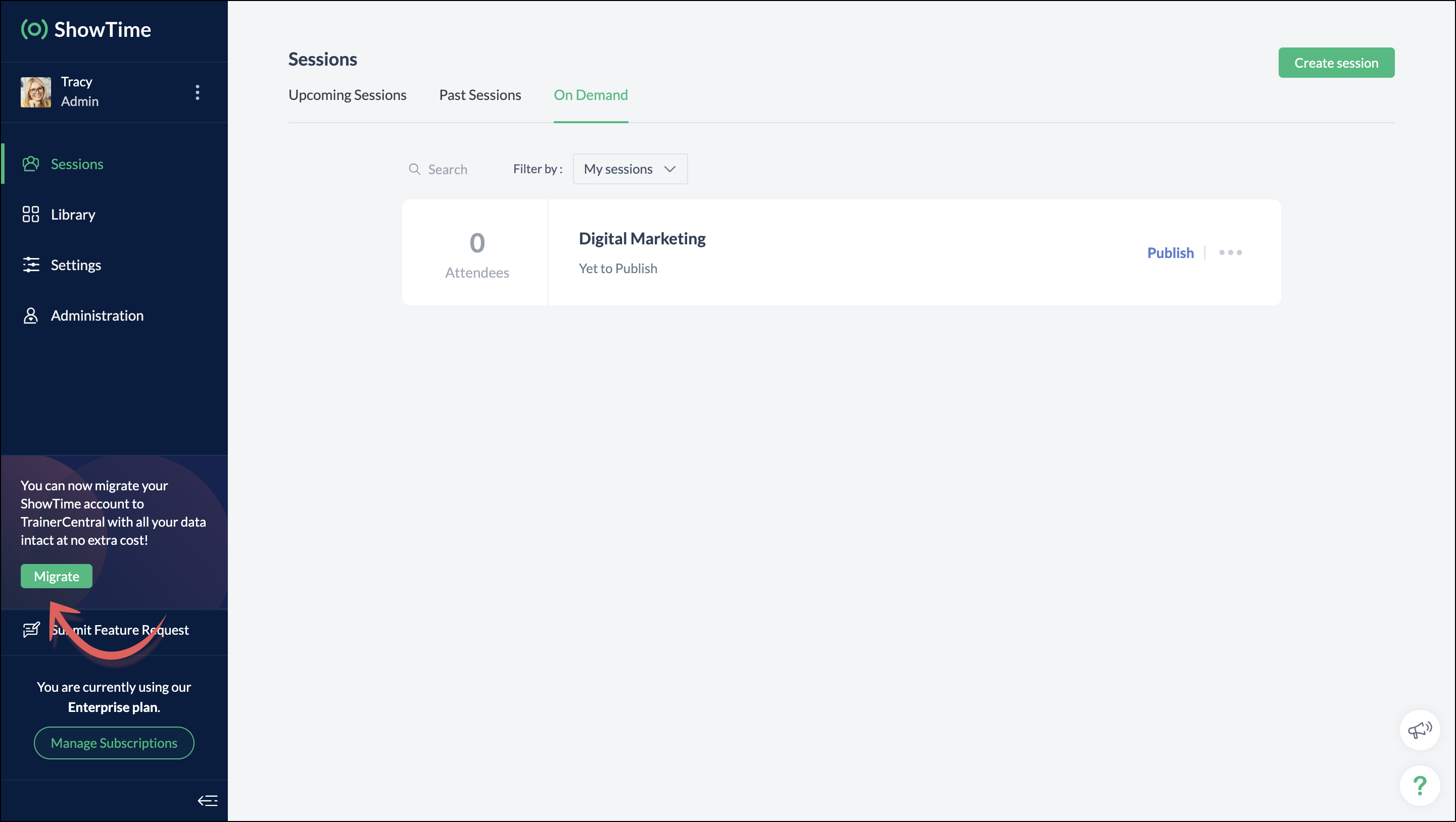
You can migrate your account from Zoho ShowTime to TrainerCentral anytime by clicking the Migrate button in the left pane and following the on-screen instructions. Once migrated, you’ll receive a notification, through which you can access your TrainerCentral account.
- Only the super admin of a Zoho ShowTime portal can migrate their portal's data to TrainerCentral.
- We’ll be disabling remote session scheduling and learner registration for on-demand sessions starting December 1, 2025. With this transition, Zoho ShowTime will reach its End of Life (EOL) on December 31, 2025.
To avoid any disruptions to your live classes, please move to TrainerCentral before December 31, 2025.
We hope this will elevate your experience to the next level.
If you have any questions, take a look at the FAQ section below, reach out to us at support@zohoshowtime.com, or just leave a comment here.
FAQ
FAQ
1. How long will the migration take?
The migration of your Zoho ShowTime data and account portal is expected to take approximately one to two hours. In the event of any technical issues or glitches during the migration, the product team will address them immediately. In such rare cases, the migration will be completed within 24–48 hours.
2. What will happen to my Zoho ShowTime account if it is not migrated before the sunset?
If you fail to migrate before the sunset, i.e., December 31, 2025, active Zoho ShowTime accounts will be automatically migrated to TrainerCentral.
3. What will happen after migration?
You will be able to access TrainerCentral with your Zoho ShowTime credentials and continue your teaching journey seamlessly, with the added benefit of new features.
4. Will there be any changes to my payment after migration?
No, there will be no changes to your payment. The amount you currently pay for your Zoho ShowTime subscription will remain the same after migration.
5. I am a Zoho ShowTime customer or Zoho One user. How will I be mapped to the TrainerCentral plan?
If you are a Zoho ShowTime customer or a Zoho One user, you will be mapped to the equivalent TrainerCentral plan automatically to ensure a seamless transition.
6. What happens if I choose not to migrate?
You can back up your data, including materials, recordings, and analytics associated with your account, and then contact our support team to delete your account.
7. I am a Zoho One user and purchased paid attendee add-ons. How do I enable them in TrainerCentral?
8. Will my configured payment gateway and ticket settings in Zoho ShowTime be migrated to my TrainerCentral account automatically?
All of the sessions and tickets created in Zoho ShowTime will be migrated without any changes to your TrainerCentral account. However, for any new sessions you create in TrainerCentral, you will need to set up your payment gateway and ticketing options again.
9. Where can I find my past sessions and library content from Zoho ShowTime in TrainerCentral after migration?

➤ Remote session: You can find previously created/conducted Zoho ShowTime remote sessions in Live Workshops → Past Sessions.
➤ On-demand session: You can find previously created/conducted Zoho ShowTime on-demand sessions in Live Workshops → On demand.
➤ All materials hosted in your ShowTime library will be moved to TrainerCentral's library.
10. Will my current integrations like Zoho CRM, Zapier, and Zoho Flow function seamlessly?
All of your Zoho CRM, Zapier, and Zoho Flow integrations and their functionalities will be migrated seamlessly to TrainerCentral. In Zapier and Zoho Flow, several additional triggers and actions are available for all courses and live workshops.
11. If I cancel my TrainerCentral subscription after migration, will I get the same plan when I resubscribe to a new TrainerCentral account?
No. The equivalent plan is provided only if you migrate from Zoho ShowTime. If you resubscribe for a new TrainerCentral account, you’ll be mapped to a new plan.
12. What if I can't see the Migrate button on my Zoho ShowTime portal?
If the Migrate button isn’t visible, please contact our support team to help you migrate from Zoho ShowTime to TrainerCentral.
Topic Participants
Neeraja Raghavendran
Sticky Posts
Video tip 02: Customize your feedback and evaluation forms in Zoho ShowTime
Hello everyone, Here's a new video tip for all our ShowTime users. Today we will learn few quick, effective ways to evaluate your participants and assess your trainings conducted on Showtime, like MCQs (multiple choice questions), text-boxes, and ratings scale. Watch the below video to learn how these assessment systems help you effectively evaluate course-related knowledge and skills of your trainees on a regular basis. Follow this page to learn more such tips and stay updated on all theVideo tip 05: Host training courses under your own personalized domain and white-label your email communications.
Hello everyone, As a trainer, having your own domain name increases your brand's positioning and reach through search results on top search engines like Google, Yahoo, and Bing. Prospective customers will more readily pay for courses from an organization with a professional, established online presence. A custom domain establishes you as a leader in your area of subject expertise, helping you promote your courses and build brand recognition with your global audience. In today's video tip, we atVideo tip 04: Do you want to set up repeated training sessions at regular intervals? Learn how.
Hello everyone, Sometimes it is difficult to organize and manage your everyday work and training sessions. Scheduling recurring or repeated sessions can be even more time-consuming as you need to create and maintain the training content, schedule multiple time slots for the training, manage registrants across each session, and more. Zoho ShowTime offers a smarter option for these cases that only takes a few clicks. Play the video below to learn how to use the same presentation content and setSpotlight 03: Connect and deliver more effective trainings with ShowTimes' Viewer app
With the growing need for virtual classroom learning, the use of mobile and tablet software is quickly becoming the most convenient way to share knowledge between educators and students. According to a 2018 study, nearly 67% of digital learners now use mobile devices to complete their online coursework. Additionally, smartphone learners complete course material 45% faster than those using a computer. Considering these facts, we now introduce our next community spotlight series that will focus on ZohoVideo tip 1: Record and share trainings on Zoho ShowTime.
Hello everyone, We are excited to launch our video tip of the month series within our ShowTime's community, aimed to help our trainers and educators with brief and practical tips on delivering more effective and comprehensive training. In this month's video tip, we will show you how to record your training sessions quickly and share them with your attendees and other prospective learners externally. We hope this tip was useful. ShowTime also allows you to automatically record your live trainings
Recent Topics
Dynamic Field Folders in OneDrive
Hi, With the 2 options today we have either a Dynamic Parent Folder and lots of attachments all in that one folder with only the ability to set the file name (Which is also not incremented so if I upload 5 photos to one field they are all named the sameLogging Out of FSM
I have tried to log out of FSM app of the last person and it will not let me do so. I need to log in to my account.Manage Every Customer Conversation from Every Channel inside Zoho SalesIQ
Your customers message you from everywhere. But are you really able to track, manage, and follow through on every conversation, without missing anything? With interactions coming in from websites, mobile apps, and messaging platforms like WhatsApp andSuper Admin Logging in as another User
How can a Super Admin login as another user. For example, I have a sales rep that is having issues with their Accounts and I want to view their Zoho Account with out having to do a GTM and sharing screens. Moderation Update (8th Aug 2025): We are workingEnhancement in Zoho CRM: Control who gets to participate in a forecast by customizing the user hierarchy
Include only users from the sales function; exclude the rest Dear Customers, We hope you're well! We started this year with a series of exciting enhancements to Zoho CRM and to this list, we are thrilled to add an enhancement to forecasting. Let's talkMultiple Zoho One accounts
Hello. I'm searching for a solution to run multiple organizations under 1 Zoho One account or have a different Zoho One account for each organization and still be able to easily login to each. Currently Zoho One doesn't allow the same email address toTips and tricks #63: Hold and Drag to select elements in the Show app for iOS
Hello everyone! Welcome to another tips and tricks article. In today's article, we will learn about the Hold and Drag function in the Show app for iOS. The Hold and Drag option lets you select multiple elements on a slide quickly. Once they are selected,Organize and manage PDFs with Zoho PDF Editor's dashboard
Hello users, Zoho PDF Editor's dashboard is a one-stop place to upload, sort, share PDF files, and more. This article will explore the various capabilities that Zoho PDF Editor's dashboard offers. A few highlights of Zoho PDF Editor's dashboard: UploadPossible to generate/download Quote PDF using REST API?
See title. Is there any way after a quote has been created to export to a PDF using a specified template and then download it? Seems like something that should be doable. Is this not supported in the API v2.0?Free Webinar - AI for email: Helpful or Hype?
Hello, Zoho Mail community! 👋 We're kicking things off with a webinar you won't want to miss—and yes, we're going there: Is AI in email actually useful, or is it all hype? In this session, two of our experts will have an open, no-fluff conversation aboutBalancing access, security, and productivity with Email Policy
An organization typically includes multiple user groups, such as leadership, sales, and support, each with different email usage patterns and security needs. Administrators must balance flexibility and control, thereby ensuring email usage aligns withIs it possible to update multiple work items at once?
Hi, Is it possible to update the statuses/release tags of multiple work items at once? I came across this thread that says it's not possible at the moment, but it was related to the Sprints mobile app. Does this feature not exist in the website as well?See Every IM Conversation as It Happens
Instant messaging moves fast. Customers expect quick replies and smooth conversations across WhatsApp, Instagram, Facebook, and live chat. But without real-time visibility, small issues become big problems. A session stays open longer than expected. ARelease Notes | January 2026
We have rolled out a set of powerful new enhancements across Zoho Vertical Studio that bring several long-awaited capabilities to your applications. These updates focus on deeper customization, smarter automation, better reporting, and improved usabilityProduct Request: Send email to Secondary email
Guys, we should be able to send the campaign to the secondary email too. Is this on the plans for Zoho Campaign? It looks like I can map the secondary email from the CRM to the Campaigs, but can not send the message.Franchise
Is there a solution of how to organize global franchise organisations?Recording overpayment?
So a customer just overpaid me and how do I record this? I can't enter an amount that is higher than the invoice amount. Eg. Invoice is $195 and he sent $200. He's a reccuring customer so is there a way to record so that he has a $5 advance for future invoice?Holidays
Hi; For defining Holidays, you need to add logic to handle the year as well as the month & day. We need to be able to enter Holidays for the next year. I need to add a holiday for January 2, 2017, but I can't until January 1st, which is a Sunday and weComposite Product (kit) - Dynamic Pricing
I am setting up Composite Products for item kits that I sell. I also sell the items from the kit individually. Problem is when pricing changes on an individual part, the Composite Product price does not change meaning when the cost of item # 2 in theUrgent: Slow Loading Issue on Zoho Commerce Website
Dear Zoho Support Team, I am experiencing slow loading times on my Zoho Commerce website, which is affecting its performance and user experience. The issue persists across different devices and networks. Could you please investigate this matter and provideNeed help with importing expenses
I'm using the template downloaded from the application. When I try to import my expenses, I get the message: Duplicate entry in the Expense Date column. Ensure it contains unique values. None of the rows will import. There are duplicate dates, but theySearch not working!
I have items in my notebook tagged but when I search for a tag nothing comes up! Any fix for this?ERROR CODE :550 - 550 5.1.1 Invalid email recipients
This message was created automatically by mail delivery software. A message that you sent could not be delivered to one or more of its recipients. This is a permanent error. mustafa.ashraf@techlink-eg.net, ERROR CODE :550 - 550 5.1.1 Invalid email recipientsWhat's New in Zoho POS - February 2026
Hello everyone, Welcome to Zoho POS’s monthly updates, where we share our latest feature updates, enhancements, events, and more. Let’s take a look at how February went. Purchase and sell items on different units We have introduced a unit conversion functionalityCan i integrate bigin with google voice?
I make all my calling through google voice to seprate my personal line from business. I want to log my calls with customers automatically but i domt see anywhere where i can do that. Any help? Im pretty sure i wont be able to. SadPOP/SMTP access authentication failed
I am unable to log setup outlook for my zoho mail account. I am using these settings poppro.zoho.com port 995 SSL smtp.zoho.com port 587(tls)/465(ssl) username/password works on mail.zoho.com but not with POP access. Can you help?Our Review Of Zoho CRM after 60 Days
The purpose of this is to just share with Zoho why I love their product, but ultimately why I could not choose Zoho CRM for our next CRM. About two months ago we begun a CRM exploration process for our financial planning firm, based in Texas. We alreadyError AS101 when adding new email alias
Hi, I am trying to add apple@(mydomain).com The error AS101 is shown while I try to add the alias.This domain is not allowed to add. Please contact support-as@zohocorp.com for further details
I am trying to setup the free version of Zoho Mail. When I tried to add my domain, theselfreunion.com I got the error message that is the subject of this Topic. I've read your other community forum topics, and this is NOT a free domain. So what is theAllow Admin to Configure Report > More Options Button
As an Admin, I want to configure the options of the Report > More Options button to improve UX and reduce Developer overhead. See attached screenshot. Original question posted here: https://help.zoho.com/portal/en/community/topic/modify-standard-repGenerate a link for Zoho Sign we can copy and use in a separate email
Please consider adding functionality that would all a user to copy a reminder link so that we can include it in a personalized email instead of sending a Zoho reminder. Or, allow us to customize the reminder email. Use Case: We have clients we need toYou cannot send this campaign as there is no contact in the selected mailing list.
We have synced contact lists and sent campaigns just fine prior to today. Now no matter what list I upload when I go to send the campaign it gives an error "You cannot send this campaign as there is no contact in the selected mailing list." And now itPivot Report Formula - using a today() variable
Is it possible for me to use a value of today() in a formula on a pivot table? I'm trying to identify where the end date of a project is greater than the current date if("10. Projects (Zoho Projects).End Date" > today(), 'Yes', 'No') I get the error thatCannot connect IMAP to outlook
Hello I have followed the instructions to connect my zoho account to Outlook IMAP but get this message: Session Id: bba118fb-151c-824f-9512-3ad1e91b109d Timestamp: 1708976566964 Error code: INVALIDCREDENTIALS INTERACTIONREQUIRED I'm using the exact configerationDepartment Overview by Modified Time
We are trying to create visuals to show the work our agents do in Zoho Desk. Using Zoho Analytics how can we create a Department Overview per modified time and not ticket created time? In order for us to get an accurate view of the work our agents areEnhance Sign CRM integration
Hello all, I'm working on a custom Deluge script to enhance the integration between Zoho CRM and Sign by using a writer merge template for additional flexibility. I want to replicate the post-sign document integration that exists between CRM and SignZoho Workdrive download was block by security software
Hi Team, Recently workdrive download was blocked by huorong security. Could you please advise how to put zoho workdrive as white list? every time we put "*.zohoexternal.com" or "workdrive.zohoexternal.com", the warning msg will still pop in next dowChoosing a portal option and the "Unified customer portal"?
I am trialling Zoho to replace various existing systems, one of which is a customer portal. Our portal allows clients to add and edit bookings, complete forms, manage their subscriptions and edit some CRM info. I am trying to understand how I might bestGeneral feedback
I think Zoho is at the moment (potentially) the best, or perhaps the only, real online solution, for business, and not just business. Surely the only one that has all the features that I need (and I've probably tried everything, at least all that has a cost-free option). It has still got lots of bugs and imperfect features, so I do hope it keeps developing and becomes a really professional platform. Lots of people (including me) want to use such one platform for all scheduling/mail/note-taking...How to add SSL to Short URL custom domain?
Hi, I've added a custom domain the the URL Shortener Domains. It's creating the short URL fine, but when clicking through, firstly I get an SSL warning, then a 400 Bad Request warning.Next Page