What's New - August 2025 | Zoho Backstage
Every month, Zoho Backstage grows with you. These updates aren't just features and fixes, they're about making your workday smoother, your events more impactful, and your attendees happier. We’ve listened, learned, and shaped this release to keep things simple where they can be, powerful where they should be, and thoughtful all the way through. Think of it as a mini renovation where the walls stay up, but the lights shine brighter, the doors swing easier, and your coffee somehow refills itself. Let’s take a look at what’s new and enhanced this August.
Session registration
Turn your agenda into a choose-your-own adventure.
We’re excited to announce the arrival of session registration in Zoho Backstage. This feature gives event organizers more control over premium content, attendee scheduling, and capacity management while creating a more personalized experience for participants.
With session registration, organizers can monetize high-value content such as workshops, masterclasses, and sessions featuring high-profile speakers. Attendees can pre-select the sessions they want to attend, helping them build structured schedules that suit their interests. On the organizer’s side, this avoids overcrowding by enforcing capacity limits and provides valuable insights into which sessions generate the most demand for future planning.

How it works:
- Session registration can be enabled from the Manage > Agenda screen. Once configured and republished, sessions will appear on the event website with registration options.
- When attendees register for the event, they can now select tickets, choose sessions, provide attendee details, associate attendees with specific sessions, and complete their payments in a single flow.
- After logging in, registered sessions appear under a new Your Sessions tab, while order-level details are available in Your Orders. If a session is canceled, attendees will see the update under Cancel and Refund History.
- Even after ticket purchase, ticket holders can log into the event website, go to Agenda > Register, and sign up for sessions later. Please note that, in this release, purchasers can't register sessions on behalf of other ticket holders.
Event organizers will find new tools to manage and track session registrations:
- Session Registration tab: Displays a list of all registered attendees, with options to filter by track, sort by details, and manage visible columns such as session name, track, date, time, and attendee count.
- Register New Attendee: Organizers can register attendees directly from the Session Registration tab or from each session’s View Attendees section. Here, they can export data, apply filters like ticket class or check-in status, and customize visible columns.
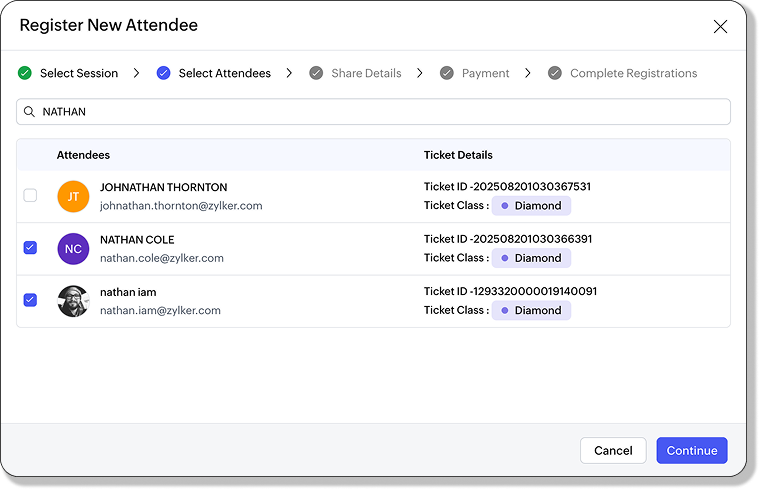
- Session Check-In: Supports both free and paid sessions. Organizers can register and check in attendees directly, even if they haven't registered in advance, through the Yet to Register section under Session Check-In.
After registration, attendees receive session details by email, similar to ticket confirmations. Email notifications also cover session cancelations. Within the Order Details tab, session information is listed alongside tickets, with cancelations and refunds captured in the Cancel & Refund History pane.

Plan availability: Available across all plans. Paid sessions are supported starting from Essentials and above.
Ticket grouping
Because tickets deserve a family tree too.
We’re adding more clarity and flexibility to how tickets are managed in Zoho Backstage with the introduction of ticket class grouping. This feature allows organizers to organize different ticket types into groups, making it easier to present a structured and intuitive registration flow for attendees.
Ticket classes such as General Admission, VIP, Free, Investor, or Partner passes can now be grouped together in a way that highlights their distinctions while still keeping the registration process simple. This helps attendees quickly understand the differences between options and choose tickets that best match their preferences, budget, or privileges.

How it works:
- Navigate to Registrations > Ticket Class > Add Ticket Group. Create a new group and assign ticket classes to it.
- Once created, groups can be edited at any time to add or remove ticket classes. If you need to rearrange, simply use the "Move to" option or drag and drop ticket classes within or across groups. If a group is deleted, only the group itself is removed, while the ticket classes remain available and appear as ungrouped.
This update gives organizers flexibility to design their ticketing structure around audience segments, ensuring clarity during registration while keeping the backend easy to manage.
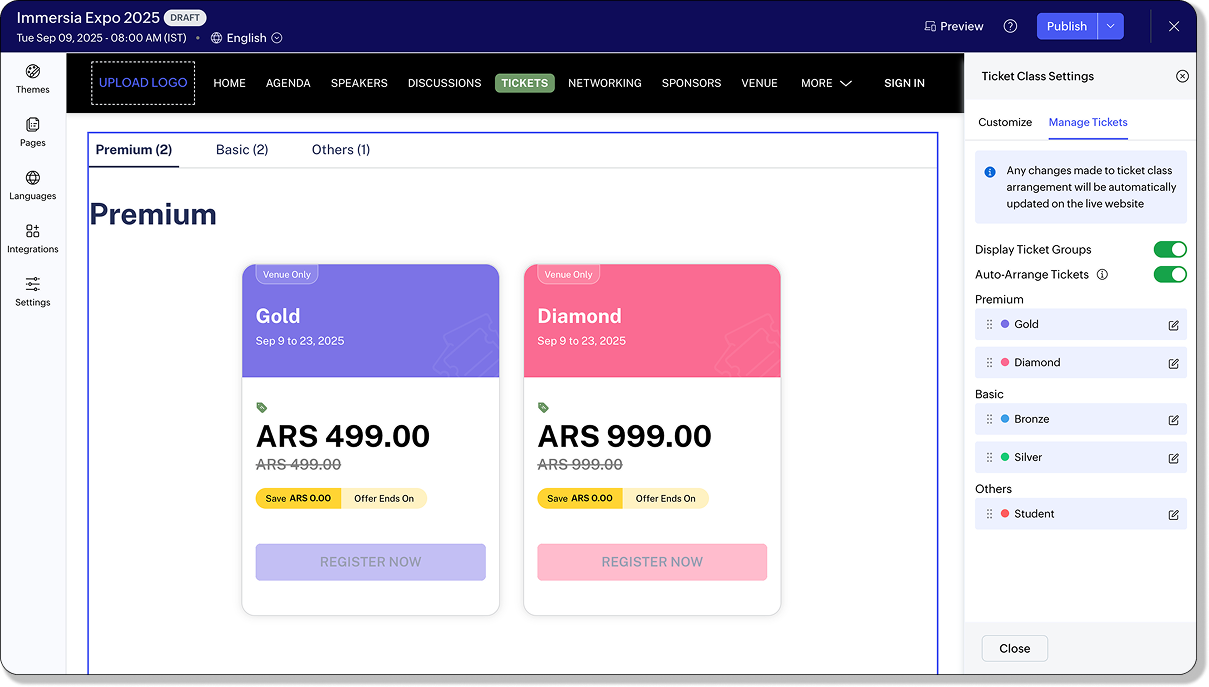
On the event website, tickets are displayed in their grouped structure by default, giving attendees a clear view of available options. Organizers can choose to disable this grouped display from the website builder if they prefer a simpler layout. Any ungrouped ticket classes are automatically displayed under an “Others” section, ensuring no ticket is left out. The grouped view is consistently shown across the Tickets page, the Select Tickets screen, and even when adding an order from the Orders tab.
By grouping ticket classes, event organizers can create a clearer, more organized registration experience that benefits both their team and their attendees.
Plan availability: Included in the Free, Essentials, Premium, and Ultimate plans.
Assign primary contacts for custom forms
No more “Who’s handling this?” moments.
Managing form responses just got a whole lot easier. With this update, Zoho Backstage now lets you assign a primary contact for each custom form. That means every submission reaches the right person without extra forwarding or missed follow-ups.

How it works:
- Navigate to Communicate > Preferences > Primary Contact > Module-Specific Primary Contact > Assign Primary Contact.
- Or, head to Manage > Custom Forms > Edit > Form Builder and set the contact directly from there.
- If you ever need to make a change, simply click Change, and you’ll be redirected back to the Primary Contact settings under Communicate. From there, you can update your configuration without any hassle.
Once a primary contact is set, every response submitted through your event website will trigger an email notification to the designated person. This means no more delayed follow-ups or confusion over who’s responsible for handling incoming submissions. Communication becomes more streamlined, and accountability is always clear.
The benefit of this update is simple: by assigning primary contacts, you ensure that form responses never slip through the cracks. The right people receive the right submissions, ownership is straightforward, and your team can manage event communications with greater confidence.
This enhancement is now available across all plans that support custom forms.
Plan availability: Included in the Premium and Ultimate plans.
Enhancements
A new look for order management in Zoho Backstage
Orders, organized!
The Orders tab in the Registration module has been reimagined. What was once a simple list of purchases is now a full-featured workspace where organizers can view, edit, and act on orders with far more control than before.

At the heart of the update is a redesigned Order Details view. Each order is now broken down into clear sections: Order Information, Purchaser Details, and Order Summary. This structure helps organizers quickly locate the information they need without extra effort. Attendees and session registrations are also displayed in separate panels, making it clear who is associated with each order.
If something needs to be updated, the new Edit Order pane lets organizers adjust purchaser information and access billing addresses quickly. For offline orders, payments can now be marked manually as paid or unpaid, with fields for payment mode, transaction ID, and notes.
From the More Actions menu, every order now comes with tools to:
- Resend order emails
- Edit purchaser information
- Cancel or refund orders (with adjustable fees and refund amounts)
- Check purchaser email history
- Track order activity in real time
This means fewer steps, less switching between screens, and a faster workflow for managing registrations.
Events can generate thousands of orders, and keeping them organized is now easier than ever. The Orders tab includes advanced filters for order status, type, payment method, payment mode, and source. Sorting by purchaser name, order ID, or date/time makes it simple to surface the right records. And with 18 column headers to choose from, organizers can design their own view of the data, showing only what matters most.
This release doesn’t just improve the present—it also prepares for what’s ahead.
Plan availability: Included in the Free, Essentials, Premium, and Ultimate plans.
Exhibitor categories made better
Give your categories a glow-up.
We’ve upgraded your exhibitor category setup and management in Zoho Backstage. The new design gives you a cleaner interface, more flexibility, and better visibility controls.
With this release, categories are now more customizable. Organizers can group and organize benefits within each category, assign distinct colors for easy identification, and use visibility toggles to decide what's shown. Flexible display options allow each event setup to match its specific requirements, ensuring categories are both functional and clear.
The new creation and management screens make it easier to move between categories and their associated benefits. Benefits can be enabled or disabled whenever required, and their availability, counts, and status are presented in a structured way. This gives organizers a complete view of what's currently active in each category.
Categories can also be linked directly to exhibitor or sponsor packages so that reserved benefits are applied consistently. Assigning unique colors to categories adds another layer of clarity, making it simpler to manage and distinguish them.

On the website, organizers can now decide how categories are displayed to attendees. Categories may be shown or hidden, and exhibitor listings can appear in either a card view or a table view, depending on the style that best suits the event.
To start using it:
- Navigate to Exhibitors > Exhibitor Categories, or configure the display preferences in Design > Website.
With Exhibitor Categories V2, organizers gain more control over how exhibitors are managed and presented, while attendees receive a clearer and more organized view of event participants.
Plan availability: Included in the Essentials, Premium, and Ultimate plans.
New withdrawal flow in Registration Approval
Sometimes “no thanks” deserves its own button.
Event registration just got more flexible. We’ve added a new Withdrawn status to make the ticket request process smoother for both attendees and organizers. From now on, attendees who no longer wish to attend can simply withdraw their registration requests directly from the event website. These requests will be neatly recorded in the system and can be found under the Canceled filter in the Registration Approval tab.
On the website, attendees will see their request clearly marked as Withdrawn, ensuring there’s no confusion about whether their registration is still pending. For event organizers, this new status provides better visibility by separating attendee-initiated withdrawals from organizer-declined requests. This way, you’ll always know which cancelations were voluntary and which were rejected during approval.

To help you stay on top of your workflow, the Registration Approval tab now follows a simple guide. Pending requests are those awaiting review, approved requests are the ones you have confirmed, rejected requests are those you have declined, and withdrawn requests are those attendees have chosen to cancel themselves.
This update not only simplifies your approval process but also gives attendees more control over their registrations, making the overall experience clearer, more transparent, and easier to manage for everyone involved.
Plan availability: Included in the Free, Essentials, Premium, and Ultimate plans.
More flexibility with Transaction ID requests
Ask for details only when you really need them.
We’ve introduced a new level of flexibility to how transaction details are collected during ticket registration. Event organizers can now choose whether to display the Transaction ID pop-up when attendees select an offline payment option.
By default, the Transaction ID request will appear for Bank Transfer, Check, and Other payment modes, ensuring that important reference details are collected upfront. However, if you prefer not to request these details, you now have the option to disable it with a simple setting change. On the other hand, for Pay at Venue, the Transaction ID request will remain disabled by default, but you can easily enable it if your workflow requires attendees to provide transaction details in advance.

To keep things transparent, any changes you make to the offline payment settings will be automatically recorded in the activity logs. This gives you a reliable trail of updates and ensures accountability across your event management team.
With this enhancement, you have greater control over how payments are managed, offering both convenience and flexibility for your attendees while keeping your processes streamlined.
Plan availability: Included in the Essentials, Premium, and Ultimate plans
Other updates
New UI in Marketing Plus
A refreshed Zoho Backstage interface has been introduced in the Marketing Plus and CRM Plus bundles. The updated design improves navigation, creates consistency across modules, and helps organizers manage events with greater clarity and ease.
New themes: Velvet and Neo Noir
The Velvet and Neo Noir themes has been added to the website, giving organizers a bold and stylish option to match event branding. These modern designs introduce a darker palette with sleek layouts for professional-looking event pages.
New session card layout
A third layout style has been released for session cards under Design > Website settings. Organizers can select from multiple layouts to better highlight speakers, timings, or details, creating an agenda design tailored to their event.
Publish events without a location
Events can now be published without requiring a location to be entered, giving organizers more flexibility when setting up offline or hybrid events. This change makes publishing faster while accommodating events that may not need a physical address.
Schedule Demo option for Trial plans
Trial plan users are given the option to schedule a demo directly from their account. This addition makes it easier for new users to explore features, understand workflows, and receive guided assistance before moving to a paid plan.
Host parallel sessions
The restriction limiting organizers to a single active session has been lifted. Organizers gain more flexibility to test, manage, and run multiple tracks or parallel sessions without interruption, making event operations more efficient.
That’s everything we have for this month. Every improvement comes from your feedback, ideas, and support. Thank you for being part of this journey and for trusting Backstage to power your events. We'll be back soon with more updates. Until then, here’s to smoother planning, stronger connections, and events that leave lasting memories.
All the features and enhancements mentioned in this article are available across all Zoho Backstage-supported data centers.
For additional assistance or questions regarding these new features, contact support@zohobackstage.com. Stay tuned for continued updates designed to enhance your event management capabilities.