Zoho DataPrep and File Pattern configuration
I'm using Zoho data prep to ingest data from One Drive into Zoho Analytics...
The pipeline is super simple but I can't any way to get all the files that I need. Basically I need to bring all the files with a certain pattern and for that I'm using a regex expression on the source configuration.
My files are called with this format YYYYMMDD_HHMMSS_CONTACT and YYYYMMDD_HHMMSS_ACCOUNT_CONTACT
For example
20241115_050104_CONTACT
20241106_050120_CONTACT
The pipeline is super simple but I can't any way to get all the files that I need. Basically I need to bring all the files with a certain pattern and for that I'm using a regex expression on the source configuration.
My files are called with this format YYYYMMDD_HHMMSS_CONTACT and YYYYMMDD_HHMMSS_ACCOUNT_CONTACT
For example
20241115_050104_CONTACT
20241106_050120_CONTACT
20241003_050129_ACCOUNT_CONTACT
20240918_112048_ACCOUNT_CONTACT
The pattern for ACCOUNT_CONTACT is working perfectly with .*ACCOUNT_CONTACT.json
But I can't use the same strategy for CONTACT because it will bring also ACCOUNT_CONTACT, so I tried to validate that the previuos character is numeric but it's not working as expected.
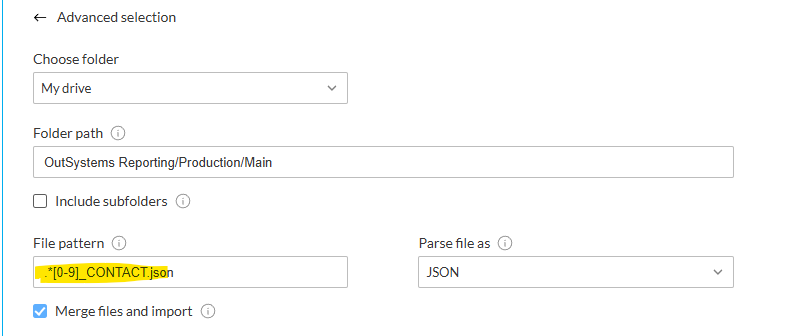
Also I tried a different pattern to match with the format YYYYMMDD_HHMMSS like this
[0-9]{8}_[0-9]{6}_CONTACT.json
The weird part is but scenarios are able to read some files but it ignore the majority.
I will appreciate ideas about why it can be block because I'm really stuck with this.
thanks in adavence!!
The weird part is but scenarios are able to read some files but it ignore the majority.
I will appreciate ideas about why it can be block because I'm really stuck with this.
thanks in adavence!!