Nous avons des nouveautés très intéressantes qui vont transformer la façon dont vous communiquez avec vos clients. Zoho Voice, la solution de téléphonie d'entreprise et de centre de contact basée sur le cloud est arrivée en France ! Vous pouvez enfin profiter des fonctionnalités et des avantages exceptionnels de Zoho Voice.
Acheter ou transférer des numéros adaptés à votre organisation
Vous pourrez appeler vos clients à partir de vos numéros existants ou en acheter de nouveaux à partir de notre catalogue. Les numéros locaux et numéros verts* sont disponibles dans plus de 100 pays.
(* - Les numéros verts sont disponibles sous réserve de disponibilité. Il vous suffit de contacter
support@eu.zohovoice.com si vous avez besoin de numéros verts personnalisés pour vos clients).
Personnaliser et communiquer dans la langue de votre choix
Finies les barrières linguistiques, bienvenue à la communication personnalisée en adoptant les langues de toute l'Europe. Configurez vos appels entrants avec des réponses pré-enregistrées et une file d'attente avec différentes sonneries, ou attribuez des numéros de téléphone ou des extensions à des abonnés individuels. Vous pouvez également configurer des voice mails et orienter les appels en dehors des horaires de travail grâce aux configurations "Heures ouvrables" et "Jours fériés". Que ce soit des messages d'accueil, des réponses pré-enregistrées et d'enregistrement d'appels ou des commentaires et des messages de départ, Zoho Invoice permet à votre entreprise de communiquer et de se présenter sans effort dans 12 langues européennes, dont l'anglais (Royaume-Uni), l'allemand, le français, l'italien, l'espagnol, le polonais, le néerlandais, le portugais, le suédois, le danois, le finnois et le norvégien.
Profiter des minutes gratuites avec Zoho Voice
Le crédit reste intact jusqu'à expiration des minutes gratuites disponibles, ce qui vous permet d'en profiter au maximum avant que les frais d'appel ne soient déduits.
Zoho Voice offre des minutes gratuites pour les appels dans 14 pays européens : Allemagne, France, Royaume-Uni, Pays-Bas, Suède, Espagne, Italie, Belgique, Danemark, Finlande, Irlande, Norvège, Suisse et Luxembourg.
Au fur et à mesure que vous passez à un plan supérieur, la durée des minutes gratuites augmente. Chaque plan au sein de chaque édition dispose d'un nombre spécifique de minutes gratuites pour les appels entrants et sortants.
Renforcer la sécurité grâce aux mesures de conformité de Zoho Voice
Chez Zoho Voice, la confidentialité et la sécurité des données sont des priorités. Nos systèmes de chiffrement sont particulièrement bien conçus pour protéger vos données au repos, en transit et en cours d'utilisation. Les fonctionnalités de Zoho Voice vous permettent, en tant que responsable du traitement des données de vos clients, d'utiliser Zoho Voice en toute confiance et de vous conformer aux obligations et responsabilités de protection des données prévues par le
RGPD et l'
HIPAA.
S'intégrer à vos applications Zoho préférées
En intégrant Zoho Voice à vos applications préférées, votre entreprise améliore ses capacités d'engagement avec les clients. Il vous permet de personnaliser vos interactions avec vos clients en tirant des informations contextuelles de ces applications Zoho lors d'appels en direct, au moment où vous en avez besoin - le tout grâce à des recherches intuitives de contacts.
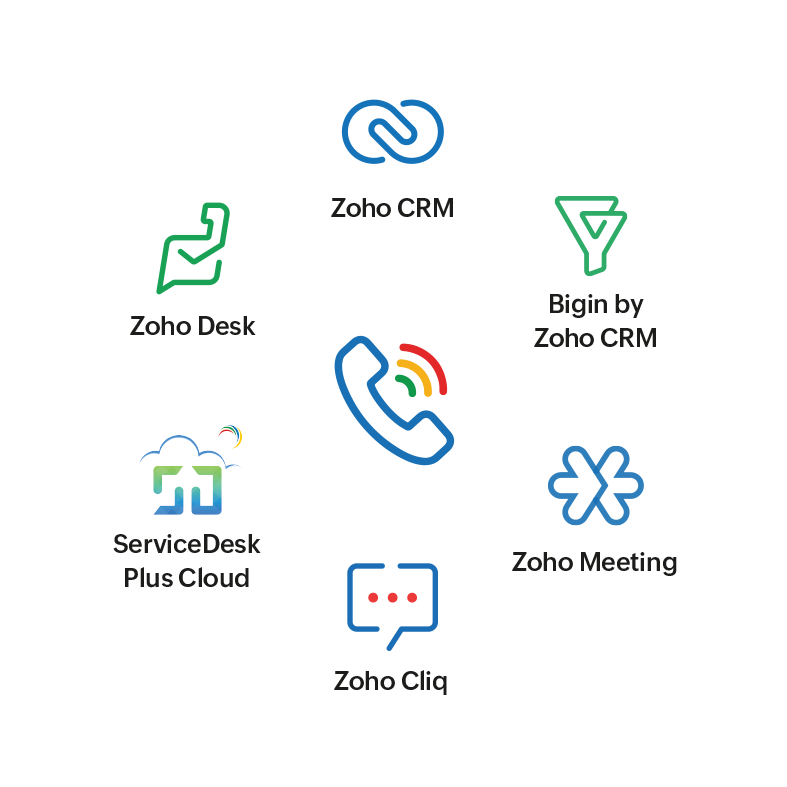
À l'aide de l'extension de
navigateur ZDialer, vous passez des appels instantanés à l'aide des boutons d'appel situés à côté de chaque contact sur votre écran dans les applications intégrées. Après chaque appel, il suffit d'ajouter des contacts à des modules spécifiques de l'application Zoho.
Optimiser vos campagnes de vente avec Power Dialer
La solution Power Dialer vous permet de maximiser les résultats de vos campagnes de vente afin de permettre à votre équipe de ventes de mener à bien plus d'affaires grâce à l'automatisation des appels. Les appels sont centralisés à partir d'applications intégrées et la croissance de l'organisation est stimulée par la prise de contact quotidienne avec des clients potentiels accrus. Dynamiser la productivité des agents et personnaliser les délais d'attente entre les appels pour éviter la surcharge, maintenir un flux régulier d'appels et s'assurer que vos agents sont parfaitement préparés pour la prochaine interaction.
Former les nouvelles recrues en temps réel grâce au contrôle virtuel
Autorisez vos managers à évaluer les performances des agents, à fournir des conseils en temps réel pour renforcer la confiance des agents dans les situations incertaines, et à participer aux appels en cours pour améliorer les interactions avec les clients et les amener à une résolution plus rapide.
Rester connecté sur tous les appareils
Zoho Voice est accessible partout, à tout moment, que vous soyez en déplacement ou au bureau. Restez connecté grâce aux applications mobiles de Zoho Voice (
Android et
iOS), à l'
application de bureau et à la version
web sur votre navigateur avec l'extension de navigateur ZDialer.
L'équipe Zoho France !
Recent Topics
Exporting All Custom Functions in ZohoCRM
Hello, All I've been looking for a way to keep about 30 functions that I have written in Zoho CRM updated in my own repository to use elsewhere in other instances. A github integration would be great, but a way to export all custom functions or any way
Dynamic Field Folders in OneDrive
Hi, With the 2 options today we have either a Dynamic Parent Folder and lots of attachments all in that one folder with only the ability to set the file name (Which is also not incremented so if I upload 5 photos to one field they are all named the same
Right Shift key not sending to Zoho Assist environments
I'm unable to use Right Shift key in Zoho environments. Zoho environments are Win10. Computer I access from is Win 11. Issue started when I changed to Win 11. Have tried: - Multiple browsers - web client AND desktop client - 3rd party mapping tools to
Unable to Filter Retail Sales Orders & Need Paid/Unpaid Filter – Zoho Books
Hi Zoho Team, Recently you introduced Retail – Standard and Retail – Premium templates for Sales Orders. However, in the Sales Order module we still cannot filter or segregate Retail Sales Orders separately from normal B2B sales orders. Because of this,
About Meetings (Events module)
I was working on an automation to cancel appointments in zoho flow , and in our case, we're using the Meetings module (which is called Events in API terms). But while working with it, I'm wondering what information I can display in the image where the
How can I hide "My Requests" and "Marketplace" icon from the side menu
Hello everybody, We recently started using the new Zoho CRM for Everyone. How can I hide "My Requests" and "Marketplace" from the side menu? We don't use these features at the moment, and I couldn't find a way to disable or remove them. Best regards,
Introducing Workqueue: your all-in-one view to manage daily work
Hello all, We’re excited to introduce a major productivity boost to your CRM experience: Workqueue, a dynamic, all-in-one workspace that brings every important sales activity, approval, and follow-up right to your fingertips. What is Workqueue? Sales
PDF Annotation is here - Mark Up PDFs Your Way!
Reviewing PDFs just got a whole lot easier. You can now annotate PDFs directly in Zoho Notebook. Highlight important sections, add text, insert images, apply watermarks, and mark up documents in detail without leaving your notes. No app switching. No
Ability to assign Invoice Ownership through Deluge in FSM
Hi, As part of our process, when a service appointment is completed, we automated the creation of the invoice based on a specific business logic using Deluge. When we do that, the "Owner" of the invoice in Zoho FSM is defaulted to the SuperAdmin. This
How do you do ticket add ons in Backstage?
Hi Everyone, If you wanted to have general admin tickets and allow for add ons, like camping, or car or Carbon offset. What would you do? Peace Robin
From Zoho CRM to Paper : Design & Print Data Directly using Canvas Print View
Hello Everyone, We are excited to announce a new addition to your Canvas in Zoho CRM - Print View. Canvas print view helps you transform your custom CRM layouts into print-ready documents, so you can bring your digital data to the physical world with
validation rules doesn't work in Blueprint when it is validated using function?
I have tried to create a validation rule in the deal module. it works if I try to create a deal manually or if I try to update the empty field inside a deal. but when I try to update the field via the blueprint mandatory field, it seems the validation
Pull cells from one sheet onto another
Hello all! I have created an ingredients database where i have pricing and information and i want to pull from that database into a recipe calculator. I want it to pull based on what ingredient I choose. The ingredients database has an idea and i want
How can Data Enrichment be automatically triggered when a new Lead is created in Zoho CRM?
Hi, I have a pipeline where a Lead is created automatically through the Zoho API and I've been trying to look for a way to automatically apply Data Enrichment on this created lead. 1) I did not find any way to do this through the Zoho API; it seems like
Emails Failing with “Relaying Issues – Mail Sending Blocked” in ZeptoMail
Hello ZeptoMail Support Team, We are facing an email delivery issue in our ZeptoMail account where emails are failing with the status “Process failed” and the reason “Relaying issues – Mail sending blocked.” Issue Details Agent Name: mail_agent_iwwa From
How does Zoho handle support operations for our EU users?
Dear Zoho users, We have some news and reminders about how we handle support operations for Zoho users in the EU Data Center. This is part of our broader commitment to ensuring GDPR compliance and providing secure data handling for all users. We'd like
Sender Email Configuration Error.
Hello Team, Hope you are all doing well. We are in the process of creating the Zoho FSM environment in the UAE. When we try to add the sender email address “techsupportuae@stryker.com”, we receive the error message: “Error occurred while sending mail
Different Task Layouts for Subtasks
I was wondering how it would be possible for a subtask to have a different task layout to the parent task.
Layout Adjustment.
Hello Latha, Hope you are doing well. I wanted to check with you about adjusting the layout columns in the Service Report from the backend, as currently there is no capability for us to customize the layout from our end. Below is the output that I am
Let us view and export the full price books data from CRM
I quote out of CRM, some of my clients have specialised pricing for specific products - therefore we use Price Books to manage these special prices. I can only see the breakdown of the products listed in the price book and the specialised pricing for
Anyone in Australia using Zoho Books AND has their account with NAB?
Hi I have an account with both NAB and Suncorp. Suncorp transaction come in the next day however NAB transactions take 4-5 business days to appear. eg: A deposit made today in my Suncorp will be imported into Zoho tomorrow. A deposit made today to the NAB account will be imported maybe Saturday (Friday overnight). I have contacted both Zoho and NAB but noone seems to know why. I was just wondering if anyone else in Australia uses NAB and has this issue (or doesn't) maybe we could compare notes and
Zoho Often Lag
Desk Team, We've noticed that Desk, Creator & other apps seems to lag more these days. We often refresh multiple times.
Offer already made- but I withdrew it
I made an offer letter, but made a mistake on it. I withdrew the offer but now I can't recreate the correct offer. Zoho keeps saying that "A same offer has already been made". I look in the "offers" and there are NO offers (this is the first time I've
Importing into the 'file upload' field
Can you import attachments into the file upload field. I would expect it to work the same way as attachments do, But can't seem to get it to work. Moderation Update: The option to import into File Upload and Image Upload fields has been supported. Read
Layout Rules Don't Apply To Blueprints
Hi Zoho the conditional layout rules for fields and making fields required don't work well with with Blueprints if those same fields are called DURING a Blueprint. Example. I have field A that is used in layout rule. If value of field A is "1" it is supposed to show and make required field B. If the value to field A is "2" it is supposed to show and make required field C. Now I have a Blueprint that says when last stage moves to "Closed," during the transition, the agent must fill out field A. Now
Why is the ability Customize Calls module so limited?
Why can't I add additional sections? why can't I add other field types than the very limited subset that zoho allows? Why can I only add fields to the outbound/inbound call sections and not to the Call Information section?
Zoho Desk blank screen
opened a ticket from my email, zoho desk comes up blank, nothing loads. our receptionist also gets the same thing under her login on her computer. our sales rep also gets same thing on zoho desk at his home on a different computer. I tried clearing cache/history/cookies,
Optimum CRM setup for new B2B business
Can some advise the most common way to setup Zoho CRM to handle sales for a B2B company? Specifically in how to handle inbound/outbound emails. I have spent hours researching online and can't seem to find an accepted approach, or even a tutorial. I have
filter on sheets mobile (iOS, iPadOS) does not work
I have this issue on every spreadsheet, whether imported or created natively in Zoho Sheets. I can use on desktop without issue: desktop screenshot on iOS the filter dropdowns are not there and there is no way to add them mobile iPadOS looks the same
【Zoho CRM】商談タブへのデータインポート
Zoho使用前にエクセルで管理していた商談情報を、Zoho一括管理のため、商談タブにインポートしたいのですが、お客さまの氏名だけが紐づけられませんでした。 「Zoho CRMにインポートする項目を関連付ける」のところが画像のようになっています。 (弊社では、「姓」を「★個人データ名」という項目名に変更し、フルネームを入れて使用しています。) どのようにしたら氏名をインポートできるかご存じの方がいらっしゃいましたら、ご教示いただきたく、よろしくお願いいたします。 (投稿先が間違っていましたらご指
Canva Integration
Hello! As many marketing departments are streamlining their teams, many have begun utilizing Canva for all design mockups and approvals prior to its integration into Marketing automation software. While Zoho Social has this integration already accomplished,
Can't edit Segments
Happening with 2 different Zoho One environments, in different browsers. Please fix.
Zoho Sheet for Desktop
Does Zoho plans to develop a Desktop version of Sheet that installs on the computer like was done with Writer?
Transfer ownership of files and folders in My Folders
People work together as a team to achieve organizational goals and objectives. In an organization, there may be situations when someone leaves unexpectedly or is no longer available. This can put their team in a difficult position, especially if there
Consumer Financing
Does Zoho currently have a payment gateway (such as Stripe, Square, etc) which offers financing for customers? So, let's say the estimate we give the customer is greater than what they can afford at the time, but we can sell the service now, letting them
Subform edits don't appear in parent record timeline?
Is it possible to have subform edits (like add row/delete row) appear in the Timeline for parent records? A user can edit a record, only edit the subform, and it doesn't appear in the timeline. Is there a workaround or way that we can show when a user
Zoho CRM - Option to create Follow-Up Task
When completing a Zoho CRM Task, it would be very helpful if there was an option to "Complete and Create Follow-Up Task" in the pop-up which appears. It could clone the task you are closing and then show it on the screen in edit mode, all the user would
Mandatory Field - but only at conversion
Hello! We use Zoho CRM and there are times where the "Lead Created Date & Time" field isn't populated into a "Contractor" (Account is the default phrase i believe). Most of my lead tracking is based on reading the Lead Created field above, so it's important
Zoho CRM for Everyone's NextGen UI Gets an Upgrade
Hello Everyone We've made improvements to Zoho CRM for Everyone's Nextgen UI. These changes are the result of valuable feedback from you where we’ve focused on improving usability, providing wider screen space, and making navigation smoother so everything
File Upload field automatically replaces spaces with underscores – support experience
Hi everyone, I want to share my recent experience regarding the File Upload field behavior in Zoho Creator and my interaction with the Zoho support team. When a user uploads a file, the system automatically renames the document by replacing spaces in
Next Page