【Zoho CRM】キオスク機能のアップデート

【Zoho CRM】キオスク機能のアップデート

ユーザーの皆さま、こんにちは。コミュニティチームの藤澤です。
Zoho CRMのキオスク機能のアップデートを紹介します。これまで以上に柔軟性が増し、データ処理が高速化されたことで、リアルタイムのデータ取得が可能になりました。

目次

  1. クライアントスクリプトで、キオスクをどこからでも起動が可能に
  2. 新規データ作成処理を使用してキオスク実行中にデータをリアルタイムで取得
  3. データ取得画面における新しい機能強化   

1. クライアントスクリプトで、キオスクをどこからでも起動が可能に

キオスク向けクライアントスクリプトのサポート(第一段階)がリリースされました。これにより、Zoho CRM内のどこからでも、クライアントスクリプトを使ってキオスクの直接起動が可能です。

また今回のアップデートでは、全バージョン共通の一意な識別子として「統合API名」を導入しました。キオスク作成時にこのAPI名を設定することで、管理・追跡が簡単になり、クライアントスクリプトとのスムーズな連携が可能です。

1.1  クライアントスクリプトを使用するには

まずは、「キオスク」機能を設定画面から開いて、キオスクを作成しておく必要があります。 
今回は、見込み客タブの詳細にキオスク画面が表示されるよう設定します。 「見込み客タブ」→「連絡先タブ」へ変換される処理も合わせて設定してください。
(添付動画をご参照ください)


次に、[設定]>[開発者向け情報]>[クライアントスクリプト]>[コマンド]の順に移動し、キオスクを起動するためのコマンドを作成します。
ここでのポイントは、冒頭に記載したとおり、統合APIを利用することです。
キオスク側で「Convert_Leads」という名前のAPIを作成しているため、クライアントスクリプト側にも同じAPIを設定します。


作成後は、コマンドパレットまたはキーボードショートカットを使って、CRM内の任意のタブからキオスクを開くことができます。
以下の動画内では、「Convert Leads」の名前で設定したキオスク画面が表示されています。「完了」ボタンを押すことで、キオスクで設定した処理通りにそのまま「連絡先タブ」へ移行しています。


2. 新規データ作成処理を使用してキオスク実行中にデータをリアルタイムで取得    

2.1 - 標準の設定(既存データ処理)

データ作成処理は保持され「標準の設定」に名前が変更されます。キオスクの実行時に、データが自動で作成されます。固定値、または前の画面で入力したデータを指定値として設定できます。

2.2 - 「ユーザー入力を使用する」(新規データ処理)

本アップデートにより、管理者がキオスクでデータ作成を設定する手順が大幅に簡素化されました。管理者権限を持つユーザーは、キオスクの実行中にデータを作成できるように選択できます。
「かんたん作成」の画面を使用することで「項目の複製」「関連付け」などの連携を行う必要がなくなり、より効率的に設定を行うことが可能です。

加えて、キオスクの実行中にリアルタイムでデータを作成できます。実行中にポップアップ表示される「かんたん作成」画面に値を入力するだけで、タブに新しいデータを追加できます。
キオスク設定画面を開き、「処理」>「データの作成」>「ユーザー入力を使用する」の順で選択します。


今回は「見込み客タブ」のデータ内でのキオスク実行中に、入力用のポップアップが表示されるように設定します。

今回の設定要件

  • データ詳細タブを開くと、現在の「見込み客のステータス」が表示される
  • 「次へ」ボタンを押すと、ステータスを変更するための入力画面がポップアップで表示される
以下の動画は「ユーザー入力を使用する」機能を使い、「見込み客タブ」のデータ詳細画面で表示されるように設定した画面です。


キオスク設定画面での動画は以下になります。「画面(緑のアイコン)」>「ユーザー入力を使用する(オレンジのアイコン)」の順で遷移するように設定しています。キオスクの設定画面上でも、プレビューで設定後の表示内容が確認可能です。


 3. データ取得画面における新しい機能強化   

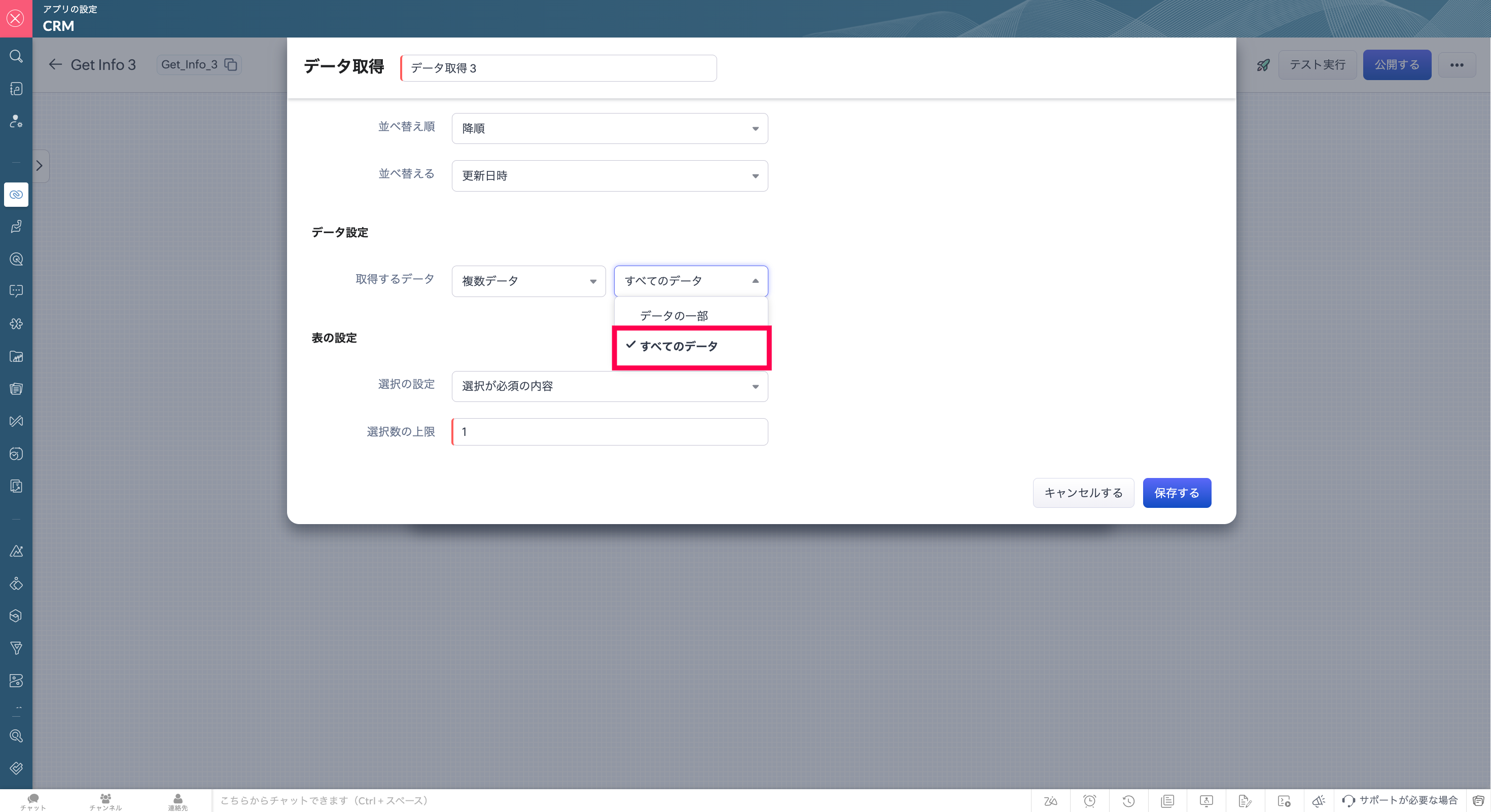
タブから「すべてのデータ」の取得が可能になりました。「データの一部」または「すべてのデータ」を選択可能です。

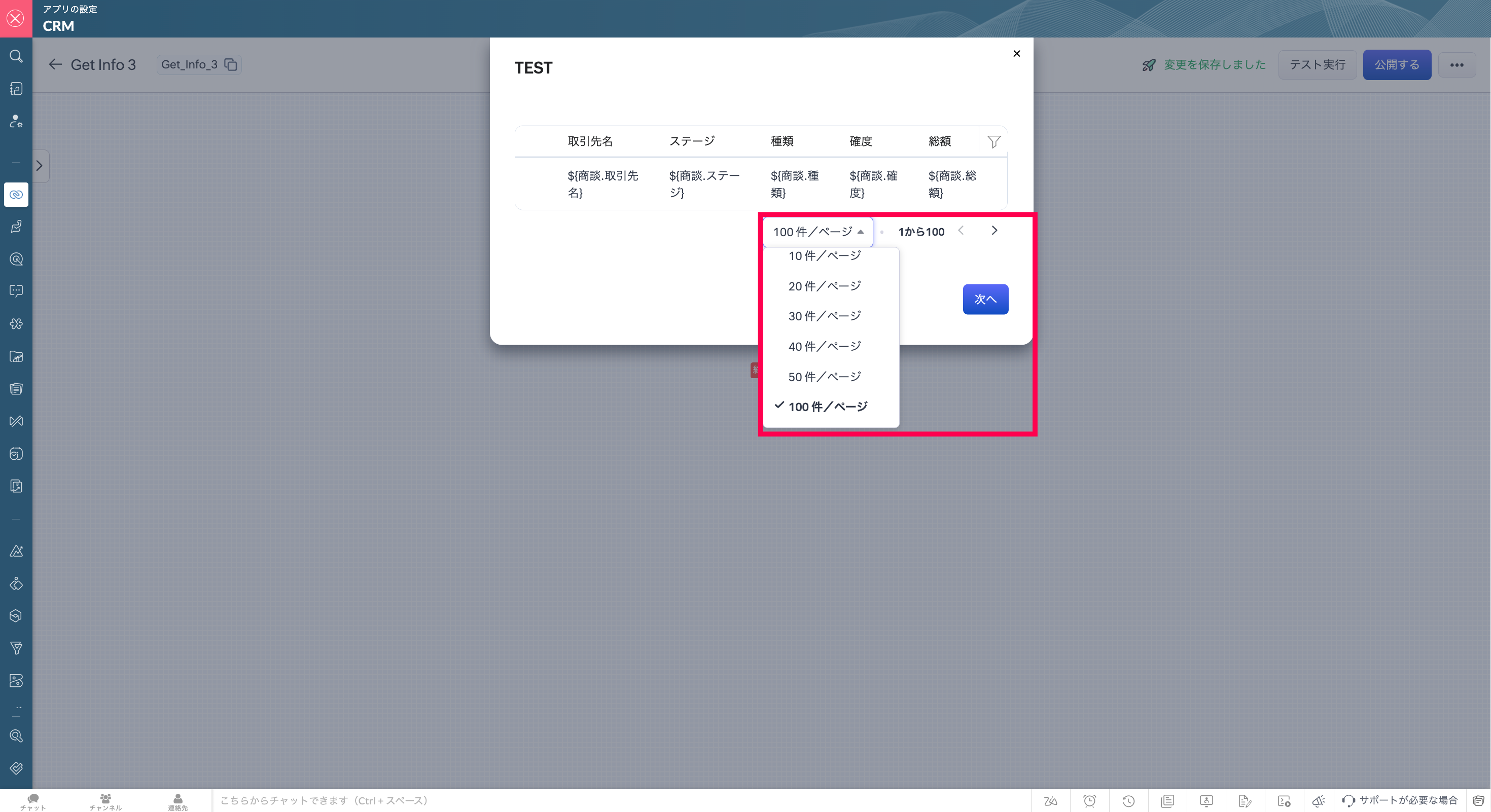
3.1 新しいページの切り替え機能により、より多くのデータを表示  

データ取得画面にページ切り替えボタンを追加したことで、データをより素早く見つけられるようになりました。

3.2 データ取得の画面でデータを検索/フィルタリング  

キオスクに新たに追加されたこの機能を使えば、データ取得の画面でデータをすばやく見つけることができます。


3.3 データ選択数の上限の引き上げ  

選択できるデータ数の上限が10から100に増えました。


補足:キオスクをスタンダードプランでも利用できるようになりました。   

Zoho CRMのスタンダードプランを含むすべての有料プランでキオスク作成機能をご利用いただけるようになりました。Zoho CRMの各プランにおけるキオスク作成数の制限については、以下の表をご覧ください。
 
スタンダード
プロフェッショナル
エンタープライズ
アルティメット/ CRM Plus / Zoho One
キオスクの作成数
2
7
25
50
 

 いかがでしょうか。CRMをご利用中のユーザーさんは、ぜひ試してみてください!

https://zurl.co/jKTM

Info適用範囲:すべてのデータセンター、すべてのユーザー
……………………………………………………………………………………………………………………

Zoho オンラインフォーラムの最新情報をいち早く入手しませんか?

Zoho Japan Community フォーラムの「フォローする」ボタン(右側)をクリックすると、最新の投稿やコメントをメールで受け取れます。
◼︎◻︎フォロー方法◻︎◼︎
  • フォーラム全体をフォロー:フォーラムトップページの「フォローする」をクリック
  • 特定のトピックのみフォロー:興味のあるサブフォーラムを選択し、「フォローする」をクリック
コミュニティのイベント情報も当フォーラムでお知らせしますので、ぜひフォローをお願いします!


      Zoho Campaigns Resources


        • Desk Community Learning Series


        • Digest


        • Functions


        • Meetups


        • Kbase


        • Resources


        • Glossary


        • Desk Marketplace


        • MVP Corner


        • Word of the Day


        • Ask the Experts


          Zoho CRM Plus Resources

            Zoho Books Resources


              Zoho Subscriptions Resources

                Zoho Projects Resources


                  Zoho Sprints Resources


                    Zoho Orchestly Resources


                      Zoho Creator Resources


                        Zoho WorkDrive Resources


                          Zoho CRM Resources

                          • CRM Community Learning Series

                            CRM Community Learning Series


                          • Tips

                            Tips

                          • Functions

                            Functions

                          • Meetups

                            Meetups

                          • Kbase

                            Kbase

                          • Resources

                            Resources

                          • Digest

                            Digest

                          • CRM Marketplace

                            CRM Marketplace

                          • MVP Corner

                            MVP Corner


                            Zoho Writer Writer

                            Get Started. Write Away!

                            Writer is a powerful online word processor, designed for collaborative work.

                              Zoho CRM コンテンツ


                                ご検討中の方

                                  • Recent Topics

                                  • HOW TO: Searching a thread (email body/text) with a custom function, allowing filtering and specific actions

                                    We are still trialing out Zoho at this time, but have found a major expected feature to be missing - the ability to search within the text of an email for automation/workflows. NOTE: You need to create a connection for zohodesk under settings -> Developer
                                  • Cold emails not allowed?

                                    I planned to use Zoho Mail to send businesses some cold emails to offer my freelance writing services, but I noticed that the anti-spam policy is very strict -- no commercial emails whatsoever without prior permission from the recipient? I would be very
                                  • Zoho Team Inbox - roadmap

                                    Hi, would be good to understand the Teaminbox roadmap, in particular: 1. API / Zoho Deluge connections. We have a process where the each email needs to be either tagged or assigned daily. It would be great if we could automate a 5pm alert for any exemptions
                                  • Leave Time - Past Dates by Pay Period

                                    Under Settings | Leave Policy | [policy name] | Restrictions, one can set a number of days that an employee can go back to apply leave. This is very good and very needed. However, in most organizations, the real deadline isn't X number of days from the
                                  • Link webform to a job opening

                                    I have a webfrm embeded on my website and everytime a candidates fill the form, their candidate status is to new. Is it possible that it links to a specific job opening instead of me having to assing it manually ? Thanks
                                  • New in WorkDrive: Organize your storage using Data Templates

                                    Organizations generate huge volumes of data day in and out. From financial reports, client details, and resumes to promotional images, product videos, and more. The list is endless. When you have so much data to manage, you need to classify your documents and structure them in a way that makes them more accessible.  This is exactly what WorkDrive's Data Templates lets you do! You can create Data Templates, add meta data as custom fields, and associate those fields with files and folders based on
                                  • Need Native Support for docx files in Zoho Writer

                                    Absolutely love Zoho Writer, but often need to share files by email with people who are in the Office ecosystem. Downloading a file as docx, then sending it by email, getting the comments back, converting it to Zoho format, editing it, then converting
                                  • Mirror Component in Zoho CRM: Access real-time related data without leaving your record

                                    Hi everyone, This feature is now available for the JP, CA, SA, UAE, and AU DCs. We're excited to bring to you Zoho CRM's mirror component, which presents relevant data on a record's details page and keeps everything users need in one place without having
                                  • Associate records via the Multi-select lookup RELATED LIST via API

                                    In the REST API, is there a way to associate records for a multi-select lookup related list other than via the linking module? There are two methods for the lookup: 1. via insert records API 2. via the linking module ...as described in https://help.zoho.com/portal/en/community/topic/kaizen-125-manipulating-multi-select-lookup-fields-mxn-using-zoho-crm-apis
                                  • What's New - May 2026 | Zoho Backstage

                                    Another month, another round of improvements in Zoho Backstage. We’ve been busy refining existing experiences and introducing new capabilities to help you plan, manage, and deliver successful events with less effort. Here’s a quick look at everything
                                  • Product sorting in Zoho Commerce - how can I influence standard behaviour?

                                    Hello Zoho, I want to sort my products by e.g. name, SKU (Ascending / Descending) or by another attribute. I could neither find any solution in the settings, nor an entry in this help. Can you advice how this would work? Seems the standard sorting is
                                  • Dynamically prefill ticket fields

                                    Hello, I am using Zoho Desk to collect tickets of our clients about orders they placed on our website. I would like to be able to prefill two tickets fields dynamically, in this case a readonly field for the order id, and a hidden field for the seller
                                  • Price Managment

                                    I have been in discussions with Zoho for some time and not getting what I need. Maybe someone can help explain the logic behind this for me as I fail to understand. When creating an item, you input a sales rate and purchase rate. These rates are just
                                  • Workflow Assistance in Zoho CRM

                                    Our client's sales team visits customers on-site and currently fills a physical paper form to capture customer details, and then separately re-enters the same data into Zoho CRM via the mobile app — resulting in double data entry. We want the salesperson
                                  • Integration problem between zoho crm and zoho forms for an update in zcrm, with two mapped custom fields

                                    Hello everyone, I need to correct an existing integration between Zoho CRM and Zoho Forms: the use case is that a user needs to send an email to a contact, who will click on a button in this email, redirecting to a Zoho Forms. The contact can update or
                                  • Delivery Note without services

                                    Hi all, It there a possibility to create a delivery note from an invoice without the listed services "idem type: service"? Thank you in advance, Michel
                                  • Automation Series: Auto-assign Task Followers

                                    As task progresses, several users are required to stay aware of the updates to plan their upcoming work items efficiently. Manually adding users as followers for an active task might create additional overhead. With this automation, followers can be added
                                  • Send Email Directly to Channel

                                    Hi, We are coming from Slack. In Slack each channel has a unique Email address that you can send emails too. I currently forward a specific type of email from my Gmail InBox directly do this channel for Verification Codes so my team doesn't have to ask
                                  • Terms & Conditions

                                    I have defined Terms & Conditions in the invoice setting and have set %TermsAndCondition% where I want it to appear but nothing shows up in that area. Is this something we have to define per invoice or can we have a global variable?
                                  • Billing Status Update

                                    Hello Latha, I’m working on a new automation (deluge) to fulfill one of our requirements. In this automation, there is a step to update the Work Order billing status from “Not Yet Invoiced” to “Non-Billable.” I tried to find the API information relevant
                                  • Export to pdf. Images not showing

                                    My report contains a column with images. When I export it as a list, the images do not show in the PDF document. I have published the report but the images are still not visible. What should I do so that the photos appear in the export?
                                  • Zoho CRM Kiosk question – Passing Screen Fields to a Function

                                    I am building a Kiosk in Zoho CRM to create new Supplier (Vendors) records. Current setup: Screen 1 contains user input fields: Supplier Name (Vendor_Name) First Name (First_Name) I created a Deluge function: createSupplier(vendor_name, first_name) The
                                  • パスワード

                                    ログインするためのパスワード取得したい。
                                  • Associate Zoho Project with Deal that is in a specific stage?

                                    Hi there, When a deal hits a certain stage, I'd like to associate it with an pre-exisiting zoho project? I am using blueprints. Using a custom function and deluge, how could I do this? I was thinking that the easiest option would be the modify the pre-made
                                  • [Product Update] Locations module migration in Zoho Books integration with Zoho Analytics

                                    Dear Customers, As Zoho Books are starting to support an advance version of the Branches/Warehouses module called the Locations module, users who choose to migrate to the Locations module in Zoho Books will also be migrated in Zoho Analytics-Zoho Books
                                  • Canvases Auto-Skewing/Adding Scroll Bars When They Were Not There Prior

                                    Is anyone else noticing rendering issues in their canvases today? It seems to be mainly icons which now have scroll bars added which makes them all look off, though some fields seemed to revert to squished length as well. Were the icons replaced with
                                  • New UI for Writer - Disappointed

                                    I've been enjoying Zoho Writer as a new user for about 6 months, and I really like it. One of my favorite things about it is the menu bar, which you can hide or leave out while still seeing most of your page because it is off to the left. I think this
                                  • Client Script Button in Related List become invalid

                                    Hi, I am the admin of our organization. And I setup a client script button in related list to raise payment refund request While this button become non selectable recently. I believe there is something wrong from zoho as this button had run for a year.
                                  • SMTP outgoing problem

                                    Hello I have a website where the SMTP email is connected through Zoho Mail SMTP. Today I am no longer receiving emails from the website. Joomla shows that the email was sent successfully, but I do not receive it.
                                  • Fiscal year setting

                                    Hi, I am looking into using Zoho Books. I cannot understand the organisation fiscal year setting. Our fiscal year runs from 1 April to 31 March. In the organisation profile, I need to set Fiscal Year to “April to March” and Start Date to “2” for the period
                                  • Issue with payments on invoices

                                    Hello, I’m having the following issue. When I create an invoice and try to apply a partial payment in a single transaction, the system does not allow it — it only allows full payment. Is this the expected behavior, or am I missing some configuration?
                                  • auto add as member the contact owner

                                    is there a way that i can make a zoho flow that will add the owner of the contact as a member of the chat after the round robin assignment?
                                  • Welcome to Zoho CommunitySpaces

                                    Hello everyone, This is your space to ask questions, share ideas, and connect with others building and growing their own communities. For those new here, Zoho CommunitySpaces is a platform for building and managing online communities—from discussion spaces
                                  • Announcing new features in Trident for Windows (v.1.20.4.0)

                                    Hello Community, Trident for Windows is here with some new features to elevate your work experience. Let's take a quick look at what's new. Export emails. You can now export emails in the .eml file format as compressed zipped files to create a secure
                                  • Announcing new features in Trident for Windows (v1.14.5.0)

                                    Hello Community, Trident for Windows is here with new features to elevate your workplace productivity. Let's take a quick look at what's new. Add and edit contacts Previously, you could view all of your personal and organizational contacts in Trident.
                                  • Announcing Trident desktop app for Zoho Mail & Zoho Workplace users

                                    Hello Community, I hope you are doing well and staying safe. As you know, our Mail & workplace teams have been constantly working on adding more value to our offerings to ensure you and your organization continue enjoying your Zoho experience. As part
                                  • Quick way to add a field in Chat Window

                                    I want to add Company Field in chat window to lessen the irrelevant users in sending chat and set them in mind that we are dealing with companies. I request that it will be as easy as possible like just ticking it then typing the label then connecting
                                  • Please Remove the Confirmation Popup

                                    Currently, every time a recruiter changes the status of a candidate in Zoho Recruit, a popup confirmation appears that requires clicking “OK, Got it” before proceeding. This creates unnecessary friction in the workflow, especially for users handling high
                                  • Team Module Issues?

                                    We are testing Team Licenses for use by our Customer Service staff. I created a Teamspace called CSR and only assigned two users to this space: Administrator (me) and “Team License Test.” Team License Test is assigned to the Team User profile, with a
                                  • Announcing new features in Trident for Windows (v.1.41.5.0)

                                    Hello Community! Trident for Windows just received an exciting update with new ways to collaborate and stay organized without leaving your workspace. Let’s take a look at what’s new! Integrate Zoho Meeting with Trident. You can now schedule, start, and
                                  • Next Page