{Action Required} Re-authenticate your Google Accounts to Continue Data Sync

{Action Required} Re-authenticate your Google Accounts to Continue Data Sync

Hello Users!

To align with Google’s latest updates on how apps access files in Google Drive, we’ve enhanced our integration to comply with the updated security and privacy standards, ensuring safer and more reliable access to your data.

With this update, Zoho Analytics will only access files that you explicitly select, giving you greater control and transparency over your data.

This update has been rolled out across all data centers, including US, IN, EU, JP, AU, UAE, SA, and CA. Please follow the steps mentioned below to authenticate your Google account.

Required Action - Re-authentication

To ensure uninterrupted data sync, please re-authenticate each of your connected Google accounts. The last date for re-authentication is April 30, 2026.

What happens if you don’t re-authenticate

  • Please note that any action such as modifying the sync schedule or immediate sync can only be done after re-authentication.
  • After April 30, 2026, all scheduled syncs will fail, and you will need to sync data for all tables manually.

Steps to Re-authenticate your Google Account

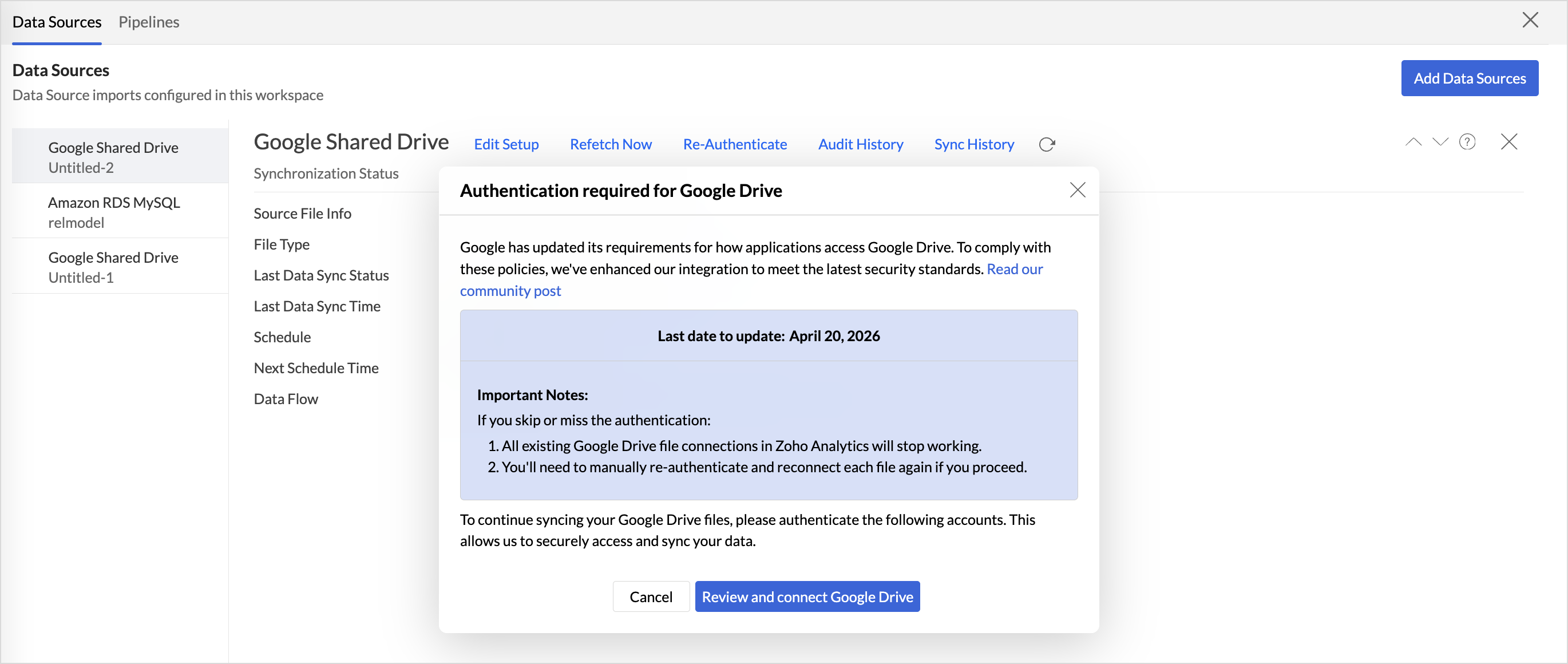
  1. Access the Data Sources tab and click Refetch now
  2. In the Authentication Required for Google Drive dialog, click Review and Connect Google Drive.
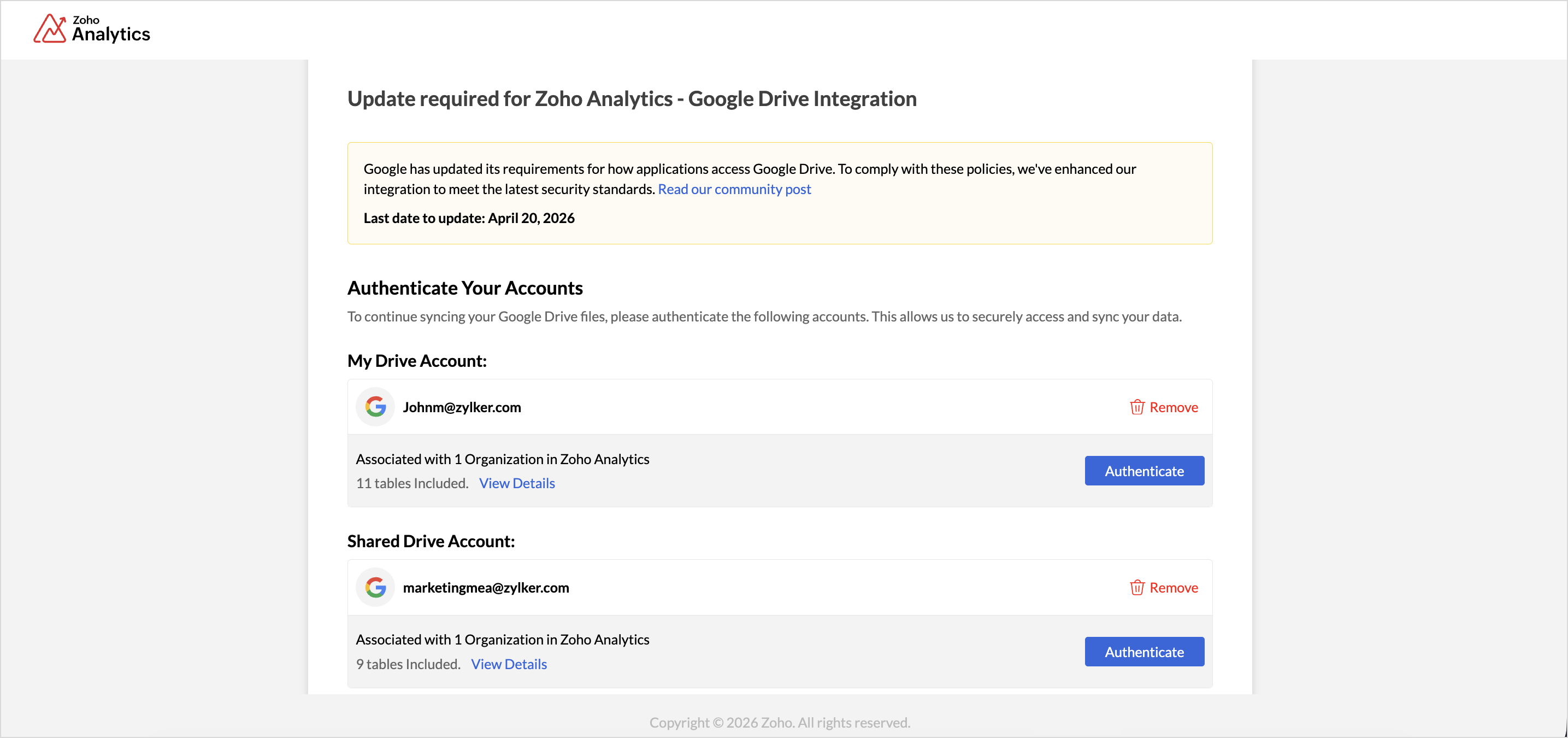
  3. All integrated Google accounts will be listed. Authenticate each account, or remove accounts that are no longer required.
  4. Once all accounts are authenticated, the Grant Access to Files button will be enabled. Click it to proceed with selecting the files.
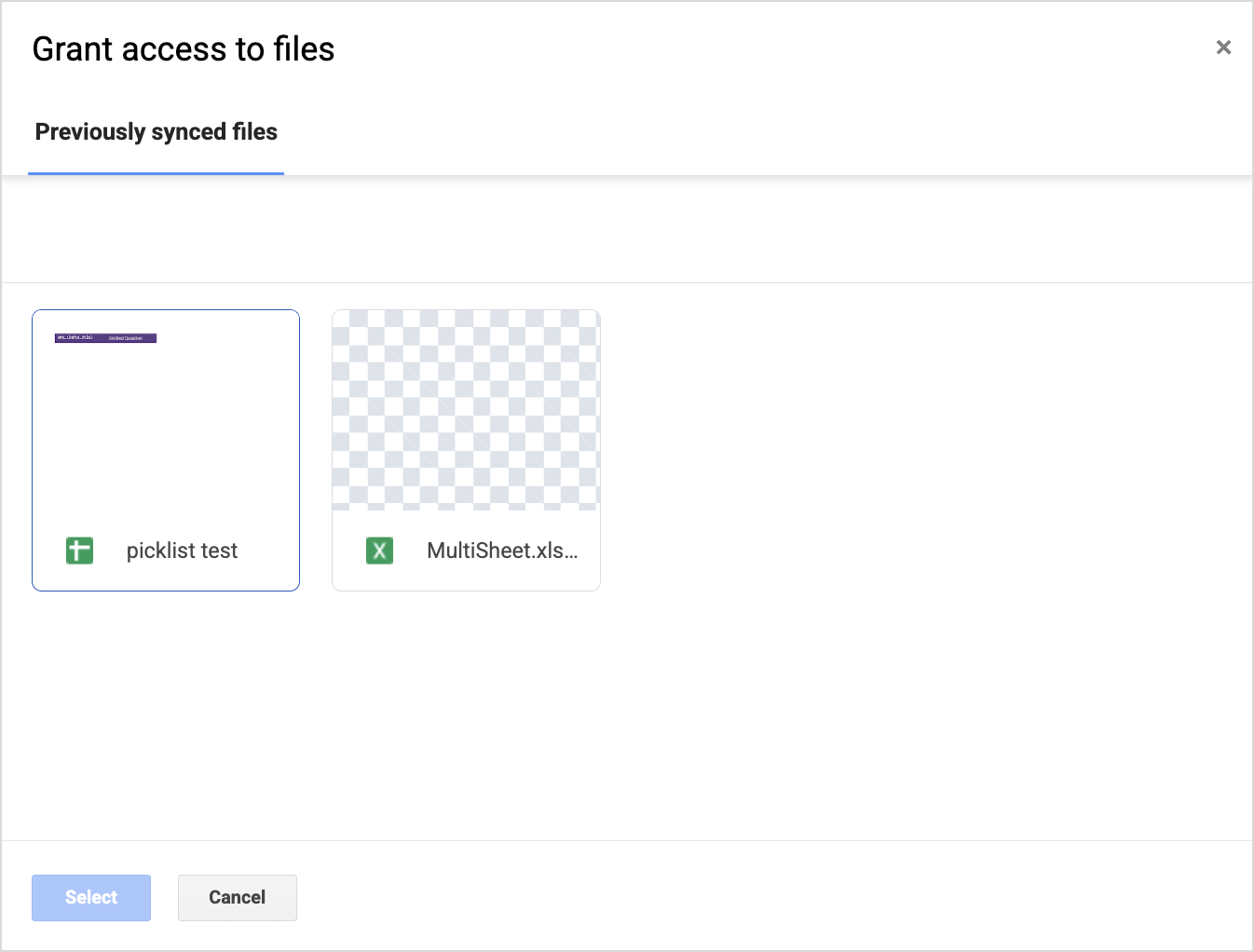
  5. The File Access Required dialog will appear. Click Grant Access to select the files or tables for each authenticated accounts.

  6. All previously synced files will be listed. Select the ones you want to continue syncing.
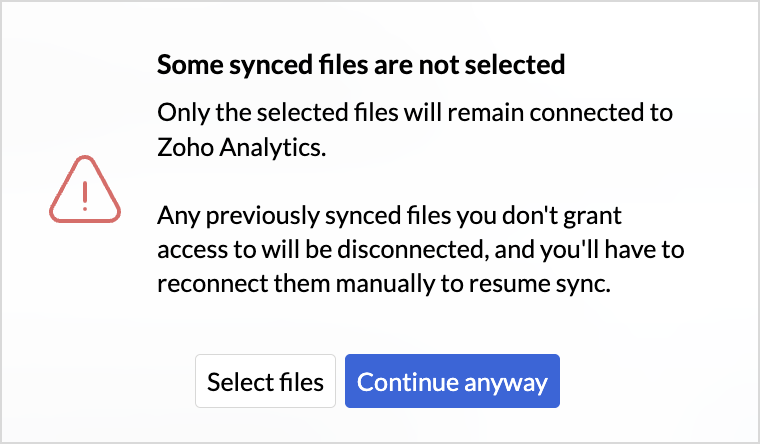
  7. If any previously synced files are not selected, an alert message will appear prompting you to review your selection. Click Continue to complete the process.
  8. An Authentication Complete dialog will appear. Click Go to Zoho Analytics to continue analyzing your data.

Thank you for your cooperation as we continue to improve security and data protection.If you have any questions, please contact our support team at [support@zohoanalytics.com]


      Zoho Campaigns Resources


        • Desk Community Learning Series


        • Digest


        • Functions


        • Meetups


        • Kbase


        • Resources


        • Glossary


        • Desk Marketplace


        • MVP Corner


        • Word of the Day


        • Ask the Experts


          • Sticky Posts

          • What's New in Zoho Analytics - June 2026

            Hello Users! This month is about meeting your data wherever it lives: reaching it from AI assistants, bringing it in from more sources, and keeping it flowing with less manual effort. Here's what's new across Ask Zia and AI, data import, integrations,
          • What's New in Zoho Analytics - February 2026

            Hello Users! We're back with another round of updates for Zoho Analytics. This month's release focuses on giving you greater flexibility in how you visualize, manage, and act on your data - with new features like custom visualizations, remote MCP server,
          • What's New in Zoho Analytics - May 2026

            Hello Users! We're back with another round of updates for Zoho Analytics. This month's release focuses on giving you greater flexibility in how you visualize, manage, and act on your data. We are introducing richer data visualizations, smarter AI-powered
          • What's New in Zoho Analytics - January 2026

            Hello Users! We are starting the year with a strong lineup of updates, marking the beginning of many improvements planned to enhance your analytics experience. Explore the latest improvements built to boost performance, simplify analysis, and help you
          • What's New in Zoho Analytics - November 2025

            We're thrilled to announce a significant update focused on expanding your data connectivity, enhancing visualization capabilities, and delivering a more powerful, intuitive, and performant analytics experience. Here’s a look at what’s new. Explore What's

          Zoho CRM Plus Resources

            Zoho Books Resources


              Zoho Subscriptions Resources

                Zoho Projects Resources


                  Zoho Sprints Resources


                    Zoho Orchestly Resources


                      Zoho Creator Resources


                        Zoho WorkDrive Resources


                          Zoho CRM Resources

                          • CRM Community Learning Series

                            CRM Community Learning Series


                          • Tips

                            Tips

                          • Functions

                            Functions

                          • Meetups

                            Meetups

                          • Kbase

                            Kbase

                          • Resources

                            Resources

                          • Digest

                            Digest

                          • CRM Marketplace

                            CRM Marketplace

                          • MVP Corner

                            MVP Corner


                            Zoho Writer Writer

                            Get Started. Write Away!

                            Writer is a powerful online word processor, designed for collaborative work.

                              Zoho CRM コンテンツ


                                ご検討中の方