Add Claude in Zoho Cliq
Add Claude in Zoho Cliq


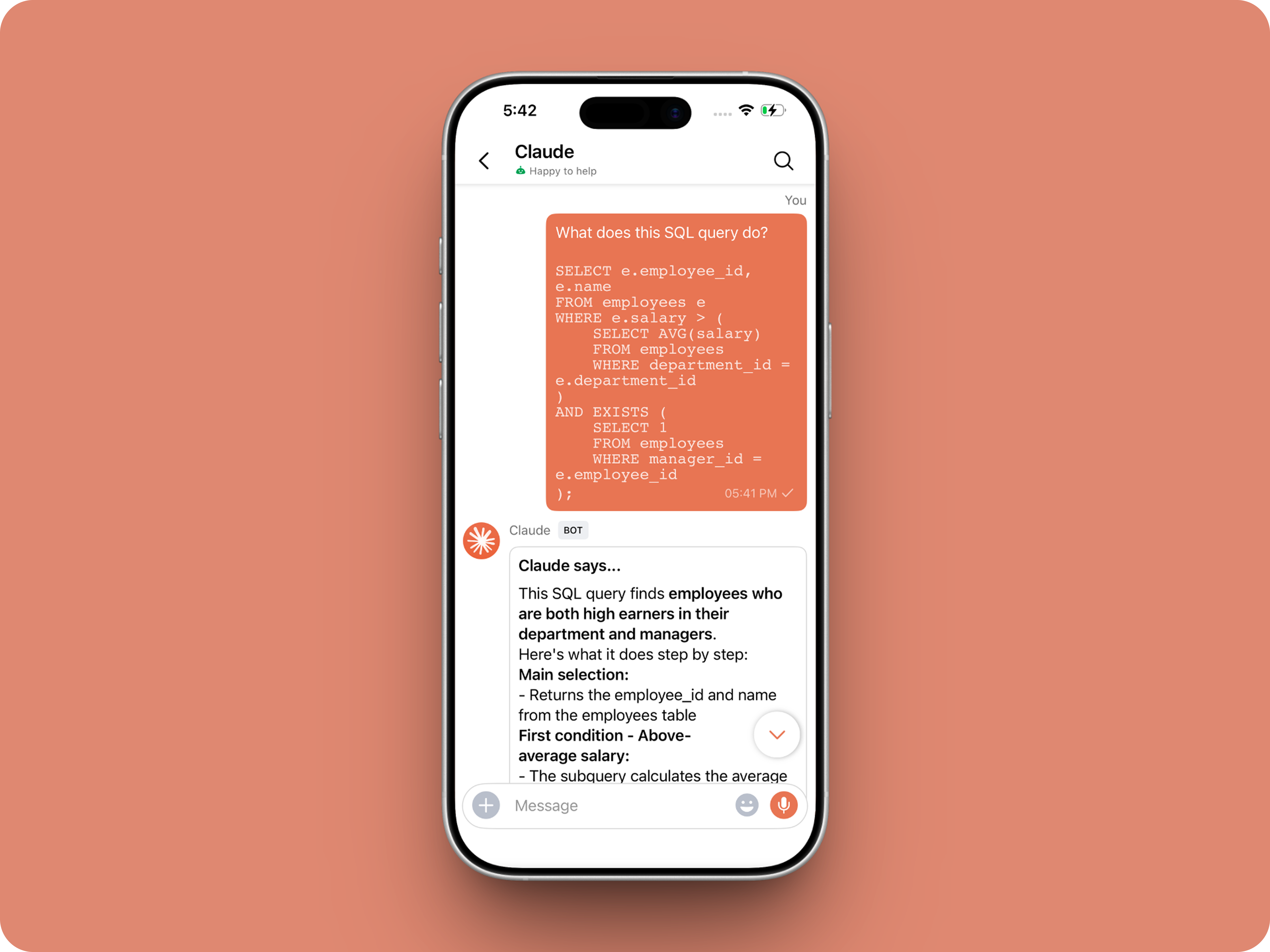
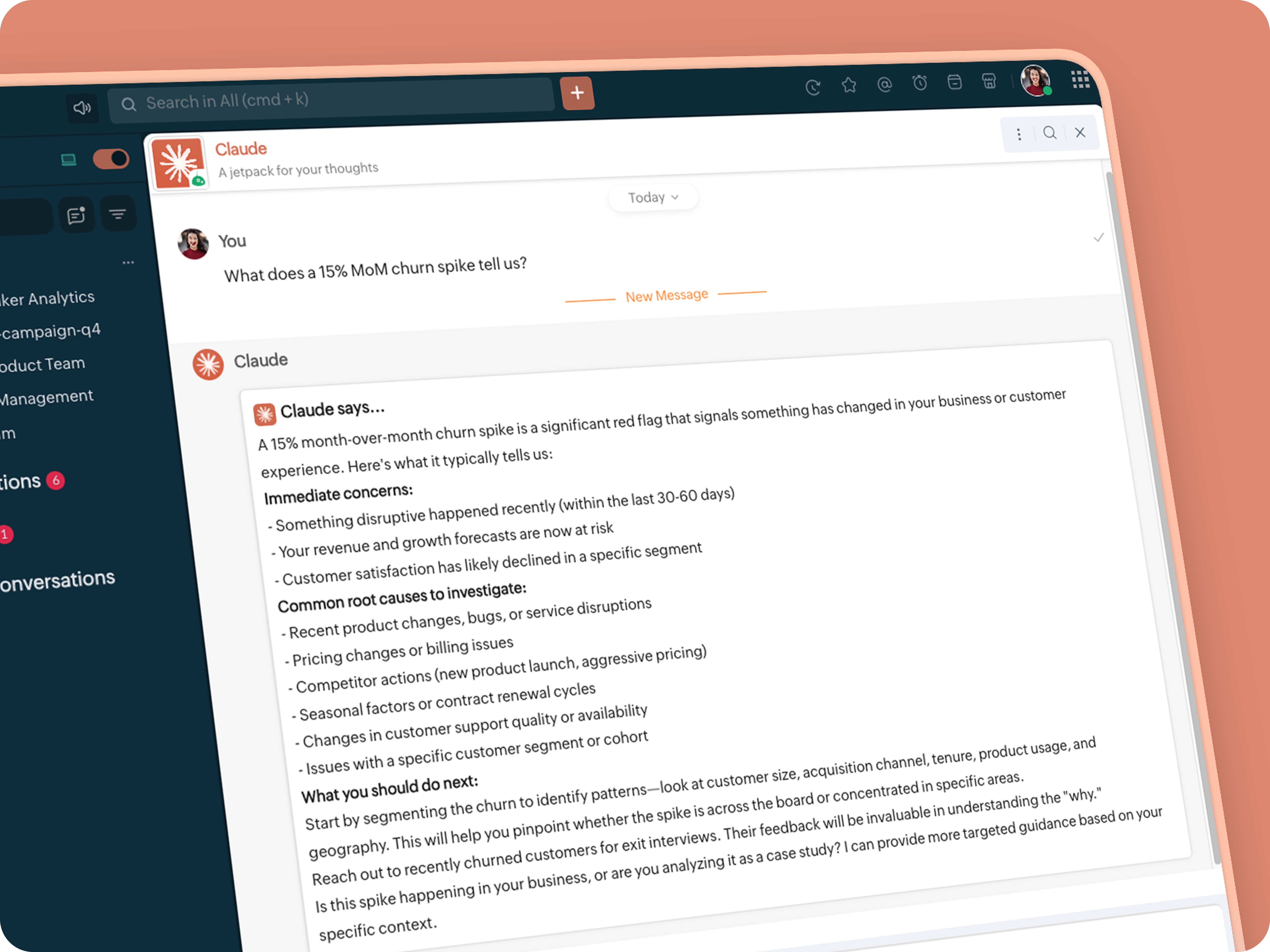
Let’s add a real AI assistant powered by Claude to your workspace this week, that your team can chat with, ask questions, and act on conversations to run AI actions on.

This guide walks you through exactly how to do it, step by step, with all the code you'll need.
Just copy, paste, replace the placeholders and you'll be good to go.


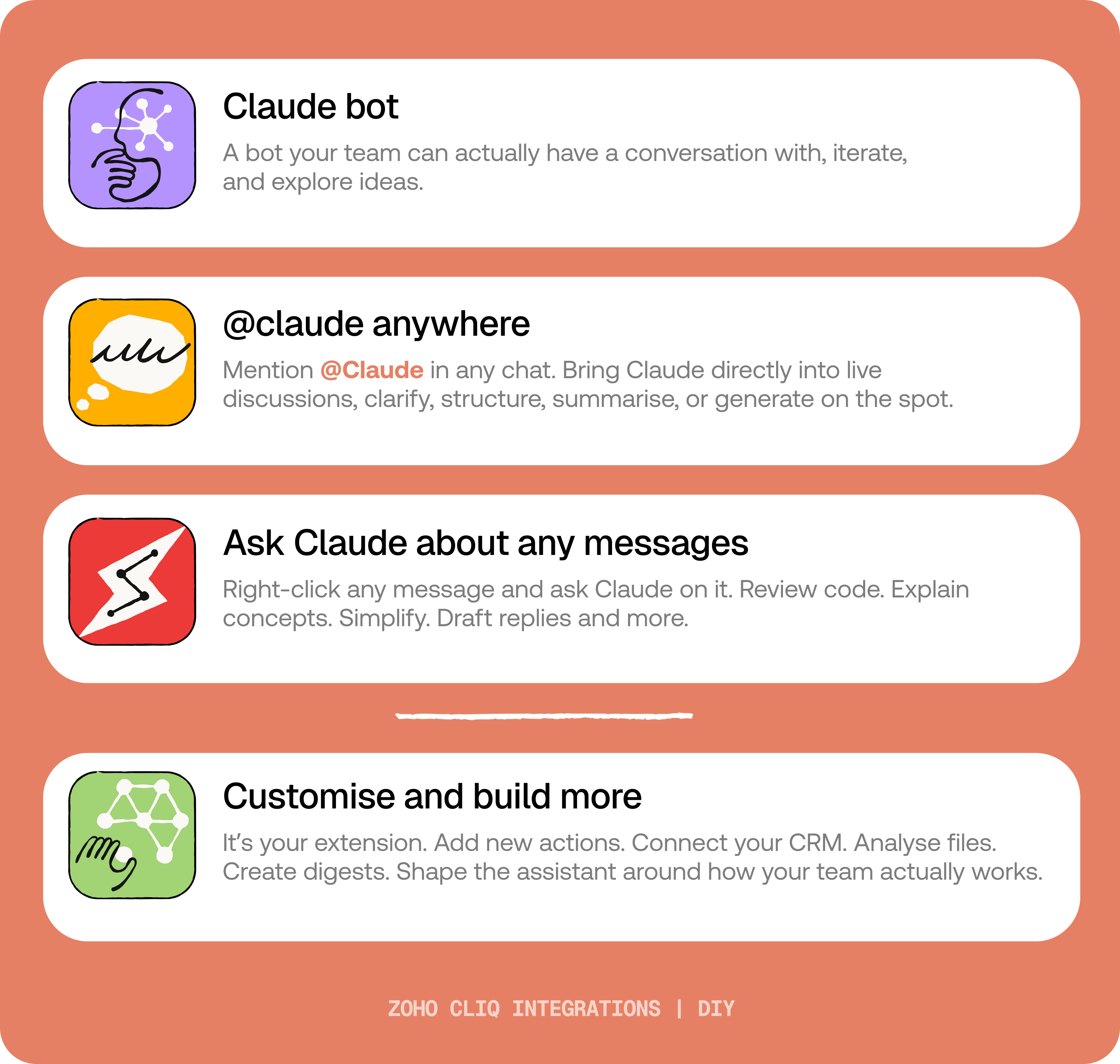
By the end of this guide, you’ll have:

  1. A Claude bot inside Zoho Cliq to have real back-and-forth conversations.
  2. The ability to @mention Claude in any channel and reply to a message and ask Claude to act on it.
  3. A message action to act on messages in Cliq by Claude. Additionally, pre-built actions to review code, generate mind maps, draft a reply for the selected message, or explain it like you’re new.
IdeaBefore you start:
1. A Zoho Cliq account with Developer access.
2. An Anthropic API key
3. Basic comfort with Deluge (optional — all code is provided
😉)

A. How to get an Anthropic API key?
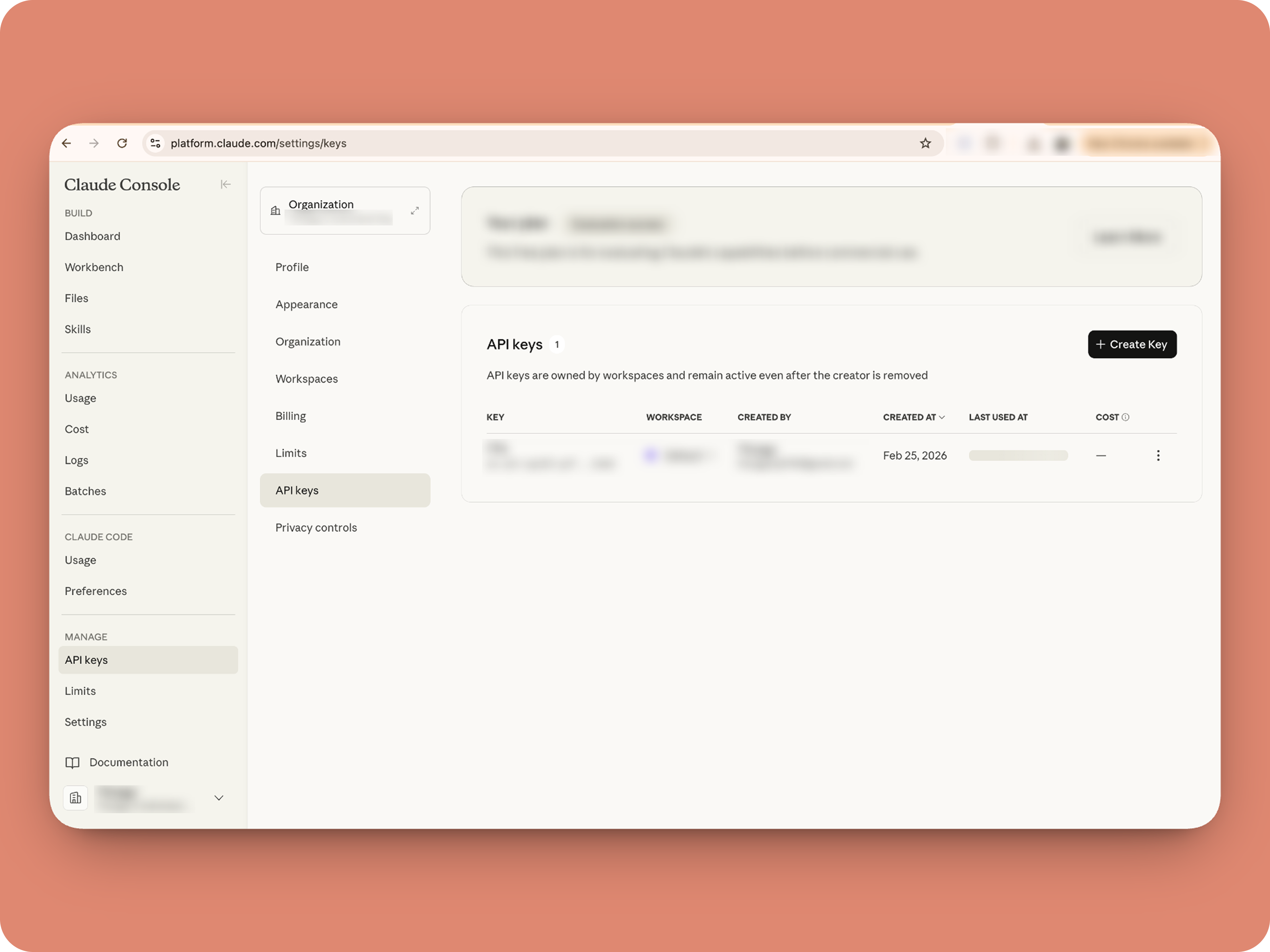


1. To get an Anthropic API key, sign up at the Anthropic Console (console.anthropic.com).
2. Navigate to the API Keys tab, and click Create Key. 
3. You must add credits via the Billing section to activate the key. Copy the key immediately, as it cannot be viewed again.

Alert
Note: In this guide, the API key is pasted directly into the code for simplicity. But never, ever share your API key to others and double-check before sharing screenshots or code.

B. Create a Connection 

Claude needs permission to: Read chat messages and Fetch attachments (like PDFs) when prompted, for that let's create a connection for it.  ⓘ Learn more about connections

1. Go to the Connections module (in Bots & Tools) → Create Connection
2. Add a Connection name, for eg. "readmessageandfile"
3. Select:
ZohoCliq.Attachments.READ
ZohoCliq.Messages.READ
4. Create
Click Create, then authorize the connection. Copy the connection name, you'll paste it into the handlers in the next steps.

How to start

Go to Zoho Cliq → Settings → Bots & Tools 

Claude Bot:


  • Go to Bots → Create Bot.

  • Name it Claude and give it any description of choice.

  • First, let's create a Message handler to handle the conversations first.

  • Click edit code and copy paste the below code in it (follow along the comments to understand what each part does)

Idea

One API endpoint. That's all.


Both the bot and the message action use the same single Anthropic endpoint: POST /v1/messages. The only thing that changes between them is the system prompt and what you put in the messages array. Once you understand that, the rest is just assembly.
Explore API docs →


Message Handler:
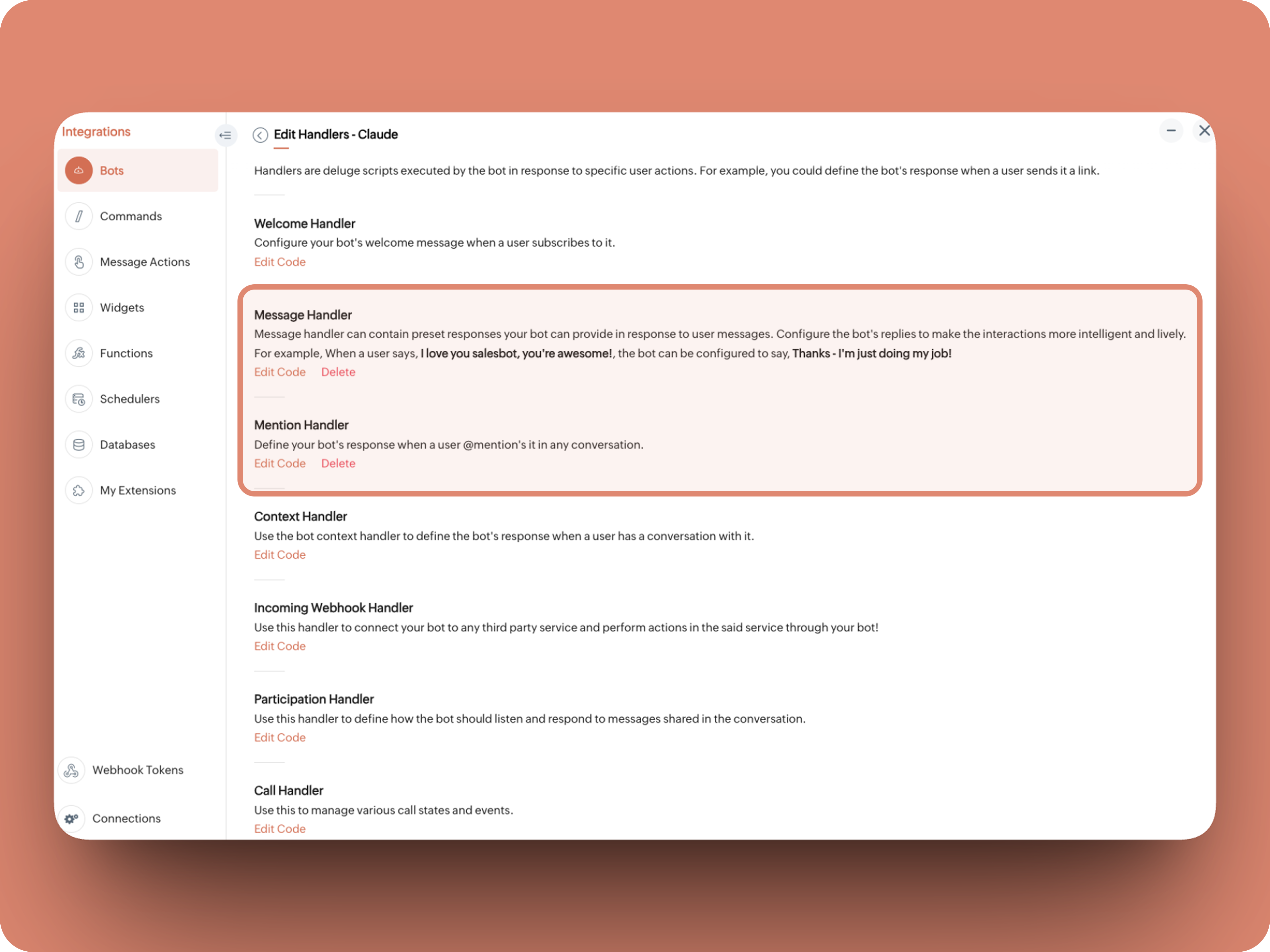


What does this do: Fetches last 10 (customizable - but keep message limit small ( around 10–15 to avoid token overuse)) chat messages for additional context and enables natural chat conversations 


  1. info environment;
  2. botUniqueName = "BOT-UNIQUE-NAME";
  3. // Replace with your bot unique name
  4. cliqBaseUrl = environment.get("base_url");
  5. fetchRecentMessages = invokeurl
  6. [
  7. url :cliqBaseUrl + "/api/v2/chats/" + chat.get("id") + "/messages?limit=10"
  8. type :GET
  9. connection:"CONNECTION-NAME"
  10. //Read below how to create a connection, and paste here:
  11. ];
  12. info fetchRecentMessages;
  13. contentList = list();
  14. contentList.add({"role":"user","content":"Act as a conversational assistant. Reply to the message below in a friendly, informative, and well-organized way.\n\nGuidelines:\n- Respond only to the message provided.\n- Do not use memory or external context.\n- Be warm but professional.\n- Be clear and structured (use short paragraphs or bullet points if helpful).\n- Provide helpful details or clarification where useful.\n- If something is unclear, ask a polite follow-up question.\n- If action is needed, suggest a simple next step.\n- Do not include meta commentary.\n- Output only the reply.\n\n\nSTRICTLY USE * FOR BOLD, AND NEVER ** FOR BOLD MARKDOWN."});
  15. allMessages = fetchRecentMessages.get("data");
  16. for each  data in allMessages
  17. {
  18. type = data.get("type");
  19. if(type == "card" || type == "text")
  20. {
  21. getMessage = data.get("content").get("text").replaceAll("\n"," ");
  22. senderID = data.get("sender").get("id");
  23. if(senderID.startsWith("b-"))
  24. {
  25. contentList.add({"role":"assistant","content":getMessage});
  26. }
  27. else
  28. {
  29. contentList.add({"role":"user","content":getMessage});
  30. }
  31. }
  32. }
  33. info contentList;
  34. // Set up API headers
  35. apiHeaders = Map();
  36. apiHeaders.put("anthropic-version","2023-06-01");
  37. apiHeaders.put("Content-type","application/json");
  38. apiHeaders.put("X-Api-Key","INSERT-API-KEY-HERE");
  39. // Don't forget your API key!
  40. model = "claude-sonnet-4-5-20250929";
  41. requestPayload = {"max_tokens":1024,"messages":contentList,"model":model};
  42. // Make API call to Claude
  43. claudeApiResponse = invokeurl
  44. [
  45. url :"https://api.anthropic.com/v1/messages"
  46. type :POST
  47. parameters:requestPayload + ""
  48. headers:apiHeaders
  49. detailed:true
  50. ];
  51. info claudeApiResponse;
  52. if(claudeApiResponse.get("responseCode") == 200)
  53. {
  54. responseBody = claudeApiResponse.get("responseText");
  55. parsedResponse = responseBody.toMap();
  56. claudeMessage = parsedResponse.get("content").get(0).get("text").replaceAll("\n\n","\n").remove("---").remove("#");
  57. if(claudeMessage.length() > 4000)
  58. {
  59. claudeMessage = claudeMessage.subString(0,4000) + "...";
  60. }
  61. info "Claude's Response: " + claudeMessage;
  62. }
  63. else
  64. {
  65. responseBody = claudeApiResponse.get("responseText");
  66. parsedResponse = responseBody.toMap();
  67. claudeMessage = "*" + parsedResponse.get("error").get("type") + "* \n" + parsedResponse.get("error").get("message");
  68. info "API Error: " + claudeApiResponse;
  69. }
  70. responseContent = {"text":claudeMessage,"card":{"title":"Claude says...","icon":"https://uxwing.com/wp-content/themes/uxwing/download/brands-and-social-media/claude-ai-icon.png"}};
  71. info responseContent;
  72. info zoho.cliq.postToBot(botUniqueName,responseContent);
  73. return Map();


⚙️ Replace These Placeholders

BOT-UNIQUE-NAME (ⓘ How to find it?)
CONNECTION-NAME
INSERT-API-KEY-HERE
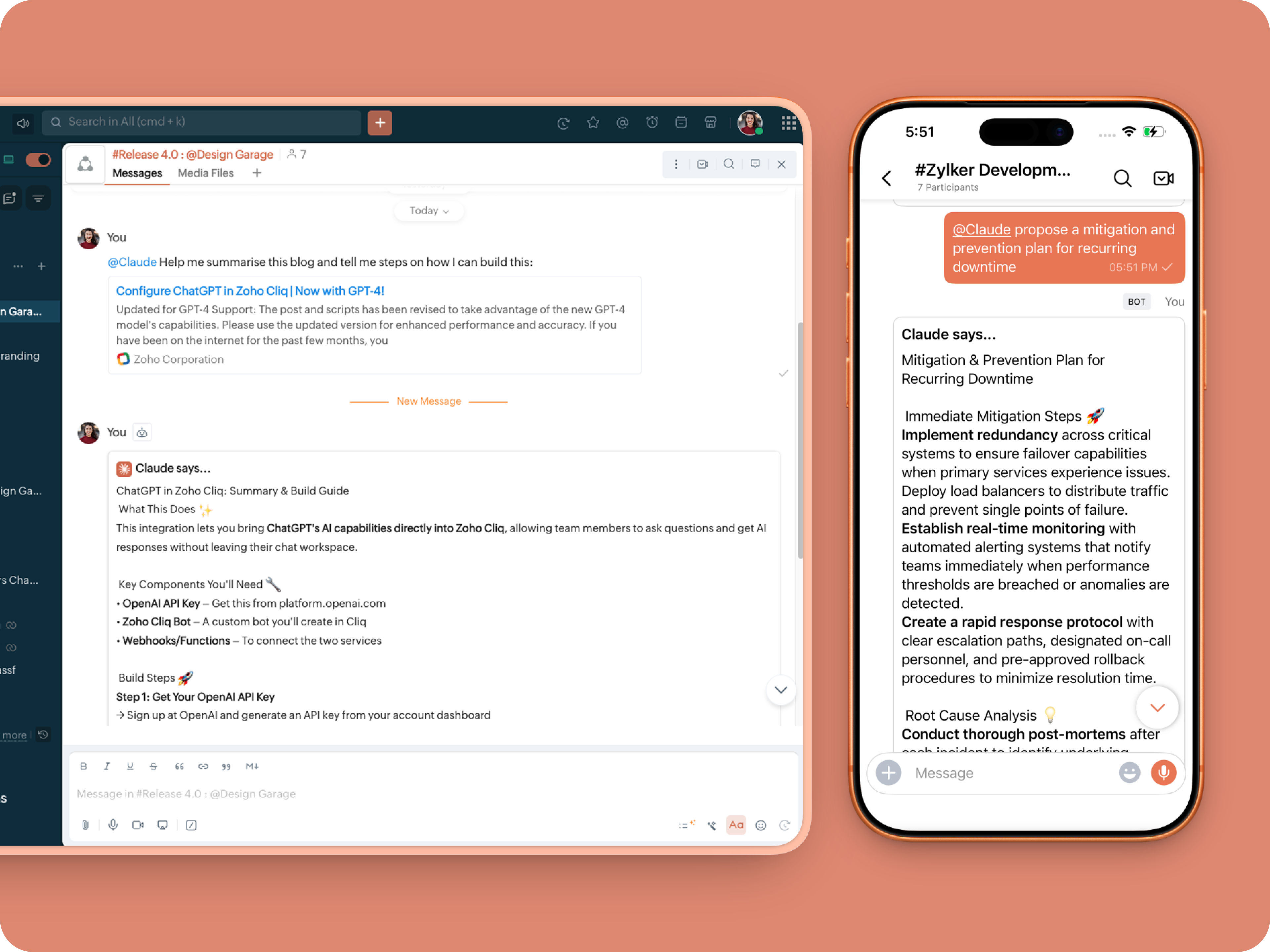


Mention Handler:


What does this do: This is to allow Claude to be @mentioned in any chat.
  1. userMessageText = "";
  2. fileAction = false;
  3. repliedMessage = false;
  4. if(message_details.get("message").containKey("replied_message"))
  5. {
  6. repliedMessage = true;
  7. replyMessageID = message_details.get("message").get("replied_message").get("id");
  8. messageType = message_details.get("message").get("replied_message").get("type");
  9. if(messageType == "text" || messageType == "card")
  10. {
  11. userMessageText = message_details.get("message").get("replied_message").get("text");
  12. }
  13. else
  14. {
  15. fileType = message_details.get("message").get("replied_message").get("file").get("type");
  16. if(fileType != "application/pdf")
  17. {
  18. return {"type":"banner","text":"Only PDF files are supported for this action","status":"failure"};
  19. }
  20. else
  21. {
  22. fileAction = true;
  23. }
  24. }
  25. }
  26. promptInstruction = "\"### Instructions ⓘ \nProvide a human-digestible, highly organized response (300-500 characters). Break down your output into bite-sized paragraphs and use bolding to guide the reader's eye. *Strictly avoid tables.* Use plenty of white space and only ### headings for a clean look. \n\n ### Formatting Protocol • \n - Bold: *text* \n - Italic: _text_ \n - Strike: ~text~ \n - Underline: __underline__ \n - Headers: ### Title \n - Quote: \"quote\" \n - Blockquote: > text \n - Bullets: Use • or → for lists \n - Emojis: Use ✨, 🚀, or 💡 to highlight key takeaways \n - Separator: --- \n\n ### and replace ** to *";
  27. userPrompt = "";
  28. if(message.trim().length() > 0)
  29. {
  30. userPrompt = "Action: " + message + "\n\n\n" + userMessageText + "\n\n\n" + promptInstruction;
  31. }
  32. else
  33. {
  34. userPrompt = "Action: " + userMessageText + "\n\n\n" + promptInstruction;
  35. }
  36. // Set up API headers
  37. apiHeaders = Map();
  38. apiHeaders.put("anthropic-version","2023-06-01");
  39. apiHeaders.put("Content-type","application/json");
  40. apiHeaders.put("ENTER-APIKEY-HERE");
  41. // Don't forget your API key!
  42. // Check if message is text-only or contains a file
  43. if(!fileAction)
  44. {
  45. // Handle text-only message
  46. requestPayload = {"max_tokens":1024,"messages":{{"content":userPrompt,"role":"user"}},"model":"claude-sonnet-4-5-20250929"};
  47. }
  48. else
  49. {
  50. // Handle message with file attachment
  51. uploadedFile = invokeurl
  52. [
  53. url :message_details.get("message").get("replied_message").get("file").get("url")
  54. type :GET
  55. connection:"ENTER-CONNECTION-NAME"
  56. ];
  57. info uploadedFile;
  58. // uploadedFile = message.get("content").get("file").get("name");
  59. base64EncodedFile = zoho.encryption.base64Encode(uploadedFile);
  60. if(message_details.get("message").get("replied_message").containKey("comment"))
  61. {
  62. comment = message_details.get("message").get("replied_message").get("comment");
  63. userPrompt = userPrompt + "\n" + comment;
  64. }
  65. else
  66. {
  67. userPrompt = userPrompt;
  68. }
  69. mediaType = "application/pdf";
  70. requestPayload = {"max_tokens":1024,"messages":{{"role":"user","content":{{"type":"document","source":{"type":"base64","media_type":mediaType,"data":base64EncodedFile}},{"type":"text","text":userPrompt}}}},"model":"claude-sonnet-4-5-20250929"};
  71. }
  72. info requestPayload;
  73. // Make API call to Claude
  74. claudeApiResponse = invokeurl
  75. [
  76. url :"https://api.anthropic.com/v1/messages"
  77. type :POST
  78. parameters:requestPayload + ""
  79. headers:apiHeaders
  80. detailed:true
  81. ];
  82. info claudeApiResponse;
  83. // Extract the actual text response
  84. if(claudeApiResponse.get("responseCode") == 200)
  85. {
  86. responseBody = claudeApiResponse.get("responseText");
  87. parsedResponse = responseBody.toMap();
  88. claudeMessage = parsedResponse.get("content").get(0).get("text").replaceAll("\n\n","\n").remove("---").remove("#");
  89. if(claudeMessage.length() > 4000)
  90. {
  91. claudeMessage = claudeMessage.subString(0,4000) + "...";
  92. }
  93. info "Claude's Response: " + claudeMessage;
  94. }
  95. else
  96. {
  97. responseBody = claudeApiResponse.get("responseText");
  98. parsedResponse = responseBody.toMap();
  99. claudeMessage = "*" + parsedResponse.get("error").get("type") + "* \n" + parsedResponse.get("error").get("message");
  100. info "API Error: " + claudeApiResponse;
  101. }
  102. responseContent = {"text":claudeMessage,"card":{"title":"Claude says...","icon":"https://uxwing.com/wp-content/themes/uxwing/download/brands-and-social-media/claude-ai-icon.png"}};
  103. info responseContent;
  104. if(repliedMessage)
  105. {
  106. responseContent.put("reply_to",replyMessageID);
  107. }
  108. info zoho.cliq.postToChat(chat.get("id"),responseContent);
  109. return Map();


Message Action
What does it do: Allow Claude to act on any message or file.

Quoteⓘ For files, we've extended this to only PDF file formats for now to keep implementation predictable and to avoid unsupported file formats

What we're adding:
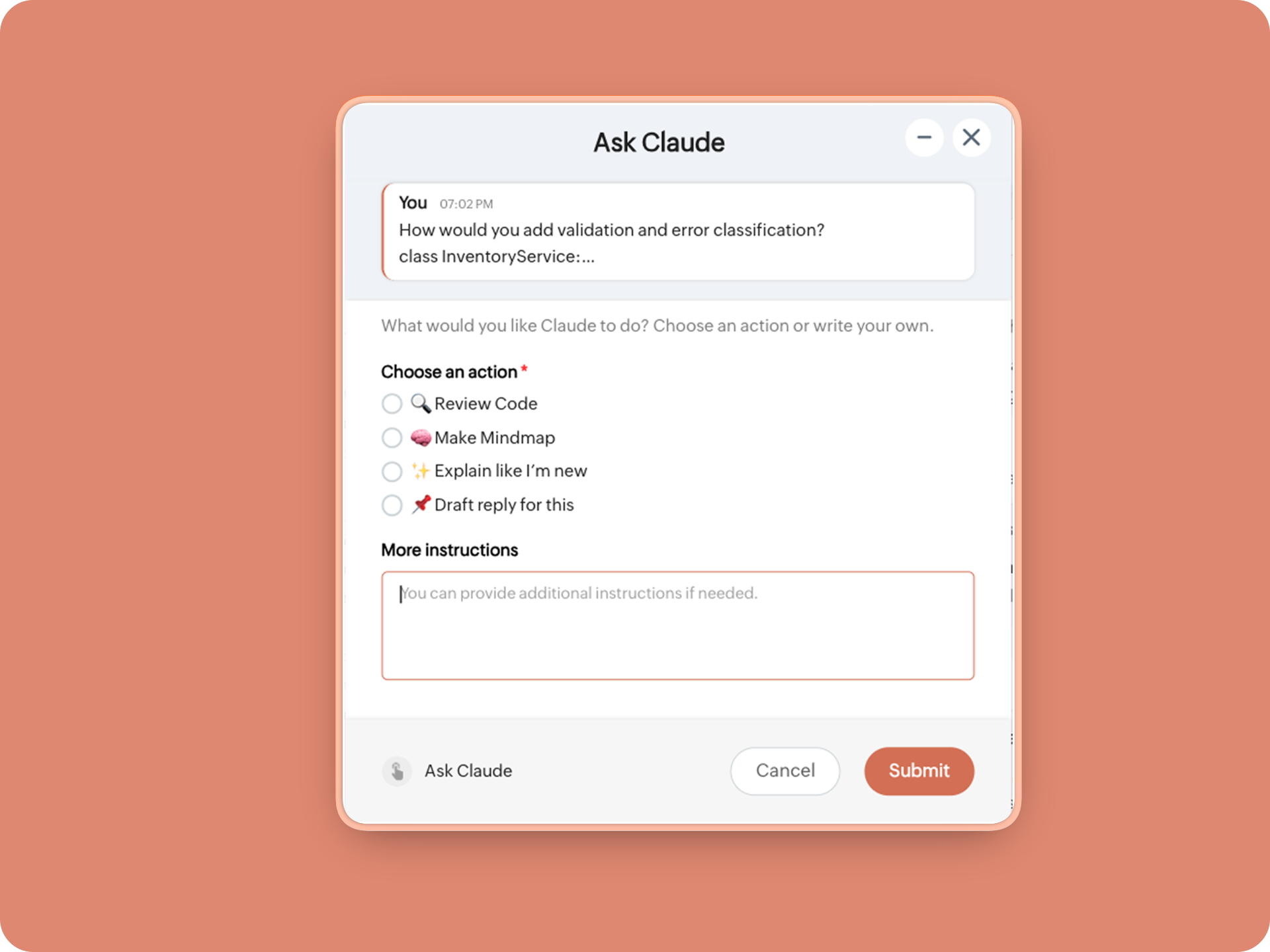
1. When executed on any message, a form opens to prompt:

A. 🔍 Review code
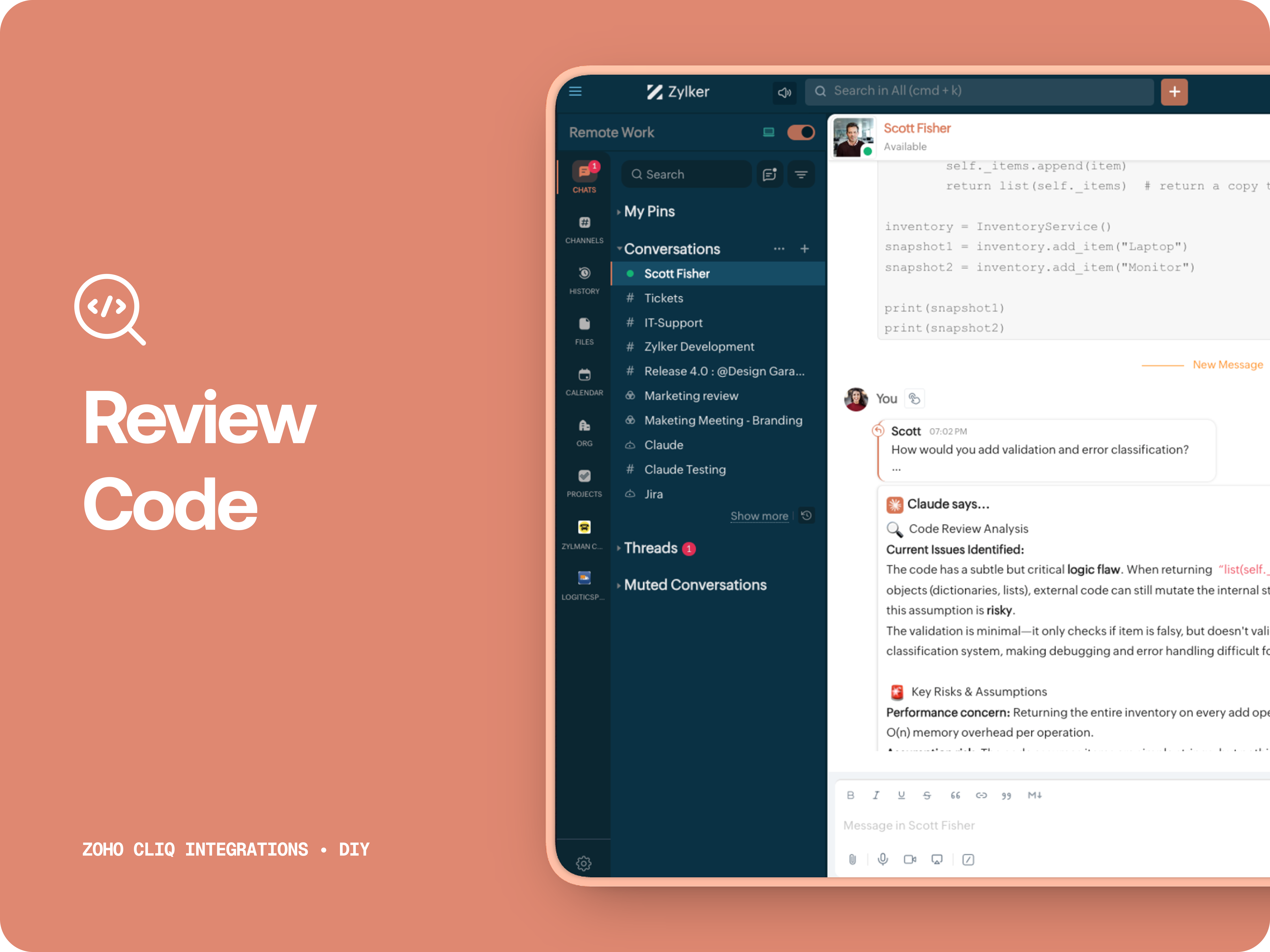
Claude acts like a senior engineer who finds bugs, lists risks, suggest improvements, provides corrected code.


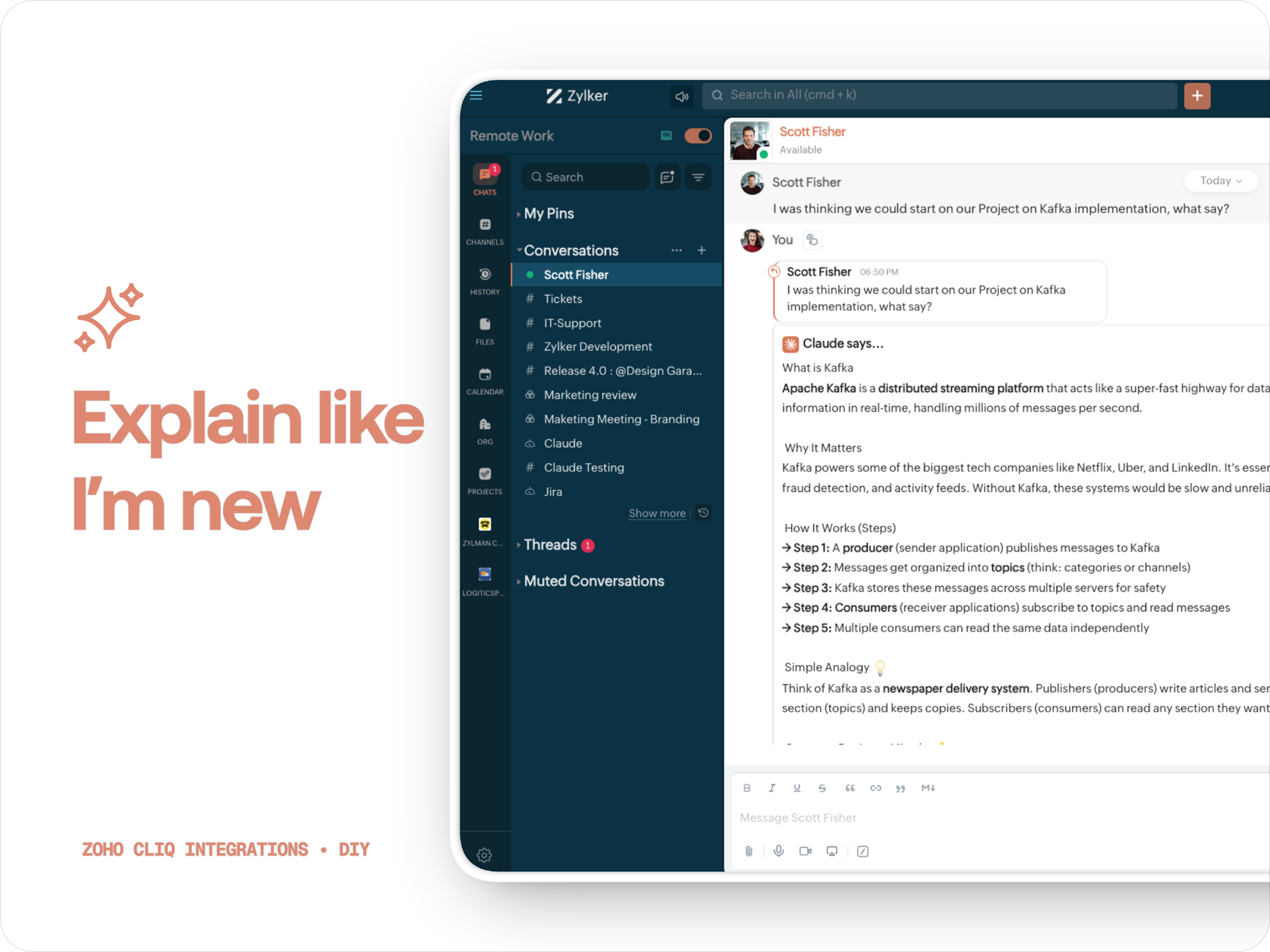
B. ✨ Explain like I'm new
Claude teaches you what it is, why it matters, how it works, an analogy or common mistakes for any concept.

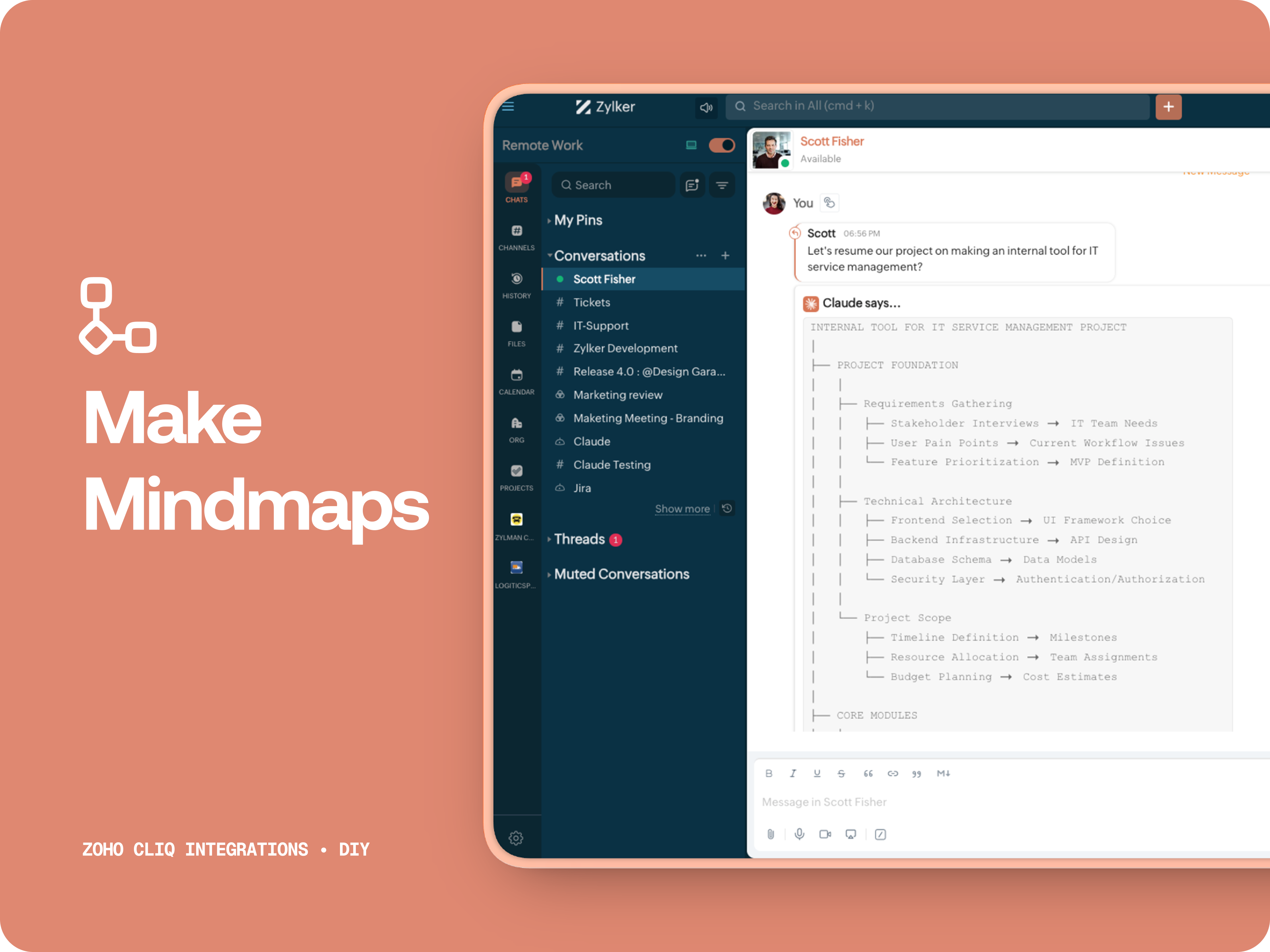
C. 🧠 Make Mindmap

Converts content into a structured ASCII flow chart for explaining system designs, feature breakdowns or general product thinking.

D. 📌 Draft a reply
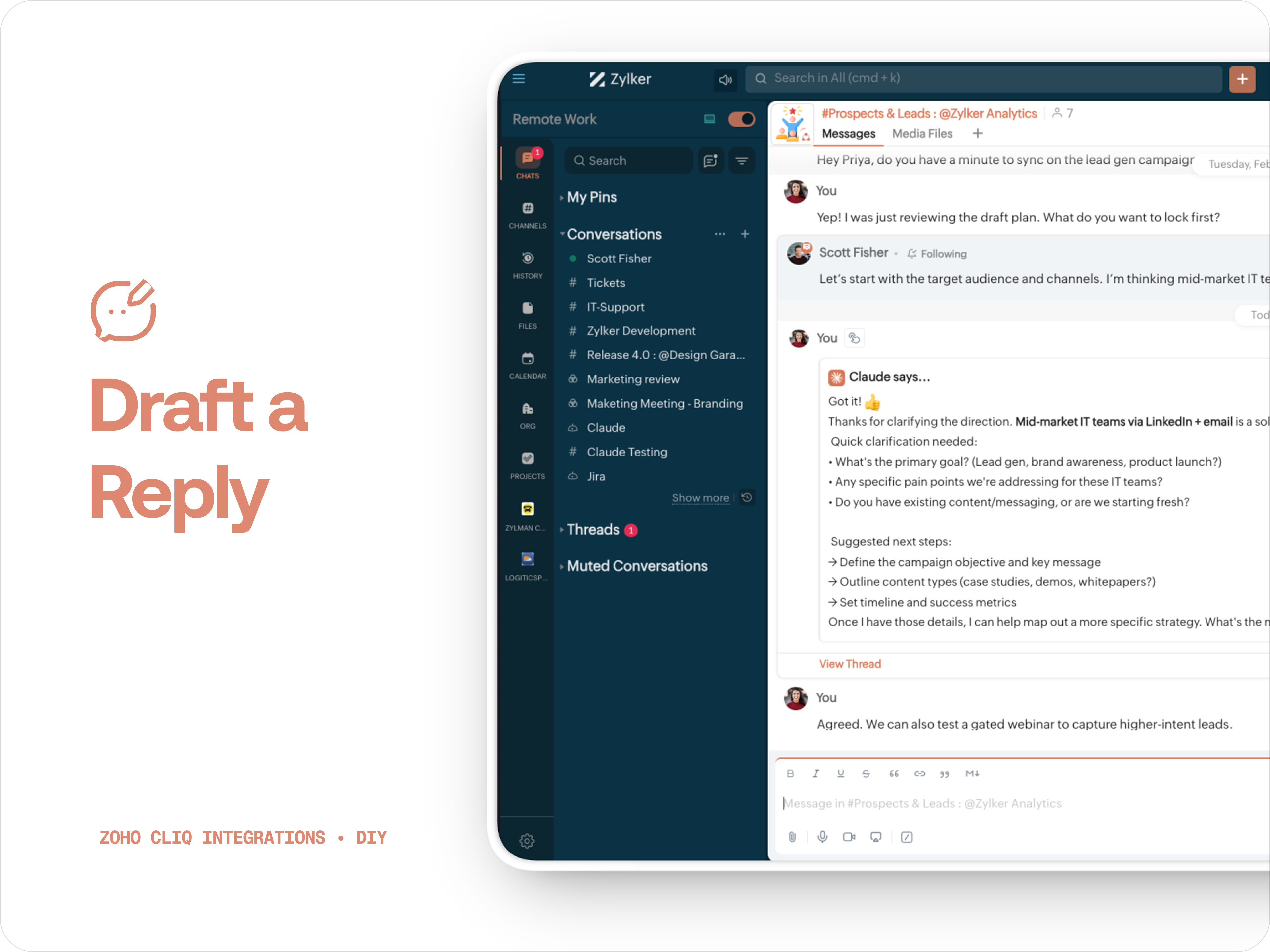
Give professional, concise business replies to address, asks clarifications, suggests next steps in a human tone. 


How to create:

1. Create a
Message Action, name it Ask Claude and give any description of your choice.
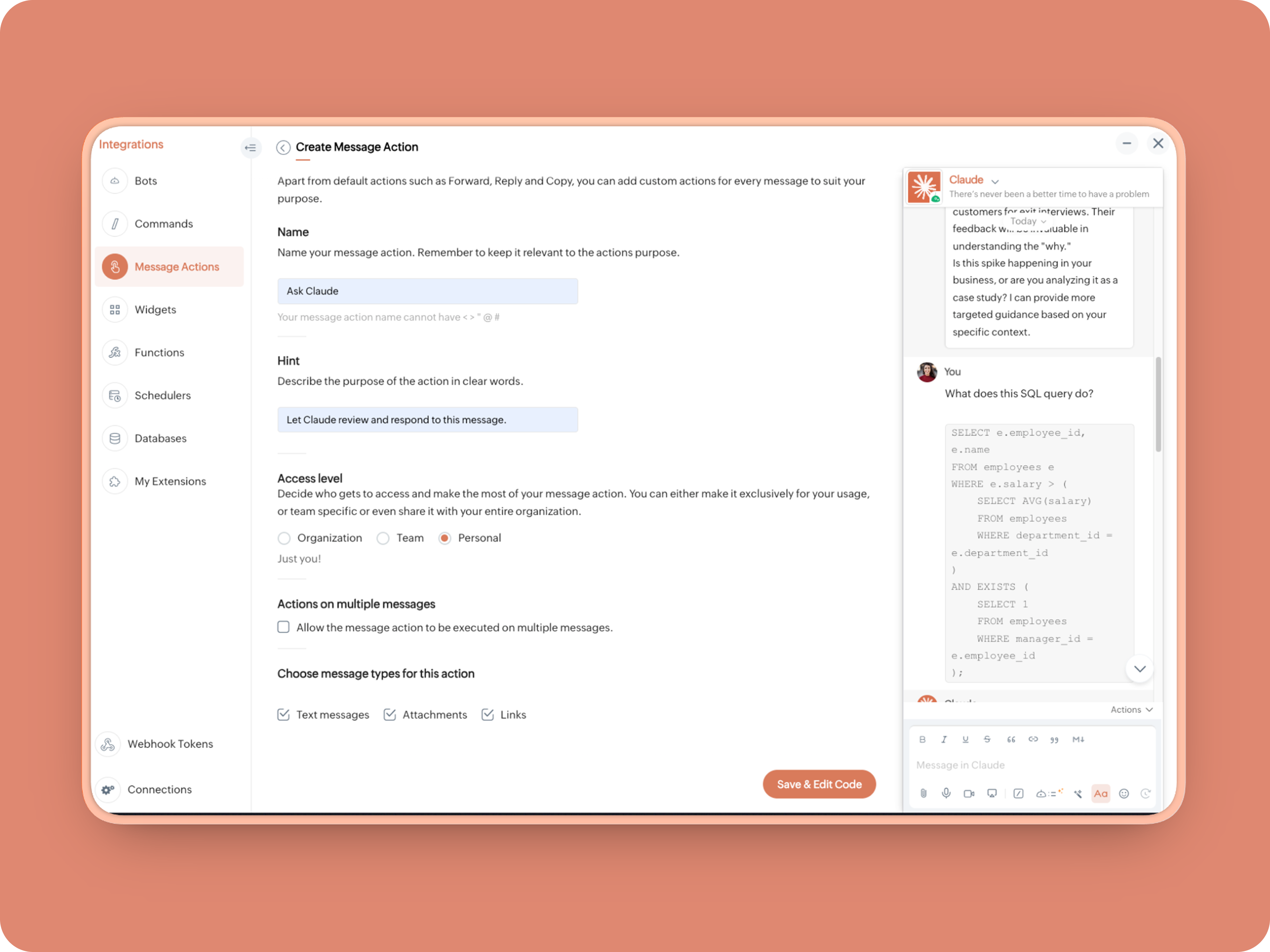


2. Message properties:  Text messages, Attachments, Links
3. Enter code as instructed below:
(Copy the function name and replace it in Line. 14)
  1. info message;
  2. returnForm = false;
  3. if(message.get("type") == "file")
  4. {
  5. fileType = message.get("content").get("file").get("type");
  6. if(fileType != "application/pdf")
  7. {
  8. return {"type":"banner","text":"Only PDF files are supported for this action","status":"failure"};
  9. }
  10. }
  11. inputs = list();
  12. inputs.add({"label":"Choose an action","name":"action","mandatory":true,"type":"radio","options":{{"value":"reviewcode","label":"🔍 Review Code"},{"value":"explainthis","label":"🧠 Make Mindmap"},{"value":"ExplainlikeImnew","label":"✨ Explain like I’m new"},{"value":"Draftreplyforthis","label":"📌 Draft reply for this"}}});
  13. inputs.add({"label":"More instructions","name":"additionalInstructions","placeholder":"You can provide additional instructions if needed.","min_length":"0","max_length":"500","mandatory":false,"type":"textarea"});
  14. return {"type":"form","title":"Ask Claude","hint":"What would you like Claude to do? Choose an action or write your own.","name":"INSERT-FUNCTION-NAME","button_label":"Submit","inputs":inputs,"action":{"type":"invoke.function","name":"INSERT-FUNCTION-NAME"}};
Next, let's create a function and then link it up to the built-Message action to open the form:


Form Function:


1.Go to Functions → Name your function (Eg. askclaude) and add description
2. Select Form function
3. Create
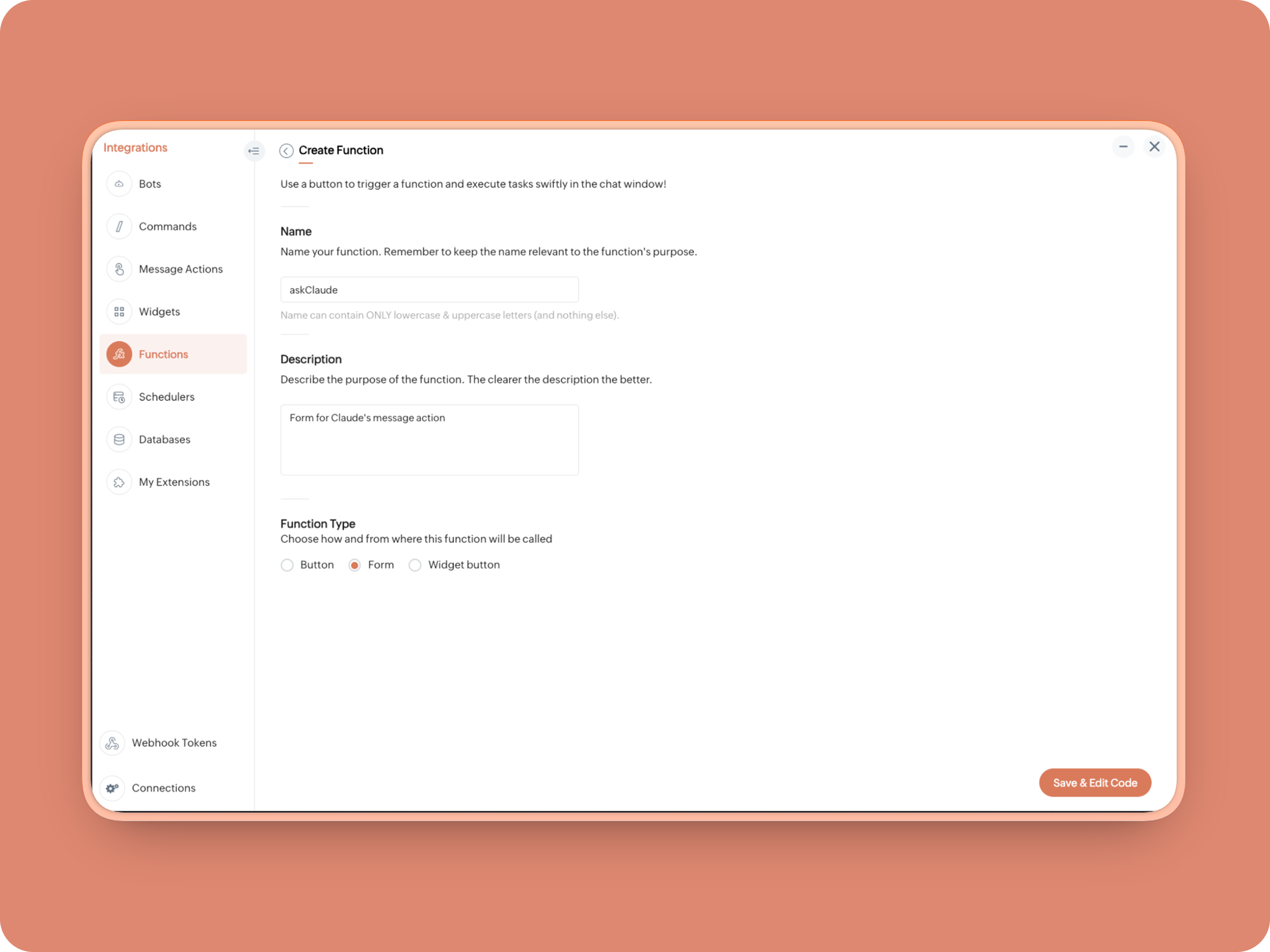


Once created, in the Form Submit Handler, paste this code:
  1. info form;
  2. info message;
  3. // Set up API headers
  4. apiHeaders = Map();
  5. apiHeaders.put("anthropic-version","2023-06-01");
  6. apiHeaders.put("Content-type","application/json");
  7. apiHeaders.put("ENTER-APIKEY-HERE");
  8. // Don't forget your API key!
  9. actionType = form.get("values").get("action").get("value");
  10. promptInstruction = "\"### Instructions ⓘ \nProvide a human-digestible, highly organized response (250-300 characters). Break down your output into bite-sized paragraphs and use bolding to guide the reader's eye. *Strictly avoid tables.* Use plenty of white space and only ### headings for a clean look. \n\n ### Formatting Protocol • \n - Bold: *text* \n - Italic: _text_ \n - Strike: ~text~ \n - Underline: __underline__ \n - Headers: ### Title \n - Quote: \"quote\" \n - Blockquote: > text \n - Bullets: Use • or → for lists \n - Emojis: Use ✨, 🚀, or 💡 to highlight key takeaways \n - Separator: --- \n\n ### and replace all ** to *";
  11. if(actionType == "reviewcode")
  12. {
  13. userPrompt = "🔍 You are a senior engineer. \nReview this code: \n• List bugs or logical errors \n• Note assumptions and risks \n• Suggest improvements \n• Provide corrected code \n• Explain why your version is better\n\n\n" + promptInstruction;
  14. }
  15. else if(actionType == "explainthis")
  16. {
  17. userPrompt = "🧠 You are a systems thinker. \n•Convert the input into a visual flow chart using plain text. \n•Strict Output Rules \n•Output ONLY inside a triple backtick code block \n•Do NOT use Mermaid \n•Do NOT write paragraphs \n•Do NOT explain anything \n•Do NOT use bullet lists outside structure \n•Use ASCII connectors to form a real flow chart \n•Use arrows (→, ↓, ↳, ├──, └──) to show relationships \n•Maintain clear hierarchy and spacing \n•One single root at the top \n•Logical directional flow (top → down) \n•Structure Requirements \n•Root node at top \n•First-level branches below \n•Subpoints indented \n•Cross-links if relevant \n•Clean spacing \n•No duplicated nodes \n•Required Format Example \n•MAIN IDEA \n•Branch 1 -> Subpoint -> Subpoint \n•Branch 2 -> Subpoint ->Subpoint \n•Branch 3 -> Subpoint -> Subpoint\n\n\n" + promptInstruction;
  18. }
  19. else if(actionType == "ExplainlikeImnew")
  20. {
  21. userPrompt = "✨ You are a teacher for beginners. \nExplain: \n• What it is \n• Why it matters \n• How it works (steps) \n• A simple analogy \n• One common beginner mistake\n\n\n" + promptInstruction;
  22. }
  23. else if(actionType == "Draftreplyforthis")
  24. {
  25. userPrompt = "📌 You are a professional responder. \nReply to this message: \n• Directly address main point \n• Ask for clarification if needed \n• Suggest next steps \n• Keep it concise and clear \n• Make sure message in a buisness casual tone, consise, human written.\n\n\n" + promptInstruction;
  26. }
  27. if(form.get("values").get("additionalInstructions").length() > 0)
  28. {
  29. userPrompt = userPrompt + "\n" + form.get("values").get("additionalInstructions");
  30. }
  31. // Check if message is text-only or contains a file
  32. if(message.get("type") == "text" || message.get("type") == "card")
  33. {
  34. // Handle text-only message
  35. userMessageText = message.get("text");
  36. requestPayload = {"max_tokens":1024,"messages":{{"content":userPrompt + "\n\n" + userMessageText,"role":"user"}},"model":"claude-sonnet-4-5-20250929"};
  37. }
  38. else
  39. {
  40. // Handle message with file attachment
  41. uploadedFile = invokeurl
  42. [
  43. url :"https://cliq.zoho" + environment.get("tld") + "/api/v2/files/" + message.get("content").get("file").get("id")
  44. type :GET
  45. connection:"ENTER-CONNECTION-NAME"
  46. ];
  47. info uploadedFile;
  48. base64EncodedFile = zoho.encryption.base64Encode(uploadedFile);
  49. if(message.get("content").containKey("comment"))
  50. {
  51. comment = message.get("content").get("comment");
  52. userPrompt = userPrompt + "\n" + comment;
  53. }
  54. else
  55. {
  56. userPrompt = userPrompt;
  57. }
  58. mediaType = message.get("content").get("file").get("type");
  59. mediaType = "application/pdf";
  60. requestPayload = {"max_tokens":1024,"messages":{{"role":"user","content":{{"type":"document","source":{"type":"base64","media_type":mediaType,"data":base64EncodedFile}},{"type":"text","text":userPrompt}}}},"model":"claude-sonnet-4-5-20250929"};
  61. }
  62. info requestPayload;
  63. // Make API call to Claude
  64. claudeApiResponse = invokeurl
  65. [
  66. url :"https://api.anthropic.com/v1/messages"
  67. type :POST
  68. parameters:requestPayload + ""
  69. headers:apiHeaders
  70. detailed:true
  71. ];
  72. // info claudeApiResponse;
  73. // Extract the actual text response
  74. if(claudeApiResponse.get("responseCode") == 200)
  75. {
  76. responseBody = claudeApiResponse.get("responseText");
  77. parsedResponse = responseBody.toMap();
  78. claudeMessage = parsedResponse.get("content").get(0).get("text").replaceAll("\n\n","\n").remove("---").remove("#");
  79. if(claudeMessage.length() > 4000)
  80. {
  81. claudeMessage = claudeMessage.subString(0,4000) + "...";
  82. }
  83. info "Claude's Response: " + claudeMessage;
  84. }
  85. else
  86. {
  87. responseBody = claudeApiResponse.get("responseText");
  88. parsedResponse = responseBody.toMap();
  89. claudeMessage = "*" + parsedResponse.get("error").get("type") + "* \n" + parsedResponse.get("error").get("message");
  90. info "API Error: " + claudeApiResponse;
  91. }
  92. responseContent = {"text":claudeMessage,"card":{"title":"Claude says...","icon":"https://uxwing.com/wp-content/themes/uxwing/download/brands-and-social-media/claude-ai-icon.png"},"reply_to":message.get("id")};
  93. info responseContent;
  94. info zoho.cliq.postToChat(chat.get("id"),responseContent);
  95. return Map();

When triggered: Opens a form → User selects an action → Adds additional instructions → Submits → Claude processes the selected message


And that's it. You're Claude integration is ready to be used. 


What's Next:

What you built today is just the foundation.

Shape it around how your team actually works. Extend it to turn discussions into action items, review PRs before they’re merged, generate standup updates, extract tasks automatically, or create knowledge snippets from resolved threads.

Start with one real pain point. Solve it well. Then layer more intelligence on top.

The structure is already there. The possibilities are yours.

🔗 Explore Zoho Cliq: Developer Platform
🔗 Explore Anthropic API Docs

Questions? Comments below. 
Looking forward how you'll build and go make it your own. 🚀

      Zoho Campaigns Resources


        • Desk Community Learning Series


        • Digest


        • Functions


        • Meetups


        • Kbase


        • Resources


        • Glossary


        • Desk Marketplace


        • MVP Corner


        • Word of the Day


        • Ask the Experts


          • Sticky Posts

          • Automating Real-Time Zoho Bookings Alerts in Zoho Cliq

            Enable your teams to respond in seconds by bridging the gap between booking confirmation and team notification. No sticky notes, no calendar nudges and no follow-up frenzies. For businesses that rely on scheduled appointments, real-time visibility is
          • Cliq Bots - Post message to a bot using the command line!

            If you had read our post on how to post a message to a channel in a simple one-line command, then this sure is a piece of cake for you guys! For those of you, who are reading this for the first time, don't worry! Just read on. This post is all about how
          • Add Claude in Zoho Cliq

            Let’s add a real AI assistant powered by Claude to your workspace this week, that your team can chat with, ask questions, and act on conversations to run AI actions on. This guide walks you through exactly how to do it, step by step, with all the code
          • Automate attendance tracking with Zoho Cliq Developer Platform

            I wish remote work were permanently mandated so we could join work calls from a movie theatre or even while skydiving! But wait, it's time to wake up! The alarm has snoozed twice, and your team has already logged on for the day. Keeping tabs on attendance
          • Customer payment alerts in Zoho Cliq

            For businesses that depend on cash flow, payment updates are essential for operational decision-making and go beyond simple accounting entries. The sales team needs to be notified when invoices are cleared so that upcoming orders can be released. In contrast,

          Zoho CRM Plus Resources

            Zoho Books Resources


              Zoho Subscriptions Resources

                Zoho Projects Resources


                  Zoho Sprints Resources


                    Zoho Orchestly Resources


                      Zoho Creator Resources


                        Zoho WorkDrive Resources


                          Zoho CRM Resources

                          • CRM Community Learning Series

                            CRM Community Learning Series


                          • Tips

                            Tips

                          • Functions

                            Functions

                          • Meetups

                            Meetups

                          • Kbase

                            Kbase

                          • Resources

                            Resources

                          • Digest

                            Digest

                          • CRM Marketplace

                            CRM Marketplace

                          • MVP Corner

                            MVP Corner


                            Zoho Writer Writer

                            Get Started. Write Away!

                            Writer is a powerful online word processor, designed for collaborative work.

                              Zoho CRM コンテンツ


                                ご検討中の方

                                  • Recent Topics

                                  • Printing preview is empty

                                      - head-line - I'm a happy user of Zoho Writer almost a year now, but I got some seriues probelm on my Printing Preview. I wrote some long doc, and once in a while I did a printing preview, and everything were fine. Suddnly the Printing Preview is empty and the Page View dosn't deviding the doucmunebt into pages. thank you, and love your service - Eli.
                                  • DYK 4 - Reactions

                                    Did You Know that you can react to comments in Zoho Projects? In a collaborative workspace, comments come in throughout the day. Some need a detailed reply, others just need to be acknowledged, and the more the replies, the harder it is to follow the
                                  • since the new interface of ZOHO writer can't turn of automatic reminder option for merge documents

                                    Since the new interface of ZOHO writer I have this problem. I have a large set of templates that I use to send documents to ZOHO Sign. But now in all those templates the box for Sending reminders is ticked, which i don't want. But even if I untick the
                                  • Introducing Interactive WhatsApp Templates and Quick Replies in the Bigin iOS App

                                    Hello everyone! We are happy to introduce interactive WhatsApp templates and Quick replies in Business Messaging in the Bigin iOS app. Scenario: John Bailey owns a small-scale digital marketing company. He gets an enquiry on chat while he is busy, so
                                  • New UI for Writer - Disappointed

                                    I've been enjoying Zoho Writer as a new user for about 6 months, and I really like it. One of my favorite things about it is the menu bar, which you can hide or leave out while still seeing most of your page because it is off to the left. I think this
                                  • Qualified electronic signatures (QES) via SIGN8 in Zoho Sign

                                    Zoho Sign now integrates with SIGN8, a qualified trust service provider (QTSP) under the eIDAS regulation, so you can collect qualified electronic signatures (QES) that are legally recognized across the EU. With QES via SIGN8, you can: Allow recipients
                                  • SalesIQ Live Chat Widget Upgrade For Zoho Desk Customers

                                    The older version of the SalesIQ live chat widget will be deprecated on May 15, 2026. SalesIQ powers the chat experience across Zoho Desk, Help Center, and ASAP widgets. To ensure continued support, Zoho Desk will begin rolling out the new SalesIQ widget
                                  • Set Custom Icon for Custom Modules in new Zoho CRM UI

                                  • Support Custom Background in Zoho Cliq Video Calls and Meetings

                                    Hello Zoho Cliq Team, We hope you are doing well. We would like to request an enhancement to the video background capabilities in Zoho Cliq, specifically the ability to upload and use custom backgrounds. Current Limitation At present, Zoho Cliq allows
                                  • Looking for Guidance on Building a Zoho Website

                                    I'm exploring the possibility of building a custom website with specific features using Zoho as an alternative platform. My goal is to create something similar to https://gtasandresapk.com , with the same kind of functionality and user experience. I'd
                                  • What's New in Zoho POS - April 2026

                                    Hello everyone, Welcome to Zoho POS’s monthly update, where we share our latest feature updates, enhancements, events, and more. Let’s take a look at how April went. Access and manage other web applications in Zoho POS with Web Tabs You can now access
                                  • プロフェッショナルプランで、見積作成時に原価と利益率を確認する代替案について

                                    現在、Zoho CRMのプロフェッショナルプランを利用しています。 海外から輸入した商品を販売しており、商品ごとに原価が異なるため、見積書を作成する際(または保存直後)に、その見積の原価合計と利益率を確認したいと考えています。 しかし、現在のプランではDeluge(関数)が使えず、見積書の「商品詳細」の項目をカスタマイズすることもできません。 1,見積作成画面で商品の原価を参照できるような、標準機能での工夫はありますか? 2,レポート機能を使って、見積単位での原価・利益を算出する方法はありますか?
                                  • Plug Sample #9 - Get Notified on Cliq When Your Premium Customers Interact with SalesIQ's Zobot

                                    Hi everyone! We're here with another simple yet effective plug for your chatbot to integrate with Zoho Cliq to make your job easier. Just imagine whenever a potential lead or your premium customers are on your website, and they engage with your chatbot,
                                  • Zoho IP address blocked by Microsoft

                                    Today I tried to send emails to Outlook email addresses and all of them failed. The log displays like this: Reporting-MTA: dns; mx.zohomail.jp Arrival-Date: Fri, 27 Jun 2025 12:52:30 +0800 Original-Recipient: rfc822; ######@outlook.com Final-Recipient:
                                  • Remove "Subject" as a required field on Quotes

                                    Currently, when you create a quote in CRM, the field "Subject" is mandatory. The properties of a system defined field cannot be edited which means we cannot de-select the mandatory requirement. A 'subject' on a quote is a little vague and not something
                                  • Integrate QuickBooks with Bigin and streamline your sales and accounting!

                                    If your business relies on Bigin for customer management and QuickBooks for accounting and invoicing, this new integration is here to make your operations more efficient. By connecting these two platforms, you can now manage your CRM and financial processes
                                  • Upgraded sentiment analysis model for more accurate detection

                                    Hello everyone! Sentiment Analysis in Zia is being upgraded to a newer model to improve how customer sentiment is detected and interpreted. This transition is aimed at getting better contextual understanding across all supported channels. As part of this
                                  • Adding contact to account automatically in helpdesk?

                                    Hello, We're using Zoho desk to managed our helpdesk tickets.  Is there a way to add contacts (email senders) automatically to an account based on their emails domain name?  For example:  when UserA@companyx.com send an email to our support mailbox, a trigger or a workflow would automatically add the userA to Companyx account if it does exists  Please advise Thank you 
                                  • GLM 5 not available

                                    Hello, I am trying to setup a Zia Agent using agents.zoho.com. The settings says that GLM5 is among the list of free zoho hosted models available. However, when I try to setup an agent and pick a model from the list only GLM 4.7 Flash is available. How
                                  • Native QuickBooks integration for Zoho CRM: Connecting sales and finance

                                    Greetings, I hope all of you are doing well. We're excited to announce Zoho CRM's integration with QuickBooks Web, which is designed to synchronize your CRM data with your QuickBooks accounting records and bridge the gap between sales and finance. This
                                  • Knowledge base articles is now available in the Zoho Desk mobile app!

                                    Hello all,   As a customer service agent, every day you might have to deal with many questions and issues reported by the users. With Knowledge Base, you can reduce the issue resolution life cycle for your organization.   We are delighted to announce that we have brought in support for 'Knowledge Base articles' in the Zoho Desk iOS mobile app.  This feature is already available for Android users.   KB articles are available to iOS users in the latest version of the app (v2.4.9). You can update the
                                  • ZOHO CRM User management or role

                                    I need guidance regarding Zoho CRM licensing and user management. I want to purchase one Zoho CRM license and create multiple team users under the same account with the following hierarchy: Super Admin User Manager User Executive Users (with limited access)
                                  • Urgent Issue – Draft Reply Fails to Save When Message Contains Code Snippets

                                    Hello Zoho Desk Support Team, We are experiencing a critical issue in the ticket reply editor that is directly impacting our support operation. Whenever we write a reply containing code snippets, URLs, or technical content (for example, terms like “curl
                                  • Introducing parent-child ticketing in Zoho Desk [Early access]

                                    Hello Zoho Desk users! We have introduced the parent-child ticketing system to help customer service teams ensure efficient resolution of issues involving multiple, related tickets. You can now combine repetitive and interconnected tickets into parent-child
                                  • Zoho CRM Meetings Module Issues

                                    We have a use-case that is very common in today's world, but won't work in Zoho CRM. We have an SDR (Sales Development Rep) who makes many calls per day to Leads and Contacts, and schedules meetings for our primary Sales Reps. He does this by logging
                                  • information on a suggestion how to treat old records in the - pipeline deals, notes, activities (tasks- events-calls) and emails etc.

                                    Hi, I would like information or a suggestion on how to treat old records in the - pipeline deals, notes, activities (tasks- events-calls) and emails etc. ? As each option (pipeline deal, notes, activities, emails etc.) counts as a record and as we advance
                                  • Inventory batch details

                                    Hi there, I'm trying to get the batch details of an item, here's what I've done so far. I've sent cUrl request to the below endpoint and I get a successful response. Within in the response I find the "warehouses" property which correctly lists all the
                                  • Zoho Trident Windows - Streams Not Visible

                                    Namaste We’re having an issue with Streams not being visible in Trident (Windows), which is important for us as we share many emails internally. It appears that the feature to show Streams above the Inbox folder, as seen in the default mailbox view, is
                                  • Adding Multiple Products (Package) to a Quote

                                    I've searched the forums and found several people asking this question, but never found an answer. Is ti possible to add multiple products to a quote at once, like a package deal? This seems like a very basic function of a CRM that does quotes but I can't
                                  • Early Access: Check Printing in Zoho Books

                                    Hello Everyone,   Are you constantly writing checks to pay your vendors?   We've got a great news to share with you! You can now pay your vendors by writing and printing a check directly from Zoho Books. The feature is ready and we'll be rolling it out to our customers in phases.  It is available in the  US Edition of Zoho Books and also in the Global edition, where the country is selected as USA and the currency is USD.   Here’s a summary of what’s possible:   1. Write and print a check. 2. Make
                                  • Trash - Delete All

                                    We use 6 inbox shared (via IMAP). The Trash bin contains a lot of messages. Is it possible to delete them all permanently? Is there a rule to empty trash bin after xx days? Deleted permanently message in TeamInBox are deleted permanently in the related
                                  • Internal mails on our company domain (managed by Zoho) do not get delivered

                                    Hi last week Thursday and Friday a colleague had sent me two emails which did not show up at all in my inbox, spam or anywhere else. What this a problem with Zoho mail in general or did this affect just us? From the forum is reads like many problems had
                                  • Paste Options don't work

                                    I've always wondered about this, as I've experienced this issue for quite some time now. Why don't the right-click Paste options work properly in Zoho Writer? I can use Ctrl + V without any issue, but if I right-click and use one of the Paste menu options,
                                  • What's New - April 2026 | Zoho Backstage

                                    Hello everyone, April has been focused on improving speed, reliability, and overall platform performance. Here are a few updates from this month. Safaricom M-PESA for event payments in Kenya Organizers hosting events in Kenya can accept payments through
                                  • How do you paginate in schedule function

                                    How does someone paginate in schedule function in deluge is there an ideal way to do this apart from hardcoding max pages
                                  • Enrich your contact and company details automatically using the Data Enrichment topping

                                    Greetings, I hope you're all doing well. We're happy to announce the latest topping we've added to Bigin: The Data Enrichment topping, powered by WebAmigo. This topping helps you automatically enhance your contact and company records in Bigin. By leveraging
                                  • Consolidate your workflows and be more productive - Introducing Multiple Conditions in Workflow Rules

                                    Workflow rules in Zoho CRM helps you automate your routine tasks and save time. Usually, while creating a workflow rule, you'd provide the basic details of the rule, specify when the rule should be triggered and associate set of actions to be executed whenever the rule criteria is met. And you’d create a new workflow rule for every new automation that you required.  Not anymore! You can now combine multiple conditions and the corresponding actions to follow in a single workflow rule. Let’s look at
                                  • How has Zoho still not resolved Daylight Savings Time?

                                    According to these forums Zoho has been working on DST for 12 years. Totally unacceptable. Am I missing something? Why are other customers who observe DST not screaming for this to be fixed? Are there reasonable workarounds? This is a must-have for
                                  • Overview on users IMAP settings

                                    We have about 30 users who all have the channels/email/email configuration/IMAP integration/O365 enabled and emails are synchronized. Here my problem: Passwords for the email accounts are expiring on individual bases and most of the users forget to update
                                  • Digest Avril - Un résumé de ce qui s'est passé le mois dernier sur Community

                                    Chers utilisateurs, Un nouveau mois riche en nouveautés vient de filer à toute vitesse chez Zoho Community France ! Jetons un œil à ce qu’il s’est passé. Des webinaires à votre image avec Zoho Webinar Vos pages d’inscription sont souvent le premier point
                                  • Next Page