Add Claude in Zoho Cliq
Add Claude in Zoho Cliq


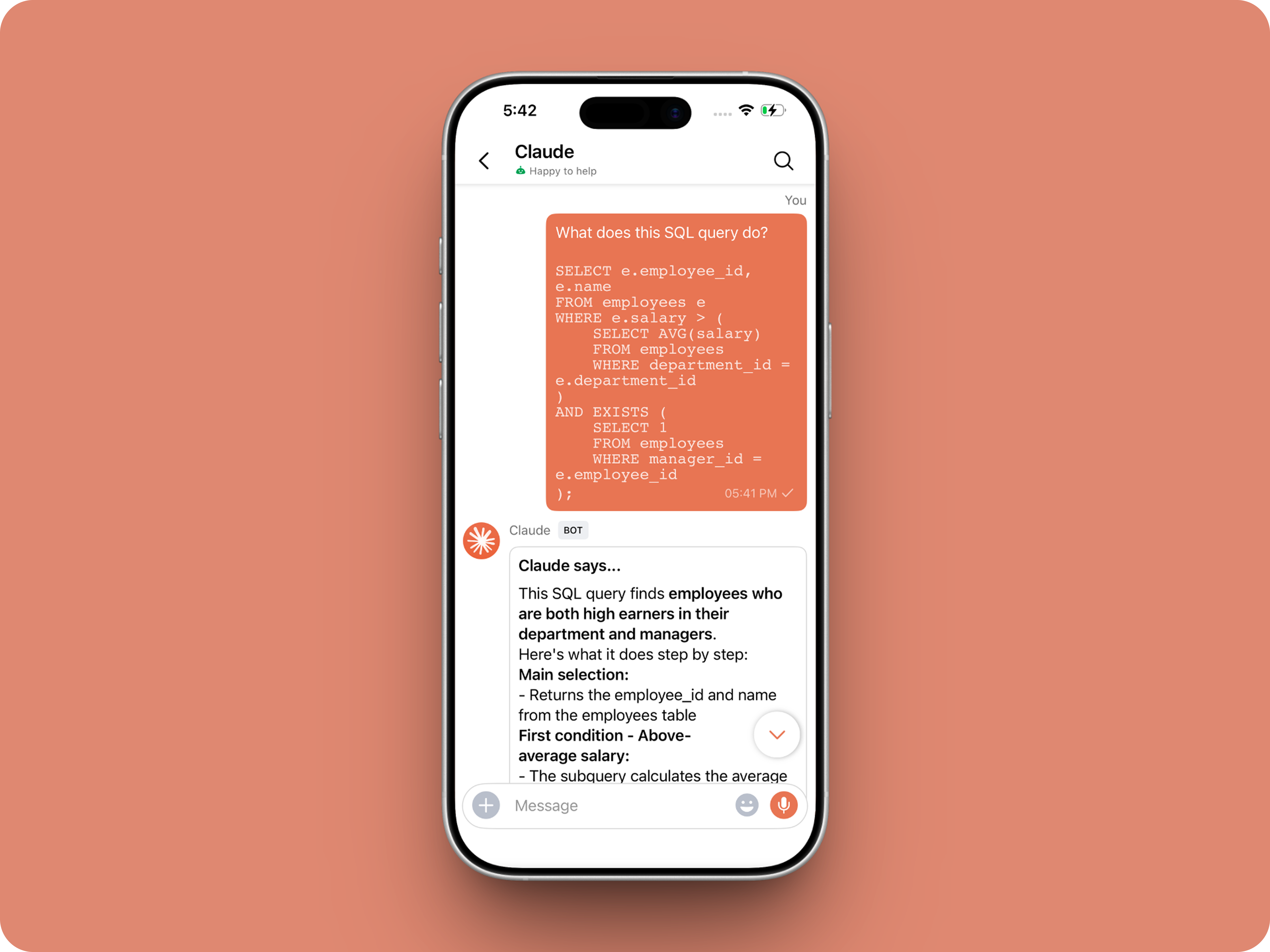
Let’s add a real AI assistant powered by Claude to your workspace this week, that your team can chat with, ask questions, and act on conversations to run AI actions on.

This guide walks you through exactly how to do it, step by step, with all the code you'll need.
Just copy, paste, replace the placeholders and you'll be good to go.


By the end of this guide, you’ll have:

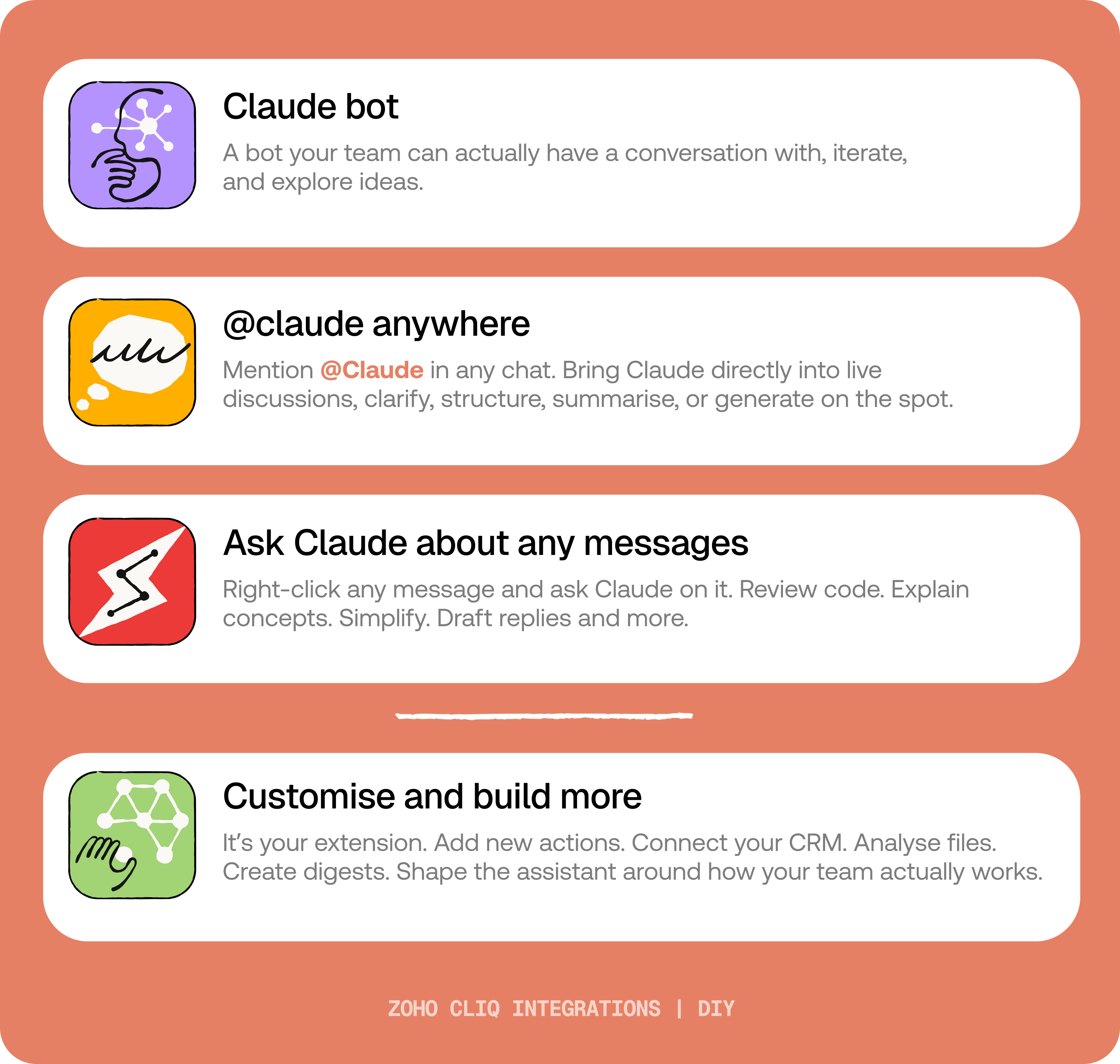
  1. A Claude bot inside Zoho Cliq to have real back-and-forth conversations.
  2. The ability to @mention Claude in any channel and reply to a message and ask Claude to act on it.
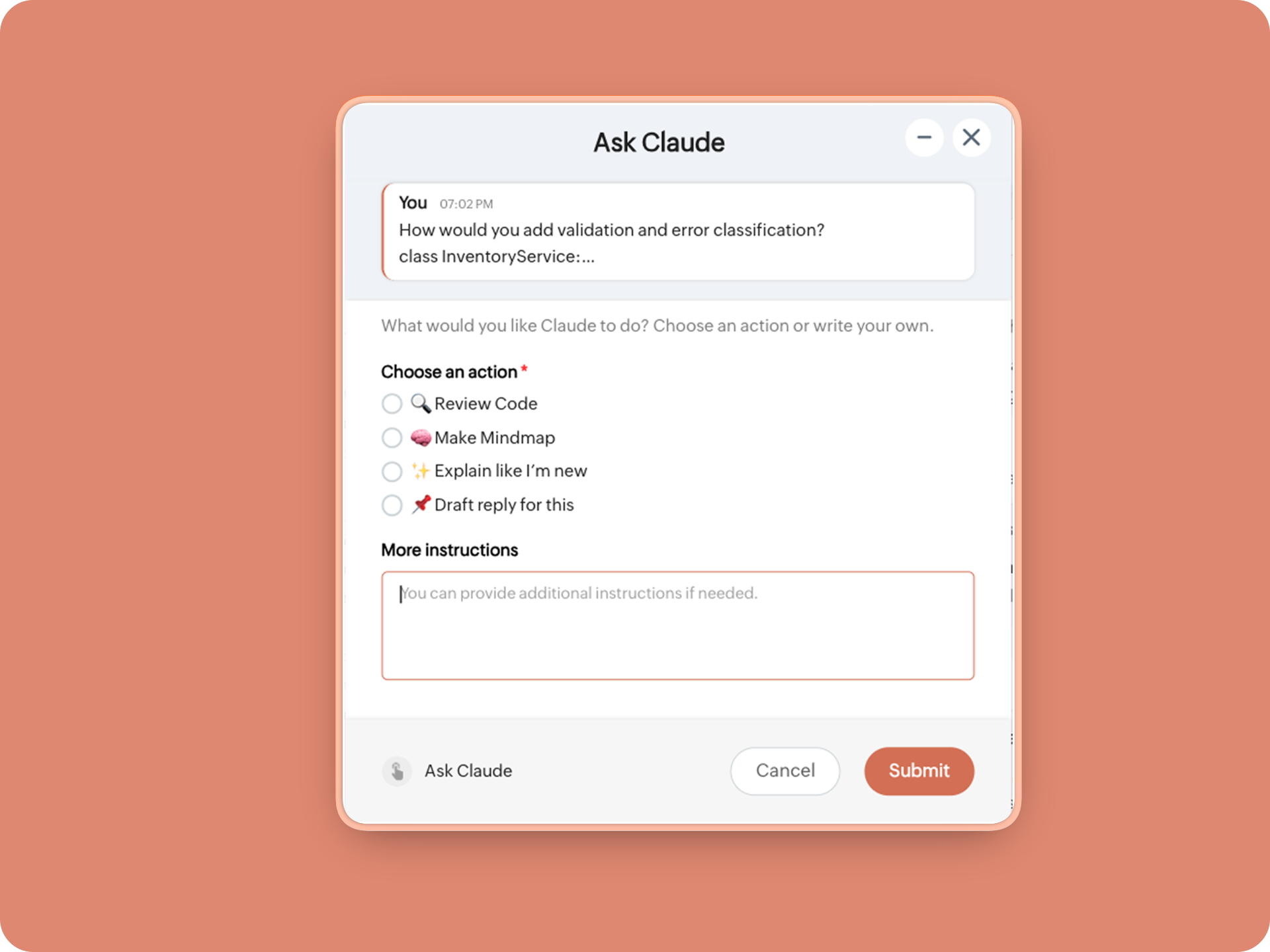
  3. A message action to act on messages in Cliq by Claude. Additionally, pre-built actions to review code, generate mind maps, draft a reply for the selected message, or explain it like you’re new.
IdeaBefore you start:
1. A Zoho Cliq account with Developer access.
2. An Anthropic API key
3. Basic comfort with Deluge (optional — all code is provided
😉)

A. How to get an Anthropic API key?
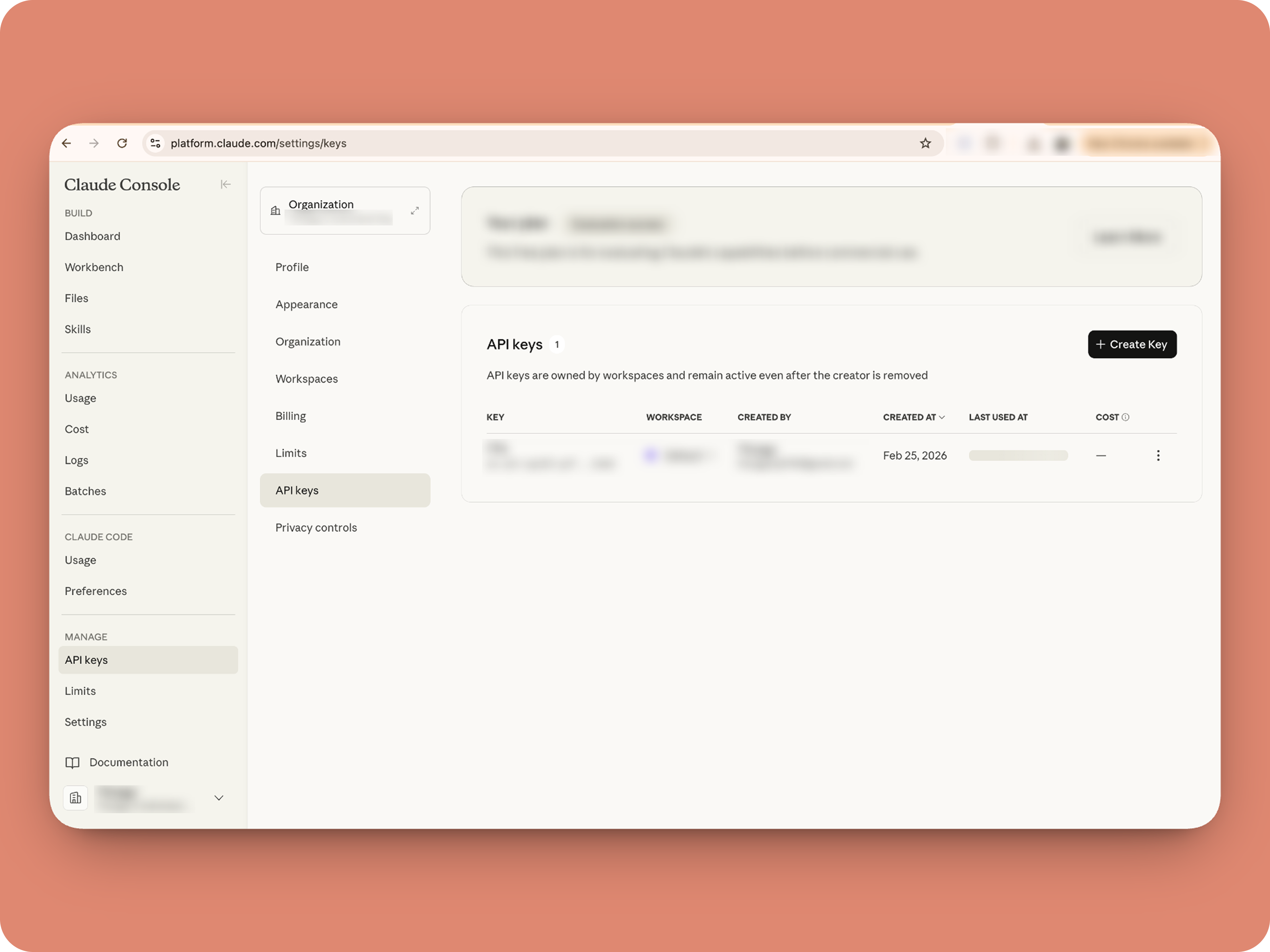


1. To get an Anthropic API key, sign up at the Anthropic Console (console.anthropic.com).
2. Navigate to the API Keys tab, and click Create Key. 
3. You must add credits via the Billing section to activate the key. Copy the key immediately, as it cannot be viewed again.

Alert
Note: In this guide, the API key is pasted directly into the code for simplicity. But never, ever share your API key to others and double-check before sharing screenshots or code.

B. Create a Connection 

Claude needs permission to: Read chat messages and Fetch attachments (like PDFs) when prompted, for that let's create a connection for it.  ⓘ Learn more about connections

1. Go to the Connections module (in Bots & Tools) → Create Connection
2. Add a Connection name, for eg. "readmessageandfile"
3. Select:
ZohoCliq.Attachments.READ
ZohoCliq.Messages.READ
4. Create
Click Create, then authorize the connection. Copy the connection name, you'll paste it into the handlers in the next steps.

How to start

Go to Zoho Cliq → Settings → Bots & Tools 

Claude Bot:
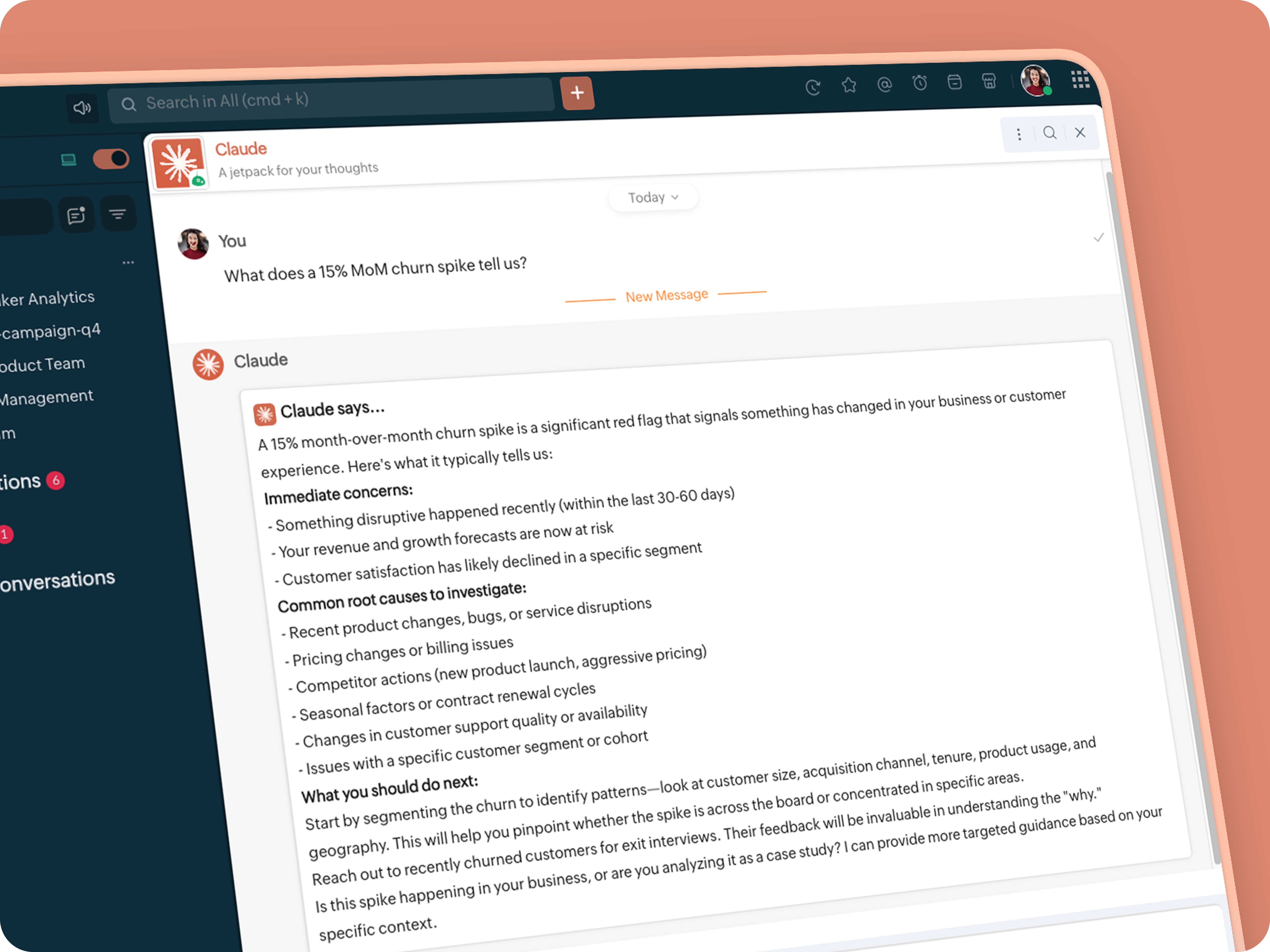


  • Go to Bots → Create Bot.

  • Name it Claude and give it any description of choice.

  • First, let's create a Message handler to handle the conversations first.

  • Click edit code and copy paste the below code in it (follow along the comments to understand what each part does)

Idea

One API endpoint. That's all.


Both the bot and the message action use the same single Anthropic endpoint: POST /v1/messages. The only thing that changes between them is the system prompt and what you put in the messages array. Once you understand that, the rest is just assembly.
Explore API docs →


Message Handler:
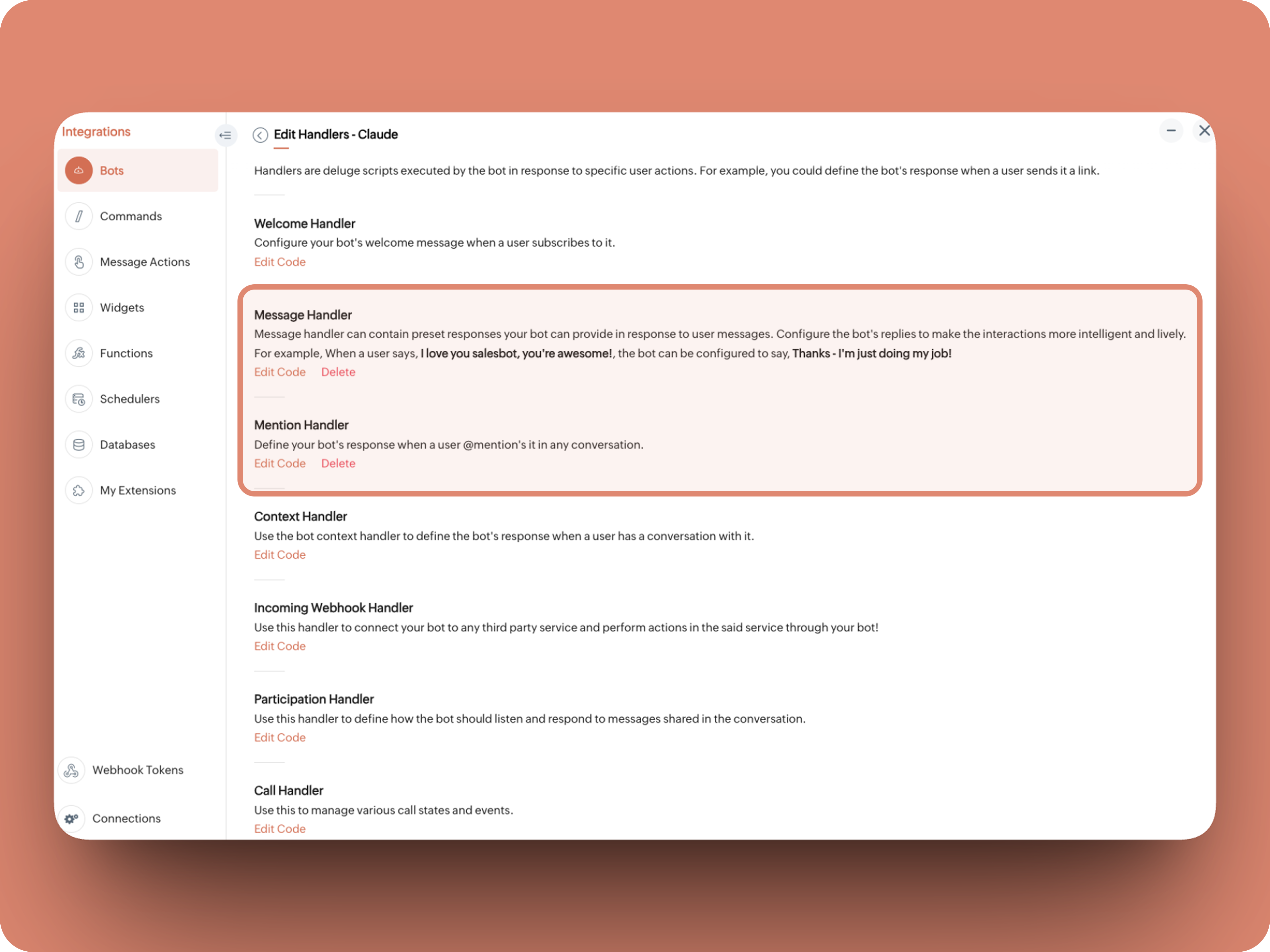


What does this do: Fetches last 10 (customizable - but keep message limit small ( around 10–15 to avoid token overuse)) chat messages for additional context and enables natural chat conversations 


  1. info environment;
  2. botUniqueName = "BOT-UNIQUE-NAME";
  3. // Replace with your bot unique name
  4. cliqBaseUrl = environment.get("base_url");
  5. fetchRecentMessages = invokeurl
  6. [
  7. url :cliqBaseUrl + "/api/v2/chats/" + chat.get("id") + "/messages?limit=10"
  8. type :GET
  9. connection:"CONNECTION-NAME"
  10. //Read below how to create a connection, and paste here:
  11. ];
  12. info fetchRecentMessages;
  13. contentList = list();
  14. contentList.add({"role":"user","content":"Act as a conversational assistant. Reply to the message below in a friendly, informative, and well-organized way.\n\nGuidelines:\n- Respond only to the message provided.\n- Do not use memory or external context.\n- Be warm but professional.\n- Be clear and structured (use short paragraphs or bullet points if helpful).\n- Provide helpful details or clarification where useful.\n- If something is unclear, ask a polite follow-up question.\n- If action is needed, suggest a simple next step.\n- Do not include meta commentary.\n- Output only the reply.\n\n\nSTRICTLY USE * FOR BOLD, AND NEVER ** FOR BOLD MARKDOWN."});
  15. allMessages = fetchRecentMessages.get("data");
  16. for each  data in allMessages
  17. {
  18. type = data.get("type");
  19. if(type == "card" || type == "text")
  20. {
  21. getMessage = data.get("content").get("text").replaceAll("\n"," ");
  22. senderID = data.get("sender").get("id");
  23. if(senderID.startsWith("b-"))
  24. {
  25. contentList.add({"role":"assistant","content":getMessage});
  26. }
  27. else
  28. {
  29. contentList.add({"role":"user","content":getMessage});
  30. }
  31. }
  32. }
  33. info contentList;
  34. // Set up API headers
  35. apiHeaders = Map();
  36. apiHeaders.put("anthropic-version","2023-06-01");
  37. apiHeaders.put("Content-type","application/json");
  38. apiHeaders.put("X-Api-Key","INSERT-API-KEY-HERE");
  39. // Don't forget your API key!
  40. model = "claude-sonnet-4-5-20250929";
  41. requestPayload = {"max_tokens":1024,"messages":contentList,"model":model};
  42. // Make API call to Claude
  43. claudeApiResponse = invokeurl
  44. [
  45. url :"https://api.anthropic.com/v1/messages"
  46. type :POST
  47. parameters:requestPayload + ""
  48. headers:apiHeaders
  49. detailed:true
  50. ];
  51. info claudeApiResponse;
  52. if(claudeApiResponse.get("responseCode") == 200)
  53. {
  54. responseBody = claudeApiResponse.get("responseText");
  55. parsedResponse = responseBody.toMap();
  56. claudeMessage = parsedResponse.get("content").get(0).get("text").replaceAll("\n\n","\n").remove("---").remove("#");
  57. if(claudeMessage.length() > 4000)
  58. {
  59. claudeMessage = claudeMessage.subString(0,4000) + "...";
  60. }
  61. info "Claude's Response: " + claudeMessage;
  62. }
  63. else
  64. {
  65. responseBody = claudeApiResponse.get("responseText");
  66. parsedResponse = responseBody.toMap();
  67. claudeMessage = "*" + parsedResponse.get("error").get("type") + "* \n" + parsedResponse.get("error").get("message");
  68. info "API Error: " + claudeApiResponse;
  69. }
  70. responseContent = {"text":claudeMessage,"card":{"title":"Claude says...","icon":"https://uxwing.com/wp-content/themes/uxwing/download/brands-and-social-media/claude-ai-icon.png"}};
  71. info responseContent;
  72. info zoho.cliq.postToBot(botUniqueName,responseContent);
  73. return Map();


⚙️ Replace These Placeholders

BOT-UNIQUE-NAME (ⓘ How to find it?)
CONNECTION-NAME
INSERT-API-KEY-HERE
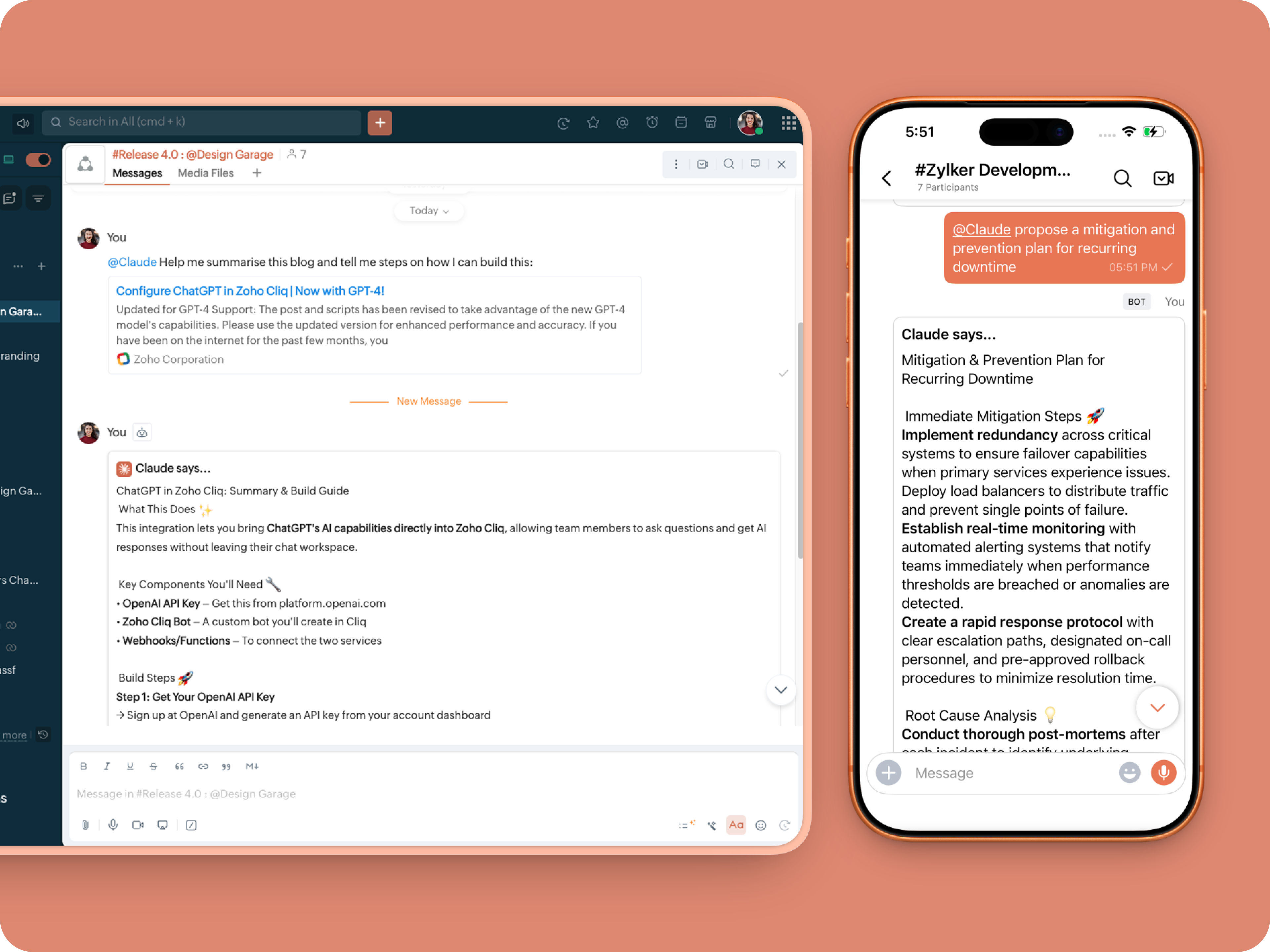


Mention Handler:


What does this do: This is to allow Claude to be @mentioned in any chat.
  1. userMessageText = "";
  2. fileAction = false;
  3. repliedMessage = false;
  4. if(message_details.get("message").containKey("replied_message"))
  5. {
  6. repliedMessage = true;
  7. replyMessageID = message_details.get("message").get("replied_message").get("id");
  8. messageType = message_details.get("message").get("replied_message").get("type");
  9. if(messageType == "text" || messageType == "card")
  10. {
  11. userMessageText = message_details.get("message").get("replied_message").get("text");
  12. }
  13. else
  14. {
  15. fileType = message_details.get("message").get("replied_message").get("file").get("type");
  16. if(fileType != "application/pdf")
  17. {
  18. return {"type":"banner","text":"Only PDF files are supported for this action","status":"failure"};
  19. }
  20. else
  21. {
  22. fileAction = true;
  23. }
  24. }
  25. }
  26. promptInstruction = "\"### Instructions ⓘ \nProvide a human-digestible, highly organized response (300-500 characters). Break down your output into bite-sized paragraphs and use bolding to guide the reader's eye. *Strictly avoid tables.* Use plenty of white space and only ### headings for a clean look. \n\n ### Formatting Protocol • \n - Bold: *text* \n - Italic: _text_ \n - Strike: ~text~ \n - Underline: __underline__ \n - Headers: ### Title \n - Quote: \"quote\" \n - Blockquote: > text \n - Bullets: Use • or → for lists \n - Emojis: Use ✨, 🚀, or 💡 to highlight key takeaways \n - Separator: --- \n\n ### and replace ** to *";
  27. userPrompt = "";
  28. if(message.trim().length() > 0)
  29. {
  30. userPrompt = "Action: " + message + "\n\n\n" + userMessageText + "\n\n\n" + promptInstruction;
  31. }
  32. else
  33. {
  34. userPrompt = "Action: " + userMessageText + "\n\n\n" + promptInstruction;
  35. }
  36. // Set up API headers
  37. apiHeaders = Map();
  38. apiHeaders.put("anthropic-version","2023-06-01");
  39. apiHeaders.put("Content-type","application/json");
  40. apiHeaders.put("ENTER-APIKEY-HERE");
  41. // Don't forget your API key!
  42. // Check if message is text-only or contains a file
  43. if(!fileAction)
  44. {
  45. // Handle text-only message
  46. requestPayload = {"max_tokens":1024,"messages":{{"content":userPrompt,"role":"user"}},"model":"claude-sonnet-4-5-20250929"};
  47. }
  48. else
  49. {
  50. // Handle message with file attachment
  51. uploadedFile = invokeurl
  52. [
  53. url :message_details.get("message").get("replied_message").get("file").get("url")
  54. type :GET
  55. connection:"ENTER-CONNECTION-NAME"
  56. ];
  57. info uploadedFile;
  58. // uploadedFile = message.get("content").get("file").get("name");
  59. base64EncodedFile = zoho.encryption.base64Encode(uploadedFile);
  60. if(message_details.get("message").get("replied_message").containKey("comment"))
  61. {
  62. comment = message_details.get("message").get("replied_message").get("comment");
  63. userPrompt = userPrompt + "\n" + comment;
  64. }
  65. else
  66. {
  67. userPrompt = userPrompt;
  68. }
  69. mediaType = "application/pdf";
  70. requestPayload = {"max_tokens":1024,"messages":{{"role":"user","content":{{"type":"document","source":{"type":"base64","media_type":mediaType,"data":base64EncodedFile}},{"type":"text","text":userPrompt}}}},"model":"claude-sonnet-4-5-20250929"};
  71. }
  72. info requestPayload;
  73. // Make API call to Claude
  74. claudeApiResponse = invokeurl
  75. [
  76. url :"https://api.anthropic.com/v1/messages"
  77. type :POST
  78. parameters:requestPayload + ""
  79. headers:apiHeaders
  80. detailed:true
  81. ];
  82. info claudeApiResponse;
  83. // Extract the actual text response
  84. if(claudeApiResponse.get("responseCode") == 200)
  85. {
  86. responseBody = claudeApiResponse.get("responseText");
  87. parsedResponse = responseBody.toMap();
  88. claudeMessage = parsedResponse.get("content").get(0).get("text").replaceAll("\n\n","\n").remove("---").remove("#");
  89. if(claudeMessage.length() > 4000)
  90. {
  91. claudeMessage = claudeMessage.subString(0,4000) + "...";
  92. }
  93. info "Claude's Response: " + claudeMessage;
  94. }
  95. else
  96. {
  97. responseBody = claudeApiResponse.get("responseText");
  98. parsedResponse = responseBody.toMap();
  99. claudeMessage = "*" + parsedResponse.get("error").get("type") + "* \n" + parsedResponse.get("error").get("message");
  100. info "API Error: " + claudeApiResponse;
  101. }
  102. responseContent = {"text":claudeMessage,"card":{"title":"Claude says...","icon":"https://uxwing.com/wp-content/themes/uxwing/download/brands-and-social-media/claude-ai-icon.png"}};
  103. info responseContent;
  104. if(repliedMessage)
  105. {
  106. responseContent.put("reply_to",replyMessageID);
  107. }
  108. info zoho.cliq.postToChat(chat.get("id"),responseContent);
  109. return Map();


Message Action
What does it do: Allow Claude to act on any message or file.

Quoteⓘ For files, we've extended this to only PDF file formats for now to keep implementation predictable and to avoid unsupported file formats

What we're adding:
1. When executed on any message, a form opens to prompt:

A. 🔍 Review code
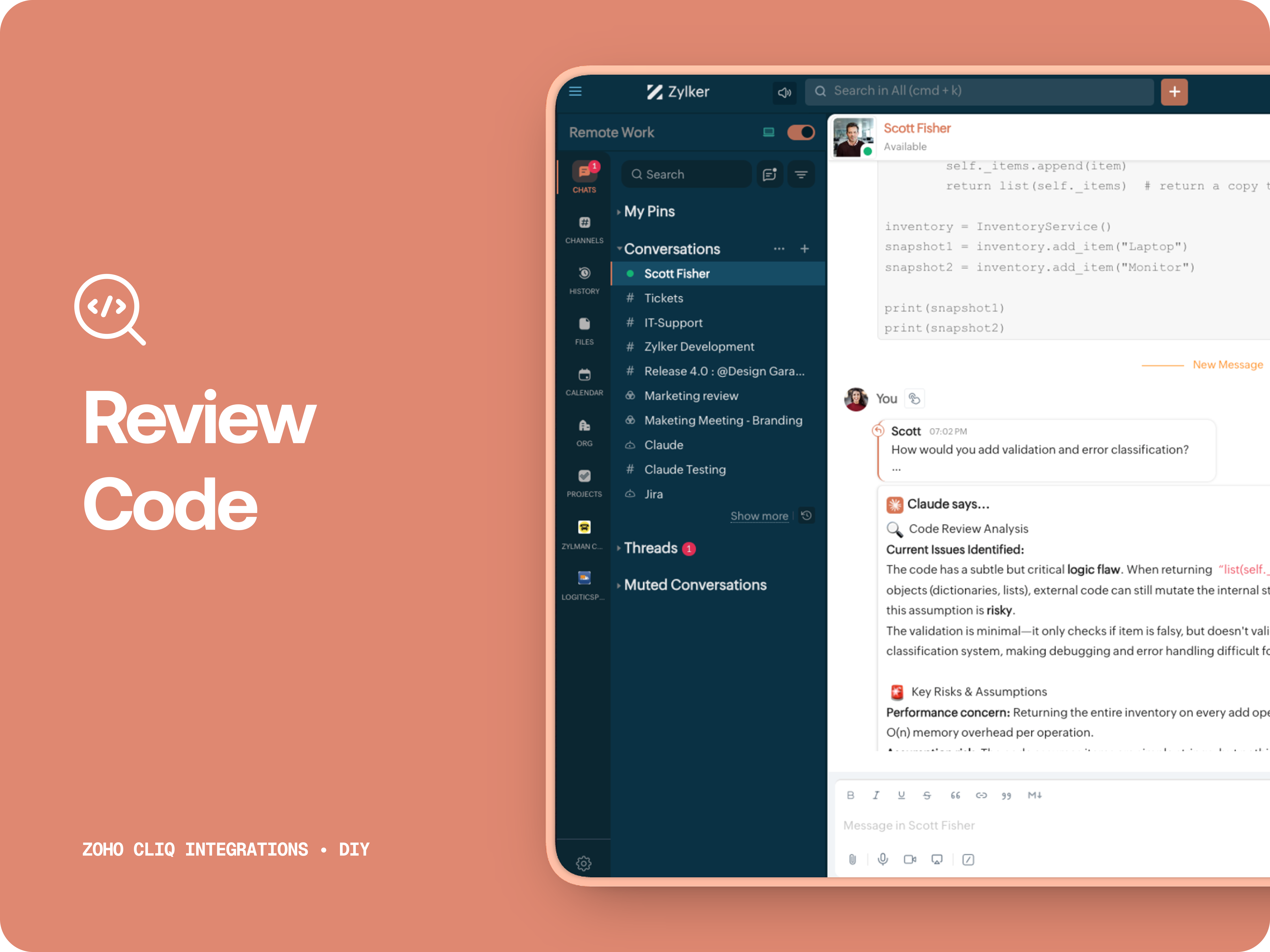
Claude acts like a senior engineer who finds bugs, lists risks, suggest improvements, provides corrected code.


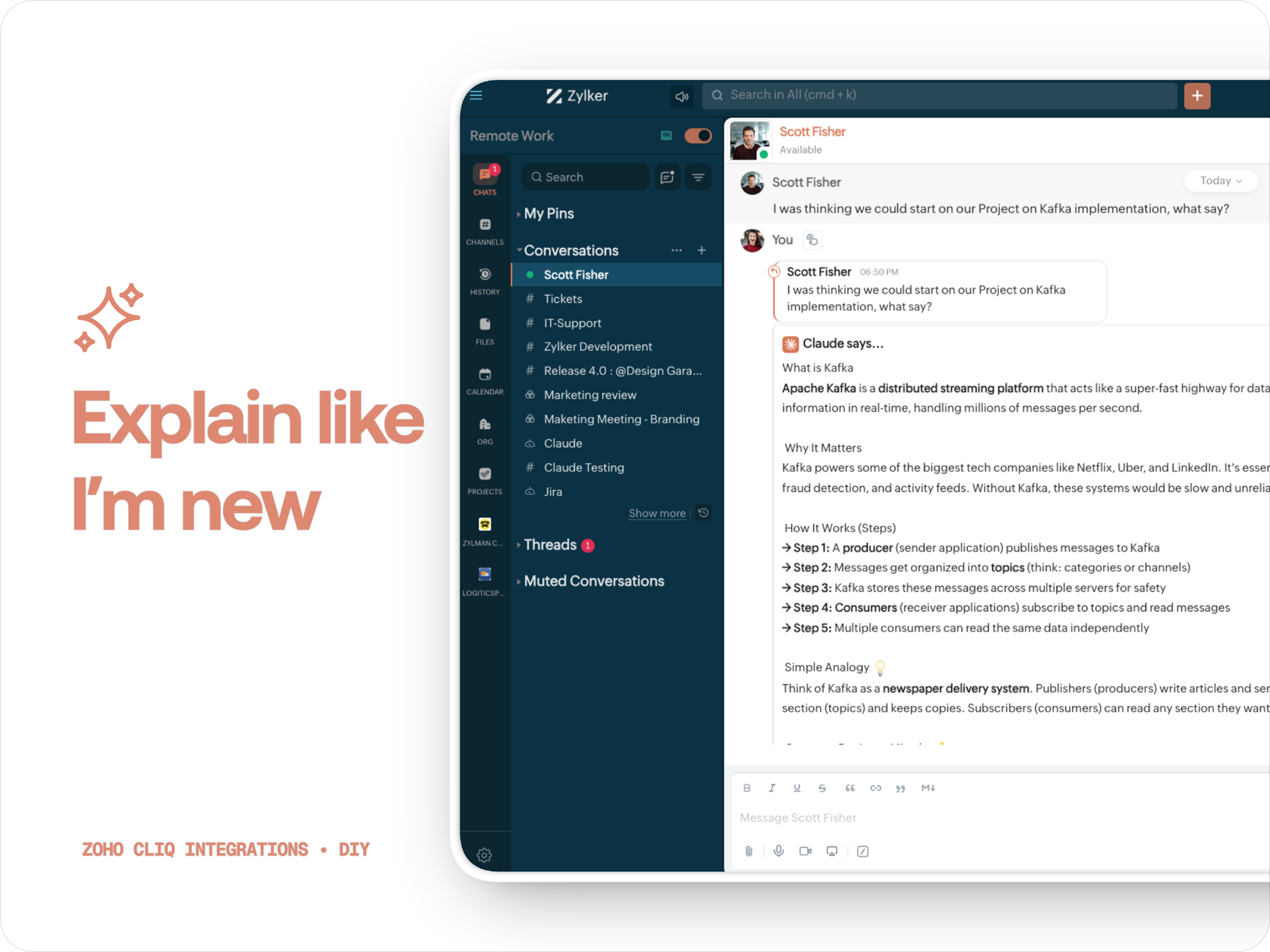
B. ✨ Explain like I'm new
Claude teaches you what it is, why it matters, how it works, an analogy or common mistakes for any concept.

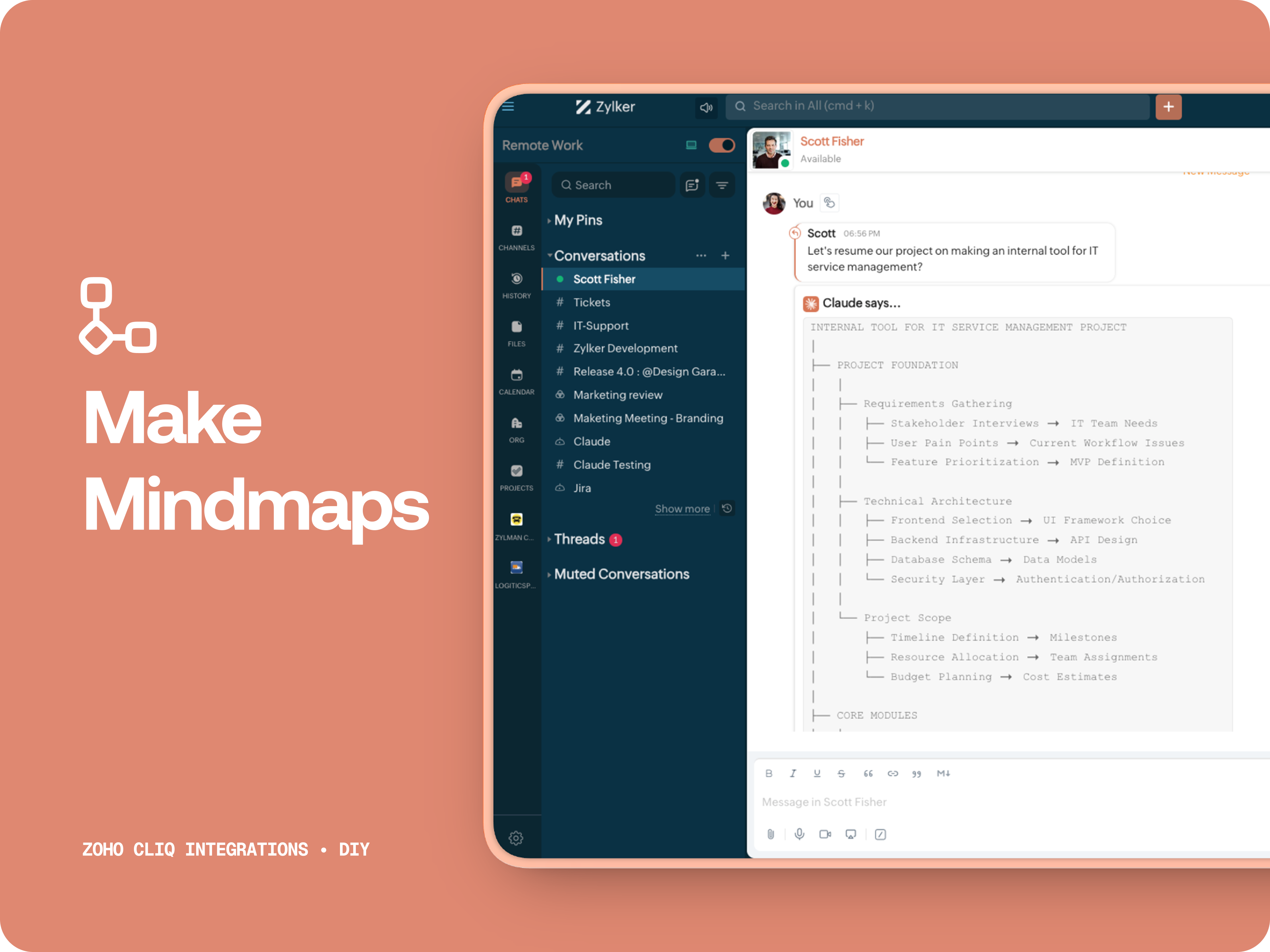
C. 🧠 Make Mindmap

Converts content into a structured ASCII flow chart for explaining system designs, feature breakdowns or general product thinking.

D. 📌 Draft a reply
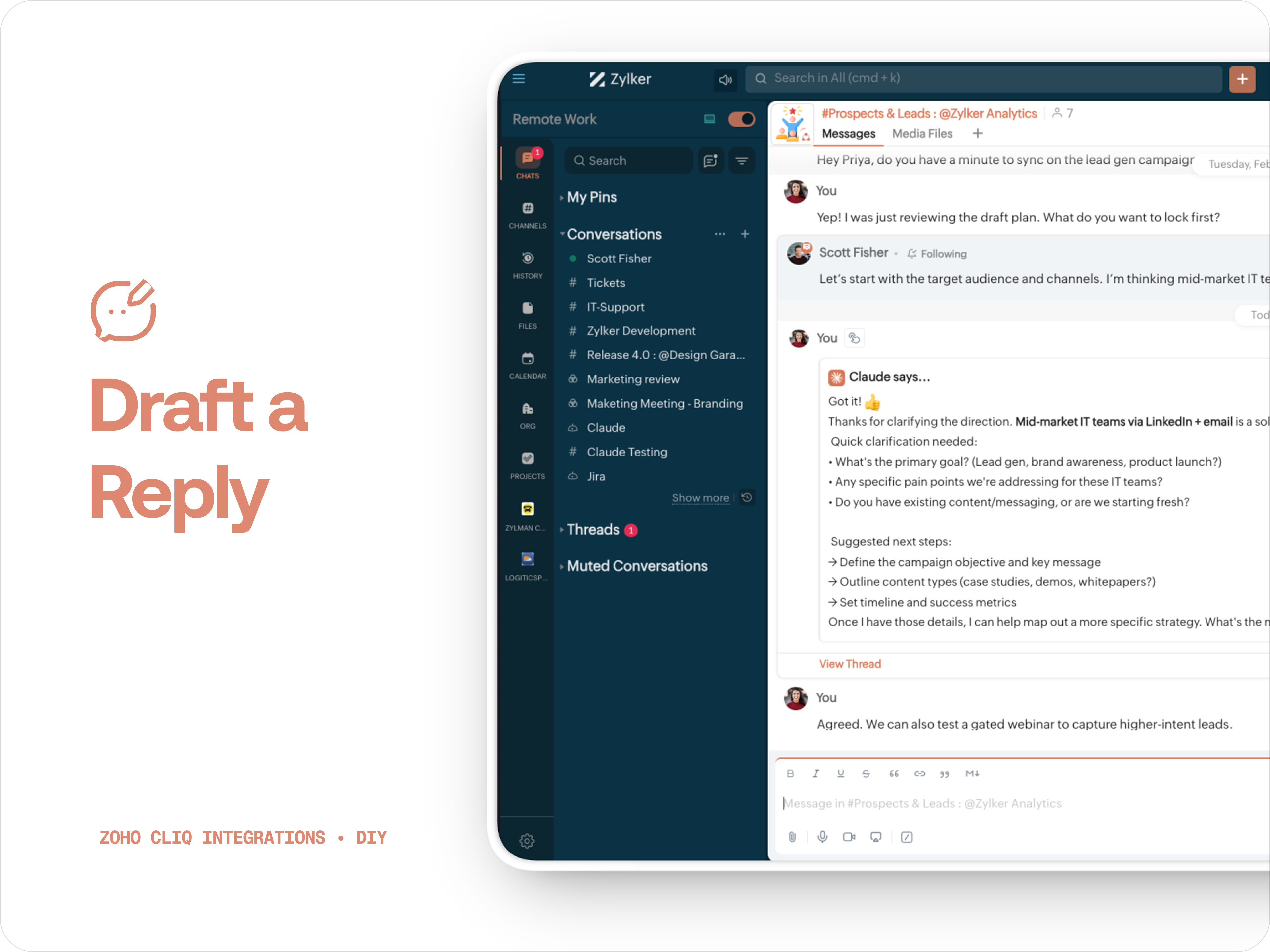
Give professional, concise business replies to address, asks clarifications, suggests next steps in a human tone. 


How to create:

1. Create a
Message Action, name it Ask Claude and give any description of your choice.
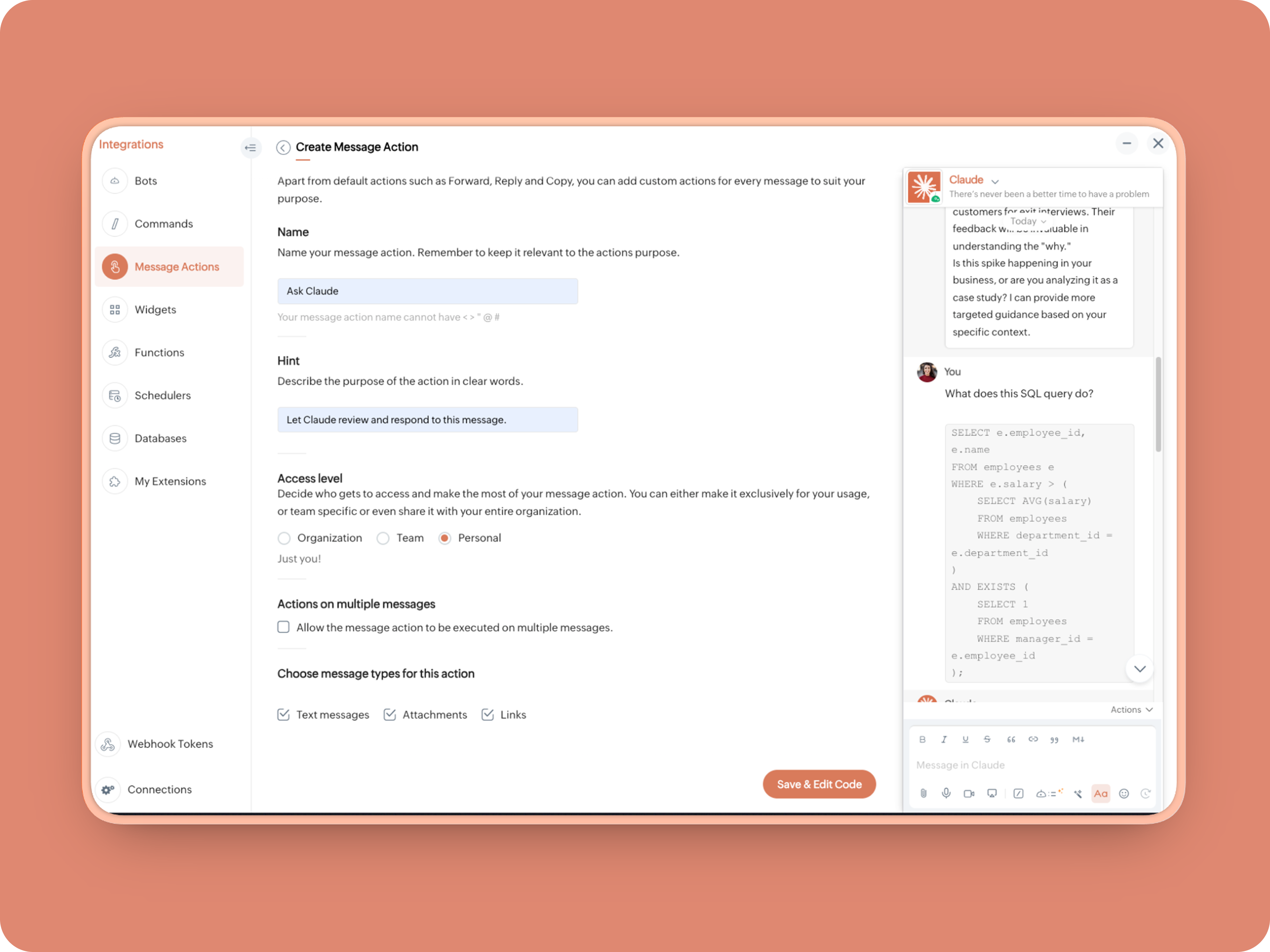


2. Message properties:  Text messages, Attachments, Links
3. Enter code as instructed below:
(Copy the function name and replace it in Line. 14)
  1. info message;
  2. returnForm = false;
  3. if(message.get("type") == "file")
  4. {
  5. fileType = message.get("content").get("file").get("type");
  6. if(fileType != "application/pdf")
  7. {
  8. return {"type":"banner","text":"Only PDF files are supported for this action","status":"failure"};
  9. }
  10. }
  11. inputs = list();
  12. inputs.add({"label":"Choose an action","name":"action","mandatory":true,"type":"radio","options":{{"value":"reviewcode","label":"🔍 Review Code"},{"value":"explainthis","label":"🧠 Make Mindmap"},{"value":"ExplainlikeImnew","label":"✨ Explain like I’m new"},{"value":"Draftreplyforthis","label":"📌 Draft reply for this"}}});
  13. inputs.add({"label":"More instructions","name":"additionalInstructions","placeholder":"You can provide additional instructions if needed.","min_length":"0","max_length":"500","mandatory":false,"type":"textarea"});
  14. return {"type":"form","title":"Ask Claude","hint":"What would you like Claude to do? Choose an action or write your own.","name":"INSERT-FUNCTION-NAME","button_label":"Submit","inputs":inputs,"action":{"type":"invoke.function","name":"INSERT-FUNCTION-NAME"}};
Next, let's create a function and then link it up to the built-Message action to open the form:


Form Function:


1.Go to Functions → Name your function (Eg. askclaude) and add description
2. Select Form function
3. Create
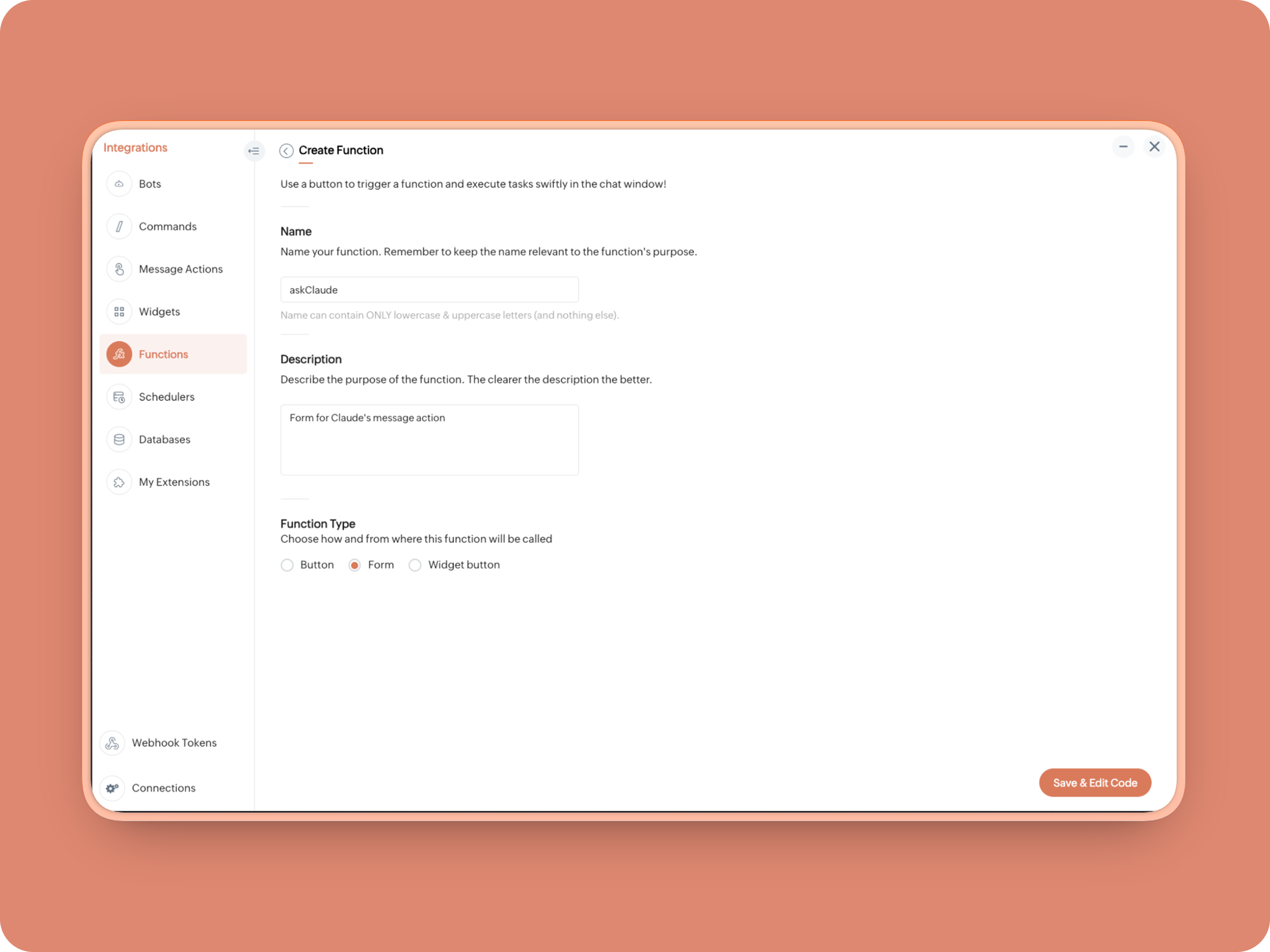


Once created, in the Form Submit Handler, paste this code:
  1. info form;
  2. info message;
  3. // Set up API headers
  4. apiHeaders = Map();
  5. apiHeaders.put("anthropic-version","2023-06-01");
  6. apiHeaders.put("Content-type","application/json");
  7. apiHeaders.put("ENTER-APIKEY-HERE");
  8. // Don't forget your API key!
  9. actionType = form.get("values").get("action").get("value");
  10. promptInstruction = "\"### Instructions ⓘ \nProvide a human-digestible, highly organized response (250-300 characters). Break down your output into bite-sized paragraphs and use bolding to guide the reader's eye. *Strictly avoid tables.* Use plenty of white space and only ### headings for a clean look. \n\n ### Formatting Protocol • \n - Bold: *text* \n - Italic: _text_ \n - Strike: ~text~ \n - Underline: __underline__ \n - Headers: ### Title \n - Quote: \"quote\" \n - Blockquote: > text \n - Bullets: Use • or → for lists \n - Emojis: Use ✨, 🚀, or 💡 to highlight key takeaways \n - Separator: --- \n\n ### and replace all ** to *";
  11. if(actionType == "reviewcode")
  12. {
  13. userPrompt = "🔍 You are a senior engineer. \nReview this code: \n• List bugs or logical errors \n• Note assumptions and risks \n• Suggest improvements \n• Provide corrected code \n• Explain why your version is better\n\n\n" + promptInstruction;
  14. }
  15. else if(actionType == "explainthis")
  16. {
  17. userPrompt = "🧠 You are a systems thinker. \n•Convert the input into a visual flow chart using plain text. \n•Strict Output Rules \n•Output ONLY inside a triple backtick code block \n•Do NOT use Mermaid \n•Do NOT write paragraphs \n•Do NOT explain anything \n•Do NOT use bullet lists outside structure \n•Use ASCII connectors to form a real flow chart \n•Use arrows (→, ↓, ↳, ├──, └──) to show relationships \n•Maintain clear hierarchy and spacing \n•One single root at the top \n•Logical directional flow (top → down) \n•Structure Requirements \n•Root node at top \n•First-level branches below \n•Subpoints indented \n•Cross-links if relevant \n•Clean spacing \n•No duplicated nodes \n•Required Format Example \n•MAIN IDEA \n•Branch 1 -> Subpoint -> Subpoint \n•Branch 2 -> Subpoint ->Subpoint \n•Branch 3 -> Subpoint -> Subpoint\n\n\n" + promptInstruction;
  18. }
  19. else if(actionType == "ExplainlikeImnew")
  20. {
  21. userPrompt = "✨ You are a teacher for beginners. \nExplain: \n• What it is \n• Why it matters \n• How it works (steps) \n• A simple analogy \n• One common beginner mistake\n\n\n" + promptInstruction;
  22. }
  23. else if(actionType == "Draftreplyforthis")
  24. {
  25. userPrompt = "📌 You are a professional responder. \nReply to this message: \n• Directly address main point \n• Ask for clarification if needed \n• Suggest next steps \n• Keep it concise and clear \n• Make sure message in a buisness casual tone, consise, human written.\n\n\n" + promptInstruction;
  26. }
  27. if(form.get("values").get("additionalInstructions").length() > 0)
  28. {
  29. userPrompt = userPrompt + "\n" + form.get("values").get("additionalInstructions");
  30. }
  31. // Check if message is text-only or contains a file
  32. if(message.get("type") == "text" || message.get("type") == "card")
  33. {
  34. // Handle text-only message
  35. userMessageText = message.get("text");
  36. requestPayload = {"max_tokens":1024,"messages":{{"content":userPrompt + "\n\n" + userMessageText,"role":"user"}},"model":"claude-sonnet-4-5-20250929"};
  37. }
  38. else
  39. {
  40. // Handle message with file attachment
  41. uploadedFile = invokeurl
  42. [
  43. url :"https://cliq.zoho" + environment.get("tld") + "/api/v2/files/" + message.get("content").get("file").get("id")
  44. type :GET
  45. connection:"ENTER-CONNECTION-NAME"
  46. ];
  47. info uploadedFile;
  48. base64EncodedFile = zoho.encryption.base64Encode(uploadedFile);
  49. if(message.get("content").containKey("comment"))
  50. {
  51. comment = message.get("content").get("comment");
  52. userPrompt = userPrompt + "\n" + comment;
  53. }
  54. else
  55. {
  56. userPrompt = userPrompt;
  57. }
  58. mediaType = message.get("content").get("file").get("type");
  59. mediaType = "application/pdf";
  60. requestPayload = {"max_tokens":1024,"messages":{{"role":"user","content":{{"type":"document","source":{"type":"base64","media_type":mediaType,"data":base64EncodedFile}},{"type":"text","text":userPrompt}}}},"model":"claude-sonnet-4-5-20250929"};
  61. }
  62. info requestPayload;
  63. // Make API call to Claude
  64. claudeApiResponse = invokeurl
  65. [
  66. url :"https://api.anthropic.com/v1/messages"
  67. type :POST
  68. parameters:requestPayload + ""
  69. headers:apiHeaders
  70. detailed:true
  71. ];
  72. // info claudeApiResponse;
  73. // Extract the actual text response
  74. if(claudeApiResponse.get("responseCode") == 200)
  75. {
  76. responseBody = claudeApiResponse.get("responseText");
  77. parsedResponse = responseBody.toMap();
  78. claudeMessage = parsedResponse.get("content").get(0).get("text").replaceAll("\n\n","\n").remove("---").remove("#");
  79. if(claudeMessage.length() > 4000)
  80. {
  81. claudeMessage = claudeMessage.subString(0,4000) + "...";
  82. }
  83. info "Claude's Response: " + claudeMessage;
  84. }
  85. else
  86. {
  87. responseBody = claudeApiResponse.get("responseText");
  88. parsedResponse = responseBody.toMap();
  89. claudeMessage = "*" + parsedResponse.get("error").get("type") + "* \n" + parsedResponse.get("error").get("message");
  90. info "API Error: " + claudeApiResponse;
  91. }
  92. responseContent = {"text":claudeMessage,"card":{"title":"Claude says...","icon":"https://uxwing.com/wp-content/themes/uxwing/download/brands-and-social-media/claude-ai-icon.png"},"reply_to":message.get("id")};
  93. info responseContent;
  94. info zoho.cliq.postToChat(chat.get("id"),responseContent);
  95. return Map();

When triggered: Opens a form → User selects an action → Adds additional instructions → Submits → Claude processes the selected message


And that's it. You're Claude integration is ready to be used. 


What's Next:

What you built today is just the foundation.

Shape it around how your team actually works. Extend it to turn discussions into action items, review PRs before they’re merged, generate standup updates, extract tasks automatically, or create knowledge snippets from resolved threads.

Start with one real pain point. Solve it well. Then layer more intelligence on top.

The structure is already there. The possibilities are yours.

🔗 Explore Zoho Cliq: Developer Platform
🔗 Explore Anthropic API Docs

Questions? Comments below. 
Looking forward how you'll build and go make it your own. 🚀

      Zoho Campaigns Resources


        • Desk Community Learning Series


        • Digest


        • Functions


        • Meetups


        • Kbase


        • Resources


        • Glossary


        • Desk Marketplace


        • MVP Corner


        • Word of the Day


        • Ask the Experts


          • Sticky Posts

          • Zoho Cliq REST APIs v3 : A complete guide to what's changed and why 

            APIs are not just consumed by a developer with numerous automations and a series of open browser tabs. They are parsed by LLMs, fed into agent pipelines, and auto-completed by AI coding assistants that have zero tolerance for inconsistency. A verb tucked
          • Cliq Bots - Post message to a bot using the command line!

            If you had read our post on how to post a message to a channel in a simple one-line command, then this sure is a piece of cake for you guys! For those of you, who are reading this for the first time, don't worry! Just read on. This post is all about how
          • Automating Real-Time Zoho Bookings Alerts in Zoho Cliq

            Enable your teams to respond in seconds by bridging the gap between booking confirmation and team notification. No sticky notes, no calendar nudges and no follow-up frenzies. For businesses that rely on scheduled appointments, real-time visibility is
          • Add Claude in Zoho Cliq

            Let’s add a real AI assistant powered by Claude to your workspace this week, that your team can chat with, ask questions, and act on conversations to run AI actions on. This guide walks you through exactly how to do it, step by step, with all the code
          • Automate attendance tracking with Zoho Cliq Developer Platform

            I wish remote work were permanently mandated so we could join work calls from a movie theatre or even while skydiving! But wait, it's time to wake up! The alarm has snoozed twice, and your team has already logged on for the day. Keeping tabs on attendance

          Zoho CRM Plus Resources

            Zoho Books Resources


              Zoho Subscriptions Resources

                Zoho Projects Resources


                  Zoho Sprints Resources


                    Zoho Orchestly Resources


                      Zoho Creator Resources


                        Zoho WorkDrive Resources


                          Zoho CRM Resources

                          • CRM Community Learning Series

                            CRM Community Learning Series


                          • Tips

                            Tips

                          • Functions

                            Functions

                          • Meetups

                            Meetups

                          • Kbase

                            Kbase

                          • Resources

                            Resources

                          • Digest

                            Digest

                          • CRM Marketplace

                            CRM Marketplace

                          • MVP Corner

                            MVP Corner


                            Zoho Writer Writer

                            Get Started. Write Away!

                            Writer is a powerful online word processor, designed for collaborative work.

                              Zoho CRM コンテンツ


                                ご検討中の方

                                  • Recent Topics

                                  • Zoho ERP | Product updates | June 2026

                                    Hello users, We launched Zoho ERP on January 23, and since then, our goal has been to help businesses streamline and manage their operations with greater efficiency, flexibility, and control. Since the launch, we've continued to enhance the platform every
                                  • Zia Agent activation in Zoho Desk forces new Organization creation instead of deploying to existing one

                                    While attempting to complete the deployment and activation sequence of a new Zia Agent within our existing Zoho Desk environment, the activation process failed on the user interface, throwing a generic error (see print). However, despite the activation
                                  • Allow native Webhooks to authenticate via Connections

                                    Allow native Webhooks to authenticate via Connections (Basic Auth) instead of plaintext custom headers Summary Please allow native Webhooks (Workflow Rules > Instant Actions > Webhooks) to authenticate against the destination endpoint using the existing
                                  • How do page versions work these days?

                                    I thought that Zoho Wiki had the capability to display previous versions of a page, and optionally reinstate them. But I can't find a current doc on this subject -- is there one? From what I remember, that capability was accessed via the Version number
                                  • Warehouse -> Locations Transition Causing Errors

                                    After saying "okay" to the transition from 'warehouses' to 'locations', I've now got shipped Sales Orders that I cannot invoice. How does one proceed?
                                  • Ability to run report over 180 days

                                    Is there a reason Zoho limits the ability to run reports for records older than 180 days? In my view, the only reason I can think of is that it forces us to pay for Advanced Analytics (which I do).
                                  • Cloning a View

                                    When I clone a View, it doesn't make a copy; it only creates a new copy with the same default fields as if I were creating a new view. What is the purpose of cloning if it doesn't bring in the same fields? Thanks Rudy
                                  • New tickets with empty image contents

                                    Dear Support. From the end of last week onwards customers send messages for new tickets through microsoft graph (by email to support at procert.ch using the procert portal). We have an issue with the emails because well packed images are no longer visible.
                                  • Images not showing up in Desk tickets

                                    Customers are trying to send us screenshots to diagnose their issues. But Desk seems to be stopping the images/breaking the link when the ticket comes in. (We can see them in an email box getting cc'd on all tickets...so it's not our mail system). Help!
                                  • Introducing Databridge for Zoho Creator

                                    Hello, Enterprise Support Community! We'd like to highlight a recent utility that was released for Zoho Creator, that will allow you to connect external, private datasources with your Creator apps, Databridge. Databridge is an application that will need
                                  • Zoho HTML editor is removing MSO (Outlook) specific code.

                                    The ability to add in custom HTML is great. We are using MJML to generate our wonderfully cross platform and responsive email code that works on Act-On, Salesforce, Hubspot, Active Campaign, and lead liaison. The way it supports MSO (Outlook) is it included
                                  • Retail Payment Receipt

                                    Hi, So "payment receipts" have a "Retail" template for thermal printers, but the template is configured at A4 paper size!!! How is this retail guys? On the other hand, Invoices have 3 Retail templates which have 3 and 4 inch paper size, perfectly fitting
                                  • Custom Portal URL causing SAMEORIGIN error with embedded Page snippet

                                    In my app, I have a page that embeds another page. The URL that I have for the embedded page starts with https://creatorapp.zoho.com but the custom domain I have set up is https://kors.kerndell.com. Because the user logged into the app at https://kors.kerndell.com,
                                  • Pasting images is a mess

                                    I’m trying to paste images into my tickets, in the comments field. But when I paste images, they end up in the wrong order or behind the text.
                                  • Sort by Project Name?

                                    How the heck do you sort by project name in the task list views??? Seems like this should be a no-brainer?
                                  • Zoho Contracts Just Got Better! CRM 2.0, Regional Settings & 6 New Reports

                                    Zoho Contracts is evolving to bring you a more efficient and customizable contract management experience. In this update, we are introducing powerful enhancements to our Zoho CRM integration, regional settings, and reports. Let us explore what’s new:
                                  • Zoho Finance Limitations 2.0 #5: Can't select "Account Id" if creating Custom Links in Related Panel (but it's available for Custom Buttons)

                                    When creating a custom link within the Zoho Finance module there is no option to select the "Account Id". If creating a Custom Button, it's available. Any plans to make this available within a reasonable timeframe? ======== Perspective: using Zoho finance
                                  • Zoho Cliq not working on airplanes

                                    Hi, My team and I have been having this constant issue of cliq not working when connected to an airplane's wifi. Is there a reason for this? We have tried on different Airlines and it doesn't work on any of them. We need assistance here since we are constantly
                                  • [Free Webinar] New portal page customization in Zoho Creator - Creator Tech Connect

                                    Hello everyone, We’re excited to invite you to another edition of the Creator Tech Connect webinar. About Creator Tech Connect The Creator Tech Connect series is a free monthly webinar featuring in-depth technical sessions designed for developers, administrators,
                                  • #11 Stop Absorbing Cost That Client Should Pay

                                    One of the easiest ways of losing profit in a business isn't losing a customer. It's forgetting to include the expenses that are incurred for half of your customers. A taxi ride to a client location A software subscription purchased for a project. Domain
                                  • Related products & AI product recommendations through commerce API.

                                    Hello Zoho team I’m looking to add related products and AI product recommendations to my Zoho Commerce webshop with custom storefront. Is this supported through the API? And if not, is this on your roadmap? Thanks in advance David
                                  • Can you sell Subscriptions using Zoho Commerce?

                                    In addition to physical products and the apparently coming soon 'Digital Products', it is possible to sell Subscriptions using Zoho Commerce?
                                  • Zoho Commerce B2B

                                    Hello, I have signed up for a Zoho Commerce B2B product demo but it's not clear to me how the B2B experience would look for my customers, in a couple of ways. 1) Some of my customers are on terms and some pay upfront with credit card. How do I hide/show
                                  • A method for renaming tab titles in Creator to display more relevant information

                                    Hi Zoho Devs, Updates: Rules Export File attached; you can now import this into Tab Modifier instead of manually entering the rules yourself) 2022-06-08: Updated rules so that crm.zoho.com tabs are not affected; uploaded new .json import file 2022-06-09:
                                  • Bulk upload images and specifications to products

                                    Hi, Many users have asked this over the years and I am also asking the same. Is there any way in which we can bulk upload product (variant) images and product specifications. The current way to upload/select image for every variant is too cumbersome.
                                  • Problem with CRM Connection not Refreshing Token

                                    I've setup a connection with Zoom in the CRM. I'm using this connection to automate some registrations, so my team doesn't have to manually create them in both the CRM and Zoom. Connection works great in my function until the token expires. It does not refresh and I have to manually revoke the connection and connect it again. I've chatted with Zoho about this and after emailing me that it couldn't be done I asked for specifics on why and they responded. "The connection is CRM is not a feature to
                                  • Conditional Drop Downs

                                    Am I the only one that has a problem when setting up the same project for multiple customers - resulting in a HUGE number of projects (e.g. Project A - customer 1, Project A - customer 2, Project A - customer 3 etc.). OR, am I doing it wrong? What results
                                  • Getting Project Template List using the REST API

                                    I am trying to confirm that I can use the REST API to create a project using a project template. The API documentation indicates this is possible by providing the Template ID, but it is not clear at all how to get a list of available Project Templates
                                  • Can't delete shared mailbox emails from mobile app

                                    I have the mobile app on iOS and cannot seem to find a way to delete an email from a shared mailbox. Is there something I'm missing here? Michael
                                  • From Zoho CRM to Paper : Design & Print Data Directly using Canvas Print View

                                    Hello Everyone, We are excited to announce a new addition to your Canvas in Zoho CRM - Print View. Canvas print view helps you transform your custom CRM layouts into print-ready documents, so you can bring your digital data to the physical world with
                                  • OAuth integration issues

                                    I'm experiencing persistent OAuth errors when trying to connect Make with Zoho API. I've tried multiple approaches but keep encountering the following issues: First error: 'Invalid Redirect Uri - Redirect URI passed does not match with the one configured'
                                  • Zoho Books Placeholder: Inventory Counts

                                    I was hoping to figure out how to find the placeholders for inventory counts by item. We use Location based inventory tracking, so I dont know if that affects things. I want my PDF and Printed PICK LISTS to show the Quantity Available to Pick. I have
                                  • Blueprint Not Triggering When Lead Status Is Updated by Workflow (IndiaMART Integration)

                                    I have set up a blueprint that triggers when a lead’s status is “New Lead.” Our CRM is integrated with IndiaMART, and when leads are created from IndiaMART, their Lead Status is initially set to None. To handle this, I created a workflow that automatically
                                  • Le cauchemar de PEPPOL avec Zoho Books

                                    Après de longues hésitations — car je défends toujours les produits Zoho malgré leurs imperfections —, je me suis décidé à poster cet avis sur ce forum. En effet, depuis plus de 5 mois, les nombreux soucis relatifs à la facturation par PEPPOL semblent
                                  • Overview on users IMAP settings

                                    We have about 30 users who all have the channels/email/email configuration/IMAP integration/O365 enabled and emails are synchronized. Here my problem: Passwords for the email accounts are expiring on individual bases and most of the users forget to update
                                  • Introducing Offline Signature in Zoho Contracts

                                    We are excited to announce a new feature that brings even more flexibility to your contract execution workflow — Offline Signature. What is Offline Signature? The Offline Signature feature enables organizations to manage contracts that are signed outside
                                  • URGENT ESCALATION — Unresolved Datacenter Conflict: Zoho Recruit .in vs Zoho Apps .com | Business-Critical Issue

                                    ━━━━━━━━━━━━━━━━━━━━━━━━━━━━━ ISSUE SUMMARY ━━━━━━━━━━━━━━━━━━━━━━━━━━━━━ Our organisation has existing Zoho accounts registered under the US datacenter (.com). We have onboarded Zoho Recruit under the India datacenter (.in) at https://recruit.zoho.in/
                                  • Accepting Event from Outlook Client

                                    I've noticed this behavior for a few years now. If an Event is created from CRM and sent to participants and the participant accepts the invitation using Outlook client, Zoho event won't be updated as "Going" it only works if the recipient accepts it
                                  • Zoho CRM Integration Form + Custom Fields

                                    Hi! I've created an Integration Form from Zoho CRM's Vendors Module, but I can choose a few standard fields and no custom fields I've created in Zoho CRM. There is a plan to add this feature soon? Thanks in advance.
                                  • Canvas Detail View Related List Sorting

                                    Hello, I am having an issue finding a way to sort a related list within a canvas detail view. I have sorted the related list on the page layout associated with the canvas view, but that does not transfer to the canvas view. What am I missing?
                                  • Next Page