Add Timer for Agent Status Duration in Zoho Desk Dashboard
Hello Zoho Desk Team,
We hope you're doing well.
We would like to submit a feature request to further enhance the agent status tracking functionality within the Zoho Desk Dashboard.
🎯 Current Functionality
As it stands, Zoho Desk allows us to view the online/offline status of agents, which is extremely useful. Additionally, the Idle Timeout feature automatically sets agents to offline if they remain inactive for a specified period, which is fantastic for maintaining accurate status visibility.
✅ Feature Request
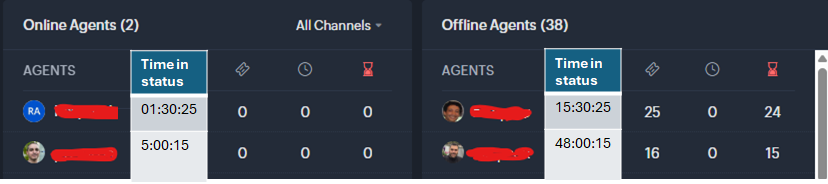
We propose adding a timer that tracks the duration of each status (online, offline, idle) for each agent. Specifically, we’d like the dashboard to show:
-
The total time an agent has been in the "Online" status (e.g., 4 hours for a full shift without idle time).
-
The total time an agent has been in the "Offline" status (e.g., if the agent has been offline for 24 hours, it should display that).
This would allow supervisors and team leads to have a clearer overview of agent activity and status duration over time.
📌 Benefits
-
Improved transparency in agent activity tracking, providing insights into time spent in each status.
-
Better resource management, as supervisors can quickly spot trends (e.g., agents who’ve been idle or offline for long periods).
-
Helps with performance monitoring and identifying any patterns or issues with agent availability.
We believe this additional timer feature will greatly enhance our ability to track and manage agent status more effectively. We hope to see this functionality added in a future update.
Thank you for considering this request!
Best regards,
Ram