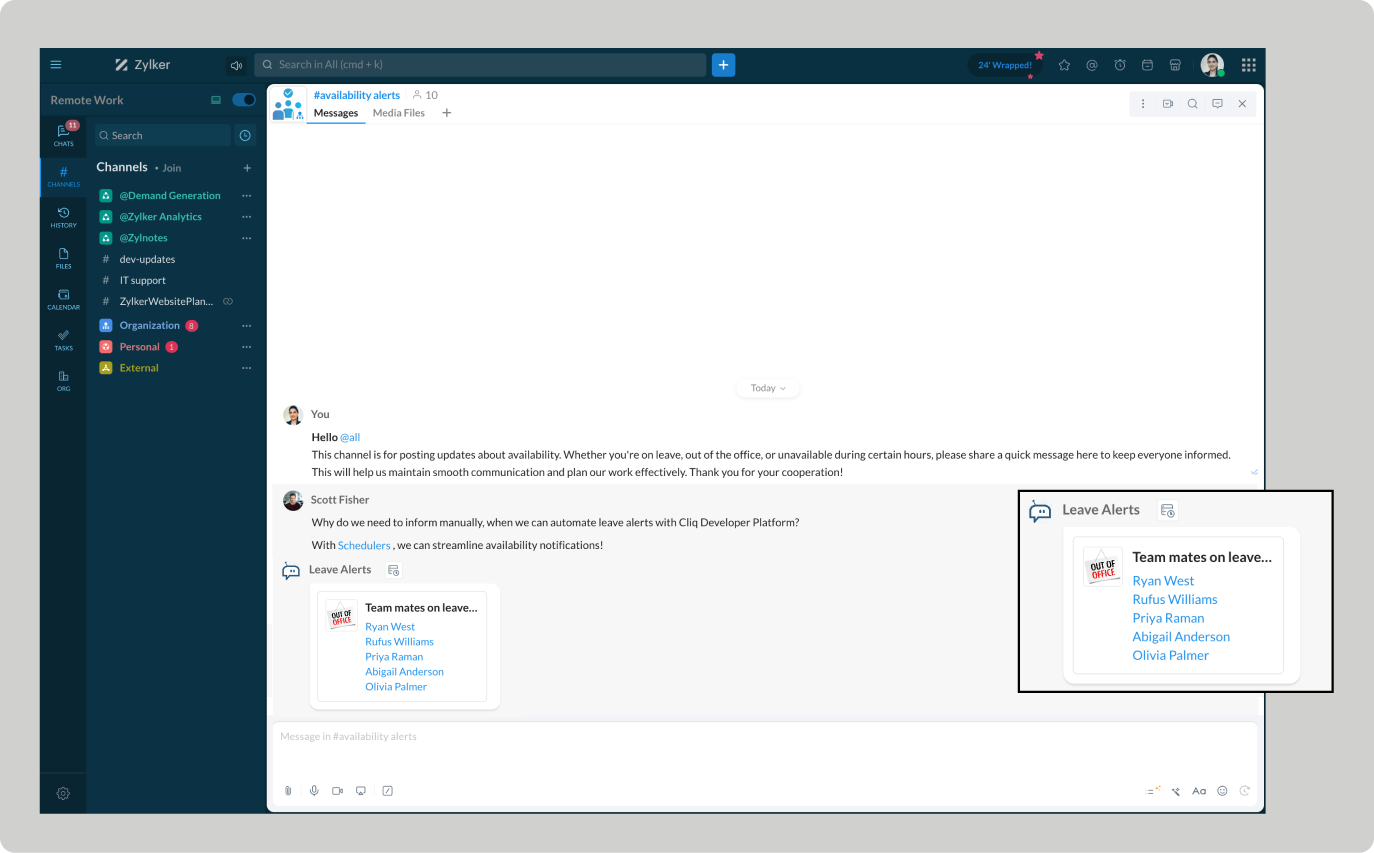
Automating leave alerts in Zoho Cliq

Automating leave alerts in Zoho Cliq


The constant ebb and flow of employee absences can disrupt projects and hinder productivity. With Zoho Cliq's leave alert automation, you can easily keep your team informed. Real-time notifications can be sent to team chats, ensuring that everyone stays connected.

This enhances communication and workflow management by making all team members aware of colleague absences, while minimizing miscommunication and potential scheduling conflicts.


Pre-requisites:  

Before beginning to script the code below, we must create a connection in Cliq with Zoho People. Once a connection is created and connected, you can use it in Deluge integration tasks and invoke URL scripts to access data from the required service.

Create a Zoho People default connection with a unique name "getemployeeinfo" with the scope - ZOHOPEOPLE.leave.ALL and ZOHOPEOPLE.dashboard.ALL

ⓘ Document for reference : Connections in Cliq 

How to obtain the bot unique name?


To use the postToChannelAsBot deluge task, the bot's unique name is essential, and the bot must be a participant in the channel.
  1. Create a bot with channel participation settings enabled to allow users to add the bot to any channel, send messages, listen to messages, and auto-follow threads.
  2. Click on the bot to open its details on the right-hand side. Locate the bot's incoming endpoint, and find the unique name of the bot in the URL after /bots.


Example : If the API Endpoint is:  https://cliq.zoho.com/company/242424/api/v2/bots/leavealerts/message
The unique name of the bot is 'leavealerts'.
  1. Add the bot to the preferred channel of your choice where you want the alerts to be posted.
ⓘ Document for reference :  Adding participants to a channel

Implementation :

Setting up the Zoho Cliq Scheduler

  • Open Zoho Cliq, click your profile picture, select Bots & Tools, and navigate to Schedulers.

  • Under Schedulers, create a new scheduler with the recurring period set to weekly and choose the days from Monday to Friday.

  • Specify the time name, description, and time of execution according to your needs.

ⓘ Document for reference : Schedulers  


Sample Leave alerts script

After providing the scheduler details, click "Save and Edit Code" to add the script below.
  1. currentDate = zoho.currentdate;
  2. currentDateString = currentDate.toString("dd-MMM-yyyy");
  3. info currentDateString;
  4. note = "";
  5. isRestrictedHoliday = "false";
  6. try
  7. {
  8. holidayResponse = invokeurl
  9. [
  10. url :"https://people.zoho.com/people/api/leave/v2/holidays/get?shift=General&employee=1&from=" + currentDateString + "&to=" + currentDateString + "&dateFormat=dd-MMM-yyyy"
  11. type :GET
  12. connection:"getemployeeinfo"
  13. ];
  14. info holidayResponse;
  15. holidayResponse = holidayResponse.toMap();
  16. if(holidayResponse.containsKey("data"))
  17. {
  18. holidayResponseData = holidayResponse.get("data").toList();
  19. if(holidayResponseData.size() > 0)
  20. {
  21. currentDayStatus = holidayResponseData.get(0);
  22. isRestrictedHoliday = currentDayStatus.get("isRestrictedHoliday");
  23. if("true".endsWithIgnoreCase(isRestrictedHoliday))
  24. {
  25. name = currentDayStatus.get("Name");
  26. note = "\nOptional holiday - " + name;
  27. }
  28. }
  29. }
  30. }
  31. catch (ex)
  32. {
  33. exceptionString = "exception occurred during restricted holiday check:  " + ex.toString();
  34. info exceptionString;
  35. }
  36. response = invokeurl
  37. [
  38. url :"https://people.zoho.com/api/v2/leavetracker/leaves/records?from=" + currentDateString + "&to=" + currentDateString + "&dateFormat=dd-MMM-yyyy&approvalStatus=[APPROVED]"
  39. type :GET
  40. connection:"getemployeeinfo"
  41. ];
  42. //info response;
  43. members = response.get("records");
  44. leaveMembers = "";
  45. membersSize = 0;
  46. for each member in members
  47. {
  48. membersSize = membersSize + 1;
  49. leaveMembers = leaveMembers + "[" + member.get("Employee") + "](zohoid:" + member.get("ZUID") + ")\n";
  50. }
  51. info "leave members : " + leaveMembers;
  52. if(leaveMembers.length() > 0)
  53. {
  54. data = {"card":{"theme":"7","title":"Team mates on leave (" + membersSize + ")" + note,"thumbnail":"https://thesoftwarepro.com/wp-content/uploads/2019/12/outlook-out-of-office.jpg"},"text":leaveMembers.trim(),"bot":{"name":"Leave Alerts","image":"https://www.pngfind.com/pngs/m/220-2200933_portfolio-alert-bot-by-symphony-alert-bot-hd.png"}};
  55. info data;
  56. }
  57. else
  58. {
  59. data = {"card":{"theme":"7","title":"Team mates on leave 0" + note,"thumbnail":"https://thesoftwarepro.com/wp-content/uploads/2019/12/outlook-out-of-office.jpg"},"text":"All Present Today.","bot":{"name":"Leave Alerts","image":"https://www.pngfind.com/pngs/m/220-2200933_portfolio-alert-bot-by-symphony-alert-bot-hd.png"}};
  60. }
  61. zoho.cliq.postToChanneAsBotl("CHANNEL_UNIQUE_NAME","BOT_UNIQUE_NAME",data);

Customize and deploy


Utilizing the data received from the invoke URL task (i.e., leavetracker/leaves/records GET request), construct a leave report card with Cliq's message builder and post it in the preferred chat or channel.


How to obtain the channel unique name?

  1. Go to the channel where you want the alerts to be posted.

  2. Hover over the three dots in the top right corner of the channel and select "Channel Info."

  3. In the Channel Info menu, go to the "Connectors" section to find the Channel Unique Name.


Troubleshooting :

  • Ensure your Zoho People pricing plan includes access to employee leave details.  

  • Verify whether the necessary administrative permissions are granted. Limited access can result in "Permission Denied" errors.

Empower automated workflows and stay ahead of absences

Automating leave alerts in Zoho Cliq boosts efficiency by minimizing disruptions from employee absences. Teams can benefit from real-time leave updates, allowing them to adjust plans, reassign tasks, and maintain the continuity of the project schedule.


      Zoho Campaigns Resources


        • Desk Community Learning Series


        • Digest


        • Functions


        • Meetups


        • Kbase


        • Resources


        • Glossary


        • Desk Marketplace


        • MVP Corner


        • Word of the Day


        • Ask the Experts


          • Sticky Posts

          • Automating Employee Birthday Notifications in Zoho Cliq

            Have you ever missed a birthday and felt like the office Grinch? Fear not, the Cliq Developer Platform has got your back! With Zoho Cliq's Schedulers, you can be the office party-cipant who never forgets a single cake, balloon, or awkward rendition of
          • Customer payment alerts in Zoho Cliq

            For businesses that depend on cash flow, payment updates are essential for operational decision-making and go beyond simple accounting entries. The sales team needs to be notified when invoices are cleared so that upcoming orders can be released. In contrast,
          • Accelerate Github code reviews with Zoho Cliq Platform's link handlers

            Code reviews are critical, and they can get buried in conversations or lost when using multiple tools. With the Cliq Platform's link handlers, let's transform shared Github pull request links into interactive, real-time code reviews on channels. Share
          • App Spotlight : PagerDuty for Zoho Cliq

            App Spotlight brings you hand-picked apps to enhance the power of your Zoho apps and tools. Visit the Zoho Marketplace to explore all of our apps, integrations, and extensions. In today's fast-paced world, seizing every moment is essential for operational
          • Automate your status with Cliq Schedulers

            Imagine enjoying your favorite homemade meal during a peaceful lunch break, when suddenly there's a PING! A notification pops up and ruins your moment of zen. Even worse, you might be in a vital product development sprint, only to be derailed by a "quick

          Zoho CRM Plus Resources

            Zoho Books Resources


              Zoho Subscriptions Resources

                Zoho Projects Resources


                  Zoho Sprints Resources


                    Zoho Orchestly Resources


                      Zoho Creator Resources


                        Zoho WorkDrive Resources


                          Zoho CRM Resources

                          • CRM Community Learning Series

                            CRM Community Learning Series


                          • Tips

                            Tips

                          • Functions

                            Functions

                          • Meetups

                            Meetups

                          • Kbase

                            Kbase

                          • Resources

                            Resources

                          • Digest

                            Digest

                          • CRM Marketplace

                            CRM Marketplace

                          • MVP Corner

                            MVP Corner


                            Zoho Writer Writer

                            Get Started. Write Away!

                            Writer is a powerful online word processor, designed for collaborative work.

                              Zoho CRM コンテンツ


                                ご検討中の方

                                  • Recent Topics

                                  • Why am I seeing deleted records in Zoho Analytics syncing with Zoho CRM?

                                    I have done a data sync between Zoho CRM and Zoho Analytics, and the recycle bin is empty. Why do I see deleted leads/deals/contacts in Zoho Analytics if it doesn't exist in Zoho CRM? How can I solve this problem? Thanks
                                  • Company Multiple Branch/ Location Accounting

                                    Hi All, anyone know whether company can maintain their multiple Branch Accounting in Zoho  Books. It will be chart of Accounts & Master Data will be same but different report available as per per Branch. Thanks & regards, Vivek +91 9766906737
                                  • Include Suggested Articles in New Ticket Email

                                    When someone creates a new ticket, is there any way to include recommended knowledge base articles (like the ones Zia Suggests) in the email notification to the user? When they're waiting for a reply, it would be nice to have sent them some recommended
                                  • Zoho Flow + QuickBooks Estimates – Line items not created from CRM subform

                                    Hi everyone, I’m trying to create QuickBooks Estimates from Zoho CRM Quotes using Zoho Flow. I’m aware that Zoho Flow’s native “Create Estimate” action does not support multiple line items, so I followed the community guidance for Invoices using a custom
                                  • SAP S/4 HANA Integration via ZOHO Flow

                                    Hi How do I change the SAP Client ID while creating a new connection ? MY client ID is 421. I believe the client id should be an input field for length 3 numbers rather then a drop down to select from a fixed set of values. Thanks
                                  • VLOOKUP FUNCTION PROBLEM

                                       Hello, i have a problem with the VLOOKUP  function in my sheet http://public.sheet.zoho.com/public/tonimoreno/indicemasacorporal2 in cell D2. This function doesn't work correctly and always returns the last content of the range. Can you help me?
                                  • CRM x WorkDrive: We're rolling out the WorkDrive-powered file storage experience for existing users

                                    Release plan: Gradual rollout to customers without file storage add-ons, in this order: 1. Standalone CRM 2. CRM Plus and Zoho One DCs: All | Editions: All Available now for: - Standalone CRM accounts in Free and Standard editions without file storage
                                  • Zoho Flow Completely Broken?

                                    Since December 13th, 100% of our flows have stopped working completely. Nothing is working or triggering??? I called support & sat on the line with them for 2 HOURS until they finally concluded it was a back-end problem on their end?? Now i'm calling
                                  • Print / Export full Dashboard page

                                    Hello Zoho team, It is currently only possible to print/export one component of a dashboard at a time. Requesting the option to print/export a full dashboard page with all components to a pdf or picture. Doing through the browser doesn't give good results.
                                  • emails duplicated in my outlook client

                                    Hello I am just new here and I have a litle problem that I do not find how to solve. I sumarise here after. Your help would be very appreciated. I have just recently contracted this zoho mail servicesservices as an initial evaluation yesterday night. I then:   - opened a free account  - created 1 initial email address ..........@domain.com  - created a second email address ..........@domain.com - proceeded with the config instructions (checking the ownership of my domain, changing MX etc... ) as
                                  • How to check task starting time in zoho mobile app?

                                    I am using the Zoho mobile app on my iPhone, and I am not able to see the task's starting and finishing times. When opening the Task information / Details, I can only see the Task start date and due date, but not the time. Is there any way to check a
                                  • Creating an extension in Sigma: Zoho CRM isn't selectable as a service

                                    I have 2 Zoho accounts which are part of 2 different workplaces. One workplace is able to select 'Zoho CRM' as a service option when creating a new extension, the other one is not. I'm not sure what the exact differences are between them. What do I need
                                  • List of packaged components and if they are upgradable

                                    Hello, In reference to the article Components and Packaging in Zoho Vertical Studio, can you provide an overview of what these are. Can you also please provide a list of of components that are considered Packaged and also whether they are Upgradable?
                                  • Cliq iOS can't see shared screen

                                    Hello, I had this morning a video call with a colleague. She is using Cliq Desktop MacOS and wanted to share her screen with me. I'm on iPad. I noticed, while she shared her screen, I could only see her video, but not the shared screen... Does Cliq iOS is able to display shared screen, or is it somewhere else to be found ? Regards
                                  • Knowledgebase SEO

                                    We have a custom-domain mapped help center that is not restricted via login. I have some questions: a) will a robots.txt file still allow us to control indexing? b) do we have the ability to edit the sitemap? c) do category URLs get indexed by search
                                  • RouteIQ for Zoho FSM

                                    Beste, Zou wel top zijn dat we een RouteIQ hebben voor FSM aangezien we constant moeten zien wat de beste route is voor onze monteurs. Nu moeten we een speciale aparte programma hebben om de beste route te berrekenen voor onze monteurs aangezien de planning
                                  • Export Tickets from the Help Center

                                    Hello everyone! We are now allowing end users to export tickets directly from the help center. The ticket export allows users to: Filter tickets by Department, Priority, and Account before exporting. Download files from Export History (Setup > Data administration
                                  • Zoho Books Sandbox environment

                                    Hello. Is there a free sandbox environment for the developers using Zoho Books API? I am working on the Zoho Books add-on and currently not ready to buy a premium service - maybe later when my add-on will start to bring money. Right now I just need a
                                  • Super Admin Logging in as another User

                                    How can a Super Admin login as another user. For example, I have a sales rep that is having issues with their Accounts and I want to view their Zoho Account with out having to do a GTM and sharing screens. Moderation Update (8th Aug 2025): We are working
                                  • Is it possible to remove filtering options?

                                    My CRM has a lot of custom fields that should not be used in filters or views. Fields that are automated and exist only to store temporary values that get used in functions. These create a lot of noise in the list of fields to filter. Isn't there any
                                  • Function #18: Associate invoice templates automatically based on customer language

                                    For businesses dealing with a diverse linguistic clientele, it becomes crucial to send out invoices in the customer's preferred language to ensure effective communication. This requirement can be handled in Zoho Books by creating invoice templates in
                                  • Changing field types

                                    Question im a Zoho CRM user and curious, if I change a flied type from single or multi line text to a URL field type will i lose the data in the field or will it be converted to website link automatically. Thanks
                                  • Quote PDF – Header image stopped rendering suddenly

                                    Hello Zoho Support Team, We are facing an issue with Quote PDF templates in Zoho Books. Previously, images added inside the Quote header HTML were rendering correctly. However, recently the header image is no longer appearing, while header text still
                                  • Changing Default PDF Name

                                    Is it possible to change the default name of a PDF? As of right now, all of my quotes are named 'QT_$QuoteNumber' (i,e: 'QT_19803471298374) - would it be possible to change this to: '$CompanyName - $AccountName - $QuoteNumber' for instance?
                                  • Tip 2: Recursive functions in Deluge: How to dynamically run a function for a specified number of times.

                                    Hi folks, As part of the Zoho Creator - Tips and Tricks series every fortnight, we are back today with a new tip on Recursive functions.  Let us first quickly understand what Recursive functions are: A function that calls itself one or more times is known as a Recursive function. That is, you can execute a function to perform a particular action a specific number of times. And, at the end of each iteration, a new output is generated. Recursive functions are commonly used by programmers as it enables
                                  • Removing "Products" as mandatory field from Sales Order creation page

                                    Hello, friends According to our workflow, we should: 1) create Sales Order (Stage "New") 2) call and discuss the Products with a customer (Stage "Communication") 3) add the Products to the Sales Order during the call However, "Products" is mandatory to
                                  • Function #48: Manage fixed installment payments using Zoho Books

                                    Hello everyone, and welcome back to our series! Businesses offer installment payment options to their customers, particularly for expensive purchases, to ease the financial burden on them. By breaking down the total cost into smaller, more manageable
                                  • Function #1: Convert an accepted Estimate to Sales Order automatically in Zoho Books

                                    As you’re aware, Zoho Books provides a default option to have the estimates automatically converted to invoices once your customer accepts them. Many of you wanted a similar option for sales orders, so here’s a workflow that converts accepted estimates
                                  • Spotlight series #6: The Show app for Android TV has a new look!

                                    Hello everyone! We are delighted to introduce our revamped and redesigned Show app for Android TV.  Smart TVs are exploding in popularity. Android TV alone has over 110 million active monthly devices. Zoho Show, as part of a constant effort to improve
                                  • Employee Appraisal Applicability - Why is Date of Joining Hard-Coded?

                                    In the new (to me, at least) Performance Appraisal Cycle wizard, it's possible to set criteria to determine for whom the appraisal process should apply. This makes sense on its face. However, one MUST use the Date of Joining criterion as a filter. Why
                                  • WorkDrive for Excel Add on

                                    Dear Sir/Madam Have installed Workdrive for Microsoft add on But unable to view the same added in Excel
                                  • Zoho Books integration sync from Zoho CRM does not work

                                    Hi Zoho Community & Zoho Support We just tried to get a sync some products into Zoho Books from CRM using the native sync and we're getting an error: "It looks like some mandatory fields you're trying to map are empty. Please provide valid field names
                                  • Appraisals - Order of Previous Reviews Should Be Newest to Oldest

                                    The new Zoho People layout generally does a decent job at providing the necessary information for performing appraisals of employee performance. One example of this is the Previous Reviews section: This information is helpful when conducting a review.
                                  • Referencing a cell from another sheet

                                    My workbook has multiple sheets. Each sheet has some calcluated totals in certain cells. The front master sheet has a list of everything that is detailed on the other sheets, with the totals. These could change at any time, so the totals need to be references to the other cell's value, not a fixed number. So on the master sheet, I put in =, then go the other sheet and choose the cell and hit Enter. In regular Excel, this works. But in the Zoho sheet, it doesn't work. I have to edit the result by
                                  • auto close automated alert tickets which are similar

                                    Hello ZOHO Community, we are using ZOHO Desk to process automated monitoring alerts. Scenario: Our monitoring system creates a ticket when a threshold is exceeded, e.g. Subject: Computer 1 – CPU usage 100% – Error A few minutes later, once the issue resolves
                                  • Paging through API results. a major gap in your documentation.

                                    There is no way for me. to get all of my data through a single API call. Typically REST APis have mechanisms for paging through API results. But the documentation for the API I am using: https://desk.zoho.com/DeskAPIDocument#Introduction Has no mention
                                  • Recurring invoices were generated with old template...

                                    I have recurring invoices setup. Ones generated on 10.20.2025 used the modified template I had used. But for some reason, on the ones created on 11/20/2025, it seems the invoices created reverted to the previous version of the invoice template. Notably,
                                  • How do people handle using Outlook and Zoho Project calendar at the same time?

                                    We have an ongoing problem in our organisation where we use Zoho Projects to plan all of our projects tasks and that also allows us to look forward using the workload report to see which of our consultants are overstretched etc and which are available.
                                  • Please, make writer into a content creation tool

                                    I'm tired of relying on Google Docs. I'm actually considering moving to ClickUp, but if Writer were a good content creation tool instead of just a word processor, I would finally be able to move all my development within the Zoho ecosystem, rather than
                                  • How do I associate pricebooks to a customer?

                                    I setup a few pricebooks, that worked fine. But now the only thing I can do with it, when I enter a quote or sales order, I can select which pricebook to use, but I have to do this product by product every time I add one. Is there a way to connect a pricebook
                                  • Next Page