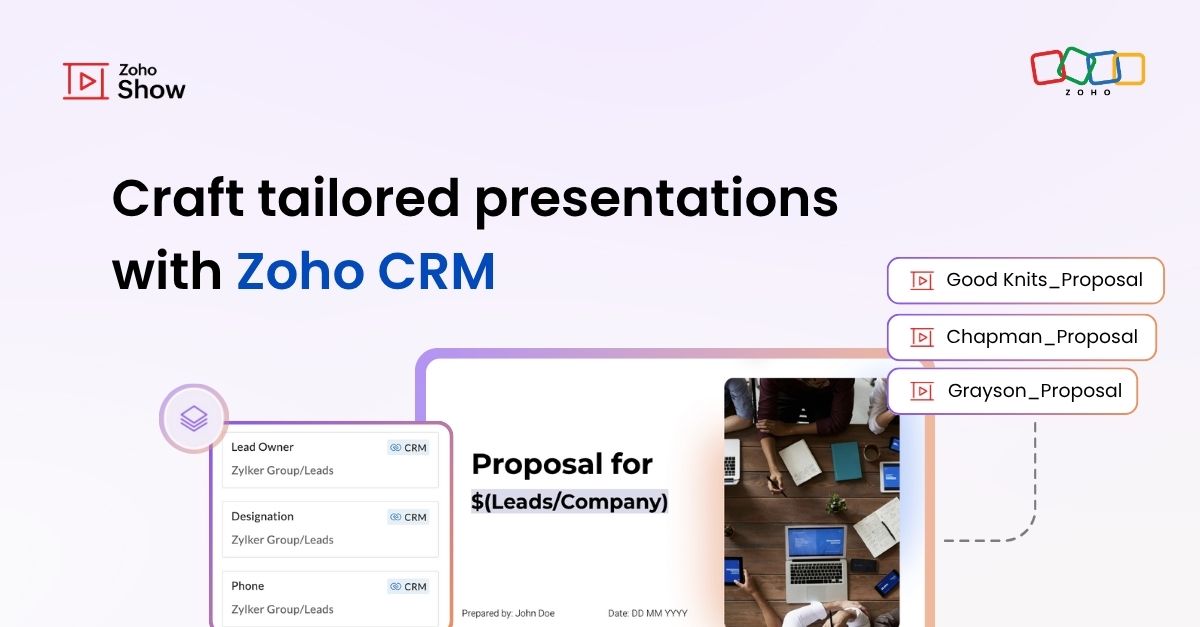
Bring your CRM data straight into your presentations in Zoho Show
Bring your CRM data straight into your presentations in Zoho Show


Let's say you are working on a presentation about your team's sales pipeline for an upcoming strategy meeting. All the information you need about clients and leads is in Zoho CRM, but you end up copying details from the CRM into your slides, adjusting names, checking for errors, and making sure everything looks just right. It’s a repetitive task, takes longer than it should, and small mistakes can easily slip through.

To simplify this process, Zoho Show now lets you pull client details directly from Zoho CRM into your presentations. No more manual entry. Just select the fields you need, and your slides update with the right information.

How it works

To get started, open Data Fields under the Text option in Zoho Show. Switch to the External tab and connect your Zoho CRM account.

Select your CRM organization and choose a single module (such as Leads, Accounts, or Contacts).
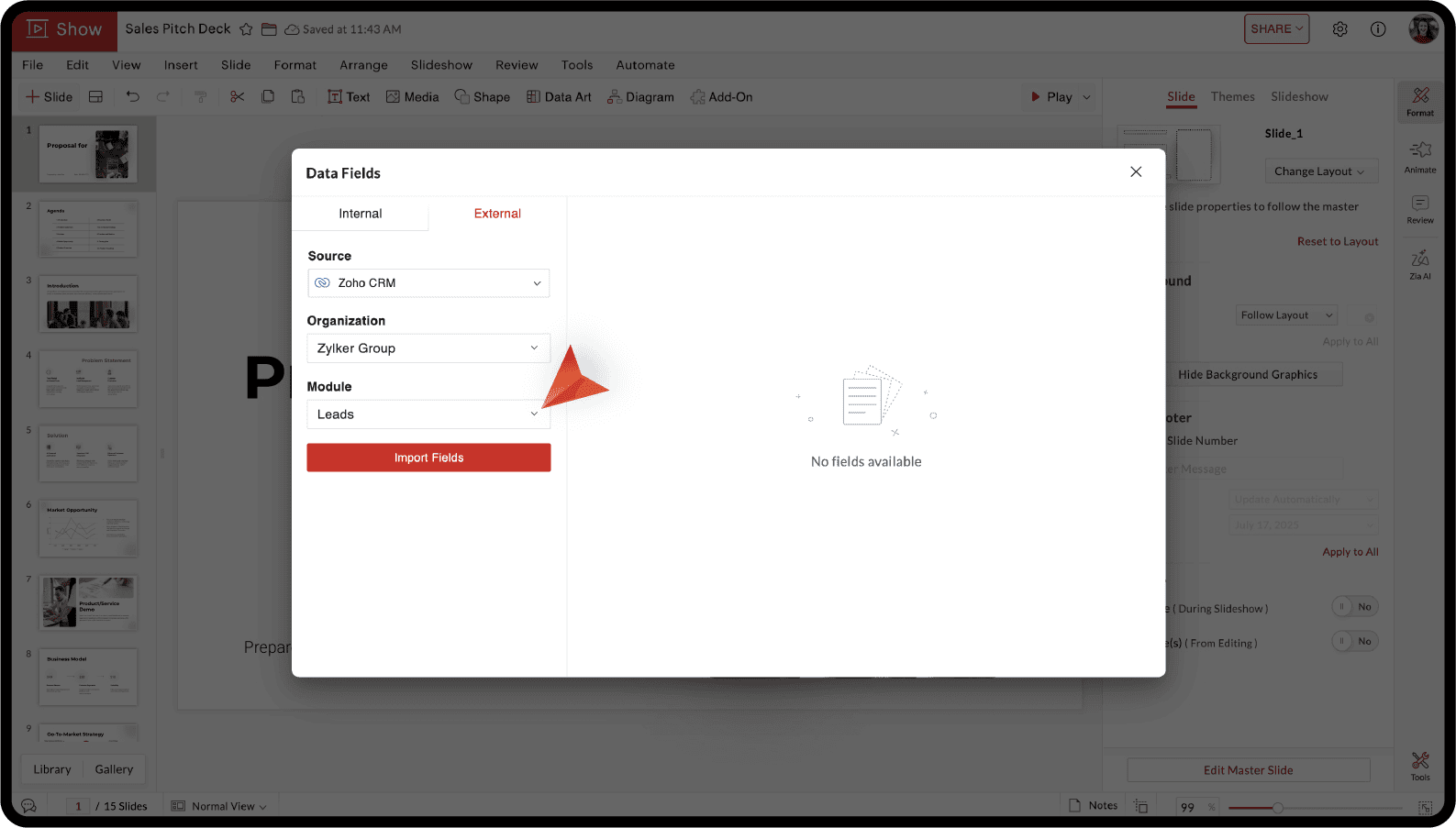


Choose the text field you want to use from the list of available fields in that module and import to add it to your slide. You can also type "$" to insert a data field to your slide.

Next, to create presentations by merging different records, go to Automate > Merge Fields.
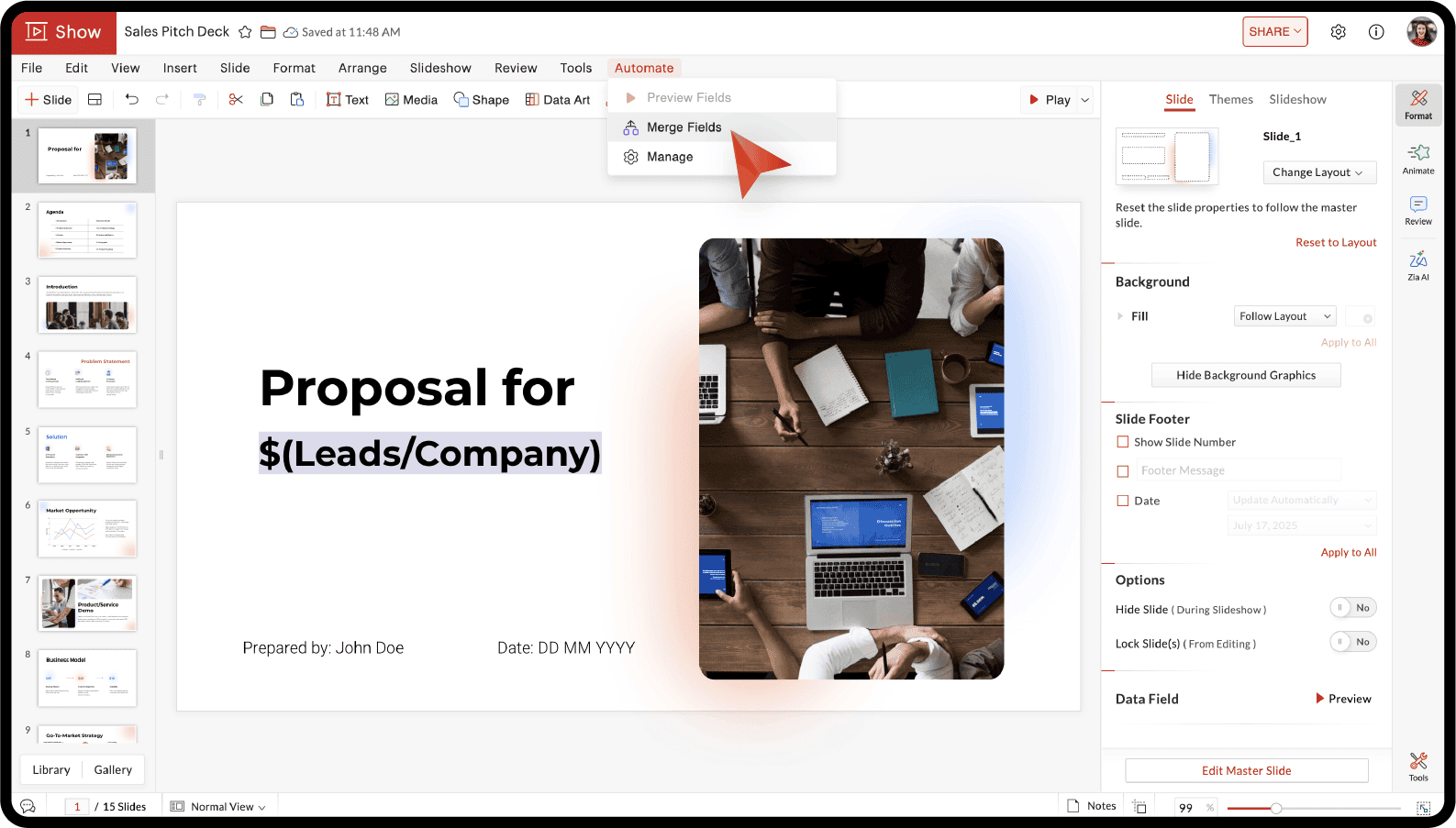


Select the identifying field, choose the records you want, and you can either create separate presentations for each record or combine them into one.
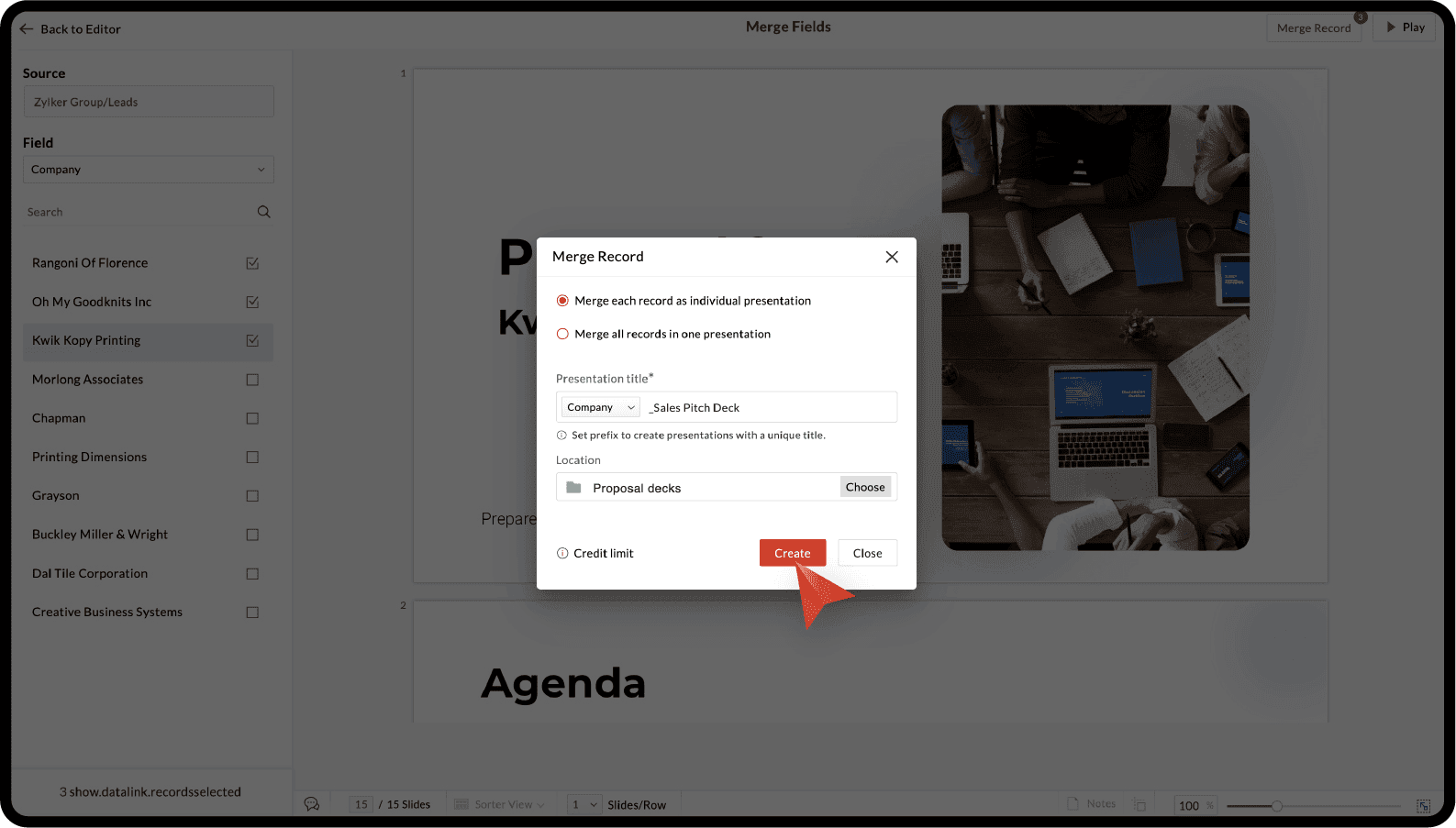


Now,
select a folder in Zoho WorkDrive to save the presentations and you are all done!

For more details, you can refer to the Zoho CRM integration with Zoho Show help article.

If customer presentations are part of your job, whether in sales, marketing, or account management, this integration can be a real time-saver.

Try this out and let us know what you think in the comments section below. If you have any specific questions suggestions, please feel free to write to us at support@zohoshow.com.

      Zoho Campaigns Resources


        • Desk Community Learning Series


        • Digest


        • Functions


        • Meetups


        • Kbase


        • Resources


        • Glossary


        • Desk Marketplace


        • MVP Corner


        • Word of the Day


        • Ask the Experts


          • Sticky Posts

          • Introducing Zoho Show extension in Your Chrome Browser

            Hi everyone, Over the years, Chrome's feature-rich support extensions have grown to offer additional ways to easily access your favorite tools from anywhere. Today, Zoho Show is excited to announce our integration with Google Chrome as an extension app to help build and access presentations directly from your browser.   Zoho Show for Google Chrome is a free extension that allows you to dive straight into drafting your presentation material. Simply install the Show extension from the Chrome Web Store
          • Take your presentations anywhere with the Zoho Show app for iOS

            We're excited to announce the launch of the Show app for iOS. Our new presentation app gives you the power to view and present slideshows on your iPhone and iPad devices wherever and whenever you want.   The Show iOS app has a host of features that will make your presentations engaging and dynamic: Access all your presentations with a single tap Sign in to your Zoho Show account to view your slides and deliver presentations on-the-go. The app stores all the presentations you've created in the My
          • Introducing All New Zoho Show - Create and Design Stunning Presentations.

            Hello,   Whether you're a first-time presenter or an expert looking to make a lasting impression, Zoho Show is the tool for you. Whatever your expertise, the All New Zoho Show's contextual user interface lets you create all kinds of slides, from plain text on a simple background to complex presentations with animations, tweets, charts, media files, and lots more.   The UI doesn't leave you to figure everything out yourself, but presents something you can easily use. It's clear, obvious, and intuitive.
          • Three smart ways to share your presentation with Zoho Show.

            "What is the best way to share a presentation?", a lingering question that is asked after every live session or a meeting. Sharing presentations can be time consuming. It can be done, either by attaching the file to an email or by saving it in a pen drive. But what happens when your file size is large or your team is spread across the globe? Zoho Show lets you share your presentations both internally and externally without worrying about the file size. You can share your slides as a link and decide
          • Convey Your Ideas and Convince Your Audience with Zoho Show

            Visual presentations are highly impactful and it is a no-brainer that your audience gets attracted to them. The use of images and videos help you reach your objectives by emphasizing your ideas more effectively.  According to the psychologist Jerome Bruner of New York University, "people only remember 10% of what they hear and 20% of what they read, but about 80% of what they see and do." For example, if the above data on its own, was presented visually, there is an 80% chance that the information

          Zoho CRM Plus Resources

            Zoho Books Resources


              Zoho Subscriptions Resources

                Zoho Projects Resources


                  Zoho Sprints Resources


                    Zoho Orchestly Resources


                      Zoho Creator Resources


                        Zoho WorkDrive Resources


                          Zoho CRM Resources

                          • CRM Community Learning Series

                            CRM Community Learning Series


                          • Tips

                            Tips

                          • Functions

                            Functions

                          • Meetups

                            Meetups

                          • Kbase

                            Kbase

                          • Resources

                            Resources

                          • Digest

                            Digest

                          • CRM Marketplace

                            CRM Marketplace

                          • MVP Corner

                            MVP Corner


                            Zoho Writer Writer

                            Get Started. Write Away!

                            Writer is a powerful online word processor, designed for collaborative work.

                              Zoho CRM コンテンツ


                                ご検討中の方

                                  • Recent Topics

                                  • Free Webinar : Unlock AI driven business insights with Zoho Inventory + Zoho Analytics

                                    Are you tired of switching between apps and exporting data to build customized reports? Say hello to smarter & streamlined insights! Join us for this exclusive webinar where we explore the power of the Zoho Inventory–Zoho Analytics integration. Learn
                                  • Critical Issue: Tickets Opened for Zoho Support via the Zoho Help Portal Were Not Processed

                                    Hi everyone, We want to bring to your attention a serious issue we’ve experienced with the Zoho support Help Portal. For more than a week, tickets submitted directly via the Help Portal were not being handled at all. At the same time no alert was posted
                                  • Hide/Show Subform Fields On User Input

                                    Hello, Are there any future updates in Hide/Show Subform Fields "On User Input"?
                                  • Cloning Item With Images Or The Option With Images

                                    Hello, when I clone an item, I expect the images to carry over to the cloned item, however this is not the case in Inventory. Please make it possible for the images to get cloned or at least can we get a pop up asking if we want to clone the images as
                                  • Archiving Contacts

                                    How do I archive a list of contacts, or individual contacts?
                                  • WorkDrive and CRM not in sync

                                    1/ There is a CRM file upload field with WorkDrive file set as the source: 2/ Then the file is renamed in WorkDrive (outside CRM): 3/ The File in CRM is not synced after the change in WorkDrive; the file name (reference) in CRM record is not updated (here
                                  • Custom validation in CRM schema

                                    Validation rules in CRM layouts work nicely, good docs by @Kiran Karthik P https://help.zoho.com/portal/en/kb/crm/customize-crm-account/validation-rules/articles/create-validation-rules I'd prefer validating data input 'closer to the schema'
                                  • Adding Default Module Image into mail merge field

                                    As with most people finding their way to these forums i have a specific requirement that doesn't seem to be supported by Zoho I have created 2 custom modules to suit my purpose 1 is an inventory type module that lists aluminium extrusions, and all relevant
                                  • Sync Data from MA to CRM

                                    Currently, it's a one-way sync of data from the CRM to MA. I believe we should have the ability to select fields to sync from MA to the CRM. The lead score is a perfect example of this. In an ideal world we would be able to impact the lead score of a
                                  • Is it possible to roll up all Contact emails to the Account view?

                                    Is there a way to track all emails associated with an Account in one single view? Currently, email history is visible when opening an individual Contact record. However, since multiple Contacts are often associated with a single Account, it would be beneficial
                                  • Update CRM record action

                                    Currently, MA only offers a "Push Data" action to push data to a CRM module. This action is built to cover the need to both create a new record and update an existing record. Because it has been implemented this way all required fields on the CRM module
                                  • Notes badge as a quick action in the list view

                                    Hello all, We are introducing the Notes badge in the list view of all modules as a quick action you can perform for each record, in addition to the existing Activity badge. With this enhancement, users will have quick visibility into the notes associated
                                  • What's new in Zoho One 2025

                                    Greetings! We hope you have all had a chance by now to get hands-on with the new features and updates released as part of ZO25. Yes, we understand that you may have questions and feedback. To ensure you gain a comprehensive understanding of these updates,
                                  • Good news! Calendar in Zoho CRM gets a face lift

                                    Dear Customers, We are delighted to unveil the revamped calendar UI in Zoho CRM. With a complete visual overhaul aligned with CRM for Everyone, the calendar now offers a more intuitive and flexible scheduling experience. What’s new? Distinguish activities
                                  • Add deluge function to shorten URLs

                                    Zoho Social contains a nice feature to shorten URLs using zurl.co. It would be really helpful to have similar functionality in a Deluge call please, either as an inbuilt function or a standard integration. My Creator app sends an email with a personalised
                                  • Edit default "We are here to help you" text in chat SalesIQ widget

                                    Does anyone know how this text can be edited? I can't find it anywhere in settings. Thanks!
                                  • Quick way to add a field in Chat Window

                                    I want to add Company Field in chat window to lessen the irrelevant users in sending chat and set them in mind that we are dealing with companies. I request that it will be as easy as possible like just ticking it then typing the label then connecting
                                  • How to create a two way Sync with CRM Contacts Module?

                                    Newbie creator here (but not to Zoho CRM). I want to create an app that operates on a sub-set of CRM Contacts - only those with a specific tag. I want the app records to mirror the tagged contacts in CRM. I would like it to update when the Creator app
                                  • Zoho Sheet for Desktop

                                    Does Zoho plans to develop a Desktop version of Sheet that installs on the computer like was done with Writer?
                                  • Allow Manual Popup Canvas Size Control

                                    Hello Zoho PageSense Team, We hope you're doing well. We would like to request an enhancement to the PageSense popup editor regarding popup sizing. Current Limitation: Currently, the size (width and height) of a popup is strictly controlled by the selected
                                  • Where is the settings option in zoho writer?

                                    hi, my zoho writer on windows has menu fonts too large. where do i find the settings to change this option? my screen resolution is correct and other apps/softwares in windows have no issues. regards
                                  • How to set page defaults in zoho writer?

                                    hi, everytime i open the zoho writer i have to change the default page settings to - A4 from letter, margins to narrow and header and footer to 0. I cannot set this as default as that option is grayed out! so I am unable to click it. I saved the document
                                  • Develop and publish a Zoho Recruit extension on the marketplace

                                    Hi, I'd like to develop a new extension for Zoho Recruit. I've started to use Zoho Developers creating a Zoho CRM extension. But when I try to create a new extension here https://sigma.zoho.com/workspace/testtesttestest/apps/new I d'ont see the option of Zoho Recruit (only CRM, Desk, Projects...). I do see extensions for Zoho Recruit in the marketplace. How would I go about to create one if the option is not available in sigma ? Cheers, Rémi.
                                  • How to import data from PDF into Zoho Sheet

                                    I am looking to import Consolidated Account Statement (https://www.camsonline.com/Investors/Statements/Consolidated-Account-Statement) into zoho sheet. Any help is appreciated. The pdf is received as attachment in the email, this document is password
                                  • Zoho Projects Android app: Integration with Microsoft Intune

                                    Hello everyone! We’re excited to announce that Zoho Projects now integrates with Microsoft Intune, enabling enhanced security and enterprise app management. We have now added support for Microsoft Intune Mobile Application Management (MAM) policies through
                                  • Cant't update custom field when custom field is external lookup in Zoho Books

                                    Hello I use that : po = zoho.books.updateRecord("purchaseorders",XXXX,purchaseorder_id,updateCustomFieldseMap,"el_books_connection"); c_f_Map2 = Map(); c_f_Map2.put("label","EL ORDER ID"); c_f_Map2.put("value",el_order_id); c_f_List.add(c_f_Map2); updateCustomFieldseMap
                                  • Wrapping up 2025 on a high note: CRM Release Highlights of the year

                                    Dear Customers, 2025 was an eventful year for us at Zoho CRM. We’ve had releases of all sizes and impact, and we are excited to look back, break it down, and rediscover them with you! Before we rewind—we’d like to take a minute and sincerely thank you
                                  • About Zoneminder (CCTV) and Zoho People

                                    Hi team I would like to implement a CCTV service for our branches, with the aim of passively detecting both the entry and exit of personnel enrolled in Zoho Peeple, but my question is: It is possible to integrate Zoho People with Zoneminder, I understand
                                  • Introducing the Zoho Projects Learning Space

                                    Every product has its learning curve, and sometimes having a guided path makes the learning experience smoother. With that goal, we introduce a dedicated learning space for Zoho Projects, a platform where you can explore lessons, learn at your own pace,
                                  • Create CRM Deal from Books Quote and Auto Update Deal Stage

                                    I want to set up an automation where, whenever a Quote is created in Zoho Books, a Deal is automatically created in Zoho CRM with the Quote amount, customer details, and some custom fields from Zoho Books. Additionally, when the Sales Order is converted
                                  • How to show branch instead of org name on invoice template?

                                    Not sure why invoices are showing the org name not the branch name? I can insert the branch name using the ${ORGANIZATION.BRANCHNAME} placeholder, but then it isn't bold text anymore. Any other ideas?
                                  • Admin asked me for Backend Details when I wanted to verify my ZeptoMail Account

                                    Please provide the backend details where you will be adding the SMTP/API information of ZeptoMail Who knows what this means?
                                  • Unable to remove the “Automatically Assigned” territory from existing records

                                    Hello Zoho Community Team, We are currently using Territory Management in Zoho CRM and have encountered an issue with automatically assigned territories on Account records. Once any account is created the territory is assigned automatically, the Automatically
                                  • Kaizen #223 - File Manager in CRM Widget Using ZRC Methods

                                    Hello, CRM Wizards! Here is what we are improving this week with Kaizen. we will explore the new ZRC (Zoho Request Client) introduced in Widget SDK v1.5, and learn how to use it to build a Related List Widget that integrates with Zoho WorkDrive. It helps
                                  • Set connection link name from variable in invokeurl

                                    Hi, guys. How to set in parameter "connection" a variable, instead of a string. connectionLinkName = manager.get('connectionLinkName').toString(); response = invokeurl [ url :"https://www.googleapis.com/calendar/v3/freeBusy" type :POST parameters:requestParams.toString()
                                  • Possible to connect Zoho CRM's Sandbox with Zoho Creator's Sandbox?

                                    We are making some big changes on our CRM so we are testing it out in CRM's Sandbox. We also have a Zoho Creator app that we need to test. Is it possible to connect Zoho CRM's Sandbox to Zoho Creator's Sandbox so that I can perform those tests?
                                  • I Need Help Verifying Ownership of My Zoho Help Desk on Google Search Console

                                    I added my Zoho desk portal to Google Search Console, but since i do not have access to the html code of my theme, i could not verify ownership of my portal on Google search console. I want you to help me place the html code given to me from Google search
                                  • Timeline Tracker

                                    Hi Team, I am currently using Zoho Creator – Blueprint Workflows, and I would like to know if there is a way to track a timeline of the approval process within a Blueprint. Specifically, I am looking for details such as: Who submitted the record Who clicked
                                  • Primary / Other Billing Contacts

                                    If you add an additional contact to a Zoho Billing Customer record, and then mark this new contact as the primary contact, will both the new primary and old primary still receive notifications? Can you stop notifications from going to the additional contacts
                                  • Missing Import Options

                                    Hello, do I miss something or is there no space import option inside of this application? In ClickUp, you can import from every common application. We don't want to go through every page and export them one by one. That wastes time. We want to centralize
                                  • Next Page