Comment gérer vos colis et expéditions dans Zoho Inventory
Comment gérer vos colis et expéditions dans Zoho Inventory


La logistique a évolué afin de permettre l'optimisation des commandes à travers la planification et l'exécution - de la réception de la commande à la livraison.
Un système de gestion des colis présente plusieurs avantages.
  • Livraison dans les délais prévus
  • Des possibilités de tarification compétitive en fonction de critères tels que l'origine-destination, les services du transporteur et les modes de transport.
  • Intégration aux systèmes de l'entreprise pour exécuter de manière transparente, les expéditions à partir de n'importe quelle opération, qu'elle soit automatisée, manuelle ou quelque part entre les deux.
  • Une meilleure expérience client.
Dans Zoho Inventory le module "Colis" vous permet de créer et d'attribuer des codes d'emballage aux articles de vos commandes et de suivre vos expéditions.

Workflow des colis


Créer un colis

Il y a deux façons de créer un colis dans Zoho Inventory.

Méthode - 1

  • Passez à l'onglet "Colis" depuis le panneau à gauche.
  • Zoho Inventory vous fournit deux vues, la vue liste et la vue fiche.
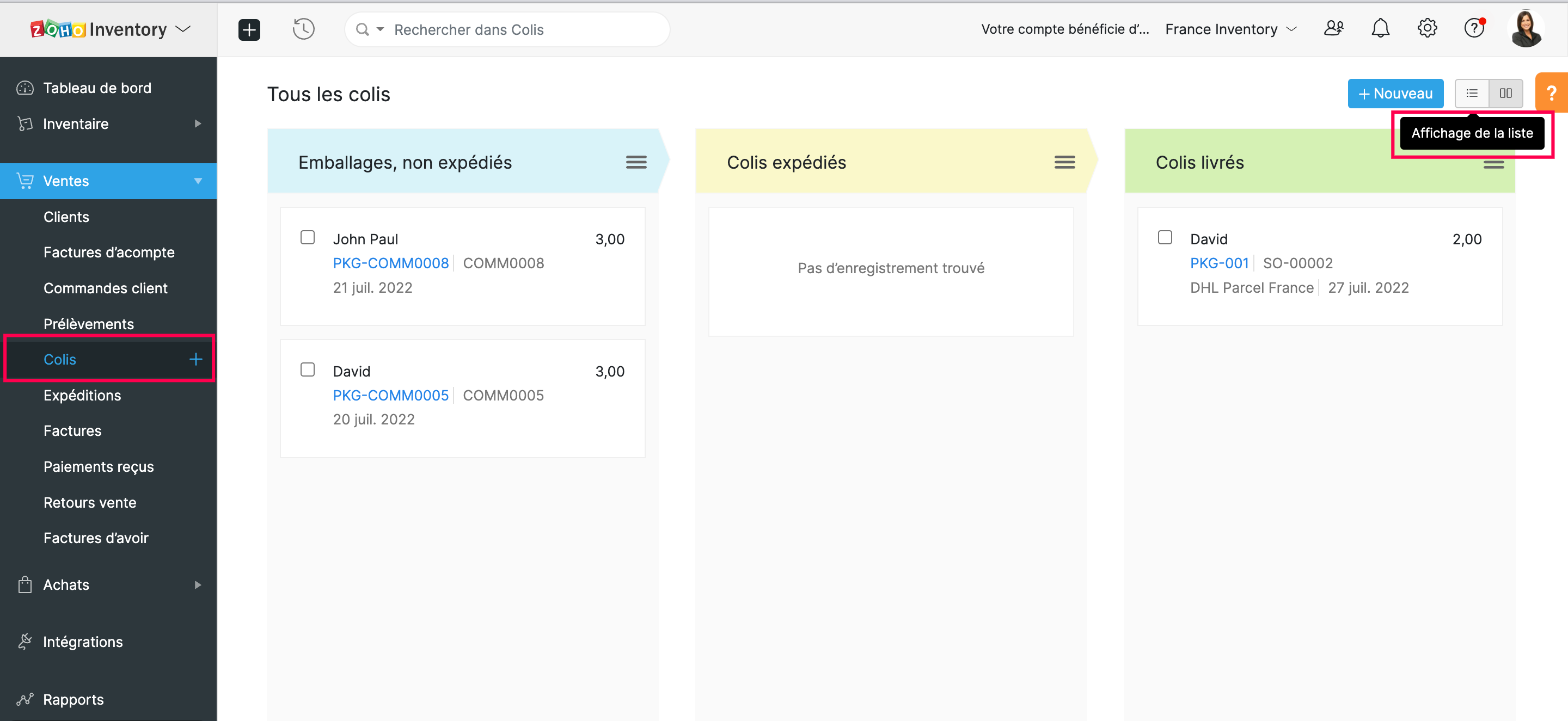

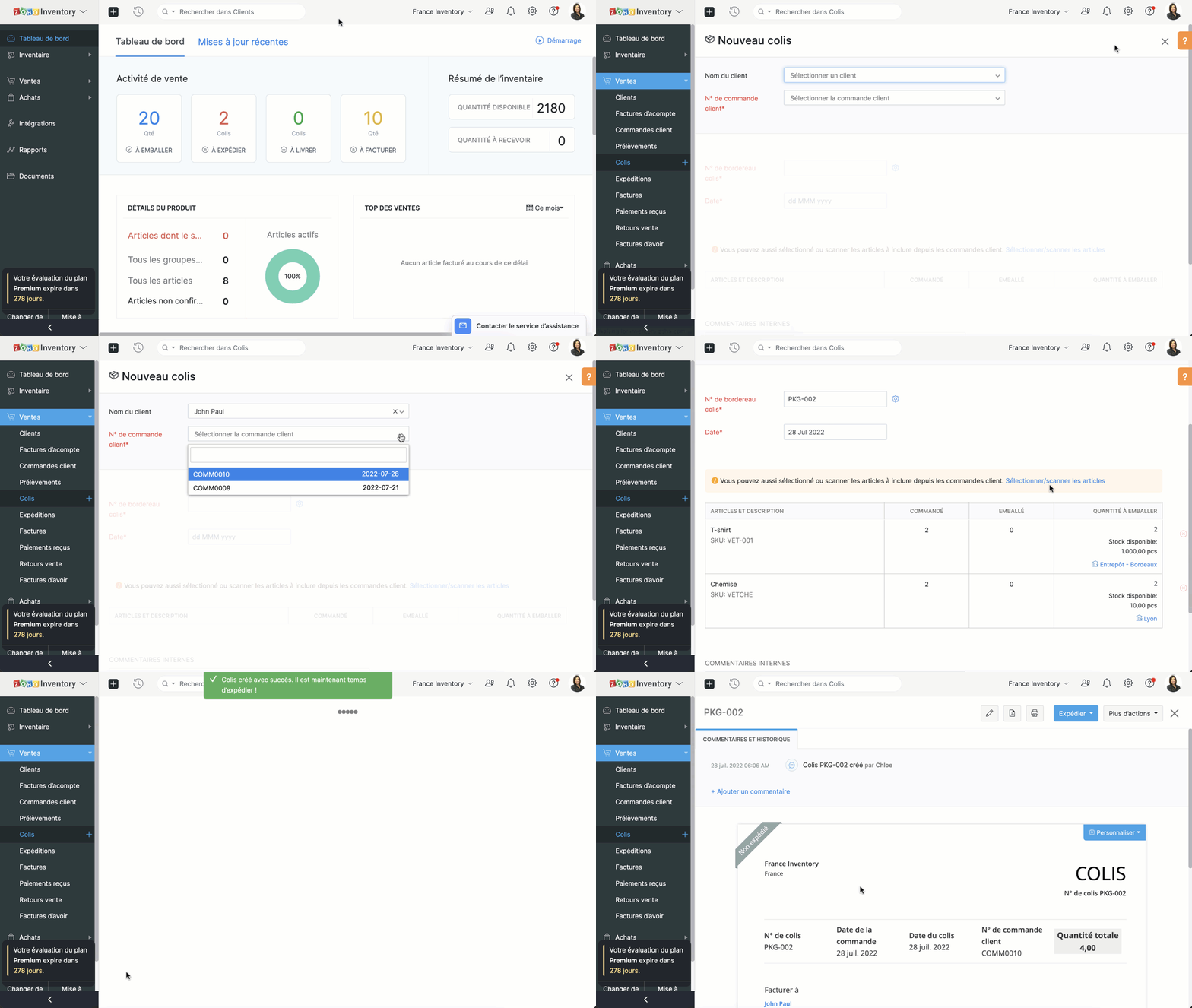
  • Pour créer un nouveau colis, sélectionnez "+ nouveau".
  • Saisissez le nom client depuis la liste déroulante.
  • Vous pouvez choisir le commende client attribué à partir de la liste déroulante. Sélectionnez pour laquelle vous souhaitez créer un package. Ainsi, tous les articles de la commande client seront automatiquement intégrés dans le nouveau colis.
  • Remarque : Il est impossible de créer un colis sans établir une commande client. Seuls ceux qui sont confirmés seront affichés dans la liste déroulante. Si la commande client est en version brouillon, convertissez-la en commande confirmée avant de créer un colis.
  • Saisissez le numéro du colis et sélectionnez la date. Par défaut, le numéro de colis est généré automatiquement. Pour personnaliser, cliquez sur "Paramètres" à côté de ce champs et sélectionnez l'option "Je les ajouterai manuellement à chaque fois".
  • Saisissez des remarques internes pour référence et enregistrez.

Méthode - 2

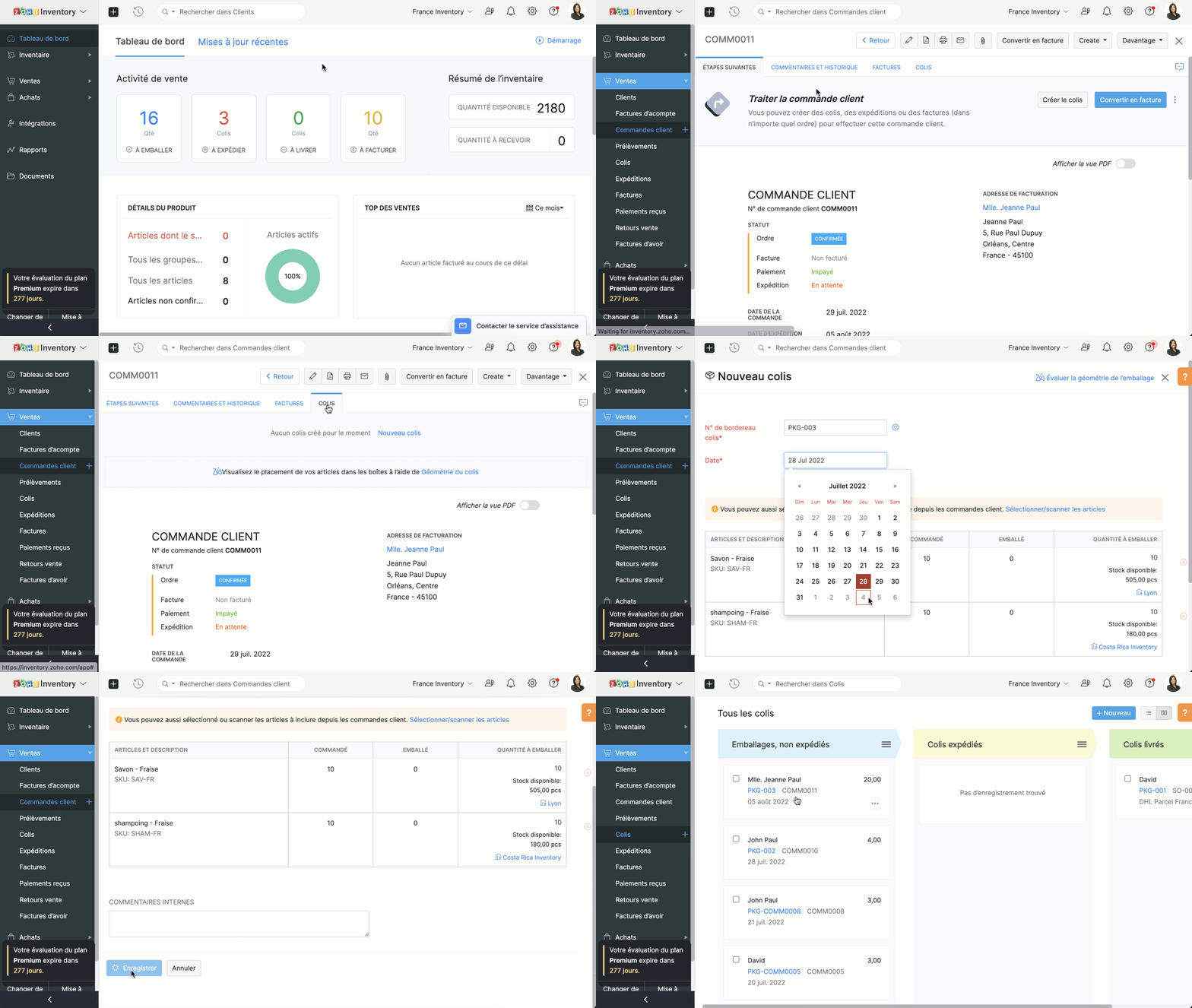
  • Créer un colis à partir d'une commande client
  • Passez à l'onglet "Commandes client" et sélectionnez pour une commande qui a des articles à emballer.
  • Sélectionnez "Nouveau Colis/ Colis".
  • Saisissez le numéro du bordereau de colis et la date d'emballage.
  • Si vous avez activé le suivi avancé des stocks, vous pouvez sélectionner les numéros de série/de lot pour les articles.
  • Passez à "Sélectionner les numéros de série / de lot sous la quantité.
  • Sélectionnez les numéros de série/ de lot des articles à emballer et enregistrez.
 

Expédition

La fonctionnalité d'expédition peut intégrer votre organisation avec une multitude de fournisseurs de services d'expédition, vous permettant d'obtenir des tarifs d'expédition, d'expédier vos marchandises emballées à votre client, de suivre vos expéditions et de gérer vos livraisons à partir de Zoho Inventory.

Conditions préalables

  • Pour les envois manuels, il suffit d'avoir un compte Zoho Inventory.
  • Pour les expéditions via un transporteur, vous devez disposer d'un compte d'expédition valide auprès du fournisseur de services d'expédition avant de configurer votre intégration avec Zoho Inventory.
  • Vous pouvez créer l'expédition uniquement pour les commandes clients mises en colis.

Créer des expéditions

  • Accéder à l'onglet "colis".
  • Sélectionnez le colis à livrer. Sous l'onglet "Expédier, choisissez parmi les différentes méthodes d'expédition - "Expédier manuellement" et "Expédier par transporteur". 
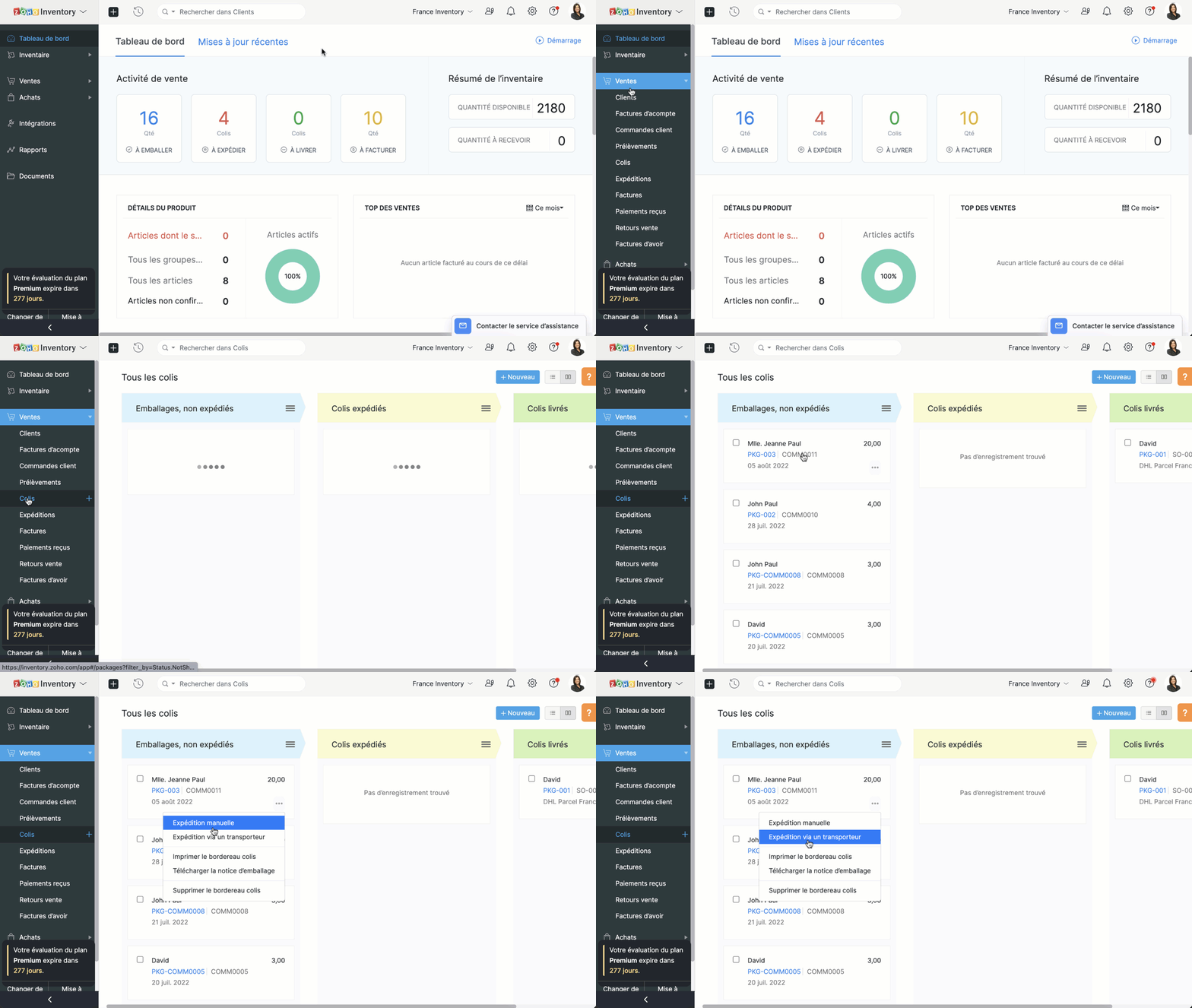

Expédier manuellement

  • Cette méthode d'expédition est utilisée souvent pour réaliser des commandes hors ligne.
  • Comme le nom indique, la plupart des informations sont saisies manuellement.
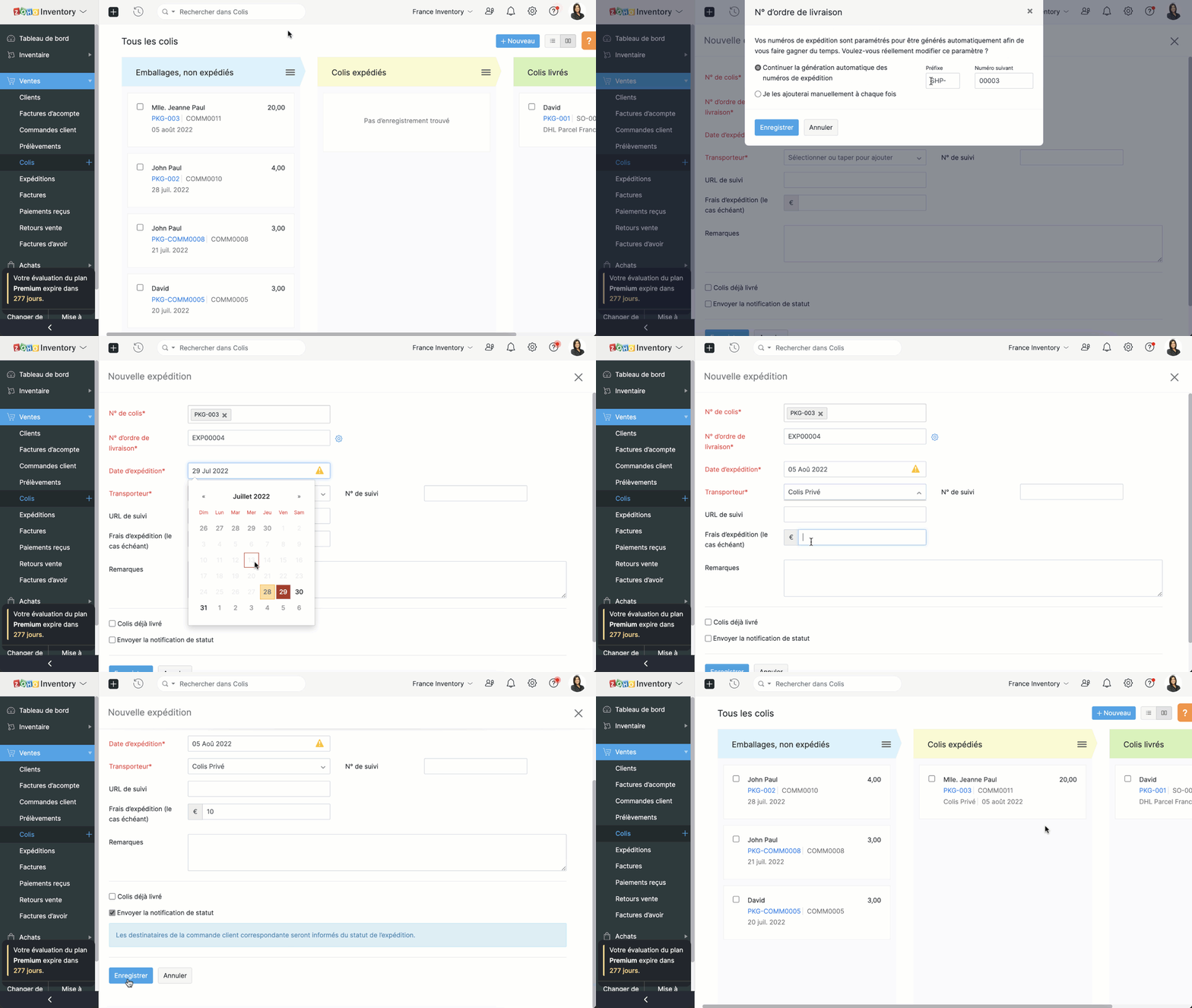

Expédier par transporteur

Lorsque vous choisissez cette méthode d'expédition;
  • Choisissez le transporteur.
  • Par défaut, l'adresse de départ sera l'adresse de votre organisation et l'adresse d'arrivée sera celle de client que vous avez enregistré dans vos contacts.
  • Enregistrez et vous passerez à la page des détails d'expéditions.
  • Dans cette section, des informations telles que la date/le jour de la livraison, les frais d'expédition de votre transporteur, la taille du colis sont ajoutées.
  • Enregistré ces informations et voici un ordre d'expédition et une étiquette d'expédition sont créés.


N'hésitez pas à poser toutes vos questions et suggestions en commentaire.

L'équipe Zoho France.


      Zoho Campaigns Resources


        • Desk Community Learning Series


        • Digest


        • Functions


        • Meetups


        • Kbase


        • Resources


        • Glossary


        • Desk Marketplace


        • MVP Corner


        • Word of the Day


        • Ask the Experts


          • Sticky Posts

          • Collaboration sans faille avec Zoho One

            Bonjour à tous, Dans cet article nous allons voir comment Zoho One permet une collaboration à différents niveaux .       La façon dont nous travaillons évolue. À mesure que les entreprises se mondialisent, la plupart des activités sont menées en équipe.

          Zoho CRM Plus Resources

            Zoho Books Resources


              Zoho Subscriptions Resources

                Zoho Projects Resources


                  Zoho Sprints Resources


                    Zoho Orchestly Resources


                      Zoho Creator Resources


                        Zoho WorkDrive Resources


                          Zoho CRM Resources

                          • CRM Community Learning Series

                            CRM Community Learning Series


                          • Tips

                            Tips

                          • Functions

                            Functions

                          • Meetups

                            Meetups

                          • Kbase

                            Kbase

                          • Resources

                            Resources

                          • Digest

                            Digest

                          • CRM Marketplace

                            CRM Marketplace

                          • MVP Corner

                            MVP Corner


                            Zoho Writer Writer

                            Get Started. Write Away!

                            Writer is a powerful online word processor, designed for collaborative work.

                              Zoho CRM コンテンツ


                                ご検討中の方

                                  • Recent Topics

                                  • Customer/Vendor Portal session duration - can it be extended?

                                    Hi all, We'd like to know how long the login session lasts for the Customer/Vendor Portal in Zoho Books, and whether there's any way to extend it (either through settings or via support/API). Right now this is causing a pretty poor experience for our
                                  • Accessible & Customizable User Governance in Zoho Projects!

                                    As teams expand and collaborate with multiple external collaborators across projects, keeping control of user access to project data becomes a challenge. Mismanaged access can cause accidental or unauthorized edits, data leaks and lack of accountability.
                                  • Bulk deleting Zoho CRM records using Deluge, COQL and CRM API

                                    Hello everyone, During CRM implementations, data cleanup is a common task, especially after testing, migrations, imports, or integration development. The Zoho CRM UI allows deleting records in batches of 100, which is not practical when dealing with thousands
                                  • CNIL - Suivi de Pixel

                                    Bonjour à tous, À la suite de la nouvelle recommandation de la CNIL sur les pixels de suivi dans les e-mails, savez-vous si Zoho Campaigns permet : de conditionner le suivi des ouvertures au consentement de chaque contact ; de proposer un lien permettant
                                  • Zoho CRM Layout Rules: Nine New Actions, Profile-Based Execution, and Interactive Preview

                                    Hello everyone, Availability: This feature is now available for customers in the JP and SA DCs. It is planned to be released for other customers in soon. We’re excited to announce powerful new enhancements to Layout Rules in Zoho CRM - a feature built
                                  • Automatically set the default VAT percentage on a quote

                                    Every time I create a quote, I have to manually adjust the VAT and activate the checkbox for 21%. But all of our quotes include 21% VAT. So now occasionally, it happens that the checkbox is forgotten, and the customer receives an incorrect quote (without
                                  • How to View Part Inventory and Warehouse Location When Creating a Work Order in Zoho FSM

                                    Hi everyone, We’re currently setting up Zoho FSM and would like to improve how our team selects parts when creating a Work Order. Right now, when we add a part or item to a Work Order, we can select it from our Zoho Inventory list but we don’t see any
                                  • Zoho Sprints - Q2 Updates for 2026

                                    Improve your agile project management experience with the newly released capabilities in Zoho Sprints. This quarter we've shipped a few new features and enhancements that are built around smarter planning and execution tools, tighter integrations, and
                                  • Problem with currency field in Zoho CRM

                                    Hi Guys Zoho Books has a feature in currency fields that automatically converts decimal numbers with commas ( , ) to period format ( . ) when pasting them. For example: R$ 2,50 --> R$ 2.50 Is this behavior available in Zoho CRM? I couldn't find any configuration
                                  • Building extensions #5: Creating custom user interfaces using widgets

                                    In our last post, we looked at connections and how they help build a seamless integration with an example. In this post, we'll explore creating widgets in Zoho Sprints and their benefits with a real-time example. Widgets What and where? Widgets are custom
                                  • Images not saved in notes

                                    Created noteboards and create a note, copy pasted the image, close the note and open again, image is not coming this same problem occurs in note on notebook I have attached the replication steps as video url to analyse it, and also attached the videos
                                  • How to Change Notecard Color After It Is Created

                                    I would like to change the color of a Notecard that already exists in my notebook. I can't for the life of me figure out how to do it. I don't see an option or color picker anywhere.
                                  • Cannot export Zoho Notebook data nor search via MCP (GDPR)

                                    Hi, I'm using Zoho Notebook for a few years now. Not as my main notetaking app, but for specific usecases I did find it handy. Now I want to export all my data. Preferably all notes in html format with metadata like note title, included images and parent
                                  • Add a MATRIX field to the forms creation

                                    Same as Zoho forms, we need a Matrix field in Zoho Creator forms, is very usefull
                                  • incoming mails not received

                                    incoming mails not received
                                  • Integrate QuickBooks with Bigin and streamline your sales and accounting!

                                    If your business relies on Bigin for customer management and QuickBooks for accounting and invoicing, this new integration is here to make your operations more efficient. By connecting these two platforms, you can now manage your CRM and financial processes
                                  • Automatically calculate and include tax on quotes

                                    I've recently been VAT registered and now need to include VAT on my quotes. I have been able to set the tax label and amount but still need to click the tax link and select the tax I wish to include before it appears on the quote. Does anyone know of
                                  • Relative Dates

                                    Is there a way to apply a Relative Date filter in DataPrep (ie. Today or Yesterday)? I need to filter a dataset to only include rows with a created date of yesterday, but I’m not finding a way to do it?
                                  • Change email addresses - Advise how

                                    Good day, I need assistance to change all our users email addresses Please advise
                                  • email signature

                                    How do you add an email signature
                                  • Email Forwarding | How to Enable and Disable Email Forwarding on a Non-Admin User Account

                                    Email Forwarding Issue: Enable and Disable Email Forwarding
                                  • Ask the Experts 31: Improving support performance with reports and dashboards

                                    Hello everyone, Join us for the next Ask the Experts (ATE) session! Ask the Experts is an opportunity to connect with people who have deep knowledge of Zoho Desk. Let's look at the topic we're focusing on this month. Just as we rely on the right tools
                                  • Zia AI capabilities now available in all paid editions

                                    Hello everyone, We are expanding the availability of AI-powered features in Desk to the other paid subscriptions from 7th July 2026. Right now, the following AI-based features are available for Enterprise edition users: Intelligence: Sentiment analysis,
                                  • Product updates in Zoho Workplace applications | June 2026

                                    Hello Workplace Community, Let’s take a look at the new features and enhancements that went live across all Workplace applications for the month of June. Zoho Mail Alphanumeric support for attachment extensions in rule conditions Attachment extension
                                  • Biggest supported size of a note

                                    I'm still testing this ZOho Notebook before purchasing a premium licence and can't work with large notes. I store personal vocabulary in two 13,000-word / 83200-character notes. Same poor experience with PC, Web, and mobile apps: Is there an application
                                  • I need help lease Email

                                    I' not getting an email replay when someone open a ticket
                                  • Sigma function call hangs forever from Desk widget — app_install_id/encapiKey are null

                                    Calling ZOHODESK.request() from the widget to invoke a Sigma DRE function URL hangs forever (never resolves, never rejects, no error) until client timeout. Tried with merge fields app_install_id={{sigmaInstallId}}/{{installationId}} and encapiKey={{enCapApiKey}}
                                  • Draft quotes, sales orders, and raise invoices for services in CRM

                                    Create Quotes, Sales Orders, and Invoices for Services in Zoho CRM You can now draft Quotes, and Sales Orders as well as raise Invoices for services in Zoho CRM. And how is that possible? By filling out the Service subform in your Quotes, Sales Orders
                                  • Error Code 2945 , PATTERN_NOT_MATCHED

                                    Hi, I am trying out Zoho Creator API.  However, I always get the following <response>     <code>2945</code>     <message>PATTERN_NOT_MATCHED</message> </response> However, error code list error as Invalid Ticket. I do not know what is wrong. 
                                  • Action Required: Allowlist New IP Ranges for the EU Data Center

                                    Dear Users, We are adding new IP ranges for the Zoho Analytics EU data center (https://analytics.zoho.eu) If you connect Zoho Analytics to cloud databases (both Live Connect and import), such as Amazon RDS, Amazon Redshift, or Microsoft Azure, you must
                                  • Is there a way to see a total of time agents spend on ticket today in Analytics?

                                    I am trying to see if there is a way to look at and add the total amount of time agent have entered into tickets in desk TODAY, like a running total, not every time entry so it would show John smith 1:55:20 total Bob smith 4:20:22 total etc
                                  • Tips & Tricks #3: Zoho CRM - Agentes en la página de inicio

                                    Hola a todos, Vuestros Agentes realizan un trabajo muy útil. Encuentran información como clientes potenciales importantes, oportunidades de venta y actualizaciones relevantes. Sin embargo, hasta ahora no era posible ver esa información directamente en
                                  • Automating CRM backup storage?

                                    Hi there, We've recently set up automatic backups for our Zoho CRM account. We were hoping that the backup functionality would not require any manual work on our end, but it seems that we are always required to download the backups ourselves, store them,
                                  • 'Pinned' notes feature of a pipeline record

                                    Hi team, Could you please implement a feature which will allow users to pin different notes so that they will appear at the very top of the notes tab in a pipeline record. Sometimes we have a wide range of notes on a record which means more important
                                  • Associate emails from both primary and secondary contacts to deal

                                    We need to associate emails from multiple contacts to a deal. Please advise how this can be achieved. At present, only emails from primary contacts can be associated. Thanks
                                  • #PitStop3: Share & Collect Payment using Zoho Invoice

                                    We have reached another milestone in our journey. Post #15 to #20 weren't just about sharing invoices, they were about building a payment workflow that works for you, your customers and your business. Here's a quick wrap of what we covered in this segment:
                                  • Suggestions for Improving the Deluge Development Experience

                                    Hello, I would like to share some ideas that could significantly improve the Deluge development experience, especially for partners and developers building larger solutions across the Zoho ecosystem. Some key areas that would add a lot of value: Deluge
                                  • Enhancement announcement: Mitigate mailbox clutter using the new field: "Sync emails from"

                                    Dear Customers, We hope you're well! We are here with a minor enhancement in email integration in Zoho CRM. Emails have become the primary mode of communication these days. Because of which mailboxes are getting overly cluttered day after day. To help
                                  • Zoho CRM Sandbox now supports integrations

                                    Hello everyone, We are now expanding Zoho CRM Sandbox to support integrations with other Zoho products. You can connect, configure, and validate the behavior of your integrated tools within a safe, isolated environment - testing end-to-end without touching
                                  • Building Toppings #8 - Using widgets to extend the Bigin UI

                                    Hello Biginners, In our previous forum post, we explored schedules and workflow functions and learned how to automate real-time and time-based actions inside a topping. In this post we'll look at how to embed custom UI components inside Bigin using widgets.
                                  • Next Page