Customize the ticket ID for enhanced ticket tracking

Customize the ticket ID for enhanced ticket tracking

Hello everyone,

Ticket IDs in Zoho Desk are the unique reference numbers that are assigned to tickets when they're created.

Agents generally use the ticket ID to locate a particular ticket and to reference a ticket in conversations and feeds. When customers know the ID of the ticket, they can use it in follow-up discussions.

Since ticket IDs act as the chief identifiers for tickets, it is imperative to keep them easy to recall. To help you do this, we're rolling out an efficacious new feature: ticket ID customization.

You can use this feature to set the ticket ID format for your organization in your help desk.

Here's a look at how you can customize the Ticket ID format:

You can change the ticket ID number (which we call the starting number) to a number greater than that of your current maximum starting number. For example, if your current maximum ticket ID is 1064, your new ticket ID can be 5001.
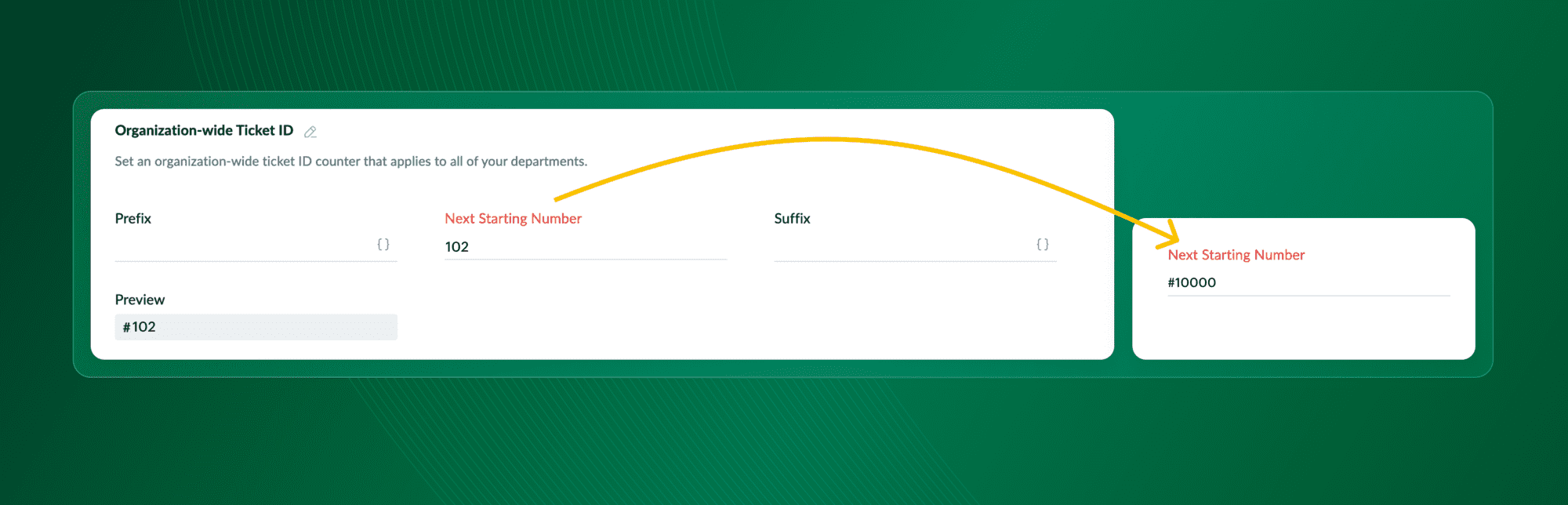


Introduce letters and symbols into the ticket ID by adding a prefix and/or suffix. Example: Reqno_5001.


Include a piece of information from the ticket in its ID using dynamic values in the prefix or suffix. Example: email_5001.


You can use the customized ticket ID format for all departments in your organization, or you can create separate ticket ID formats for each of your departments. For example, sales_5001


Here are some innovative ways in which ticket ID customization can benefit your organization:

Use it to rebrand the help desk

You can incorporate branding into the ticket ID by using your company's initials as the prefix or suffix. This will make it more recognizable to your customers.

Make ticket IDs easy to remember

Agents usually mention a ticket in a comment or feed using its ID, but when the ticket ID is just a random series of numbers it might be difficult to remember and the agent might even end up mentioning a different ticket altogether. Customizing ticket IDs with a prefix and suffix can make it easier to remember and avoid confusion.

Add more context

Using dynamic values, you can include details of the ticket, like its classification, priority, due date, and create date, in the ticket ID. Agents will be able to get pivotal information about the ticket just by looking at its ID.

Change the numbering sequence

The ticket ID of your first ticket in Zoho Desk is #101, but as you keep receiving more tickets this number will get larger. You can use ticket ID customization to change the number sequence to a simple one. The addition of a prefix and suffix ensures the Ticket ID stays unique.
Make the ticket id reflect your business processes 

A department in a help desk usually contains agents who handle specific types of customer issues. For instance, agents from the sales department are responsible for sales inquiries, while agents from the tech department are responsible for service and product-related queries. You can set up department-specific ticket IDs for each of these departments, to keep these two different types of tickets separate and organized.

Besides customization, we've also brought in two new settings that let you hide or show the ticket ID in the following places:
  • Subject line of outgoing email replies
  • Subject line of forwarded replies
Ticket ID customization is an awesome feature that can help Zoho Desk mesh seamlessly into your business processes. Please try it out and share your feedback with us!
 
Regards,
Varsha P | Zoho Desk

      Zoho Campaigns Resources


        • Desk Community Learning Series


        • Digest


        • Functions


        • Meetups


        • Kbase


        • Resources


        • Glossary


        • Desk Marketplace


        • MVP Corner


        • Word of the Day


        • Ask the Experts


          • Sticky Posts

          • 2024 Email Authentication Standards: Elevating Security with Google and Yahoo

            In contemporary email communication, email authentication plays a pivotal role in mitigating email fraud, spam, and phishing attacks. Brace yourself for a new level of security. Starting February 2024, Gmail and Yahoo will be implementing robust email
          • Using Agent Email Address as From Address

            Currently, while replying to a ticket, it is possible for agents to choose their own email addresses as 'from' addresses. Although we built this just for that little extra flexibility, in hindsight, it hasn't figured much in conventional usage.  Almost all businesses prefer that responses to their customers' tickets be sent from the common support/service email address and NOT from those of individual agents. During personal interactions at events, some of you have even made passing mentions about
          • Edit and Delete options in Comments

            A lot of teams have been using ticket comments extensively to collaborate everyday. Notification Center further improved this experience by bringing real-time updates. As we continue to build more improvements to this experience, we've shipped a small-yet-important
          • Webinar 2: Supercharged customer support for growing business

            Join us for this webinar and learn how to step up your support game using a real-time communication platform to generate happier, more successful customers. In this live webinar, we will will discuss the importance of SalesIQ for your support team and how it can help you:  Understand your customers better and their journeys to proactively support and engage them even before they ask for help.  Integrating real time conversations into Zoho Desk’s Support, providing a conversational customer service
          • Customize Colors of your Customer Self Service Portal

            You asked for it. We heard you. We're happy to roll out the most sought after feature request, Customizing the Colors of your Customer Self-service Portal. Now you can set the color of your customer portal to mimic your company's web site, so that your customers visiting the portal will not feel alienated by the default theme.  Go ahead and configure the color of the header, tabs, fonts and background according to your needs. You can either choose between default color themes like Blue, Grey, Green

          Zoho CRM Plus Resources

            Zoho Books Resources


              Zoho Subscriptions Resources

                Zoho Projects Resources


                  Zoho Sprints Resources


                    Zoho Orchestly Resources


                      Zoho Creator Resources


                        Zoho WorkDrive Resources


                          Zoho CRM Resources

                          • CRM Community Learning Series

                            CRM Community Learning Series


                          • Tips

                            Tips

                          • Functions

                            Functions

                          • Meetups

                            Meetups

                          • Kbase

                            Kbase

                          • Resources

                            Resources

                          • Digest

                            Digest

                          • CRM Marketplace

                            CRM Marketplace

                          • MVP Corner

                            MVP Corner


                            Zoho Writer Writer

                            Get Started. Write Away!

                            Writer is a powerful online word processor, designed for collaborative work.

                              Zoho CRM コンテンツ


                                ご検討中の方

                                  • Recent Topics

                                  • Subform edits don't appear in parent record timeline?

                                    Is it possible to have subform edits (like add row/delete row) appear in the Timeline for parent records? A user can edit a record, only edit the subform, and it doesn't appear in the timeline. Is there a workaround or way that we can show when a user
                                  • Script Editor not an option

                                    I am trying to apply a script to a sheet and Script Editor is not an option. I don't want to go outside Sheets to do this (like Creator) if it can be done inside Sheets.
                                  • Zoho CRM - Writing Assistant Tone

                                    Hi Zoho CRM Team, Text in my emails often gets underlined in yellow because I tend to use a more informal tone with my client's, like using "I'm" instead of "I am". Is there some way for me to tell the system that this is my preferred writing tone, so
                                  • Not able to link email text.

                                    Kindly check Zoho Sites. I am unable to turn a text into a email link. The save button does not work. Kindly try yourself to see it not responding to save.
                                  • Adding Multiple Files to a Zoho Vault Entry

                                    There is a old blog post talking about adding multiple file attachments to one Zoho Vault Secret: https://www.zoho.com/blog/vault/introducing-new-features-in-zoho-vault-powerful-password-sharing-wider-storing.html Is that still possible, I can see how
                                  • Migrate data from old to new account

                                    Hy, Have one Old Zoho Notebook Account with Data , want to migrate that whole Data to New Zoho Notebook Account which is in Zoho One . Is that possible ? If Yes then how?
                                  • Zoho Analytics Regex Support

                                    When can we expect full regex support in Zoho Analytics SQL such as REGEXP_REPLACE? Sometimes I need to clean the data and using regex functions is the easiest way to achieve this.
                                  • RTL Support for Webforms in Zoho CRM

                                    Dear Zoho CRM Support Team, We are writing to request an enhancement to the webform builder functionality within Zoho CRM. Currently, to create a webform in a right-to-left (RTL) language, the entire CRM instance must be set to RTL, which can be inconvenient
                                  • Add Custom Reports To Dashboard or Home Tab

                                    Hi there, I think it would be great to be able to add our custom reports to the Home Tab or Dashboards. Thanks! Chad
                                  • MCP > Creator connection failing with Claude

                                    I'm trying to get claude to access any of my Zoho Creator apps and it keeps failing. I have enabled all tools for creator and ensured in claude settings that everything is authorised. Here is what claude says : Unfortunately, the error messages I'm receiving
                                  • Pricing Strategies: #1 Nuances in Pricing

                                    When Clara first opened her digital printing shop, pricing was simple. She sold handmade greeting cards, planners, business cards, and other physical items at fixed label prices, individually and in bulk. One SKU, one price, one bill, and that's all it
                                  • [Free Webinar] Learning Table Series – Education Management in Zoho Creator

                                    Hello Everyone! We’re excited to invite you to another edition of Learning Table Series, where we showcase how Zoho Creator empowers industries with innovative and automated solutions. About the Learning Table Series The Learning Table Series is a free,
                                  • Channel Configuration and Default Channels

                                    There are some of the default fields that cannot be removed or changed. Examples are the social media ones, such as Facebook. It would be nice to be able to remove these fields as it would be confusing if someone selected this but it's not configure
                                  • CRM x WorkDrive: File storage for new CRM signups is now powered by WorkDrive

                                    Availability Editions: All DCs: All Release plan: Released for new signups in all DCs. It will be enabled for existing users in a phased manner in the upcoming months. Help documentation: Documents in Zoho CRM Manage folders in Documents tab Manage files
                                  • Move attachments from one module to another with Deluge

                                    I have created a button that works just like the convert button for my custom modules. I would like this custom function to move any attachments in this record to the new module. I can't seem to find any documentation on how this can be accomplished.
                                  • Help in function code

                                    Hi, could someone look at the code below and tell me what 's wrong with it? After a deal creation or edition the code should find the related Account, than all open Deals for that Account and copy the field Total_Open_Deals from the Account record to
                                  • Automation Series: Auto-update Phase Status

                                    Hello Folks! You can auto-update your phase's status based on status of underlying tasks using custom functions. In this series, we will showcase how to create and run custom functions, using Deluge, with ease. Follow the steps below and automate your
                                  • Zoho CRM for Everyone's NextGen UI Gets an Upgrade

                                    Hello Everyone We've made improvements to Zoho CRM for Everyone's Nextgen UI. These changes are the result of valuable feedback from you where we’ve focused on improving usability, providing wider screen space, and making navigation smoother so everything
                                  • Is it possible to sync data every 5–10 minutes in Zoho Analytics (CRM or Excel imports)?

                                    Hello Team, I want to know if Zoho Analytics supports near real-time syncing of data from different sources. My requirements: I am importing data from Zoho CRM → Zoho Analytics I also have some datasets maintained in Excel/CSV I want both data sources
                                  • how to add subform over sigma in the CRM

                                    my new module don't have any subform available any way to add this from sigma or from the crm
                                  • Reporting Limitation on Lead–Product Relation in Zoho CRM

                                    I noticed that Zoho CRM has a default Products related list under Leads. However, when I try to create a report for Lead–Product association, I’m facing some limitations. To fix this, I’m considering adding a multi-lookup field along with a custom related
                                  • Zoho Projects - Project Details on the Project Menu

                                    Hi Project's team, I've helped may businesses setup and use Zoho Project and one thing I see time and time again is confusion on where to find the Project Details information. I would be much more intuitive if Project Details was on the menu before Dashboard.
                                  • Zoho Projects - Add Feed to Project Tabs

                                    Hi Projects Team, I'm working on a lightweight communications requirement for one of my customers in relation to communicating with their client users via Zoho Projects. I noticed that the Feed is only available in the Collaboration section, but you can
                                  • Zoho Logs - Not seeing logs since 30 Nov

                                    Hi, we have a few functions running, I am testing some new ones and noticed that although I can see executions, I cannot see any logs, even when the first line on the functions is a log. I reviewed some existing functions, one of which is invoked on a
                                  • Flow - Fetch info from drop down in another module

                                    I am running into a road block which I thought would be a simple task. My goal - The account is assigned to a "route" which can be selected from a drop down menu and adds a tag to the account accordingly (easy enough). Now when I create a task for this
                                  • Problem with signature on zoho survey

                                    Hello, I'm trying to export individual responses with signatures on zoho survey. But the signatures on some of my surveys are not exported as the original image, but as a generic image, same for all (screen joins). Is there a solution to have the signatures
                                  • Show unsubscribed contacts ?

                                    Hello, I would like to display the unsubscribed contacts. Unfortunately, I do not have this subscription type as described in the documentation (https://help.zoho.com/portal/en/kb/marketing-automation-2-0/user-guide/contacts/contact-management/articles/subscription-type-24-1-2024#Subscription_Type_field.)
                                  • Zoho Developer Community Hackathon 2025 is LIVE!

                                    Hey developers! It’s that time of the year again — the Zoho Developer Community Hackathon 2025 is officially open for registrations! If you’ve been waiting for a chance to stretch your skills, try something new, or finally bring that idea to life, this
                                  • Converted Leads Not Showing in Lead Reports

                                    Converted leads are not showing in the Lead reports. How can I make converted leads visible in the report,
                                  • Text widgets in dashboards

                                    Having a text widget in a dashboard would help immensely. It would allow adding links to related documents, relevant CRM views, etc. It would allow adding explanations of the data displayed in the other widgets, about how to interpret them or about filtering.
                                  • Read webpage - MSXML2.ServerXMLHTTP

                                    I have the following VBA script, put together from various sources (mainly zoho forum/help/support, so it once worked, I guess): private Sub GetListOfSheets() Dim url As String Dim xmlhttp As Object Dim parameters As String Dim html As String range("B1").value
                                  • [Webinar] Zoho Writer for content creators and publishing houses

                                    Managing multiple drafts, edits, and client reviews doesn't have to slow you down. Join our upcoming webinar to see how Zoho Writer helps content creators and publishing houses create, edit, and publish seamlessly—all in one place. You'll learn how to:
                                  • Adding Reports to Portals

                                    Is there a way to add Reports to portals so only the user can see report templates relevant to them?
                                  • How to assign one Manual to multiple Spaces?

                                    Hello, I have two spaces, one called tech knowledge and the other one called HR knowledge. I have a manual that is called HR tech. I want to assign this manual to HR knowledge and tech knowledge. How should I do that?
                                  • How can I assign courses to Spaces?

                                    How can I make courses show up here in this space?:
                                  • When will Zoho Learn be able to support SCORM files on the mobile app?

                                    When I click the SCORM content, I just get a message saying it's not possible yet. Yet implies that it will be coming soon. All I'm asking for is a realistic timeline so I know whether or not to invest my time in using it. If it will be soon, then I will
                                  • Announcing new features in Trident for Windows (v.1.35.6.0)

                                    Hello Community! Trident for Windows just got better with an update that makes working with your emails even more efficient. Let’s dive into what’s new! Work with PST files more efficiently. You can now do more than just view mounted PST files. You can
                                  • Looking for best practices to import data from SAP Business One (on-prem) into Zoho Analytics via Zoho DataPrep / Databridge — daily automated schedule

                                    Hi all, I’m using SAP Business One on-prem (SQL Server / or HANA — depending on DB backend) as our ERP. I want to build a pipeline that, every morning at 9:00 AM IST: pulls transactional data (invoices, customers, products, stock, etc.) from SAP B1, loads
                                  • facing error 550 5.4.6 while sending emails

                                    Please help me fix this issue
                                  • Marketing Tip #9: Track your traffic sources

                                    Not all marketing channels work equally well. Knowing whether your visitors come from Google, Instagram, or email helps you focus on what actually drives sales. Try this today: Check your Zoho Commerce reports or connect Zoho PageSense to see your top
                                  • Next Page