Email Forwarding: Maintain business continuity

Email Forwarding: Maintain business continuity

As an administrator, ensuring uninterrupted email communication is critical when a role-based employee is unavailable due to extended leave or a temporary role change. Emails from customers, partners, and internal teams must continue to be received and addressed without compromising security or access controls. 

When this is not addressed:

  1. Important emails may go unanswered during the employee’s absence.
  2. Granting direct login access to another user poses security risks.
  3. Manually tracking or redirecting emails can lead to delays or missed messages.
  4. The organization may require a temporary solution without altering the mailbox structure.
To overcome this, administrators can configure email forwarding from the user’s mailbox through the Zoho Mail Admin Console. 

Once enabled, all incoming emails to the original user’s address are automatically forwarded to a designated mailbox. This ensures uninterrupted communication, allows timely responses, and maintains secure, controlled access while the primary user is unavailable.

Practical scenarios where Email Forwarding can be used effectively

Managing inactive or archived mailboxes
When a mailbox is no longer active but continues to receive important emails, email forwarding ensures messages reach an active user. This allows necessary action to be taken without granting full access to the old mailbox.

Ensuring continuity during role transitions or exits
When an employee leaves the organization or moves to a different role, email forwarding helps redirect incoming emails to the appropriate owner. This ensures business communication continues smoothly while responsibilities are reassigned.

Journaling and centralized archiving at org-level
In addition to the above, organizations can configure automated rules to forward copies of all incoming and outgoing emails to a central archive. This supports compliance requirements like HIPAA and GDPR by ensuring data retention for audit and disaster recovery purposes.

Steps to configure Email Forwarding from Zoho Mail Admin Console

  1. Log in to Zoho Mail Admin Console.
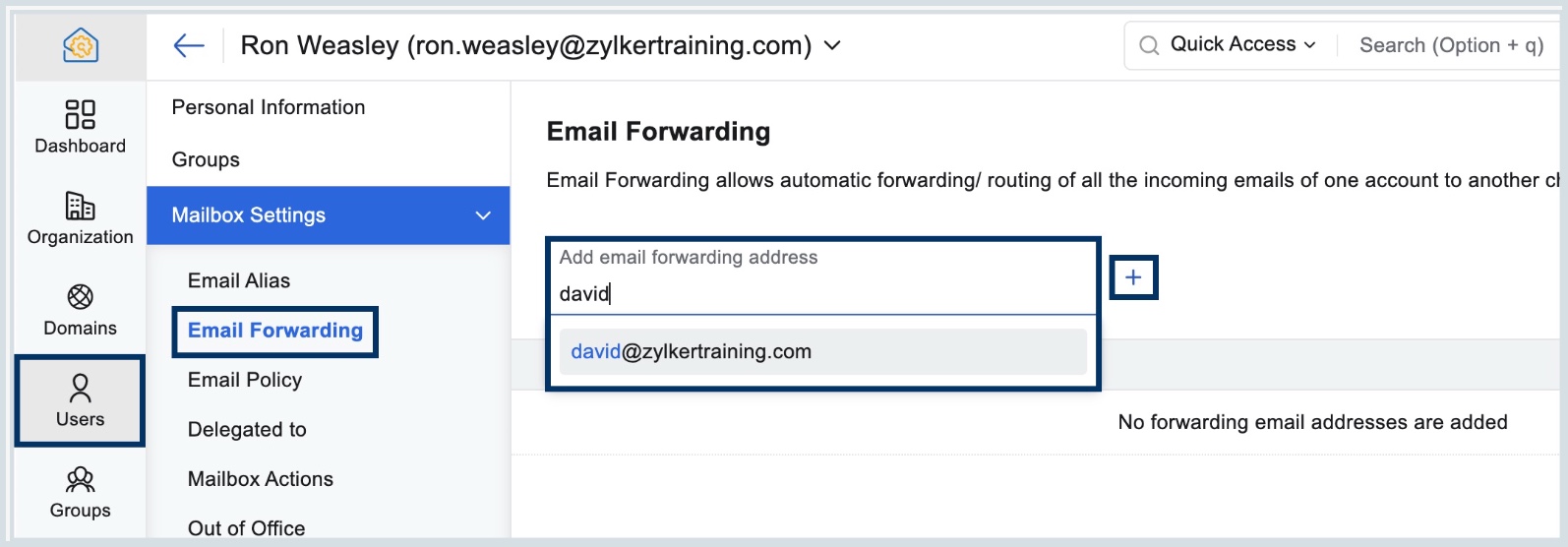
  2. Navigate to Users in the left pane, and click on the user you want to configure email forwarding.
  3. Select Mailbox Settings on the left pane and choose Email Forwarding.
  4. Enter the email address you want the user's emails to be forwarded to, and click the + button.
    Note:
    A verification process is required for external email addresses. But, verification will not be required if the email forwarding address is from within your organization.
  5. Click Add in the confirmation dialog that appears.
  6. Select Delete Zoho Mail's copy, to move the email to the primary user's Trash folder after forwarding the email.
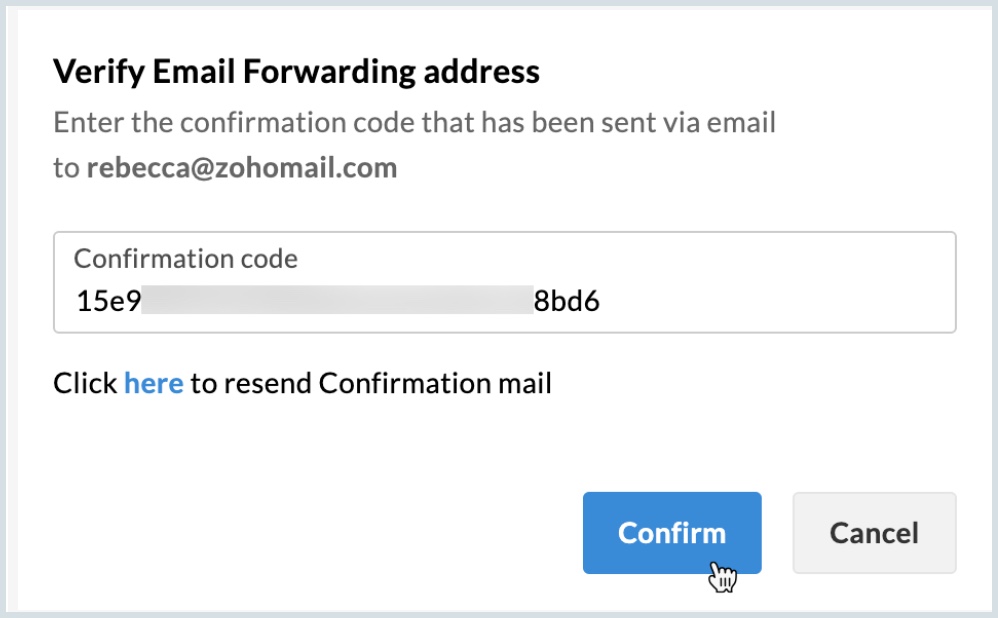
  7. If you have configured an external email address, you would have received an email with a Verification Code.
  8. Click Verify and enter the Verification Code.
  9. After entering the verification code, click Confirm.


      Zoho Campaigns Resources


        • Desk Community Learning Series


        • Digest


        • Functions


        • Meetups


        • Kbase


        • Resources


        • Glossary


        • Desk Marketplace


        • MVP Corner


        • Word of the Day


        • Ask the Experts


          • Sticky Posts

          • Managing user mailbox actions

            An organization often has users with different roles and responsibilities, such as leadership, operations, or support teams. While some users may require full access to email features, others may only need limited functionality. For example, enabling
          • Balancing access, security, and productivity with Email Policy

            An organization typically includes multiple user groups, such as leadership, sales, and support, each with different email usage patterns and security needs. Administrators must balance flexibility and control, thereby ensuring email usage aligns with
          • Mailbox delegation - A secure way to enable collaboration

            Admins often encounter scenarios where a user needs another team member to access and manage their mailbox during extended leave, role transitions, or while handling high email volumes. In such situations, ensuring business continuity without sharing
          • Email Forwarding: Maintain business continuity

            As an administrator, ensuring uninterrupted email communication is critical when a role-based employee is unavailable due to extended leave or a temporary role change. Emails from customers, partners, and internal teams must continue to be received and
          • Maintain steady traffic to your domain: How Domain Aliasing helps

            Consider this scenario: An organization has its primary domain as administrator.com. Now it wants to shorten its domain to admin.com because it's simpler and easier to remember. However, changing the domain completely can cause the following problems:

          Zoho CRM Plus Resources

            Zoho Books Resources


              Zoho Subscriptions Resources

                Zoho Projects Resources


                  Zoho Sprints Resources


                    Zoho Orchestly Resources


                      Zoho Creator Resources


                        Zoho WorkDrive Resources


                          Zoho CRM Resources

                          • CRM Community Learning Series

                            CRM Community Learning Series


                          • Tips

                            Tips

                          • Functions

                            Functions

                          • Meetups

                            Meetups

                          • Kbase

                            Kbase

                          • Resources

                            Resources

                          • Digest

                            Digest

                          • CRM Marketplace

                            CRM Marketplace

                          • MVP Corner

                            MVP Corner


                            Zoho Writer Writer

                            Get Started. Write Away!

                            Writer is a powerful online word processor, designed for collaborative work.

                              Zoho CRM コンテンツ


                                ご検討中の方

                                  • Recent Topics

                                  • Announcing Kiosk 1.1 - Customize screen titles, configure new fields & actions, use values from your Kiosk to update fields, and more.

                                    Hello all We are back again with more enhancements to Kiosk. So what's new? Enhancements made to the Components Add titles for your Kiosk screens and adjust its width to suit your viewing preferences. Three new fields can be added to your screen: Percentage,
                                  • Please can the open tasks be shown in each customer account at the top.

                                    Hi there This has happened before, where the open tasks are no longer visible at the top of the page for each customer in the CRM. They have gone missing previously and were reinstated when I asked so I think it's just after an update that this feature
                                  • Sign Out

                                    Hello, I have a doubt with Permalink. I have a view created with critera to show only the records belonging to the user who has sign in. The problem is that the different users use the same computer and some times the user login keep signed, and when I send the permalink (by email) of the view, the users enter with other login signed. Moreover the permalink view doesn�t allow to do a log out. May I add something in the permalink to request always sign in? Sorry for my English. Many thanks! Regards
                                  • Customize Sign-out Button

                                    Are there some url parameters I can use to make a form button sign-out the user from the app? The sign-out link on the top right is small. Here's and example of the url for the top right sign-out: https://creator.zoho.com/logoutpage.jsp?sharedBy=niskypto&appID=212085000006568003&appLinkName=MYAPP&signOutUrl=niskypto/MYAPP/view-login/SOMEPAGE Note: In my account, the sign-out is set to redirect users to my website. Can I also override this with some url parameters? John M. Whitney
                                  • Announcing new features in Trident for Windows (v.1.39.4.0)

                                    Hello Community! Trident for Windows just received a major update, with a range of capabilities that focuses on strengthening communication and simplifying workflows. Let’s dive into what’s new! Upload email attachments to WorkDrive. Until now, you could
                                  • Notification of Interaction Assignment

                                    If a user is assigned an interaction, they should be notified via email. These are almost useless because if I assign an interaction for someone to respond to, they dont know that I assigned it to them without me telling them or them logging in and discovering
                                  • Introducing Automatic Field Addition (Text Tags) in Zoho Sign

                                    Hello, Today we are excited to announce the general availability of automatic field addition (text tags) feature in Zoho Sign. Now, you can now add text tags in the content of your documents and Zoho Sign will automatically add the corresponding fields when they are uploaded for the signing process. For example: when you add text tags to your sales orders, new employee contracts, and NDAs, Zoho Sign will add the corresponding fields when these documents are uploaded for the signing process. If you
                                  • Option to Automatically Publish Job Openings to the Career Website via API or Workflow

                                    Currently, when creating Job Openings using the Zoho Recruit API, the records are successfully inserted into the system. However, there is no way to automatically publish these Job Openings to the Career Website. In the Job Opening field data, there are
                                  • Zoho Recruit -> Exchange Online Relay

                                    HI! I have tried to connect Recruit to our MS 365 Exchange Online without any luck. I use this guide https://help.zoho.com/portal/en/kb/recruit/outreach/email-relay/articles/email-relay-zoho-recruit#Configuring_Email_Relay_Settings Do anyone have the
                                  • Introducing Built-in Telephony in Zoho Recruit

                                    We’re excited to introduce Built-in Telephony in Zoho Recruit, designed to make recruiter–candidate communication faster, simpler, and fully traceable. These capabilities help you reduce app switching, handle inbound calls efficiently, and keep every
                                  • Write-Off multiple invoices and tax calculation

                                    Good evening, I have many invoices which are long overdue and I do not expect them to be paid. I believe I should write them off. I did some tests and I have some questions:  - I cannot find a way to write off several invoices together. How can I do that,
                                  • Splitting Transactions in Zoho Books

                                    I have read in past forum posts that the ability to split bank transactions would likely be implemented - it's definitely a typical accounting program feature.  I'm new to Zoho and thought I'd found nirvana until I realized this feature doesn't seem to
                                  • Ability to assign Invoice Ownership through Deluge in FSM

                                    Hi, As part of our process, when a service appointment is completed, we automated the creation of the invoice based on a specific business logic using Deluge. When we do that, the "Owner" of the invoice in Zoho FSM is defaulted to the SuperAdmin. This
                                  • Power up your Kiosk Studio with Real-Time Data Capture, Client Scripts & More!

                                    Hello Everyone, We’re thrilled to announce a powerful set of enhancements to Kiosk Studio in Zoho CRM. These new updates give you more flexibility, faster record handling, and real-time data capture, making your Kiosk flows smarter and more efficient
                                  • Statement Aging On Cutomer Statement

                                    Hello, Is it possible to put aging on customer statements? Current 1-30days 31-60days 61-90days 91-120days Over 120 days. See attached image from another accounting package. Many customers pay off a statement and clear older invoices.
                                  • Adding Markdown text using Zoho Desk API into the Knowledge Base

                                    Hi Zoho Community members, We currently maintain the documentation of out company in its website. This documentation is written in markdown text format and we would like to add it in Zoho Knowledge Base. Do you know if there is REST API functionality
                                  • Enhancing Zia's service with better contextual responses and article generation

                                    Hello everyone, We are enhancing Zia's Generative AI service to make your support experience smarter. Here's how: Increased accuracy with Qwen One of the key challenges in AI is delivering responses that are both contextually accurate and empathetic while
                                  • Unveiling the next iteration of Ask Zia in Zoho CRM: An all-new chat interface, conversation history, actions, and much more

                                    Your CRM assistant just leveled up. Zoho CRM's Ask Zia functionality now offers a more conversational and context-aware experience to help you not just understand your data, but act on it—all from one chat window. With its redesigned interface and expanded
                                  • Response rate and time on social media

                                    Hello, I just want to know if it's possible to manage the response rate and response time from my social media on zoho social ? I don't see any statistical reports on the online scoreboard ? Thank you in advance for your response and sorry if the question has already been posted
                                  • Whatsapp BOT with CRM

                                    Hello, how do you use Whatsapp integrations in zoho CRM?
                                  • Ability to translate Zoho CRM Kiosks

                                    Hi team, Is support for translating kiosk text and screen names in the Zoho CRM translation tool planned on the roadmap? Thanks,
                                  • Create Receipt of a Donation (not a sale)

                                    We are a non-profit organization that receives general donations. How do I create a receipt of payment for the donor and categorize the payment as a Gift? I tried the method of creating an invoice; however that automatically created a "Sales" transaction
                                  • Whatsapp Limitation Questions

                                    Good day, I would like to find out about the functionality or possibility of all the below points within the Zoho/WhatsApp integration. Will WhatsApp buttons ever be possible in the future? Will WhatsApp Re-directs to different users be possible based
                                  • Removing To or CC Addresses from Desk Ticket

                                    I was hoping i could find a way to remove unnecessary email addresses from tickets submitted via email. For example, a customer may email the support address AND others who are in the helpdesk notification group, in either the TO or CC address. This results
                                  • Editing the list of Categories in the Categorize Manually section of Banking in Zoho Books

                                    Hi, I need to create two new Categories called Withdrawals and Deposits to categorize payments in a bank account. How do I edit the Categories list?
                                  • Can I write a check in Zoho Books with no associated bill?

                                    This currently does not seem possible, and I have a client that desperately needs this function if I am able to convert them with Quickbooks. Thank you in advance for your reply. 
                                  • Income not showing in direct bank feed

                                    Hi, I am trying to enter income without knowing or mentioning customer, as i am told, my client wants single or cash basis accounting but i seriously struggling......................
                                  • Books <-> CRM synchronisation with custom Fields

                                    Hello, We are synchronising Books Customers with CRM Accounts. In CRM Accounts I set up last year a "segments" multiselect field shown below In Books, I set up a custom multi-select field with the same value as in the CRM And set up the synchronisation inside Books. Want to synchronise the Books Segments with the CRM Segments, but the later doesn't exist, and another non-existing is there ?! First, I don't understand where the field Segmentation is coming from. Second, I set CRM Segmentation to sync
                                  • Internal Fillable Contract with Zoho Writer (Before Sending to Client)

                                    Hi everyone, I’m trying to automate the following process in Zoho CRM and would appreciate some guidance. Process: When a Deal moves to a specific stage, CRM triggers an automation. CRM sends a contract template to an internal team member so they can
                                  • [Free Webinar] Intelligent document processing with Zoho RPA

                                    Hello everyone! Greetings from the Zoho RPA team! We're excited to invite you to our upcoming webinar on intelligent document processing with Zoho RPA, where we'll introduce powerful new capabilities designed to make your automation journey smarter, faster,
                                  • 401 Unauthenticated Error – Zoho CRM to Google Sheets Integration

                                    Hi I'm building an Automation Function in Zoho CRM using Deluge that appends contact data from Zoho CRM into a Google Sheet whenever a new contact is created. WHAT I'VE DONE: I created a connection in Zoho CRM (Developer Hub → Connections) with the following
                                  • Enhancements for Currencies in Zoho CRM: Automatic exchange rate updates, options to update record exchange rates, and more

                                    The multi-currency feature helps you track currencies region-wise. This can apply to Sales, CTC, or any other currency-related data. You can record amounts in a customer’s local currency, while the CRM automatically converts them to your home currency
                                  • Export Invoices to XML file

                                    Namaste! ZOHO suite of Apps is awesome and we as Partner, would like to use and implement the app´s from the Financial suite like ZOHO Invoice, but, in Portugal, we can only use certified Invoice Software and for this reason, we need to develop/customize on top of ZOHO Invoice to create an XML file with specific information and after this, go to the government and certified the software. As soon as we have for example, ZOHO CRM integrated with ZOHO Invoice up and running, our business opportunities
                                  • Preview future shift rotation in Shift Schedule

                                    Hi, What if, instead of the current behavior, the Shift Rotation feature in Zoho People allowed users to preview future shift schedules before the scheduler execution? Currently, when a shift rotation is configured (for example, monthly rotation), the
                                  • Project Management Bulletin: March, 2026

                                    We are passionate about equipping our users with efficient solutions that help them run their businesses successfully. Our collective efforts over the past 2 years have culminated in the launch of Sprints 3.0— built with reliable features, impactful integrations,
                                  • Send emails directly via Cases module

                                    Greetings all, The ability to send emails from the Cases module, which users have been eagerly anticipating, is now available, just like in the other modules. In Zoho CRM, Cases is a module specifically designed for managing support tickets. If your organization
                                  • Webinar Alert: Supercharge landing pages with data insights | Zoho LandingPage

                                    Every visitor to your landing page leaves behind valuable data, but are you leveraging it to improve conversions? Join our expert-led Landing Page Analytics webinar to learn how to track, analyze, and optimize landing page performance with Zoho LandingPage’s
                                  • How can we clear a signature field with deluge?

                                    I would like to clear a signature field in the Edit -> On Load. I have tried input.signature = ""; input.signature = null; clear input.signature; None of the above is working. is there any other way I am missing?
                                  • Bulk Deletion of Zoho Projects Using Node.js and Zoho Projects API

                                    Zoho Projects currently does not provide a built-in option to delete multiple projects in bulk from the UI. When working with testing environments or large numbers of temporary projects, deleting them one by one becomes time-consuming. To address this,
                                  • Advance Payment Record Removed When Deleting Applied Credit from Bill

                                    Hello, So while working with vendor advance payments, I noticed that removing the applied credit from a bill also removes the corresponding entry from the Payments Made section. What I did : Recorded an advance payment to a vendor through Payments Made.
                                  • Next Page