Enhancing Data Accuracy: Bot Filtering & Apple Mail Privacy Protection Compliance

Enhancing Data Accuracy: Bot Filtering & Apple Mail Privacy Protection Compliance

Dear Marketers,


The wait is over! We’re thrilled to share that the enhanced bot filtering feature is now live in Zoho Marketing Automation. Thank you for your patience as we refined this tool to deliver deeper insights into your campaign performance.


Here's a quick overview of what bot filtering means:


What are bot opens/clicks? 

Bot opens/clicks are actions performed by automated software, not humans. These programs often scan emails for security threats like viruses or malicious links. As a result, they can inflate your engagement metrics by showing multiple opens/clicks from a single contact, even if no one actually interacted with the email.


Why bot filtering matters 

Bot-generated activity can distort your campaign performance metrics. Our bot filtering feature helps you eliminate this noise, providing a more accurate picture of your audience's engagement.


Key features of bot filtering

Based on your feedback and our technical improvements, here’s how the feature has evolved:

  • Easy toggle: Enable or disable bot filtering with a simple switch in Settings > Marketing Channels> Email. Bot filtering will be enabled by default to ensure your reports prioritize reliable, human-generated engagement from the start.

  • Transparency: A visual indicator in your reports shows whether bot filtering is active, ensuring full transparency in your data analysis.

  • Reporting: Whether you enable or disable the filter, your dashboard will display two distinct metrics:

    • Reliable opens/clicks (verified engagement by individuals)

    • Bot opens/clicks (automated activity)
      This dual view offers a clearer picture of your campaign’s true performance and highlights potential discrepancies.

    • Apple MPP tracking: We’ve added visibility into Apple Mail Privacy Protection (MPP) activity. Reports now include a dedicated metric for Apple MPP opens, allowing you to analyze how privacy-focused auto-opens impact your data.


Apple Mail Privacy Protection (MPP)

Apple Mail offers users the option to enable Mail Privacy Protection (MPP), a feature designed to enhance privacy by preventing email senders from accurately tracking email opens. This feature is not enabled by default, but once activated, Apple Mail pre-loads tracking pixels—regardless of whether the recipient actually opens the email.

As a result, all emails received in Apple Mail appear as opened, leading to inflated and unreliable open rates. Since tracking pixels are triggered automatically, distinguishing between genuine user engagement and automated activity becomes challenging.

How Does Zoho Marketing Automation Address This?  

To counteract the impact of MPP, Zoho Marketing Automation provides dedicated metrics (MPP Opens) to show open rate. Using intelligent data modeling, our system delivers reliable engagement metrics, helping you assess the effectiveness of your campaigns despite Apple’s privacy changes.

Here's how to enable the bot filtering option in Zoho Marketing Automation.

Step 1: Bot filtering option
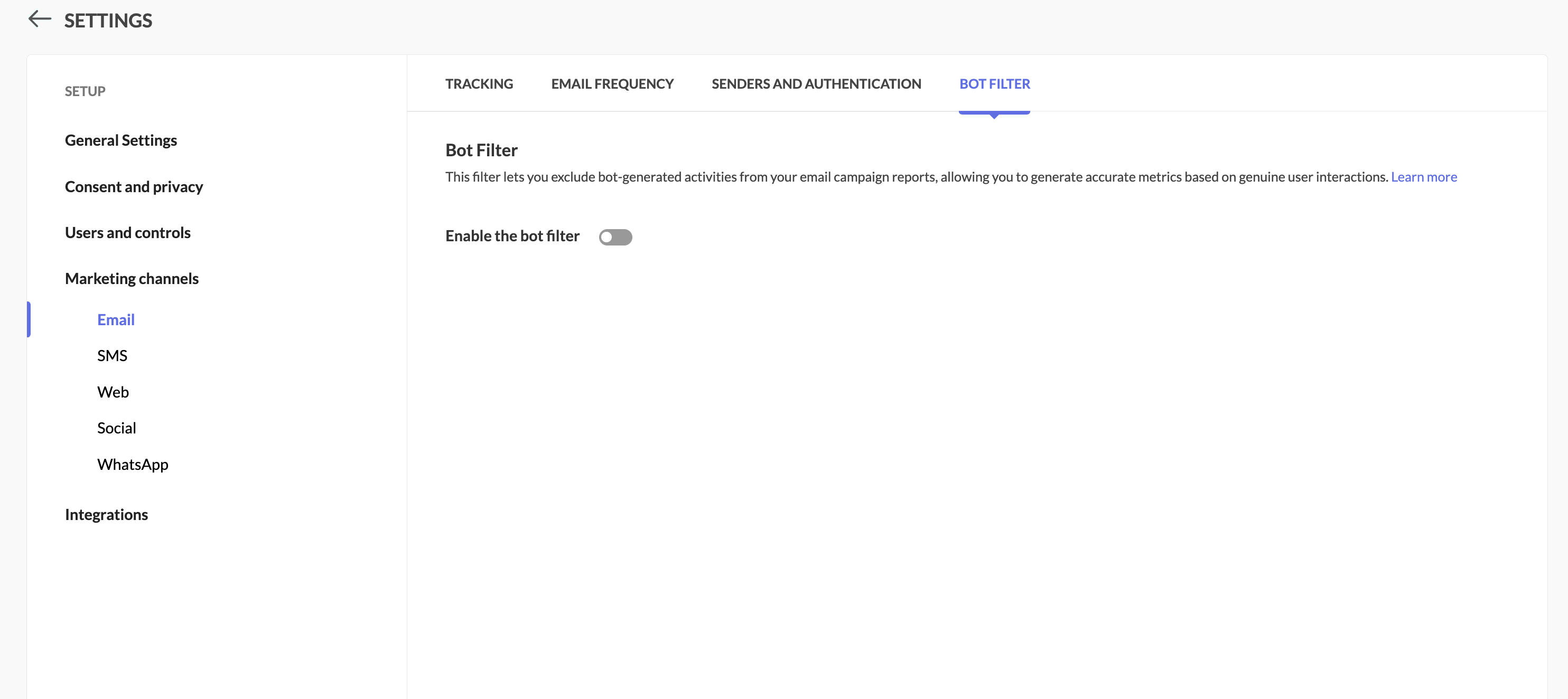
Locate the Bot Filter link under Settings > Marketing Channels.


Step 2: Toggle the bot filtering option

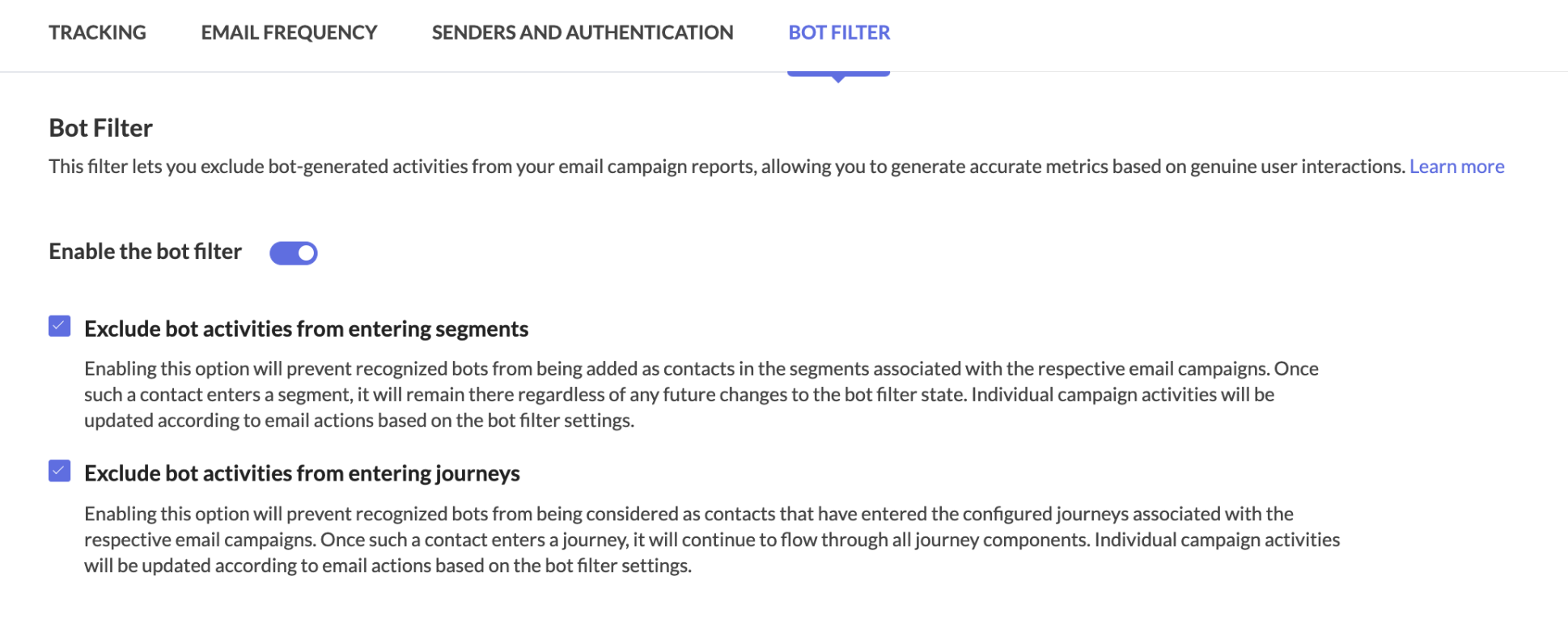
In the Bot Filter setting, you can see that bot filtering capability has been enabled for you by default.
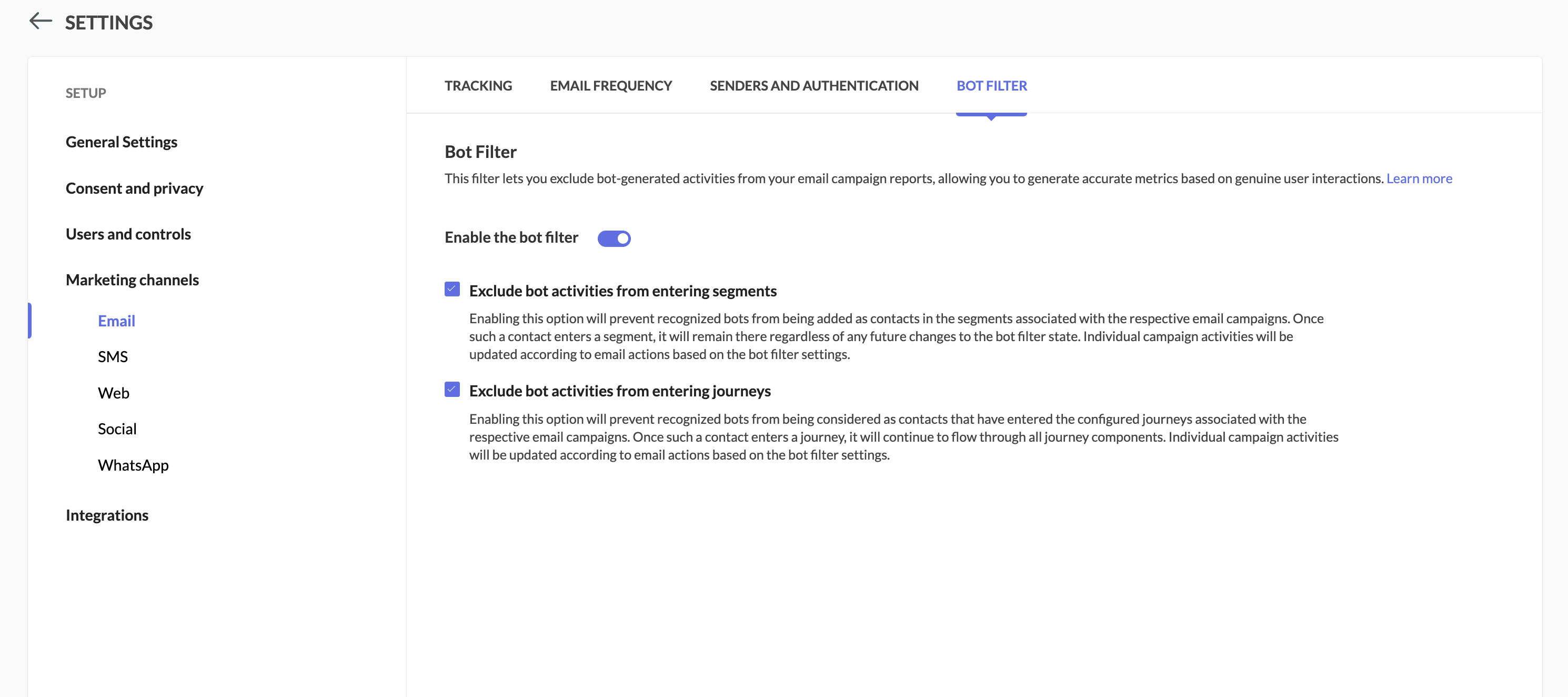


Step 3: Enable/disable the option

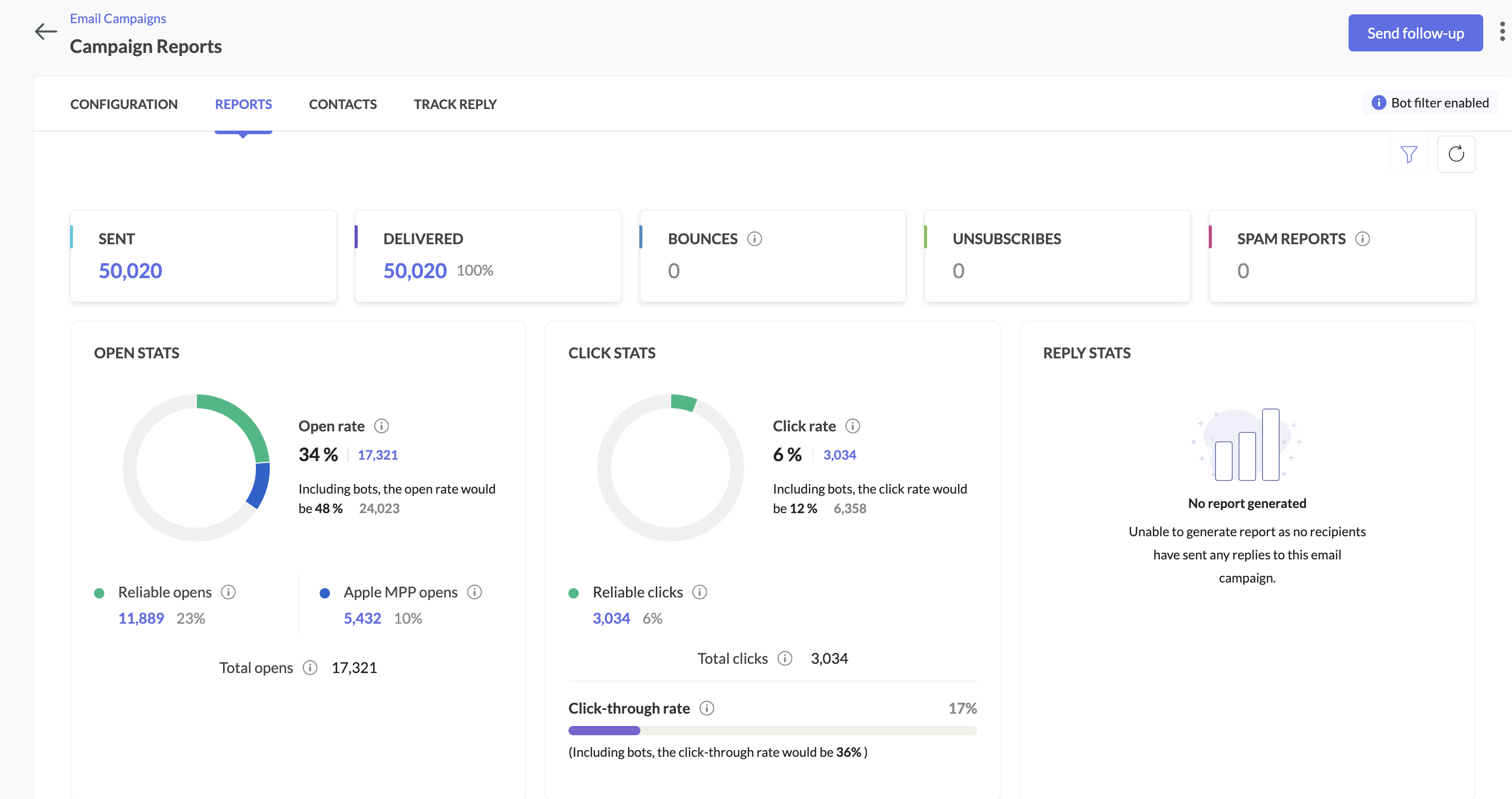
  • Filter enabled: Your primary reports will focus on human engagement, while bot activity is shown separately along with primary reports.

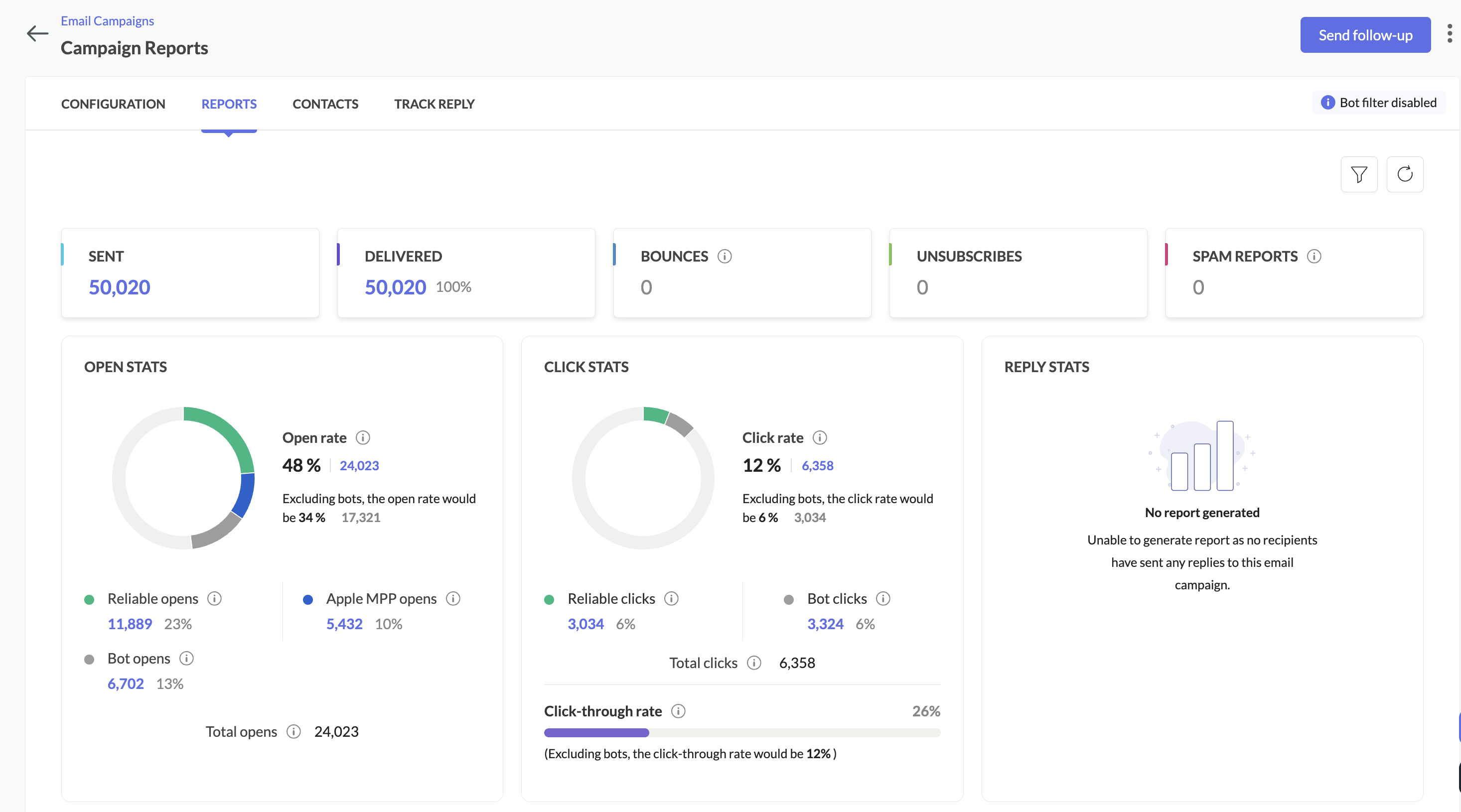
  • Filter disabled: Similar to the option above, all opens/clicks (human + bot) will be shown in main reports, with bot metrics still visible for comparison.

Here's how you can see it in the campaign reports:
When the bot filter setting is disabled


When the bot filter setting is enabled


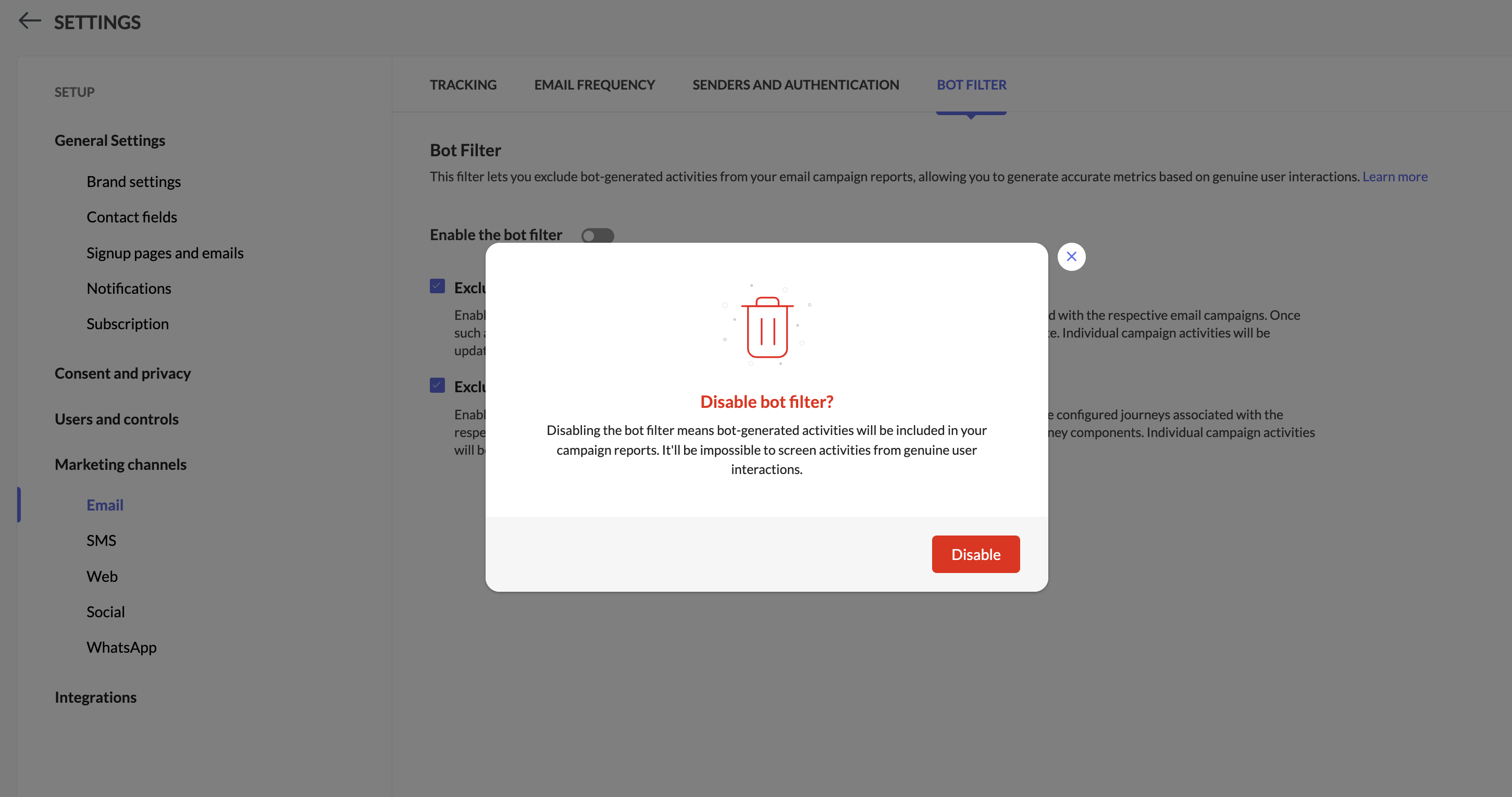
Step 4: Pop-up confirmation to disable bot filtering

You'll see a pop-up while disabling bot filtering.


Info
Notes:

  • While disabling bot filter, users will be prompted whether to allow bots to enter segments or workflows based on which follow-up actions will be triggered.
 

  1. The Apple MPP opens will be part of segments and workflows by default.

  2. Campaigns executed from 6th Feb 2025 will be shown the new reports along with reliable opens, Unreliable opens, and bot opens. Existing campaign reports won't be impacted by this change.

  3. We have introduced new filters within the contacts section in the campaigns report to analyze both reliable opens and bot opens.

  4. Bot engagement metrics will be available now while exporting campaign reports.

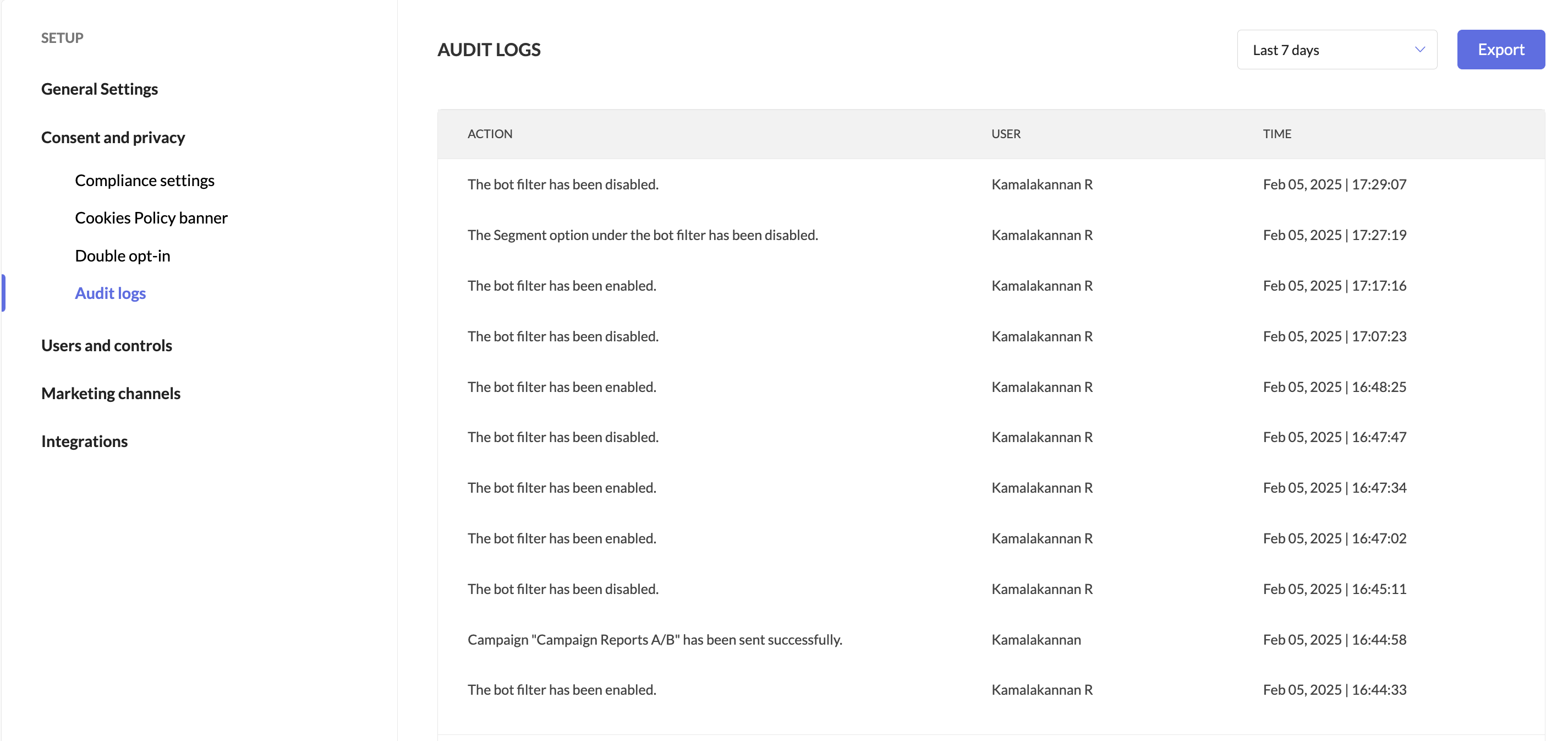
  5. Users can track when the bot filter was enabled or disabled by accessing Audit Logs.


We're here to help

We’re confident this balanced approach will help you optimize campaigns with greater precision. Give it a try, and let us know how it works for you!


Happy marketing!

Best regards,
Zoho Marketing Automation

      Zoho Campaigns Resources


        • Desk Community Learning Series


        • Digest


        • Functions


        • Meetups


        • Kbase


        • Resources


        • Glossary


        • Desk Marketplace


        • MVP Corner


        • Word of the Day


        • Ask the Experts


          • Sticky Posts

          • Marketer’s Space - Automating CRM Actions with Journeys – Part 2

            Hello marketers! Welcome back to another post in Marketer’s Space. In our previous post, we explored how CRM actions in Journeys help marketing and sales teams work together by nurturing CRM leads and pushing only engaged prospects back to sales. If you
          • Introducing automation and utility conversations in WhatsApp marketing

            We’re excited to announce the addition of two new features to our WhatsApp integration: Automation and Utility conversations. These enhancements will allow you to streamline your marketing efforts and engage with your customers more effectively by automating
          • Tip of the week 02 - The art of 'seeing' your leads

            What's the last page that your lead visited before signing up for your brand? What was the page that first convinced your lead to explore more about you? Where are your leads coming in from? Well, these are some perennial questions today's marketers live upon. And, knowing the answers to these questions is crucial, considering the vitality of leads in every business. In the journey of finding lead opportunities, it's important to understand that every detail about a lead is useful. While the channels
          • Zoho Marketing Automation Update: Topics, Contacts, and List Management

            At Zoho Marketing Automation, our highest priority is making it easier for you to use our product to accomplish your business goals. With that in mind, we are updating three of our pivotal features: Topic, Contacts, and List Management.   These existing
          • Important: Zoho MarketingHub is now Zoho Marketing Automation

            Hello Everyone,   We hope you all are doing well. We'd like to notify you that we have rebranded Zoho MarketingHub to Zoho Marketing Automation. We'll discontinue using the term "MarketingHub" from May 26, 2021. However, there will be no changes in the

          Zoho CRM Plus Resources

            Zoho Books Resources


              Zoho Subscriptions Resources

                Zoho Projects Resources


                  Zoho Sprints Resources


                    Zoho Orchestly Resources


                      Zoho Creator Resources


                        Zoho WorkDrive Resources


                          Zoho CRM Resources

                          • CRM Community Learning Series

                            CRM Community Learning Series


                          • Tips

                            Tips

                          • Functions

                            Functions

                          • Meetups

                            Meetups

                          • Kbase

                            Kbase

                          • Resources

                            Resources

                          • Digest

                            Digest

                          • CRM Marketplace

                            CRM Marketplace

                          • MVP Corner

                            MVP Corner


                            Zoho Writer Writer

                            Get Started. Write Away!

                            Writer is a powerful online word processor, designed for collaborative work.

                              Zoho CRM コンテンツ


                                ご検討中の方

                                  • Recent Topics

                                  • Push conversation to operator in guided conversations

                                    I really would like to push the conversation to an operator from a specific deppartment in guided conversations, just like Zobot in sales iq. It would help a lot. For me it does not make sense to use sales iq for messenger, instagram and others, because
                                  • Lost the ability to sort by ticket owner

                                    Hi all, in the last week or so, we have lost the ability to sort tickets by Ticket Owner. Unlike the other columns which we can hover over and click on to sort, Ticket Owner is no longer clickable. Is it just us, or are other customers seeing this too?
                                  • Zero Customer Support

                                    I have been a paying customer on Zoho Mail Premium, which clearly advertises a 40MB attachment limit. However, for a long time now, I have been experiencing ongoing issues sending PDF attachments over 10MB. Instead of sending properly as attachments,
                                  • Unable to send message;Reason:554 5.1.8

                                    Dear Zoho Support Team, I have attempted to send multiple documents in several different ZIP files containing PDF and Word documents. Initially, I received the following notification: “When Office 365 tried to send your message, the receiving email server
                                  • SOLVED - Unsubscribe Feedback Page inexplicably presenting in French, German, etc. not default language of English

                                    As the titles says, had the "Unsubscribe Feedback Page" for two different clients presenting the feedback options to unsubscribers in French, German, etc., not in English like it should. And no, it wasn't due to user preferences, embedded web translators,
                                  • Identify and clean hard bounce lists in Automation 2.0

                                    Hello. 1. I want to know how I can identify hard bounces in the lists I created to clean them before sending an email, given that the bounce rate has increased and it is necessary to clean the lists. 2. How can I exclude hard bounces and invalid emails
                                  • Catalyst DB is insufficient for many use cases

                                    Hi all: I've been diving deep on full stack application development inside Zoho Catalyst. I've been using catalyst for serverless compute and API gateway for a few years, but I haven't used the DB beyond simple storing of app data. As I was working through
                                  • Customise Lead Source and Sub Lead Source per webinar

                                    We have an integration between Zoho Meeting and Zoho CRM. New leads are imported into CRM but now they all have the source "Zoho Webinar". Can I change this source? Can I add a sub source? And can I customize these fields per webinar? (So different webinars
                                  • Can I use 24 hour time format in Zoho Social

                                    Can I use 24 hour time format in Zoho Social? AM/PM is annoying, backwards – and leads to errors in posting time…
                                  • Transfer Ownership of Documents

                                    In an organization, a person moves from one team to another or decides to leave his / her current post. He may have files / folders that are important and confidential, and needs to be transferred to another member in the organization. Zoho Docs lets you Transfer Ownership of document / folder from one member to another in a few clicks. This action has to be performed by the administrator. Just follow these simple steps to transfer the ownership of your documents / folders: In the top right corner
                                  • How to change column headings in pivot table?

                                    Hi, Is there a way to rename the column headers of a pivot table? Now some the columns are named with value labels: 'SUM of .....'. We would like to rename those headers. As of now we couldn't find any direct solution to adjust the headers, besides copying and reformat. We want to avoid these extra steps. Best, Tiemen
                                  • Native QuickBooks integration for Zoho CRM: Connecting sales and finance

                                    Greetings, I hope all of you are doing well. We're excited to announce Zoho CRM's integration with QuickBooks Web, which is designed to synchronize your CRM data with your QuickBooks accounting records and bridge the gap between sales and finance. This
                                  • Report/All Entries Filter Contains to support multiple values

                                    Hi, I use different fields to filter All Entries before Export, one is the Added Email ID (May soon replace with the new Logged in User Name Field!!), and I want to filter for more than one person, so select "Contains", but I try with a comma seperating
                                  • Marketing Tip #32: Improve SEO and customer confidence with an FAQ section

                                    Before making a purchase, customers often have simple questions about delivery times, returns, product usage, or sizing. If they can’t quickly find answers, they may leave your store without buying. Adding a clear FAQ (Frequently Asked Questions) section
                                  • Zobot with Plugs

                                    Hello, I am having a problem with Zobot using Plugs. Here is my current flow: When I run the flow, I should immediately see the messages from the initial cards (Send Message cards), then after running the plug, and finally, see the messages after the
                                  • Zoho Creator é para você? Saiba quando escolher (e quando não escolher) essa plataforma

                                    Todo mês alguém me pergunta: "Leandro, vale a pena usar o Zoho Creator para o meu projeto?" A resposta honesta é: depende. E neste artigo vou te dar os critérios reais que uso para tomar essa decisão — sem marketing, sem generalização. O que é Zoho Creator,
                                  • Control Fields on Mobile App

                                    On the mobile app, how do we control which fields appear on the screen for records that have a related list? In the example below I want the Inspection Stage and Inspection Type fields to appear, not the record owner (Dev Admin). I changed the Inspections
                                  • Show Zoho Marketing Automation Messages in SalesIQ Chat

                                    When the same number is used in Zoho Marketing Automation and SalesIQ, campaign messages should be visible inside the SalesIQ chat. Currently, when customers reply to marketing campaign messages, SalesIQ chat owners get confused because they cannot see
                                  • SalesIQ Chat Owner to CRM Lead Owner Mapping

                                    There is no proper mapping between the SalesIQ chat owner and the CRM lead owner. When a chat is assigned to an agent, the lead created in CRM is often assigned to a different user, forcing admins to manually change ownership every time. This creates
                                  • [Webinar] Agentic AI and its influence on analytics and autonomous decision-making

                                    Analytics is evolving from passive reporting to proactive, intelligent systems. Agentic AI is at the center of this shift, bringing context-aware reasoning, continuous learning, and the ability to act on data in real time. Join this webinar with Michael
                                  • Zoho One: books and inventory working together

                                    Hi, I was very pleased when I saw that in Zoho Inventory can now pull the orders from Woocommerce. They are now fed in Inventory as Sales order and with choosing convert invoice as Instant Invoice I am getting the exact data as they appear in Woocommerce.
                                  • Zoho Forms - Form Availability Redirect Option

                                    Hi Forms Team, It would be great if there was a redirect URL option on the Form Availability settings. For example, I would like to create a support form which is only available outside business hours and if the current data and time is not Mon-Fri 9-5
                                  • VAT and Taxes option not available

                                    Dear ZOHO Team , The VAT and Taxes options in my ZOHO books account not available,I tried to find how to enable or check the way to use this option but unfortunately couldn't find it anywhere ,I'm in UAE ,kindly let me know what to do to solve this issue
                                  • Syncing zoho books into zoho crm

                                    I was wondering how I can use zoho books in crm as I have been using them separately and would like to sync the two. Is this possible and if so, how? Thanks
                                  • Client requests I submit invoices using bill.com

                                    The title states it all. I have a reoccurring invoice setup for this client who has been manually paying by credit card. We are both experiencing merchant costs/fees. The use of bill.com's direct deposit is not far removed from Zoho's, only the client
                                  • Zoho Inventory Feature Roadmap Visible To All

                                    Hello, please consider making your feature roadmap visible to us users so that we know what to expect in future. This may appease current users who are seeking clarification on feature implementation dates, so that they can make an informed decision whether
                                  • Can't Remove Payment Gateway

                                    I am getting the error "Settings cannot be cleared as some of the transactions are still in progress." when trying to remove the PayGate payment gateway which I was unable to get working. I am now using paystack and I want to remove Paygate.
                                  • New in WorkDrive: Personalize your file system with Labels

                                    Data is the driving force behind every decision made by businesses today. We at WorkDrive know every employee needs reliable access to their information and be able to locate the data they need at the right time.  Introducing Labels: organize your files in a way that's personal to you.  While WorkDrive's Data Templates feature focuses on adding structure to your organization's data, Labels help your team members classify files based on their preference. The Labels created will appear only to the
                                  • Custom Buttons & Links Now Supported in Portals

                                    We’ve just made portals in Zoho Recruit more powerful and customizable than ever! You can now bring the power of Custom Buttons and Links to your Candidate, Client, Vendor, and Custom Portals, enabling portal users to take direct action without recruiter
                                  • Work Type Section in Field Service Settings

                                    Hello Team, We are trying to understand how skills are managed in the system. During our review, we found an article mentioning a section called Work Type, which is used to manage skill assignment. According to the documentation, this section should be
                                  • Mirror Component in Zoho CRM: Access real-time related data without leaving your record

                                    Hi everyone, This feature is now available for the JP, CA, SA, UAE, and AU DCs. We're excited to bring to you Zoho CRM's mirror component, which presents relevant data on a record's details page and keeps everything users need in one place without having
                                  • Clone a Module??

                                    I am giong to repurpose the Vendors module but would like to have a separate but very similar module for another group of contacts called Buyers. I have already repurposed Contacts to Sellers. Is it possible to clone (make a duplicate) module of Vendors
                                  • Is there lead tracking in Bigin? There should be.

                                    Is there a way to track leads before they are ready to be added to Pipelines? I'm afraid we're going to lose opportunities. Example: We're sending out small batches of 25 emails to those we collected at tradeshows. They are all qualified leads. Out of
                                  • How to get static reports via Desk API

                                    Hello, we are hoping to use the Desk API to automatically export the default static reports in Zoho Desk, or reconstruct them via other API calls. What's the best way to do this? For example, if I want to recreate the Response Time static report via the
                                  • Product updates in Zoho Workplace applications | April 2026

                                    Hello Workplace Community, Let’s take a look at the new features and enhancements that went live across all Workplace applications for the month of April. Zoho Mail Enhance group member exports with additional data fields Customize your group member exports
                                  • Billing Status Update

                                    Hello Latha, I’m working on a new automation (deluge) to fulfill one of our requirements. In this automation, there is a step to update the Work Order billing status from “Not Yet Invoiced” to “Non-Billable.” I tried to find the API information relevant
                                  • Zoho Projects Coming to CRM Teamspaces

                                    Availability: The US DC Standard Edition is now available. It will be rolled out to customer accounts in all DCs in phased manner. Hello all, You are probably already familiar with Teamspaces, the dedicated workspaces where teams organize the CRM modules
                                  • Zoho Projects Roadshows 2026 - APAC

                                    Dear Users, Building on the amazing response to our roadshows in 2025, we are excited to announce our next set of roadshows in the APAC region. To start with, our team of experts will conduct these events in Singapore and Manila. They will walk you through
                                  • how do i add more than one google my business location?

                                    they are connected to one account, but while connecting social channels it makes me pick one location. I have 3 and growing.
                                  • Notes - Reaction Buttons

                                    Using the native notes option within CRM is fine, it works and the RTF features are great, however, would it be possible - if there isnt already something in place, where we can add a reactions button, similar to teams/whatsapp to show that its been read
                                  • Next Page