Function #20: Custom calculation in item table of invoices

Function #20: Custom calculation in item table of invoices

When you create an invoice in Zoho Books, the 'Amount' of a line item is typically calculated as the product of the "Quantity" and the "Rate" of the item. For instance, if an item has a sales rate of $50 and a quantity of 5 is sold, then the amount would be calculated as follows: 
Amount = Quantity * Rate = $5 * $50 = $250.

There may be scenarios where you'd need to include a third variable to arrive at the item amount. Let's take the example of a rental business where you lend equipments and charge customers based on the duration of usage. In this case, the computation for the Amount field should be as follows:
Amount = Duration * Quantity of equipment lent * Rate.
For instance, if you rented out 2 pieces of equipment for 5 days at the rate of $10 per day, the amount should be calculated as 5 * 2 * $10=$100. 

In cases when you need to include a third variable for calculation, you can use today's custom function. We're providing you with a sample script that you can adjust to fit your specific requirements.

Prerequisites: 

1. Create a Connection named "zbooks" to successfully execute the function. You can watch the GIF attached below to know how to create the connection. 
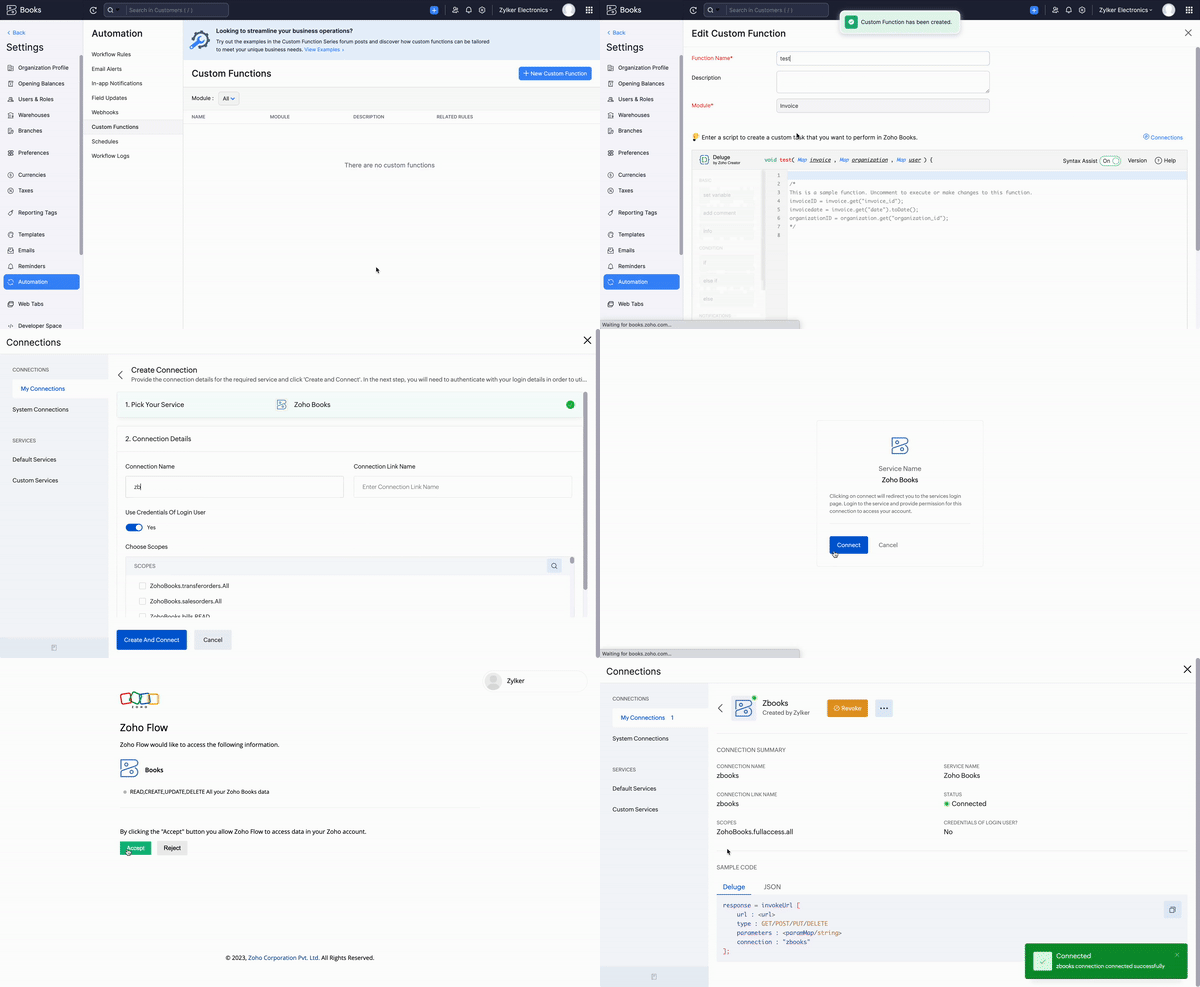


2. Create the third variable (Days in this example) as an item-level custom field to be displayed in the sales transactions. You can check the GIF below for the steps. 


3. Similarly, create another custom field called " Unit Rate" to be displayed in the item table. The purpose of this custom field is to store the original sales rate of the line item. 


Custom Function:

Navigate to Settings -> Automation -> Custom Functions -> +New Custom Function > Add the function code from this GitHub link.
 
Workflow Rule: 
 
Go to Settings -> Automation -> Workflow Rules -> +New Workflow Rule and set up the workflow rule as shown below:-

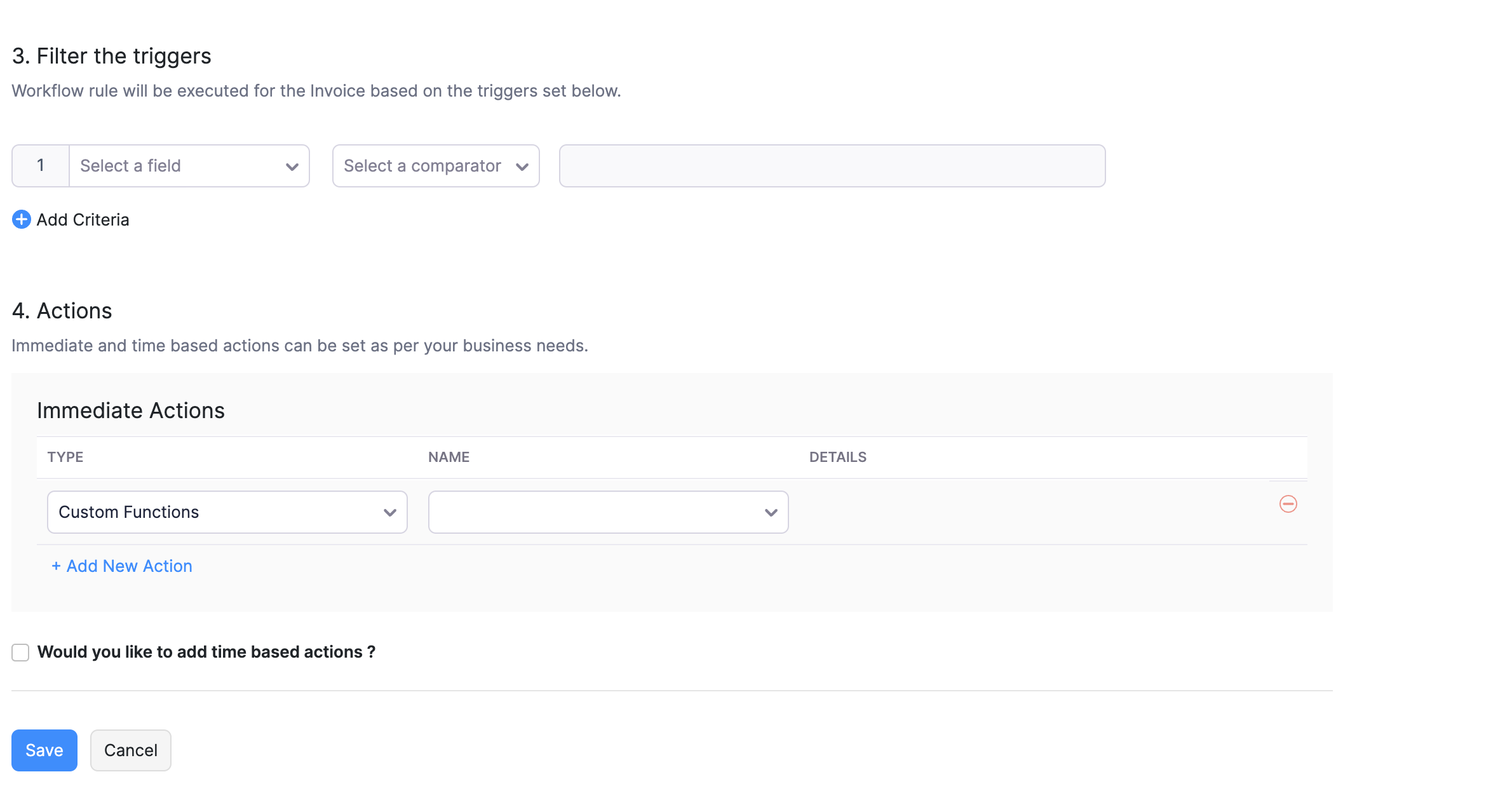


In the final step of this workflow rule, associate the custom function you created and then hit Save.

Here's how the function will work:

The custom function will be executed once the invoice is saved. Initially, it copies the original sales rate to the Unit Rate (Custom) field. Then, it multiplies Days * Unit Rate and populates the result in the Rate (Default) field. Following this, Zoho Books performs the calculation of Rate (Default field) * Quantity and fills the result in the Amount field.

Note: If you wish to hide the "Rate" - default field at the template level, go to Settings > Templates > Invoices > Edit > Table > Disable the checkbox for Rate field > Save. Now the invoice templates will only display the Unit Rate (Custom field), Third variable field (Days), Quantity field, and their resultant in the Amount field.


Should you require any help in tailoring this function to better suit your requirements, don't hesitate to reach out to us at support[at]zohobooks[dot]com. We will be happy to assist you!

Regards,
Shireen Farhana S
Zoho Books


      Zoho Campaigns Resources


        • Desk Community Learning Series


        • Digest


        • Functions


        • Meetups


        • Kbase


        • Resources


        • Glossary


        • Desk Marketplace


        • MVP Corner


        • Word of the Day


        • Ask the Experts


          Zoho CRM Plus Resources

            Zoho Books Resources


              Zoho Subscriptions Resources

                Zoho Projects Resources


                  Zoho Sprints Resources


                    Zoho Orchestly Resources


                      Zoho Creator Resources


                        Zoho WorkDrive Resources


                          Zoho CRM Resources

                          • CRM Community Learning Series

                            CRM Community Learning Series


                          • Tips

                            Tips

                          • Functions

                            Functions

                          • Meetups

                            Meetups

                          • Kbase

                            Kbase

                          • Resources

                            Resources

                          • Digest

                            Digest

                          • CRM Marketplace

                            CRM Marketplace

                          • MVP Corner

                            MVP Corner


                            Zoho Writer Writer

                            Get Started. Write Away!

                            Writer is a powerful online word processor, designed for collaborative work.

                              Zoho CRM コンテンツ


                                ご検討中の方

                                  • Recent Topics

                                  • Marketing Tip #26: Optimize product images for SEO

                                    Product images can do more than make your store look good. They can also help customers discover your products through search. Since search engines can’t "see" images, they rely on text signals to understand what an image is about. Two small actions make
                                  • Does Zoho Creator support multilingual translation for user-entered data?

                                    I understand that Zoho Creator provides localization support for UI elements such as field labels and static text. I would like to know: Does Zoho Creator support automatic translation of user-entered data (for example, form inputs or stored records)
                                  • Clone a Module??

                                    I am giong to repurpose the Vendors module but would like to have a separate but very similar module for another group of contacts called Buyers. I have already repurposed Contacts to Sellers. Is it possible to clone (make a duplicate) module of Vendors
                                  • [Webinar] Solving business challenges: Secure, real-time, and external collaboration

                                    Hi Zoho Writer users, We are excited to announce Zoho Writer's webinar for March 2026: Solving business challenges: Secure, real-time, and external collaboration. Zoho Writer supports real-time collaboration by allowing teams to work together in documents.
                                  • Realtime Translations of Video via OnAir

                                    It would be an amazing feature to have a drop down selector in the On Air video area for attendees to select a language to convert the original language to.
                                  • can change deal colors in bigin?

                                    can be super useful if we can change colors deals process any way to do it?
                                  • You have reached the maximum limit of bank accounts that can be connected to Zoho Books through token.

                                    I can no longer connect to my bank account to download transactions into Zoho Books. I egt the error message: "You have reached the maximum limit of bank accounts that can be connected to Zoho Books through token. To connect more accounts, write to us
                                  • Assign emails to lead

                                    I have some contacts who refers leads but there is no away to manually assign emails to lead.   
                                  • How to let club members update their own profile data

                                    Our club has about 200 members. We keep names, addresses, phones, emails, payment records, etc. for each, recently migrated to Creator. Once a year I send email to each member to confirm or correct their info on file with us, as well as ask for payment
                                  • Separate Items & Services

                                    Hi, please separate items and services into different categories. Thank you
                                  • Can I import MSG files into Microsoft 365 without Outlook?

                                    Yes, absolutely. You do not need Outlook installed to import MSG files into Microsoft 365. Aryson MSG file Converter is a dedicated tool that eliminates the Outlook dependency entirely, making the migration process simple and efficient for all users.
                                  • Print Sales Orders, Purchase Orders or Invoices from API

                                    Hello, Is it possible to use the print option that is available in Sales Orders Purchase Orders and Invoices with the API?. I don't see any information in the docs about this. Thanks
                                  • Connectivity issues with Google Calendar and third-party integrations

                                    Description: We are currently experiencing a critical failure with Zoho CRM third-party connections. This issue is heavily affecting our primary workflow. Symptoms: Sync Failure: Existing Zoho CRM to Google Calendar connections have been failing for approximately
                                  • How are you syncing CRM, Inventory & orders in Zoho without issues?

                                    Hi everyone, While working with Zoho One, I noticed syncing CRM, Inventory, and orders can get tricky as operations grow. Issues I’ve seen: Inventory mismatches Delayed order updates Too much manual intervention For those using Zoho at scale — How are
                                  • Auto-sync field of lookup value

                                    This feature has been requested many times in the discussion Field of Lookup Announcement and this post aims to track it separately. At the moment the value of a 'field of lookup' is a snapshot but once the parent lookup field is updated the values diverge.
                                  • Specifying time increments on a Date/Time field

                                    Hi all, Im using a Date/Time field in my CRM module. At the moment the increments are 30 minutes. How can I change these to be 15 minutes? Thanks
                                  • Push Forms to CRM

                                    Hello, I created a Form but forgot to integrate to CRM before many of the Forms were filled out. Is it possible to push those entries to CRM or should I just export a CSV then upload to CRM?
                                  • Better use of contacts

                                    Zoho inventory has the ability to add multiple contacts to customers. However Zoho inventory doesn't currently provide a way to link a contact to objects like sales orders. This means that while you can tell what company has placed a sales order you can't
                                  • Layout Adjustment.

                                    Hello Latha, Hope you are doing well. I wanted to check with you about adjusting the layout columns in the Service Report from the backend, as currently there is no capability for us to customize the layout from our end. Below is the output that I am
                                  • Looking for Guidance on Building a Zoho Website

                                    I'm exploring the possibility of building a custom website with specific features using Zoho as an alternative platform. My goal is to create something similar to https://gtasandresapk.com , with the same kind of functionality and user experience. I'd
                                  • Invoice emails repeatedly "Bounced back" from perfectly good email address of clients.

                                    Hi For a couple of months now I am getting tens of invoice email invoices "bounced back" from perfectly sound email addresses when they are sent via Zoho Books. (see attached or an example) (the common theme seems to be that the emails are going to either
                                  • Newby Questions - Vendors, Customers, and Income vs. Other Income Clarifications

                                    Q1. For Deposits, there does not seem to be an option for "Income". "Other Income" is an option however. What is the process to add the option to assign a deposit to type "Income"? Q2. In many cases Vendors and Customer are the same. Vendors may purchase
                                  • yodlee bank fees

                                    My bank feeds have been pretty much error-free until this recent Yodlee update.  I have configured it as per the information however nothing comes through. It says that bank feeds have been refreshed as of 30th June, 2022. It is the end of the financial
                                  • Deleting, Adding and Changing a Zoho Books Entry

                                    Zoho Books Community & Support, If a bulk upload of entries were added to an account, what is the process to: - Delete an entry - Change the amount of an entry - Is there a means to manually add an entry other than upload?
                                  • Create Item group from a composite Item

                                    I have applied my mind for hours but cannot figure this out. Can you have a composite item in an item group?. E.g. We bundle different color and size SKU's together as composite items. Also Using composite items as Bill of Materials. We want to create
                                  • Amazon.in FBA multiple warehouse integration with Zoho Inventory

                                    My organisation subscribed to Zoho One looking at the opportunity to integrate Amazon.in with Inventory. But during the configuration, we understood the integration has severe limitations when it involves multiple warehouses in the same Organisation.
                                  • Feature Request - Make Available "Alias Name" Field In Item List View

                                    Hi Zoho Inventory Team, I have noticed that the "Alias Name" field does not appear on the list of selectable columns in the Customise Columns feature in the Items module. This would be very useful to see for businesses who are using the Alias Name field
                                  • Feature Request - Option To Hide Default System Fields on Items

                                    Hi Zoho Inventory Team, As far as I know it is not possible to hid some of the defult system fields on Items, such as UPC, MPN, EAN, ISBN. A good use case is that in many cases ISBN is not relevant and it would be an improved user experience if we could
                                  • OpenAPI Specs are just plain wrong

                                    The provided yml files for generating the OpenAPI specs are absolutely riddled with errors and inconsistencies. From missing fields on the objects, to just incorrectly named resource objects. I'm having to go through and manually changing the spec to
                                  • Zoho Inventory - Composite Items - Assembly - Single Line Item Quantity of One

                                    Hi Zoho Inventory Team, Please consider relaxing the system rules which prevent an assembly items from consisting of a single line item and outputting a quantity of 1. A client I'm currently working with sells cosmetics and offers testers of their products
                                  • Categorize Items with Item Headers

                                    Hello customers, Did you ever want to classify items based on specific categories to help your customers understand your invoice better? With the new Item Header feature, you can easily categorize items in your invoices and estimates and give them a common title.  Item Headers are available in the Invoices, the Recurring Invoices and the Estimates module. It can be carried forward from estimates to invoices at the time of converting the estimates.  To add an item header: Go to the Estimates, Invoices
                                  • What is a realistic turnaround time for account review for ZeptoMail?

                                    On signing up it said 2-3 business days. I am on business-day 6 and have had zero contact of any kind. No follow-up questions, no approval or decline. Attempts to "leave a message" or use the "Contact Us" form have just vanished without a trace. It still
                                  • Zoho Creator Developer Console | Improved Distribution and Lifecycle Management for apps

                                    Hello everyone, We're excited to introduce new enhancements now in the Zoho Creator Developer Console. These updates strengthen private app distribution through licensing controls and extend environment support across all installed apps, helping teams
                                  • Logged out

                                    Hi, just been working on a sheet when a pop up box appeared telling me I'm going to be logged out in x number of seconds and if I reload I may lose any edits, or words to that effect. It did indeed log me out and I did indeed lose my last edits. Any idea
                                  • 554 5.1.1 – Mail sending blocked for the domain(s): [gmail.com]

                                    Here's your corrected text: Hello, I hope you are doing well. I was unable to send a message and received the following error: "554 5.1.1 – Mail sending blocked for the domain(s): [gmail.com]" I tried to send and deliver an email but got this error. I
                                  • Can you import projects into Zoho Projects yet?

                                    I see some very old posts asking about importing project records into Zoho Projects. But I can't find anything up to date about the topic. Has this functionality been added? Importing tasks is helpful. But we do have a project where importing projects
                                  • Upload field on tasks module

                                    Hello, Why I cannot add an upload field to a Task? Or maybe when creating the task make attachements visible, so you can add an attachement while creating the task? Looking forward to your response!
                                  • First Name in Mail

                                    While sending a mail/message to the user, I want only the first name to be displayed—for example: “Hi John” instead of the full name using "Hi ${Name_Field}"
                                  • Add Reauthentication Option for Zoho Bug Tracker Integration in Zoho Desk

                                    Hello Zoho Desk Team, We hope you're doing well. We would like to request an enhancement to the Zoho Bug Tracker integration within Zoho Desk. Current Limitation: At the moment, there is no option to reauthenticate the Zoho Bug Tracker integration in
                                  • Newby Questions

                                    Q1. The top bar of Zoho Books has a "Search in Banking (/) " field. What is the proper use of this text box? - Searching for Amazon for example has no results but there are transactions. - Is the search case sensitive? - Are regular expressions allowed?
                                  • Next Page