Gestion de suivi des expéditions
Gestion de suivi des expéditions


Le suivi des expéditions est un élément indispensable à une gestion réussie de la chaîne d'approvisionnement. Aussi bien le fournisseur que le client peuvent bénéficier de la transparence et de la responsabilité apportées par le système ; ce dernier fournit des informations sur la localisation des commandes tout au long du processus d'expédition et de livraison.

Avantages du suivi des expéditions pour votre entreprise :

Il ne fait aucun doute que le suivi des expéditions ne peut qu'améliorer votre chaîne d'approvisionnement, notamment grâce à une meilleure visibilité. Au-delà de la visibilité, un logiciel de suivi va :
  • Limiter les tickets de support client.
  • Vous rassurer sur la traçabilité de vos expéditions lorsqu'elles sortent de votre entrepôt.
  • Réduire le nombre de clients mécontents de la livraison de leur colis.
  • Identifier les possibilités de réduire les coûts en optimisant les parcours.
  • Fournir une preuve de livraison à des fins comptables.
  • Intégrer le système d'e-commerce pour centraliser les processus.

Avantages pour vos clients du suivi des expéditions :

À l'autre bout du processus d'expédition, vos clients bénéficient de :
  • La possibilité de tracer leur colis à tout moment de la journée.
  • Notifications instantanées sur l'état d'avancement de l'expédition de leur colis.
  • L'expérience positive des acheteurs avec votre entreprise.
  • La preuve de livraison à des fins d'archivage.

Suivi des expéditions avec Zoho Inventory

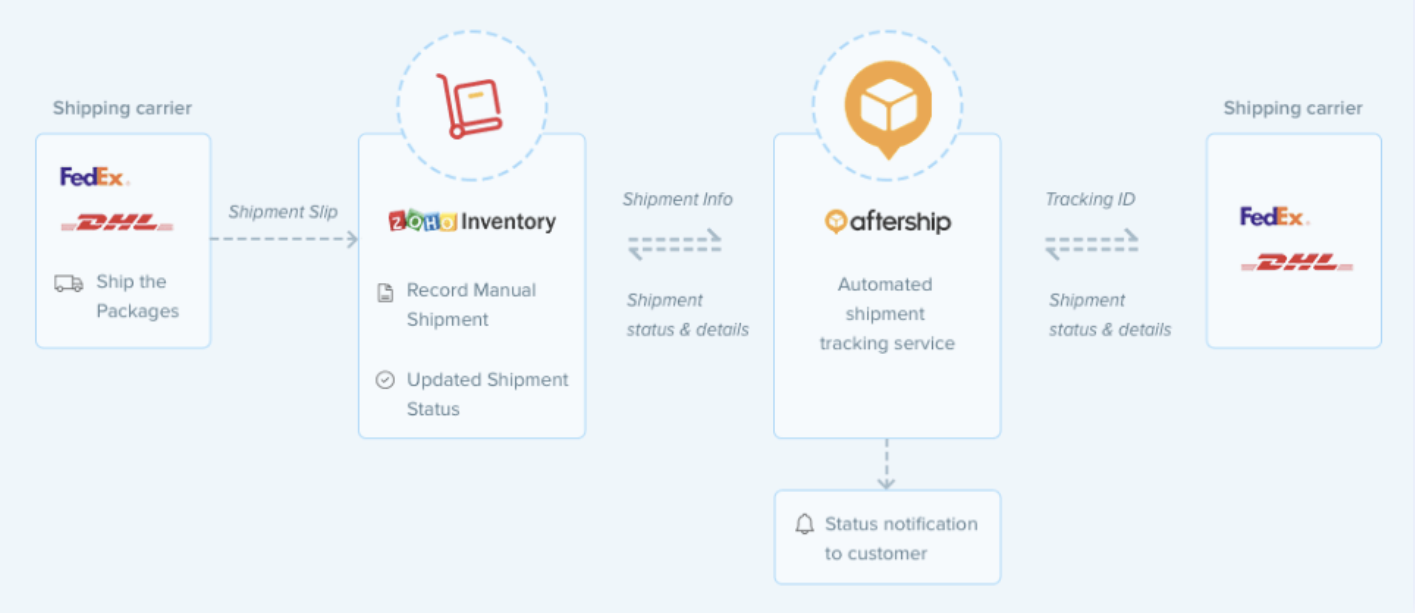
AfterShip est un service tiers de suivi des expéditions qui s'intègre à Zoho Inventory pour récupérer et mettre à jour le statut en temps réel de vos expéditions auprès des transporteurs. Cette fonctionnalité de Zoho Inventory peut être utilisée pour suivre les ordres de transfert, les expéditions manuelles et les réceptions d'achats. 

Avantages de l'intégration avec AfterShip :

  • Support du suivi de plus de 400 expéditeurs internationaux dans le monde entier.
  • L'expéditeur et le destinataire sont informés de l'état de la livraison par e-mail ou SMS.
  • Récupération et mise à jour le statut de la livraison dans Zoho Inventory en temps réel.

Comment fonctionne l'intégration d'AfterShip

  • Une fois que vous avez activé le suivi en temps réel de votre transaction, AfterShip transmet l'ID de suivi au transporteur approprié qui reçoit le statut de la livraison et le met à jour dans Zoho Inventory.
  • En même temps, il notifie vos clients par e-mail et par SMS de la position de leur livraison.

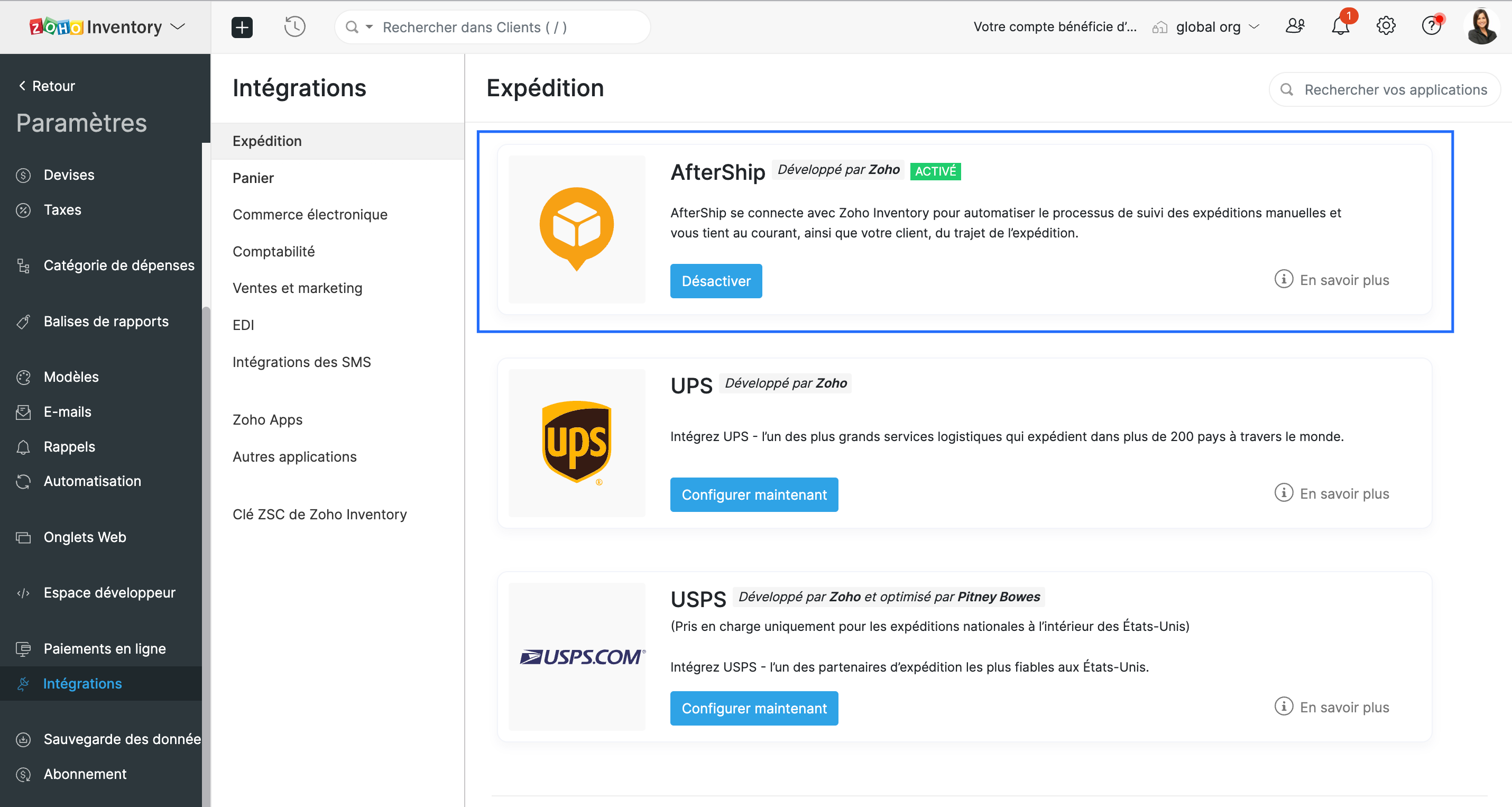
Configurer l'intégration

  • Accédez à Paramètres >> Intégrations >> Expédition

Suivre la livraison

  • Sélectionnez une commande client confirmée.
  • Passez à Créer >> Expédition >> Expédition manuelle. Une nouvelle page d'expédition s'affiche.
  • Cochez l'option "Suivre cet envoi en temps réel". Cette option fait apparaître tous les transporteurs professionnels supportés par AfterShip. 
  • Sélectionnez le fournisseur approprié et saisissez l'identifiant de suivi qu'il vous a fourni.
  • Indiquez les coordonnées du client auquel les notifications de statut doivent être envoyées, enregistrez.
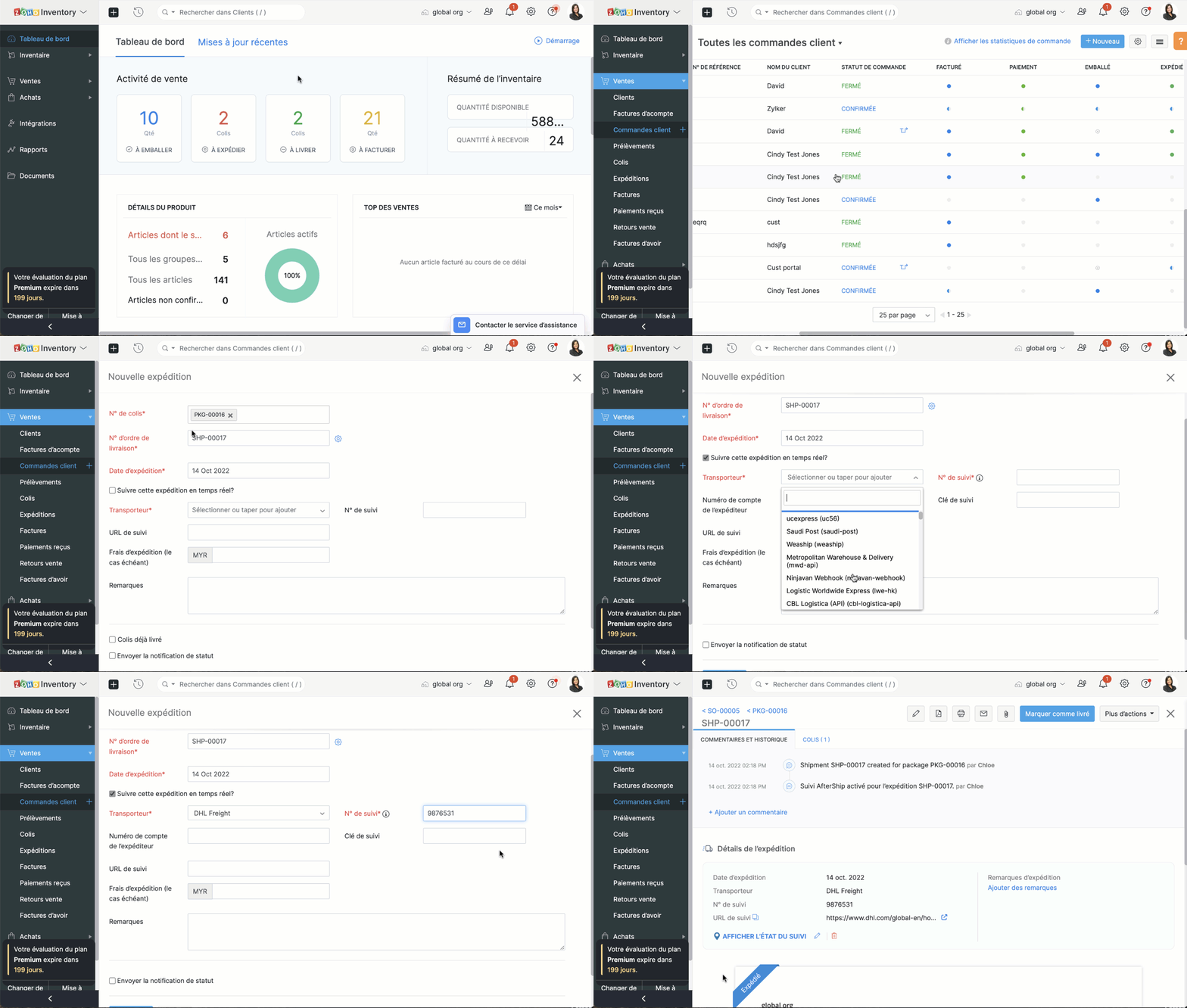


Consulter l'état de l'envoi

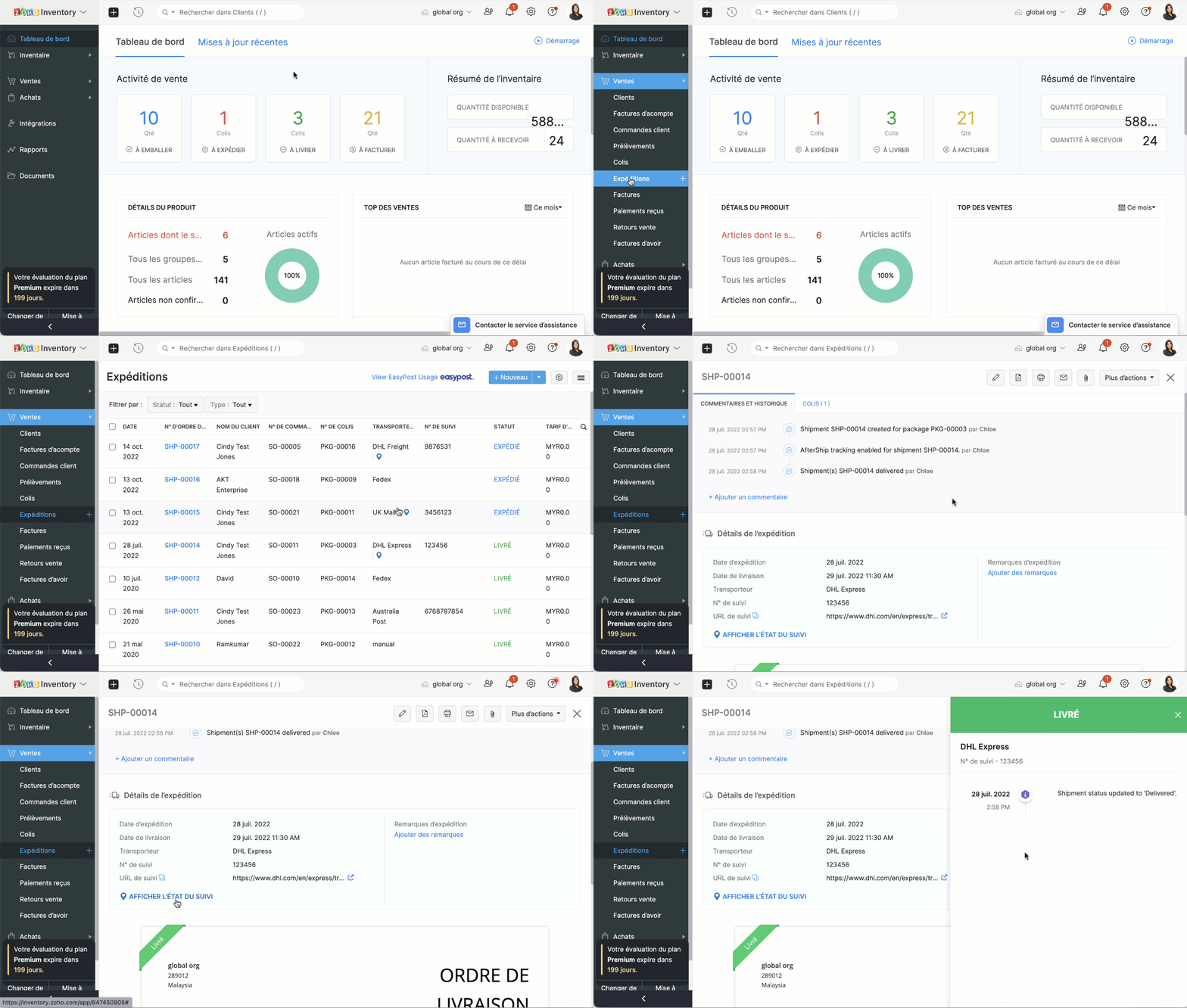
  • Depuis l'onglet "Expéditions", accédez une expédition suivie. 
  • Sélectionnez l'option "Afficher le statut du suivi"
  • Un écran apparaît à la droite où vous pouvez consulter l'emplacement actuel et la chronologie complète d'un envoi.
  • Vous pouvez également cliquer sur l'URL de suivi pour afficher le statut de votre expédition directement sur le site Web du fournisseur.

L'équipe Zoho France


      Zoho Campaigns Resources


        • Desk Community Learning Series


        • Digest


        • Functions


        • Meetups


        • Kbase


        • Resources


        • Glossary


        • Desk Marketplace


        • MVP Corner


        • Word of the Day


        • Ask the Experts


          • Sticky Posts

          • Collaboration sans faille avec Zoho One

            Bonjour à tous, Dans cet article nous allons voir comment Zoho One permet une collaboration à différents niveaux .       La façon dont nous travaillons évolue. À mesure que les entreprises se mondialisent, la plupart des activités sont menées en équipe.

          Zoho CRM Plus Resources

            Zoho Books Resources


              Zoho Subscriptions Resources

                Zoho Projects Resources


                  Zoho Sprints Resources


                    Zoho Orchestly Resources


                      Zoho Creator Resources


                        Zoho WorkDrive Resources


                          Zoho CRM Resources

                          • CRM Community Learning Series

                            CRM Community Learning Series


                          • Tips

                            Tips

                          • Functions

                            Functions

                          • Meetups

                            Meetups

                          • Kbase

                            Kbase

                          • Resources

                            Resources

                          • Digest

                            Digest

                          • CRM Marketplace

                            CRM Marketplace

                          • MVP Corner

                            MVP Corner


                            Zoho Writer Writer

                            Get Started. Write Away!

                            Writer is a powerful online word processor, designed for collaborative work.

                              Zoho CRM コンテンツ


                                ご検討中の方

                                  • Recent Topics

                                  • CRM verify details pop-up

                                    Was there a UI change recently that involves the Verify Details pop-up when changing the Stage of a Deal to certain things? I can't for the life of me find a workflow or function, blueprint, validation rule, layout rule ect that would randomly make it
                                  • Sync your Products Module for better context.

                                    In customer support, context is everything. The integration between Zoho Desk and Zoho CRM helps your sales and support teams function as one, delivering better customer experiences. With the latest update to this integration, you can now sync the Product module in your Zoho CRM with your Zoho Desk portal. This feature enables products from Zoho CRM to reflect in the "product" field in Zoho Desk. This can save your support team valuable time and effort.    Some things to note when syncing the two:
                                  • Does Zoho Writer have Dropdowns

                                    I want to add a drop down field in Zoho writer. Is this possible?
                                  • How can Data Enrichment be automatically triggered when a new Lead is created in Zoho CRM?

                                    Hi, I have a pipeline where a Lead is created automatically through the Zoho API and I've been trying to look for a way to automatically apply Data Enrichment on this created lead. 1) I did not find any way to do this through the Zoho API; it seems like
                                  • Transitions do not update fields until the record moves to next stage

                                    We have a blueprint where a couple of stages have multiple transitions. If only some of the transitions are completed, but not all, Zoho does not update any of the fields impacted by the completed transitions. Is there any way Zoho can udate the fields
                                  • Blueprint enhancements - Parallel and multiple transitions, and more

                                    Last modified on Sep 4, 2023: All Zoho CRM users can now access these enhancements. Initially, these features were available only on an early access basis and by request. However, as of August 2, 2023, they have been made available to all users in all
                                  • Optimum CRM setup for new B2B business

                                    Can some advise the most common way to setup Zoho CRM to handle sales for a B2B company? Specifically in how to handle inbound/outbound emails. I have spent hours researching online and can't seem to find an accepted approach, or even a tutorial. I have
                                  • using the Client script on the load of the form if service no is empty means then i want to make issue relate to is Service

                                    using the Client script on the load of the form if service no is empty means then i want to make issue relate to field is Service if Purchae no is empty means then i want to make issue relate to is Purchase
                                  • Multiple header in the quote table???

                                    Hello, Is it possible in Zoho CRM to add multiple headers or sections within the Quote product table, so that when the quote is printed it shows separate sections (for example “Products” and “Services”)? To clarify, I’m asking because: This does not appear
                                  • using the Client script I want to Hide Show the Fields

                                    if Related to service means some of the field like service no want to shoe and hide Amc no , purchase no how i achive this let issu = ZDK.Page.getField('Issue_Related_To').getValue(); if (issu == 'Service') { var field_obj = ZDK.Page.getField('Warranty_Cases');
                                  • openUrl in blueprints

                                    My customer wants to open a URL at the end of a blueprint transition. Seems this isn't possible right now but it would be very useful. In this thread, https://help.zoho.com/portal/en/community/topic/openurl-not-working the Zoho agent said that it's logically
                                  • Dropshipping Address - Does Not Show on Invoice Correctly

                                    When a dropshipping address is used for a customer, the correct ship-to address does not seem to show on the Invoice. It shows correctly on the Sales Order, Shipment Order, and Package, just not the Invoice. This is a problem, because the company being
                                  • Prepayment of a sales order

                                    How does everyone handle this common (at least it is common for us!) situation? We require all our orders to be fully prepaid before shipment since we manufacture made to order, custom products. Since ZOHO does not allow a sales order to be prepaid, we are forced to create an invoice at the time an order is placed to allow the customer to pay it. Our sales category is therefore skewed, since the sale was actually booked at the time an order was placed, rather then at the time it is shipped, which
                                  • Access to Specific Zoho Desk layout for external parties

                                    Hi, We have a partner who handles for us sales requests from specific markets. He is not a Zoho Desk user. But we want him to b part of a specific Zoho Desk layout to handle inquiries.  How to achieve it in the easiest way possible?
                                  • Deposit on a Sales Order

                                    Good day, 100% of my business is preorders, no inventory. I am trying to run away from QB for one of my businesses, but I require two options that I don't seem to find with Zoho Books. 1 - If there is a way to apply a deposit on a sales order, as with
                                  • How Does Knowledge Base Search and Article Recommendation Work?

                                    Hello, I would like to understand how the Knowledge Base search engine works. Specifically, does it search based on: The article title only? The full article content? Both, the article and the content? Keywords? Tags? Also, how does the system determine
                                  • validation rules doesn't work in Blueprint when it is validated using function?

                                    I have tried to create a validation rule in the deal module. it works if I try to create a deal manually or if I try to update the empty field inside a deal. but when I try to update the field via the blueprint mandatory field, it seems the validation
                                  • Bulk Delete Attachments

                                    Is there a way to bulk delete attachments on the form entries? our storage is full and deleting files one by one is pain taking process.
                                  • How do I sync multiple Google calendars?

                                    I'm brand new to Zoho and I figured out how to sync my business Google calendar but I would also like to sync my personal Google calendar. How can I do this so that, at the very least, when I have personal engagements like doctor's appointments, I can
                                  • Zoho CRM || Unable to Bulk Assignment of Territories for Contacts

                                    Dear Zoho CRM Support Team, I hope this email finds you well. We recently performed a bulk upload of Contacts into Zoho CRM using the official sample Excel template downloaded from the CRM. The upload itself was completed successfully; however, we encountered
                                  • Cannot get code to work with v2.mergeAndStore!

                                    Please can someone help me pass subform items into a repeating mail merge table row using v2.mergeAndStore? I have a mail merge template created in Writer and stored in Workdrive. This template is referenced by a custom CRM function which merges all of
                                  • Ability to CC on a mass email

                                    Ability to CC someone on a mass email.
                                  • Is It Possible to Convert a Custom Module to a Quote?

                                    I recently created a custom module in our CRM environment for RFQs so that our sales team can submit quote requests directly in Zoho rather than by email/phone. This allows for a cleaner overall process, minimizing potential errors and potentially encouraging
                                  • Ability to Disable System Banner Messages in Chat Flow Control

                                    Dear Zoho SalesIQ Team, Greetings, We would like to request an enhancement related to the system banner messages in Zoho SalesIQ chat flow control. Current Behavior: SalesIQ allows configuring various automatic banner/system messages such as: Waiting
                                  • How do you do ticket add ons in Backstage?

                                    Hi Everyone, If you wanted to have general admin tickets and allow for add ons, like camping, or car or Carbon offset. What would you do? Peace Robin
                                  • Writing SQL Queries - After Comma Auto Suggesting Column

                                    When writing SQL Queries, does anyone else get super annoyed that after you type a comma and try to return to a new line it is automatically suggest a new column, so hitting return just inputs this suggested column instead of going to a new line? Anyone
                                  • Sort Legend & stacked bar chart by value

                                    I'd love to see an option added to sort the legend of graphs by the value that is being represented. This way the items with the largest value in the graph are displayed top down in the legend. For example, let's say I have a large sales team and I create
                                  • Idle Chat Reminders for Agent-Handled Conversations

                                    Dear Zoho SalesIQ Team, Greetings, We would like to request an enhancement to the Idle Chat Handling functionality in Zoho SalesIQ—specifically for chats that are handled by human agents after a bot-to-agent transfer. Current Behavior: In Zobot settings,
                                  • Layout Adjustment.

                                    Hello Latha, Hope you are doing well. I wanted to check with you about adjusting the layout columns in the Service Report from the backend, as currently there is no capability for us to customize the layout from our end. Below is the output that I am
                                  • Snapchat

                                    Are there any plans to add Snapchat to Zoho Social or is there any API that we can use to integrate into Zoho.
                                  • Zoho Sign "An unexpected error occured" when clients trying to sign documents

                                    We are unable to have clients sign our documents. When attempting to complete the process an error appears saying "an unexpected error occured" and in the document history just shows "signing failure." We are at a complete standstill with no response
                                  • Service Reports.

                                    Hello Team, I have a requirement to create multiple service reports for a single AP. That means, in one AP I have 5 service line items, and all line items are linked to assets. Once I complete the AP, I want to generate 5 individual service reports, one
                                  • ¡Vuelven los Workshops Certificados de Zoho a España!

                                    ¡Hola usuarios de Español Zoho Community! Hace ya unos días que hemos dado la bienvenida al 2026, y promete ser un año de lo más emocionante. Y es que nos gustaría haceros nuestro particular regalo de Reyes, aunque lleguemos un poco tarde. 🎁 ¡Nos gustaría
                                  • Cancel Subscription

                                    Hi , Im want to cancel my account but without success please help me to do it
                                  • Deprecation Notice: OpenAI Assistants API will be shut down on August 26, 2026

                                    I recieved this email from openAI what does it means for us that are using the integration and what should we do? Earlier this year, we shared our plan to deprecate the Assistants API once the Responses API reached feature parity. With the launch of Conversations,
                                  • How to list services on quote instead of products

                                    I need to create a customer facing estimate that displays our services. The default quote layout only allows products to be listed. Is there a way to correct this?
                                  • Making an email campaign into a Template

                                    I used a Zoho Campaign Template to create an email. Now I want to use this email and make it a new template, but this seems to be not possible. Am I missing something?
                                  • Syncing calendar with Google Calendar doesn't work when events are sent to auto repeat

                                    Hi... The ZOHO CRM -- GOOGLE CALENDAR sync is broken. If I create a single event on either side, sync works, but if I create an event with auto repeat on either side it doesn't work. Furthermore, events created before the sync don't show up in the calendar.
                                  • Invoice status on write-off is "Paid" - how do I change this to "Written off"

                                    HI guys, I want to write off a couple of outstanding invoices, but when I do this, the status of the invoices shows as "Paid". Clearly this is not the case and I need to be able to see that they are written off in the customer's history. Is there a way
                                  • CRM gets location smart with the all new Map View: visualize records, locate records within any radius, and more

                                    Hello all, We've introduced a new way to work with location data in Zoho CRM: the Map View. Instead of scrolling through endless lists, your records now appear as pins on a map. Built on top of the all-new address field and powered by Mappls (MapMyIndia),
                                  • Next Page