Handling identifiers during an import

Handling identifiers during an import

Importing your data

When importing data into an application, it is crucial to prevent data loss or duplication. These types of errors can hinder the development of a clean and well-organised database, which is essential for effective data management and security.


Zoho Desk provides robust functionality for importing your data. The system intelligently automates the mapping of modules and fields to reduce the risk of data loss and maintain data integrity. Users have the advantage of verifying the field mappings in advance, thus adding an extra layer of security to the import process.
 
This capability is essential not only for clarity but also in mitigating the challenges associated with user adoption. For instance, clients can be accurately mapped to the Contact name field, while company names can seamlessly align with the Account name field. This approach to data management helps maintain an organised database, thereby enhancing productivity and user trust in the system. 

Related knowledge base article: Importing data into Zoho Desk.
Info
Prerequisites
  • Users can upload a .csv file or a .zip file containing multiple .csv files. 
  • The .zip file must be named, for example, Contacts.zip, Accounts.zip, etc.

Working with the Identifier Field
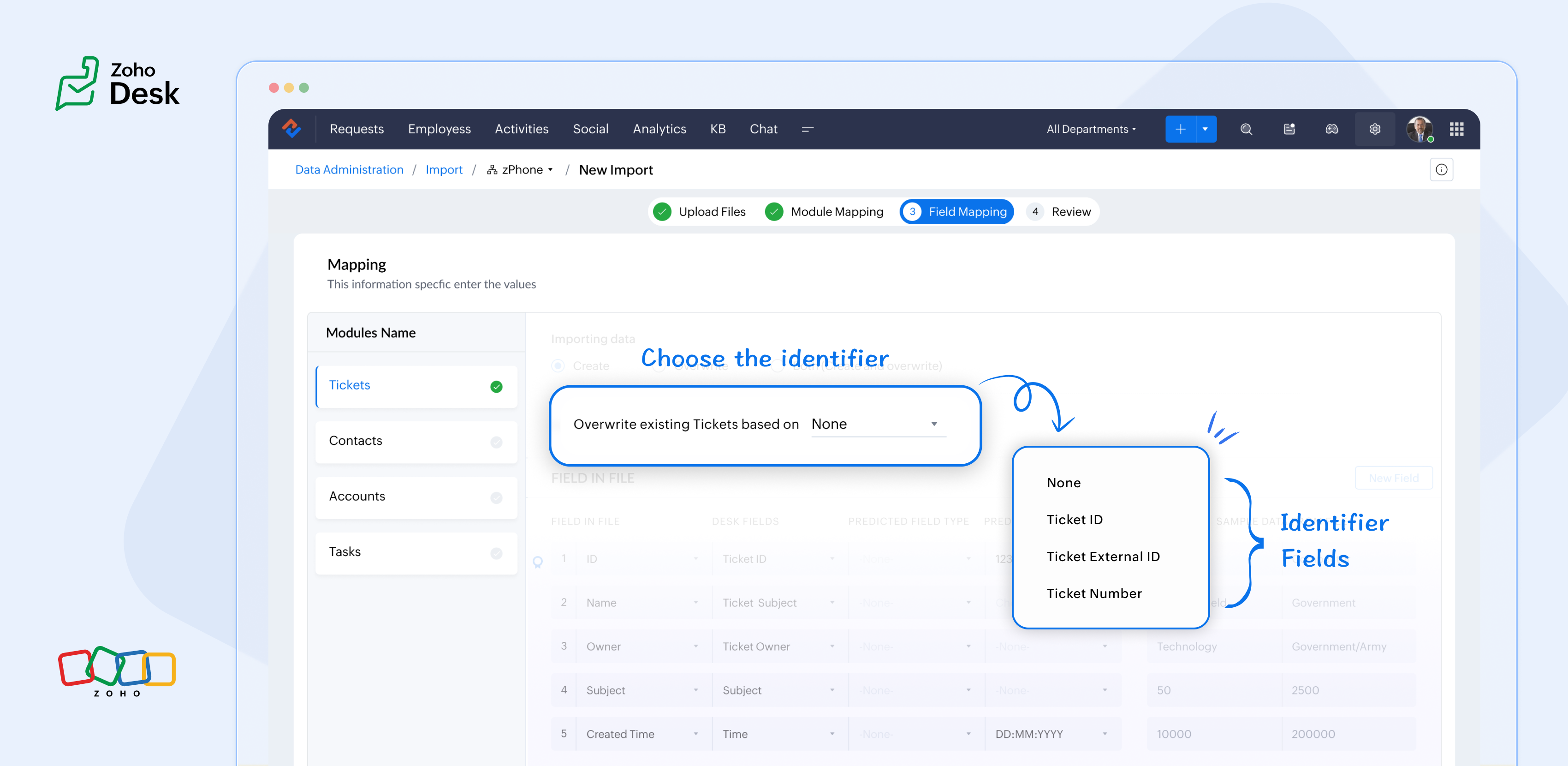
When importing data into Zoho Desk, the Identifier Field is essential because it helps identify existing records and avoid duplicate entries. 


What are the Identifier Fields?  

Identifier fields are fields used to find and match existing records when importing data into the product. They also help link related records, like connecting a contact’s name with their email address.

Each module supports different unique identifier fields for identification, as described in the table below:


Module

Unique Identifier Fields

Accounts

Account ID 

Account External ID

Account Name

Contacts

Contact ID

Contact External ID 

Last Name

First Name

Email

Phone Number

Mobile

Tickets

Ticket ID

Ticket External ID

Ticket Number

Products

Product ID

Product External ID

Product Name

Tasks

TaskId

Task External ID

Calls

Call ID

Call External ID

Events

Event ID

Event External ID

Article Translation

Translation: External ID

Translation ID

Custom Modules

Record External ID

Custom Module Name


Idea

Points to remember:

  • While these fields help find matching records.
  • So, if multiple records match the value, the first matching record will be selected automatically.
  • This can lead to unexpected matches or data being updated in the wrong record if you're not careful.

For your understanding:

Some users expressed a preference for matching Contacts by Last Name instead of Email, highlighting the importance of flexibility in their workflow. Furthermore, some additional users approached matching through the use of a custom field, emphasising the need for tailored solutions to fit their unique requirements. Moreover, users requested that the functionality be enhanced by updating existing records with the relevant entity's Zoho Desk ID, aiming to streamline their processes and improve data accuracy.

Commonly used identifier fields:

  • Find By is used to identify an existing record during the import process.
  • Map By is utilized to link a child record to a parent record, for instance, by linking a Contact to a Ticket.


You can now select specific fields for matching, providing enhanced control and customization during bulk processes or integrations. This functionality enables more precise data handling, ensuring that the information aligns with your specific requirements. By tailoring the matching criteria, you can streamline processes, ultimately leading to enhanced efficiency and better outcomes for your team. This flexibility enables you to harness the full potential of your data.

Import Systems

Let's start by preparing the CSV file.

A sample tickets module CSV file is given below,


External ID

Subject

Contact Email

Contact Name

About

101

Hitman

rohit@bcci.com

Sharma

Rohit Sharma's journey from a gifted schoolboy to an international icon and fierce competitor reflects resilience, elegance, and remarkable leadership.

102

King Kohli

virat@bcci.com

Virat

Virat Kohli is a world-renowned Indian cricketer known for his aggressive batting, unmatched consistency, and passionate leadership across all forms of the game.

103

Lambu Ishanth

ishanth@bcci.com

Sharma

Ishant Sharma is a tall and experienced Indian fast bowler known for his 300 test wickets and key performances in overseas conditions.


Then choose the appropriate Find By identifier field.

The Find By field is selected from a predefined set of fields specific to each module. It is used to determine whether a record already exists in Zoho Desk.


When using the import tool, the system searches the Desk portal for a record (e.g., a ticket) that matches the value mapped to the selected Find By field. This prevents duplicate records by identifying existing entries based on the chosen field.  


  • Once the file is uploaded, you need to choose a Find By Field — for instance, Ticket External ID.
  • Whichever Find By field we choose must correspond to the relevant column in the CSV file. Since we've selected the Ticket External ID, the Case External ID column in your file should be mapped to the Ticket External IDfield.
QuoteIf the chosen operation is to 'create new records while avoiding duplicates', and there is no existing ticket with the External ID 101, the import tool will generate a new ticket using the mapped fields. To associate the ticket to the correct Contact, the import tool utilizes the Map By field feature.

Finally, choose the appropriate Map By field.

The Map By field enables users to link imported records to their corresponding dependent records, such as associating a ticket with a specific contact. This functionality ensures that when you import ticket data, the import tool actively searches for a matching Contact in Zoho Desk based on the value defined in the selected Map By field.


For instance, during the field mapping process, you can specifically choose to map the Ticket to a Contact using criteria such as the Contact's email ID. This approach enhances the accuracy of data integration by ensuring that each ticket is correctly associated with the relevant Contact, thereby improving data integrity and streamlining the support process. This meticulous mapping not only minimizes the chances of errors but also facilitates a more organized and efficient ticket management system, ultimately leading to improved customer experiences and satisfaction.


Idea

Map by identifier field functionality

The tool efficiently searches for contacts associated with the provided email address.    


Search: When a user submits a ticket, the system initiates a search for contacts associated with the specified email address.   


Match found: If a single match is identified, the ticket is seamlessly associated with that Contact, ensuring that all relevant customer information is readily accessible for support agents.   


Multiple Matches: If numerous contacts are found with the same email address, the system will prioritize and use the first match. This helps streamline the ticketing process while maintaining clarity in customer support.   


No Match Found: If no matches are found within the system, the ticket will not be created. This prevents unnecessary duplication and ensures that support agents are only working with valid, existing customer records. 

In summary, the strategic use of Custom Unique Fields and External ID fields as identifiers, along with the potential for composite identifiers, positions support teams to operate more effectively and improve overall customer interactions.

Significant improvements in user experience 

Transparent process and status tracking 

We’ve implemented a straightforward, step-by-step process for data imports, complete with real-time status updates for each stage. This transparency enables users to monitor import progress and understand the current state of the process.

Unique identifiers for entity mapping 

New fields have been introduced to help users identify if a parent entity already exists when importing related child entities. For example, users can seamlessly map a contact to an existing account in Zoho Desk, streamlining the import process while minimizing the risk of duplicate entries.

Enhanced error handling and log accessibility

We’ve made significant improvements in error handling by allowing users to download detailed error logs directly from the history page in the event of import failures. This enhancement provides users with greater insight into any issues, facilitating faster troubleshooting and resolution.

Support for custom modules

The import UI has been revamped to support custom modules, providing users with greater flexibility and customization options. This enables a more personalized and efficient data import experience.

Takeaway

For instance, a large corporation merging client data from multiple legacy systems into Zoho Desk modules will benefit significantly from automatic field mapping, ensuring that contact and account names are accurately aligned. This attention to detail not only improves the user experience but also enhances overall data integrity during the merging process.
 
Please stay tuned for more Desk updates.
 
Cheers,
 
Kavya Rao
The Zoho Desk Team

      Zoho Campaigns Resources


        • Desk Community Learning Series


        • Digest


        • Functions


        • Meetups


        • Kbase


        • Resources


        • Glossary


        • Desk Marketplace


        • MVP Corner


        • Word of the Day


        • Ask the Experts


          • Sticky Posts

          • Zoho Desk Partners with Microsoft's M365 Copilot for seamless customer service experiences

            Hello Zoho Desk users, We are happy to announce that Zoho Desk has partnered with Microsoft's M365 to empower customer service teams with enhanced capabilities and seamless experiences for agents. Microsoft announced their partnership during their keynote
          • WhatsApp pricing changes: Pay per message starting July 1, 2025

            Starting July 1, 2025, WhatsApp is shifting from conversation-based pricing to per-message billing. That means every business-initiated message you send will count. Not just the first one in a 24-hour window. Pricing updates on the WhatsApp Business Platform
          • Live Webinar - Work smarter with Zoho Desk and Zoho Workplace integration

            Hello customers! Zoho Desk and Zoho Workplace are coming together for a webinar on 14th May, 2024. Zoho Workplace is a suite of productivity apps for email, chat, docs, calls, and more at one single place. Zoho Desk is closely integrated with a few tools
          • Apple iOS 17 and iPadOS 17 updates for Zoho Desk users

            Hello Zoho Desk users! Apple recently announced the release of iOS 17 and iPad OS 17. These latest OS updates will help you stay productive and efficient, through interactive and seamless user experiences. Zoho Desk has incorporated the updates to help
          • Zoho Desk Cheat Sheet For The Year-End

            Check out these Zoho Desk best practices to end this year on a high and have a great one ahead! #1 Set Business (Holiday) Hours - If you have limited working hours, please make sure you restrict your business hours or set them as holidays for the coming days. Let your customers know when you will, and won't, be available. #2 Update the Annual Holiday List - Check the holidays for the new year and update the holiday schedule. Usually, holidays from the current year will be carried over for the next

          Zoho CRM Plus Resources

            Zoho Books Resources


              Zoho Subscriptions Resources

                Zoho Projects Resources


                  Zoho Sprints Resources


                    Zoho Orchestly Resources


                      Zoho Creator Resources


                        Zoho WorkDrive Resources


                          Zoho CRM Resources

                          • CRM Community Learning Series

                            CRM Community Learning Series


                          • Tips

                            Tips

                          • Functions

                            Functions

                          • Meetups

                            Meetups

                          • Kbase

                            Kbase

                          • Resources

                            Resources

                          • Digest

                            Digest

                          • CRM Marketplace

                            CRM Marketplace

                          • MVP Corner

                            MVP Corner


                            Zoho Writer Writer

                            Get Started. Write Away!

                            Writer is a powerful online word processor, designed for collaborative work.

                              Zoho CRM コンテンツ


                                ご検討中の方

                                  • Recent Topics

                                  • Full Hebrew Language Support for Client-Side Zoho Assist Interface

                                    Dear Zoho Assist Team, We would like to request an enhancement to Zoho Assist's client-side interface to support full Hebrew language customization, including all popups, notifications, and session-related messages. Current Limitation The Join page allows
                                  • Add Hebrew & RTL Support to Feedback Widget

                                    Hello Zoho Desk Team, How are you? We are using Zoho Desk and would like to utilize the Feedback Widget. While Zoho Desk itself supports Hebrew and RTL, the Feedback Widget unfortunately does not. We kindly request that Hebrew and full RTL support be
                                  • Zoho Books Sandbox environment

                                    Hello. Is there a free sandbox environment for the developers using Zoho Books API? I am working on the Zoho Books add-on and currently not ready to buy a premium service - maybe later when my add-on will start to bring money. Right now I just need a
                                  • Merge Tickets Directly from Contact Page in Zoho Desk

                                    Dear Zoho Desk Support Team, We are writing to request a new feature that would allow users to easily merge tickets directly from the contact page in Zoho Desk. Currently, the only option to merge tickets is from the Tickets list view page, which can
                                  • Different languages for users

                                    Hello, Do you plan to enable individual users to select their languages for interface? Currently language can be changed for everyone - it looks like a settings for a whole portal, which is not good when you are working internationally. Best regards,
                                  • Pipeline.Company Name field shows up as numbers! [Bigin Developer Console > Component > URL]

                                    Hi there, I am setting up to invoke URL to send infromation zoho bigin > zoho forms with company name pre-fill in the form. however when I use : ${Pipelines.Company Name} field it shows up as a string of number instead of words. Help.
                                  • Kaizen #222 - Client Script Support for Notes Related List

                                    Hello everyone! Welcome to another week of Kaizen. The final Kaizen post of the year 2025 is here! With the new Client Script support for the Notes Related List, you can validate, enrich, and manage notes across modules. In this post, we’ll explore how
                                  • 2025年 Zoho コミュニティ 活動の振り返り 🎉

                                    ユーザーの皆さん、こんにちは!コミュニティチームの中野です。 2025年も多くの学びと出会いがあったZoho コミュニティ。 本記事では今年の活動を振り返りながら、フォーラムの投稿・参加者の皆さん・イベントのハイライトをご紹介していきます。 目次 フォーラム:注目の投稿 フォーラム:多くの貢献をしてくださった方々 ユーザー交流会振り返り ワークアウト振り返り その他のトピックス 1. フォーラム:注目の投稿 本フォーラムでは様々な議論と知識の共有が行われました。 ユーザーの皆さんが日々の業務で直面する課題を投稿し、経験豊富なユーザーさん達が実践的な解決策を提供してくださいました。
                                  • Customer Management: #3 Giving Customers Control & Privilege

                                    Rio, the founder of RenoTech Solutions, a fast-growing digital service company, found itself juggling a dozen different services for its clients. They handled one-time setup fees, recurring monthly invoices, and custom milestone-based billing for projects.
                                  • Can I use a Standalone CRM Function as the Callback URL For Async Export Data API?

                                    I am creating an export job using this API https://www.zoho.com/analytics/api/v2/bulk-api/export-data-async/create-export/view-id.html There is a "callbackUrl" key in the CONFIG object. I tried copying the URL for a standalone function in CRM which can
                                  • Module Customisation - Lookup function not available

                                    Good evening, Within my business, I can have multiple customers, who have multiple mobile assets. When I set these assets up, I enter information such as vehicle registration, Vehicle identification number (VIN), Unit number, YOM, in addition to others.
                                  • Books Api: listing expenses created after certain dates

                                    Is there any parameter I can add to the List Expenses endpoint that will let me look up expenses by when they were created?
                                  • Ability to Set Text Direction for Individual Cells in Zoho Sheet

                                    Dear Zoho Sheet Team, We hope you are doing well. We would like to request an enhancement in Zoho Sheet that allows users to set the text direction (right-to-left or left-to-right) for individual cells, similar to what is available in Google Sheets. Use
                                  • Add RTL (Right-to-Left) Text Direction Support Across All Zoho Learn Editing Interfaces

                                    Hi Zoho Learn Team, Hope you're doing well. We would like to request an important enhancement to Zoho Learn regarding support for right-to-left (RTL) languages such as Hebrew and Arabic. 🔹 Current Issue While the Knowledge Base Article editor provides
                                  • Add Hebrew Support for Meeting Transcripts Provided by ZIA in Zoho Cliq

                                    Hi Zoho Cliq Team, Hope you're doing well. We would like to request the addition of Hebrew language support for the Meeting Transcript and Summary feature in Zoho Cliq. Currently the transcript and summary feature is available for recorded meetings and
                                  • Remote Control Functionality During Screen Sharing in Zoho Cliq

                                    Hello Zoho Cliq Team, We would like to request the addition of remote control functionality during screen sharing sessions in Zoho Cliq. Currently, while screen sharing in Cliq is very useful, it lacks the ability for another participant to take control
                                  • Real-Time Screen Annotation During Zoho Cliq Screen Sharing

                                    Hi Zoho Support Team, Hope you're doing well. We’d like to request the addition of real-time screen annotation tools during screen sharing sessions in Zoho Cliq video calls. 🔍 What We're Looking For: The ability for the presenter—and optionally, other
                                  • Centralized Organization Information Management in Zoho One

                                    Dear Zoho One Support, I'm writing to propose a feature that would significantly improve the user experience and streamline data management within Zoho One. Current Challenge: Currently, managing organization information across various Zoho One apps requires
                                  • Enhance Zoho One Conditional Assignment to Fully Reassign App Settings When Changing Departments

                                    Hi Zoho Team, We’d like to submit a feature request regarding the current behavior of Zoho One’s conditional assignment logic when moving a user between departments. 🔧 Current Limitation As it stands, Zoho One’s conditional assignment does not remove
                                  • Add RTL and Hebrew Support for Candidate Portal (and Other Zoho Recruit Portals)

                                    Dear Zoho Recruit Team, I hope you're doing well. We would like to request the ability to set the Candidate Portal to be Right-to-Left (RTL) and in Hebrew, similar to the existing functionality for the Career Site. Currently, when we set the Career Site
                                  • Support for Custom Fonts in Zoho Recruit Career Site and Candidate Portal

                                    Dear Zoho Recruit Team, I hope you're doing well. We would like to request the ability to use custom fonts in the Zoho Recruit Career Site and Candidate Portal. Currently only the default fonts (Roboto, Lato, and Montserrat) are available. While these
                                  • Ability to Filter Alias Mailboxes in Zoho Recruit

                                    Dear Zoho Recruit Team, I hope you are doing well. We would like to request a feature enhancement regarding the handling of alias mailboxes in Zoho Recruit. Currently, when we connect an alias mailbox (e.g., jobs@domain.com) from our Zoho One account
                                  • Automatic Department and Employee Sync Between Zoho One and Zoho People

                                    Dear Zoho Support, I'm writing to propose a valuable feature request that would streamline data management and improve user experience within the Zoho ecosystem: automatic synchronization between departments and employees in Zoho One and Zoho People.
                                  • Ensure Consistent Service Delivery with Comprehensive Job Sheets

                                    We are elated to announce that one of the most requested features is now live: Job Sheets. They are customizable, reusable forms that serve as a checklist for the services that technicians need to carry out and as a tool for data collection. While on
                                  • Add Attachment Support to Zoho Flow Mailhook / Email Trigger Module

                                    Dear Zoho Support Team, We hope you are well. We would like to kindly request a feature enhancement for the Mailhook module in Zoho Flow. Currently, the email trigger in Zoho Flow provides access to the message body, subject, from address, and to address,
                                  • Prefered Bin Missing in android APP

                                    Andoroid app dosent show preferred bin in the picklist. The workaround support reccomend is to use the computre to create the picklist. it shuld be information to be shown aas basic for the pciker.
                                  • Open Sans Font in Zoho Books is not Open Sans.

                                    Font choice in customising PDF Templates is very limited, we cannot upload custom fonts, and to make things worse, the font names are not accurate. I selected Open Sans, and thought the system was bugging, but no, Open Sans is not Open Sans. The real
                                  • Function #1: Convert an accepted Estimate to Sales Order automatically in Zoho Books

                                    As you’re aware, Zoho Books provides a default option to have the estimates automatically converted to invoices once your customer accepts them. Many of you wanted a similar option for sales orders, so here’s a workflow that converts accepted estimates
                                  • Write-Off multiple invoices and tax calculation

                                    Good evening, I have many invoices which are long overdue and I do not expect them to be paid. I believe I should write them off. I did some tests and I have some questions:  - I cannot find a way to write off several invoices together. How can I do that,
                                  • Reusable Jira Connection for Multiple Zoho Projects Imports

                                    Hello Zoho Projects Team, We would like to raise a concern and submit a feature request regarding the Jira → Zoho Projects migration process, specifically around how Jira connections are handled. Current Behavior: When setting up a Jira connection for
                                  • Zoho invoice doesn't support Arabic language

                                    I added a clause in the terms & conditions section in Arabic but it doesn't appear when I sent or print it.
                                  • Recurring Invoice Placeholder Not Updating Billing Period

                                    Hi, I’m using Zoho Invoice Free and want the billing period to update automatically in recurring invoices. In Item Description I tried: Billing Period: %(m-6)% %(y)% to %(m-1)% %(y)% but even if the invoice date is in 2026, it still shows the period based
                                  • Work Type - Limitation

                                    Hello, I'm setting up work types and have noticed, a limitation on the parts area to 10 lines. Can this be increased to 20 or greater? In addition to this, when I attempt to add the work type to a work order, the correct labour hours doesn't flow through.
                                  • Related list Mobile Device

                                    Hello, We use an the Zoho creator application to make reports linked to Accounts. On the computer: it's easy to go the Account and see all the created reports in the related list below On iPad/Phone ZOHO CRM APP: we cannot see the reports on those accounts
                                  • Can't update the company address in zoho invoice

                                    Dear Sir/Madam, I want to update the company address in Zoho Invoice but failed. It popped out a sentence "Invalid value passed for Website". Please advice how to solve this problem. Thank you.
                                  • Is there a plan to allow for the hierarchical organization of Customers / Companies in Zoho Billing?

                                    We have a few customers who have organizational structures that we haven't quite found a way to deal with in Zoho Billing. In CRM, these sub-companies (or subsidiaries or whatever you want to call them) all have another CRM account as the parent account.
                                  • 【Zoho CRM】作業リスト機能リリースのお知らせ

                                    ユーザーの皆さま、こんにちは。コミュニティチームの藤澤です。 今回は「Zoho CRM アップデート情報」の中から、作業リスト機能リリースのお知らせ情報をご紹介します。 目次 作業リスト機能 概要 機能① 自分の未完了の活動 機能② 処理待ち 機能③ 自分の作業リスト 作業リスト機能 概要 営業チームでは、CRM内に業務やデータが分散しているため、管理が煩雑になりがちです。この断片化は、機会の見逃しや生産性の低下につながります。 作業リスト機能は、タブを横断する業務項目をひとつのカスタマイズ可能なダッシュボードに集約し、業務を効率的に管理できるようにします。
                                  • SalesIQとPageSenseの利用について

                                    初めての投稿で場違いだったらすいません。 弊社ではSalesIQを運用しているのですが、追加でPageSenseの導入もしたいと現場からの声があります。 両サービスともクッキー同意バナーが必要なサービスなのですが 弊社では同意無しに情報はとりませんという方針なので 2つ入れると2つバナーを出す必要がでてきます・・・ 両サービスを運用されてる方があれば運用状況とか教えてほしいです。 PageSenseについては詳細まで機能を理解してないなかでの質問です。
                                  • Emails sent through Bigin are not posting in IMAP Sent folder

                                    I have set up my email to work from within Bigin using IMAP.  I am using IMAP so I can sync my email across multiple devices - phone / laptop / desktop / iPad / etc.  I want all my emails to populate my email client (outlook & iphone email) whether or
                                  • Parent-Child Tickets using API or Deluge

                                    Hi Everyone, We are looking at the parent-child ticketing features in Zoho Desk. We want to be able to create a parent ticket at customer level and nest child tickets underneath. The issue we are facing is to be able to automate this. I'm checking the
                                  • Next Page