How to see maximum kits in Zoho Crm?
Accurate Kit Availability in Zoho Inventory + CRM (Committed Stock Included)
Ran into an interesting stock visibility challenge recently with Zoho Inventory and Zoho CRM that might be useful to share.
The business sells products both as individual SKUs and as composite (kit) items. In Zoho Inventory, composite items show:
-
Mapped component SKUs
-
Required quantities
-
Stock on hand
However, what’s missing out of the box is a true “available to sell” number for kits that factors in committed stock (e.g., quantities reserved on sales orders that aren’t invoiced yet).
This created two practical issues:
-
Kit availability appeared higher than what could actually be fulfilled.
-
The sales team works entirely in Zoho CRM, so they had no simple way to confirm whether a kit could realistically be built at the time of quoting.
Approach we took
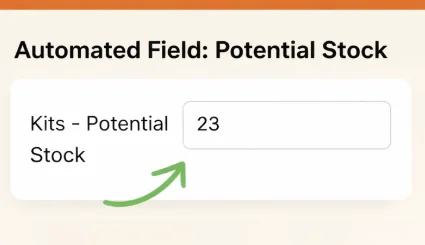
We added a custom field on composite items (e.g., Potential Kit Stock) and used a scheduled function in Zoho Inventory to keep it updated automatically. The function:
-
Iterates through composite items
-
Looks up each mapped component SKU
-
Uses committed-aware stock values (not just stock on hand)
-
Calculates how many complete kits can be assembled based on the lowest available component
-
Writes the result back to the custom field on a schedule
This makes the effective kit availability visible directly in Zoho Inventory and synced into Zoho CRM (including during estimate/quote creation), so sales can see realistic availability without manual checks or workarounds.
Overall, it’s been a solid way to reduce guesswork and prevent accidental overselling, with the logic running quietly in the background.
Curious how others have handled kit availability or committed stock visibility in Zoho — always keen to compare approaches or learn different patterns people are using.