Introducing Rollup summary in Zoho CRM

Introducing Rollup summary in Zoho CRM

------------------------------------------Moderated on 5th July'23----------------------------------------------
Rollup summary is now available for all organizations in all the DCs.


Hello All, 

We hope you're well!

We're here with an exciting update that goes right into CRM's core capabilities. It's called the Rollup summary

Let's go!

Your CRM is a vast database with well-connected data sources, where you can access both the primary and associated information from one place.

Consider the Leads module, for example. A lead record encompasses information about the lead, their activities, and other applicable information, enough to decide upon the next move. This sort of association forms the foundation for data accessibility.
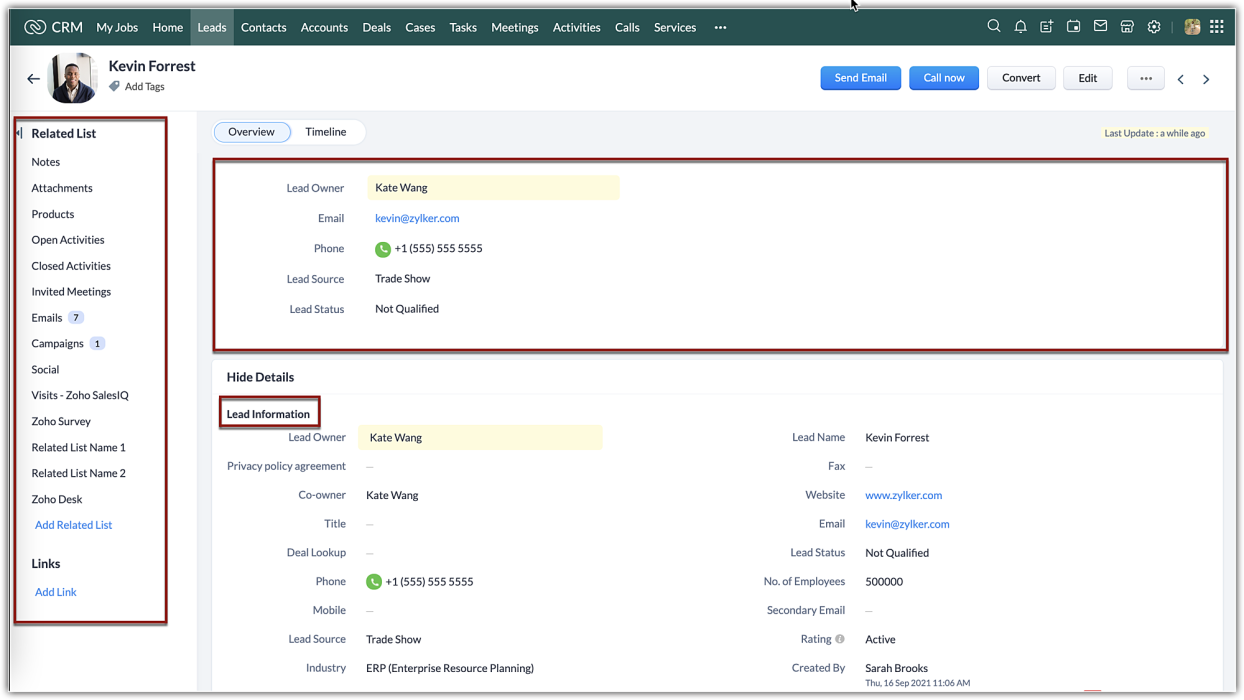

However, when it comes to effective data management, mere association alone is not adequate. You need what is called an interoperable data relationship between your primary and associated data. In the CRM context, an ability to associate values from the related lists with the primary information itself is the premise of the Rollup summary.

Rollup summary
Rollup summary is a field type that can summarize or aggregate values from your desired related list. It is adaptable and versatile. All you have to do is to choose which property to aggregate from your related list and assign that to the field, the field will start rolling up values.
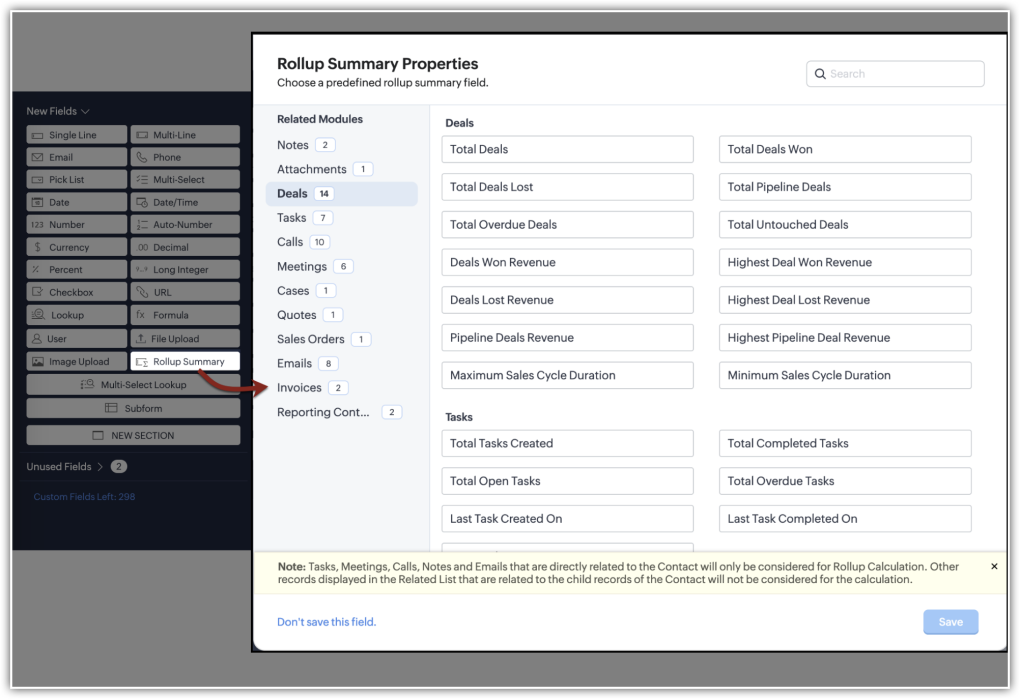

Let us look at different scenarios where rollup summary can benefit you:

Example 1: Aggregate account-based revenue
The accounts module in your CRM holds business information about your prospects and customers. It also displays the contacts, deals, quotes, invoices, and other information associated as related lists.
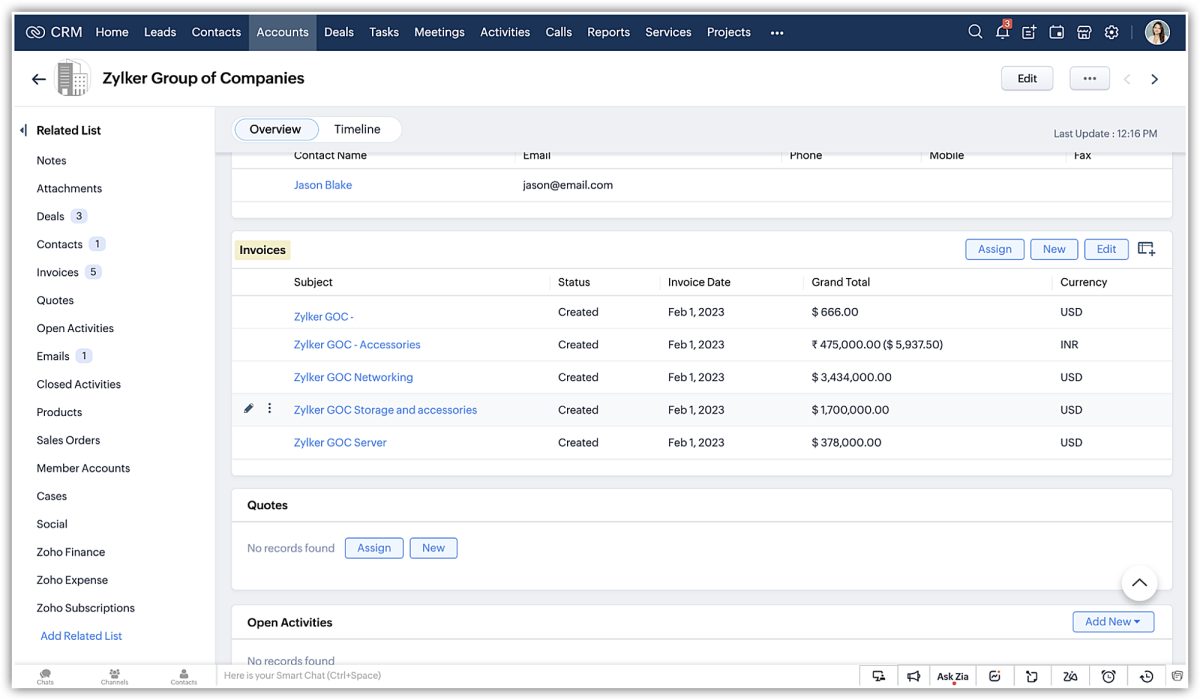

Now, to assess the account's contribution before signing a purchase agreement, the sales manager had to create a report and aggregate the values separately.
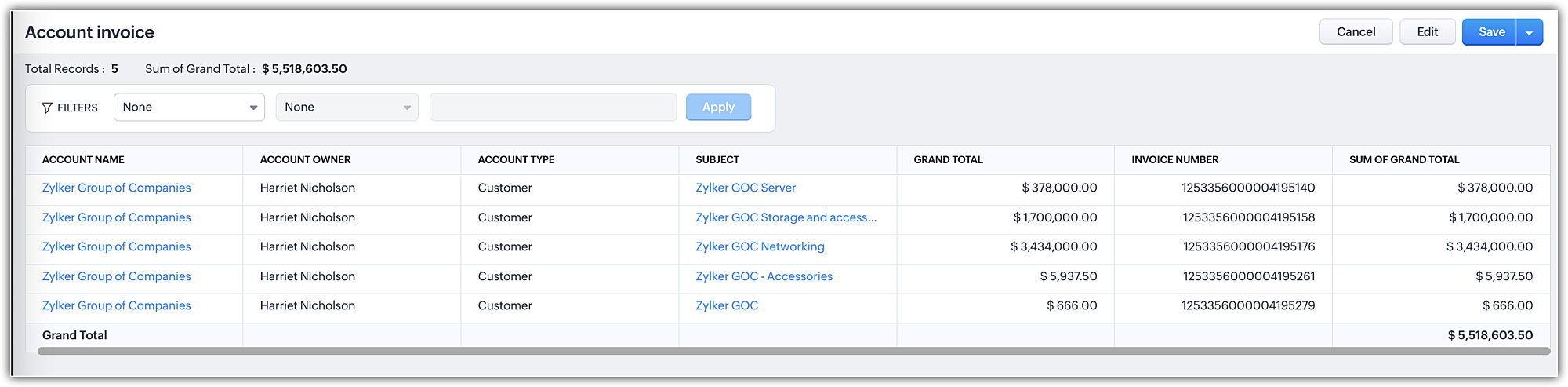


With the rollup summary field added to the module, you can get an auto-assimilated value of invoices created for the account. This saves a lot of time and effort invested in creating reports and the best part is that the field, upon addition, will be available for all records in that layout.
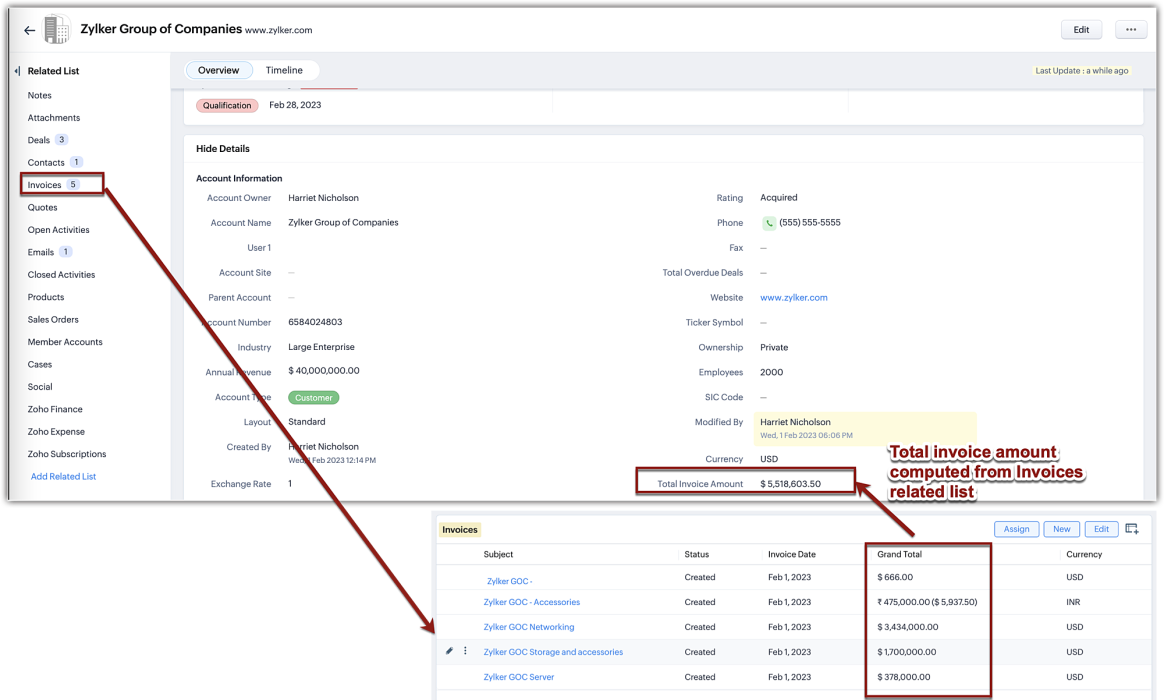
Using this computed value in the rollup field, you can create automation, create a review process, and so on.

Example 2: Take action on the untouched deals
Untouched deals are deals without any actions till time. These kinds of deals are not only stagnant but are also unfavorable for business. However, for an enterprise business that creates more deals each day, manually identifying untouched deals and following up could be a missed opportunity, already. To keep a constant eye, you can create a rollup field that displays the number of untouched deals in your contact records and quickly follow up or automate.
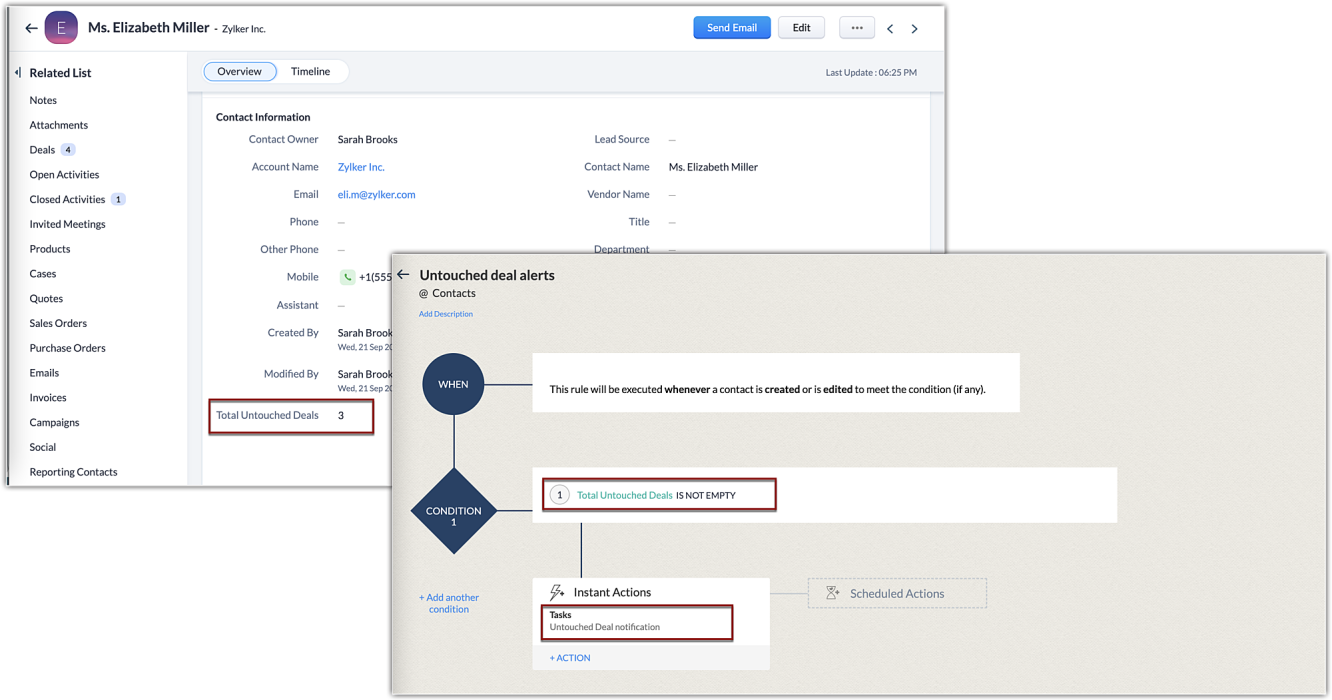

Example 3: Get to know overdue tasks
Tasks are a great way to plan your actions that also act as a reminder. In Zoho CRM, when you add a task it will be added to the open activities related list. Until a task is completed, the task won't be moved to the closed activities. But, due to some lapse, if the rep couldn't complete the task on time, the task will remain in the open activities, giving an impression that the task has time left and as a sales manager, you might want to know of such cases in the leads module. This is where the rollup field will come in handy. With rollup being a field, you can use that as a column and filter the records with values in it.
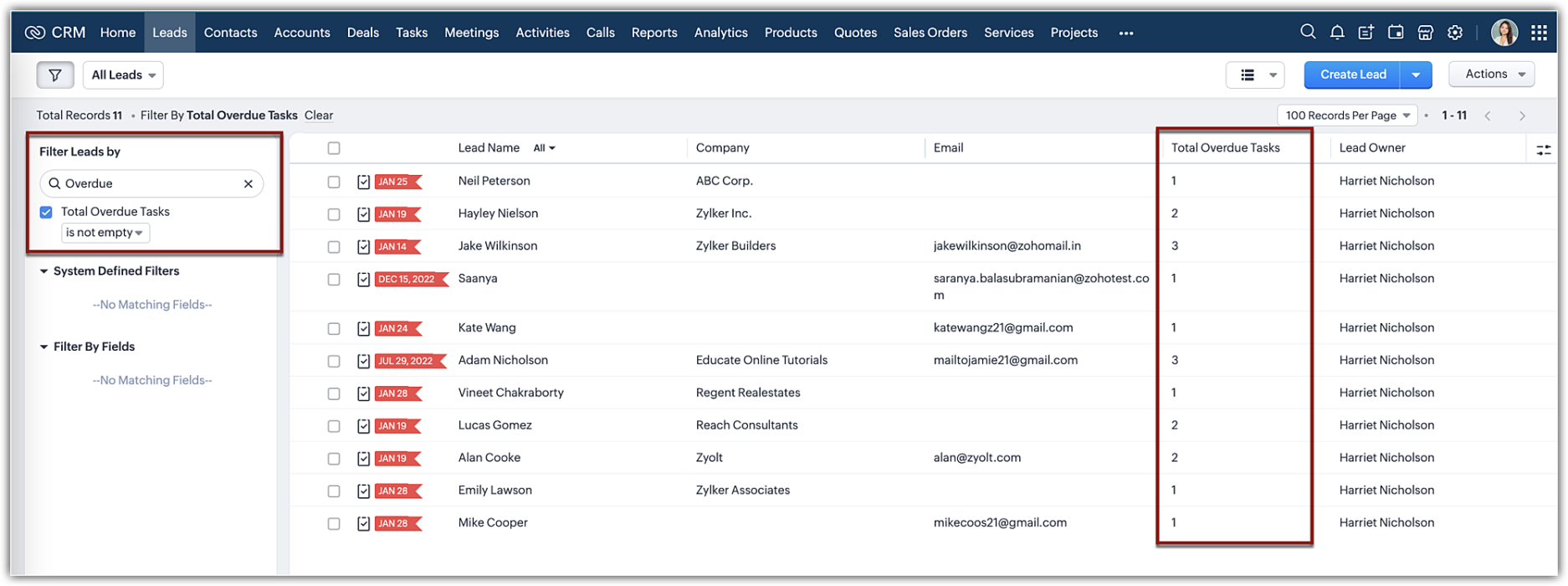
Likewise, you can add a rollup field type to your layout editor and get value assimilated as a read-only field in your record detail page.

Note:
Currently, the rollup summary field property will list only fields that are part of the system-defined related list belonging to a module.

Pre-requisites:
  • Rollup field is available in all modules except in tasks, calls, meetings, and appointments.
  • Rollup summary field type is available only for organizations with Enterprise and Ultimate editions of CRM. You can create up to 10 rollup fields per module for Enterprise and 15 for Ultimate edition.
That's about rollup summary. We hope this new feature will help you conduct cumulative analyses effectively. While this is just the first cut of the release, we are planning the following enhancements:
  • Customization capabilities: We are developing the ability to customize and configure your own rollup summary field. This enables you to aggregate different parameters for different related lists.
  • Rollup as a workflow trigger: In addition to using the field as criteria in a workflow rule, we are developing to base workflow automation upon a rollup field as a rule condition itself. This will enable you to create automation exclusively based on a rollup field.
Resource: Help document 

      Zoho Campaigns Resources


        • Desk Community Learning Series


        • Digest


        • Functions


        • Meetups


        • Kbase


        • Resources


        • Glossary


        • Desk Marketplace


        • MVP Corner


        • Word of the Day


        • Ask the Experts


          Zoho CRM Plus Resources

            Zoho Books Resources


              Zoho Subscriptions Resources

                Zoho Projects Resources


                  Zoho Sprints Resources


                    Zoho Orchestly Resources


                      Zoho Creator Resources


                        Zoho WorkDrive Resources


                          Zoho CRM Resources

                          • CRM Community Learning Series

                            CRM Community Learning Series


                          • Tips

                            Tips

                          • Functions

                            Functions

                          • Meetups

                            Meetups

                          • Kbase

                            Kbase

                          • Resources

                            Resources

                          • Digest

                            Digest

                          • CRM Marketplace

                            CRM Marketplace

                          • MVP Corner

                            MVP Corner


                            Zoho Writer Writer

                            Get Started. Write Away!

                            Writer is a powerful online word processor, designed for collaborative work.

                              Zoho CRM コンテンツ


                                ご検討中の方

                                  • Recent Topics

                                  • Drop shipment cancellation

                                    Hello! I have a problem and need a piece of advice. Me and my customer had a deal. I have created all the documents ( SO, PO, Invoice, Bill), however, unfortunatelly, we have to cancell it. Now, I would like to mark all these documents as void. At the
                                  • Specific ListView Canvas on Canvas Home Page Always Loads Most Recent ListView, Not the One Specified

                                    I had mentioned this to ZOHO, but I mainly wanted to see if others in the Community are also facing this problem. I created a Canvas ListView for a Custom Module, and then created a Canvas Home page (technically on a tab item, but I'm not sure if that
                                  • New UI - Color Preference Not Saving Permanently

                                    Small, not very urgent problem I'd like to share regarding the new UI theme color. I've changed my theme preference to the default blue color around 20 times by now. It always reverts to a green color theme. I've followed the instructions of changing
                                  • Zoho Wont Login

                                    Can anyone tell me why my password stops logging in all the time? Is it a ploy to make you change your password? I have to use OTP all the time. I dont want to change passwords all the time. Over the last couple of years I've found myself using Zoho (as
                                  • Collapsible Sections & Section Navigation Needed

                                    The flexibility of Zoho CRM has expanded greatly in the last few years, to the point that a leads module is now permissible to contain up to 350 fields. We don't use that many, but we are using 168 fields which are broken apart into 18 different sections.
                                  • Global Sets for Multi-Select pick lists

                                    When is this feature coming to Zoho CRM? It would be very useful now we have got used to having it for the normal pick lists.
                                  • Cannot See Available Deal States in Zoho Blueprint

                                    I am trying to create a blueprint to manage our sales pipeline and ensure data accuracy at each stage. I have already created a similar blueprint for handling leads. However, when I attempt to create the 'Deal Management' blueprint, the different stages
                                  • Is there a CRM Deluge function available to convert an RTF (rich text field) to plain text (with no formatting tags)?

                                    I know that we can run reports so that RTF fields can either show as plain text or the text or the text with the formatting fields included (which is wonderful, btw, as it helps me adjust tags when I need to troubleshoot and just see what I need to see
                                  • Como conectar a API de Conversões da Meta com a Zoho (Analytics, CRM e SalesIQ)?

                                    Não estou conseguindo saber de quais anúncios são os leads que chegam pelo SalesIQ e nem como retornar a informação pra Meta dos leads que tiveram conversão em venda.
                                  • IMAP Migration — Map Sent Items to Sent....

                                    Here's a common problem. The Sent folder on the other email service is called Sent Items. Rather than put those into the Sent folder on migration, it creates a separate folder. Is there any way I can have this done as part of the migration process. One of the Sent Items on an account I expect to migrate shortly has 25,000 messages. Manually moving them would be time-consuming and work against the migration feature. Solutions? Peace, Gene Steinberg
                                  • Tips & Tricks Series - #3 Setting question weights in quiz questions

                                    Hello everyone! Welcome back to our Tips & Tricks series, where we share useful features and best practices to help you get the most out of Zoho Learn. Today, we’ll be looking at question weights in quizzes. Not all questions in a quiz need to carry the
                                  • TimeBro/Memtime Time Tracking Import Errors

                                    Our staff use Memtime (formerly TimeBro) to track working time, and we have the Zoho Projects integration installed, so that the entries are mapped to Projects/Tasks/Issues automatically. Today, we've started getting the following error when attempting
                                  • Zoho Visual Editor Not Opening

                                    Hello There I am trying to build a website using zoho and I can't open the visual editor. It keep saying Loading...  Do you know why it is happening. Thanks in Advance Regards Rajat
                                  • Automate Backups

                                    This is a feature request. Consider adding an auto backup feature. Where when you turn it on, it will auto backup on the 15-day schedule. For additional consideration, allow for the export of module data via API calls. Thank you for your consideration.
                                  • Tip #85 – Never Lose Track of What Happened in a Session with Session Recording – 'Insider Insights'

                                    Tip #85 – Never Lose Track of What Happened in a Session with Session Recording – 'Insider Insights' Hello Zoho Assist Community! A technician wraps up a complex remote session. The issue is fixed, the customer is happy, and everyone moves on. But three
                                  • LinkedIn RSC is now live in Zoho Recruit

                                    LinkedIn Recruiter System Connect (RSC) is here. Your Zoho Recruit data (candidates, jobs, notes, stage updates, resume attachments, and more) now syncs with LinkedIn in real time. Note: LinkedIn RSC is included with your LinkedIn Recruiter Corporate
                                  • Cross Module Filtering – Use Fields from Lookup modules in Custom Views criteria and Advanced Filters

                                    Hello everyone, Zoho CRM now enables you to achieve deeper filtering of records in a module, using fields of a lookup, thereby enhancing your data management experience manifold. This filtering based on lookup module fields is now available in advanced
                                  • Turn off workflow Applied pop-up

                                    hi We are new to Desk. I have a rule to set to "waiting for customer" when agent sends reply. This comes up every time. How to i turn off? Or am i seeing as admin.
                                  • Make your IM workflows smarter: Automate sessions and personalize responses

                                    There are two simple ways to make IM workflows more efficient: automate how sessions are handled and personalize how agents communicate. Here's a look at both. 1. Automate IM session updates with the API The Update an IM Session API lets you update session
                                  • Discover related products for contacts and companies with new topping

                                    Greetings! We hope you're all doing well. We've heard your request for an easier way to view products associated with a contact or company—without having to open and go through every deal individually. To help you achieve this, we're happy to introduce
                                  • What’s New in IM: Shared Phone Number and 1,000 Templates

                                    Instant Messaging continues to evolve in Zoho Desk, giving teams more flexibility in how they manage WhatsApp conversations and messaging workflows. Here are two capabilities worth exploring. 1. Manage WhatsApp conversations across Zoho services using
                                  • Cliq iOS can't see shared screen

                                    Hello, I had this morning a video call with a colleague. She is using Cliq Desktop MacOS and wanted to share her screen with me. I'm on iPad. I noticed, while she shared her screen, I could only see her video, but not the shared screen... Does Cliq iOS is able to display shared screen, or is it somewhere else to be found ? Regards
                                  • CLIENT PORTAL (If clients can place orders directly on the portal)

                                    Zoho client portal is excellent. Everything is there except one thing. Client should be able to place orders directly on the portal. This would enhance the portal and end users will be extremely happy. This suggestion infact came from one of our client.
                                  • Exceed Limit Execution

                                    Hi Everyone, I begin to encounter some execution limit hit, The 1st part wherein when a record was being submitted, it checks and patch existing rows (Site Asset Services) matching the submitted row (PMS form) error: row1.Serial_N=Final_Rec.AV_Serial_N;
                                  • [For info] As CRM administrators its important to be aware that potentially sensitive business logic & operational parameters are available via unauthenticated URLs

                                    There are a collection of files within Zoho CRM that COULD contain potentially sensitive commercial parameters and logic in them, and that can be accessed without authentication. This includes the CRM Data Model, Custom Picklist values, Custom Role /
                                  • WhatsApp Calling Integration via Zoho Desk

                                    Dear Zoho Desk Team, I would like to request a feature that allows users to call WhatsApp numbers directly via Zoho Desk. This integration would enable sending and receiving calls to and from WhatsApp numbers over the internet, without the need for traditional
                                  • View Products (items) in Contact and Company

                                    Hi, I would like to know if there is an option to view all the products /(items) that were inserted in the pipeline deal stage for exemple "Win Pipeline" within the company and contacts module section? For instance, view with the option filter for the
                                  • zoho desk

                                    Hello, Did Zoho Desk have any issues today? Are tickets coming in late? I have an email account linked, and messages seem to be arriving with a delay—some email threads aren't coming through completely, and so on.
                                  • Transform your line of items into line items: ICR can now record your table values as subform values

                                    Enhancement in Zoho CRM Dear Customers, We hope you're well! Zia Vision’s ICR capability can now recognize, extract, and store tabulated values in your subforms. An ideal example is a university application form. It has printed fields and handwritten
                                  • Minor enhancements in Zoho CRM Dashboards: drill-down for Funnels, flexible Duration settings, and more

                                    Dashboards in Zoho CRM help you visualize data across modules, track performance, and make informed decisions. Components like charts, KPIs, and funnels bring together key metrics in a single view, making it easier to spot trends and take action. Over
                                  • Get a realistic picture of your revenue with Forecast Adjustments in Zoho CRM

                                    #crm25q1 Dear Customers, We hope you're doing well! Today, we're here with an important enhancement for business decision makers: forecast adjustments. Let's get straight to it! With technology on the rise and CX at its core, businesses are constantly
                                  • Three new ways to manage Instant Messaging in Zoho Desk

                                    Managing IM conversations isn't just about responding to customers. It's also about getting each conversation to the right team. Here are three updates in Zoho Desk that can help with exactly that. 1. Transfer IM tickets across departments Sometimes a
                                  • Ask the Experts 32: Managing Privacy, Security, and Data Administration in Zoho Desk

                                    Hello everyone, As organizations increasingly rely on AI, machine learning, and automation, there are pressing questions around privacy, security, and data governance. Every customer interaction involves sensitive business information, whether it's troubleshooting
                                  • Zoho Cliq 7.0: Built for Uninterrupted Work

                                    Work today moves fast, but follow-ups, meetings, and coordination still get messy more than we often like to admit. Zoho Cliq 7.0 is all about making everyday work feel a little lighter—better collaboration, smoother workflows, more helpful assistance,
                                  • Zoho CRM Functions: Redesigned Interface, Rich Analytics, and Multi-Language Support

                                    Hello everyone! We have given Functions in Zoho CRM a major overhaul with a new interface that makes it easier to build, organize, monitor, and troubleshoot your functions throughout their lifecycle. As part of this revamp, we have also introduced a unified
                                  • Native SMS and MMS Channel Support

                                    89% of US consumers say they prefer to communicate with businesses via SMS / MMS (aka "texting"). (link) Unfortunately, Zoho Desk does not currently support the most popular channel for consumer communications in the United States. For those of us in
                                  • Smarter holiday planning with yearly-specific Holiday Lists

                                    Hello everyone! Managing holidays and business hours is now easier and more efficient. Holiday Lists now support holidays that fall on different dates every year, while business hours now supports more than one holiday list. This helps businesses manage
                                  • Api de conversão da Meta

                                    Como conectar a Zoho com a api de conversão do Meta Ads?
                                  • Side-panel “Quick Preview & Edit” for Deals and Tasks (Web)

                                    Hi all, I’d like to submit a feature request to improve record navigation and data entry speed in Zoho CRM. NOTE: This feature exists on Pipedrive, HubSpot, and Bigin by Zoho. Requested Feature: Add a side-panel / slide-in “quick preview” for records
                                  • Why can't we choose Fixed Asset account for Purchased Items? (eTims issue?)

                                    Hello, When the company purchase items not for sale and not supposed to be in the inventory stock, like equipment for operational use, there is no way to access the Fixed Asset accounts in the drop down list. Is that an eTims limitation again? Or something
                                  • Next Page