Introducing Rollup summary in Zoho CRM

Introducing Rollup summary in Zoho CRM

------------------------------------------Moderated on 5th July'23----------------------------------------------
Rollup summary is now available for all organizations in all the DCs.


Hello All, 

We hope you're well!

We're here with an exciting update that goes right into CRM's core capabilities. It's called the Rollup summary

Let's go!

Your CRM is a vast database with well-connected data sources, where you can access both the primary and associated information from one place.

Consider the Leads module, for example. A lead record encompasses information about the lead, their activities, and other applicable information, enough to decide upon the next move. This sort of association forms the foundation for data accessibility.
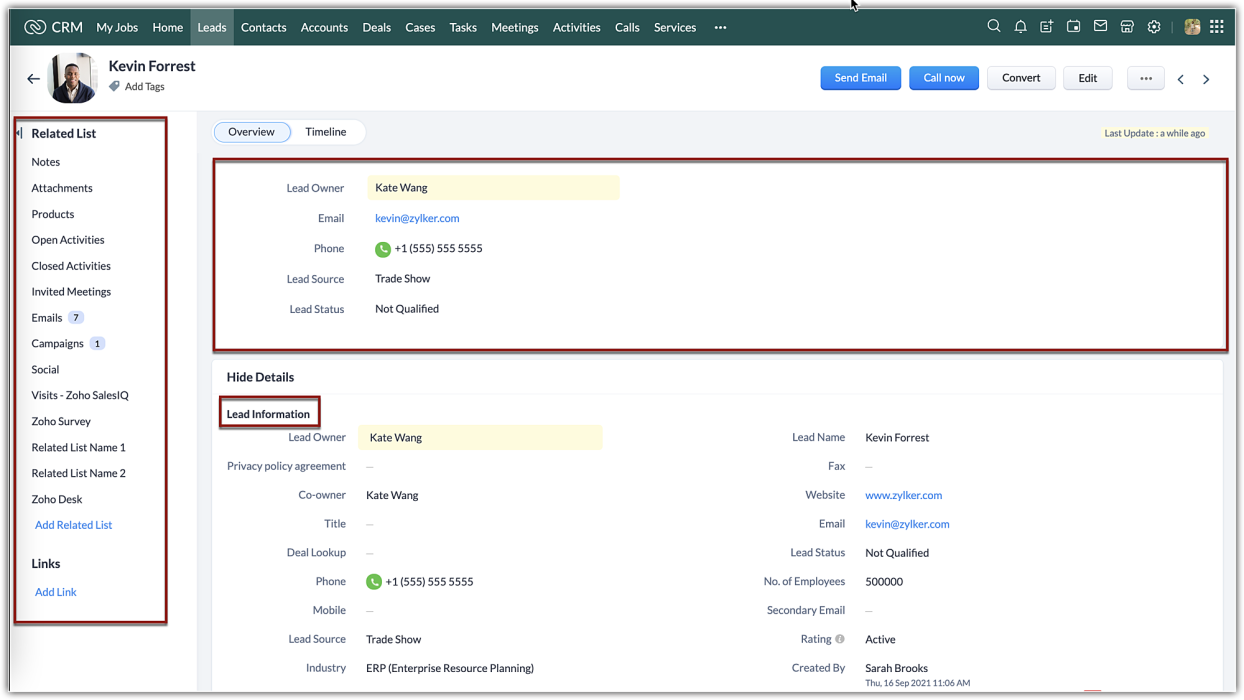

However, when it comes to effective data management, mere association alone is not adequate. You need what is called an interoperable data relationship between your primary and associated data. In the CRM context, an ability to associate values from the related lists with the primary information itself is the premise of the Rollup summary.

Rollup summary
Rollup summary is a field type that can summarize or aggregate values from your desired related list. It is adaptable and versatile. All you have to do is to choose which property to aggregate from your related list and assign that to the field, the field will start rolling up values.
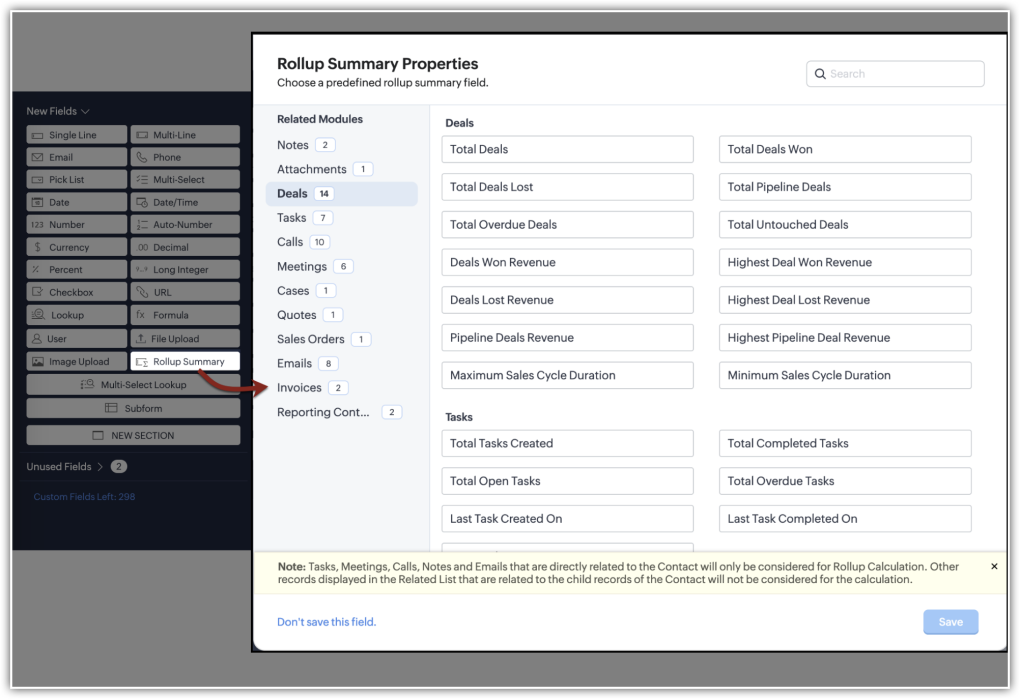

Let us look at different scenarios where rollup summary can benefit you:

Example 1: Aggregate account-based revenue
The accounts module in your CRM holds business information about your prospects and customers. It also displays the contacts, deals, quotes, invoices, and other information associated as related lists.
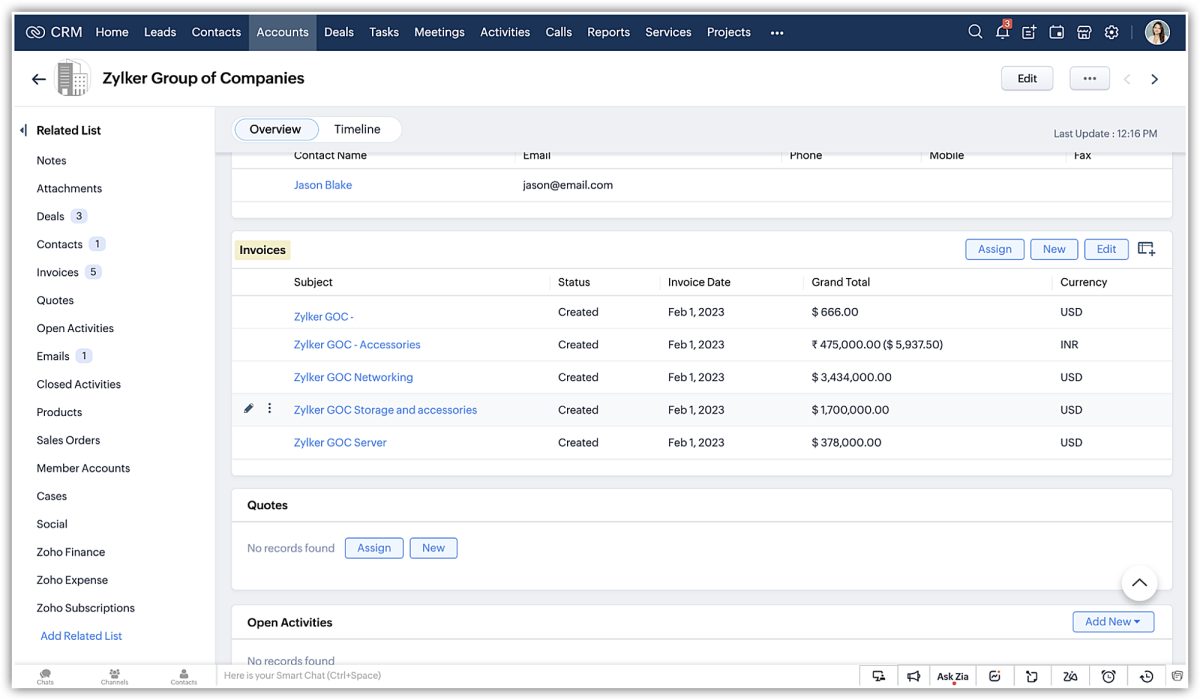

Now, to assess the account's contribution before signing a purchase agreement, the sales manager had to create a report and aggregate the values separately.
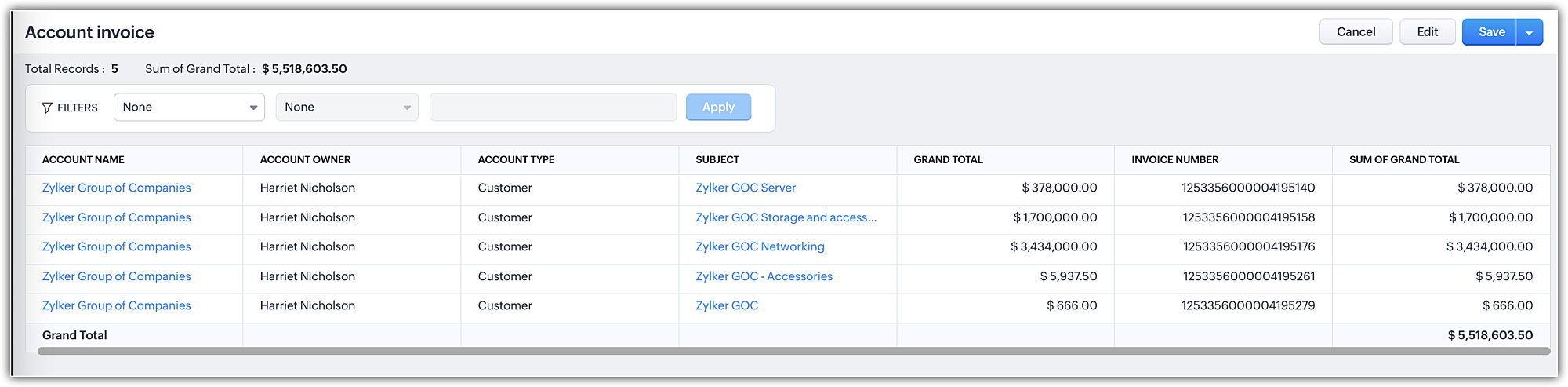


With the rollup summary field added to the module, you can get an auto-assimilated value of invoices created for the account. This saves a lot of time and effort invested in creating reports and the best part is that the field, upon addition, will be available for all records in that layout.
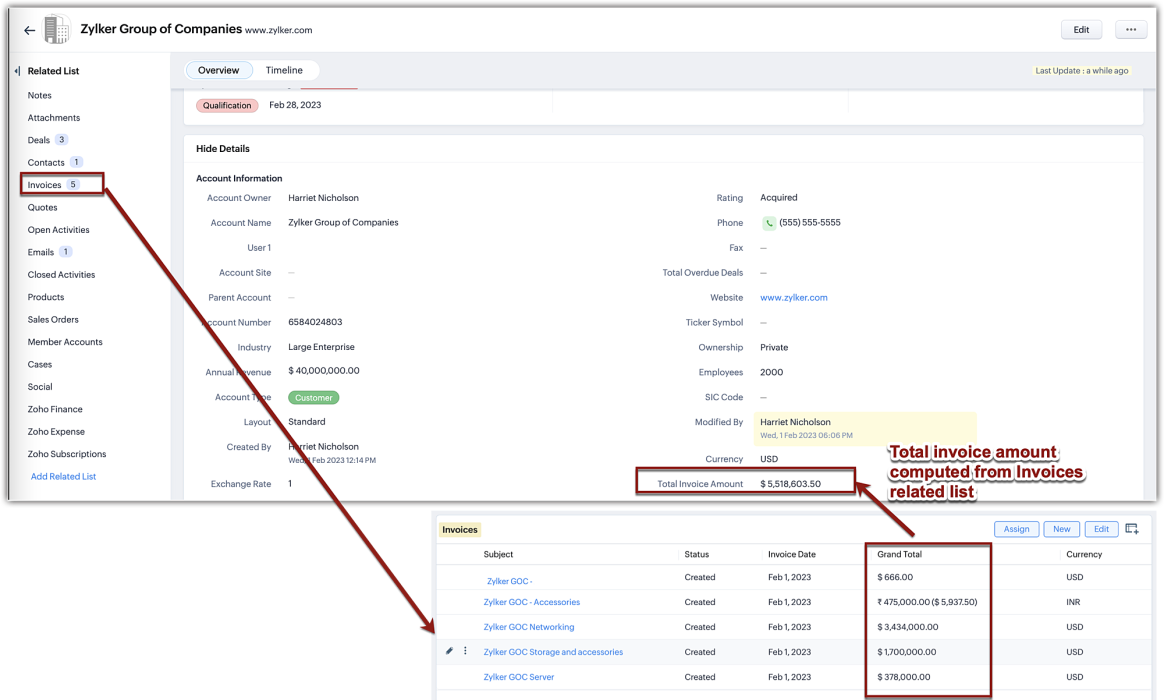
Using this computed value in the rollup field, you can create automation, create a review process, and so on.

Example 2: Take action on the untouched deals
Untouched deals are deals without any actions till time. These kinds of deals are not only stagnant but are also unfavorable for business. However, for an enterprise business that creates more deals each day, manually identifying untouched deals and following up could be a missed opportunity, already. To keep a constant eye, you can create a rollup field that displays the number of untouched deals in your contact records and quickly follow up or automate.
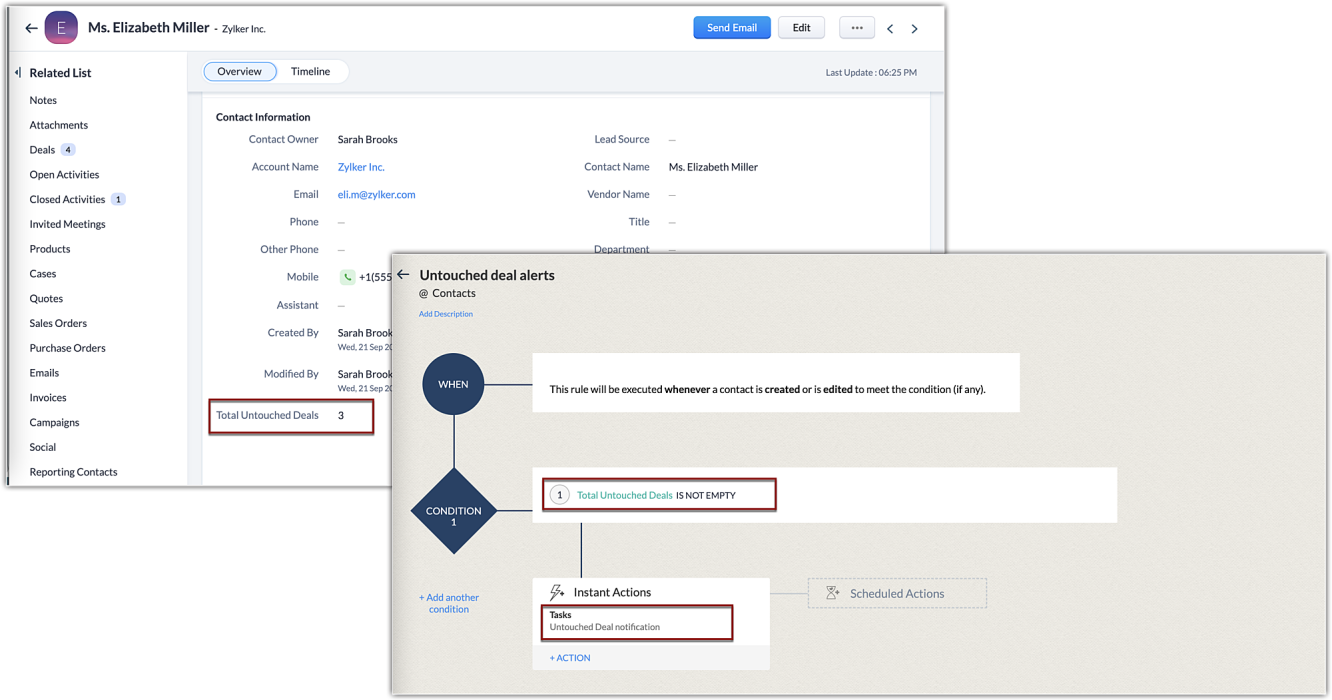

Example 3: Get to know overdue tasks
Tasks are a great way to plan your actions that also act as a reminder. In Zoho CRM, when you add a task it will be added to the open activities related list. Until a task is completed, the task won't be moved to the closed activities. But, due to some lapse, if the rep couldn't complete the task on time, the task will remain in the open activities, giving an impression that the task has time left and as a sales manager, you might want to know of such cases in the leads module. This is where the rollup field will come in handy. With rollup being a field, you can use that as a column and filter the records with values in it.
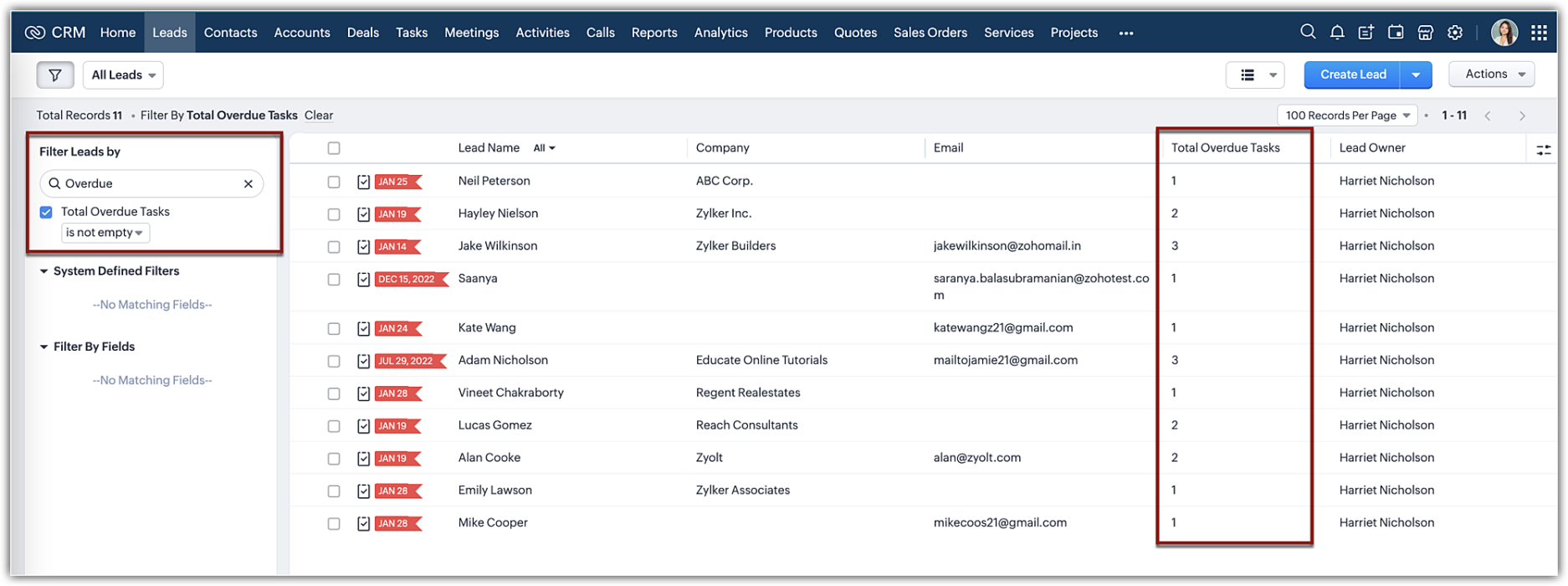
Likewise, you can add a rollup field type to your layout editor and get value assimilated as a read-only field in your record detail page.

Note:
Currently, the rollup summary field property will list only fields that are part of the system-defined related list belonging to a module.

Pre-requisites:
  • Rollup field is available in all modules except in tasks, calls, meetings, and appointments.
  • Rollup summary field type is available only for organizations with Enterprise and Ultimate editions of CRM. You can create up to 10 rollup fields per module for Enterprise and 15 for Ultimate edition.
That's about rollup summary. We hope this new feature will help you conduct cumulative analyses effectively. While this is just the first cut of the release, we are planning the following enhancements:
  • Customization capabilities: We are developing the ability to customize and configure your own rollup summary field. This enables you to aggregate different parameters for different related lists.
  • Rollup as a workflow trigger: In addition to using the field as criteria in a workflow rule, we are developing to base workflow automation upon a rollup field as a rule condition itself. This will enable you to create automation exclusively based on a rollup field.
Resource: Help document 

      Zoho Campaigns Resources


        • Desk Community Learning Series


        • Digest


        • Functions


        • Meetups


        • Kbase


        • Resources


        • Glossary


        • Desk Marketplace


        • MVP Corner


        • Word of the Day


        • Ask the Experts


          Zoho CRM Plus Resources

            Zoho Books Resources


              Zoho Subscriptions Resources

                Zoho Projects Resources


                  Zoho Sprints Resources


                    Zoho Orchestly Resources


                      Zoho Creator Resources


                        Zoho WorkDrive Resources


                          Zoho CRM Resources

                          • CRM Community Learning Series

                            CRM Community Learning Series


                          • Tips

                            Tips

                          • Functions

                            Functions

                          • Meetups

                            Meetups

                          • Kbase

                            Kbase

                          • Resources

                            Resources

                          • Digest

                            Digest

                          • CRM Marketplace

                            CRM Marketplace

                          • MVP Corner

                            MVP Corner


                            Zoho Writer Writer

                            Get Started. Write Away!

                            Writer is a powerful online word processor, designed for collaborative work.

                              Zoho CRM コンテンツ


                                ご検討中の方

                                  • Recent Topics

                                  • Tip #7: Customize the appointment confirmation page

                                    A confirmation page plays a crucial role in creating the first impression, as that's where customers land when booking with you. It shows your brand identity, engages your audience, and drives more conversions. Yet, this section is often overlooked when
                                  • Add Image Upload Field to Zoho Bookings Registration Form

                                    Hi, We would like to request the addition of an image upload field to the Zoho Bookings registration form. Currently, Zoho Bookings only supports text-based fields (e.g., Single Line, Multi-Line, Email, Checkbox, Dropdown, Radio Button, and Date), but
                                  • Meeting integration with Otter.ai

                                    Would love for an integration with an AI transcription service like Otter.ai to be integrated with Zoho Meeting. Thanks
                                  • [Free webinar] AI agents in Zoho Creator - Creator Tech Connect

                                    Hello everyone, We’re excited to invite you to another edition of the Creator Tech Connect webinar. About Creator Tech Connect The Creator Tech Connect series is a free monthly webinar featuring in-depth technical sessions designed for developers, administrators,
                                  • プロフェッショナルプランで、見積作成時に原価と利益率を確認する代替案について

                                    現在、Zoho CRMのプロフェッショナルプランを利用しています。 海外から輸入した商品を販売しており、商品ごとに原価が異なるため、見積書を作成する際(または保存直後)に、その見積の原価合計と利益率を確認したいと考えています。 しかし、現在のプランではDeluge(関数)が使えず、見積書の「商品詳細」の項目をカスタマイズすることもできません。 1,見積作成画面で商品の原価を参照できるような、標準機能での工夫はありますか? 2,レポート機能を使って、見積単位での原価・利益を算出する方法はありますか?
                                  • Announcing Zoho Sheet desktop app for macOS and Windows (Beta)

                                    Hello Sheet users, We know you’ve been waiting for this one. It has always been the top priority on our roadmap to provide a single native desktop app for macOS and Windows that works both online and offline. Today, we are excited to announce that the
                                  • How to create a directory report from one-to-many relationship

                                    Hi all, Newbie here. I'm converting an Access DB to Creator. I've learned Forms are tables and Reports are used to edit table rows, not Forms. I've got the data loaded and can maintain it with the Reports already done. I've done filtering and sorting,
                                  • SalesIQ Email Delivery Issues to Microsoft

                                    Is anyone else having delivery issues to Hotmail, Outlook, and Live inboxes when sending transcripts and replies via email from SalesIQ? We’ve detected that emails sent from SalesIQ to these accounts aren't arriving—they don’t even bounce back; they simply
                                  • Moving Project Task to other parent not possible

                                    We are trying to move an existing Zoho Projects task to a different parent task via API. Example: Task ID: 289214000001385113 Current parent: 289214000001281044 New parent: 289214000001281045 We tested updating the task with: taskParam.put("parent_task_id",
                                  • Remove or hide default views

                                    I'm looking to only have the views pertinent to my organization. Is there a way to show only my custom views (or separate them to a different area or something)? If not, this should be a feature as switching from Zendesk we had this option...
                                  • Add more than 7 sender addresses in campaigns

                                    I need to add at least 15 sender email addresses but am currently limited to 7. Please can you increase. Thank you
                                  • Email sent to Hotmail arrives to Spam

                                    I'm sending email tests to my Hotmail account and they arrives to the Spam folder all the time. My domain has been verified correctly. How can I fix it?
                                  • Let’s Talk Recruit: Your pipeline is full. So why aren’t roles closing?

                                    Welcome back to Let’s Talk Recruit, where we break down hiring workflows into simple, actionable insights for recruiters. The focus this month is on what slows down your pipeline even when everything looks like it’s working. Picture this. You log in to
                                  • Mirror Component in Zoho CRM: Access real-time related data without leaving your record

                                    Hi everyone, This feature is now available for the JP, CA, SA, UAE, and AU DCs. We're excited to bring to you Zoho CRM's mirror component, which presents relevant data on a record's details page and keeps everything users need in one place without having
                                  • Search through email contents

                                    Is there a way to search through the email history of a lead? Meaning if among the 50 emails to a lead about different topics I want to find all the ones with the word "pizza" in the body of the email, is that possible? Thanks for your help, Hanan
                                  • Marketing Tip #9: Track your traffic sources

                                    Not all marketing channels work equally well. Knowing whether your visitors come from Google, Instagram, or email helps you focus on what actually drives sales. Try this today: Check your Zoho Commerce reports or connect Zoho PageSense to see your top
                                  • It Really Can Be This Simple

                                    Let's be honest.... Running a business already comes with enough moving parts. Invoices, payments, follow-ups, reminders, tracking who paid and who disappeared. It can slowly turn into a full-time admin job on its own, especially when you are a Sole Proprietor,
                                  • Huge confusion in zoho crm and zoho analytics

                                    Context => We have reporting based hierarchy in zoho crm and basically there will be one sales head and couple sales managers and 10 pre sales excutives divided between 2 sales managers we have maintained that in zoho crm and there is complex reporting
                                  • Zoho Books | Product updates | May 2026

                                    Hello users, We're back with the latest updates and enhancements we've rolled out in Zoho Books. From sales tax automation to scanning receipts for free, explore the updates designed to upgrade your bookkeeping experience. Sales Tax Automation [US & Canada
                                  • Update: [Issue fixed] Temporary access issue on Android and iOS devices

                                    Hello, Zoho Sheet users! We're aware that some of you are currently unable to open spreadsheet files from your Android and iOS devices. We extend our sincere apologies for the inconvenience caused. We're working on fixing the issue with highest priority
                                  • Action Required: Migrate Your SQL Server Connection

                                    Dear Users, Following our earlier communication on the upcoming Zoho Analytics security updates affecting Microsoft SQL Server connections, we have revised our recommended approach. The previously shared cipher suite configuration is no longer the recommended
                                  • Currency Change for Companies

                                    Hello FSM Team, We would like your assistance in changing the company currency for our UAE organization from AED to USD. Currently, all customers and users are configured with AED currency settings, and we would like to standardize the organization currency
                                  • Accrual Data - Zoho Books API

                                    Hi Team, When we integrate Zoho Books with Zoho Analytics, we usually receive a consolidated dataset called “Accrual Transactions,” which contains all types of transaction data. Could you please confirm whether it is possible to retrieve this same data
                                  • Bank Fees - Allow User to Choose Expense Account

                                    Bank fees from Customer Payments can only be debited against the system Bank Fees account due to hard-coding. The user should be able to select which expense account those fees are debited against. The use case is pretty straightforward. A business like
                                  • Showing Cost Price and Profit Margin in PDF

                                    Hi there, We use two different types of quotes in our company. One is a version for our clients that does not include cost or profit margin information, and the other is for our internal team that includes profit margin and cost. We are running into an
                                  • Side bar menu

                                    It would be great if you could stop the auto collapse of expanded menus when selecting a different module. It would save a lot of mouse clicks for a lot of users that frequently switch between sales & purchases as we do, it's easier to collapse them manually when not required !
                                  • Syncing zoho books into zoho crm

                                    I was wondering how I can use zoho books in crm as I have been using them separately and would like to sync the two. Is this possible and if so, how? Thanks
                                  • Remove horizontal scroll bar

                                    Is there any way to remove or hide the horizontal scroll bars on the iframe reports? I removed columns, but it still stays there.
                                  • Rich Text Type Format for Notes Field

                                    Has it been discussed or is there a way to insert a table in the notes field? We sometimes receive information in a table format, and it would be beneficial to have it in the same format as a note on a record. Moderation Update (12-May-26): We are working
                                  • Multiple Blueprints on different fields at the same time.

                                    It looks only 1 Blueprint can run at the same time, it makes sense for many Blueprints on the same field (Eg. Stage). But what about multiple Blueprints on "different" fields? the multiple options must be available. (Eg. Stage, Documents Status, Contract
                                  • sales IQ issue on website

                                    i integrated the zoho sales IQ code on the website but it is comming in distroted form i am sharing the screenshot below the website is bulit in wix platform
                                  • Contract to payment flow

                                    Hi everyone, I’m trying to set up a contract-to-payment flow and want to avoid duplicating invoices or customers in Zoho Books. The flow should be: contract generated from CRM, sent via Zoho Sign, client signs, deposit is paid, and the invoice should
                                  • Linking Contacts to Other Modules

                                    In creator, I've got a Contacts page with a lookup that searches Suppliers. Is there a way to have the contacts attached to the Suppliers modular as a list automatically, similar to the CRM version? It goes the other way. If I entered an Employee in the
                                  • Multiple Pipelines

                                    Is it possible to create multiple candidate pipelines?
                                  • Automation #7 - Auto-update Email Content to a Ticket

                                    This is a monthly series where we pick some common use cases that have been either discussed or most asked about in our community and explain how they can be achieved using one of the automation capabilities in Zoho Desk. Email is one of the most commonly
                                  • Introducing Custom Columns in Forecasts in Zoho CRM

                                    Release Plan: Enabling in Phased Manner, Enabled for JP DC Hello all, Forecasts in Zoho CRM help sales representatives, managers, and business stakeholders evaluate performance and plan future sales activities. While standard metrics such as Target, Achieved
                                  • How would you handle Warranty replacement parts or items in zoho inventory

                                    Hi everyone, I'm working on setting up zoho inventory for our distribution business.  We handle the service for our customers and will replace items that malfunction under a warranty basis.  Does anyone else do this and how do you set it up in inventory?  Do you have to create a sales order and if you want to the original item back, do you use a RMA?  If so, how is it done so there isn't a credit memo associated with it? Thanks, Tim
                                  • Atlassian Jira integration live in Zoho Apptics

                                    Tracking crashes and fixing them often happen with different tools. You might use Zoho Apptics to track crashes and understand what went wrong and Jira to resolve those issues. If you use both, you're probably familiar with the manual effort involved
                                  • What's New in Zoho Billing | January 2026

                                    Excited about the latest enhancements in Zoho Billing? Our January updates bring an intelligent AI assistant, smarter subscription management, and improved tax compliance, saving you time and reducing manual work. Dive into the details below to see how
                                  • Customising Outcome drop down

                                    Is it possible to customize the drop down list for appointment outcomes?
                                  • Next Page