Introducing spam detection for webforms: An additional layer of protection to keep your Zoho CRM clean and secure

Introducing spam detection for webforms: An additional layer of protection to keep your Zoho CRM clean and secure

Greetings all,

One of the most highly anticipated feature launches—Spam Detection in webforms—has finally arrived!

Webforms are a vital tool for record generation, but they're also vulnerable to submissions from unauthenticated or malicious sources, which can lead to the collection of spam records that clutter CRM systems and reduce data quality. 

Zoho CRM's new spam detection capability provides an additional security layer and minimizes dependencies on the basic options such as captchas and double opt-ins, ultimately improving data quality of webform submissions. Users no longer have to check potential spam records from webforms manually.

Let's dive into how Spam Detection restricts suspected spam records from webforms and helps users keep their CRM clean and organized.

What does spam detection do?

Spam detection offers the following advantages:
  1. Simplifies the manual review of potential spam in webform submissions.
  2. Detects potential spam submissions by identifying invalid or suspicious email addresses and scoring them to indicate spam probability.
  3. Holds these possible spam records for manual approval from users.
  4. Automatically blocks spam records to keep them out of the CRM account.

What happens to webform submissions?

All webform submissions are evaluated against predefined criteria and screened for spam detection. Let's say you've received several webform submissions for the Leads module from your website visitors.

Clean, non-suspicious records that originate from verified IP addresses—and are therefore deemed likely to be genuine and valid—are fed into the Leads module (unless approval has been set for all webform submissions).

In contrast, suspicious submissions are flagged as potentially spam and held back for manual approval in the usual record approval page called, Awaiting Leads (previously known as Approve Leads). These records are assigned a Spam Possibility Score based on the identified suspicious factors. 

The new Record Source column provides details related to the submission's source—for example, the submission's IP address, the webform name, and the URL—when you hover over the info icon. 

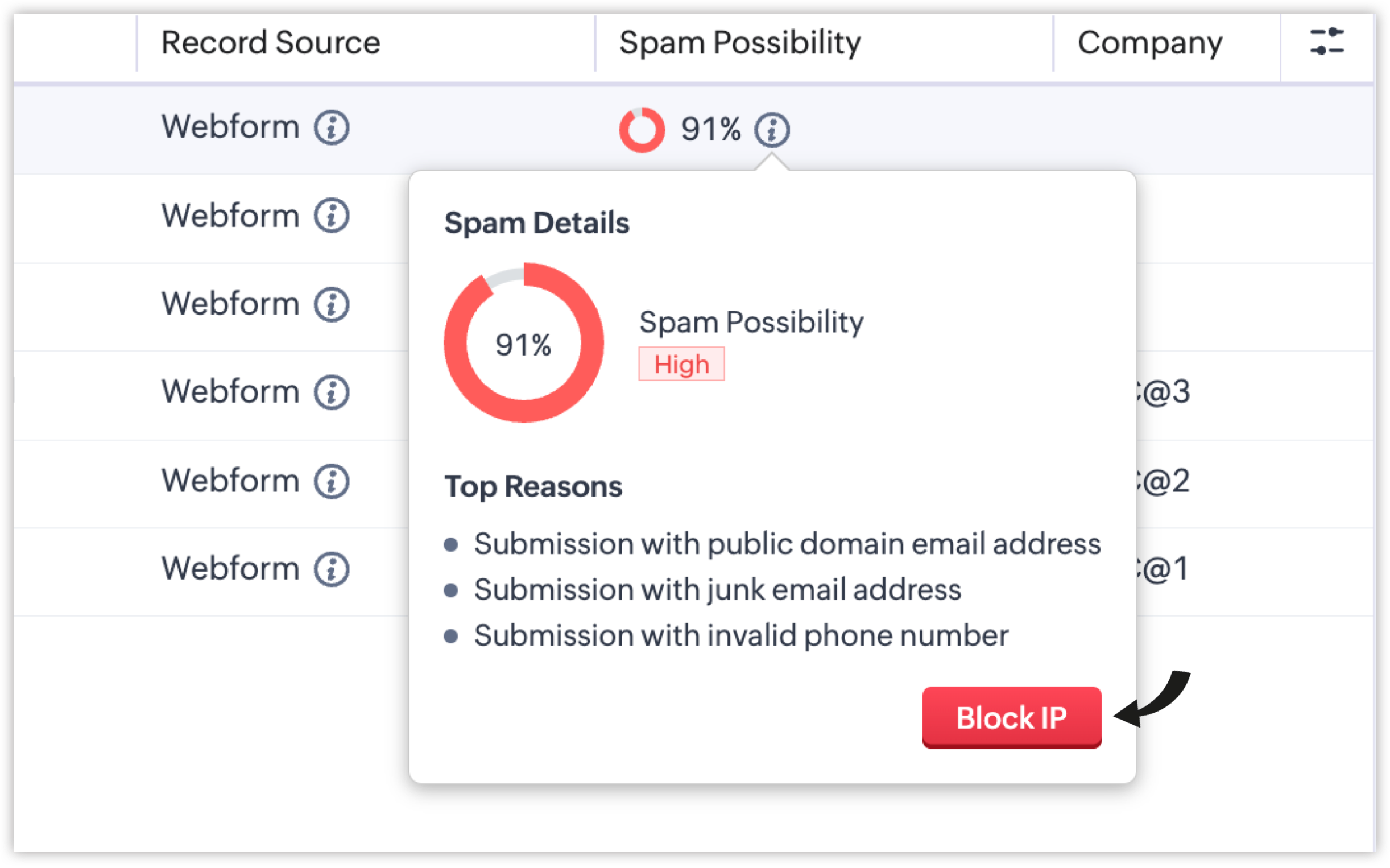
The new Spam Possibility column indicates the spam probability for each record as a percentage. You can also view the top reasons behind the scores of the spam record by hovering over the info icon beside it. 
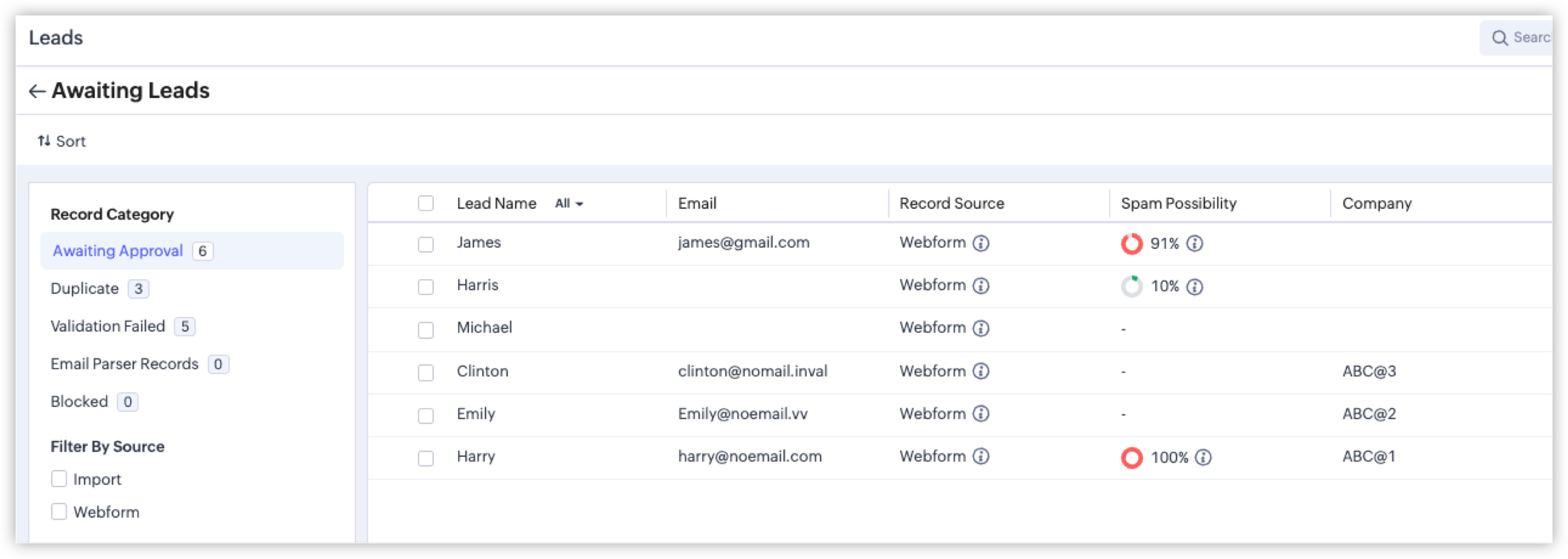

Each reason identified contributes to the score, and the sum is calculated to determine the final Spam Possibility Score for the record. Some of the reasons are listed below:
  1. Submission from bots/crawlers: If a bot or crawler fills and makes a submission via your hosted webform, the Spam Detection layer will automatically identify this malicious submission.
  2. Submission with invalid phone numbers: If a form respondent shares an incorrect phone number, a toll-free number, or a junk contact number, it will be flagged as an invalid phone number.
  3. Submission with invalid email addresses: If the submitted email address originates from a spam source, an unauthorized domain, or a temporary mailbox, it will be flagged as an invalid email address.
We're also introducing an advanced security layer: Honeypot Field, which is a cybersecurity mechanism that identifies bots by detecting submissions made to invisible form fields that genuine users don't interact with. If the submission comes with values filled in the hidden fields, the system flags the entry as likely being a spam submission.

Spam Detection has more parameters like these to detect spam submissions and assign appropriate scores. For quick probability recognition, the following colors represent the severity of spam possibilities:
  1. Green: 1% - 20%
  2. Orange: 21% - 70% 
  3. Red: 71% - 100%

How spam detection helps handle records awaiting approval

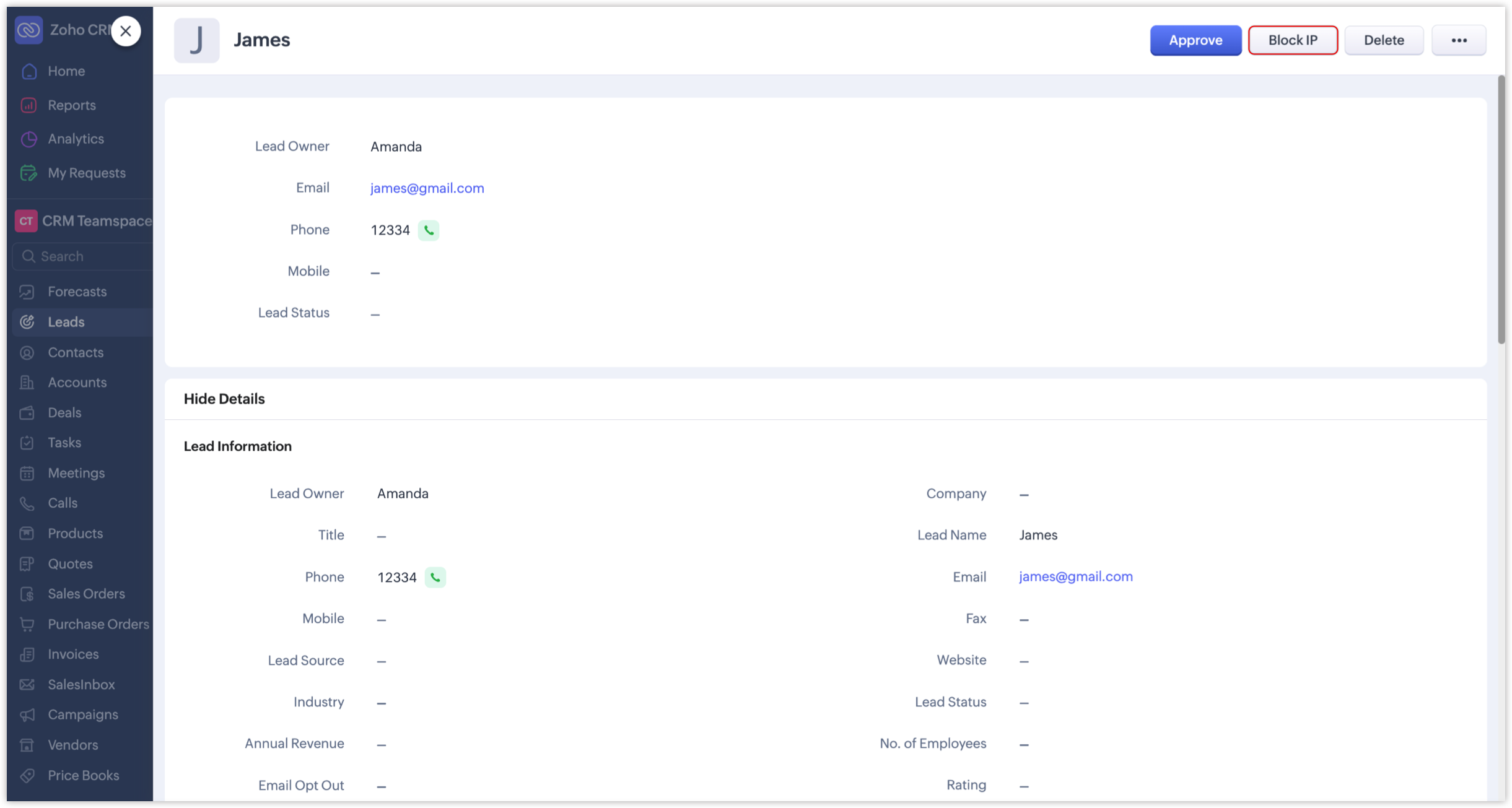
Previously, records that awaited approval were evaluated manually and then approved, merged, resolved, or deleted accordingly. In addition to these traditional actions, and with the introduction of Spam Detection, administrators can now optionally block IP addresses of records with high spam possibility scores if they want to restrict further submissions from them.

  1. The Block IP button is available, along with the other buttons like Merge, Approve, or Resolve.
  1. Admins can also directly block an IP by using the Block IP button available when hovering over the info icon.
Record submissions from such blocked IPs will be categorized under the new Blocked record category.
Additionally, Zoho's system internally maintains a set of blacklisted IPs based on security assessments. Records submitted from those IPs will be automatically and permanently blocked by the CRM.
Notes
Note: Records under the Blocked category will be deleted in 60 days.

How to enable Spam Detection for your webforms

While setting up a webform, you'll see the Spam Detection section where you can adjust the Spam Possibility Score slider to set the threshold at which records should be flagged for manual review.

A score range of 90% to 100% will be set by default for all webforms as the tolerance level, which the webform owner can change anytime based on their preferences.

NotesNote: Records whose spam possibility scores fall within the set range will be held for approval, along with the relevant percentages and reasons. If, say, the chosen range is 80 to 100%, only those records with spam possibility percentages between 80 and 100 will be listed. Submissions with lower percentages will not be held as spam.

We've revamped the record approval page to provide a better UI experience and make it easier to manage and review spam records. Let's look at the changes in detail.

Revamped record approval page

  1. In modules like Leads, the "Approve Leads" field under Actions has been renamed to "Awaiting Leads". This change extends to other modules as well.
  2. The approval page has been redesigned to make it easier to switch between categories and review all records. This enhancement applies to all webform-supported modules and team modules.
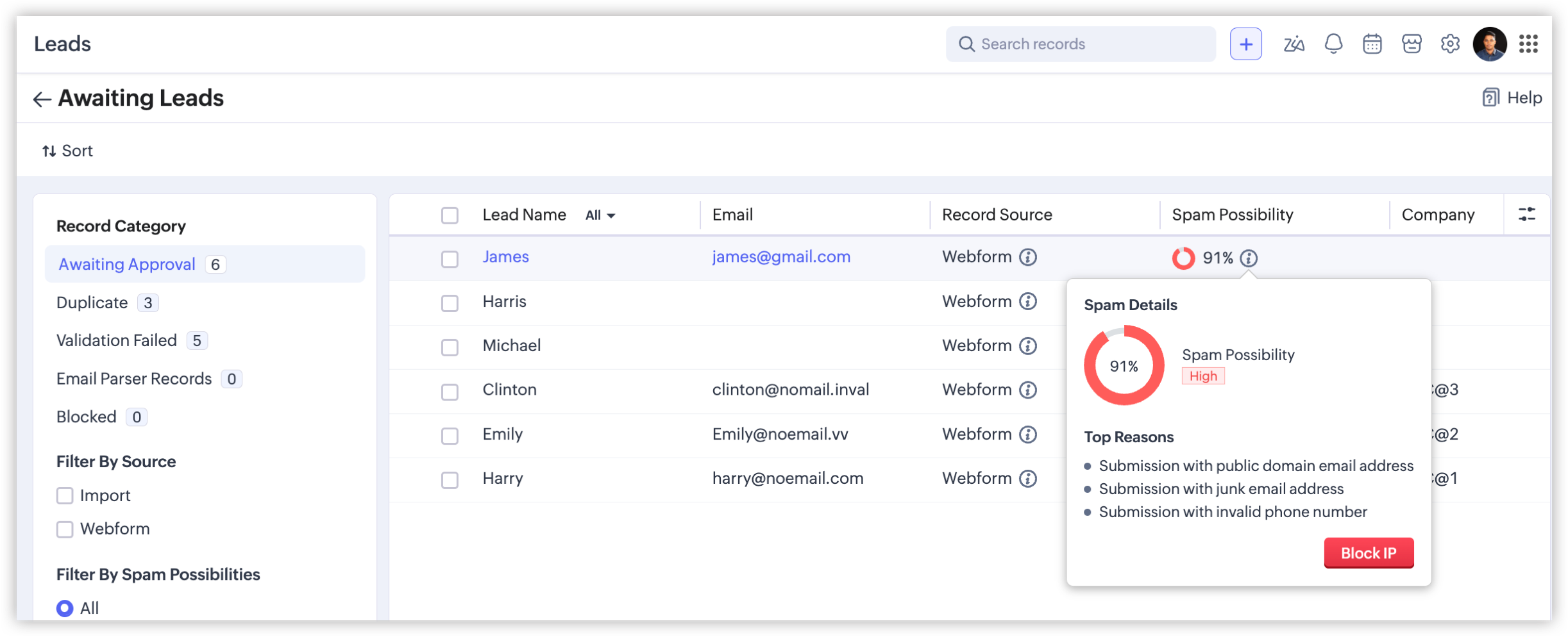
  3. The number of records in each category displayed prevents users from overlooking records that are awaiting approval.
  4. You can also filter these records using the new filters in the left panel on the Awaiting Leads page.
    1. Filter By Source: Filters records based on the source—webform or import.
    2. Filter By Spam Possibilities: Choosing the Webform option will enable this filter to list records based on the spam possibilities.
    3. Filter By Fields: Lists records based on these fields: Created Time and Record Owner.
    4. Filter By IP - Webform: Filters blocked possible spam entries based on whether a given record is blocked manually by a user or automatically by the system. This filter is available only under the Blocked category.
That concludes everything about spam detection in webforms. Feel free to share your thoughts and suggestions in the comments.

Info
Availability 

Editions: All paid editions, including the developer edition (except for the paid trial edition)
DC: All DCs
Release Plan: We've released this feature for partners across all DCs, and for customers up to the Professional edition across all DCs. We'll roll it out to higher editions in a few more days. [Updated on July 9, 2026]

Regards,
Fiona


      Zoho Campaigns Resources


        • Desk Community Learning Series


        • Digest


        • Functions


        • Meetups


        • Kbase


        • Resources


        • Glossary


        • Desk Marketplace


        • MVP Corner


        • Word of the Day


        • Ask the Experts


          Zoho CRM Plus Resources

            Zoho Books Resources


              Zoho Subscriptions Resources

                Zoho Projects Resources


                  Zoho Sprints Resources


                    Zoho Orchestly Resources


                      Zoho Creator Resources


                        Zoho WorkDrive Resources


                          Zoho CRM Resources

                          • CRM Community Learning Series

                            CRM Community Learning Series


                          • Tips

                            Tips

                          • Functions

                            Functions

                          • Meetups

                            Meetups

                          • Kbase

                            Kbase

                          • Resources

                            Resources

                          • Digest

                            Digest

                          • CRM Marketplace

                            CRM Marketplace

                          • MVP Corner

                            MVP Corner


                            Zoho Writer Writer

                            Get Started. Write Away!

                            Writer is a powerful online word processor, designed for collaborative work.

                              Zoho CRM コンテンツ


                                ご検討中の方

                                  • Recent Topics

                                  • [BUG] WebTabs in ZohoCRM now have a spurious "\" displayed along with some additional HTML Head code included

                                    An example of the issue can be seen below:
                                  • CNIL - Suivi de Pixel

                                    Bonjour à tous, À la suite de la nouvelle recommandation de la CNIL sur les pixels de suivi dans les e-mails, savez-vous si Zoho Campaigns permet : de conditionner le suivi des ouvertures au consentement de chaque contact ; de proposer un lien permettant
                                  • Scheduled import

                                    The tutorial shows a scheduled import option but this option doesn't appear to be available when using Zoho DB.
                                  • #4 Choosing How My Invoice Should Look

                                    Day 4: Meera had the basics sorted. Her business name was there, the address looked right, and her logo finally appeared where it should. But the invoice still did not quite look like hers. Her old studio used invoices that were clean, tightly laid out,
                                  • Transaction rules for "Owner's Contribution" ?

                                    I have a bank account where a lot of the deposits are "Owner's Contributions" (i.e., the business owner investing money in the company). Is it possible to create a Transaction Rule to automatically recognize these? They all have the same verbiage from
                                  • DYK 12: Turn Email into Work Items

                                    Did you know you can add work items to your Zoho Projects portal directly from your inbox? The initial step of important collaborations start over an email, and most of these require an immediate follow-up by creating a task, or reporting an issue. During
                                  • Custom Function not getting package details when triggered from Workflow Rules.

                                    I have a custom function for Packages that submits a form in our Creator app that we use to generate custom shipping labels (internal staff complete deliveries so we cannot generate shipping labels straight from Inventory). When the function is executed
                                  • how to Solve Conflict Invoices in Zoho POS

                                    Hello Team, I am facing a repeated issue in Zoho POS while saving a sale that contains service-based items. My products are intentionally created as Service (Non-Inventory) items because I do not want to track stock for them. However, every time I try
                                  • ¿Cuándo estará disponible la edición de Zoho POS para México?

                                    He estado revisando las capacidades de Zoho POS y su evolución dentro de la estrategia de Zoho for Retail, y me parece que existe una oportunidad muy interesante para el mercado mexicano. Zoho POS ya ofrece funcionalidades para gestionar ventas, inventario,
                                  • Important update for Zoho RPA Windows Agent users

                                    Hi everyone, We would like to share an important update for Zoho RPA Windows Agent users running Windows Server 2016 or Windows Server 2019. The new Zoho RPA Windows Agent 6.0.0 and later versions are not supported on Windows Server 2016 and Windows Server
                                  • Multi-Option Estimates: One Estimate, Multiple Choices

                                    Every service request can have multiple solutions. Multi-Option Estimates help you present these different solutions in a single estimate with its own name, parts, price, and total. Each option can differ in scope, approach, or price — whatever choices
                                  • Delete CRM Portal

                                    How do I delete portals from my CRM? I created one just to test, it is not in use and is disabled but it's existence is preventing me from marking fields in modules as "required" unless I make it 'read/write' in the portal first. I'd rather just delete
                                  • Marketing Tip #32: Improve SEO and customer confidence with an FAQ section

                                    Before making a purchase, customers often have simple questions about delivery times, returns, product usage, or sizing. If they can’t quickly find answers, they may leave your store without buying. Adding a clear FAQ (Frequently Asked Questions) section
                                  • Contact removed when picking ticket template.

                                    hi new to Desk rolling out to company, replacing Freshdesk. Is there way to keep the in context contact when selecting a template? When you choose a template you lose the contact!
                                  • ZOHO Campaigns in ZOHO Analytics - Campaigns vs Contacts Table

                                    There seems to be information in the Zoho Campaigns table such as Unique Opens and Unique Clicks that can't be found in the Campaigns vs Contacts table where only Opens and Clicks are shown on a per contact level. Is there a way to bring Unique Opens
                                  • Zoho Publish is now available in Zoho One!

                                    Hello Zoho One users, We’re excited to announce that Zoho Publish is now included as part of the Zoho One suite! As businesses grow, managing Google Business Profiles across many locations becomes challenging. Business information needs to stay accurate,
                                  • How to change an employee mail id

                                    Hi, Does the administrator have the rights to edit an  employees mail id. 
                                  • Cousin Domain Verification in Zoho Mail: Identify and block look-alike domains

                                    Phishing attacks often rely on domain names that closely resemble legitimate ones. This makes it difficult for users to identify fraudulent emails at first glance. Zoho Mail's Cousin Domain Verification feature allows administrators to define trusted
                                  • How do I add 2 agents under the same email?

                                    I have 2 agents who use the same email address. I added one, but when adding the second agent, it says that the email is already registered. How do I configure this properly?
                                  • Zoho Desk API modifiedTimeRange returns HTTP 500 around 2026-03-08T02:00:00.000Z

                                    Hello Zoho Support Team, We are experiencing a reproducible HTTP 500 Internal Server Error when querying the Zoho Desk API search endpoint with a specific modifiedTimeRange boundary. ### API Endpoint GET /api/v1/tickets/search ### Reproduction Steps &
                                  • Updating an Invoice Line Item's Discount Account via API Call / Deluge Custom Function

                                    I need help updating an invoice line item's discount account via API. Below is a screenshot of the line item field I am referring to. Now the field to the left of the highlighted field (discount account) is the sales income account. I am able to modify
                                  • Collaborate Visually with Whiteboard in Zoho Projects

                                    Whiteboard in Zoho Projects allows you to collaborate visually by creating diagrams, annotating designs, and sketching project workflows using shapes, text, and images within project modules. Team members can work simultaneously, improving productivity
                                  • Associate project with timer on iPhone

                                    When I start the timer without first associating a project (on my iPhone), its starts fine but now when I need to associate a project, and click on the link, I get a list of EVERY project I've ever put into Zoho Books. It used to just show active projects.
                                  • Sales Tax Refund on Commerce Order

                                    I've looked high and low. Relatively new to ZOHO but not to systems in general. How do we produce a refund for sales tax charged and paid for by a customer in error? This does not impact inventory stock. Simply for accounting and getting the $ back to
                                  • Importing Chart of Accounts from Quickbooks -- "Debit or Credit"?

                                    I'm trying to switch from QB to Zoho Books. I've prepped my chart of accounts and put it into the format following the structure of the sample CSV file. But one thing that does not exist at all on the Quickbooks side is the Zoho column for "Debit or Credit".
                                  • Long term pricing for customers managing multiple organizations

                                    I've been using Zoho extensively for quite some time and genuinely think it's one of the most powerful and customizable business platforms available. Between Zoho Books and Zoho Analytics, I've invested a significant amount of time building automations,
                                  • Default Status for Appointments to Completed

                                    We use Zoho Bookings integrated with Zoho Desk to book time for tech support sessions, we've configured it to only allow for a contact to book a single session to avoid customers overbooking time that may not be needed. The trouble is, once a session
                                  • Customer User Fields for use in Rules

                                    Hi, I would like to be able to add custom fields to the users, such as Department or Role, which can then be used in Rules, Reports, etc. as a condition. A use case is limiting Global lists or Choices based on the users Custom Field, so one form can be
                                  • Add ZeptoMail to Zoho One

                                    Hi Zoho Team, I would like to request that ZeptoMail be added as a fully included application within Zoho One. Why this is important Zoho One is positioned as a unified business operating system that brings the applications an organization needs under
                                  • Item image on document

                                    I know what I am asking may not be possible, but I will ask anyway, maybe I will get lucky, and someone else is doing it. My business is based on special orders only from various online stores. When I send a quote to a client, I generate a separate quote
                                  • Dashboard Metric Drill-Down Shows Stale Data

                                    Summary: When clicking between different metric components on a custom dashboard, the drill-down list shows data from the previously opened metric instead of the one just clicked. Steps to Reproduce: Create a custom dashboard with multiple pre-defined/templatized
                                  • Zoho Marketing Automation WhatsApp Campaign Import Sync for Zoho Analytics

                                    WhatsApp is a critical channel in modern marketing, yet WhatsApp Campaign metrics from Zoho Marketing Automation currently cannot be natively imported into Zoho Analytics via the default advanced analytics connector. Integrating this into the standard
                                  • Allow Reauthorizing CRM Connections Without Revoking First

                                    Currently, when a Zoho CRM connection needs to be reauthorized or authorized with another account, we first have to revoke the existing authorization and then authorize it again. This creates a gap where the connection is unavailable, and any functions,
                                  • Programmatic Itemized Expenses?

                                    It does not appear that it is possible to create itemized expenses programmatically (via the API)? Is this correct, or am I misunderstanding the situation?
                                  • Prefix & Suffix on Single Line, Number, etc.

                                    Hi, I would like to have the same Prefix and Suffix that was added to the Unique ID on Text and Number Fields. Use case could be as basic as temperature, as per another Idea I have to use Single Line (Text) for a number that might have leading zeros today,
                                  • Handle Leading Zeros in a Number Field

                                    Hi, If I use a Number Field, set with Min 7 Digits and Max 7 Digits, and enter 0000001, it will result in 1 and an error as it removes the leading zeros, the same with entering 0012340 will result in 12340 and error. So I have to use a Text Field and
                                  • Is there a way to show contact emails in the Account?

                                    I know I can see the emails I have sent and received on a Contact detail view, but I want to be able to see all the emails that have been sent and received between all an Accounts Contacts on the Account Detail view. That way when I see the Account detail
                                  • Virtual Option for Fields

                                    Hi, I would like to be able to choose another option other than Read-Only or Disabled, such as Virtual. And with Virtual, the field is shown on the form and avilable in rules, but NOT saved to the Database. A use case is having multiple Large Lists of
                                  • Zoho Marketing Automation Cannot Sync Lookiup Fields

                                    Hello all, It seems that Zoho MA cannot sync Lookup fields from the CRM. Can you confirm if this is the case? Is there a workaround? Do you know if Campaigns can sync with custom modules and also with Lookup field in the CRM? Thank you!
                                  • Specific ListView Canvas on Canvas Home Page Always Loads Most Recent ListView, Not the One Specified

                                    I had mentioned this to ZOHO, but I mainly wanted to see if others in the Community are also facing this problem. I created a Canvas ListView for a Custom Module, and then created a Canvas Home page (technically on a tab item, but I'm not sure if that
                                  • Next Page