Kaizen 238 Fetching Employee Data from Microsoft SQL Server into Zoho CRM Using Queries

Kaizen 238 Fetching Employee Data from Microsoft SQL Server into Zoho CRM Using Queries


Hello everyone!
Welcome back to the Kaizen series!

Many organizations manage workforce data such as employee designations, contact details, salary bands, and joining dates in an HRMS backed by Microsoft SQL Server, while their sales teams work in Zoho CRM. When a deal needs an assigned pre-sales engineer or a CSM hand off, reps must leave CRM, open the HR portal, and manually look up the right person.

This post shows how to use the Queries feature in Zoho CRM to connect to a Microsoft SQL Server database, fetch employee records with a parameterized SQL query, and display them directly on a Deal Canvas without leaving CRM. We will cover source creation, SSL and Read-Only configuration, writing the query, serializing the response, and a brief overview of how the same query can be reused across Canvas, Custom Related List, and Kiosk.

Prerequisites

  1. Zoho CRM Enterprise or Ultimate edition (SQL sources require Enterprise or above)
  2. A running Microsoft SQL Server instance with a database user that has SELECT privileges on the EMPLOYEE table
  3. The SQL Server instance must be reachable from Zoho CRM either publicly or Zoho CRM IP ranges must be whitelisted in the firewall rules
  4. The SQL Server hostname must be added to Trusted Domains in Zoho CRM (Setup > Developer Hub > Trusted Domains) if using a DNS hostname
  5. Developer role or System Administrator access in Zoho CRM
  6. A custom "Employee ID" field (Single Line) on the relevant CRM module (e.g., Deals or Contacts) to store the external employee reference if passing a single employee ID as a variable. Not required if the query fetches the full list (no variable).

Use Case

Sales reps at a professional services firm need to assign internal team members (solutions engineers, CSMs) to deals, but employee contact and designation data lives only in a Microsoft SQL Server HRMS requiring a manual lookup outside CRM every time.

Solution

Connect Zoho CRM Queries to the HRMS database. A parameterized SELECT on the EMPLOYEE table filtered by {{EMP_ID}}, resolved from a custom field on the Deal record, fetches the assigned employee's profile and displays it on the Deal Canvas in real time.

Follow the steps to implement this solution.

Step 1: Whitelist Zoho CRM IPs in SQL Server Firewall

Before creating the source in Zoho CRM, ensure the SQL Server instance can accept inbound connections from Zoho CRM's servers.
  1. The SQL Server instance must be accessible over the internet on port 1433 (SQL Server default).
  2. Zoho CRM's IP ranges must be whitelisted in the firewall rules governing the SQL Server. Refer to the Zoho CRM IP Whitelist guide for the full list of IP ranges for your data center.
  3. Ensure SQL Server Browser service is running and TCP/IP is enabled in SQL Server Configuration Manager.
  4. If the SQL Server uses a DNS hostname, also add it to Setup > Developer Hub > Trusted Domains in Zoho CRM.

Step 2: Create a Dedicated Read-Only SQL Server Login

On your SQL Server instance, create a login with the minimum permissions needed.
Do not use 'sa' (SQL Server's built-in System Administrator login) or any admin account. 'System Administrator login has unrestricted access to all databases and server settings. 

Step 3: Add Microsoft SQL Server as a Database Source

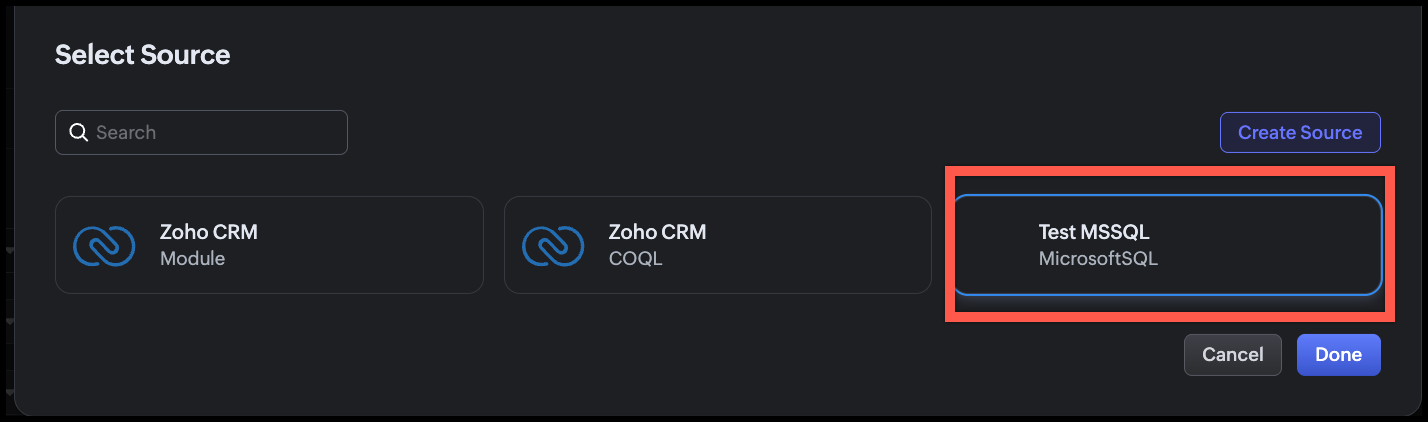
  1. In Zoho CRM, go to Setup > Developer Hub > Queries.
  2. Click the Sources tab.
  3. Click Add Source.
  4. From the list of source types, select Database.
  5. From the available database options, choose MicrosoftSQL.
  6. Fill in the source configuration as shown in the following image.
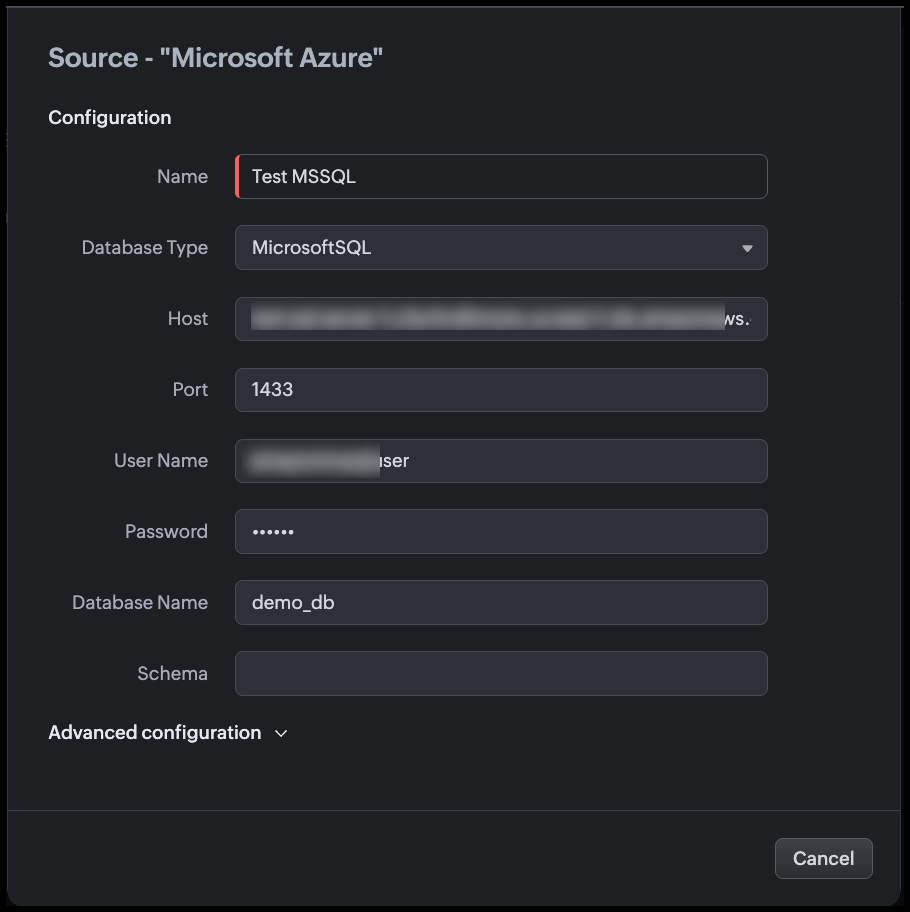
Step 4: Configure Advanced Settings

Expand the Advanced configuration section before saving.

Use SSL

Enable the Use SSL toggle. This action,
  1. Encrypts the connection between Zoho CRM and SQL Server using TLS.
  2. When a DNS hostname is used, the system also validates the server certificate and hostname match before establishing the connection.
  3. SQL Server supports SSL/TLS natively. Ensure the SQL Server instance has a valid TLS certificate configured or that the certificate is trusted by the host.

Notes
Note
  1. The SSL setting is IMMUTABLE after the source is successfully created. If your SSL configuration needs to change, you must delete and recreate the source.
  2. If you add the hostname to Trusted Domains, the system bypasses certificate and hostname verification. Only add genuinely trusted hosts.
Read Only
Enable the Read Only toggle. This action,
  1. Restricts this source to only SELECT operations at the Zoho CRM level.
  2. Blocks INSERT, UPDATE, and DELETE queries even if the zoho_crm_reader SQL login is later granted write permissions at the database level.
Since this source is used purely to display employee information in CRM views, you must enable Read-Only.
You can change this setting after the source is created, unlike SSL.

Time Zone
Set Time Zone to match the time zone of your SQL Server instance (e.g., UTC, or the server's local time zone).
The DATE_OF_JOIN and MODIFIED_ON columns are stored as DATETIME in SQL Server (without time zone information). Setting the correct source time zone allows Zoho CRM to convert these values to each viewing user's local time zone for accurate display.
Example: If the server stores MODIFIED_ON = 2026-04-15T18:30:00 in IST, a user in UTC will see 2026-04-15 13:00.

Connection Timeout
Set Connection timeout to 10 seconds. This action defines how long Zoho CRM waits for the SQL Server to accept the connection before giving up.
10 seconds accommodates typical network latency while preventing the CRM UI from hanging indefinitely during server downtime or network issues.


Click Validate and Save.
Zoho CRM tests the connection. On success, the source is saved and available for queries.

Step 5: Create the Query

  1. Go to Setup > Developer Hub > Queries.
  2. Click Create Query.
  3. In the dialog box enter the name of the query.
  4. Click Next.
  5. Under Configuration, click Change and select the source we added.
  6. Click Done.

Step 6: Write the SQL Query

In the query editor, enter the following query.
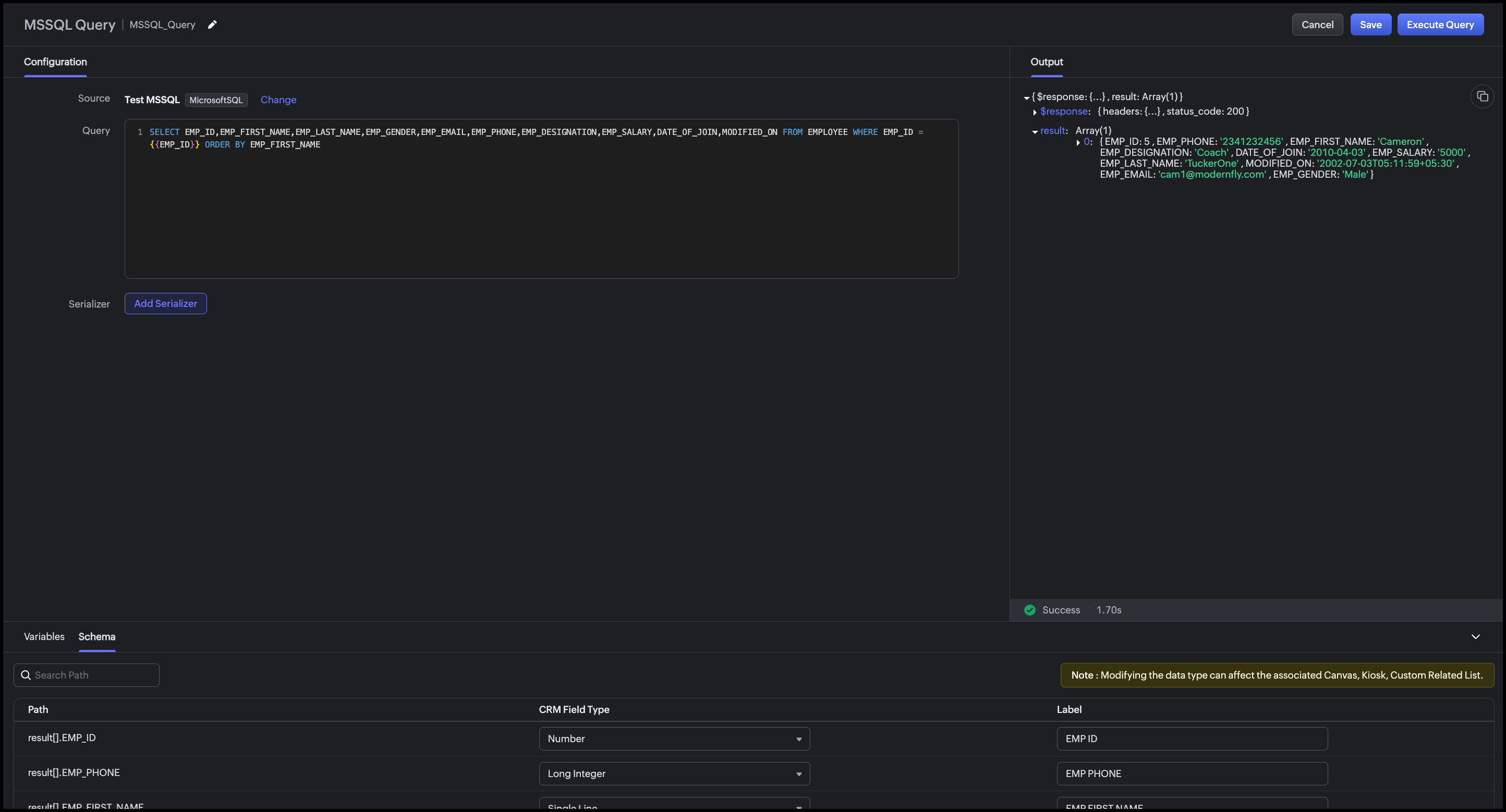
SELECT EMP_ID,EMP_FIRST_NAME,EMP_LAST_NAME,EMP_GENDER,EMP_EMAIL,EMP_PHONE,EMP_DESIGNATION,EMP_SALARY,DATE_OF_JOIN,MODIFIED_ON FROM EMPLOYEE WHERE EMP_ID = {{EMP_ID}} ORDER BY EMP_FIRST_NAME

Zoho CRM automatically detects {{EMP_ID}} as a query variable. At runtime, the value of the "Employee ID" custom field on the Deal record is passed to this variable.

Step 7: Execute and Validate the Query

  1. Click Execute Query.
  2. Enter a valid employee ID from your SQL Server database.
  3. Click Next.
  4. Review the raw response.
  5. Review the Schema panel and verify CRM Field Type mapping.
Step 8: Add a Serializer

The serializer combines the first and last name, formats dates, and computes the employee's tenure.
  1. Click Add Serializer.
  2. Enter the following JavaScript.
    return result.map(record => {
    // Compute tenure in years from DATE_OF_JOIN
    const joinDate = new Date(record.DATE_OF_JOIN);
    const today = new Date();
    const tenureYears = Math.floor(
    (today - joinDate) / (1000 * 60 * 60 * 24 * 365)
    );

    return {
    emp_id: record.EMP_ID,
    full_name: record.EMP_FIRST_NAME + " " + record.EMP_LAST_NAME,
    gender: record.EMP_GENDER,
    email: record.EMP_EMAIL,
    phone: record.EMP_PHONE,
    designation: record.EMP_DESIGNATION,
    date_of_join: record.DATE_OF_JOIN
    ? String(record.DATE_OF_JOIN).split("T")[0]
    : "N/A",
    tenure: tenureYears + (tenureYears === 1 ? " year" : " years"),
    last_modified: record.MODIFIED_ON
    ? String(record.MODIFIED_ON).split("T")[0] + " " + String(record.MODIFIED_ON).split("T")[1].slice(0, 5)
    : "N/A"
    };
    });

This serializer:
  1. Combines EMP_FIRST_NAME and EMP_LAST_NAME into a single full_name field
  2. Computes tenure in years from DATE_OF_JOIN to today, a derived field not stored in the database
  3. Formats date_of_join as YYYY-MM-DD (strips the time component)
  4. Formats last_modified as YYYY-MM-DD HH:MM.
Click Execute Query again to preview the serialized output.


Click Save to save the query.

Conclusion

The Queries feature in Zoho CRM makes it straightforward to surface employee records from an external Microsoft SQL Server HRMS directly within CRM without any middleware, scheduled sync, or manual copy-paste. The advanced configuration options (SSL, Read-Only, Time Zone, Connection Timeout) ensure the connection is secure, non-destructive, and accurate across time zones.

With a single parameterized query and a lightweight serializer, sales reps can see the full profile of an assigned employee such as designation, contact info, tenure etc., right on the Deal Canvas when they need it most. The same query can be reused across multiple CRM UI components for different team workflows.

This approach is best suited when:

  1. The employee data is authoritative in an external HRMS and should not be duplicated into CRM fields.
  2. Real-time accuracy matters (recently onboarded or transferred employees are immediately visible).
  3. The organization wants to avoid building and maintaining a custom sync integration.

Associating the query with CRM's UI components

You can associate a query with multiple UI components such as Canvas, Kiosk, Custom Related Lists based on the workflow.

Canvas List View

Associate the query with the Canvas List View of the Deals (or Contacts) module.
Map {{EMP_ID}} to the "Employee ID" custom field on the record. When a sales rep opens a Deal, the assigned employee's full profile, including name, designation, phone, email, tenure etc., appears as an "Assigned Employee" panel on the canvas. Refer to our Kaizen post for associating a query with Canvas List View.

Kiosk

Associate the query with a Kiosk Decision component to build an internal lookup screen, say a self-service screen, where a sales rep types an Employee ID, and the Kiosk fetches and displays that employee's profile from the HRMS. The Decision component evaluates the query response (e.g., checking if EMP_DESIGNATION matches a required role) and branches the Kiosk flow accordingly.
Map {{EMP_ID}} to a Kiosk input variable collected in a preceding Screen component.
For more details, refer to our Kaizen post on Handling Query variables in Zoho CRM and associating it in Kiosk.

Custom Related List

Use a modified version of the query (filtered by ACCOUNT_ID instead of EMP_ID) to display a related list of all employees assigned to a given account on the Account record. This is useful when multiple internal team members like solutions engineers, CSMs, support contacts, are mapped to an account in the HRMS.
Map {{ACCOUNT_ID}} to the Account record's identifier during association, and the related list will show all employees assigned to that account, updated automatically as the HRMS changes.
For step-by-step instructions on associating a query with a Custom Related List, refer to this Kaizen post.

We hope you found this post useful.
Writer to us at support@zohocrm.com or let us know your thoughts in the comments.

Cheers!

=================================================================================


      Zoho Campaigns Resources


        • Desk Community Learning Series


        • Digest


        • Functions


        • Meetups


        • Kbase


        • Resources


        • Glossary


        • Desk Marketplace


        • MVP Corner


        • Word of the Day


        • Ask the Experts


          • Sticky Posts

          • Kaizen #198: Using Client Script for Custom Validation in Blueprint

            Nearing 200th Kaizen Post – 1 More to the Big Two-Oh-Oh! Do you have any questions, suggestions, or topics you would like us to cover in future posts? Your insights and suggestions help us shape future content and make this series better for everyone.
          • Kaizen #226: Using ZRC in Client Script

            Hello everyone! Welcome to another week of Kaizen. In today's post, lets see what is ZRC (Zoho Request Client) and how we can use ZRC methods in Client Script to get inputs from a Salesperson and update the Lead status with a single button click. In this
          • Kaizen #222 - Client Script Support for Notes Related List

            Hello everyone! Welcome to another week of Kaizen. The final Kaizen post of the year 2025 is here! With the new Client Script support for the Notes Related List, you can validate, enrich, and manage notes across modules. In this post, we’ll explore how
          • Kaizen #217 - Actions APIs : Tasks

            Welcome to another week of Kaizen! In last week's post we discussed Email Notifications APIs which act as the link between your Workflow automations and you. We have discussed how Zylker Cloud Services uses Email Notifications API in their custom dashboard.
          • Kaizen #216 - Actions APIs : Email Notifications

            Welcome to another week of Kaizen! For the last three weeks, we have been discussing Zylker's workflows. We successfully updated a dormant workflow, built a new one from the ground up and more. But our work is not finished—these automated processes are

          Zoho CRM Plus Resources

            Zoho Books Resources


              Zoho Subscriptions Resources

                Zoho Projects Resources


                  Zoho Sprints Resources


                    Zoho Orchestly Resources


                      Zoho Creator Resources


                        Zoho WorkDrive Resources


                          Zoho CRM Resources

                          • CRM Community Learning Series

                            CRM Community Learning Series


                          • Tips

                            Tips

                          • Functions

                            Functions

                          • Meetups

                            Meetups

                          • Kbase

                            Kbase

                          • Resources

                            Resources

                          • Digest

                            Digest

                          • CRM Marketplace

                            CRM Marketplace

                          • MVP Corner

                            MVP Corner


                            Zoho Writer Writer

                            Get Started. Write Away!

                            Writer is a powerful online word processor, designed for collaborative work.

                              Zoho CRM コンテンツ


                                ご検討中の方

                                  • Recent Topics

                                  • Forms cannot be accessed.

                                    https://forms.zoho.com/ is not available, please help to fix
                                  • Problem with CRM Connection not Refreshing Token

                                    I've setup a connection with Zoom in the CRM. I'm using this connection to automate some registrations, so my team doesn't have to manually create them in both the CRM and Zoom. Connection works great in my function until the token expires. It does not refresh and I have to manually revoke the connection and connect it again. I've chatted with Zoho about this and after emailing me that it couldn't be done I asked for specifics on why and they responded. "The connection is CRM is not a feature to
                                  • Kaizen #245 - Real Time Signal Alerts for High-Value Abandoned Checkouts

                                    Howdy, Tech Wizards! Welcome back to another week of Kaizen. In this post, we will build a real-time abandoned checkout notification system using Stripe, Zoho CRM Functions, Sales Signals, and Widgets. When a customer abandons a high-value purchase, Zoho
                                  • Unable to attach Fillable File Upload field to Merge Template ever since UI update

                                    Ever since the new UI update, the field for Attachments for sending document for Signing in Writer has had an issue where trying to add a Fillable item in the Attachment field ends up always becoming a "Choose a File From Drive" option instead. No matter
                                  • Latest updates in Zoho Meeting | An improved Analytics tab and user interface, an invite pop-up revamp, an enhanced Zoho Meeting iOS app, a recording feature in the Android app, and more

                                    Hello everyone, We’re excited to share a few updates and enhancements in Zoho Meeting. Here's what we've been working on lately: Improved analytics for meetings, an invite pop-up revamp, a multi-video feed interface in the iOS app, a recording feature
                                  • Inquiry Regarding Automated Assignment of Zoho TeamInbox Messages using Zoho Flow and Deluge

                                    Hello, Our company is currently using Zoho TeamInbox, and we are interested in automating the assignment of responsible parties using tools such as ZOHO Flow and Deluge. Is it possible to achieve this? Allow me to provide more details. Currently, when
                                  • [Bug] WebAuthn passkey registration blocked on rpIds with TLDs longer than 6 characters (.accountant, .technology, etc.) — isValidDomain regex too strict

                                    Hi, Filing on behalf of an enterprise customer where Zoho Vault is deployed across the company. The Chrome extension blocks WebAuthn passkey registration on legitimate sites whose Relying Party ID (rpId) has a TLD longer than 6 letters. This affects every
                                  • Celebrating the businesses behind Bigin: Customer Awards 2026

                                    Hello Biginners, We're excited to announce the very first Bigin Customer Awards! If Bigin has played a role in your organization's journey, we'd love to hear about it. Share your story for a chance to be recognized among the best Bigin users across industries.
                                  • Client Script Button in Related List become invalid

                                    Hi, I am the admin of our organization. And I setup a client script button in related list to raise payment refund request While this button become non selectable recently. I believe there is something wrong from zoho as this button had run for a year.
                                  • Send Email Directly to Channel

                                    Hi, We are coming from Slack. In Slack each channel has a unique Email address that you can send emails too. I currently forward a specific type of email from my Gmail InBox directly do this channel for Verification Codes so my team doesn't have to ask
                                  • Zoho Desk: Auto-resizing of the "Description" textarea when creating a ticket.

                                    I would like to suggest an improvement for Zoho Desk regarding the Auto-Height-Resizing for Description field on the “Create a Ticket” page. It would be highly beneficial if the editor supported auto-resize functionality, allowing it to adjust dynamically
                                  • [URGENT] Cannot access Functions tab in CRM

                                    Navigating to /settings/functions/myFunctions gives this error message: "Sorry, something went wrong. Please try again later." I raised this issue with Zoho Support on Monday (3 days ago) but have not heard back. I'm sure it's clear how important it is
                                  • Not able to see appointements when the territory permission is activated

                                    Hello, I created different territories to separate the various departments within the company that will be working on different projects. The issue I am currently experiencing is that when I enable territory-based permissions, I can see the work order
                                  • Accepting Event from Outlook Client

                                    I've noticed this behavior for a few years now. If an Event is created from CRM and sent to participants and the participant accepts the invitation using Outlook client, Zoho event won't be updated as "Going" it only works if the recipient accepts it
                                  • Is there an API endpoint to retrieve the remaining email credit balance?

                                    Hi everyone, Is there any way to retrieve the remaining email credit balance programmatically through the API? I've gone through the full API documentation and it seems like there's no endpoint for this — everything related to credits is only visible
                                  • Switch between multiple LLMs instantly for tailored Zia experiences

                                    Availability Editions: Professional , Enterprise, Ultimate , CRMPlus , ZohoOne Release Plan: Available for all DCs Hello everyone, Previously, the multi-LLM feature supported only one LLM at a time for Zia Record Assistant, which restricted users' flexibility
                                  • Zoho CRM Community Digest - April 2026 | Part 2

                                    Hello Everyone! We're back with Part 2 of the April Zoho CRM Community Digest to wrap up our monthly roundup. This week, the spotlight is on smart database connections, proactive error tracking, and optimizing subform line items without breaking your
                                  • 【西日本初開催】「AI and DX Summit 2026」のご案内

                                    ユーザーの皆さま、こんにちは! 西日本初開催となるZoho ユーザー / 検討中の方々向けイベントのご紹介です。 AI・DX大型カンファレンス「AI and DX Summit 2026」を、2026年7月16日(木)に開催します。 会場は、ウォルドーフ・アストリア大阪。 グラングリーン大阪直結のラグジュアリーな空間で、AIとDXの最新トレンド、実践事例、 展示、ネットワーキングが集結する、特別な1日をお届けします。 👉イベントページを見る ━━━━━━━━━━━━━━━ AIとDXの“今”を、体感。
                                  • Zoho Desk MCP doesn't expose all functions

                                    Hello, I'd like to be able to draft (rather than send) ticket replies using Claude Cowork. However, the Zoho Desk MCP doesn't currently offer that, despite it being available in the API (https://desk.zoho.com/DeskAPIDocument#Threads#Threads_DraftEmailReply).
                                  • Stop by and explore our six updates in ABM for Zoho CRM

                                    Dear Customers, We hope you're well! ABM for Zoho CRM is built to sharpen your database so that you engage with the right set of customer accounts. To fine-tune it further, we have six new updates: New access location for ABM Refined account entry criteria
                                  • Tracking Emails sent through Outlook

                                    All of our sales team have their Outlook 365 accounts setup with IMAP integration. We're trying to track their email activity that occurs outside the CRM. I can see the email exchanges between the sales people and the clients in the contact module. But
                                  • Enhancement in Zoho CRM: Introducing New Return Types for String Fields Based on Character Length

                                    Dear Customers, We hope you’re well! In Zoho CRM, formula field with string return type is used in various scenarios where text is involved like concatenating customers’ first and last names, trimming characters from texts, performing find and replace
                                  • Cross Module Filtering – Use Fields from Lookup modules in Custom Views criteria and Advanced Filters

                                    Hello everyone, Zoho CRM now enables you to achieve deeper filtering of records in a module, using fields of a lookup, thereby enhancing your data management experience manifold. This filtering based on lookup module fields is now available in advanced
                                  • Incoming Rules: Define how incoming emails are evaluated and handled

                                    As organizations grow, managing incoming emails manually becomes increasingly difficult. Administrators often need more control than what a standard spam filtering can provide. Whether that's enforcing company-wide email policies, handling messages from
                                  • Zia Emails Summary: Instant context from past emails

                                    Hello all, Reading all of the past emails associated with a specific record can be tedious, which in turn makes it difficult to understand the context quickly, as these messages often include irrelevant details that waste time. This is true for everyone
                                  • Boost your CRM communication with new font types, sizes, and default reply-to options while composing emails

                                    Hello Everyone, We’re excited to introduce a series of impactful enhancements to the email composer settings in Zoho CRM. These updates enable you to personalize and optimize your customer interactions with greater efficiency. So what's new? Add custom
                                  • Custom Portal URL causing SAMEORIGIN error with embedded Page snippet

                                    In my app, I have a page that embeds another page. The URL that I have for the embedded page starts with https://creatorapp.zoho.com but the custom domain I have set up is https://kors.kerndell.com. Because the user logged into the app at https://kors.kerndell.com,
                                  • Automating CRM backup storage?

                                    Hi there, We've recently set up automatic backups for our Zoho CRM account. We were hoping that the backup functionality would not require any manual work on our end, but it seems that we are always required to download the backups ourselves, store them,
                                  • Bing ads integration and tracking

                                    Hi, Is there any way to track Bing ads in the same way that we are able to track google adwords?  It is important for us to be able to determine the conversion rate of our Bing ads.  If this is not possible now, will this feature be added in the future?
                                  • Zoho Creator Calendar - Sorting Events

                                    Hi, I have a calendar view to hold the schedule for a group of engineers. I have created a formula field to show the combination of fields I want visible as the title of the event, but I need to be able to sort the list by something other than the event
                                  • Create a "My saved custom themes" section in Zoho Forms

                                    Hi! I created lots of forms for my company that we embed on the website with a custon design. It is a pain not to be able to save a custom layout as a template and just not to have to do it again! So could you add a gallery like : "My saved themes" ?
                                  • Upcoming Update: Disposition Sync for Indeed

                                    We’re updating our Indeed integration to support Disposition Sync, improving how candidate application statuses are communicated. This change is scheduled to go live on 15 June, 2026. What’s changing? Once enabled, this allows candidate application statuses
                                  • Joining Two Tables on Multiple Ids

                                    Hello all, I'm guessing there is an obvious solution for this, but definitely not an expert in sql. On our Deals module, we have two user lookup fields. In Analytics, those fields have the user's ids in those table rows, and I'm trying to create a query
                                  • auto update of item purchase cost

                                    Would be nice if, when entering bills, the price of the item varied from the stored item price, we could have a user dialogue "Update item price" | "yes / no". Simple, but saves a lot of additional work !
                                  • Journeys - How to set up a webhook that triggers when a contact meets the goal criteria?

                                    Hi there, I'm setting up a journey on Marketing Automation. The main goal of the journey is to get the leads to reply our emails. Is there a way to trigger a webhook when that goal is met? The webhook would then trigger a notification. Is that possible?
                                  • Latest updates in Zoho Meeting | Personal Meeting Rooms and Zoho Meeting Annotator

                                    Hello everyone, We’re excited to share a few updates for Zoho Meeting. Here's what we've been working on lately: Introducing Personal Meeting Rooms - Tailored for private discussions, this secure meeting space is yours alone, accessible via a unique link.
                                  • Canvases Auto-Skewing/Adding Scroll Bars When They Were Not There Prior

                                    Is anyone else noticing rendering issues in their canvases today? It seems to be mainly icons which now have scroll bars added which makes them all look off, though some fields seemed to revert to squished length as well. Were the icons replaced with
                                  • New UI for Writer - Disappointed

                                    I've been enjoying Zoho Writer as a new user for about 6 months, and I really like it. One of my favorite things about it is the menu bar, which you can hide or leave out while still seeing most of your page because it is off to the left. I think this
                                  • The reason I switched away from Zoho Notebook

                                    My main reason for switching to Zoho was driven by three core principles: moving away from US-based products, keeping my data within India as much as possible, and supporting Indian companies. With that intent, I’ve been actively de-Googling my digital
                                  • Introducing the enhanced Zoho People integration

                                    We're excited to announce an enhancement to the integration between Zoho Recruit and Zoho People, designed to streamline your data management processes and boost efficiency across your recruitment and HR workflows. With this latest update, you can now
                                  • Next Page