Kaizen #262 - Using Zoho CRM Skill to build Queries

Hello everyone!
Welcome back to another edition of the Kaizen series, where we uncover powerful ways to extend and customize Zoho CRM.
In the previous Kaizens, we explored how the zoho-crm skill can help developers work with Zoho CRM APIs, Client Scripts and COQL.
In this Kaizen, let's take this further and see how the skill can help us build Zoho CRM Queries using natural language.
Queries provide a flexible way to retrieve data from Zoho CRM and transform the response before using it in CRM features such as Canvas, Kiosk, and other custom UI components. A Query can use a CRM module, COQL, or other supported sources, and its response can also be modified using a serializer.
In this Kaizen, we will cover:
- About Zoho CRM Skill
- How the Skill Helps with Queries
- Business Scenario
- Requirement 1 - Retrieving CRM Data Using Queries
- Requirement 2 -Transforming Query Responses with Serializers
- Requirement 3 -Calculating Derived Values with Query Serializers
- Summary
- Related Links
1. About Zoho CRM Skill
The zoho-crm skill acts as an orchestration layer across different Zoho CRM developer capabilities, including REST APIs, Deluge Functions, Client Scripts, Widgets, COQL, Queries, and Connections.
The skill follows a five-step approach:
- Understand the requirement.
- Identify the appropriate CRM capability.
- Load the relevant references.
- Generate the solution.
For Queries, you can describe the data you need in natural language, and the skill can help determine the appropriate Query configuration, source, fields, criteria, sorting, and serializer logic.
For example, instead of manually determining how to configure a Query, you can provide a requirement such as:
"Fetch all upcoming events that are currently open for registration and sort them by event date."
The skill can then help build the corresponding Query.
Refer to Kaizen#258 : Getting Started with zoho-crm SKILL.md for more details.
2. How the Skill Helps with Queries
The zoho-crm skill simplifies Query development by helping you translate a natural-language requirement into the appropriate Query configuration. It can help with:
- Identifying the Query source - such as Module, COQL, or other supported data sources.
- Building the Query - defining the fields, criteria, sorting, and other required configurations.
- Configuring variables - identifying values that need to be passed dynamically to the Query.
- Defining the schema - structuring the Query response based on the required output.
- Creating serializers - transforming the Query response and performing calculations or deriving additional values.
- Following Zoho CRM Query guidelines - using the relevant Query and CRM references while generating the solution.
- Validating the implementation - helping identify missing fields, incorrect configurations, and potential edge cases.
- Associating Queries - help you understand how a Query should be associated with the appropriate CRM component based on the requirement.
This allows developers to focus on describing what data they need and how it should be processed, while the skill helps determine how to implement the Query.
The user needs to:
Verify the CRM setup → Create/configure the Query → Associate it with the required component → Test and validate the result

3. Business Scenario

Zylker Events, an event management company that conducts workshops, conferences, and training programs, uses a custom module called Programs to manage its events.
The event management team wants to use Queries to display useful event information in CRM. Let's consider three requirements using the same Programs module, with each requirement introducing an additional level of Query configuration and complexity.
4. Retrieving CRM Data Using Queries
Let's start with a straightforward requirement.
Requirement 1
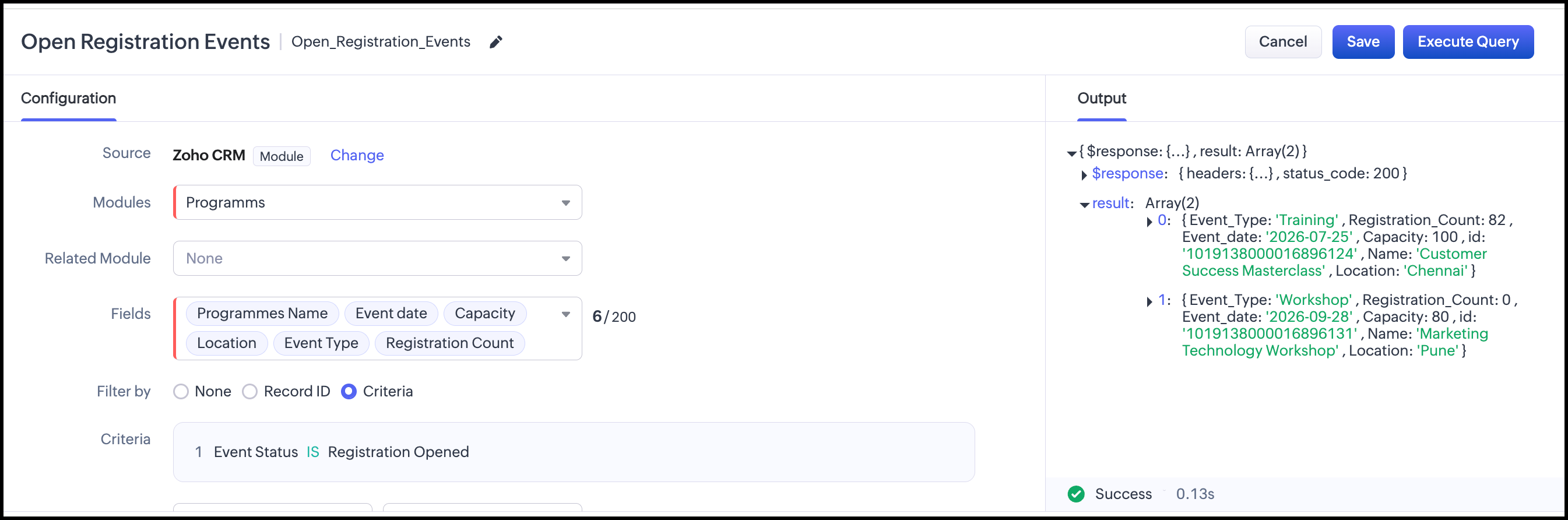
The event manager wants to see all upcoming events for which registration is currently open in a Kiosk.
The results should contain:
- Program Name
- Event Type
- Event Date
- Location
- Capacity
- Registration Count
The events should be displayed in ascending order of the Event Date.


Prompt
/zoho-crm
Create a Zoho CRM Query for the Programs custom module. Fetch events where Event Status is "Registration Opened".Return the following fields: Program Name, Event Type, Event Date, Location, Capacity, and Registration Count. Sort the results by Event Date in ascending order and associate with Kiosk.

The API names may differ, so we need to verify them against our API names as this is a custom module.
What did the skill do?
- Read the Query documentation: Reviewed Query sources, configuration, and Kiosk association guidance.
- Analyzed the requirement:
- Fetch Programs with Event Status = Registration Open.
- Sort by Event Date ascending.
- Retrieve the required programme and event fields.
- Use the Query in a Kiosk.
- Selected the Query source: Chose the Module source since the requirement involves retrieving and filtering records from a single CRM module.
- Configured the Query: Mapped the requirement to the module, criteria, sort order, and required fields.
- Considered Kiosk association: Identified that the Query should be associated with a Kiosk screen to display multiple Program records.
- Verified assumptions: Noted that the API names should be verified against the actual CRM setup before implementation.
5. Transforming Query Responses Using a Serializer
Now let's make the requirement slightly more useful.
Requirement 2
The event manager wants to know:
- How many seats are remaining?
- What percentage of the capacity has already been filled?
- Is the event nearly full?
Instead of storing these values as additional fields in CRM, we can calculate them when the Query executes.
Prompt
/zoho-crm
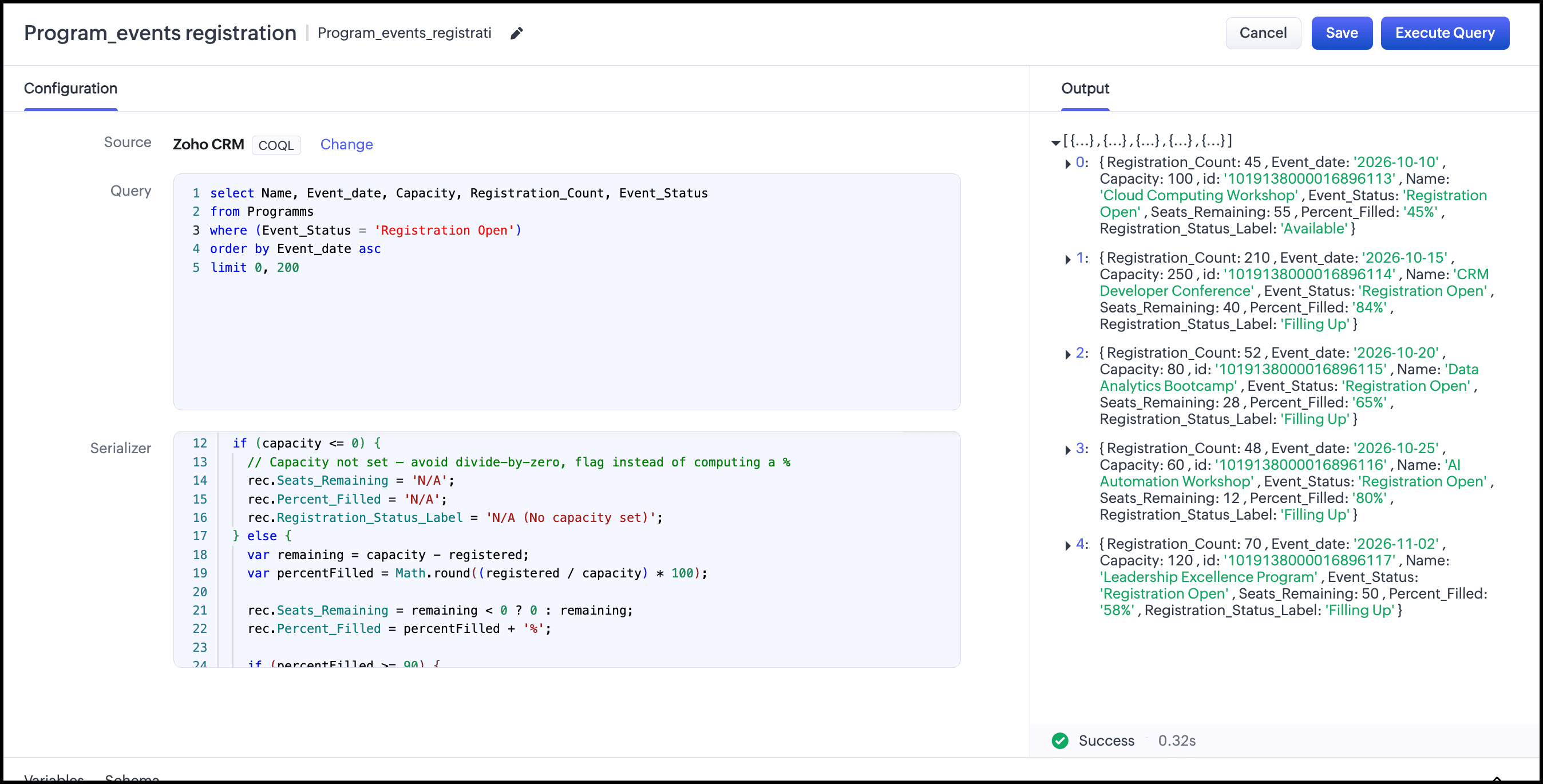
For the custom module "Programs", using Queries, help me understand the current registration status of events that are open for registration.
For each event, I want to know:
How many seats are remaining?
What percentage of the event capacity has been filled?
Is the event Nearly Full, Filling Up, or Available?
Also show the Program Name, Event Type, Event Date, Location, Capacity, and Registration Count.
Show the earliest events first.
What Did the Skill Do?
- Selected COQL as the Query source based on the filtering, sorting, and field requirements.
- Created the COQL query to fetch registration-open programs sorted by Event Date.
- Mapped the required fields such as Program Name, Event Type, Event Date, Location, Capacity, and Registration Count.
- Designed the serializer to calculate Remaining Capacity, Registration Percentage, and Registration Status.
- Handled edge cases, including zero capacity and division-by-zero errors.
- Defined the response schema to include both CRM and calculated fields.
- Identified API-name dependencies that must be verified in the target CRM.
- Considered Query association with components such as Canvas, Kiosk, or Custom Related List.
In short: The skill converted the requirement into a COQL Query → Serializer → Schema → Component association workflow.
6. Calculating Derived Values with Query Serializers
Let's take the same scenario one step further.
The event manager now wants to analyze events that have already been completed.
Requirement 3: Completed Event Analysis
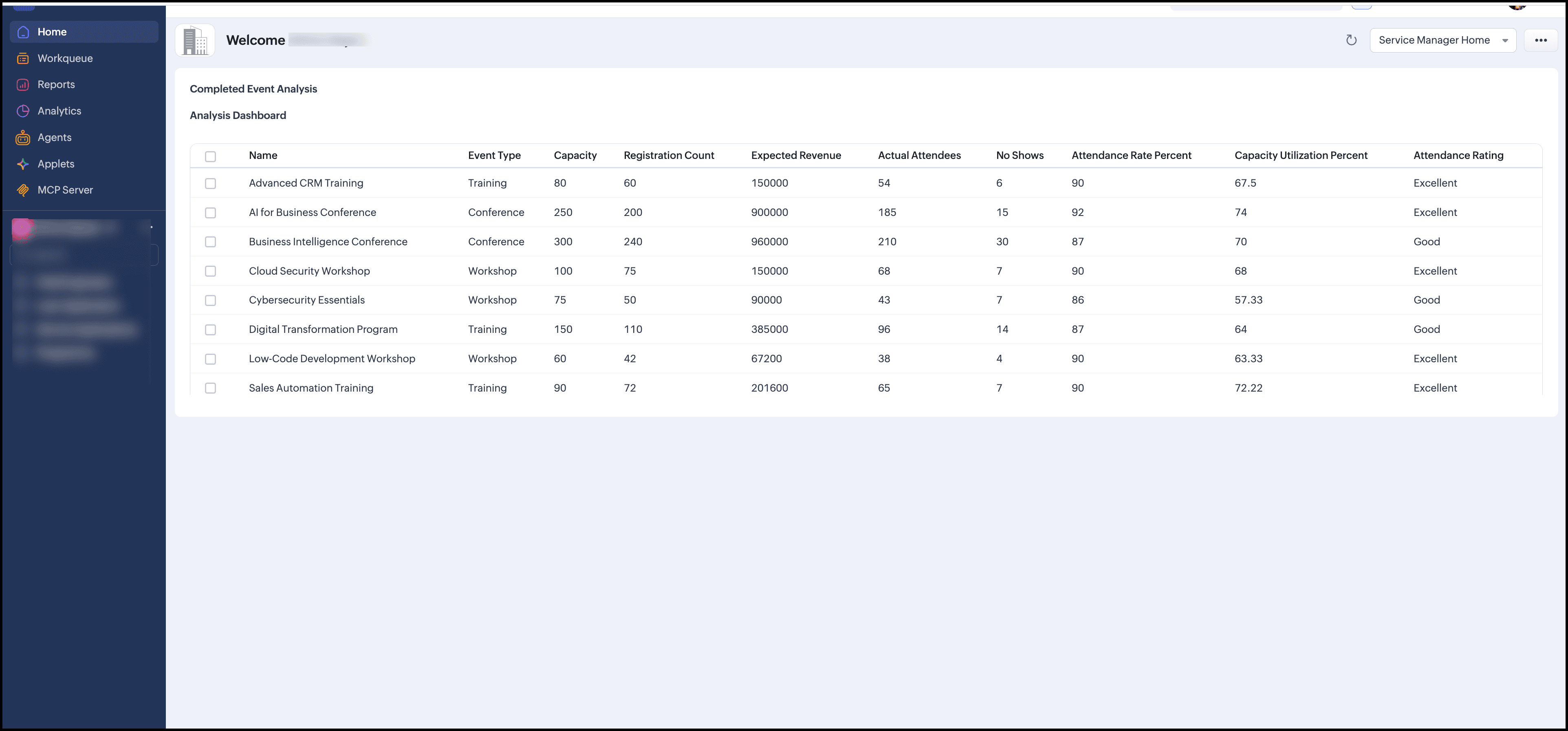
For each completed event:
- Expected Revenue = Registration Count × Registration Fee
- Attendance Rate = Actual Attendees / Registration Count × 100
- Capacity Utilization = Actual Attendees / Capacity × 100
- No-show Count = Registration Count − Actual Attendees
- No-show Rate = No-show Count / Registration Count × 100
- Attendance Classification:
- Excellent: ≥ 90%
- Good: 70–89%
- Needs Attention: < 70%
Prompt
/zoho-crm
For the custom module "Programs", using Queries, help me understand how completed
events performed.
For each completed event, I want to know:
How much revenue was expected from registrations?
What percentage of registered participants attended?
What percentage of the event capacity was utilized?
How many registered participants did not attend?
Was the attendance Excellent, Good, or in Need of Attention?
Also show the Program Name, Event Type, Capacity, Registration Count and Actual Attendees.
What did the skill do?
The skill converted the requirement into a COQL-based Query with a Serializer and worked through the complete configuration.
- Loaded the relevant Query references for structure, sources, and serializers.
- Selected the Module source with Event_Status = Completed.
- Identified the required CRM fields such as Event Type, Event Date, Capacity, Registration Count, Registration Fee, and Actual Attendees.
- Designed the serializer to calculate Expected Revenue, Attendance Rate, Capacity Utilization, No-show Count, No-show Rate, and Attendance Performance.
- Added zero-value checks and error handling to prevent calculation errors.
- Defined the schema to expose both CRM and calculated fields.
- Prepared the implementation steps for Query creation, source, schema, serializer, and associating to Kiosk.
- Noted that API names must be verified against the actual CRM setup.
In short:Module Query → Filter → Retrieve data → Serializer calculates derived values → Schema exposes the results.

This is how it looks after implementing it through Kiosk:
7. Summary
In this Kaizen, we used a single Event Management scenario to explore three levels of Query development with the zoho-crm skill.
What the User Does
- Define the requirement: Specify the data, source/module, fields, filters, sorting, and target component.
- Provide the requirement to the AI coding agent: Give the requirement to an AI coding agent with the zoho-crm skill enabled. The skill analyzes it and suggests a Query implementation.
- Review the Query configuration: Verify the source, fields, criteria, sorting, variables, and other configuration.
- Review the serializer: If needed, provide the expected transformation logic and verify the serializer's filtering, formatting, renaming, or calculations.
- Verify CRM details: Confirm the actual module names, field API names, and field types in the target CRM organization.
- Configure the Query in Zoho CRM: Create and validate the Query using the reviewed source, schema, serializer, and other configuration.
- Associate the Query: Add the Query to the required component, such as a Kiosk, Canvas, or related list.
- Test and validate: Verify the data, filtering, sorting, serialized output, and displayed fields against the original requirement.
The zoho-crm skill simplifies this workflow by helping developers turn natural-language requirements into appropriate Query configurations and implementations.
Have an advanced scenario you’d like to see solved using the skill? Drop it in the comments or write to us at support@zohocrm.com.
Happy Querying!
Related Links
Kaizen #258 – Getting Started with zoho-crm SKILL.md - Introduction to the zoho-crm skill and how it works across Zoho CRM developer capabilities.
Kaizen #259 – Working with Zoho CRM APIs using the zoho-crm skill - Using the skill to work with Zoho CRM APIs.
Kaizen #260 – Using Zoho CRM Skill to generate Client Script - Using the skill to generate Client Scripts.
Zoho CRM Queries – Developer Documentation - Learn more about Query sources, variables, serializers, and schema management.
New to Zoho Recruit?
Zoho Campaigns Resources





Topic Participants
Athira Rajan
Sticky Posts
Announcing the new SKILL.md for Zoho CRM and the updated OAS repository!
We are introducing a new zoho-crm skill to make working with Zoho CRM Developer tools (like APIs, functions, widgets, client scripts, queries etc) easier and faster, with the help of AI in your preferred AI harness like Claude Code, Codex, Cursor, VSCodeKaizen #261 : Using Zoho CRM Skill to generate complex COQL queries
Hello everyone, In the previous Kaizen posts, we introduced the zoho-crm SKILL.md and discussed how it can help you when you are working with Zoho CRM APIs and Client Script. In this Kaizen, we will focus on using the Zoho CRM `SKILL.md` with GitHub CopilotKaizen #256 - Build an Arrival Readiness Web Tab in Zoho CRM
Hi everyone! Welcome back to the Kaizen series! In the post, we discuss a use case in hospitality industry: how an Arrival Readiness web tab widget can be used to let reception staff identify and resolve issues before arrival of guests. Use case In theKaizen #198: Using Client Script for Custom Validation in Blueprint
Nearing 200th Kaizen Post – 1 More to the Big Two-Oh-Oh! Do you have any questions, suggestions, or topics you would like us to cover in future posts? Your insights and suggestions help us shape future content and make this series better for everyone.Kaizen #226: Using ZRC in Client Script
Hello everyone! Welcome to another week of Kaizen. In today's post, lets see what is ZRC (Zoho Request Client) and how we can use ZRC methods in Client Script to get inputs from a Salesperson and update the Lead status with a single button click. In this
Zoho CRM Plus Resources
Zoho Books Resources
Zoho Subscriptions Resources
Zoho Projects Resources
Zoho Sprints Resources
Zoho Orchestly Resources
Zoho Creator Resources
Zoho WorkDrive Resources


Zoho CRM Resources
Get Started. Write Away!
Writer is a powerful online word processor, designed for collaborative work.
Zoho CRM コンテンツ
-
オンラインヘルプ
-
Webセミナー
-
機能活用動画
-
よくある質問
-
Ebook
-
-
Zoho Campaigns
- Zoho サービスのWebセミナー
その他のサービス コンテンツ
ご検討中の方
Recent Topics
Autoscan Settings
I saw that autoscan is now included in my plan which is great however when I import pdf invoices from my main supplier which contain inventory lines and some also include shipping charges the autoscan doesn't match any of the items and also misses theIs there a way to make Reason For Loss field mandatory at Closed Lost stage?
Hi guys, Reason For Loss system picklist appears on Verify Details page but it is not mandatory so as a result, AEs tend to omit it (leave at default value -None-). Is there a way to make it mandatory at Closed Lost? I tried layout rule but this fieldHow to resubscribe to email after using unsubscribe link in Zoho
I was testing the unsubscribe link feature from our contacts module in ZohoCRM and I sent my personal email a version of an email template with the default embedded unsubscribe link to see if it would utilize the "Email Opt Out" field to track un-subscription.WhatsApp Calling Integration via Zoho Desk
Dear Zoho Desk Team, I would like to request a feature that allows users to call WhatsApp numbers directly via Zoho Desk. This integration would enable sending and receiving calls to and from WhatsApp numbers over the internet, without the need for traditional[ZohoDesk] Improve Status View with a new editeble kanban view
A kanban view with more information about the ticket and the contact who created the ticket would be valueble. I would like to edit the fields with the ones i like to see at one glance. Like in CRM where you can edit the canvas view, i would like to editNo access to contact categories in Zoho Mail Apps
I have set up a number of contact categories for my organization. When I compose an email using a web browser these categories are visible. When I compose an email using your Android or iOS Apps no contact categories are visible. Is this expected? IfZoho Plug In
Is there anyone out there who is able to use it? I have seen lots of problems posted, unable to get any satisfactory suppport at the moment! I would be really appreciate hearing from users that have it installed and working, my team are loosing belief it will ever work. Be great to hear from those that have a more positive experienceOutlook to Zoho sync
I am the admin for our company and I have (1) single user that is having difficulties with her emails syncing. I have found where the problem is, but I don't know 100% if what is happening is how the plug-in works or if it's a setup issue. My boss createdCant' find the CRM plug in for outlook
I want to be able to tag emails that I have received into accounts. But I can't find the plug in for out look in the other apps section. Where can I download it from?Problems with Zoho CRM Microsoft Outlook Plug-In (Add-On)
I am having problems with the Zoho CRM Microsoft Outlook Plug-In. I was able to install and setup the Plug-In correctly I believe in Microsoft Outlook, but contacts are now being created in Zoho CRM when an email is sent from MS Outlook. A contact is created and appears under Contacts in Zoho CRM but no other information is populated in the fields; for instance only the name is there (for instance "rfairley" ) which matches the beginning of their email address; but no phone numbers. Also, otherzoho for outlook
it would be woderfull to be able to add an email to a case, just as it is possible to add an email to a potential VincentMail Addon issue
Hi, I am trying to make the mail add on feature work without clutter. The issues is that all emails from the contact are being listed in every opportunity that contact is involved in/ linked to. I want to filter out the emails that are not relevant to the opportunity. It is ok to have all the mails of a contact under in the contact module. But under the opportunity it shall show only the relevant emails. Is there a way i could do this? Atleast if I could manually assign or amend the listed emailsEliminate duplicate tickets in one department using Email Deduplication
Hello everyone, A department can have multiple email addresses designed for different purposes for example, support@zpad.com and help@zpad.com. When a customer sends an email or thread response to both addresses, or includes both in the To, CC, or BCCFeature Request - Copy Reschedule Link
Hi Bookings Team, I had a client contact me today, to let me know that she can't make a meeting she booked this week. I can't remember if I included a reschedule link in email notifications, but I was thinking that it would be great if I could just openIssue While Rescheduling Interviews in Zoho Recruit
Dear Zoho Support Team, We are facing an issue with the Interview Rescheduling functionality in Zoho Recruit integrated with Microsoft Teams. Problem Description When an interview is rescheduled through Zoho Recruit: The new interview is created successfullyEnhancement Request for Job Publishing Management in Zoho Recruit
Provide a centralized view to Publish/Unpublish job openings across: - Job Portals - Career Portal - Employee Referral Portal Add filters to view job openings based on: Published to Career Portal Published to Employee Referral Portal Published to specificMass Update Option for Changing Work Order Owner
Hello FSM Team/Mr. Abid, We would like to inquire if there is an option to mass update or bulk change the Owner of Work Orders in Zoho FSM. Current Situation: At the moment, the Owner of a Work Order can only be changed individually, which becomes time-consumingCategorize Items with Item Headers
Hello customers, Did you ever want to classify items based on specific categories to help your customers understand your invoice better? With the new Item Header feature, you can easily categorize items in your invoices and estimates and give them a common title. Item Headers are available in the Invoices, the Recurring Invoices and the Estimates module. It can be carried forward from estimates to invoices at the time of converting the estimates. To add an item header: Go to the Estimates, InvoicesCareers Site & Job Openings
Hello, It would be good to have a section in the careers site with past and inactive jobs. On that note, active jobs to automatically move to this section once the target date in the job opening is reached. At the moment, Recruit administrator will haveTeamInbox - Configure Email Sending Delay
Hello, The feature in Zoho Mail to automatically DELAY a sent message by X minutes is a wonderful feature to catch mistakes before they are sent out. Is this possible with TeamInbox? If not, is it on the roadmap to add it in? ThanksZoho Desk API Custom Module not all data is showing up
When i get a record by id for my new module: responseDetailed = invokeurl [ url :"https://desk.zoho.eu/api/v1/cm_tickets_CM/" + record.getJSON("id") type :GET parameters:"" connection:"desk_connection" ]; The response doesnt contain all fields, the fieldCan you sync CRM contacts to TeamInbox?
Can you sync CRM contacts to TeamInbox? Or at least upload them? From what I can see, you have to enter them manually one at a time.Team Inbox Support Is TERRIBLE
Team inbox has the worst support team i've ever dealt with. They take forever to reply to your emails/issues, if you even get a reply. They don't have a phone number so you can't talk with anyone. There is clearly bugs in their system and they don't addressIntroducing ServiceDesk Plus Integration
Integrate Zoho Sprints with ServiceDesk Plus (SDP), a service management system that wraps IT asset management, IT service management, and configuration database management into a unified solution. With this integration, agile teams can track and manageRequest for Backscatter Protection and Filtering Options
Hello Zoho Support, Recently, my domain has been targeted by an email spoofing/backscatter attack. Attackers are using our legitimate email addresses, particularly one as forged sender addresses when sending messages from unauthorized servers. Our SPFKeeping phone number text format exporting from Books to Sheet
We have a custom function that copies data from our customers in Books to Sheets. In the process the customers' phone numbers (unless they contain a space) get treated as numeric values, so leading zeros get stripped off, and in some cases scientificprint preview
We are using microsoft edge, till 12 sep we were getting directly print option. Now we are getting this preview option we have to click print option again. How to bypass this-preview option?NOT SYNCING ORGANIZATIONS-ZOHO BOOKS AND ZOHO INVENTORY
I purchased the zoho books before and again i purchased zoho inventory after 2 day while syncing the orzaniazation i deleted the trial account of inventory and started the new organization on same user. The problem is that the new inventory organizationVehicle Tracking
we have GPS devices that installed on our vehicles, and we would like to know if it's possible to get vehicle live location data from the GPS device To Zoho Creator App. Thank You[Critical] Massive delays with e-mail
It takes half an hour or longer for emails to arrive or replies to go out! Another thing I have noticed with outgoing e-mails is that I see an error message when I click on "Show original" (tab "HEADER"). If I click on the "CONTENT" tab, the mail bodyZOHO CRM APP - SALESINBOX
Is it possible to access SALESINBOX in the CRM MOBILE APPCliq iOS can't see shared screen
Hello, I had this morning a video call with a colleague. She is using Cliq Desktop MacOS and wanted to share her screen with me. I'm on iPad. I noticed, while she shared her screen, I could only see her video, but not the shared screen... Does Cliq iOS is able to display shared screen, or is it somewhere else to be found ? RegardsSheet co-edit: no live presence — also on Collaborate demo?
Two Sheet co-edit sessions open OK (same document_id, document.edit: true), but there’s no real-time collaboration: no cell highlights, Group Chat → Users stays empty. Writer co-edit works on the same Office Integrator setup. We see the same on the officialZohoのAIエージェント、作り方から使いどころまで。デモとユーザー事例で学ぶ|12/8東京・無料
ユーザーの皆さま、こんにちは。 ゾーホージャパンの中野です。 12月8日(火)、Zohoコミュニティで初めてとなる「Zoho コミュニティ ユーザー総会 2026」を開催します。 年に一度、ユーザーとZoho社員が集まる総会として、今回は100名規模での開催を予定しています。 ユーザー企業の実践事例、AIエージェント / Zoho MCP のデモ、CRM・Campaignsの活用セッションなど、 日頃の交流会よりも幅広いプログラムをご用意しました。 以前のご案内から新たに予定している内容も含め、当日の見どころをご紹介します。How to sync Organisation Contacts to Android / AES
After migration form Exchange compatible server, I got Org Contacts: I've turned on EAS Organisation contacts sync. But on my phone they don't appear and there is no contacts folder to select for these contacts. Only personal contacts. They do appearZoho Inventory | Can't uncheck/turn off Advance Tracking
Hi, I wanted to know if there's a way to turn off Advanced Tracking (such as Serial Number or Batch Tracking) for an item in Zoho Inventory. I’ve read that you might need to delete associated transactions and clear the opening stock to disable these features.A way to report on all leads for a given month
Is there a way to report on ALL leads created in one month by source. I need to include both open, closed lost and converted leads. Right now I can only see source of non converted lead and cannot find a way to add the converted leads to the same report. I'm trying to do this to gain insight into my sources of leads, volume in and disposition of each lead.Unable to delete domains from Zoho Campaigns
This error occurs while deleting a domain "This domain cannot be deleted because we've found $1sender addresses associated to it." But I have no more sender addresses of this domain anymore. I can't delete the domain.Ability to translate Zoho CRM Kiosks
Hi team, Is support for translating kiosk text and screen names in the Zoho CRM translation tool planned on the roadmap? Thanks,WorkDrive Desktop Sync Is Being Deprecated: Move to WorkDrive TrueSync for a Smarter Experience
Hi everyone, We are excited to share a better, smarter way to access and manage your files directly from your computer! We’re transitioning from our legacy Desktop Sync app to WorkDrive TrueSync, designed to give you faster performance,greater flexibility,Next Page