Kaizen #59 - Creating alerts and custom messages using Client Script

Kaizen #59 - Creating alerts and custom messages using Client Script

Hello everyone! 
We are happy to resume our Zoho CRM Developer Community series - The Kaizen series!
Welcome back to the new start of Kaizen!
This post is about Client Script and its simple use cases involving ZDK Client functions.

What is Client Script?

The Client Script feature gives you a seamless platform for achieving and extending your business cases in Zoho CRM by allowing Java Script code execution in your browser. It enables you to configure events for the UI components and define the actions once those events are triggered. 

The ZDK Client Functions available in Client Script are,

ZDK Client Function
Description
showMessage 
To display a text message on create/clone/edit/detail(canvas) page.
showConfirmation
To display a confirmation box with accept and reject message on  create/clone/edit/detail(canvas) page.  
showAlert 
To show alert message on create/clone/edit/detail(canvas) page.
openMailer
To open mailer component from detail(canvas) page.

Use Case

Let us consider that you want to achieve the following using Client Script.
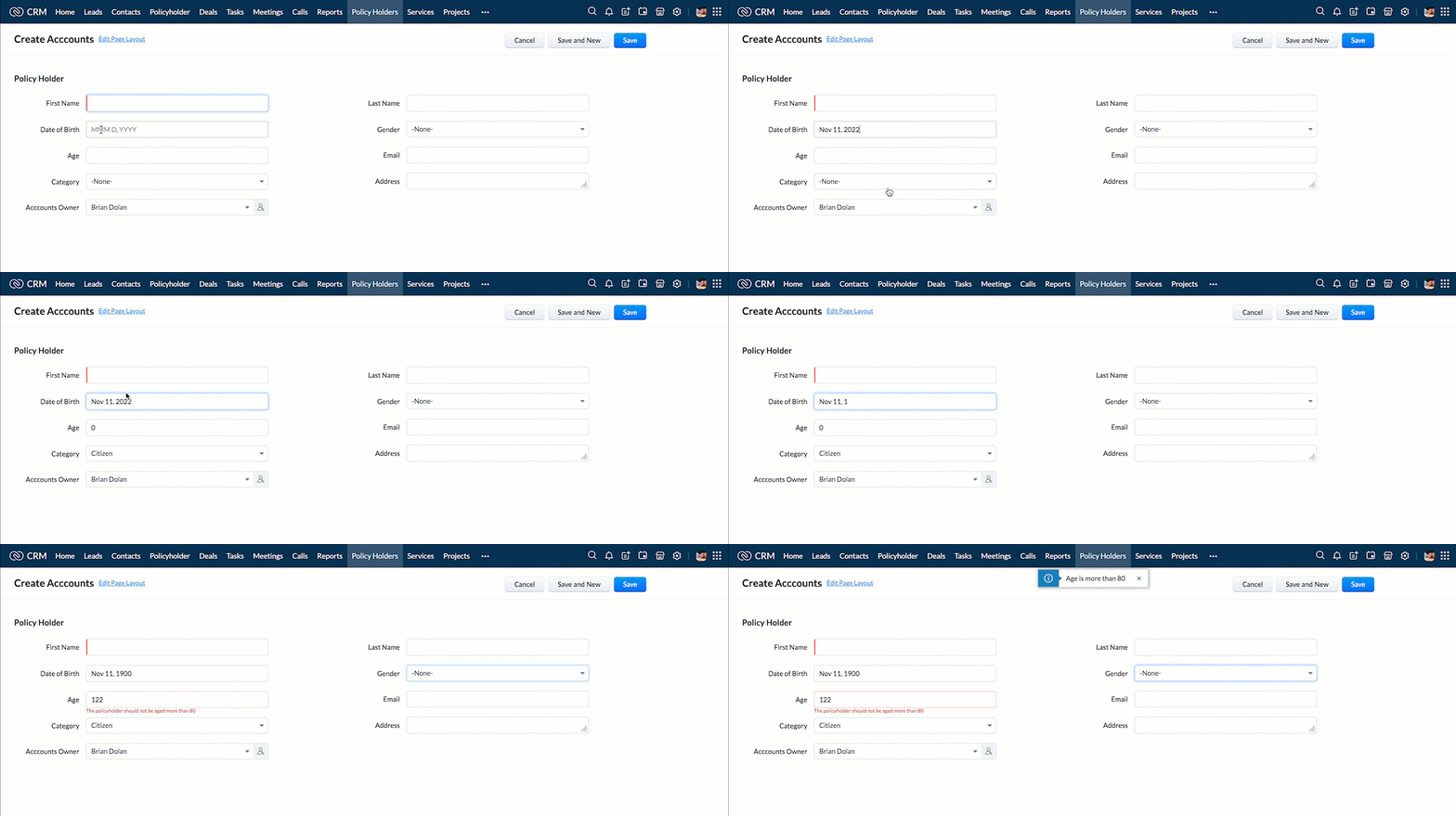
  1. Calculate age based on Date of Birth and display the message "Age is more than 80" whenever the age is above 80 in create page of Policyholder module.
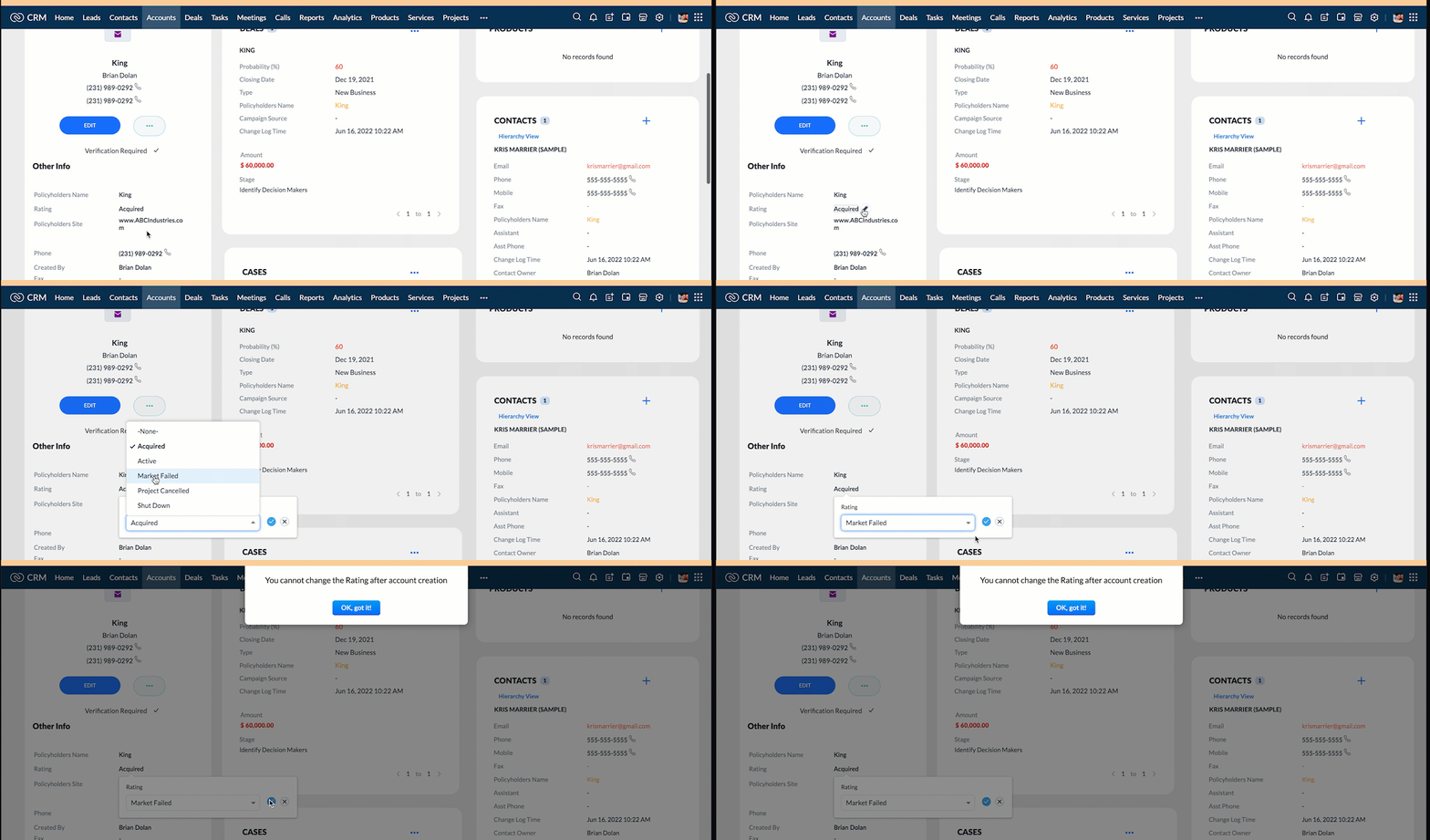
  2. Show the alert message "You cannot change the Rating of a verified account" whenever you try to update the field Rating in Accounts module.
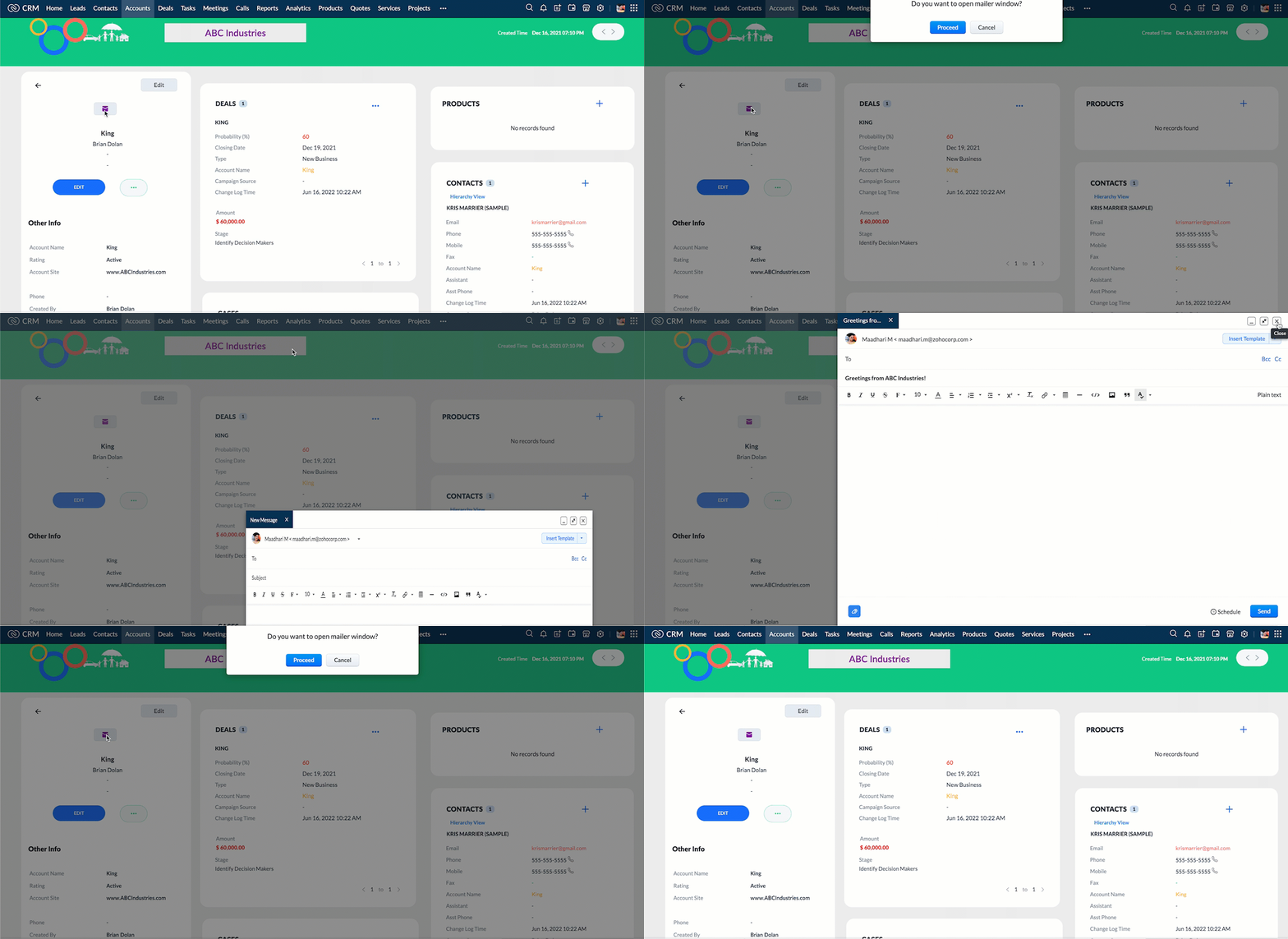
  3.  When you click the mail button on detail(canvas) page, ask for confirmation and open a mailer window.

Solution using Client Script

Note:

The solution listed in this post includes detail(canvas) page and create page.
To create a canvas page, 
  • Go to Setup > Customization > Canvas
  • Click Create Record Detail Page. 
  • On the Create a Custom Record pop up that appears, select the module as "Accounts" and select the required layout for the canvas page
  • Choose a template from the gallery and click Select.
  • Enter a name and save the canvas page.
  • Click Canvas Assignment and assign the page to the required profiles.
  •  Click here for more details on creating a canvas page(Customizing the record detail page).
1. Calculate age based on Date of Birth and display the message "Age is more than 80" whenever the age is above 80 in create page of Policyholder module

  • Go to Setup > Developer Space > Client Script. Click +New Script.
  • Specify the details to create a script and click Next.
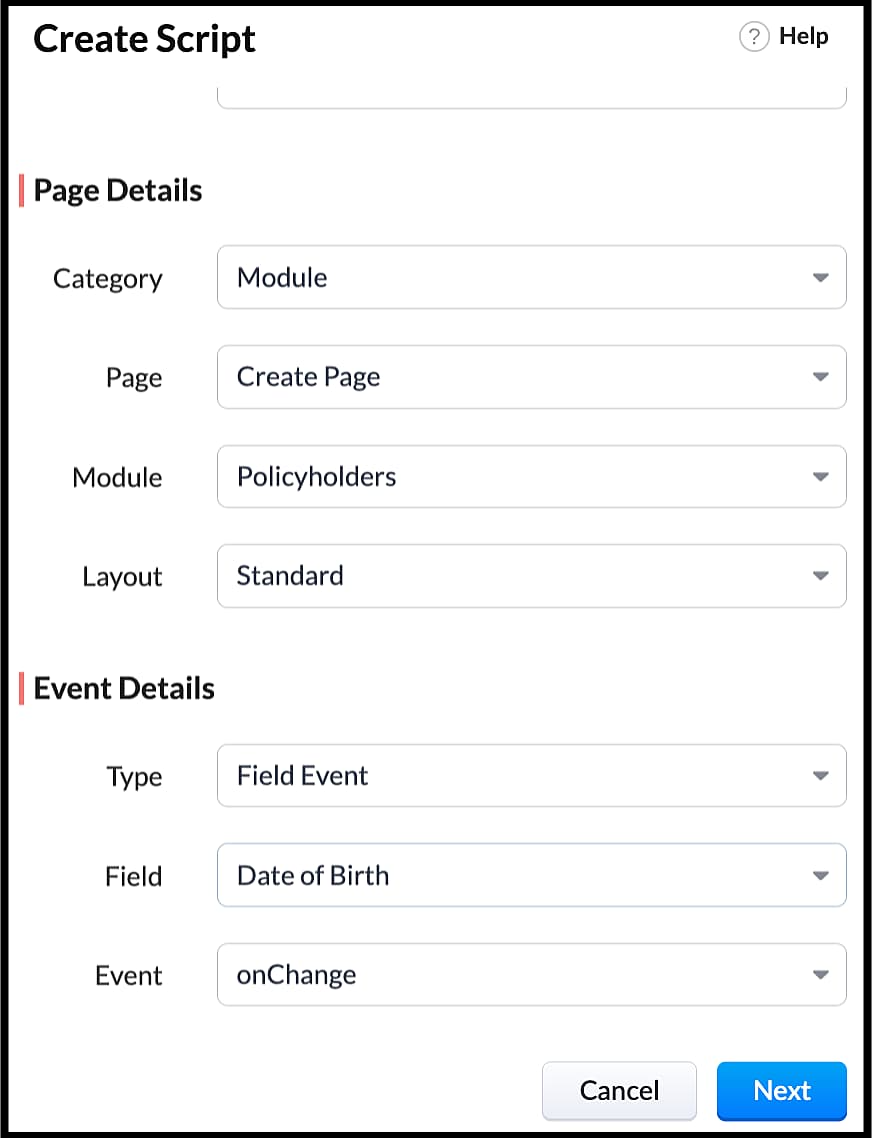
  • Enter the following script in the Client Script IDE and click save.
  1. function  getAge(dateString) 
  2. {
  3. var today = new Date();
  4.  var birthDate = new Date(dateString);
  5. var age = today.getFullYear() - birthDate.getFullYear();
  6.  var m = today.getMonth() - birthDate.getMonth();
  7.  if (m < 0 || (m === 0 && today.getDate() < birthDate.getDate())) 
  8. {
  9.    age--;
  10. }
  11.  return age;
  12. }
  13. let age = getAge(value);
  14. var age_field = ZDK.Page.getField("Age");
  15. var category_field = await ZDK.Page.getField("Category");
  16. age_field.setValue(age);
  17. if (age > 80) {
  18. ZDK.Client.showMessage('Age is more than 80', { type: 'info' });
  19. }
  • You can see the code working from the create page.  You can also see how the client script works using the Run component of the Client Script IDE.
  • You can use any of the following types in showMessage() function
Possible 'type'
Script
info
ZDK.Client.showMessage('message', { type: 'info' });


warning
ZDK.Client.showMessage('message', { type: warning });

error
ZDK.Client.showMessage('message', { type: error });

success
ZDK.Client.showMessage('message', { type: success });

2. Show the alert message whenever you try to update the field Rating

  • Go to Setup > Developer Space > Client Script. Click +New Script.
  • Specify the details to create a script and click Next.
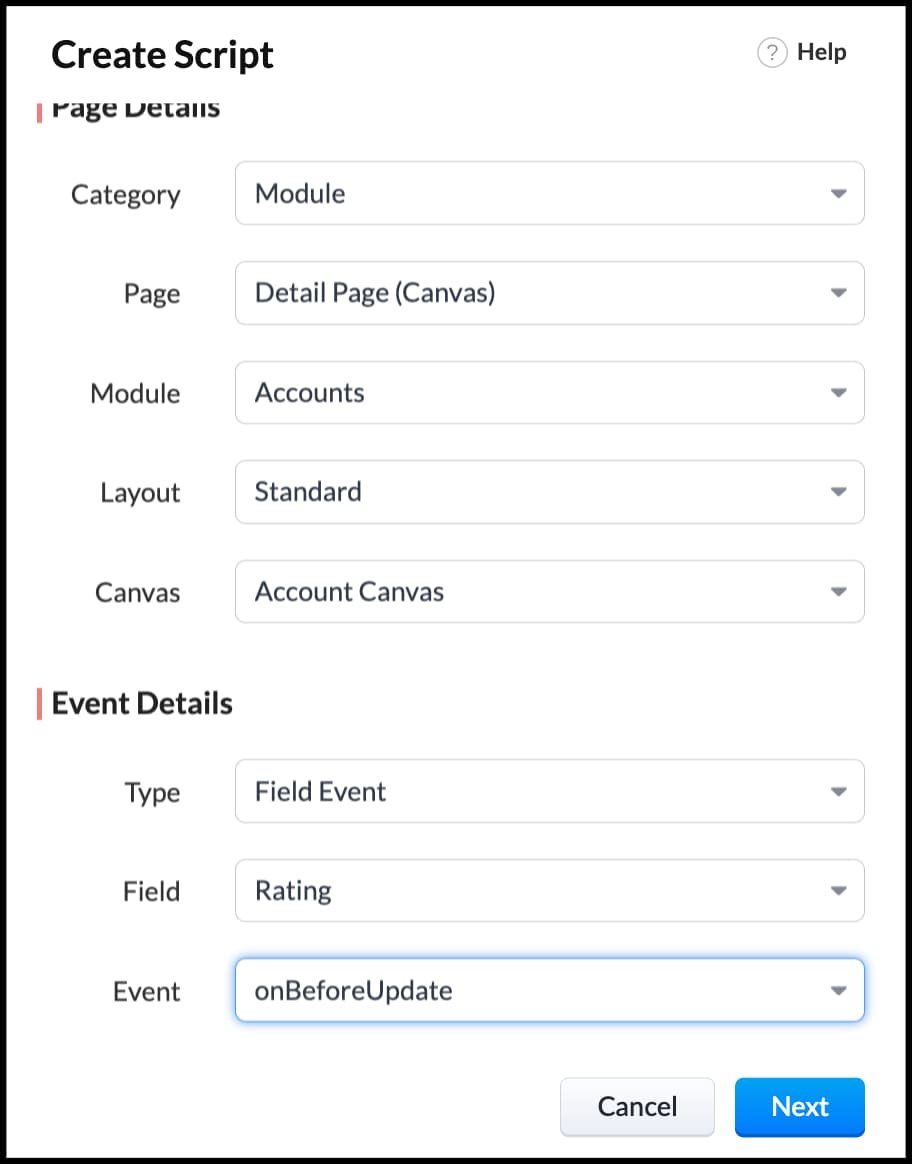
  1. ZDK.Client.showAlert('You cannot change the Rating after account creation');
  • Here is how the Client Script works. You can also see how the client script works using the Run component of the Client Script IDE.
3. Configure the mailer box with the click of a button

First of all, you need to add the button to the detail(canvas) page.
  • Go to Setup > Customization > Canvas.
  • Right click on the Canvas page for Accounts module and click Edit.
  • Click Elements, drag and drop the button wherever required and specify a label for the button.
  • Right click on the button, select Add Element ID and enter the ID of the button in the pop up that appears.
  • Once the button is created, you can configure Client Script in two ways:
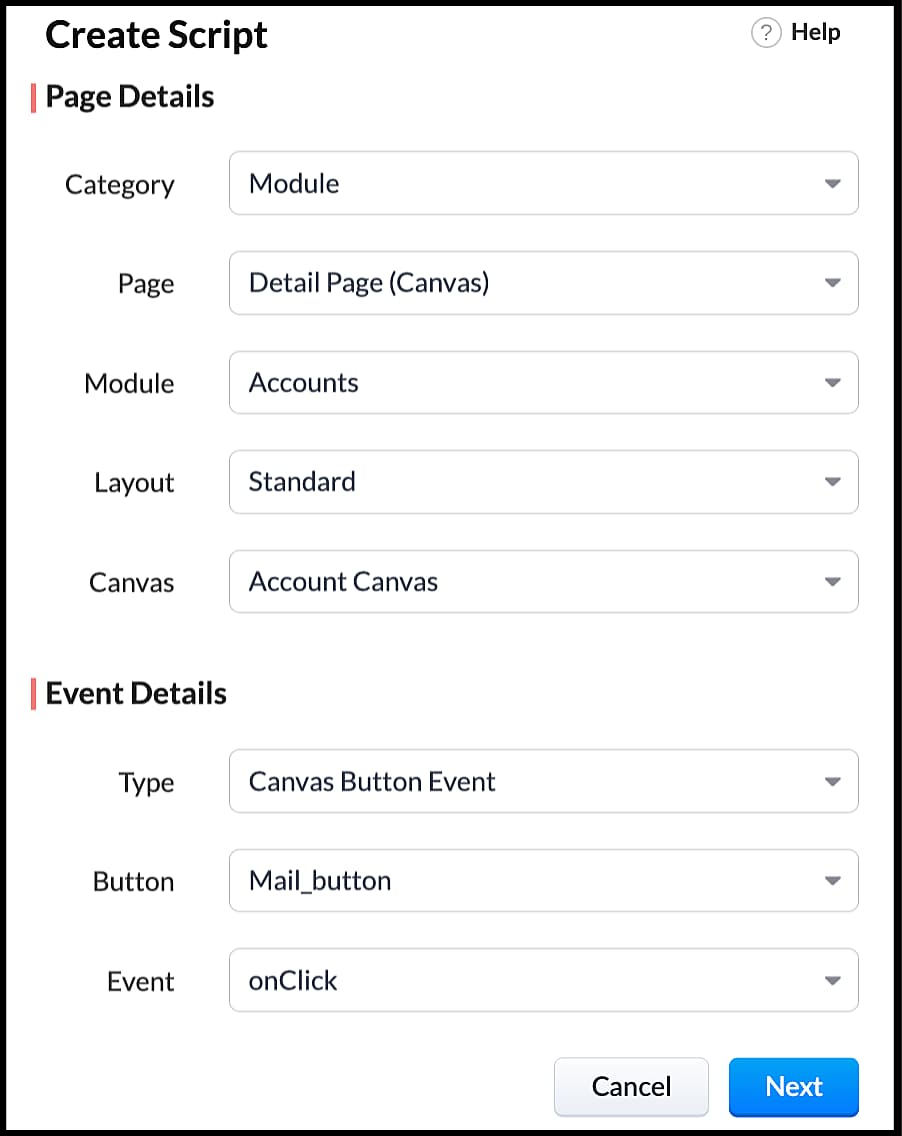
  • Right click on the button--> Add Client Script-->onClick. The Client Script IDE appears with the event type as Canvas Button Event.
                                                             (or)
  • Go to Setup > Developer Space > Client Script. Click +New Script.
  • Specify the details to create a script and click Next.
  • Enter the following script and click save.
  1. var isProceed = ZDK.Client.showConfirmation('Do you want to open the mailer window?','Proceed','Cancel');
  2. //If user clicks Proceed button
  3. if (isProceed) {
  4. ZDK.Client.openMailer({ from: '', to: [{ email: '', label: 'ABC Industries' }], cc: [{ email: '', label: 'ABC Industries' }], subject: 'Greetings from ABC Industries!', body: ' ' });
  5. }
  • The showConfirmation() function will return a boolean value based on the user selection. You should capture this boolean value using a variable and write the actions based on the boolean value returned. Here the variable isProceed will capture the user response and based on that boolean value, the mailer box will get displayed.
  • Here is how the client Script works,

We hope you found this post useful. We will meet you next week with another interesting topic!
If you have any questions let us know in the comment section.
Cheers!

Click here for more details on Client Script in Zoho CRM.

Related Links


      Zoho Campaigns Resources


        • Desk Community Learning Series


        • Digest


        • Functions


        • Meetups


        • Kbase


        • Resources


        • Glossary


        • Desk Marketplace


        • MVP Corner


        • Word of the Day


        • Ask the Experts


          • Sticky Posts

          • How to reach the official Zoho Support channels and avoid fake ones.

            Dear Customers, Thanks a lot for choosing Zoho! Our applications are built to help achieve your day-to-day business goals. We are committed to engaging with you, to understand and develop solutions that enhance your productivity.  We are happy and ready to help you use our services effectively. Understanding and avoiding fake support Just like using popular bank names and financial applications for phishing purposes, using Zoho and claiming to be providing Zoho Support or services with false numbers
          • Function #35: Close all tasks associated with a lead and create a new task.

            Welcome back everyone! Last week, we learnt how to close all tasks of a deal depending upon the deal stage. This week, let's look at a custom function that lets you close all of the tasks associated with a lead while simultaneously creating a new task, like when you need to halt all progress towards a lead while the lead is not available at the moment but create a reminder task. Business scenario: The success of a company, in one way or another, is determined by the leads it gets. Each lead is just
          • Zoho CRM Webinar - Redesigning Daily User Experiences with Canvas

            &lt;br&gt; Your users across roles use the CRM for day-to-day tasks that are necessary. Whether they perform their tasks on time, the right way, or at all depends on a lot of factors, including User Experience. Many businesses struggle with rigid layouts,
          • Join us at the Canada ZUG Meetup: What’s New in Zoho CRM

            Hello Zoho Community! Start your year with fresh insights into Zoho CRM’s latest updates and tools. Whether you're a CRM beginner or a experienced user, this meetup is crafted to help you optimise your processes and leverage new features. Explore practical
          • CRM Hack #2: Automate sending of birthday greetings to your customers.

              Hello everyone! What sets you apart as a sales person is your ability to add that personal touch to your business relationship with your customers. Sending a gift on a special day, or leaving a note wishing them on their birthdays, are small, yet significant actions that show your customers that you care. And these are actions done without any expectations :) You must be engaging with a lot of customers and it is highly unlikely that they all are your friends on Facebook or some social channel,

          Zoho CRM Plus Resources

            Zoho Books Resources


              Zoho Subscriptions Resources

                Zoho Projects Resources


                  Zoho Sprints Resources


                    Zoho Orchestly Resources


                      Zoho Creator Resources


                        Zoho WorkDrive Resources


                          Zoho CRM Resources

                          • CRM Community Learning Series

                            CRM Community Learning Series


                          • Tips

                            Tips

                          • Functions

                            Functions

                          • Meetups

                            Meetups

                          • Kbase

                            Kbase

                          • Resources

                            Resources

                          • Digest

                            Digest

                          • CRM Marketplace

                            CRM Marketplace

                          • MVP Corner

                            MVP Corner


                            Zoho Writer Writer

                            Get Started. Write Away!

                            Writer is a powerful online word processor, designed for collaborative work.

                              Zoho CRM コンテンツ


                                ご検討中の方

                                  • Recent Topics

                                  • How to install Widget in inventory module

                                    Hi, I am trying to install a app into Sales Order Module related list, however there is no button allow me to do that. May I ask how to install widget to inventory module related list?
                                  • HTML Tags added to Reports with Notes

                                    Recently Zoho added the ability to markup text within notes. That way, users can change font size, colors, etc. It's a great change. However, since the change, reports that include a column for "Note Content" are printing HTML tags within the report.
                                  • 10GB Email Storage Limits in Zoho CRM

                                    We’ve had Zoho One for almost 5 years and have always synced our emails from Gmail via IMAP… As of late, we’ve run into issues with our emails not syncing, due to being over the 10GB storage cap… What’s very odd is that we haven’t changed a thing? I know
                                  • New Feature: Audit Log in Zoho Bookings

                                    Greetings from the Zoho Bookings team! We’re excited to introduce Audit Log, a new feature designed to help you track all key actions related to your appointments. With Audit Log, you can maintain transparency, strengthen security, and ensure accountability.
                                  • Deleting unwanted ticket replies

                                    Hello, In a Zoho Desk Ticket thread, sometimes one of the recipients has auto-reply activated. This creates a new message in the Ticket thread that not only pollutes the thread, but most importantly cannot be replied properly because usually auto-reply e-mails don't do "reply all", so the other recipients are not included. I want to delete such a message in the Ticket thread. I searched the help of Zoho Desk, but only found a way to mark as Spam (https://help.zoho.com/portal/kb/articles/marking-support-tickets-as-spam)
                                  • Bill automation in Zoho Books

                                    Hi I am looking for 3rd-party options for bill automation in zoho which are economical and preferably have accurate scanning. What options do I have? Zoho's native scanning is a bit pricey
                                  • Zoho CRM Analytics - Allow To Reorder Dashboards

                                    I would like to suggest that you add the ability to reorder dashboards in the Analytics Module. I can see that this has been requested some time ago, the latest 9 years ago. I am not sure if this is a big or small endeavor, but such a small fix can go
                                  • Restrict Payment Methods

                                    Allow us to restrict certain payment methods specific for each customer.
                                  • Introducing the Zoho Projects Learning Space

                                    Every product has its learning curve, and sometimes having a guided path makes the learning experience smoother. With that goal, we introduce a dedicated learning space for Zoho Projects, a platform where you can explore lessons, learn at your own pace,
                                  • Alert if a field is ticked.

                                    Hi There, We have two modules named Opportunities (Deals) and End Users (CustomModule1), as per the image below. Within Opportunities, we have a lookup field that looks up from the End Users Module. We are looking to get an alert either via email or another
                                  • Passing the CRM

                                    Hi, I am hoping someone can help. I have a zoho form that has a CRM lookup field. I was hoping to send this to my publicly to clients via a text message and the form then attaches the signed form back to the custom module. This work absolutely fine when
                                  • Add Domain

                                    Hello Zoho Support, My Zoho Sites project accidentally auto-added domains with http:// prefix and duplicated domain entries. Current domains list shows: http://www.kinhtethethao.com.vn (Primary – cannot be removed) http://www.kinhtethethao.com.vn (verification
                                  • Kaizen #221: Workflow & Actions Reports APIs

                                    Over the last few weeks, we have joined Zylker Cloud Services as they restructured their automation ecosystem using Workflow APIs and Actions APIs. Along the way, we discovered how to audit workflows, update old rules, create new ones, and manage associated
                                  • Having an Issue with the Entity ID

                                    I'm having an issue when trying to use Zoho Flow and the notes function. I currently have it set up when a new response comes into a particular form, all of their responses will go into the notes section of their contact on the CRM. I'm currently mapping
                                  • For Each Loop in Zoho Flow

                                    I am using Zoho flow to create rows in an google sheets for every new order in Shopify but the issue is that it is creating one row per order and all line items are comma separated values but I want separate rows for each line item. Is there a way to
                                  • Zoho API - ticket creation - Validation failed for the condition : Ticket Status Info should not be empty

                                    Hi ! I'm trying to create ticket through Zoho API, and I'm getting a 422 response : "Validation failed for the condition : Ticket Status Info should not be empty" My request looks like this : curl --location 'https://desk.zoho.eu/api/v1/tickets' \ --header
                                  • Debug and Test not receiving updates

                                    Hello, I've been trying to debug two of my simple flows between Zoho Projects and Clockify but it seems like the Debug and Test feature is not working for me. When I click the Play button on any of the flows and then perform the trigger actions nothing
                                  • How do people handle using Outlook and Zoho Project calendar at the same time?

                                    We have an ongoing problem in our organisation where we use Zoho Projects to plan all of our projects tasks and that also allows us to look forward using the workload report to see which of our consultants are overstretched etc and which are available.
                                  • Attendance, Reimagined: Smarter Views for Teams and Individuals

                                    Tracking attendance shouldn’t feel like a chore. With the revamped Attendance module UI, Zoho FSM makes it easier than ever to monitor work hours, check-in activity, and team availability—whether you’re managing an entire workforce or just keeping an
                                  • How do I associate pricebooks to a customer?

                                    I setup a few pricebooks, that worked fine. But now the only thing I can do with it, when I enter a quote or sales order, I can select which pricebook to use, but I have to do this product by product every time I add one. Is there a way to connect a pricebook
                                  • Checking client unsubscribe details

                                    Hi team, Can you please let me know where we can check if a client has unsubscribed, along with the date and time it was done? If this information is not available at our end, please help confirm the unsubscribe date for the below email ID from the backend:
                                  • Logistics Industry: Learn to create amazing appointment scheduling sites

                                    In the logistics industry, the quality of service is something that cannot be shown to others unless they experience it.  Sure, there are metrics that show how you fare when compared to your competition, but then, it only communicates little with respect to quality. The usual route which firms in logistics took are advertisements, to which the internet has opened alternatives in today’s digital age like websites and appointment scheduling sites. A great online presence can help you communicate with
                                  • Please, make writer into a content creation tool

                                    I'm tired of relying on Google Docs. I'm actually considering moving to ClickUp, but if Writer were a good content creation tool instead of just a word processor, I would finally be able to move all my development within the Zoho ecosystem, rather than
                                  • Customer Management: # 1 Pick a Convenient Way to Onboard Customer

                                    When Meera opened her bookstore, onboarding customers was effortless. A customer walked in, picked a book and left with a handwritten bill. As the store gained popularity, things changed. " Can I place an order over the phone?" a customer asked one day.
                                  • Tracking Emails sent through Outlook

                                    All of our sales team have their Outlook 365 accounts setup with IMAP integration. We're trying to track their email activity that occurs outside the CRM. I can see the email exchanges between the sales people and the clients in the contact module. But
                                  • Fetch ALL items from Inventory and send to Google Sheet using Flow

                                    The title says it all -- I want to fetch the Item name, SKU, Purchase rate, and Sales rate for ALL items in Zoho Inventory and have them populate a tab in an existing Google Sheet. I have already successfully made this work for one item, so the flow is
                                  • CRM x WorkDrive: We're rolling out the WorkDrive-powered file storage experience for existing users

                                    Release plan: Gradual rollout to customers without file storage add-ons, in this order: 1. Standalone CRM 2. CRM Plus and Zoho One DCs: All | Editions: All Available now for: - Standalone CRM accounts in Free and Standard editions without file storage
                                  • Zoho CRM Email Templates 100% Width No Background How?

                                    Hi, On the Zoho CRM Email Templates in setup > customization > templates > new templates > I choose blank template, but still it puts in a gray background and a max width for the email. I just want to make an email that looks like an email I would send from gmail that has no background or max width. How do you do this? 
                                  • Why Document Integrity Matters at Every Stage of the Contract Lifecycle

                                    Contracts are legal records that must stay authentic and traceable from creation to expiry or termination. In Zoho Contracts, several design decisions focus on protecting the integrity of every document. These measures ensure that no important details
                                  • affichage pièces jointes impossible

                                    Bonjour, aujourd'hui je n'arrive pas à afficher ni à télécharger les pièces jointes dans ZOHO CRM. J'utilise Chrome, j'ai vidé les caches et les cookies. Mais cela ne change rien. Merci de votre aide
                                  • Reminder to renew subscription.

                                    Whenever I try to add to one of my notes a " renew your subscription" window pops out and won't Close disallowing me to edit. Why should I renew my subscription on an application with at best such bugs and at worse such underhanded ways to force ren
                                  • Fields not coming through, not pulling data

                                    Forgive the noviceness of my vocabulary. I am in Zoho flow connecting CRM and Projects. When an opportunity hits a certain stage, it will create the project in Projects, and bring in data from the opportunity. Everything is working, except for two fields
                                  • Smartsheet Integration

                                    Has any in the community been able to integrate Zoho Desk with Smartsheets using Zoho Flow? I am trying to get the Smartsheet Row ID based on ticket data and cannot find documentation on the Get Row function for Smartsheet. It is asking for a Query String
                                  • CRM Campaign - how to mass remove contacts?

                                    Does anyone have a solution for removing all contacts from a CRM campaign. Seems that one by one is the only option. 
                                  • Send out follow-up email in the same thread (threaded conversations in individual emails) from Zoho CRM

                                    Hi, I'm new to Zoho. I'm trying to send individual emails to my leads one by one. And I'll send out follow up email if I don't hear back from them later. However, instead of sending a new email, I want to reply in the same email thread so that the recipients
                                  • Cadence Support in Zoho Vertical Studio

                                    We would like to know whether it is possible to create and configure Cadences in Zoho Vertical Studio, similar to the Cadence feature available in Zoho CRM. Please confirm if Vertical Studio supports creating cadences for modules and users, and whether
                                  • Removing "Products" as mandatory field from Sales Order creation page

                                    Hello, friends According to our workflow, we should: 1) create Sales Order (Stage "New") 2) call and discuss the Products with a customer (Stage "Communication") 3) add the Products to the Sales Order during the call However, "Products" is mandatory to
                                  • Zoho Books says "The customer "Hakimuddin P A Ali" already exists. Please specify a different name.""

                                    One of my transaction is not getting posted from Stripe to Zoho books. I already checked in Zoho books that there is no customer already present in Zoho books with the same name (as the error mentions) I already raised this complaint on Zoho flow portal,
                                  • Is it possible to automate a file to be directly uploaded to a specific subfolder in Zoho Workdrive?

                                    I am establishing a workflow so that when a new task is marked "complete", the document submitted in the task (under the "Documents" tab) is automatically uploaded to a specific subfolder in the associated WorkDrive for the project. However, the dilemma
                                  • Steuerberater der Zoho benutzt in Deutschland

                                    I write in English because the issue is related to German regulations. Wir sind ein Unternehmen, welches aktuell keine Pflicht zur doppelten Buchführung hat. Aktuell bucht unser Steuerberater jeden Beleg, auch unsere Auslagen. Wir würden dies gerne selbst
                                  • Next Page