Kaizen #59 - Creating alerts and custom messages using Client Script
Hello everyone!
We are happy to resume our Zoho CRM Developer Community series - The Kaizen series!
Welcome back to the new start of Kaizen!
What is Client Script?
The Client Script feature gives you a seamless platform for achieving and extending your business cases in Zoho CRM by allowing Java Script code execution in your browser. It enables you to configure events for the UI components and define the actions once those events are triggered.
The ZDK Client Functions available in Client Script are,
ZDK Client Function | Description |
showMessage | To display a text message on create/clone/edit/detail(canvas) page. |
showConfirmation | To display a confirmation box with accept and reject message on create/clone/edit/detail(canvas) page. |
showAlert | To show alert message on create/clone/edit/detail(canvas) page. |
openMailer | To open mailer component from detail(canvas) page. |
Use Case
Let us consider that you want to achieve the following using Client Script.
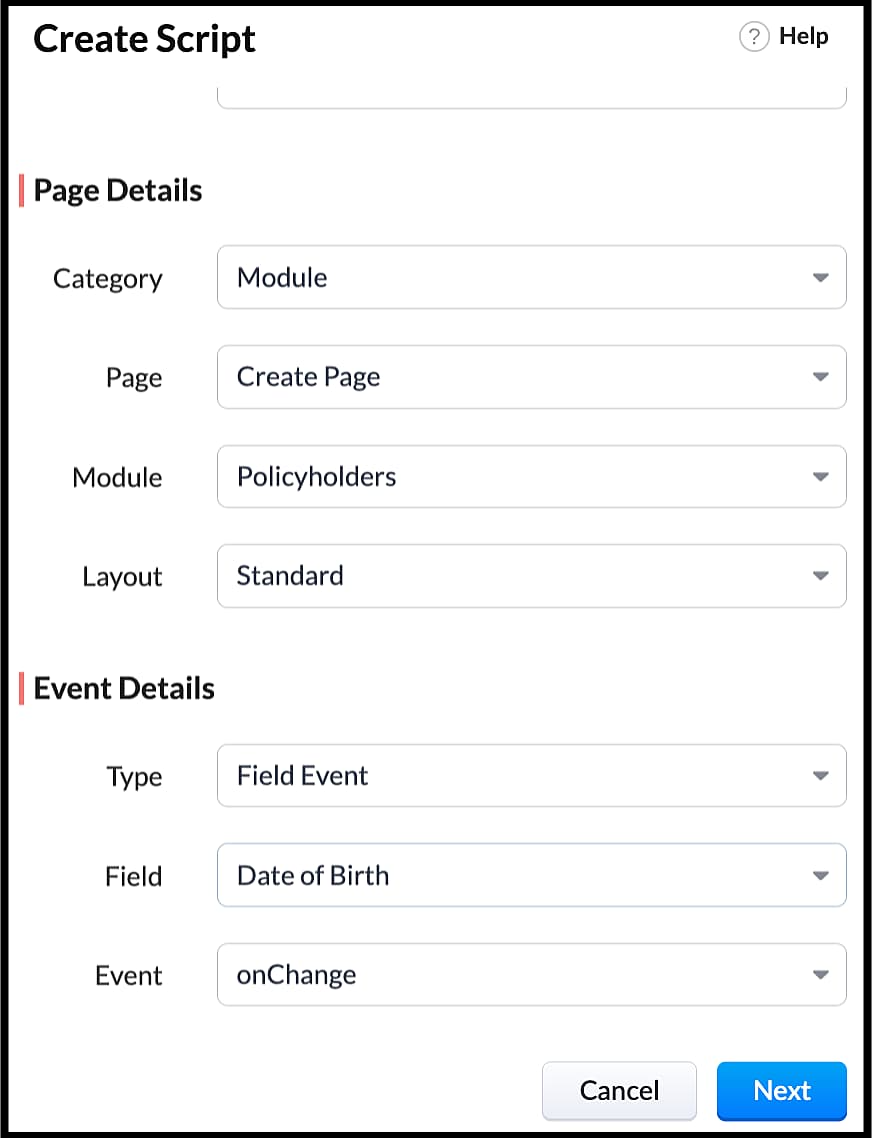
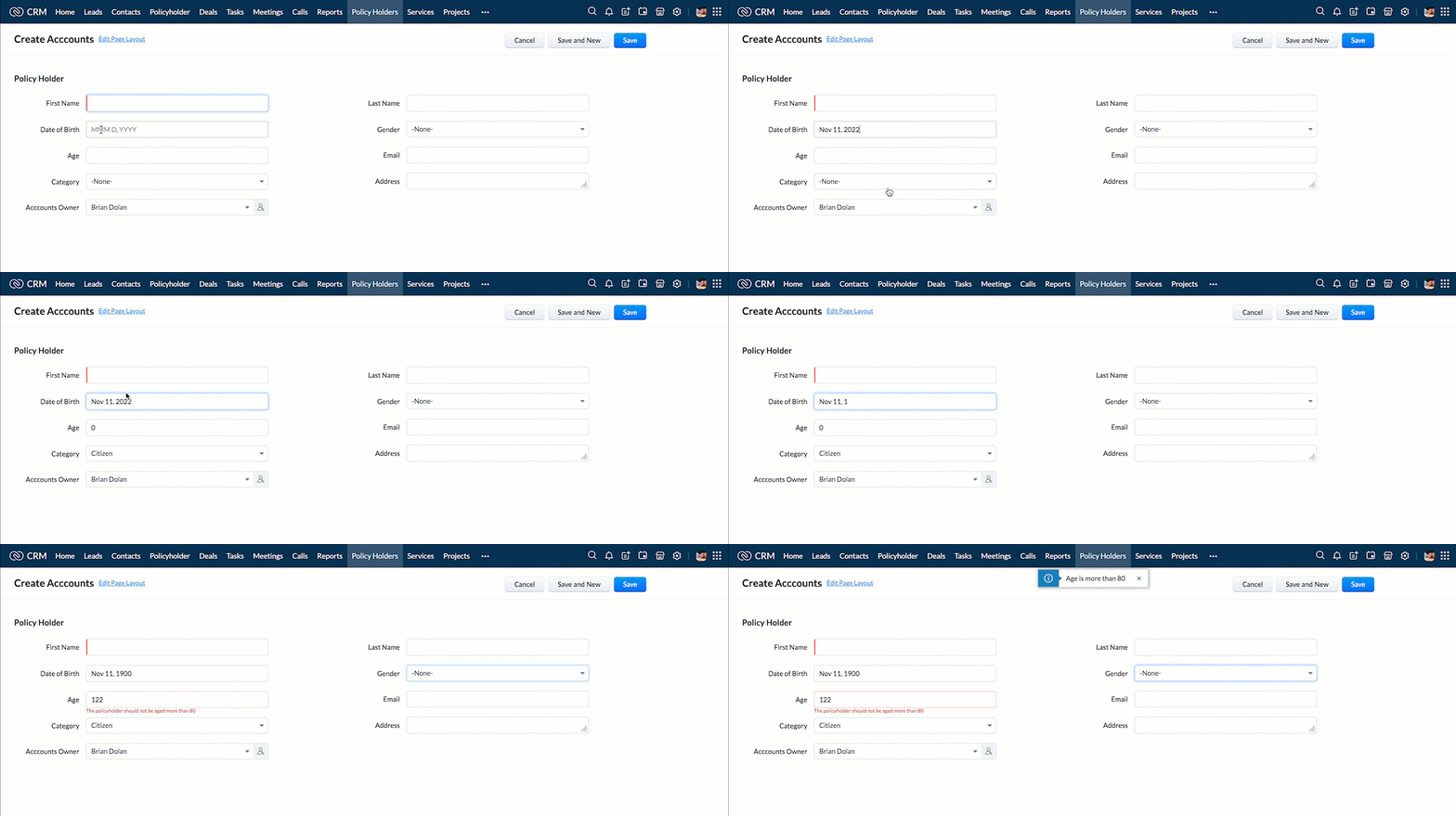
- Calculate age based on Date of Birth and display the message "Age is more than 80" whenever the age is above 80 in create page of Policyholder module.
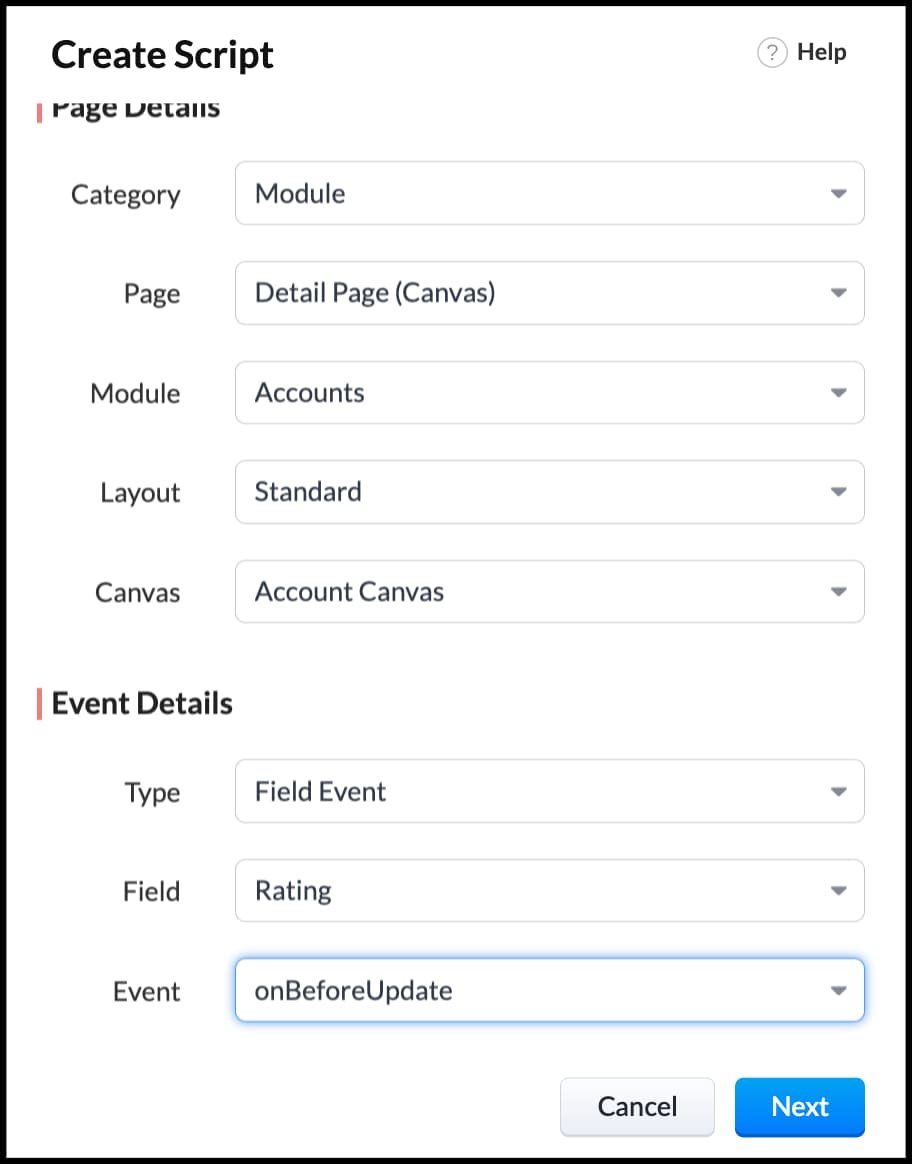
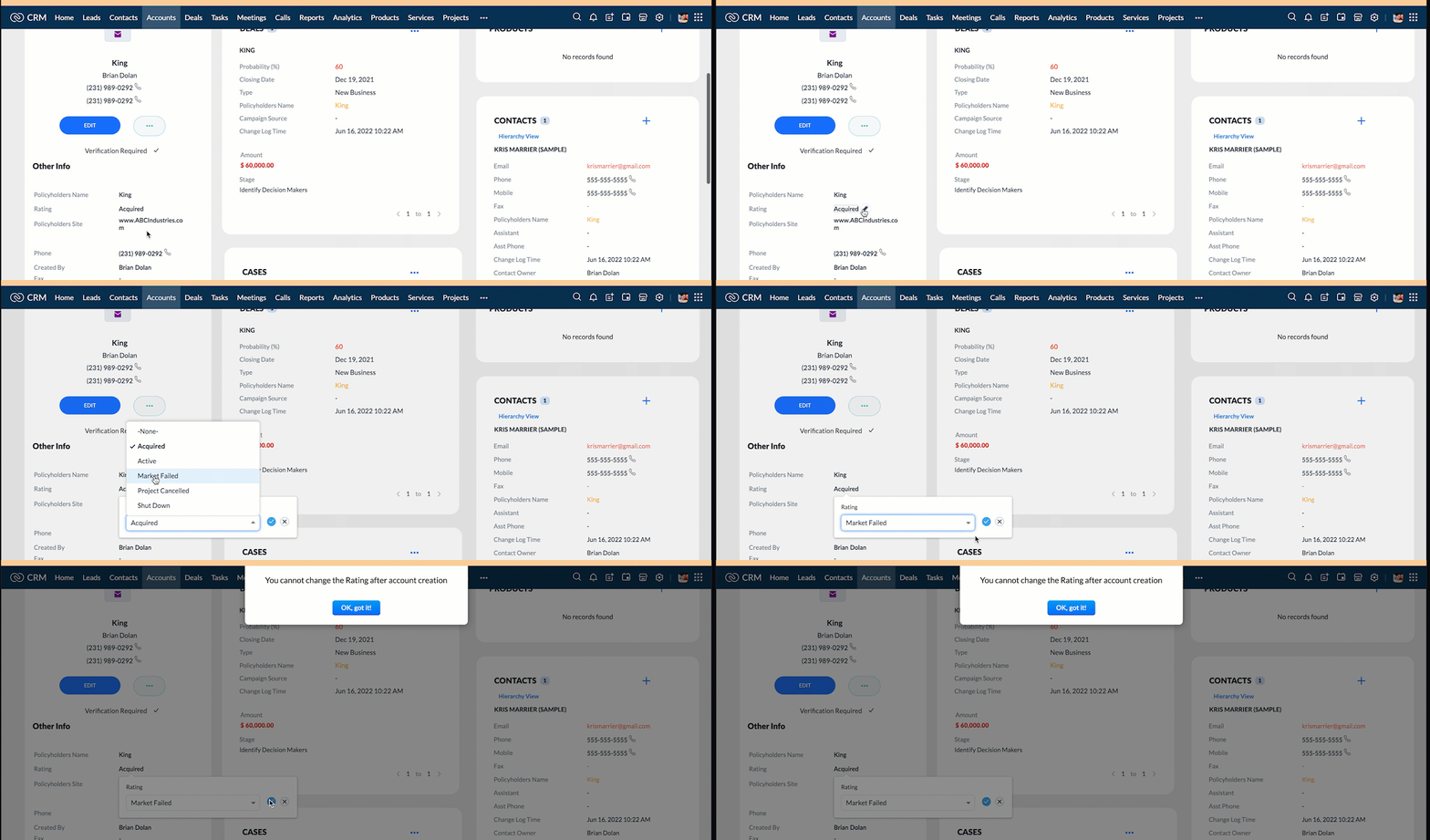
- Show the alert message "You cannot change the Rating of a verified account" whenever you try to update the field Rating in Accounts module.
- When you click the mail button on detail(canvas) page, ask for confirmation and open a mailer window.
Solution using Client Script
Note:
The solution listed in this post includes detail(canvas) page and create page.
To create a canvas page,
- Go to Setup > Customization > Canvas
- Click Create Record Detail Page.
- On the Create a Custom Record pop up that appears, select the module as "Accounts" and select the required layout for the canvas page
- Choose a template from the gallery and click Select.
- Enter a name and save the canvas page.
- Click Canvas Assignment and assign the page to the required profiles.
- Click here for more details on creating a canvas page(Customizing the record detail page).
1. Calculate age based on Date of Birth and display the message "Age is more than 80" whenever the age is above 80 in create page of Policyholder module
- Go to Setup > Developer Space > Client Script. Click +New Script.
- Specify the details to create a script and click Next.
- Enter the following script in the Client Script IDE and click save.
- function getAge(dateString)
- {
- var today = new Date();
- var birthDate = new Date(dateString);
- var age = today.getFullYear() - birthDate.getFullYear();
- var m = today.getMonth() - birthDate.getMonth();
- if (m < 0 || (m === 0 && today.getDate() < birthDate.getDate()))
- {
- age--;
- }
- return age;
- }
- let age = getAge(value);
- var age_field = ZDK.Page.getField("Age");
- var category_field = await ZDK.Page.getField("Category");
- age_field.setValue(age);
- if (age > 80) {
- ZDK.Client.showMessage('Age is more than 80', { type: 'info' });
- }
- You can see the code working from the create page. You can also see how the client script works using the Run component of the Client Script IDE.
- You can use any of the following types in showMessage() function
Possible 'type' | Script |
info | ZDK.Client.showMessage('message', { type: 'info' }); |
warning | ZDK.Client.showMessage('message', { type: warning }); |
| error | ZDK.Client.showMessage('message', { type: error }); |
success | ZDK.Client.showMessage('message', { type: success }); |
2. Show the alert message whenever you try to update the field Rating
- Go to Setup > Developer Space > Client Script. Click +New Script.
- Specify the details to create a script and click Next.
- Enter the following script in the Client Script IDE and click save.
- ZDK.Client.showAlert('You cannot change the Rating after account creation');
- Here is how the Client Script works. You can also see how the client script works using the Run component of the Client Script IDE.
3. Configure the mailer box with the click of a button
First of all, you need to add the button to the detail(canvas) page.
- Go to Setup > Customization > Canvas.
- Right click on the Canvas page for Accounts module and click Edit.
- Click Elements, drag and drop the button wherever required and specify a label for the button.
- Right click on the button, select Add Element ID and enter the ID of the button in the pop up that appears.
- Once the button is created, you can configure Client Script in two ways:
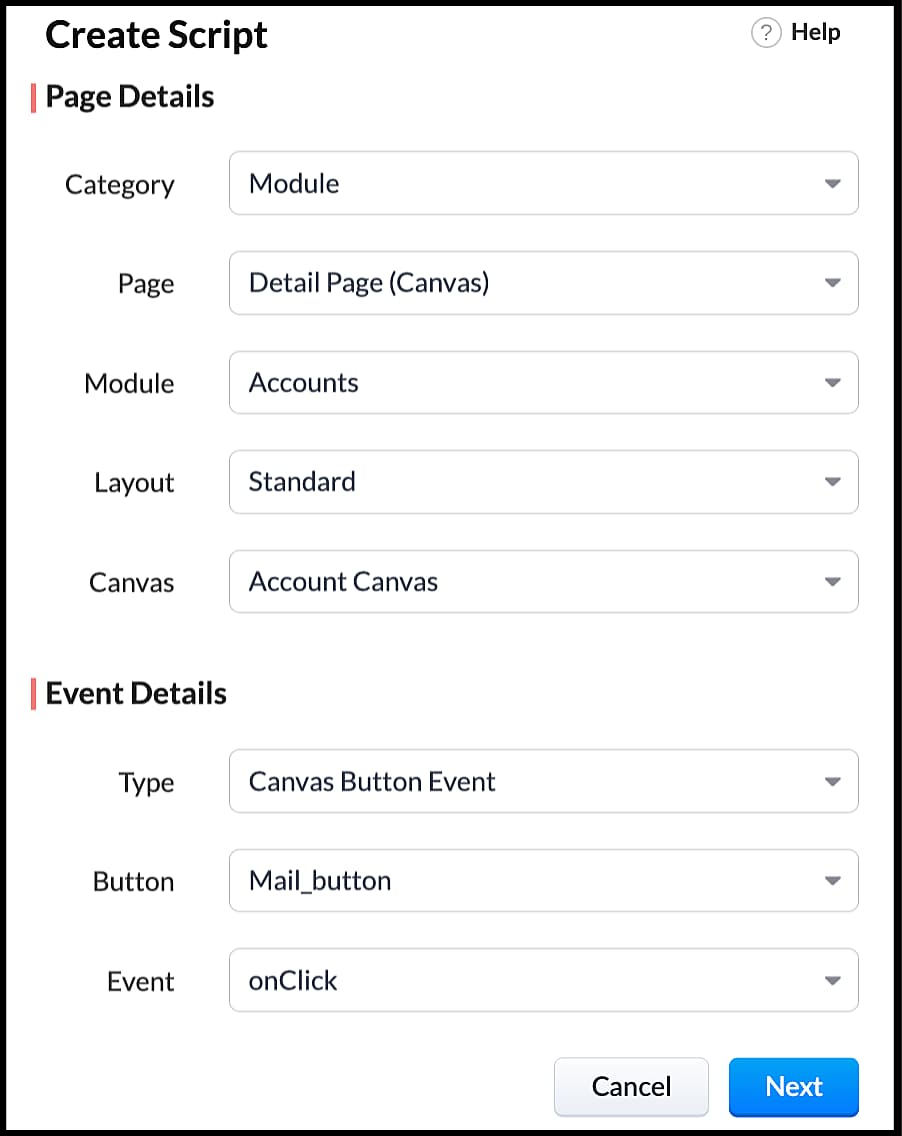
- Right click on the button--> Add Client Script-->onClick. The Client Script IDE appears with the event type as Canvas Button Event.
(or)
- Go to Setup > Developer Space > Client Script. Click +New Script.
- Specify the details to create a script and click Next.
- Enter the following script and click save.
- var isProceed = ZDK.Client.showConfirmation('Do you want to open the mailer window?','Proceed','Cancel');
- //If user clicks Proceed button
- if (isProceed) {
- ZDK.Client.openMailer({ from: '', to: [{ email: '', label: 'ABC Industries' }], cc: [{ email: '', label: 'ABC Industries' }], subject: 'Greetings from ABC Industries!', body: ' ' });
- }
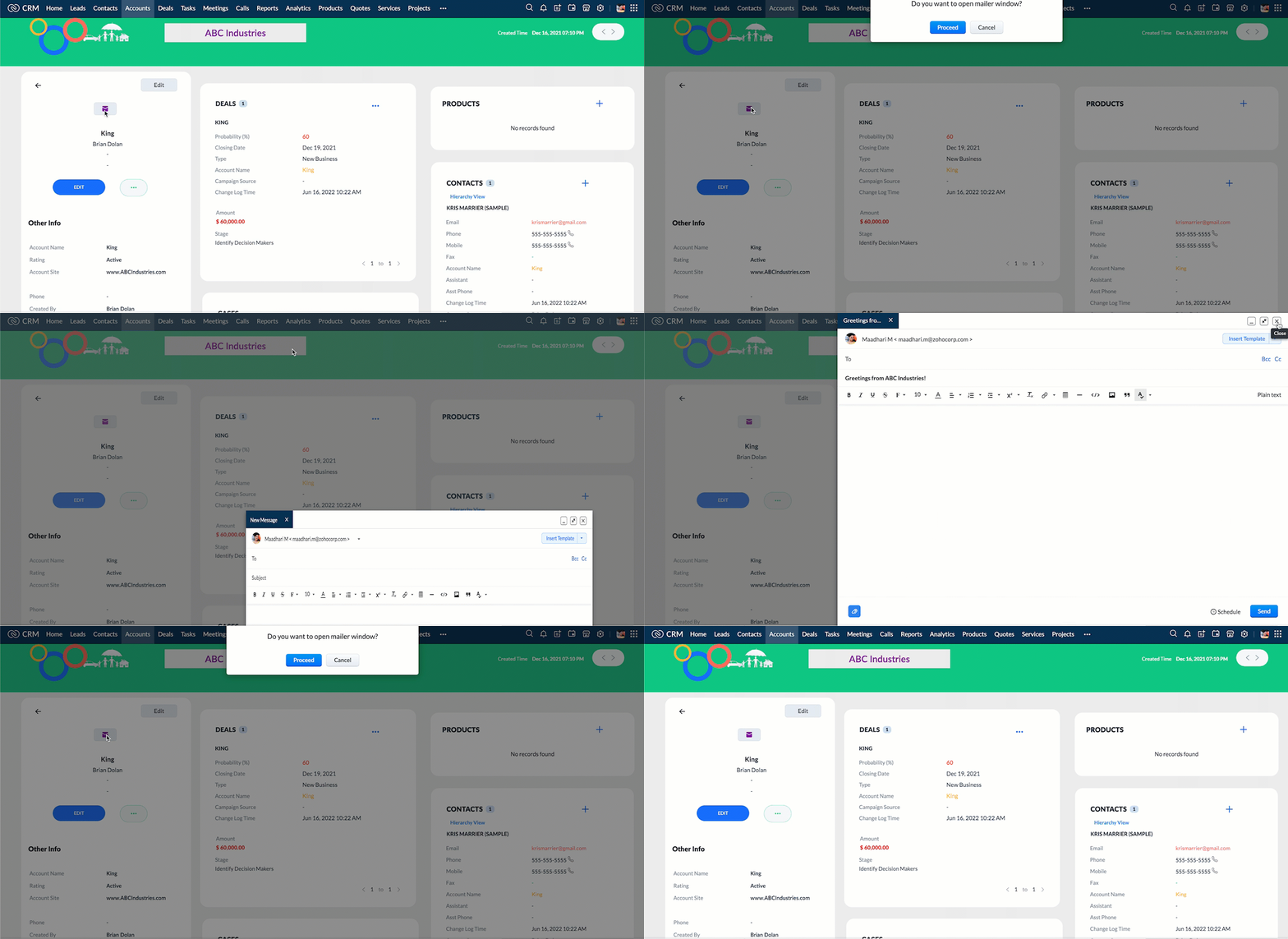
- The showConfirmation() function will return a boolean value based on the user selection. You should capture this boolean value using a variable and write the actions based on the boolean value returned. Here the variable isProceed will capture the user response and based on that boolean value, the mailer box will get displayed.
- Here is how the client Script works,
We hope you found this post useful. We will meet you next week with another interesting topic!
If you have any questions let us know in the comment section.
Cheers!
Click here for more details on Client Script in Zoho CRM.
Related Links
New to Zoho Recruit?
Zoho Campaigns Resources





Topic Participants
Maadhari M
tbiedma
Joe Sweeney
Anz
Jason
Sticky Posts
How to reach the official Zoho Support channels and avoid fake ones.
Dear Customers, Thanks a lot for choosing Zoho! Our applications are built to help achieve your day-to-day business goals. We are committed to engaging with you, to understand and develop solutions that enhance your productivity. We are happy and ready to help you use our services effectively. Understanding and avoiding fake support Just like using popular bank names and financial applications for phishing purposes, using Zoho and claiming to be providing Zoho Support or services with false numbersFunction #35: Close all tasks associated with a lead and create a new task.
Welcome back everyone! Last week, we learnt how to close all tasks of a deal depending upon the deal stage. This week, let's look at a custom function that lets you close all of the tasks associated with a lead while simultaneously creating a new task, like when you need to halt all progress towards a lead while the lead is not available at the moment but create a reminder task. Business scenario: The success of a company, in one way or another, is determined by the leads it gets. Each lead is justZoho CRM Webinar - Redesigning Daily User Experiences with Canvas
<br> Your users across roles use the CRM for day-to-day tasks that are necessary. Whether they perform their tasks on time, the right way, or at all depends on a lot of factors, including User Experience. Many businesses struggle with rigid layouts,Join us at the Canada ZUG Meetup: What’s New in Zoho CRM
Hello Zoho Community! Start your year with fresh insights into Zoho CRM’s latest updates and tools. Whether you're a CRM beginner or a experienced user, this meetup is crafted to help you optimise your processes and leverage new features. Explore practicalCRM Hack #2: Automate sending of birthday greetings to your customers.
Hello everyone! What sets you apart as a sales person is your ability to add that personal touch to your business relationship with your customers. Sending a gift on a special day, or leaving a note wishing them on their birthdays, are small, yet significant actions that show your customers that you care. And these are actions done without any expectations :) You must be engaging with a lot of customers and it is highly unlikely that they all are your friends on Facebook or some social channel,
Zoho CRM Plus Resources
Zoho Books Resources
Zoho Subscriptions Resources
Zoho Projects Resources
Zoho Sprints Resources
Zoho Orchestly Resources
Zoho Creator Resources
Zoho WorkDrive Resources


Zoho CRM Resources
Get Started. Write Away!
Writer is a powerful online word processor, designed for collaborative work.
Zoho CRM コンテンツ
-
オンラインヘルプ
-
Webセミナー
-
機能活用動画
-
よくある質問
-
Ebook
-
-
Zoho Campaigns
- Zoho サービスのWebセミナー
その他のサービス コンテンツ
ご検討中の方
Recent Topics
IMAP Block
My two accounts have been blocked and I am not able to unblocked them myself. Please respond to email, I am traveling and this is urgent."DKIM not configured"
Hello. I have been attempting get the DKIM verified but Toolkit keeps sending the message that it is not configured, but both Namecheap and Zoho show it as configured properly. What am I missing?Zoho mail with custom domain not receiving email
i registered zoho mail with my own domain. I can login and access the mail app. I tried to send email from an outlook email account and an icloud email account. Both emails were not received. My plan is free. I also tried to send email from this zohoSet connection link name from variable in invokeurl
Hi, guys. How to set in parameter "connection" a variable, instead of a string. connectionLinkName = manager.get('connectionLinkName').toString(); response = invokeurl [ url :"https://www.googleapis.com/calendar/v3/freeBusy" type :POST parameters:requestParams.toString()Waterfall Chart
Hello, I would like to create a waterfall chart on Zoho analytics which shows the movement in changes of budget throughout a few months, on a weekly basis. Should look something like the picture below. Does anyone know how to?Issue with Importing Notes against Leads
Hi, I am attempting to import some Notes into Zoho CRM which need to be assigned to various Leads. I have created a csv file which I am testing that contains just one record. This csv file contains the following columns: Note Id Parent Id (I haveOption to Hide Project Overview for Client Profiles
In Zoho Projects, the Project Overview section is currently visible to client profiles by default. While user profiles already have the option to restrict or hide access to the project overview, the same flexibility isn’t available for client profiles.Creator Add Records through API - Workflows not triggered ?
Hi Everyone, I am trying to add records to my Creator application through a third party app that I am developing. Currently, I am testing this through Postman. The records I need to add have a lot of workflows to run to populate dropdowns, fields, useImportant Update: Changes to Google Translate Support in Zoho SalesIQ
We’re updating our default chat translation options across all Zoho SalesIQ data centres to offer a more secure, in-house solution for your translation needs. What’s changing? We will be offering Zoho Translate (our in-house tool) as the default translationZoho CRM Community Digest - July 2025 | Part 1
Hey everyone, The start of July 2025 marked a special milestone: 200 posts in our Kaizen series! For those new here, Kaizen is a go-to series for Zoho CRM developers, where we regularly share best practices, tips, and expert insights to help you buildWhat’s New in Zoho Expense (April – July 2025)
Hello users, We're happy to bring you the latest updates and enhancements we've made to Zoho Expense over the past three months, which include introducing the Trip Expense Summary report in Analytics, extending Chatbot support to more editions, rollingWeekly Tips: Insert frequently used phrases in a jiffy using Hotkeys
You often find yourself using similar phrases in an email —like confirming appointments or providing standard information. Constantly switching between the mouse and keyboard interrupts your flow and slows you down.Instead of typing the same phrases overUndo Command in Notebook
It would be handy to have an Undo in the row of icons at the bottom of the notes.Narrative 9: GC—Meaningful conversations that benefit your customers
Behind the scenes of a successful ticketing system - BTS Series Narrative 9: GC—Meaningful conversations that benefit your customers Customers often seek immediate solutions, which is why self-service options are essential. Guided Conversations providesFSM App Oddity
We recently rolled out FSM to our technicians, and only one technician is having an issue. He's using an iPhone with iOS 18.6 installed. When he goes to service appointments using the calendar icon at the bottom of the app, he gets a list view only. Typically,Cliq Not Working !
Zoho Cliq has been experiencing connectivity issues since this morning. The app is unable to establish a connection with the server.Injecting CSS into ZML pages
Is there a way to inject CSS into ZML pages? Use case: 1. Dashboard displays 'Recent Activities' card displaying a list of newly added records 2. Each item in list links to the record onClick 3. When a user points the cursor over an item in the list,Power of Automation :: Automated Weekly Notifications for Unapproved Timesheets
Hello Everyone, A custom function is a software code that can be used to automate a process and this allows you to automate a notification, call a webhook, or perform logic immediately after a workflow rule is triggered. This feature helps to automateExtracting Data from Sitelink APIs
Hi All, I'm working to pull data on Sitelink using API calls but i can't seem to extract it. If you click expand, you will see it has a lot of data in it. I tried extracting from the map but it's not giving me anything. Is there a workaround on this orExport a list of fields for all modules in a spreadsheet with specific field data
Many of my clients are using spreadsheets to create lists of fields for all modules when starting a new implementation or when updating an existing setup. This is a useful process but also a very time consuming one. It would be good a list of fields could[Important announcement] Zoho Writer will mandate DKIM configuration for automation users
Hi all, Effective Dec. 31, 2024, configuring DKIM for From addresses will be mandatory to send emails via Zoho Writer. DKIM configuration allows recipient email servers to identify your emails as valid and not spam. Emails sent from domains without DKIM【Zoho Backstage】2025年7月のアップデート紹介
本投稿は、本社のZoho Desk コミュニティに投稿された以下の記事を翻訳し、一部抜粋したものです。 What's New - July 2025 | Zoho Backstage ユーザーの皆さま、こんにちは。コミュニティチームの中野です。 本投稿では、Zoho Backstage の直近のアップデートを3点抜粋して、ご紹介します。 目次 1.参加可否の確認:RSVP 2.証明書作成ツール:Certificate Builder 3.登録の承認 :Registration Approval 1.参加可否の確認:RSVPCan we have Backorder Management ?
Can we have Backorder Management ?Display a field of an Account on the Ticket view
Hi there, We would like to display of the Account of the user submitting a ticket on the ticket view. See for example: How can this be achieved? It doesn't really matter where it will be placed as long as it is shown there. Thanks, SnirInsurance Agencies
I am reaching out to see if anyone has any experience in the Insurance Agency world with using Zoho exclusively for the CRM and commissions side of things. Lots of strong features like drip campaigns, meeting, calendars, emails, can all be found in here.Problem with Egyptian internet ISP
Dears, We have problem with our ADSL internet SP, That your site not working with. So, we contact them and they asking us to contact you to solve this problem. The problem that when we are connecting to Tedata ADSL your website not working (Business Email). BR,, Mohamed OmarMail Not Showing In Inbox or Sent Box
Hi, there are mails that are not displaying in both my inbox and sent box. I just tried the iPad app and it is the same but there is a blank field where a mail should be and it refers to a server error. Please fix this.Marketing Automation List Entry Criteria is no longer an option
For a couple of years now we have used the "List Entry Criteria" option to filter our Journey recipient list. All of a suddent the option no longer exists for New Lists and I can only delete the option from existing lists but can no longer edit it. AnyoneGCLID arrives not in CRM with iframe integrated ZOHO Form
Hello amazing community, I enabled Adwords integration in ZOHO CRM. I have a ZOHO Form integrated in a wordpress. I tested iframe and Javascript. I enabled the "handover" GCLID in the ZOHO Form. When I add a GLID with http://www.example.com/?gclid=TeSter-123.Bidirectional sync between Zoho Bookings and Zoho CRM - Part 1
Hey, community members! The default integration between Zoho CRM and Zoho Bookings is unidirectional, which means that any appointments booked, rescheduled, or deleted in Zoho Bookings will be reflected in Zoho CRM. However, any modifications made toIs it possible to edit placeholder text?
In the master slides I want to make sure my templates have more meaning for the users and want to replace the standard placeholder text with something more instructional. Instead of "Click to edit Mast subtitle styles" I want to have "Click to enter reportingHow to allow download of a file AFTER information is collected?
I can't find this anywhere. Can someone help with what seems to be a pretty basic web function today? - File is stored in Workdrive - Prospect goes to a URL where the file is located - System requests prospect to enter "Name" and "Email" - An email isAdd Baseline methods to API
There are no API methods for creating or querying baselines, Use case: Customer is notified of the current project start date according to plan via another product/integration. We would like to auto create a baseline (Automated via API) at the pointBulk Fill In & Edit PO/Bill/SO/Invoice
Hello, I am adding stock in bulk on a PO, the system is automatically populating the Rate (price) and Tax from the item data. Problem is that the bill rate is different from the rate on the item data, so I have to manually erase each and enter the price.Fixed Assets beg balance
Hello, I trust you are well I'm a new zoho books user and I find it difficult to plug in the fixed assets balance and here's what I have done: 1- I imported the fixed assets data into the fixed assets module as per the instructions 2- the import processSyncing with Google calendar, Tasks and Events
Is it possible to sync Zoho CRM calendar, task and events with Google Calendar's tasks and events. With the increasing adoption by many major tool suppliers to sync seamlessly with Google's offerings (for instance I use the excellent Any.do task planningCRM Deluge how can link attach file with workdrive file.
Hi, We have create file at workdrive and would like to link to attachment at crm module by deluge. Right now can only upload it to attachment but can not link the file from workdrive. Thank youFeature announcement: AI-powered document generator in Zoho Sign
Hi there! We recently announced manual document creation by offering an editor within Zoho Sign. Today, we are excited to announce AI-powered document generation to help you draft agreements, purchase orders, and other important business documents inPermanently deleted files
Is there a way to get back permanently deleted files from your account if they were accidentally deleted and no longer recoverable from the recycling bin? I know I am probably screwed but I just figured I would ask.Shared Mailbox in iOS app
Hi, On the desktop I am using a Shared mailbox for our company's general mailbox that somebody else should be able to view. In the iOS app however I can't find it? Old sources on the internet says this isn't possible but that can't be right? SomebodyNext Page