Kaizen #59 - Creating alerts and custom messages using Client Script
Hello everyone!
We are happy to resume our Zoho CRM Developer Community series - The Kaizen series!
Welcome back to the new start of Kaizen!
What is Client Script?
The Client Script feature gives you a seamless platform for achieving and extending your business cases in Zoho CRM by allowing Java Script code execution in your browser. It enables you to configure events for the UI components and define the actions once those events are triggered.
The ZDK Client Functions available in Client Script are,
ZDK Client Function | Description |
showMessage | To display a text message on create/clone/edit/detail(canvas) page. |
showConfirmation | To display a confirmation box with accept and reject message on create/clone/edit/detail(canvas) page. |
showAlert | To show alert message on create/clone/edit/detail(canvas) page. |
openMailer | To open mailer component from detail(canvas) page. |
Use Case
Let us consider that you want to achieve the following using Client Script.
- Calculate age based on Date of Birth and display the message "Age is more than 80" whenever the age is above 80 in create page of Policyholder module.
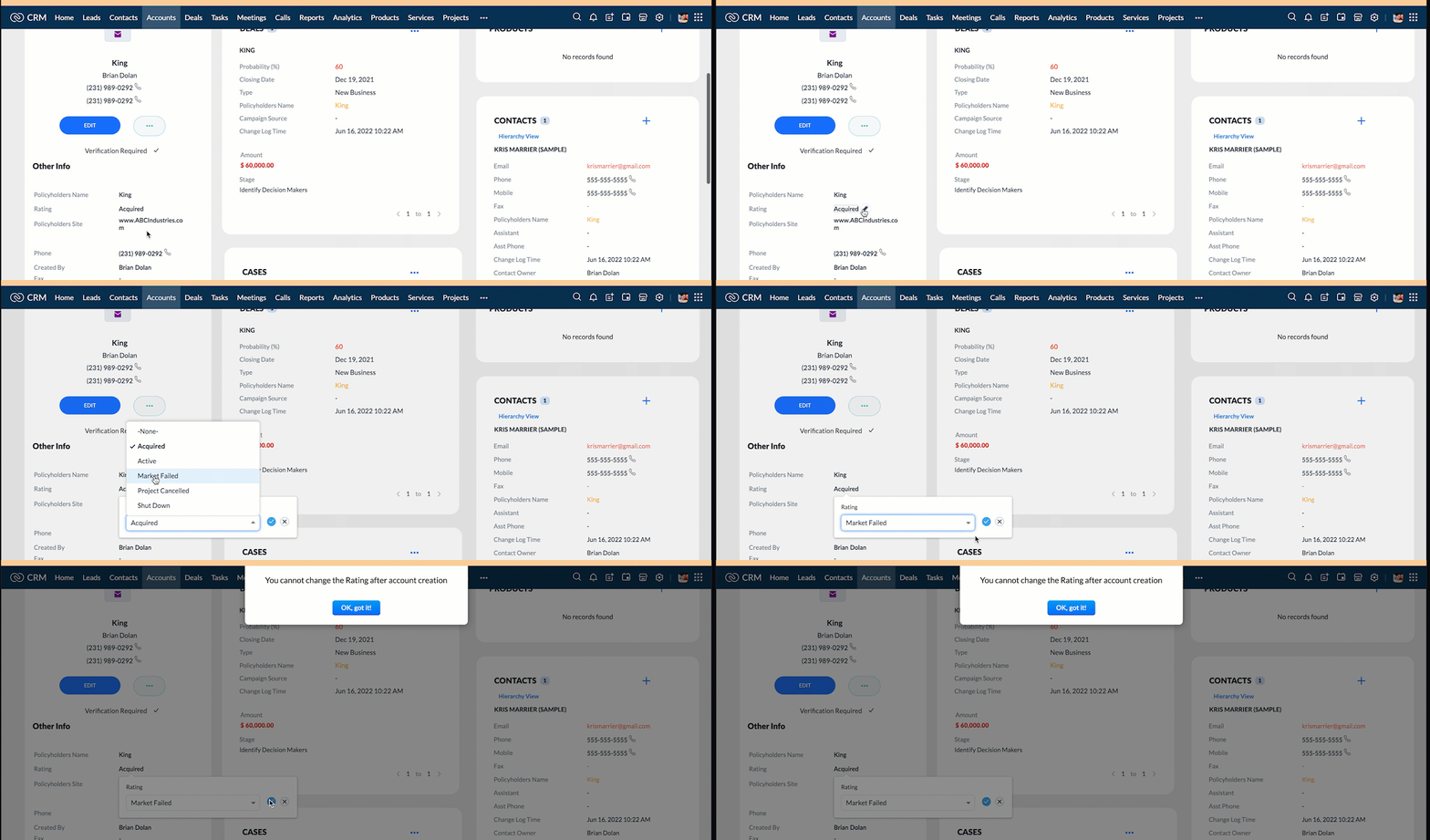
- Show the alert message "You cannot change the Rating of a verified account" whenever you try to update the field Rating in Accounts module.
- When you click the mail button on detail(canvas) page, ask for confirmation and open a mailer window.
Solution using Client Script
Note:
The solution listed in this post includes detail(canvas) page and create page.
To create a canvas page,
- Go to Setup > Customization > Canvas
- Click Create Record Detail Page.
- On the Create a Custom Record pop up that appears, select the module as "Accounts" and select the required layout for the canvas page
- Choose a template from the gallery and click Select.
- Enter a name and save the canvas page.
- Click Canvas Assignment and assign the page to the required profiles.
- Click here for more details on creating a canvas page(Customizing the record detail page).
1. Calculate age based on Date of Birth and display the message "Age is more than 80" whenever the age is above 80 in create page of Policyholder module
- Go to Setup > Developer Space > Client Script. Click +New Script.
- Specify the details to create a script and click Next.
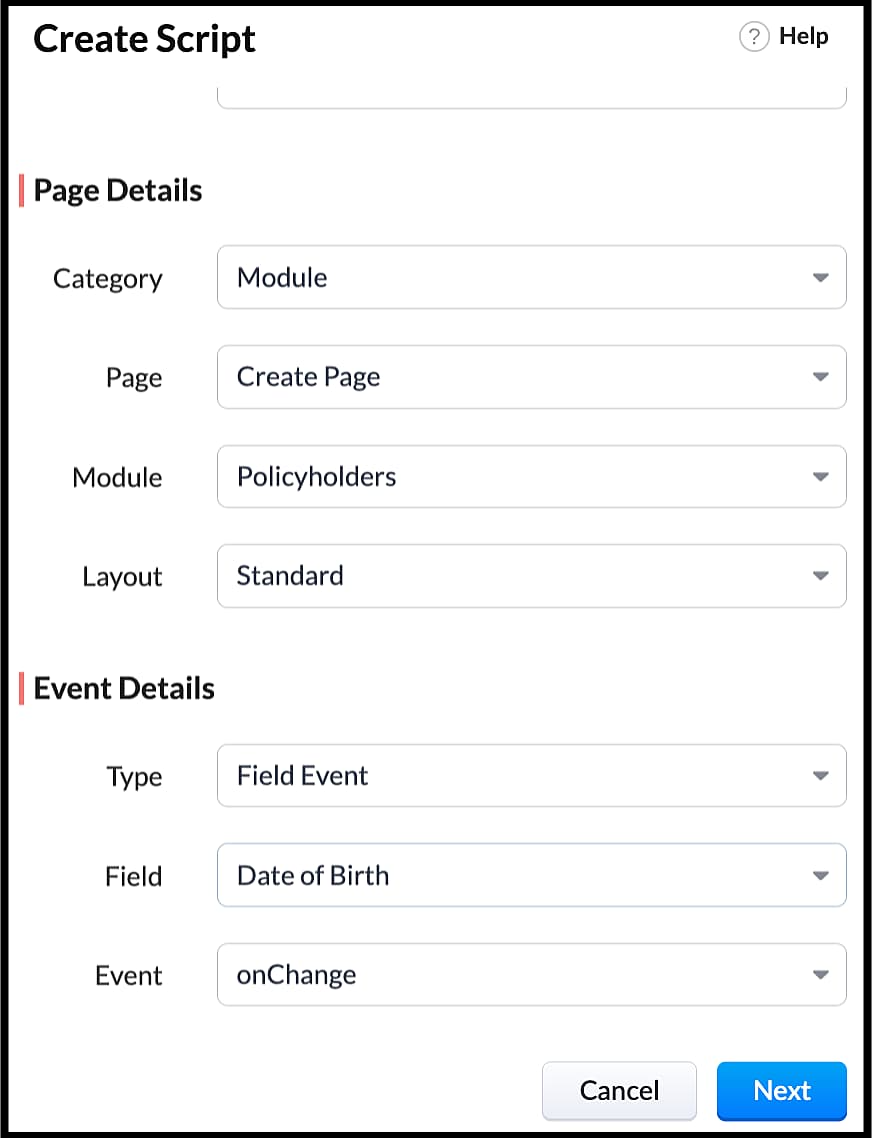
- Enter the following script in the Client Script IDE and click save.
- function getAge(dateString)
- {
- var today = new Date();
- var birthDate = new Date(dateString);
- var age = today.getFullYear() - birthDate.getFullYear();
- var m = today.getMonth() - birthDate.getMonth();
- if (m < 0 || (m === 0 && today.getDate() < birthDate.getDate()))
- {
- age--;
- }
- return age;
- }
- let age = getAge(value);
- var age_field = ZDK.Page.getField("Age");
- var category_field = await ZDK.Page.getField("Category");
- age_field.setValue(age);
- if (age > 80) {
- ZDK.Client.showMessage('Age is more than 80', { type: 'info' });
- }
- You can see the code working from the create page. You can also see how the client script works using the Run component of the Client Script IDE.
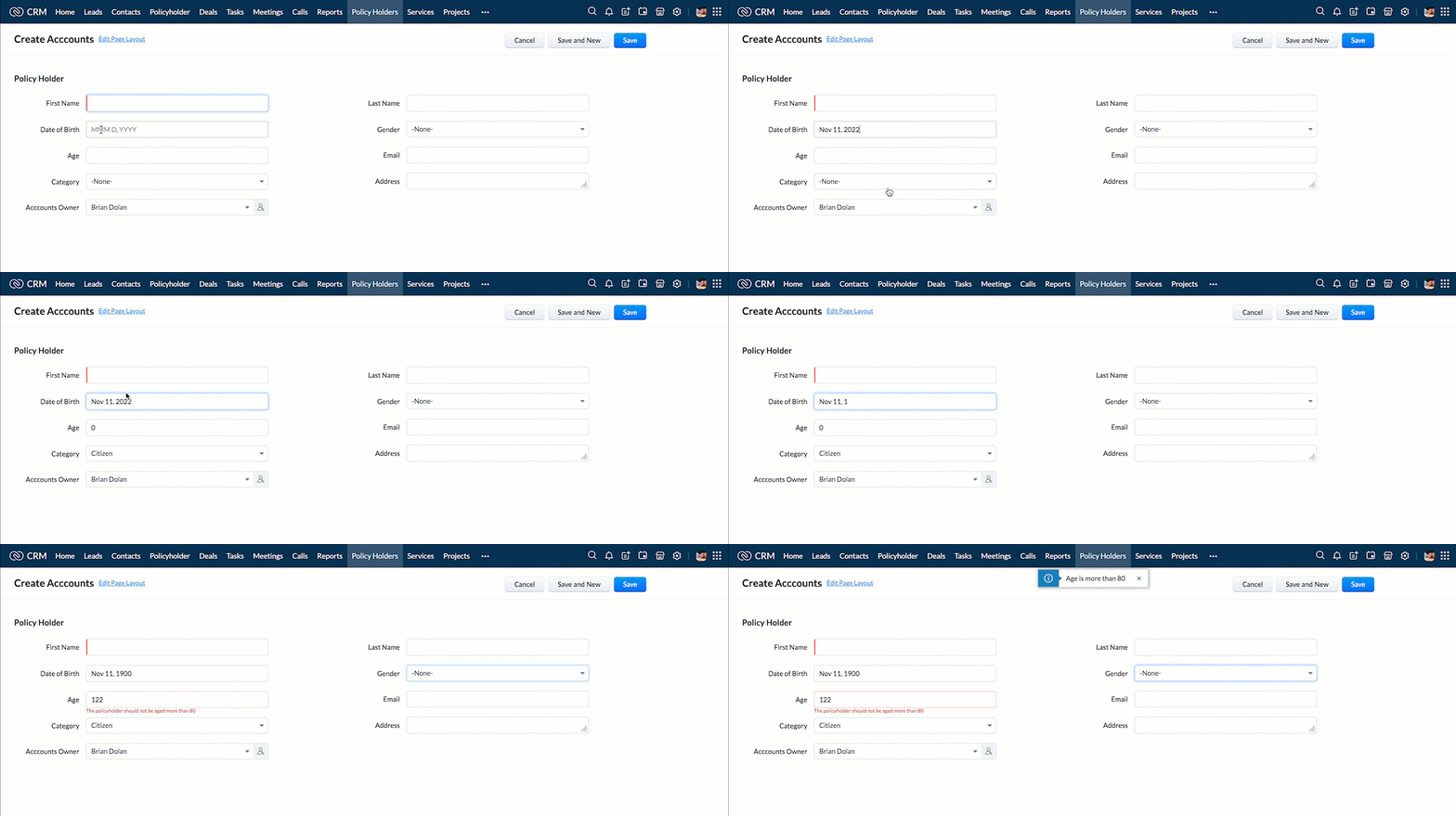
- You can use any of the following types in showMessage() function
Possible 'type' | Script |
info | ZDK.Client.showMessage('message', { type: 'info' }); |
warning | ZDK.Client.showMessage('message', { type: warning }); |
| error | ZDK.Client.showMessage('message', { type: error }); |
success | ZDK.Client.showMessage('message', { type: success }); |
2. Show the alert message whenever you try to update the field Rating
- Go to Setup > Developer Space > Client Script. Click +New Script.
- Specify the details to create a script and click Next.
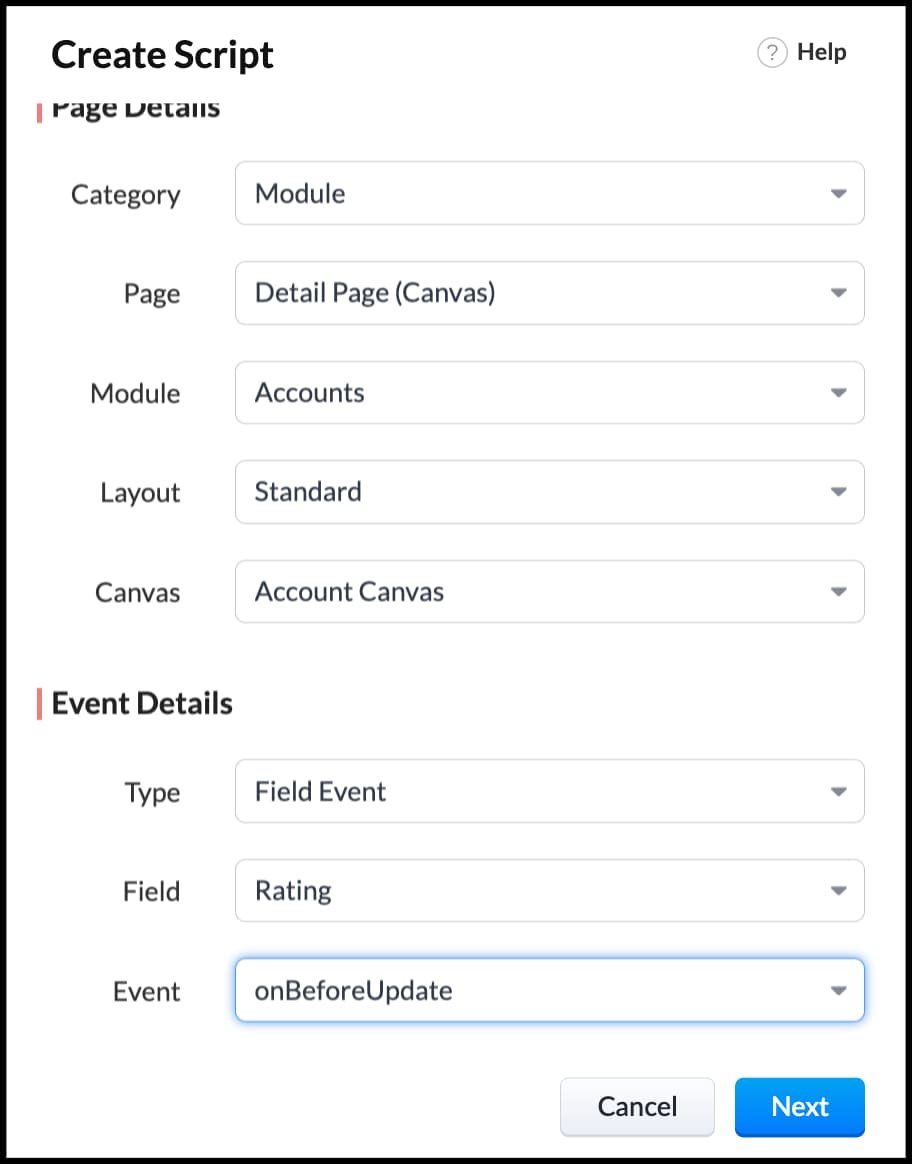
- Enter the following script in the Client Script IDE and click save.
- ZDK.Client.showAlert('You cannot change the Rating after account creation');
- Here is how the Client Script works. You can also see how the client script works using the Run component of the Client Script IDE.
3. Configure the mailer box with the click of a button
First of all, you need to add the button to the detail(canvas) page.
- Go to Setup > Customization > Canvas.
- Right click on the Canvas page for Accounts module and click Edit.
- Click Elements, drag and drop the button wherever required and specify a label for the button.
- Right click on the button, select Add Element ID and enter the ID of the button in the pop up that appears.
- Once the button is created, you can configure Client Script in two ways:
- Right click on the button--> Add Client Script-->onClick. The Client Script IDE appears with the event type as Canvas Button Event.
(or)
- Go to Setup > Developer Space > Client Script. Click +New Script.
- Specify the details to create a script and click Next.
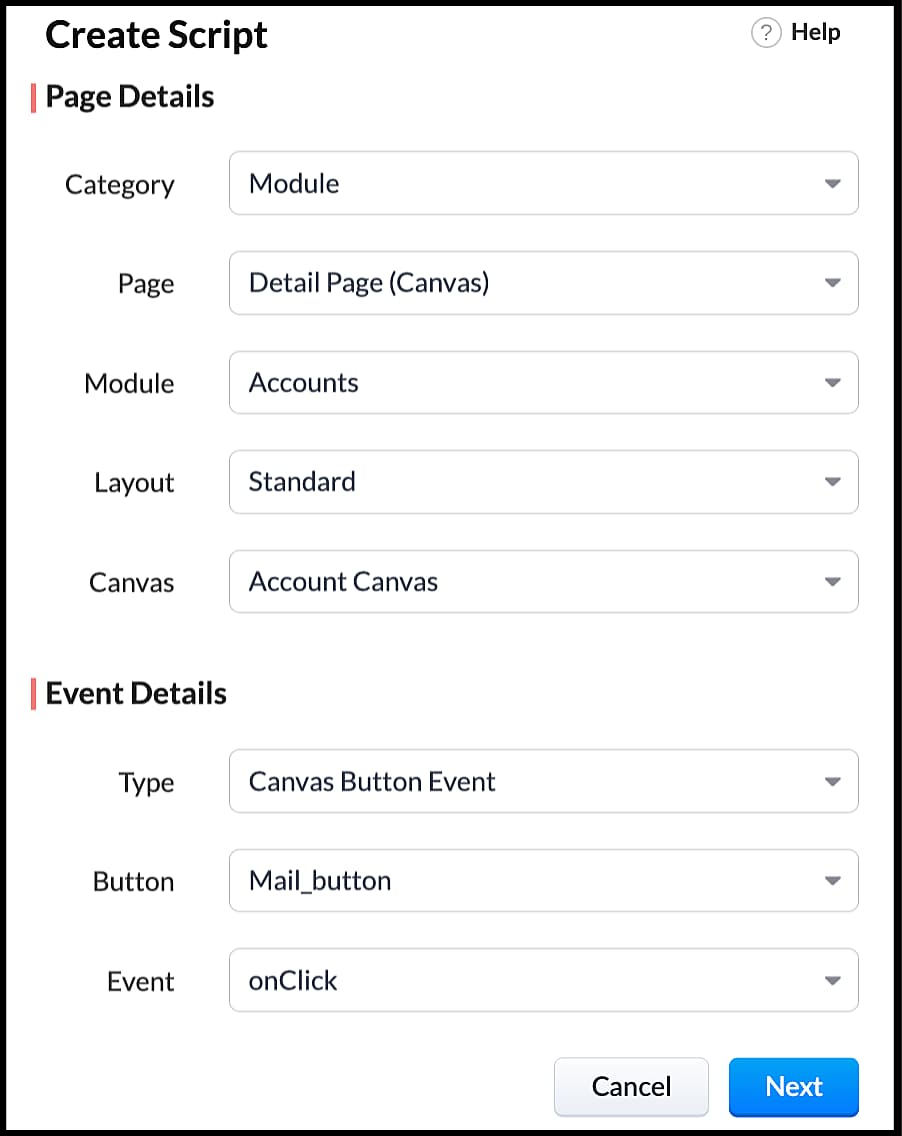
- Enter the following script and click save.
- var isProceed = ZDK.Client.showConfirmation('Do you want to open the mailer window?','Proceed','Cancel');
- //If user clicks Proceed button
- if (isProceed) {
- ZDK.Client.openMailer({ from: '', to: [{ email: '', label: 'ABC Industries' }], cc: [{ email: '', label: 'ABC Industries' }], subject: 'Greetings from ABC Industries!', body: ' ' });
- }
- The showConfirmation() function will return a boolean value based on the user selection. You should capture this boolean value using a variable and write the actions based on the boolean value returned. Here the variable isProceed will capture the user response and based on that boolean value, the mailer box will get displayed.
- Here is how the client Script works,
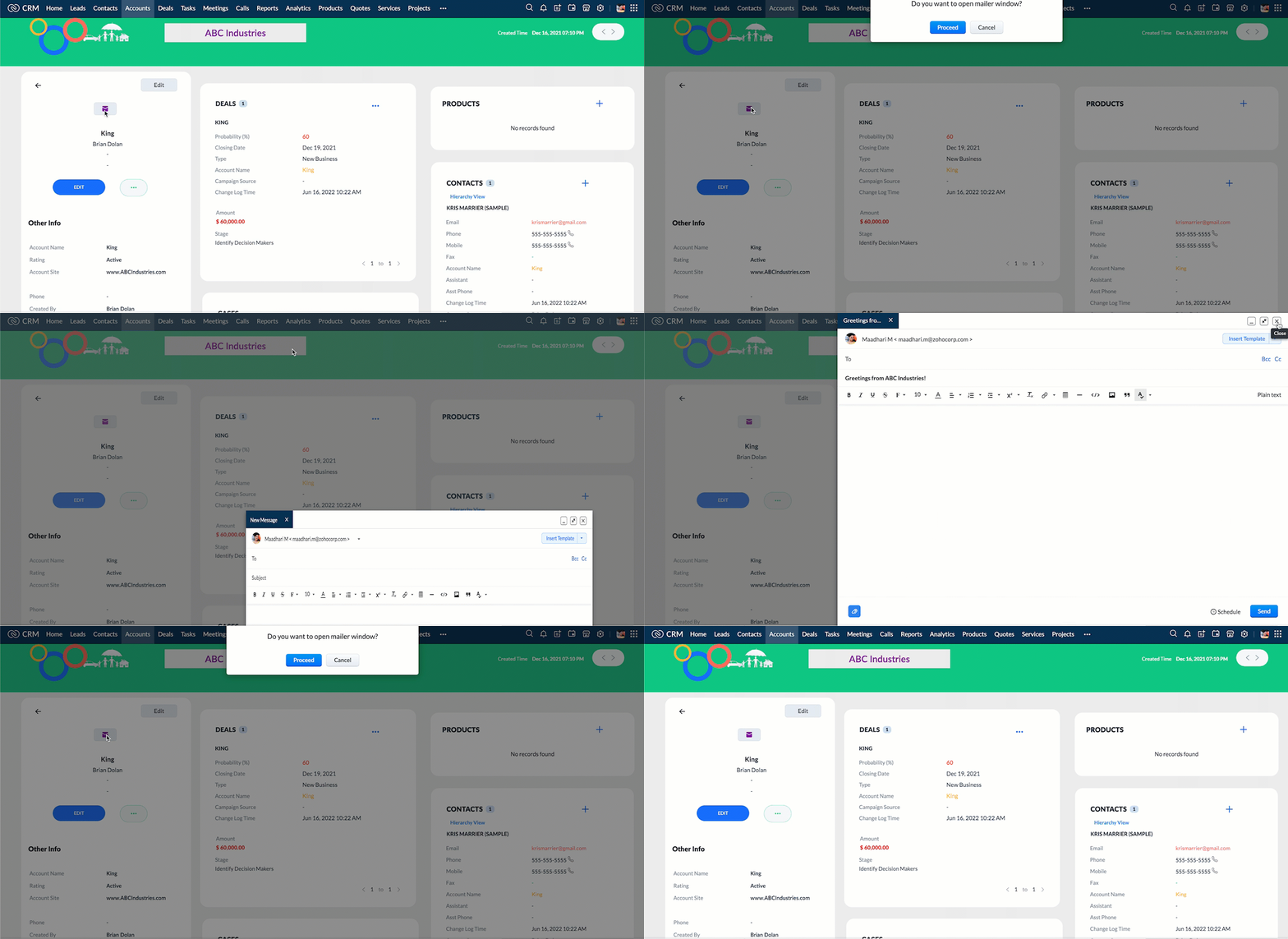
We hope you found this post useful. We will meet you next week with another interesting topic!
If you have any questions let us know in the comment section.
Cheers!
Click here for more details on Client Script in Zoho CRM.
Related Links
New to Zoho Recruit?
Zoho Campaigns Resources





Topic Participants
Maadhari M
tbiedma
Joe Sweeney
Anz
Jason
Sticky Posts
How to reach the official Zoho Support channels and avoid fake ones.
Dear Customers, Thanks a lot for choosing Zoho! Our applications are built to help achieve your day-to-day business goals. We are committed to engaging with you, to understand and develop solutions that enhance your productivity. We are happy and ready to help you use our services effectively. Understanding and avoiding fake support Just like using popular bank names and financial applications for phishing purposes, using Zoho and claiming to be providing Zoho Support or services with false numbersFunction #35: Close all tasks associated with a lead and create a new task.
Welcome back everyone! Last week, we learnt how to close all tasks of a deal depending upon the deal stage. This week, let's look at a custom function that lets you close all of the tasks associated with a lead while simultaneously creating a new task, like when you need to halt all progress towards a lead while the lead is not available at the moment but create a reminder task. Business scenario: The success of a company, in one way or another, is determined by the leads it gets. Each lead is justZoho CRM Webinar - Redesigning Daily User Experiences with Canvas
<br> Your users across roles use the CRM for day-to-day tasks that are necessary. Whether they perform their tasks on time, the right way, or at all depends on a lot of factors, including User Experience. Many businesses struggle with rigid layouts,Join us at the Canada ZUG Meetup: What’s New in Zoho CRM
Hello Zoho Community! Start your year with fresh insights into Zoho CRM’s latest updates and tools. Whether you're a CRM beginner or a experienced user, this meetup is crafted to help you optimise your processes and leverage new features. Explore practicalCRM Hack #2: Automate sending of birthday greetings to your customers.
Hello everyone! What sets you apart as a sales person is your ability to add that personal touch to your business relationship with your customers. Sending a gift on a special day, or leaving a note wishing them on their birthdays, are small, yet significant actions that show your customers that you care. And these are actions done without any expectations :) You must be engaging with a lot of customers and it is highly unlikely that they all are your friends on Facebook or some social channel,
Zoho CRM Plus Resources
Zoho Books Resources
Zoho Subscriptions Resources
Zoho Projects Resources
Zoho Sprints Resources
Zoho Orchestly Resources
Zoho Creator Resources
Zoho WorkDrive Resources


Zoho CRM Resources
Get Started. Write Away!
Writer is a powerful online word processor, designed for collaborative work.
Zoho CRM コンテンツ
-
オンラインヘルプ
-
Webセミナー
-
機能活用動画
-
よくある質問
-
Ebook
-
-
Zoho Campaigns
- Zoho サービスのWebセミナー
その他のサービス コンテンツ
ご検討中の方
Recent Topics
How to show Assemblies AND component items in a report
Hi Is there any way in Analytics to create a report that shows the Composite Item AND the Component Items with mapped quantity? It seems that the component item is not exposed in any table that I can find. Also, the same question but for Stock on Hand.....thisMandatory Messages for Specific Members in Zoho Cliq Channels
Hello Zoho Cliq Team, We hope you're doing well. We would like to request a feature enhancement to Zoho Cliq that would allow marking certain messages in a channel as mandatory for specific members — with built-in tracking and reminders. 🎯 Use Case:Admin Access to Message Read Statistics in Zoho Cliq
Hello Zoho Cliq Team, We hope you're doing well. We would like to request a feature enhancement that would allow admins or channel owners to view read/unread statistics for messages, even if they were not the original sender. 🎯 Use Case: Currently, inOnline Member Visibility in Channels (Similar to WhatsApp Group Presence)
Hello Zoho Cliq Team, We hope you're doing well. We’d like to request an enhancement to Zoho Cliq’s channel experience by introducing online presence indicators for channel members — similar to how WhatsApp shows how many people in a group are currentlyShow ticket field in Zoho Desk only if that same field is not empty (API‑created records)
Zoho Team , We have a ticket workflow where every ticket is created via API based on dynamic logic from an external form. That form has complex logic and already decides what’s relevant to ask, and the API only populates fields in Zoho Desk based on thatMultiple Products on Ticket
Good morning. We will classify all tickets based on the product. Users sometimes send different requests on the same ticket, so we are facing some challenges. Is there a way to add more than one product to the ticket, or is there a way to tie the productNão recebo Email de confirmação e validação de cadastro do PagSeguro
Olá, utilizei uma das minhas contas de email Zoho para criar um cadastro no PagSeguro, contigo o email com o link de confirmação da conta não chega no meu email Zoho (nem.ma caixa de spam, nem na lixeira, e nem em outras pastas). Outros emails do PagSeguroaccounts payable and receivable subaccounts
How to create accounts payable and receivable subaccounts? Being that I have several clients and in my balance sheet have to specify the accounts of each client and not only appear "accounts receivable or accounts payable" ??DUPLICATING WORKFLOWS IN CREATOR
Hi all, I want to duplicate and slightly amend 3 workflows in Creator so that I don't have to keep typing in all the rules and properties each time. I can see lots of videos on CRM with the 3 dots at the top of the workflow, but nothing like that in Creator.Add SKU to query options in `items` API endpoint
It would be very useful to be able to pull items by SKU in the API as this is a commonly used unique ID that tends to be consistent across systems.Estimates and invoices being sent from company-wide address, rather than individual
In our organization, team members send estimates and invoices through Zoho Books by using the "Send Email" function. However, for certain users, the system defaults to sending estimates and invoices from a shared organizational email address (e.g., company@example.com)Need profit margins for books in estimates & invoice
https://help.zoho.com/portal/en/community/topic/show-my-cost-or-profit-while-creating-estimateDecimal places settings for exchange rates
Hello, We are facing issues while matching vendor payments with banking feeds. As we often import products/services exchange rate comes into play. Currently, ZOHO allows only six digits for decimal places. We feel that conversions like JPY to INR requireItem Level Notifications
I need to create a custom workflow based on the creation of an estimate that has a SKU/Item name that matches certain criteria. I can have it generated based on a total amount, but not at the item level. Is this possible?Cannot categorize a bank deposit to an income sub-account
When I go to categorize a bank deposit, I am not able to see any income sub-accounts. If I set up an income account without a parent, then I am able to categorize a transaction into that account, but as soon as I make it a child account, it disappearsZV Extension passkey changes in v5.7.0
Has there any changes to the how passkeys are managed in ZV - Chrome extensions v5.7.0? Namely, if the passkeys were already implemented/enforced as 2FA on a certain webpage, but ZV does not track them yet. Would that be the issue for my use case?What's New in Zoho Billing - August 2025
Hello everyone, We are excited to share the latest updates and enhancements made to Zoho Billing in August 2025 to improve your overall billing management experience. Keep reading to learn more. Notify Customers About Subscriptions via WhatsApp BusinessHow do I get my account id?
Hello, I followed the instructions to get a list of accounts of the currently authenticated user (which is me, and I am logged in). But when I follow the below instructions I get the following error: ERROR: {"data":{"errorCode":"INVALID_TICKET","moreInfo":"Invalid ticket"},"status":{"code":400,"description":"Invalid Input"}} Instructions that I am following: GET - User account details Purpose The API retrieves the list of accounts of the currently authenticated user. Request URL http://mail.zoho.com/api/accountsWhy are tasks not showing in Zoho Calendar?
Hi there, I updated the Zoho calendar preferences for Task records to show on the calendar together with Meetings and Calls - see attached screenshot. Despite of that, Task records still won't show on the calendar. Is there a specific reason why thisZoho Payroll: Product Updates - July 2025
Over the past month, we've focused on making Zoho Payroll more flexible, compliant, and easier to use—whether you're processing complex payouts, ensuring accurate calculations, or meeting local tax regulations. Here's what's new: One-Time Payments andDiscussion for “sub product”, “sub item” or “child products”
Hello everyone, In some CRM systems, there is the ability to associate products in a hierarchical manner within a quote. For example: Product A: Gold Plan Product B: Setup Product C: Connector Product D: Silver Plan Product B: Setup Product C: ConnectorRetrieve Accidental Deleted User
Is there a way to undelete a user who accidentally deleted themselves?Request for Support - CRM Integration Issues
I’m reaching out to request assistance with the following items: 1. Zoho Forms Integration with Zoho CRM We are currently using Zoho Forms to send the Global Credit Application form to our customers. The intended workflow is for the form submissions toKnowledge Base Module
How to enable the knowledge base module in zoho crm account. I saw this module in one crm account but unable to find it other zoho crm account. can anyone know about this?Zoho sign changed Indexing of signing_order
Because I missed this Announcement (is there even one?): when you work with the indexes of actions > signing_order. Previous those started with 0 now starts with 1. Changed somewhere between 15.07 and 23.07How to Invoice Based on Timesheet Hours Logged on a Zoho FSM Work Order
Hi everyone, We’re working on optimizing our invoicing process in Zoho FSM, and we’ve run into a bit of a roadblock. Here’s our goal: We want to invoice based on the actual number of hours logged by our technicians on a job, specifically using the timesheetsZoho CRM Community Digest - June 2025 | Part 2
Welcome back to the Zoho CRM Community Digest! We’re wrapping up June with more fresh updates, smart discussions, and clever workarounds shared by the community. Product Updates: Struggling to keep track of scattered customer interactions? Zoho CRM'sAllow Variable Insertion in Prebuilt "Update Record" Action in Schedules
Hi Zoho Creator Team, Hope you're doing well. We’d like to submit a feature request based on our experience using Zoho Creator schedules to manage workflows integrated with Zoho Desk. We currently have an app where Zoho Desk tickets create records inRich Text Field Editor in Form Builder is Too Small and Not Resizable
Hello, I am experiencing a significant usability issue with the rich text field in the Zoho Forms builder. The editor window for this field is fixed-size and extremely small. It does not adapt to the screen size, which makes it very difficult to managePublicar Formulário
Obs. Não consigo publicar meus formulários, pesquisei alguns artigos, mas me deixou perdido, fala de campo sensível, não consigo entender o que significa. Segue Imagem do problema. Todo formulário que faço sempre termina assim sem o botão de publicar..Anyone else unable to login to ZMA this weekend?
Hey Is anyone else unable to log into Zoho Marketing Automation at all this weekend? I've been trying on multiple devices - despot and mobile - and multiple browser. I've reset browsing data, gone incognito. Nothing - since Friday I've been unable toCustom Action for Subform row
Dears, As for now, we only have 2 actions for each subform row: Edit and Delete. I would suggest to have custom action here, instead of create a button with Fx field within the subform. For example, I would create Duplicate button, which duplicates theUrgent: Unable to Receive OTP Email for Portal User Registration in Zoho Creator
I paid to enable the Portal User feature on 2/25, and followed the official instructions (Youtube video: Customer Portals | Zoho Creator) to set up the Portal User using my Gmail account. However, I am not receiving the OTP email and am unable to successfullyDisplay multiple fields in lookup dropdown
I have a module called Technicians and a related module called submissions that registers technicians for different assignments. The lookup in Submissions to Technicians is the Technician ID (auto generated unique number). How do I display in the dropdownIntegrate with Power BI
Hi, How to connect Zoho CRM dashboards & reports with POWER BI ?No "Import Users" option in Zoho FSM
I recently noticed that there is no option to import Users into Zoho FSM, and this has become a serious challenge for us. When migrating data, especially technicians or other user profiles, we often have hundreds of users to bring into the system. Currently,Finding "like" projects
Hi Everyone! My team is running into several duplicating deals. I've been trying to get them all to name things the same way ex. State is 2 letters not spelled out. Things like that. What I am wondering if there is anything I can do as the superadminNão consigo localizar o Botão de Publicar Formulário no meu app
Depois que finalizar meus formulários, não consigo localizar o botão de publicar para concluir meu aplicativoDATEV-Export Erfahrungen?
Wir würden gern den DATEV-Export in Books nutzen, jedoch ist dieser nicht wirklich nutzbar. Gibt es positive Erfahrungen von Alternativ-Lösungen?Kaizen #191: Implementing "Login with Zoho" using Python SDK
Welcome back to another week of Kaizen!! This week, we are diving into how to implement secure user authentication using Login with Zoho and integrate it with Zoho CRM through our Python SDK. To ground this in a real-world scenario, we will look at howNext Page