Kaizen #78 : How to disable clone record?

Kaizen #78 : How to disable clone record?

Hello everyone!
Welcome back to another interesting Kaizen post.
In this post, let us discuss a workaround solution for the use case - How to disable clone record for a user.

Requirement

Consider that you want to disable the clone option for the Deals module for all users other except the users with Administrator profile.


Solution

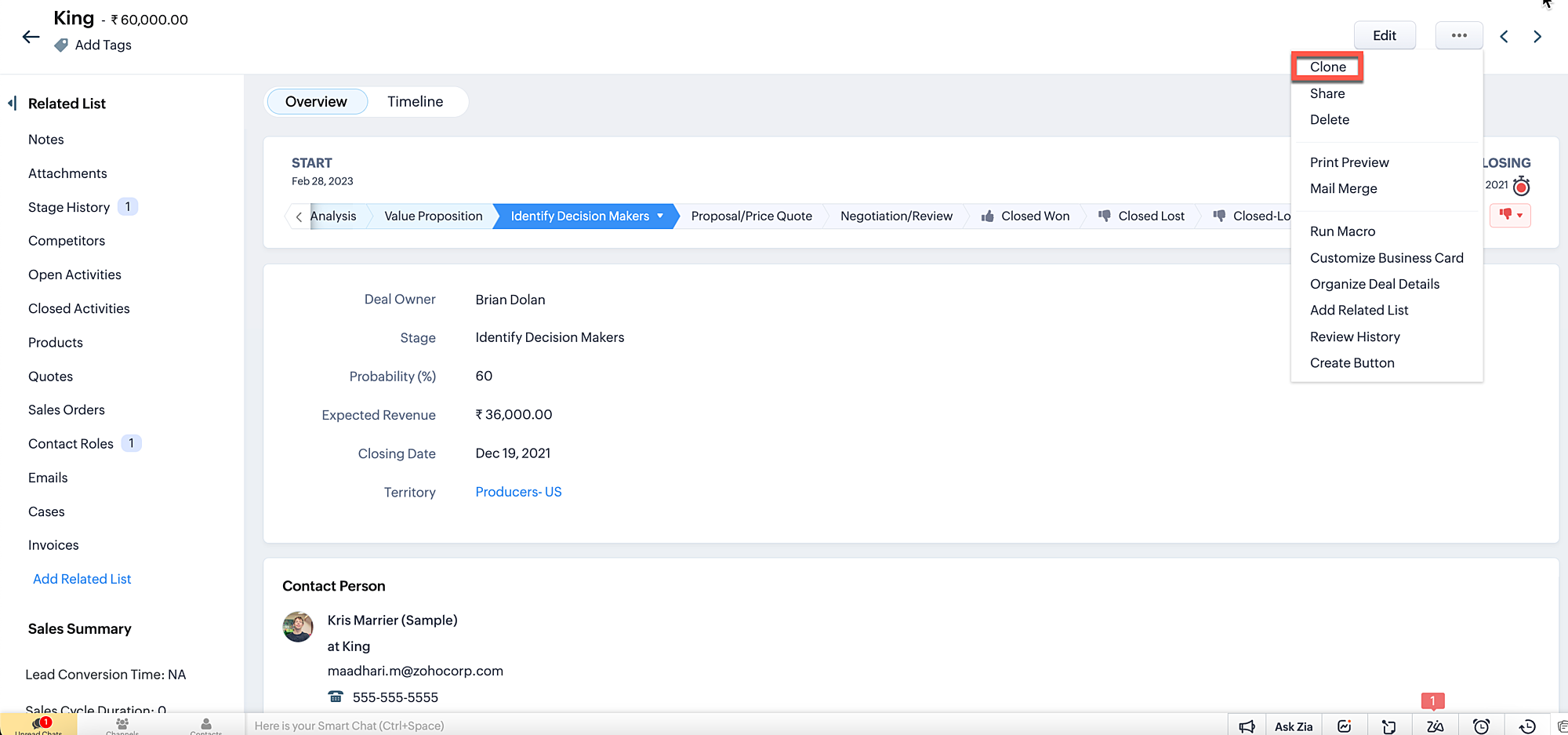
We don't have a straightforward option to disable the clone button that appears on every module. If a profile is given "create" access to a module, then the user with that profile will be able to clone the record also. But in real time, there are high chances for an approved record to get cloned by the user, which cannot be permitted. The ultimate aim is that any user other than the users having an Administrator profile should not be allowed to save a cloned record. 

Currently there are two possible ways to prevent a cloned record from getting saved.

1. Prevent record saving when the user clicks Save button.
2. Disable save button for clone Page.

1. Prevent record saving when the user clicks save button.
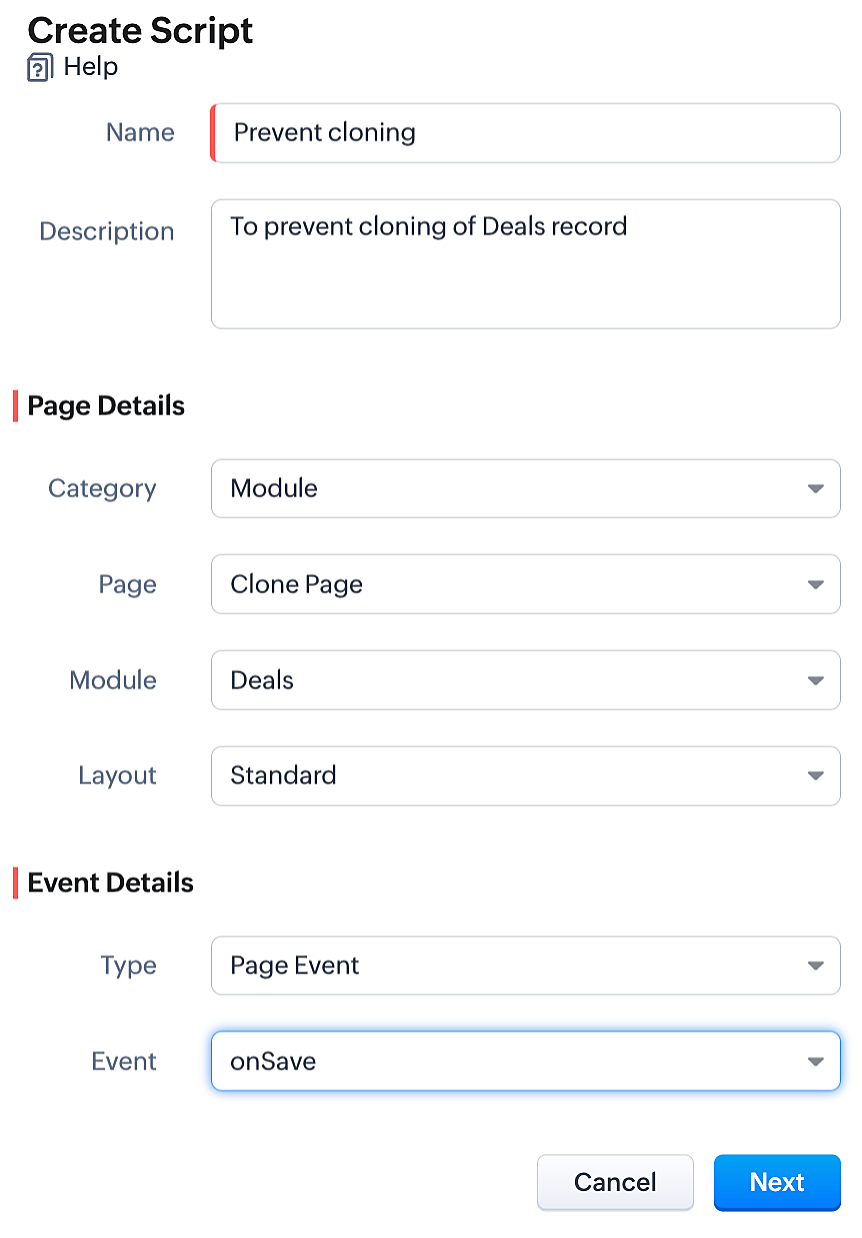
  • To achieve this, you need to create a Client Script for the clone page of the Deals module with onSave Page Event.
  • Go to Setup > Developer Space > Client Script. Click +New Script.
  • Specify the details to create a script and click Next.
  • Enter the following script and click Save.


var user = ZDK.Apps.CRM.Users.fetchById($Crm.user.id);
if (user.profile.name != 'Administrator') {
      ZDK.Client.showAlert('Hi '+user.first_name+' ' +user.last_name+', you do not have the access to clone this deal. Contact your Administrator');
      return false;
  }


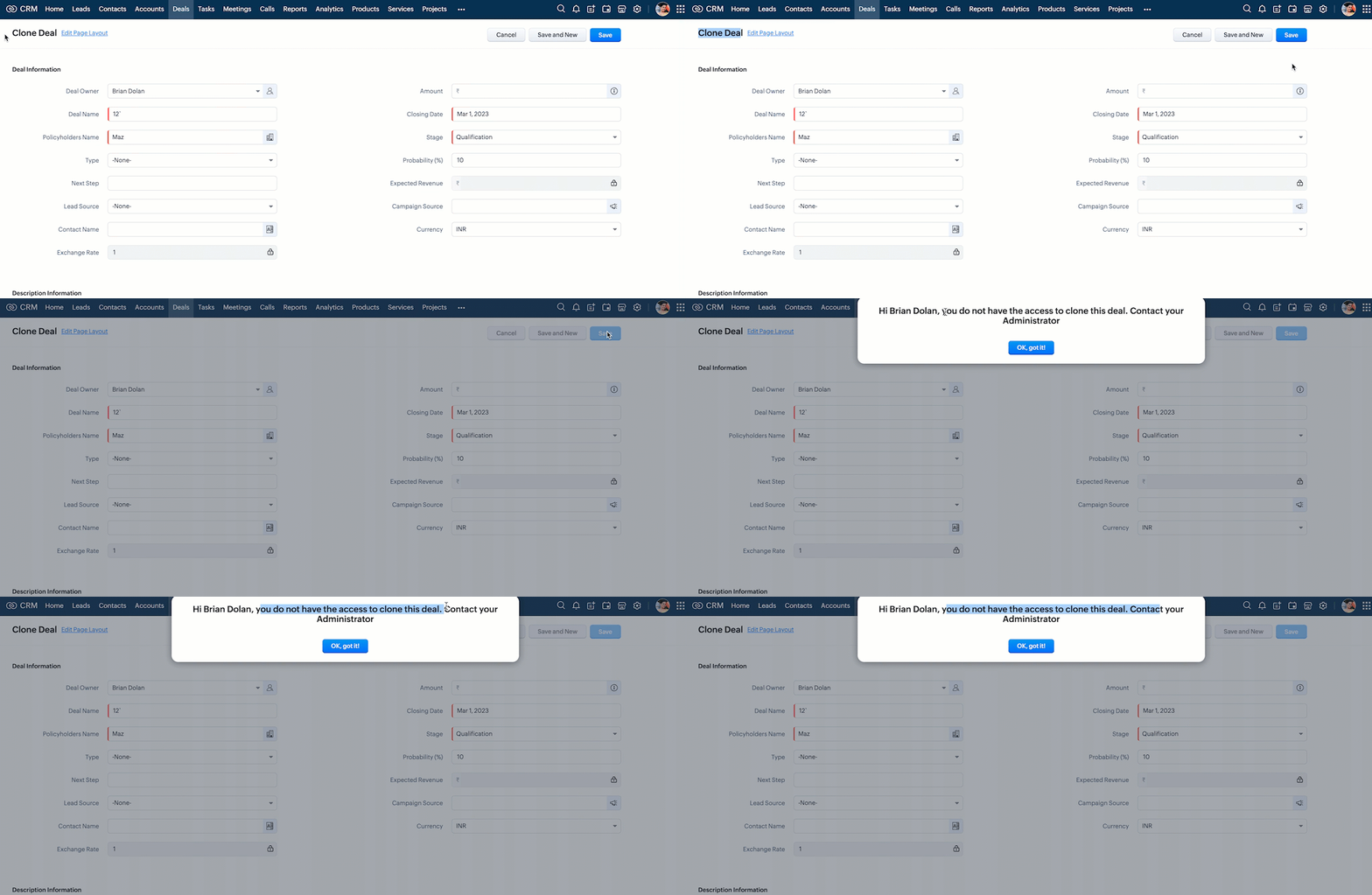
  • Here is how the Client Script works.


Thus the user can no longer save a cloned record when you implement this workaround solution. In addition to the above, you can also add an alert message when the clone Deal record gets loaded, (i.e) before the user enters value to the fields in the clone record. So that the user will be aware that he cannot save the cloned record.

 2. Disable save button for clone page
  • You can disable the save button in Clone page using Client Script. 
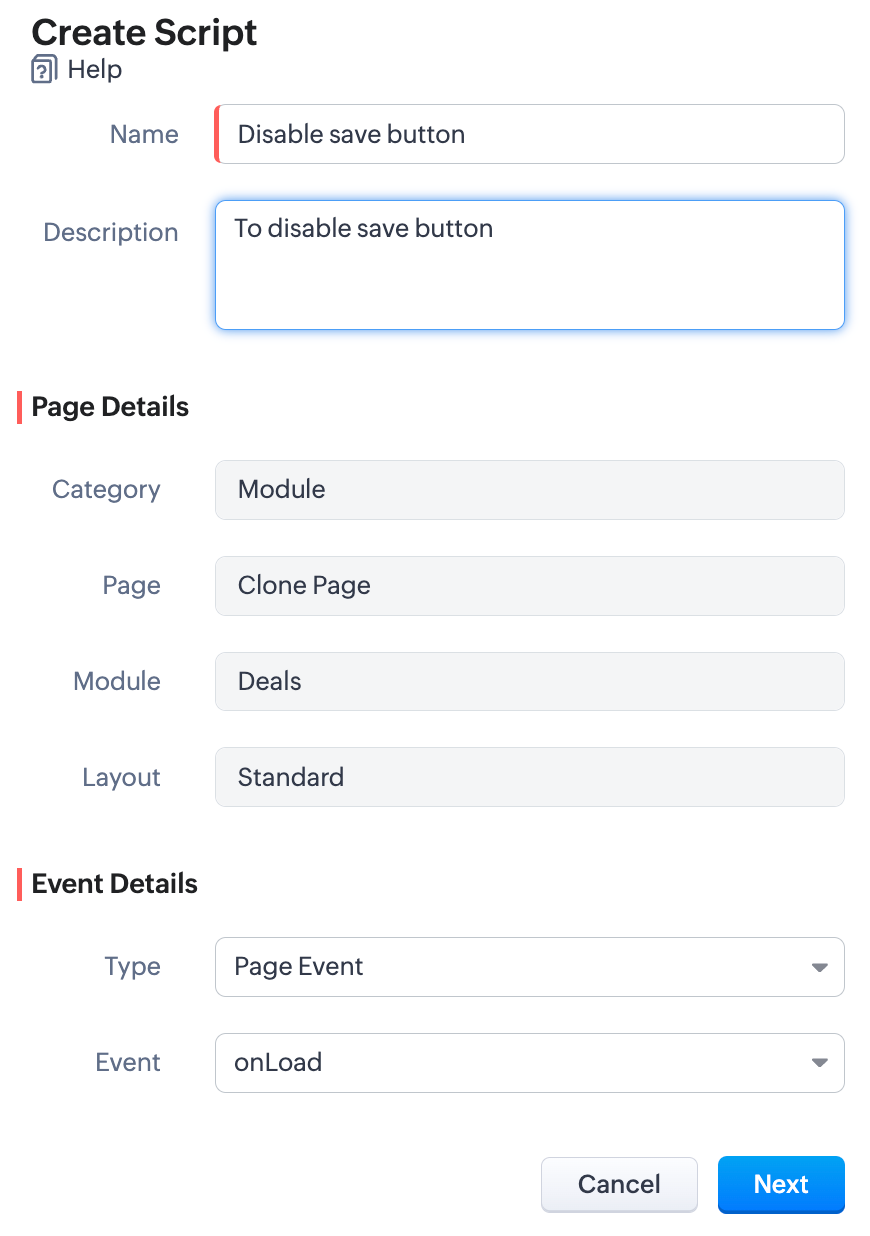
  • To achieve this, you need to create a Client Script for the clone page of the Deals module with onLoad Page Event.
  • Go to Setup > Developer Space > Client Script. Click +New Script.
  • Specify the details to create a script and click Next.
  • Enter the following script and click Save.

var user = ZDK.Apps.CRM.Users.fetchById($Crm.user.id);
if (user.profile.name != 'Administrator') {
var save_btn = ZDK.Page.getButton('record_save');
save_btn.disable();
}

  • Here is how the above Client Script works.
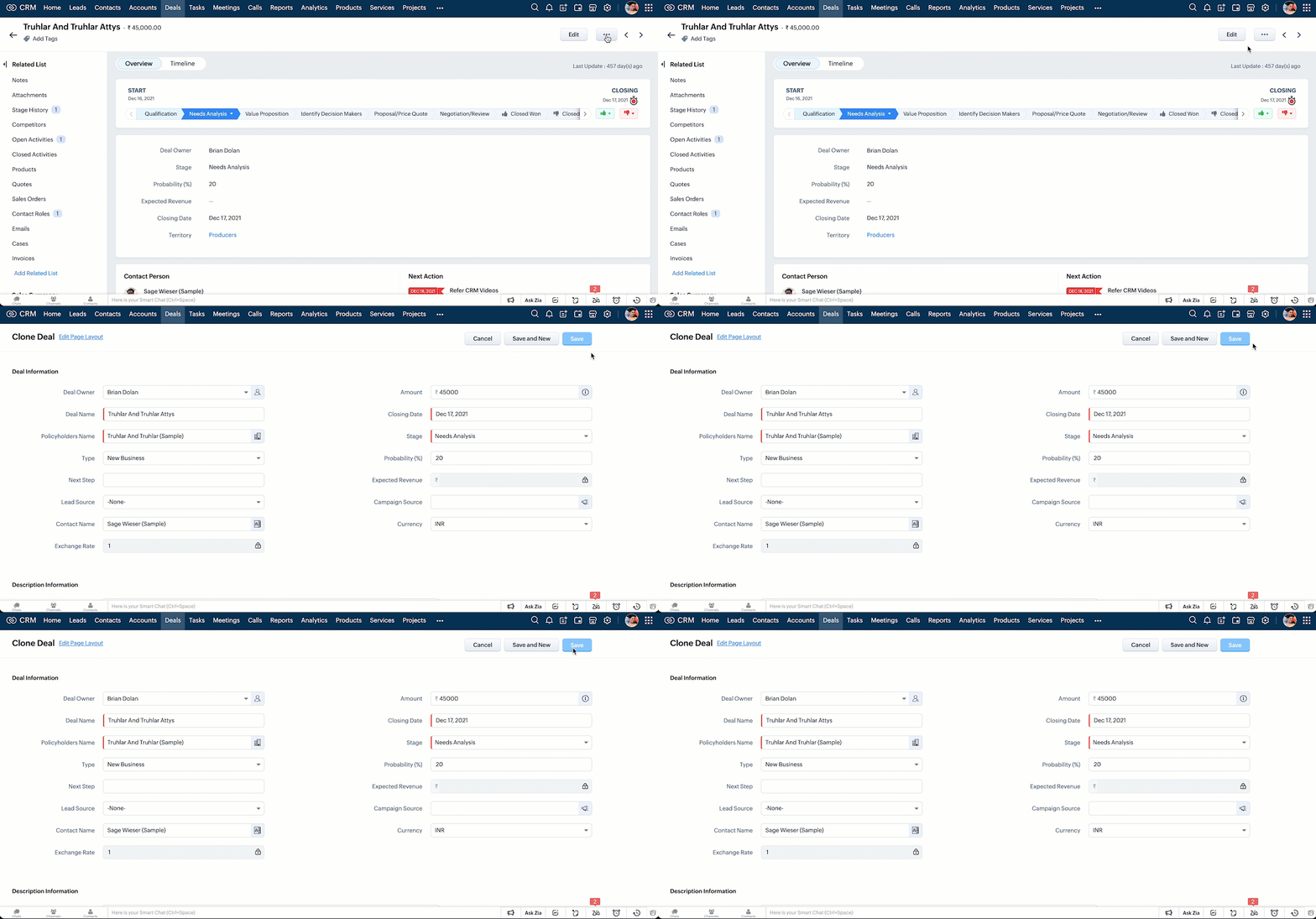

Note:
In the upcoming release of Client Script, you will be able to disable the clone button directly in the Detail page (Standard) of any module based on custom criteria.

We hope you found this post useful. We will meet you next week with another interesting topic!
If you have any questions let us know in the comment section.
Click here for more details on Client Script in Zoho CRM.


Related Links


      Zoho Campaigns Resources


        • Desk Community Learning Series


        • Digest


        • Functions


        • Meetups


        • Kbase


        • Resources


        • Glossary


        • Desk Marketplace


        • MVP Corner


        • Word of the Day


        • Ask the Experts


          • Sticky Posts

          • Kaizen #226: Using ZRC in Client Script

            Hello everyone! Welcome to another week of Kaizen. In today's post, lets see what is ZRC (Zoho Request Client) and how we can use ZRC methods in Client Script to get inputs from a Salesperson and update the Lead status with a single button click. In this
          • Kaizen #222 - Client Script Support for Notes Related List

            Hello everyone! Welcome to another week of Kaizen. The final Kaizen post of the year 2025 is here! With the new Client Script support for the Notes Related List, you can validate, enrich, and manage notes across modules. In this post, we’ll explore how
          • Kaizen #217 - Actions APIs : Tasks

            Welcome to another week of Kaizen! In last week's post we discussed Email Notifications APIs which act as the link between your Workflow automations and you. We have discussed how Zylker Cloud Services uses Email Notifications API in their custom dashboard.
          • Kaizen #216 - Actions APIs : Email Notifications

            Welcome to another week of Kaizen! For the last three weeks, we have been discussing Zylker's workflows. We successfully updated a dormant workflow, built a new one from the ground up and more. But our work is not finished—these automated processes are
          • Kaizen #152 - Client Script Support for the new Canvas Record Forms

            Hello everyone! Have you ever wanted to trigger actions on click of a canvas button, icon, or text mandatory forms in Create/Edit and Clone Pages? Have you ever wanted to control how elements behave on the new Canvas Record Forms? This can be achieved

          Zoho CRM Plus Resources

            Zoho Books Resources


              Zoho Subscriptions Resources

                Zoho Projects Resources


                  Zoho Sprints Resources


                    Zoho Orchestly Resources


                      Zoho Creator Resources


                        Zoho WorkDrive Resources


                          Zoho CRM Resources

                          • CRM Community Learning Series

                            CRM Community Learning Series


                          • Tips

                            Tips

                          • Functions

                            Functions

                          • Meetups

                            Meetups

                          • Kbase

                            Kbase

                          • Resources

                            Resources

                          • Digest

                            Digest

                          • CRM Marketplace

                            CRM Marketplace

                          • MVP Corner

                            MVP Corner


                            Zoho Writer Writer

                            Get Started. Write Away!

                            Writer is a powerful online word processor, designed for collaborative work.

                              Zoho CRM コンテンツ


                                ご検討中の方