Keep Sensitive Customer Data Private with Field Masking in Zoho CRM
Hello CRM community,
Customer records in your CRM are often accessible across multiple teams, but not every team needs visibility into every field. A non-sales team, for instance, has no real need to see a contact's mobile number, and a support agent verifying a caller's identity does not need to see it in full either. With field masking, a user can restrict this, displaying values as asterisks instead of actual data, or showing only partial values such as a mobile number like 9******8621.
What's New
Field Masking gives you granular control over who sees sensitive data in your CRM, and what happens to it when it leaves.
Full or partial masking: Fields can be completely hidden or partially masked, such as showing only the last few digits of a phone number or email Id.
Profile-based access to masked data: Choose which profiles, system-defined or custom, can view the unmasked value. Access can be granted according to need, ensuring only the right people see sensitive data.
Control over masked data shared outside CRM: When exporting data or sharing it through integrations and APIs, you decide whether masked fields go out as masked, unmasked, or restricted entirely.
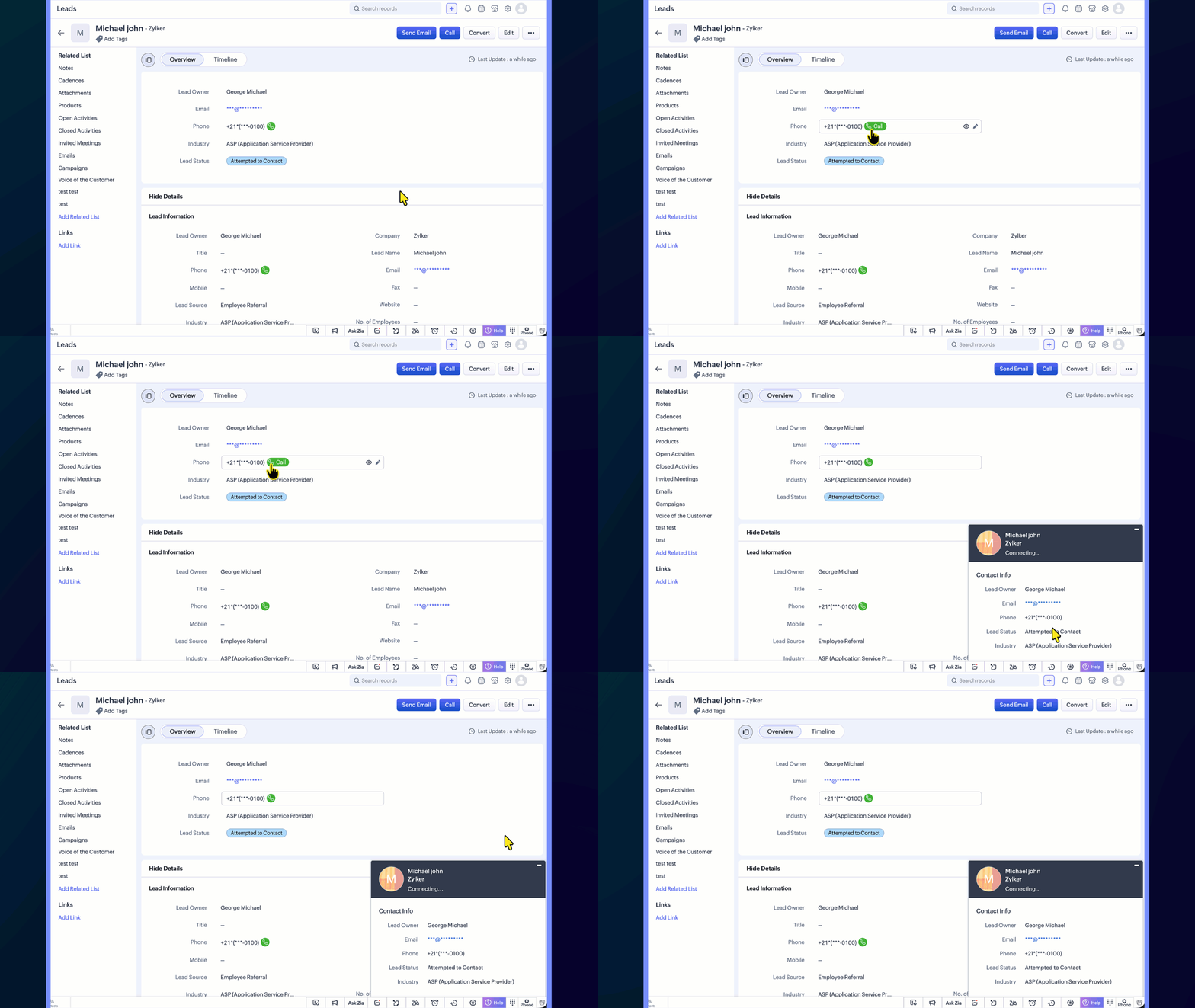
Uninterrupted workflows: Even when a phone number is masked, users can still place calls directly by clicking the call icon, so day-to-day operations are not affected.
Template-level control: In email and other templates, you can choose whether a masked field appears in its masked or unmasked form, giving you flexibility in customer-facing communication.
Report-level control: When viewing or sharing reports, you can choose whether masked field values appear in their masked or unmasked form.
Use Case
Consider a typical support call where the agent needs to confirm the caller's identity without seeing the complete phone number or policy ID. With field masking:
Sensitive fields like phone numbers, account numbers, or policy IDs are masked by default
Agents see only partial values such as the last 4 digits
They can ask, "Can you confirm the last 4 digits of your registered number?" and proceed with verification
Even with the number masked, agents can still place a call directly by clicking the phone icon next to the field, so day-to-day calling workflows remain unaffected
This balances security with usability, ensuring sensitive data stays protected without slowing down day-to-day operations.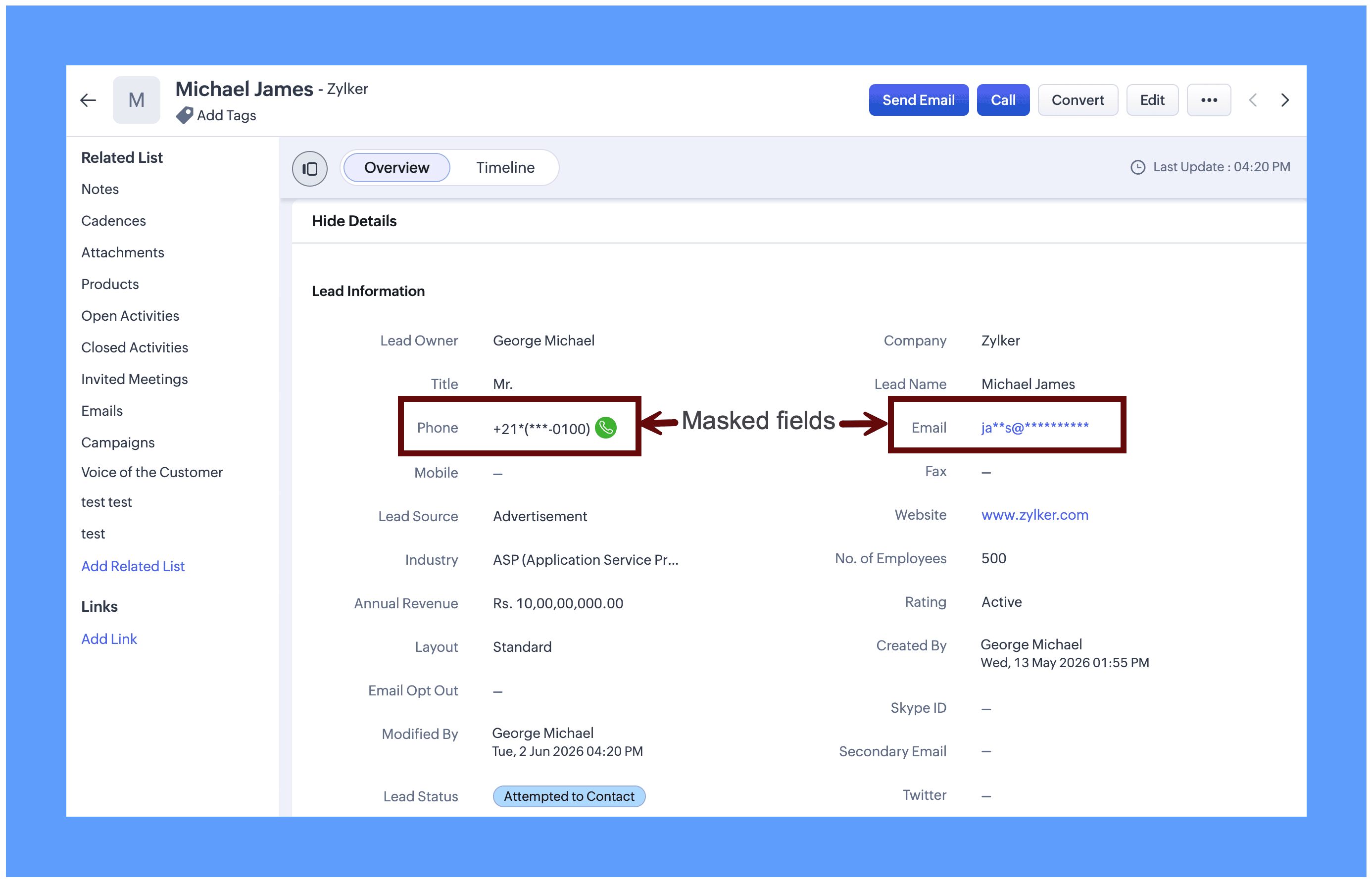
Field masking is equally useful for protecting sensitive data across a range of real-world scenarios: Aadhaar numbers, social security numbers, email addresses, policy numbers, and similar fields. It can be applied to both system-defined fields and custom fields, giving you the flexibility to protect exactly the data that matters to your organization.
Enabling Field masking
Field Masking is enabled in two stages: First you turn the feature on and then you choose which individual fields to mask.
Step 1: After field masking is enabled, you can configure how masked fields behave when data leaves CRM through integrations, APIs, or exports.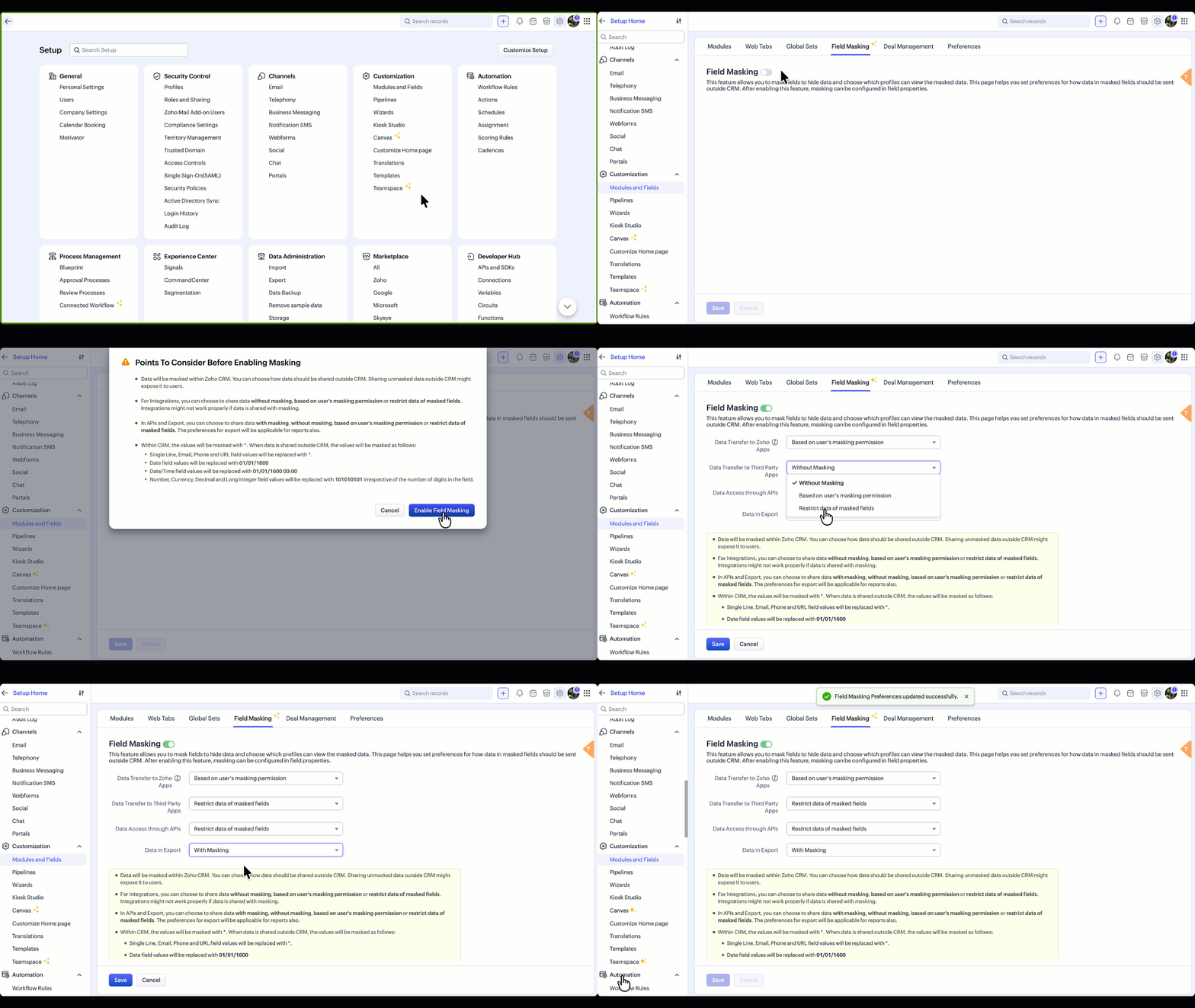
You can update your data sharing preferences anytime from the Field Masking page.
Note: Field Masking can also be enabled in the field properties, which is an alternative way to enable it.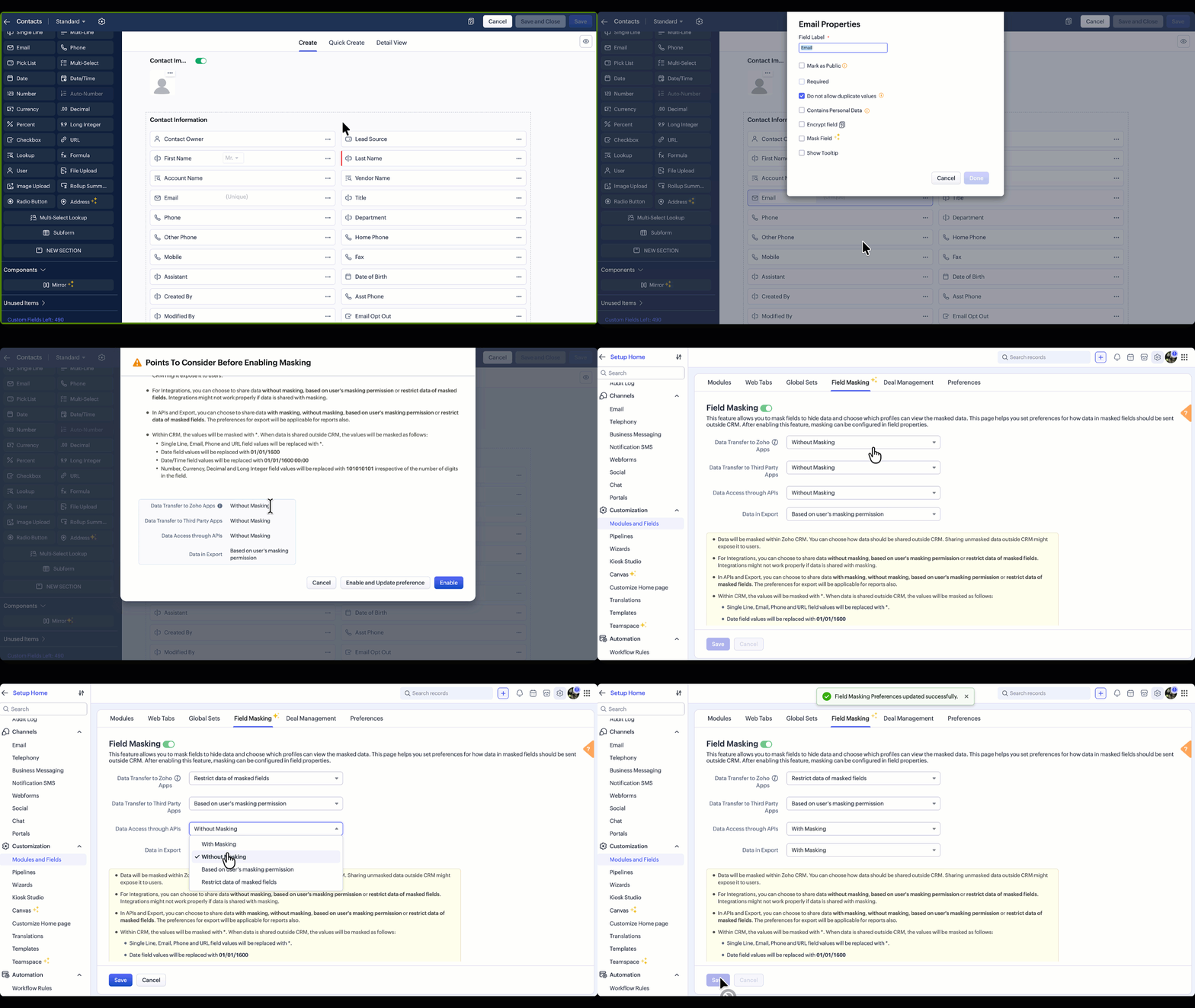
Points to Consider Before Enabling Field Masking
Once enabled, data will be masked within Zoho CRM. However, every time data leaves CRM, whether through an integration, an API call, or an export, you control how masked fields behave at that exit point. For any of these scenarios, three options are available:
Without Masking: The original value is shared as-is. Suitable when the receiving system or user is trusted and needs the complete data.
Based on User's Masking Permission: The masked or unmasked value is shared depending on what that user is allowed to see within CRM. A user who cannot view a phone number in CRM will not receive it in an export or API response either.
Restrict Masked Fields: The field is excluded entirely from the transfer. Useful when there is no legitimate reason for sensitive data to leave CRM at all.
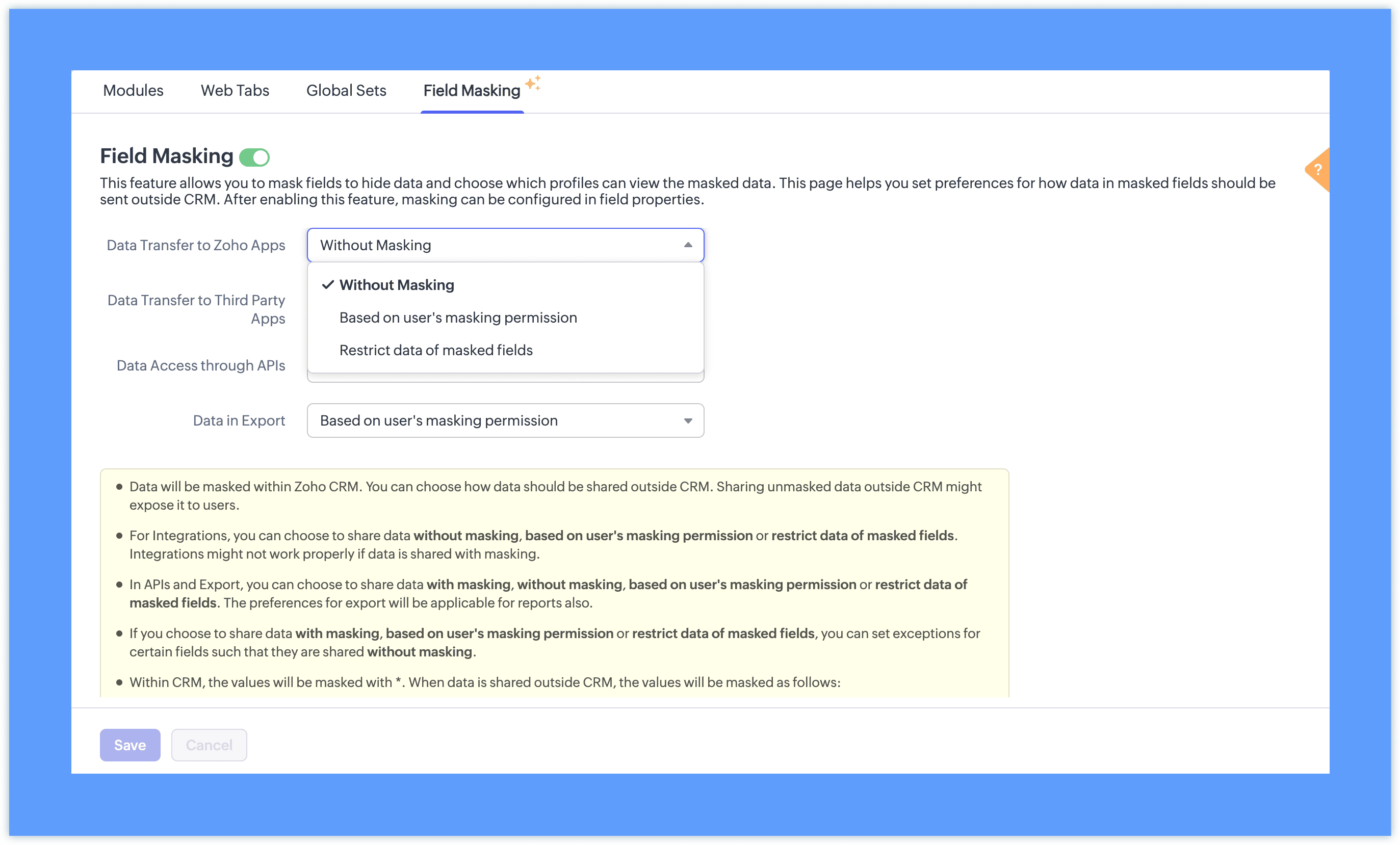
With masking: The masked format (such as 98******21) appears instead of the original value. This option is available only for APIs and Exports, and is useful when sharing data with teams who need to reference records without seeing the underlying values. This is particularly useful when sharing reports with teams who need to reference records without seeing the underlying data.
Note: Setting exceptions for these preferences for specific fields is planned in the future updates.
Step 2: Once field masking is enabled, fields can be masked fully or partially based on your requirements. You can also define which profiles have access to view the unmasked value.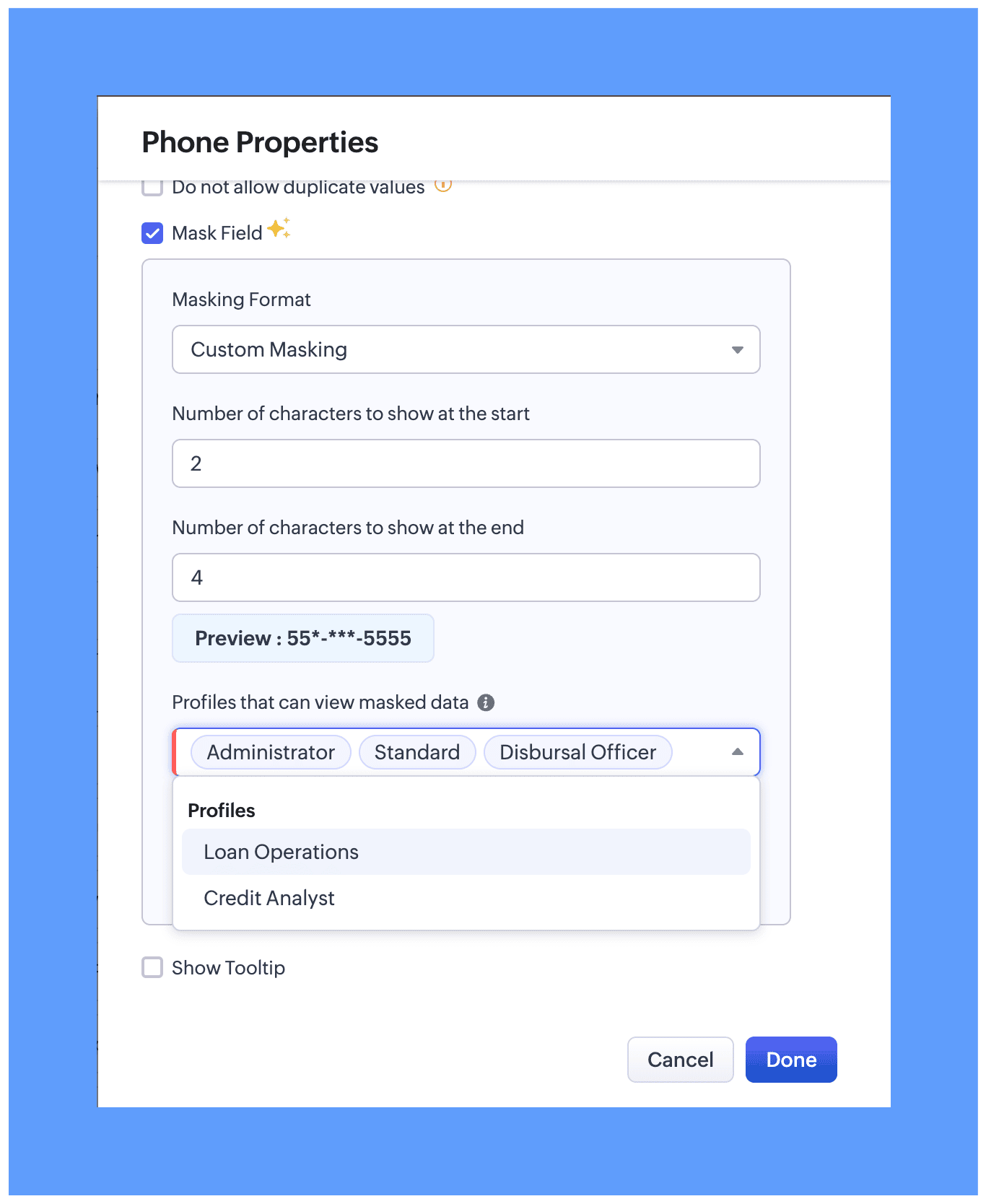
In module layout while editing properties for the preferred field. Two masking types are available:
Full Masking: The entire field value is hidden, for example ********.
Custom Masking: You can choose to mask only the first few characters or only the last few characters of the field value.

While configuring field masking, you can define which users can view the actual unmasked data. All profile types, whether system-defined or custom, are available for selection and will be able to view the unmasked data based on your preference.
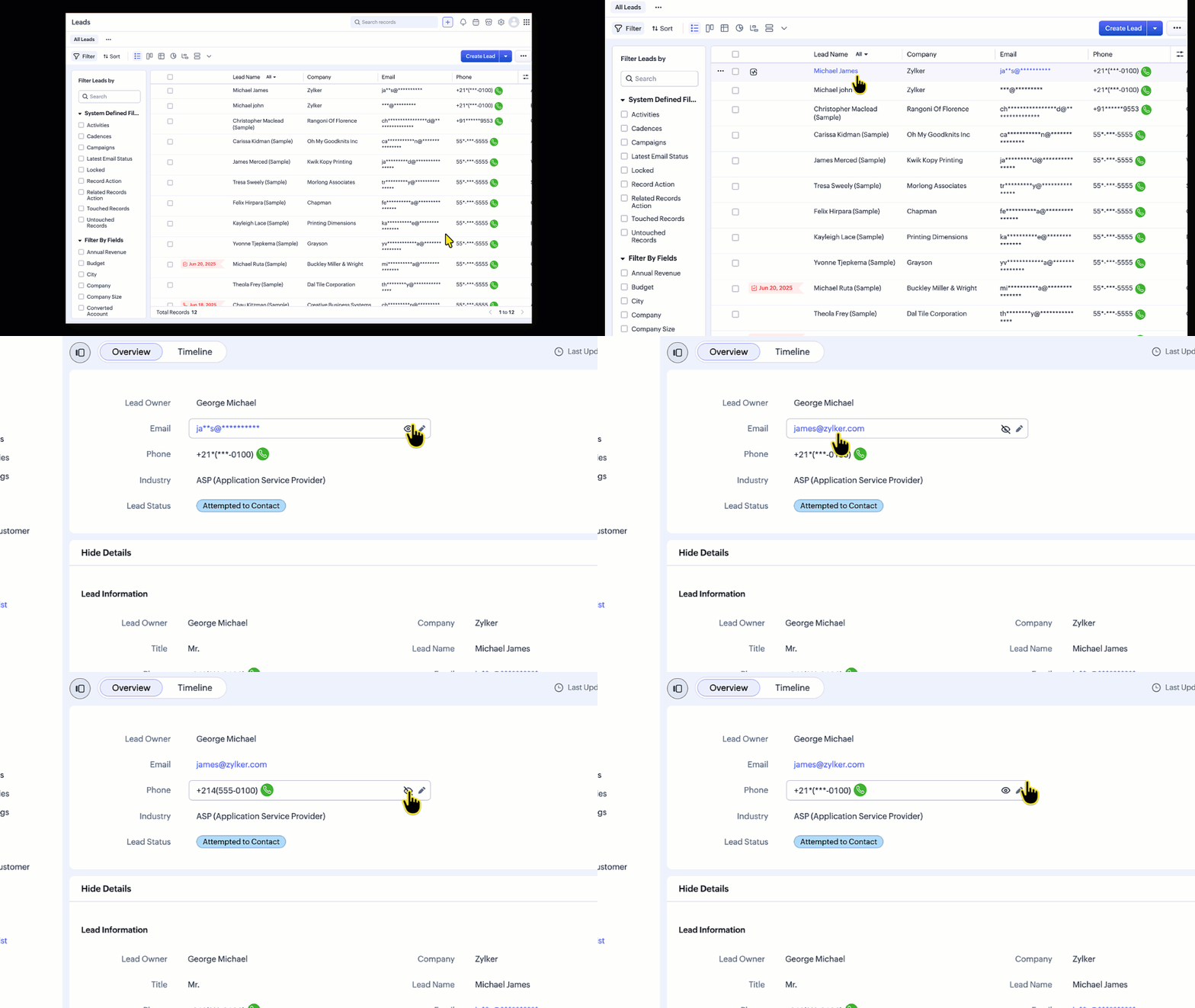
For users with permission to view masked data:
An eye icon (👁️) will be displayed next to the field.
Clicking this icon reveals the actual value.
Can place a call directly even without able to view the masked phone number
List Views
In list views, the data can be unmasked from the hamburger icon available in the column header.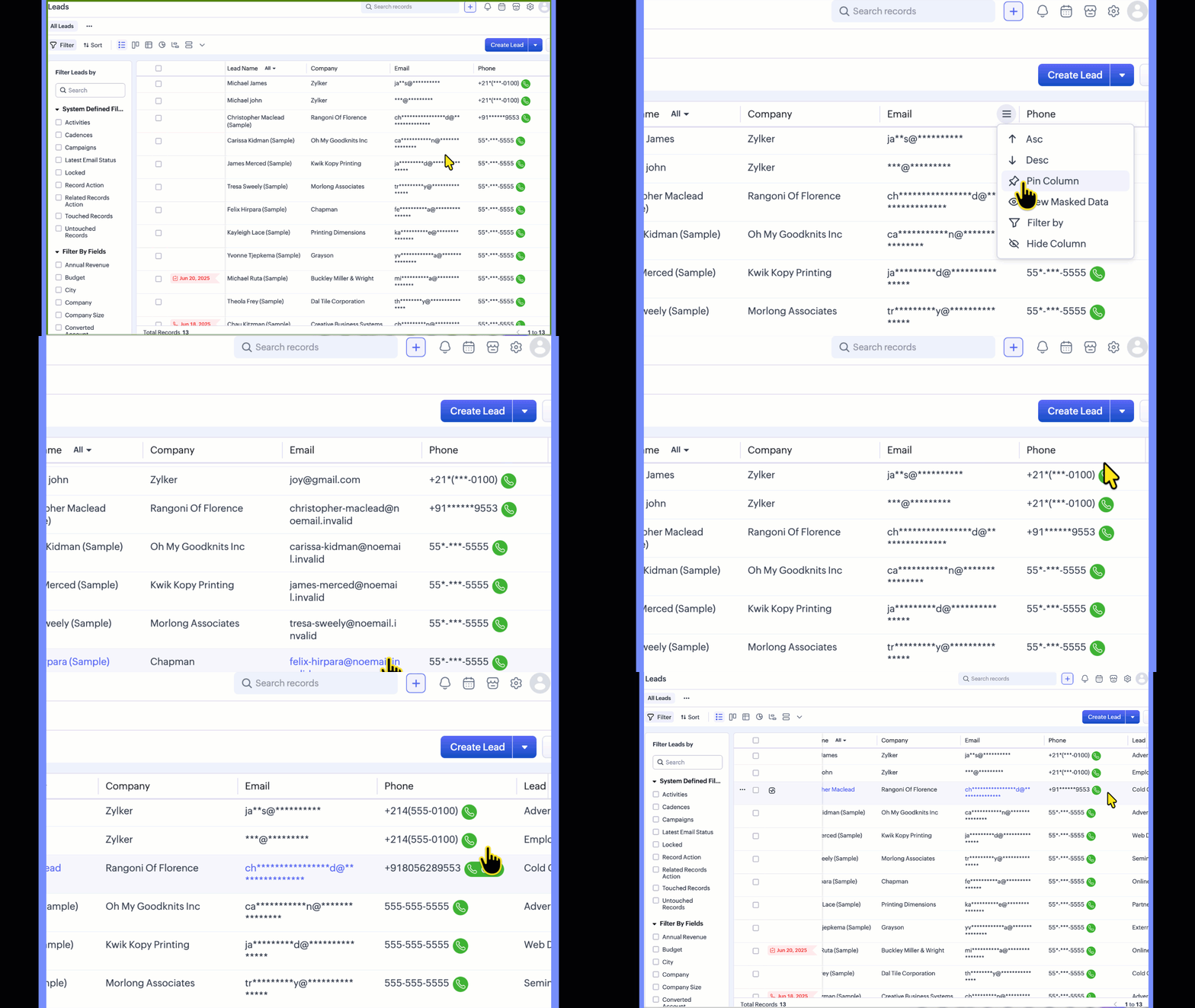
Templates
In templates, the Mail data with Masking preference lets you control how merge field data is shared when mails are sent using the template. This preference applies to all masked fields, regardless of profile permissions.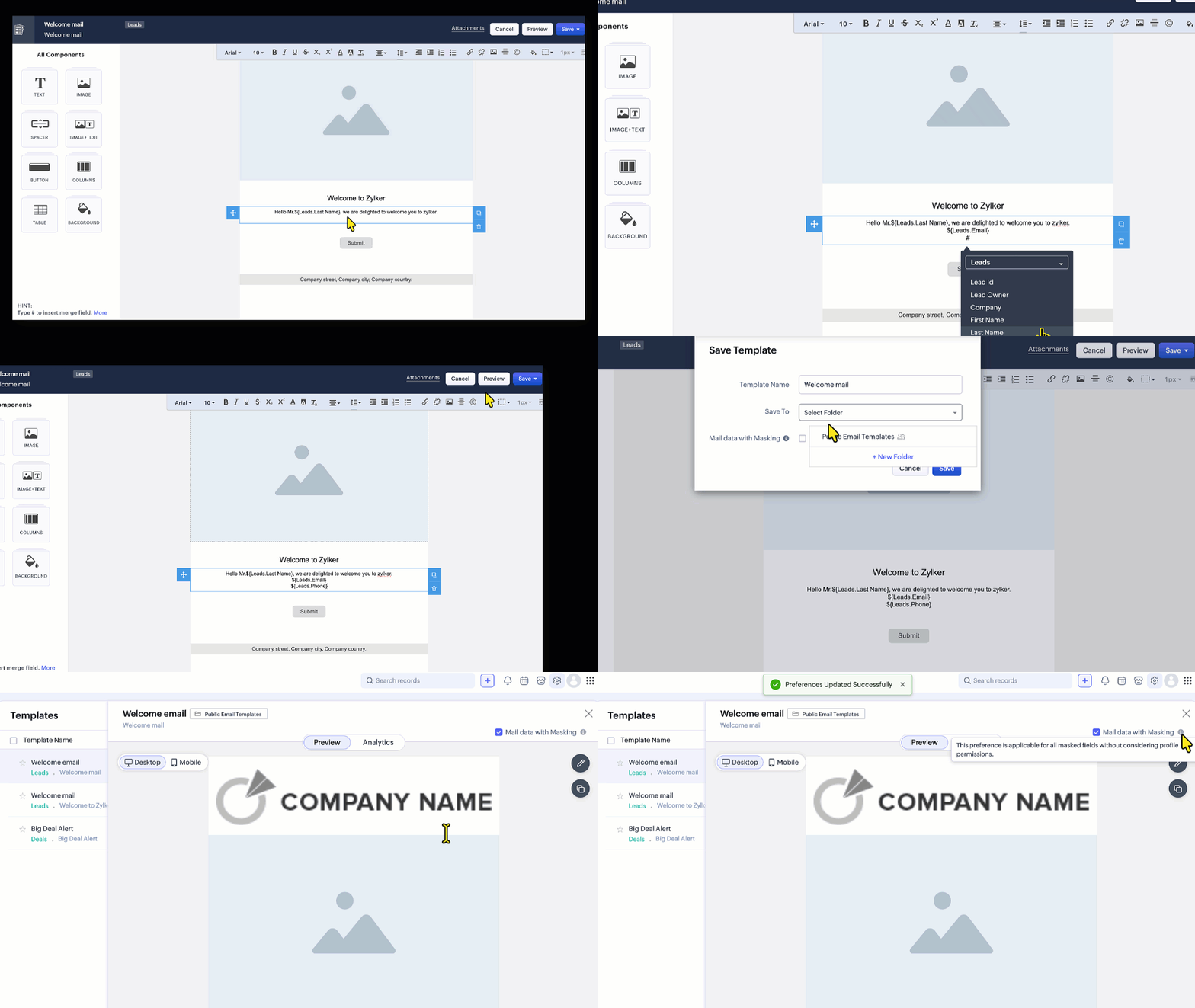
Reports:
When viewing or sharing reports, you can choose whether masked field values appear in their masked or unmasked form.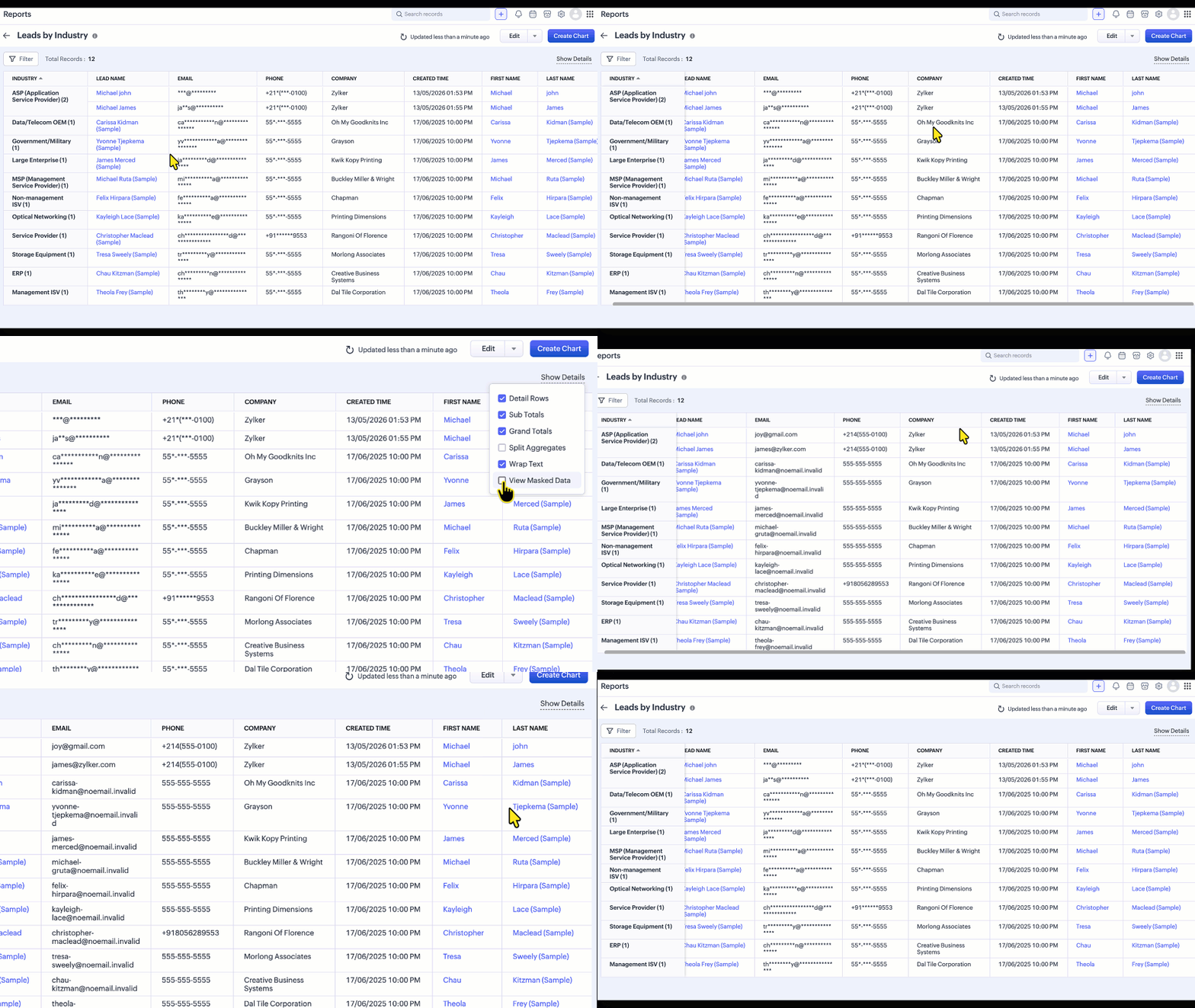
Supported field types
Field Masking can be applied to the following field types:
Single Line, Email, Phone, Date, Date/Time, Number, Currency, Decimal, Long Integer, URL
 Note: Custom Masking is supported for Single Line, Email, and Phone fields.
Limitations
The following are the current limitations of Field Masking, including areas where masking is not yet supported (masking is exposed):
Email Views - Emails Related List,Conversation View, SalesInbox, Mail Magnet, Email Reports, Mass Mail Delivery Stats and record preview in composer.
If the From/To field in the Calls module is masked but the number is not associated with a record, the number will be visible when the call is placed.
Signal notification
Zia Features
Note:
Once this feature is enabled for your org, the phone number is not shown in the call subject in calls module, whether or not Field Masking is enabled.**
If masked fields are used in Layout Rules, Validation Rules, Canvas Rules, or Wizard Conditional Rules, the rules may not execute as expected, because they rely on client-side data. A fix that prevents masked fields from being used in these rules is tentatively expected to go live within a week.
Feature Availability
Edition Supported: Enterprise and Ultimate editions of Zoho CRM,
Limits: Up to 10 masked fields per module in the Enterprise edition and up to 20 masked fields per module in the Ultimate edition.
Note: Field Masking is available across all modules except the Users module.
Zoho Campaigns Resources





Topic Participants
Jayant Nath Vatsa
Sticky Posts
Introducing Incentives for Zoho CRM: Build, automate, and track sales commissions
Dear Customers, We are here with an amazing news! We built a direct solution to help manage your commission provisioning activity in your business. From creating commission plans to issuing payouts, this application leverages your sales reps’ performancePresenting ABM for Zoho CRM: Expand and retain your customers with precision
Picture this scenario: You're a growing SaaS company ready to launch a powerful business suite, and are looking to gain traction and momentum. But as a business with a tight budget, you know acquiring new customers is slow, expensive, and often deliversEnhancement in Zoho CRM: Introducing New Return Types for String Fields Based on Character Length
Dear Customers, We hope you’re well! In Zoho CRM, formula field with string return type is used in various scenarios where text is involved like concatenating customers’ first and last names, trimming characters from texts, performing find and replaceTransform your line of items into line items: ICR can now record your table values as subform values
Enhancement in Zoho CRM Dear Customers, We hope you're well! Zia Vision’s ICR capability can now recognize, extract, and store tabulated values in your subforms. An ideal example is a university application form. It has printed fields and handwrittenApprove records efficiently: Useful enhancements to My Jobs module and Approval process in Zoho CRM
Dear Customers, As you might know, approval process is a process automation tool that allows you to automate approvals in your organization and My Jobs is where you approve requests from a single point of view. Here's how you'd go about it: You’d add
Zoho CRM Plus Resources
Zoho Books Resources
Zoho Subscriptions Resources
Zoho Projects Resources
Zoho Sprints Resources
Zoho Orchestly Resources
Zoho Creator Resources
Zoho WorkDrive Resources


Zoho CRM Resources
Get Started. Write Away!
Writer is a powerful online word processor, designed for collaborative work.
-
オンラインヘルプ
-
Webセミナー
-
機能活用動画
-
よくある質問
-
Ebook
-
-
Zoho Campaigns
- Zoho サービスのWebセミナー
その他のサービス コンテンツ
ご検討中の方
Recent Topics
Backorder For Composite Items
Hello If i released SO for composite item and use backorder feature of zoho inventory then it should backorder child item items of composite and not composite item.This is basic of backordering.I conveyed this to zoho call center but no solution yet.Global Constants / Variables
It would be great if there were a Global Constant feature. The idea here is for managing constants that are used in multiple Flows and Subflows, but might change over time. The idea is that the change could be made in one place and cascade to all futureemails?
Why can't I send emails from my account anymoreDeal Activity Tracking - By Time
Hello, I am trying to figure out a way to implement a time tracking ability within the CRP that will provide a line item on the final invoice in books. Would the Cases module be of good to use in this scenario? Want to integrate into Books as well. Itime tracking on zoho crm cases
Is there a time tracking feature in zoho crm cases? I need calculate time spent in calls, tasks and events Thanks in AdvanceTime Card Tracking For Employees
Does ZOHO have an add-on or app that my employees can use to clock in & out on a daily basis. In the past we had used a third party solution, but it was hard to use and pricey. We would really like to use your time tracking feature if you have one......ifLogging time within Time Tracking
At the moment I use the call logging feature of CRM to log time spent on clients work. Its nice to be able to start, stop and pause the timer and record how many hours I need to bill the client. Any chance of implementing this in Zoho Invoice's time tracking feature The same interface as CRM would be great or a simple start/stop/pause/restart timer.3rd Party/Easy Time Tracking Integration with Zoho
We are new customers using Zoho One with Zoho Project/CRM/Desk being the 3 big applications we will use. The majority of our work is done in the field and we need accurate and easy time tracking for our workers on mobile phones. aka TSheets type functionality. but tied to Zoho. Zoho is outstanding overall so I am surprised at how laborious, inefficient and disconnected time tracking is mobile devices. Adding time to a project task on a mobile phone can be a 10+ click task and that's not an exaggeration!TrueSync for Windows 5.16+ breaks Excel save in "Shared with Me" (temp file writes fail) – workaround: pin 5.15.1
Hi all, After TrueSync for Windows auto-updated past 5.15.1, some of our users can no longer save Excel files that live under "Shared with Me". We isolated it to a client-side regression and found a workaround. Sharing in case it saves someone a few hoursIntroducing PRM: Build, manage, and scale your partner ecosystem
Growing a partner ecosystem is a good problem to have. What starts as a handful of partners can quickly turn into a maze of spreadsheets, emails, and disconnected processes. More partners mean more opportunities, greater reach, and new ways to growPurchase Requisition in Zoho Books
I want to understand if Zoho Books is having the following workflow: PR ( Purchase Requisition ) >> PO ( Purchase order) >> GRN/SRN ( Goods/Services receipt note) >> BillEnhancement Request: Preserve Canceled Zoho Bookings Meetings in CRM
I recently worked with Zoho Support on ticket 170383788 regarding what happens in Zoho CRM when an appointment is canceled in Zoho Bookings. Support confirmed that the current behavior is intentional: when a Bookings appointment is canceled, the correspondingIntroducing the Markdown editor in Zoho Learn
Hello everyone, We're excited to announce the release of the Markdown editor in Zoho Learn. With Markdown editor, you can create and import articles as Markdown. You can write content using simple Markdown syntax and see how it looks with the built-inWhen will Bigin's latest AI features be available in Europe?
Hi, As I previously raised this question in the post “Introducing Bigin's latest AI features, built for the way you work!”, but received no response, I am bringing it up again here. It has now been five months since the announcement, and these AI featuresFunction #50: Send Mass emails to your customers
Hello everyone, and welcome back to our series! We have reached a milestone of 50 Functions, which means that we have automated 50 different tasks in Zoho Books. Every Friday, we have shared a nifty function aimed at either automating a task or streamliningTime tracking
Hi there We are looking for a simple, intuitive but powerful time track application. We bill our clients by the time we spend, and so need to link Clients<>Projects<>Tasks or Activities<> Time spent. Is there an app in Zoho we could use? Many thanks.. MorriStaff Tracking in
Hi , I would like to see what activity my staff does over Zoho CRM and over Zoho Mail . I need to know which deals in CRM haven't been touched or had an activity on by a particular staff member . Basically need to establish what work.gets done by WFHZoho Projects connector with Zoho CRM (Related List module) features
Hi community, I use Zoho Projects connected to Zoho CRM, where we associate Projects with Deals, clients, etc.. I am looking to change/edit the fields that are available in the integration. Currently it shows Project Status, Project Completion, Milestones,Report: avg time to visit each lead
We are on zoho one. our sales team visits leads using the ZohoCRM app. They track their hours using the zoho books timer. So the results in zoho books look like this: -total hours worked: 8 In ZohoCRM we have a custom date/time field in each lead recordCreating a Stop Start Timer for Custom Moduel
Hello, I am trying to track Maintenance of internal Assets through Zoho CRM (I have tried the FSM, Projects, Inventory apps nothing is working the way I need it to). I have it all built in the CRM where I have internal work orders where i can keep trackLogging time to a Sales Lead in CRM
Hi, Is there a way to log time against a Sales Lead / Deal in CRM before it is won and becomes a project? Our employees often do work for sales opportunities and need to log time against them at any point of the sales cycle, before it is won. Thanks, AtifHourly Billing in Zoho CRM Deals, Books, and Projects?
We bill on an hourly basis and need that time added into a client's invoice in Books. A client might have multiple deals open with us that we are working on, and billing separately, and thus need separate invoices for each. The functionality of ProjectsTime taken on a task
I notice that you can record the length of a call, but not an event or a task. When a potential progresses from beginning to end it is just a series of tasks/calls/events in a process. I have most of it automated depending on the type of sale and triggered by updating the sales cycle field. It follows that you should be able monitor the time of each of them so that you actually know how much time you spend on each potential. This gives an idea of profitability of each potential. I would think thisTimesheets from Deals
Hi Guys, new Zoho One customer here with only a few employees. I run a small software company and currently our small number of employees are creating manual timesheets in excel. There is a column for a job number (that relates to a Zoho Deal) and they just put in the time taken to perform the work. As an example, they might spend 1 hour running some barcodes for a particular client (and deal). Then they may do a support all for another client and that takes 2 hours (This client would have a yearlyTimesheet option in zoho crm
Recording a timesheet against a job is very crucial for every business because it will help them in billing the client accordingly and also it keeps a track on how much time a user is exactly taking in marking the job as cloed. Currently in crm therePortal access is now available in the Zoho CRM mobile app
Hello everyone, Zoho CRM Portals provide a secure space for sharing selected records with people outside your organization. These portal users can include customers, vendors, partners, or anyone who needs access to specific CRM data. Previously, portalField of Lookup - 5 Field Association Limit.
This query relates to the post at: https://help.zoho.com/portal/en/community/topic/introducing-the-field-of-lookup-in-crm-public-early-access-2023 My simple (and common) scenario: I select an account / customer lookup and want their address pulled intoZoho Forms API
Is there any way to get all form entry list using API? Looking forward to hear from youMultiple locations
I have many customers (accounts) that have multiple locations, like bank branches. How can I manage them under one account?Calendar won't load
I run into this problem about once a week, where I try to open my Zoho calendar in a web browser, and it just gets stuck, waiting forever to load (see attached screenshot). I'm usually using Edge or Duck-Duck-Go browser. Sometimes it loads just fine,Feature Request: Enhance Zoho Books Customer Approvals with WhatsApp, Multiple Approvers, Automated Reminders, and Workflow Automation
Product: Zoho Books Module: Time Tracking → Customer Approvals Category: Feature Enhancement / Workflow Automation / Omnichannel Communication Description I would like to suggest several improvements to the Customer Approvals module in Zoho Books, particularlyFeature Request: Extend Zoho Books Customer Approvals API and MCP Support
Product: Zoho Books Category: API Enhancement / OAuth Scopes / MCP Integration Feature: Customer Approvals (Timesheet Approvals) Description I would like to suggest an enhancement to the integration and automation capabilities of Zoho Books, specificallyTip: #14 Save words and phrases in Writer for faster writing!
As you start working with more documents everyday, you'd find yourself using certain words and phrases across documents quite often. In this week's tip, let's discuss two easy ways to train Writer to remember your commonly used words—equipping you toZoho ERP | Product updates | October 2026
Hello users, A new month, a fresh set of updates in Zoho ERP. This month brings Netting, enhancements across our verticals, and more updates to help streamline your everyday work. Explore this month’s updates and see what’s new. Compliance with RevisedZoho Forms - Feature Request - Embed iFrame or Dynaic URLs in Description fields
Hi Zoho Forms team, I'm working with a client who uses Zoho Forms internally to collect information over the phone from potential work placement candidates. At the end of the form, the candidate needs to be booked in for an induction, which we've configuredBANK FEED - MAYBANK , provider from YODLEE IS NOT WORKING
As per topic, the provider YODLEE is not working for the BANK FEED. It have been reported since 2023 Q3, and second report on 2023 Q4. now almost end of 2024 Q1, and coming to 2024 Q2. Malaysia Bank Maybank is NOT working. can anyone check on this issue?Digest Octobre - Un résumé de ce qui s'est passé le mois dernier sur Community
Bonjour chers utilisateurs, Bienvenue dans ce nouveau digest de la communauté Zoho France ! Vous y trouverez les discussions marquantes, les nouveautés produits, les conseils pratiques partagés et bien sûr les événements à venir. Le mois dernier, nousBank feeds - still a problem
I'm really frustrated that the bank feeds only "sometimes" work. I raised this problem once before and was advised that Zoho used Yodlee and feeds were only updated once a day. That's fine but it only "sometimes" seems to work. Eventually transactions appear but they sometimes seem to take days. I know of other programs (Xero) that another business I am involved with uses Yodlee and they do not have this issue. My bank feeds are active, I tried to manually refresh however Zoho tells me thatthis is getting ridiculous
My checking account bank feeds haven't worked since 6/4/21. Multiple emails to Zoho since 6/10, and all they tell me is they have re-escalated my problem to their banking service provider team. 14 days and nothing is fixed. I'm just about ready to bailNo feedback from Zoho Books regarding Yodlee feeds for Investec
I reported on 6 Feb 2025 that the Bank Feeds for Investec bank via Yodlee are not working. To date there has been no resolution. You are charging us for a suite of products where the functionality does not work. Please advise how you will refund me forNext Page