Manage WhatsApp Conversations Across Zoho Services Using One Phone Number

Manage WhatsApp Conversations Across Zoho Services Using One Phone Number

If your teams use multiple Zoho services to handle different business functions, such as support, sales, or other Zoho tools, you might have asked this question:

Can we manage all WhatsApp conversations using the same business phone number across these services?

The answer is yes.  You can now use a single WhatsApp Business number and associate it across multiple Zoho services.


What changes when customers and teams use one WhatsApp number across services 

  1. Customers interact with one number, regardless of which team responds
  2. Teams across different Zoho products can work on the same conversation thread
  3. Agents can see the conversation timeline, even if it started in another service
This keeps the interaction continuous, instead of splitting it across multiple channels or numbers.

Note: While the timeline is visible across services, the full message content may not always be displayed.   

How a single WhatsApp number keeps conversations in sync across multiple Zoho services 
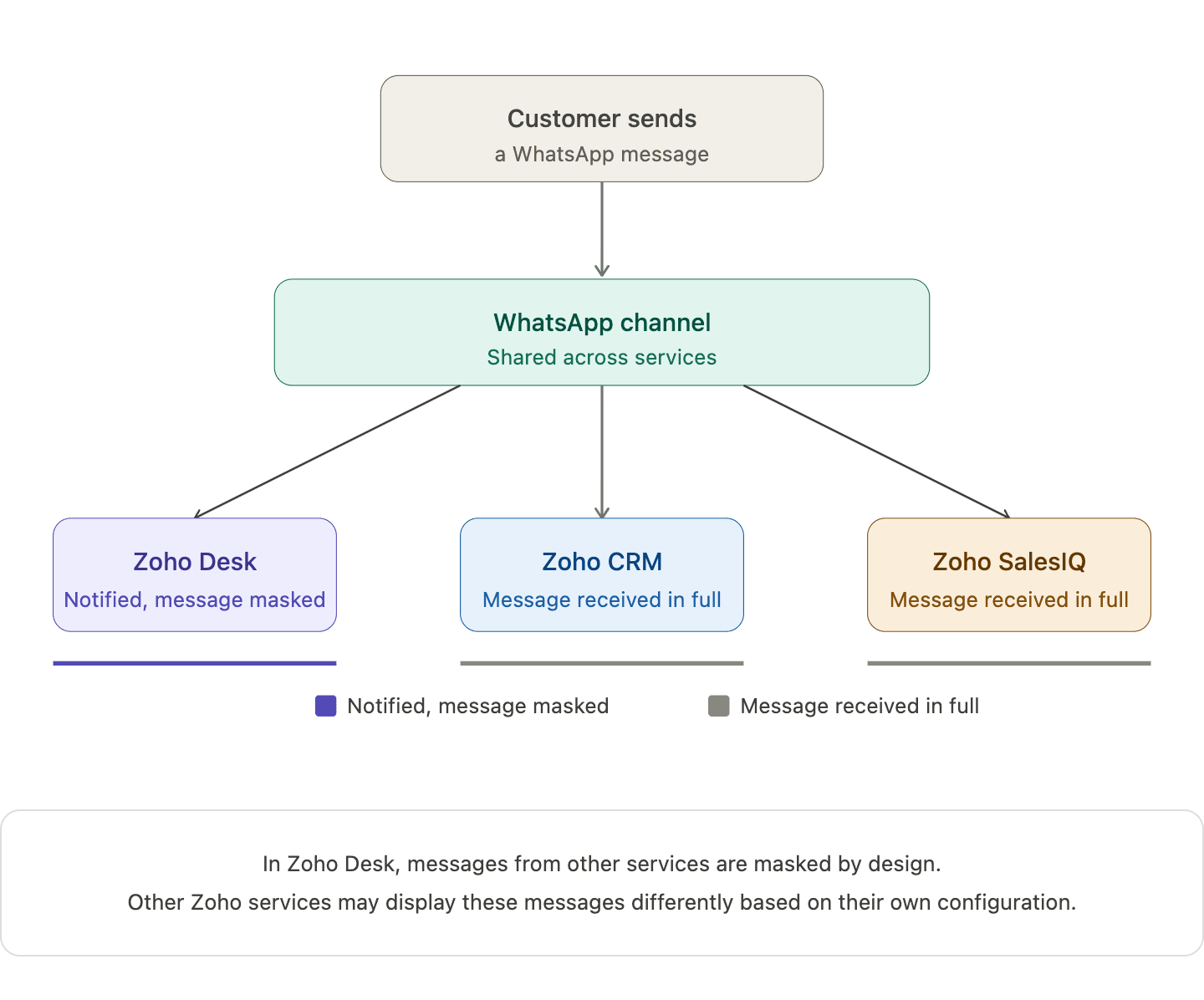
When you connect one WhatsApp number across multiple Zoho services, a single WhatsApp channel is created and shared across those services. Incoming messages appear in all connected services, and the underlying WhatsApp conversation continues as one unified thread.

When an agent replies from one service, that response is reflected in others as well. For example, in Zoho Desk, replies from other services appear in a masked format. This helps teams stay aware of the interaction without exposing the full message content.

What your team actually sees when different Zoho services handle the same conversation 

Action
What happens
Customer sends a WhatsApp message
Appears in all connected Zoho services
Agent replies from one service
Reply appears in Zoho Desk in masked form (Masked replies indicate that a response was sent from another service, without showing the full message content)
Another agent opens the conversation
The conversation timeline is visible, while message content may remain masked
Two agents attempt to handle the same conversation
The system shows a warning but does not block access
   
 Note:   In Zoho Desk, messages from other services are masked by design. Other Zoho services may display these messages differently based on their own configuration. 

How one Zoho service becomes the owner of the shared WhatsApp channel  


When a WhatsApp number is connected across multiple Zoho services, the first service where the number is configured becomes the parent service.

Other Zoho services that use the same number are automatically subscribed to this channel, allowing different teams to stay connected to the same conversation.

If the parent service is removed later, another subscribed service is automatically assigned as the new parent, without affecting ongoing conversations or message history.

What the parent service actually controls in this setup

The parent service is the Zoho service where the WhatsApp number is first configured. Once your WhatsApp number is shared across Zoho services, this parent service becomes the control point for automation.

This is where automation such as chatbots (including Guided Conversations), auto-replies, workflow-triggered messages, and outbound notifications are managed.

Other services can still participate in conversations, but they don’t control or trigger automation on that number.

How different types of automation behave across services   


Chatbots
  1. Bots run only from the parent service
  2. Customer messages trigger bot responses from that service
  3. Other services can see the interaction but cannot run their own bots
 
Auto-Replies 
  1. Only the parent service can send automatic replies
  2. Auto-replies configured in other services will not trigger
 
Workflow-Based Messages  
  1. Messages triggered by workflows (like ticket creation or lead updates) run only from the parent service
  2. Workflows in other services cannot send WhatsApp messages using the shared number
 
Notifications and Outbound Messages  
  1. Scheduled or event-based messages are sent only from the parent service
  2. Other services cannot use the same number for outbound automation


What changes when one service disconnects from the shared WhatsApp number 

When one Zoho service disconnects from the shared WhatsApp number, only that service is unsubscribed from the channel. Other subscribed services continue to receive incoming messages, and customer conversations remain active without any disruption.
Note: WhatsApp connectivity stops only if the number is removed from all connected services. 
 
The following Zoho bundles support shared WhatsApp numbers :
  1. Zoho One
  2. Zoho CRM Plus
  3. Other Zoho bundles with appropriate access
 
A few products, plans, or portals currently have restrictions:
  1. Standalone Zoho product licenses
  2. Portals upgraded from standalone plans
  3. Applications like Zoho Books, Inventory, Invoice, Subscriptions, Expense, Commerce, Checkout, and Payroll 
Note: The same WhatsApp number can still be connected the above-listed services, but each product maintains its own Channel and conversation history. 
   

What teams should align on before and after sharing a WhatsApp number 

Identify which service will act as the parent before setup. You can check this in Zoho Desk under the WhatsApp channel configuration, where the parent service is indicated.

Ensure agents understand what it means when another service has already picked up a conversation.

Define how conversations should move between support, sales, and other teams.

If your teams are already working across multiple Zoho services, this setup can simplify how conversations are handled day to day.

We're curious to know how others are approaching this. Are you already using a shared WhatsApp number across teams, or planning to try it out?
 

FAQ
Does this create multiple WhatsApp conversations for the same customer?
No. There is only one underlying WhatsApp conversation shared across the connected services.

Can two agents reply at the same time from different services?
The system shows a warning if another agent has already picked up the conversation, which helps reduce duplicate replies.
 
Why do replies appear as masked in other services?
Masked replies help other teams stay aware that a response was sent, without exposing the full message content across services.
 
Which service controls automation and bot behavior?
Automated features such as chatbots, auto-replies, and workflows are controlled by the parent service where the WhatsApp number was first configured.


      Zoho Campaigns Resources


        • Desk Community Learning Series


        • Digest


        • Functions


        • Meetups


        • Kbase


        • Resources


        • Glossary


        • Desk Marketplace


        • MVP Corner


        • Word of the Day


        • Ask the Experts


          • Sticky Posts

          • Zoho Desk Partners with Microsoft's M365 Copilot for seamless customer service experiences

            Hello Zoho Desk users, We are happy to announce that Zoho Desk has partnered with Microsoft's M365 to empower customer service teams with enhanced capabilities and seamless experiences for agents. Microsoft announced their partnership during their keynote
          • WhatsApp pricing changes: Pay per message starting July 1, 2025

            Starting July 1, 2025, WhatsApp is shifting from conversation-based pricing to per-message billing. That means every business-initiated message you send will count. Not just the first one in a 24-hour window. Pricing updates on the WhatsApp Business Platform
          • Live Webinar - Work smarter with Zoho Desk and Zoho Workplace integration

            Hello customers! Zoho Desk and Zoho Workplace are coming together for a webinar on 14th May, 2024. Zoho Workplace is a suite of productivity apps for email, chat, docs, calls, and more at one single place. Zoho Desk is closely integrated with a few tools
          • Apple iOS 17 and iPadOS 17 updates for Zoho Desk users

            Hello Zoho Desk users! Apple recently announced the release of iOS 17 and iPad OS 17. These latest OS updates will help you stay productive and efficient, through interactive and seamless user experiences. Zoho Desk has incorporated the updates to help
          • Zoho Desk Cheat Sheet For The Year-End

            Check out these Zoho Desk best practices to end this year on a high and have a great one ahead! #1 Set Business (Holiday) Hours - If you have limited working hours, please make sure you restrict your business hours or set them as holidays for the coming days. Let your customers know when you will, and won't, be available. #2 Update the Annual Holiday List - Check the holidays for the new year and update the holiday schedule. Usually, holidays from the current year will be carried over for the next

          Zoho CRM Plus Resources

            Zoho Books Resources


              Zoho Subscriptions Resources

                Zoho Projects Resources


                  Zoho Sprints Resources


                    Zoho Orchestly Resources


                      Zoho Creator Resources


                        Zoho WorkDrive Resources


                          Zoho CRM Resources

                          • CRM Community Learning Series

                            CRM Community Learning Series


                          • Tips

                            Tips

                          • Functions

                            Functions

                          • Meetups

                            Meetups

                          • Kbase

                            Kbase

                          • Resources

                            Resources

                          • Digest

                            Digest

                          • CRM Marketplace

                            CRM Marketplace

                          • MVP Corner

                            MVP Corner


                            Zoho Writer Writer

                            Get Started. Write Away!

                            Writer is a powerful online word processor, designed for collaborative work.

                              Zoho CRM コンテンツ


                                ご検討中の方

                                  • Recent Topics

                                  • Tropicalize Books

                                    Books is an incredibly powerful tool that works well in many countries. But I feel that it is a product that is not yet "tropicalized" for Brazil as we speak (this would be like adapting the local reality). We have many strong competitors who do more
                                  • Generate print-ready documents from Zoho Books with the Zoho Writer extension

                                    Hi everyone, We're excited to introduce Zoho Writer Templates for Zoho Books extension. This extension allows you to create and use customized templates to generate professional, print-ready documents such as invoices, estimates, purchase orders, and
                                  • Tip #73 - Exploring Technician Console: Diagnostics - 'Insider Insights'

                                    Hello Zoho Assist Community! Say you're remotely supporting a client whose machine is behaving erratically. Applications are freezing, services keep stopping on their own, and the user has no idea what's going wrong under the hood. You need to dig deeper,
                                  • Replies sometimes creating separate ticket

                                    Sometimes when a customer responds to an email coming from Zoho Desk, instead of adding a reply to the original ticket, a separate ticket is created. This happens even though the response subject line contained the ticket number, and the person responding
                                  • NEED HELP

                                    I have below data po no invoice no Party inv date value status 1 aa1 ABC 01-May-26 100 Under Cr 2 aa2 XYZ 02-May-26 200 Over Due 3 aa3 ABC 02-May-26 300 Under Cr 4 aa4 XYZ 03-May-26 400 Under Cr I need result as below using formulas (not Pivot table)
                                  • Pasting images is a mess

                                    I’m trying to paste images into my tickets, in the comments field. But when I paste images, they end up in the wrong order or behind the text.
                                  • A way to create kits (groups of items) that do not require bundling and are added to an order as the individual items

                                    We are evaluating moving off of Sage BusinessWorks (which handles accounting, order entry, inventory control, accounts receivable, etc) to Zoho Books/Inventory. One of the things we heavily use is a feature called Kits, which allows creating a group of
                                  • Auto-sync field of lookup value

                                    This feature has been requested many times in the discussion Field of Lookup Announcement and this post aims to track it separately. At the moment the value of a 'field of lookup' is a snapshot but once the parent lookup field is updated the values diverge.
                                  • Refering cell from other sheet

                                    Hi, If we want to refer any cell in the same sheet its very easy, like suppose if I want to refer cell A2  in P7 I just need to type =A2 in P7, similarly how can I refer a cell present in different sheet ( I mean refer cell A2 from Sheet1 into Sheet2) Thanks
                                  • How to prevent users from switching price lists in an order?

                                    Hi, I have Zoho Finance integrated with Zoho CRM. My team will be placing orders through the CRM using the Finance module. When creating a new customer I will assign it a price list, I don't want the sales rep to switch to a different Price List, other
                                  • Edit 'my' Notes only

                                    The permissions around Notes should be more granular, and allow to user to be able to edit the notes he created only. The edit Notes permission is useful as it allows the user to correct any mistakes or add information as needed. However, with this same
                                  • Invoice emails repeatedly "Bounced back" from perfectly good email address of clients.

                                    Hi For a couple of months now I am getting tens of invoice email invoices "bounced back" from perfectly sound email addresses when they are sent via Zoho Books. (see attached or an example) (the common theme seems to be that the emails are going to either
                                  • Paying a credit card

                                    When you move money from your operating account to the credit card account to pay the balance does you select "Pay Credit Card" or "Transfer". Doers it matter? Also I seem to be doing transfers and sometimes I get a list of possible matches and I select
                                  • Timer not appearing to update

                                    For the last couple of days, I've noticed my timer is not updating. When I start it, it doesn't show as started until I refresh the page. When I pause it, it doesn't show as paused until I refresh the page. But it does register a stop correctly in real
                                  • Proforma Invoice

                                    Is there an option to create proforma and advance invoices in professional
                                  • Zoho Books | Product updates | May 2026

                                    Hello users, We're back with the latest updates and enhancements we've rolled out in Zoho Books. From sales tax automation to scanning receipts for free, explore the updates designed to upgrade your bookkeeping experience. Sales Tax Automation [US & Canada
                                  • Restrict Ticket Movement to Specific Departments in Zoho Desk

                                    Hello Zoho Desk Team, Greetings, and hope you are doing well. We would like to submit a feature request regarding the ability to control ticket movement between departments in Zoho Desk. Current Limitation: At present, Zoho Desk allows agents to move
                                  • Bounced Contacts

                                    We recently started using Zoho and hadn’t sent out campaigns in quite some time. With our first campaign, we saw a high number of bounce backs, which we expected due to the age of some contacts in our database. After doing some research, I understood
                                  • DYK 5 - Soft and Hard Links in Task Dependency

                                    Did You Know you can manage dependent task schedules with Zoho Projects? In a project, some tasks are linked while others progress on their own. When a task is hard linked to another, its schedule is automatically adjusted when the predecessor moves.
                                  • No Ability to Rename Record Template PDFs in SendMail Task

                                    As highlighted previously in this post, we still have to deal with the limitation of not being able to rename a record template when sent as a PDF using the SendMail Task. This creates unnecessary complexity for what should be a simple operation, and
                                  • Whats app integration

                                    Do we have a whats app integration as wel for Zoho recruit please.. If so how can we process it
                                  • Global/Overall Reports & Dashboards in Zoho Sprints

                                    Hi, Do we have an option to refer Global Level Reports & Dashboards in Zoho Sprints? We could see that we have Project specific Reports & Dashboards inside every Project. However, for a management level we want Reports & Dashboards visibility at a Global
                                  • AI-Powered Summaries for Records, Notes, and Emails

                                    Recruiters spend a significant part of their day catching up on context. Reviewing candidate records before a call, scrolling through notes after an interview, or reading lengthy email threads to understand the latest update. As hiring volume grows, finding
                                  • Cross Module Filtering – Use Fields from Lookup modules in Custom Views criteria and Advanced Filters

                                    Hello everyone, Zoho CRM now enables you to achieve deeper filtering of records in a module, using fields of a lookup, thereby enhancing your data management experience manifold. This filtering based on lookup module fields is now available in advanced
                                  • Zoho Recruit Extension - Recruit Variables

                                    I am creating a zoho recruit extension. I have created a zoho recruit variable "token". The user who installs the token is supposed to fill this field. This is now connected with a workflow of "Job Create". I am using a deluge function that sends ths
                                  • Direct URL to "View Record"

                                    I would like to create a button (Deluge Script) to jump to the "view record" without passing by the record menu, but I can not aford to find the right url. I don't want the "view record" as a single page. I want the "view record" in the application like the picture below: Thanks in advance for your help
                                  • Zoho recruit's blueprint configuration is not functioning as mapped

                                    Current Status: Zoho Blueprint is not functioning as configured. Issue: We are moving a Candidate status in Zoho Recruit "for active file" but we encountered: "Status cannot be changed for records involved in Blueprint." This happens to various client
                                  • Interview Notes and Feedback

                                    We hold panel interviews and would like an option for all panel members to leave independent interview feedback and notes. At present, we can only see an option for a single person to do that. Is there a way multiple people can leave centralised feedback
                                  • WF On User Input of Field calling a function

                                    As the Title implies, I have an Invoice form with a Lookup field called Car. When the user enters a value, I want to create a series of SubForm (charge) rows with data entries that depend on the Car form. I have a Function that describes how many lines
                                  • site24x7

                                    regards the "www.site24x7.com" service is included in the service of zoho one If included please enable it in my zoho one service Thank you
                                  • UK MTD -- do we really need to map accounts every time we finalise a quarterly report?

                                    Hi, I've been using Books for years as a sole trader in the UK and been very happy with it overall. I was expecting that their implementation of features for MTD was going to be seamless and helpful. Unfortunately, it seems very bare bones and unclear.
                                  • How do I remove a data source from Zoho Analytics?

                                    I am unable to find a delte option on a datasource that i put in the system as an error. On teh web it refers to a setup icon but I do not see that on my interface?
                                  • How Can AI Agents Improve E-commerce Operations Efficiency?

                                    I’ve been thinking about this question recently: as e-commerce operations become more complex, can we use AI Agents to improve daily efficiency? Many e-commerce teams need to handle product management, order follow-up, inventory checks, customer replies,
                                  • Zoho Calendar Appointment Booking

                                    Hello, Community! We've all been there — the endless "Does Tuesday work?" → "How about 3pm?" → "Actually, can we do Thursday?" loop. Not anymore. Stop playing scheduling tag. Let your Calendar do it. Zoho Calendar's new Appointment Booking feature hands
                                  • Support for Custom Fonts in Zoho Recruit Career Site and Candidate Portal

                                    Dear Zoho Recruit Team, I hope you're doing well. We would like to request the ability to use custom fonts in the Zoho Recruit Career Site and Candidate Portal. Currently only the default fonts (Roboto, Lato, and Montserrat) are available. While these
                                  • Integrating Custom Zia Agents with Bigin

                                    Hello Biginners! With the introduction of Zoho's Zia Agents, automation in Bigin has moved beyond predefined rules into something much more dynamic and intelligent. Instead of building rigid workflows, you can now create custom Zia Agents that understand
                                  • Introducing the New Zoho Assist Quick Support Plugin

                                    We are thrilled to announce the new Zoho Assist Quick Support Plugin, the upgraded and enhanced version of the Zoho Assist Customer Plugin. This new plugin allows organizations and IT administrators to deploy it directly onto their customers’ devices,
                                  • Consider Making Printing Easier (UI)

                                    I'm using Zoho Analytics in much the way that it was intended when it was "Zoho Reports" - as a way to pull together information across several apps in the ecosystem. I have a dashboard that I need to run each week for every employee (change the filter
                                  • Project Management Bulletin: May, 2026

                                    Welcome back to our latest edition of Project Management Bulletin packed with our new releases, exciting new roadshows, and insider tips! But first, we have a question for you: Does your PM software adapt to your organization’s goals, or are you reshaping
                                  • Bank Feeds Missing some transactions and duplicating some

                                    Hello, I have been using Zoho or a number of years and have never had a real problem with bank feeds, however in the last month the feeds have not picked up all transactions, and sometimes a transaction is being duplicated. For example, the bank statement
                                  • Next Page