Marketer's Space: Proven tips to improve open rates – Part II - Online Help | Zoho Campaigns

Marketer's Space: Proven tips to improve open rates – Part II - Online Help | Zoho Campaigns

Hello Marketers!

Welcome back to another post in Marketer's Space!

We're continuing from where we left off a fortnight ago. We ended the previous post discussing the subject line, and we'll continue from there. Let's dive right in.

Pre-header

Pre-header text accompanies the subject line. While the subject line tells your contacts what your campaigns are about, the pre-header text adds detail to it. We strongly recommend having it when you're creating campaigns.

The image below shows an email from Perplexity, wherein both the subject line and pre-header are present.



Here, the pre-header text drives home the point of why you need to use it. If you don't include it, you're missing out on important information you can display to your contacts even before they open your campaigns.

Here are some tips for crafting pre-header text:
  • Keep the length between five and 12 words, and 30 to 60 characters. Any longer than that, and the text tends to get truncated and your contacts can't read it fully. Adhering to this length is also essential for making your campaigns mobile-friendly and mobile-responsive.
  • Don't repeat what you've already mentioned in the subject line. You're wasting precious space by doing that.
  • Place the most important hook in the first few words of your pre-header to grab your contacts' attention.

 
Sender name, from address, and reply-to address 

Let's say Patricia is the owner of Zylker Labs, an AI-centric marketing agency. She's new to this business, so she isn't fully aware of the dos and don'ts in email marketing. Though she sent well-crafted email campaigns to her contacts, she was dismayed to find that even after waiting for a couple of months, she didn't receive a single reply from them.

Upon closer inspection, she discovered that the fault lied with the sender name, sender address, and the reply-to address she had used. She didn't provide a sender name, and her sender and reply-to address was no-reply@zylkerlabs.com.

Zoho Campaigns provides granular control over sender details like these to help you avoid such mishaps. When you're creating an email campaign, you can add sender details such as your Sender Name, Sender email address, and Reply-to Address.
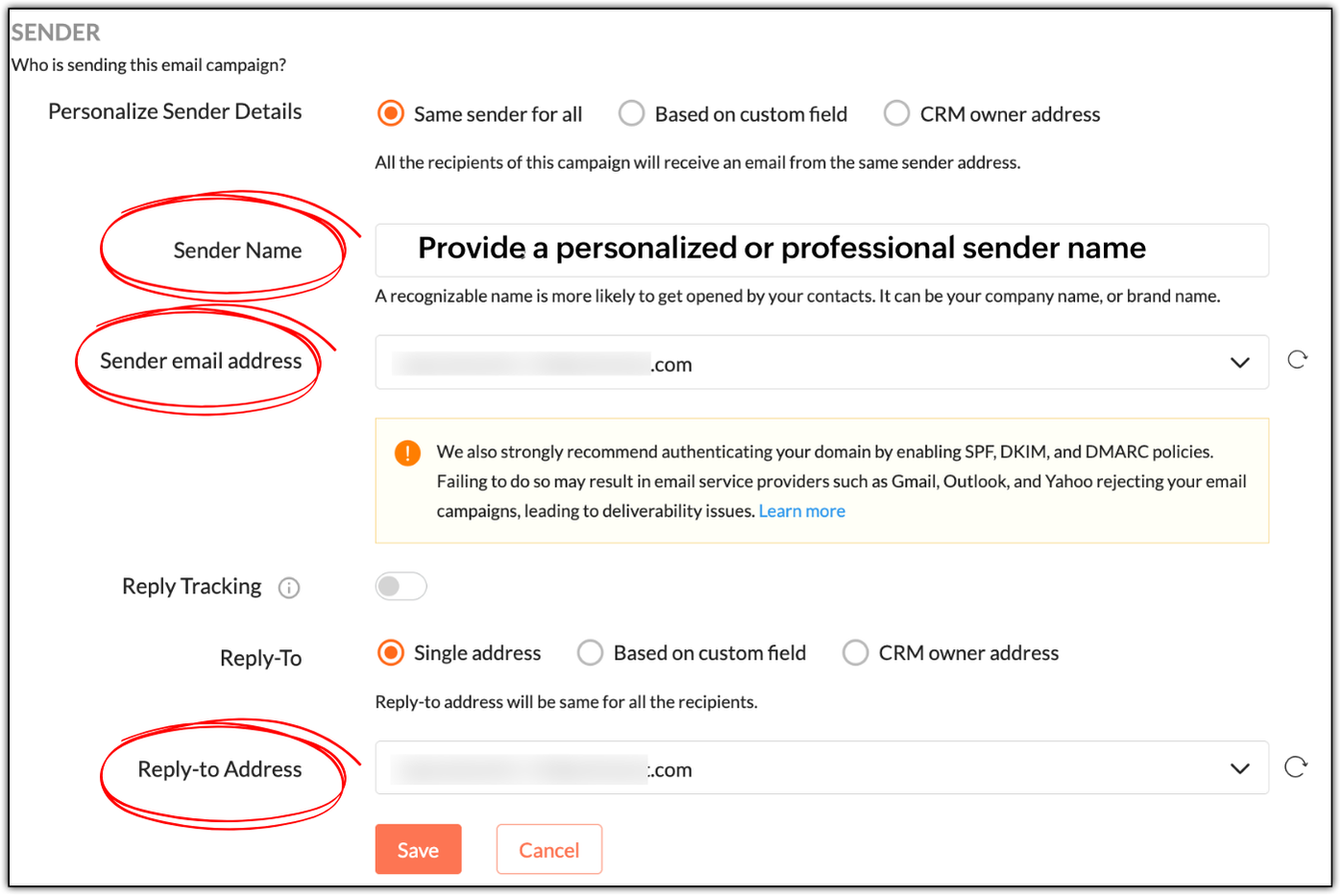


While "Sender Name" is not a mandatory field, it's best to specify a personalized or professional sender name, as it helps build trust. In Patricia's example, she can use:
  • Patricia as a personable variant
  • Patricia | Zylker Labs for a mixture of personableness and professionalism
  • Zylker Labs for a simple, professional sender name

Not having a sender name will put off your contacts; they won't be tempted to open your emails.

NotesNote: Zoho Campaigns automatically displays your sender address as the sender name if its left empty. 

If you use no-reply email addresses as your sender and reply-to addresses, you're telling your contacts not to communicate with you, which is a red flag. Instead use something like patricia@zylkerlabs.com, support@zylkerlabs.com, or help@zylkerlabs.com as your sender address. The same applies to your reply-to address, but if you wish to track the replies in a separate inbox, you can use a different address like mail-to@zylkerlabs.com or team@zylkerlabs.com.

Get consent

Let's say Julie has built a signup form using Zoho Campaigns and embedded it in her website (https://zylkerfashions.com) to attract customers. Many customers have signed up via the form to receive communications from her. Julie is excited and starts sending them campaigns. Soon, she realizes that half of these customers either marked her campaigns as spam, didn't reply, or unsubscribed—and that some campaigns didn't get delivered at all. Naturally, Julie is disappointed and frustrated, as she doesn't understand what went wrong.

Upon checking, Julie realizes that she didn't follow double opt-in to get consent from her customers. While you may assume that because people have signed up via your website, that means they're ready to receive campaigns—we strongly advise that you always confirm with them once.

Go to Settings > Manage Opt-in to enable double opt-in in Zoho Campaigns.


As soon as your contacts sign up via a signup form, Zoho Campaigns will automatically send a confirmation email that asks them to confirm their email address. Once they've confirmed, they'll be added as contacts in Zoho Campaigns. This is done to ensure that:
  • Your contacts are genuinely interested in receiving communications.
  • If they've specified an incorrect email during sign-up, the double opt-in email won't reach them, so they won't get added to Zoho Campaigns.
  • You can avoid unnecessary unsubscribes, spam, and abuse complaints.
  • Your mailing list remains clean, so you don't send campaigns to invalid email addresses, which can negatively affect your email deliverability.
 

Warm up your sender domain 

If you're starting out or haven't sent emails for quite some time, your sender domain is new or dormant—which means you have a cold domain.

Let's say you've imported 10,000 new contacts, and in your eagerness to start your marketing journey, you've sent campaigns to all of them at once—something called as an email blast. You should avoid this, because you can trigger the spam filters of email clients like Gmail, Yahoo, and Outlook, which not only leads to your campaigns being marked as spam, but also to rejection.

Sending from a cold domain affects your email deliverability negatively. Your domain can ultimately get blacklisted due to poor reputation, as well, which means you'll lose out on the opportunity to do business.

Hence, it's vital to warm up your domain by sending your campaigns in equal or incremental batches. For example, you can send 1,000 campaigns per day for 10 days or increase the number each day number from 1,000 to 1,250 to 1,500, and so on.

We've explored essential techniques to boost your email open rates, from crafting smarter pre-headers to warming up your sender domain for better deliverability. Apply these practices consistently to build trust and achieve long-term campaign success.

In two weeks' time, you'll be reading the final part of this series.

Happy marketing!

Kind regards,
Sai Prashanth
User Education
Zoho Campaigns


      Zoho Campaigns Resources


        • Desk Community Learning Series


        • Digest


        • Functions


        • Meetups


        • Kbase


        • Resources


        • Glossary


        • Desk Marketplace


        • MVP Corner


        • Word of the Day


        • Ask the Experts


          • Sticky Posts

          • Marketer's Space: Proven tips to improve open rates – Part II

            Hello Marketers! Welcome back to another post in Marketer's Space! We're continuing from where we left off a fortnight ago. We ended the previous post discussing the subject line, and we'll continue from there. Let's dive right in. Pre-header Pre-header
          • Tip of the week 03 - Sending emails in batches

            Today's marketers not only want their email marketing to be efficient, but also smart. For an email campaign, you may think you have all the essential elements for lead conversion—a big mailing list, an attractive template design, and the most-engaging message content, but after hitting the ‘send’ button, you may not get the expected conversions. Wondering why? Here’s one of the major reasons. Many marketers miss out on sending the email campaign the right way. Did you know that you should not be
          • Tip of the week 04 - Know about your recipients' 'prime open time.'

            In today's market, the importance of customer behavior is astounding, with a vast amount of research and resources going into finding how customers make decisions. The process of persuading your customers to open your email and click on your call-to-action becomes easy when you understand the psychology behind their behavioral traits. Time to turn into a psychologist! Let's get to the basics—you want your emails to resonate well with your recipients. So, what's the primary thing involved here? It's
          • Zoho Campaigns Expert Diaries on SoundCloud, Spotify, Apple Podcasts, and YouTube

            Hi email champs,  As email marketers, we find great lessons in each other's works—be it the subject lines that worked good, the design that was received well, or the CTA that had the maximum clicks. Email marketing encompasses a wide variety of topics spanning everything from creation and design to development and deliverability.  Here's when we from the Zoho Campaigns team found the need to build an email marketing community comprising of seasoned marketers and email geeks who can help each other
          • Email Deliverability Tip #3: Seal the deal with the preheader

            In the last post, we learned about the subject line. Today we'll be learning about the preheader. A preheader is the short text that follows the subject line in an email. The preheader is designed to hint at what your email message is all about. A good preheader should act as a second subject line and convince your contacts to open the email. Now, let's learn the best way to craft a preheader. Your subject line and preheader should work together and accurately convey the gist of your email. Keep

          Zoho CRM Plus Resources

            Zoho Books Resources


              Zoho Subscriptions Resources

                Zoho Projects Resources


                  Zoho Sprints Resources


                    Zoho Orchestly Resources


                      Zoho Creator Resources


                        Zoho WorkDrive Resources


                          Zoho CRM Resources

                          • CRM Community Learning Series

                            CRM Community Learning Series


                          • Tips

                            Tips

                          • Functions

                            Functions

                          • Meetups

                            Meetups

                          • Kbase

                            Kbase

                          • Resources

                            Resources

                          • Digest

                            Digest

                          • CRM Marketplace

                            CRM Marketplace

                          • MVP Corner

                            MVP Corner


                            Zoho Writer Writer

                            Get Started. Write Away!

                            Writer is a powerful online word processor, designed for collaborative work.

                              Zoho CRM コンテンツ


                                ご検討中の方

                                  • Recent Topics

                                  • Function #53: Transaction Level Profitability for Invoices

                                    Hello everyone, and welcome back to our series! We have previously provided custom functions for calculating the profitability of a quote and a sales order. There may be instances where the invoice may differ from its corresponding quote or sales order.
                                  • Power up your Kiosk Studio with Real-Time Data Capture, Client Scripts & More!

                                    Hello Everyone, We’re thrilled to announce a powerful set of enhancements to Kiosk Studio in Zoho CRM. These new updates give you more flexibility, faster record handling, and real-time data capture, making your Kiosk flows smarter and more efficient
                                  • Release Notes | January 2026

                                    We have rolled out a set of powerful new enhancements across Zoho Vertical Studio that bring several long-awaited capabilities to your applications. These updates focus on deeper customization, smarter automation, better reporting, and improved usability
                                  • [Free Webinar] Zoho RPA - OCR, PDF Automation, & More

                                    Hello Everyone! Greetings from the Zoho RPA Training Team! We’re excited to invite you to our upcoming webinar on the latest release updates for Zoho RPA, where we’ll unveil powerful new capabilities designed to make your automation journey smarter, faster,
                                  • Zobot Execution Logs & Run History (Similar to Zoho Flow)

                                    Dear Zoho SalesIQ Team, We would like to request an enhancement for Zoho SalesIQ Zobot: adding an execution log / run history, similar to what already exists in Zoho Flow. Reference: Zoho Flow In Zoho Flow, every execution is recorded in the History tab,
                                  • Capture Last check-in date & days since

                                    I have two custom fields on my Account form, these are "Date of Last Check-In" and "Days Since Last Contact" Using a custom function how can I pull the date from the last check-in and display it in the field "Date of Last Check-In"? and then also display the number of days since last check-in in the "Days SInce Last Contact" field? I tried following a couple of examples but got myself into a bit of a muddle!
                                  • Global Search Settings

                                    I'd love a way to remove some modules from being included in the global search. This would allow use to provide a better user experience, limiting the global search to only those modules that are regularly used removing any models used for background
                                  • Card Location in Zobot

                                    Hello, when using the “Location” card in a codeless builder Zobot, the behavior in WhatsApp is inconsistent. When asking the user to share their location, they can type a message, which will return the message “Sorry, the entered location is invalid.
                                  • Automation Series: Auto-create Dependent Task on Status Change

                                    In Zoho Projects, you can automatically create and assign a dependent task when a task’s status is updated. This helps teams stay aligned, ensures reviews happen on time, and reduces manual effort. In this post, we’ll walk through an easy setup using
                                  • Zoho CRM || Unable to Bulk Assignment of Territories for Contacts

                                    Dear Zoho CRM Support Team, I hope this email finds you well. We recently performed a bulk upload of Contacts into Zoho CRM using the official sample Excel template downloaded from the CRM. The upload itself was completed successfully; however, we encountered
                                  • Languages in Zobot

                                    Hello, I have found a list of supported languages for the Zobot. The information specifies the languages are supported in the following 3 features: SalesIQ supports 34 different languages in the following features. Resources (Articles, FAQs, Small Talks)
                                  • Sync your Products Module for better context.

                                    In customer support, context is everything. The integration between Zoho Desk and Zoho CRM helps your sales and support teams function as one, delivering better customer experiences. With the latest update to this integration, you can now sync the Product module in your Zoho CRM with your Zoho Desk portal. This feature enables products from Zoho CRM to reflect in the "product" field in Zoho Desk. This can save your support team valuable time and effort.    Some things to note when syncing the two:
                                  • Composite items inside of composite items; bill of materials needed

                                    Hi Zoho and Everyone, I am evaluating whether Zoho Inventory will work for my small business. I grow and harvest herbs and spices but also get from wholesalers. I use all these items to make herbal teas, but also sell them as individual items on my Shopify store and Etsy. I discovered the composite item bundling and am wondering if I could get some assistance since there is no bill of materials: Our herbal company's best selling tea is a sleepytime tea. Sleepytime Tea can be purchased in three weights
                                  • Action required: Reauthorizing your Google account for automatic cloud backup to Google Drive

                                    This is applicable to users who have already configured automatic cloud backup to Google Drive. Hi there! Google has mandated reauthorization of all preconfigured third-party integrations to ensure only the necessary scopes are shared as an improved security
                                  • Zoho CRM Layouts

                                    I have customised all our modules, Leads, Contacts and deals, and within them, I have created lots of different layouts depending on the type of Lead or contact, for example. Since the new Zoho UI came out, they have all disappeared. I have gone into
                                  • Zoho Desk API - Send Reply to CUSTOMERPORTAL

                                    Hello! I'll try to send a reply to Customer Portal, But the response is 500 (INTERNAL_SERVER_ERROR in service response). {"Error":"{\"errorCode\":\"INTERNAL_SERVER_ERROR\",\"message\":\"An internal server error occurred while performing this operation.\"}"}
                                  • Zoho CRM for Everyone's NextGen UI Gets an Upgrade

                                    Hello Everyone We've made improvements to Zoho CRM for Everyone's Nextgen UI. These changes are the result of valuable feedback from you where we’ve focused on improving usability, providing wider screen space, and making navigation smoother so everything
                                  • WhatsApp IM in Zoho Desk always routes to Admin instead of assigned agent

                                    Hello Zoho Experts, I connected WhatsApp IM to my Zoho Desk account. I only assigned my Customer Service (CS) agent to the WhatsApp channel, and I did NOT include Admin in this channel. However, every new WhatsApp conversation automatically gets assigned
                                  • hide resolution from help centre

                                    to my surprise, i just found out that the resolution text is public in the helpcenter, even if 'notify customer' is off. is there a workaround to that? how do others deal with this? How zoho support does this and I don't think its used by Zoho in the first place. the resolution is meant to be private, not public
                                  • Multiple Cover Letters

                                    We are using the staffing firm edition of Recruit and we have noticed that candidates cannot add more than one cover letter. This is a problem as they might be applying for multiple jobs on our career site and when we submit their application to a client,
                                  • Zoho Analytics + Facebook Ads: Performance Alerts for Active Campaigns

                                    Is it possible with integration of Zoho Analytics with Facebook Ads and set up alerts or notifications for active campaigns when performance drops? For example, triggering a notification if CTR goes below a defined threshold or if other key metrics (like
                                  • Multiple upload field CRM

                                    I desperately need the functionality to add more than one upload field to web to contacts form. How can I do this?
                                  • Workdrive Oauth2 Token Isn't Refreshing

                                    I have set up oauth for a bunch of zoho apis and have never had a problem with oauth. With workdrive i am using the exact same template i usually use for the other zoho apps and it is not working. All requests will work for the first hour then stops so
                                  • Sort by age

                                    It would be very helpful if there was a way to sort by age in the Age column. Please add this function if possible. Thanks!
                                  • Lookup Field Option Not Available in Customization

                                    Hello, I am trying to customize different modules (e.g., Work Orders, Systems, and others), but I am unable to find the Lookup field option in the layout customization. When I go to: Setup → Customization → Modules and Fields → Add Field The Lookup field
                                  • Stage History previous stage to new stage

                                    We are looking for a way to display deals that have changed stages the previous week. We want to see what stage it was previously and what it was changed to, as well as salespersons names if possible. I've tried to create a report as well as looked into
                                  • Snapchat

                                    Are there any plans to add Snapchat to Zoho Social or is there any API that we can use to integrate into Zoho.
                                  • Scheduled sending of a poll and its results

                                    Is there a way to schedule sending a poll to all my users and have the results sent separately to the team?
                                  • Canvas View bug

                                    I would like to report a bug. When clone a canvas view from an existing canvas view, if the original canvas view have canvas button with client script. Then the new create canvas view will have canvas button, it is make sense. But when I try to delete
                                  • How can I import OLM to Yandex Mail easily?

                                    For migrating Mac Outlook OLM data to Yandex Mail efficiently, the Aryson OLM Converter is a reliable professional tool that ensures complete data integrity throughout the process. Unlike manual methods, which can risk inconsistent formatting or missing
                                  • Zoho recruit's blueprint configuration is not functioning as mapped

                                    Current Status: Zoho Blueprint is not functioning as configured. Issue: We are moving a Candidate status in Zoho Recruit "for active file" but we encountered: "Status cannot be changed for records involved in Blueprint." This happens to various client
                                  • CRM x WorkDrive: We're rolling out the WorkDrive-powered file storage experience for existing users

                                    Release plan: Gradual rollout to customers without file storage add-ons, in this order: 1. Standalone CRM 2. CRM Plus and Zoho One DCs: All | Editions: All Available now for: - Standalone CRM accounts in Free and Standard editions without file storage
                                  • validation rules doesn't work in Blueprint when it is validated using function?

                                    I have tried to create a validation rule in the deal module. it works if I try to create a deal manually or if I try to update the empty field inside a deal. but when I try to update the field via the blueprint mandatory field, it seems the validation
                                  • Bulk Delete Attachments

                                    Is there a way to bulk delete attachments on the form entries? our storage is full and deleting files one by one is pain taking process.
                                  • Integrating Zoho Suite and apps more with Linux

                                    I just got introduced with Zoho just couple of months ago, and I've already planned to contribute to it, even though it's not an open-source software. Still I have found it's potential to beat the tech giants and still being respective towards data privacy
                                  • How do I edit the Calendar Invite notifications for Interviews in Recruit?

                                    I'm setting up the Zoho Recruit Interview Calendar system but there's some notifications I don't have any control over. I've turned off all Workflows and Automations related to the Calendar Scheduling and it seems that it's the notification that is sent
                                  • Store Submitted Forms as PDF

                                    Hi there, Is there a method to store Form submissions as a PDF in workdrive for archival? I set the form to email the submission to the user and an internal inbox but I'd really love to store the final form as PDF in workdrive automatically. I can't seem
                                  • How can Data Enrichment be automatically triggered when a new Lead is created in Zoho CRM?

                                    Hi, I have a pipeline where a Lead is created automatically through the Zoho API and I've been trying to look for a way to automatically apply Data Enrichment on this created lead. 1) I did not find any way to do this through the Zoho API; it seems like
                                  • Important Update: Google Ads & YouTube Ads API Migration

                                    To maintain platform performance and align with Google's newest requirements, we are updating the Google Ads and YouTube Ads integrations by migrating from API v19 to the newer v22, before the official deprecation of v19 on February 11, 2026. Reference:
                                  • Separate Items & Services

                                    Hi, please separate items and services into different categories. Thank you
                                  • Next Page