Marketer's Space: Proven tips to improve open rates – Part II - Online Help | Zoho Campaigns

Marketer's Space: Proven tips to improve open rates – Part II - Online Help | Zoho Campaigns

Hello Marketers!

Welcome back to another post in Marketer's Space!

We're continuing from where we left off a fortnight ago. We ended the previous post discussing the subject line, and we'll continue from there. Let's dive right in.

Pre-header

Pre-header text accompanies the subject line. While the subject line tells your contacts what your campaigns are about, the pre-header text adds detail to it. We strongly recommend having it when you're creating campaigns.

The image below shows an email from Perplexity, wherein both the subject line and pre-header are present.



Here, the pre-header text drives home the point of why you need to use it. If you don't include it, you're missing out on important information you can display to your contacts even before they open your campaigns.

Here are some tips for crafting pre-header text:
  • Keep the length between five and 12 words, and 30 to 60 characters. Any longer than that, and the text tends to get truncated and your contacts can't read it fully. Adhering to this length is also essential for making your campaigns mobile-friendly and mobile-responsive.
  • Don't repeat what you've already mentioned in the subject line. You're wasting precious space by doing that.
  • Place the most important hook in the first few words of your pre-header to grab your contacts' attention.

 
Sender name, from address, and reply-to address 

Let's say Patricia is the owner of Zylker Labs, an AI-centric marketing agency. She's new to this business, so she isn't fully aware of the dos and don'ts in email marketing. Though she sent well-crafted email campaigns to her contacts, she was dismayed to find that even after waiting for a couple of months, she didn't receive a single reply from them.

Upon closer inspection, she discovered that the fault lied with the sender name, sender address, and the reply-to address she had used. She didn't provide a sender name, and her sender and reply-to address was no-reply@zylkerlabs.com.

Zoho Campaigns provides granular control over sender details like these to help you avoid such mishaps. When you're creating an email campaign, you can add sender details such as your Sender Name, Sender email address, and Reply-to Address.
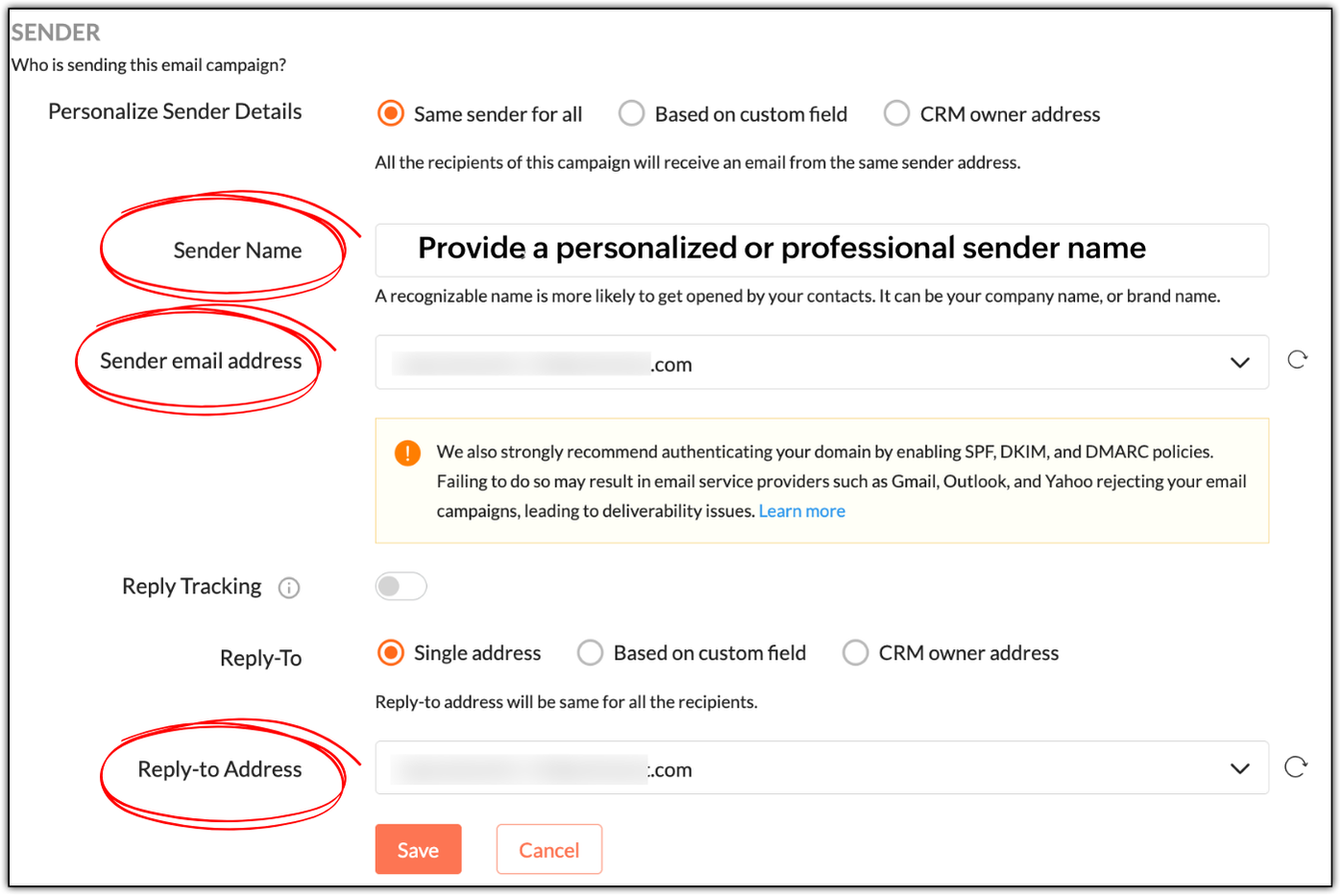


While "Sender Name" is not a mandatory field, it's best to specify a personalized or professional sender name, as it helps build trust. In Patricia's example, she can use:
  • Patricia as a personable variant
  • Patricia | Zylker Labs for a mixture of personableness and professionalism
  • Zylker Labs for a simple, professional sender name

Not having a sender name will put off your contacts; they won't be tempted to open your emails.

NotesNote: Zoho Campaigns automatically displays your sender address as the sender name if its left empty. 

If you use no-reply email addresses as your sender and reply-to addresses, you're telling your contacts not to communicate with you, which is a red flag. Instead use something like patricia@zylkerlabs.com, support@zylkerlabs.com, or help@zylkerlabs.com as your sender address. The same applies to your reply-to address, but if you wish to track the replies in a separate inbox, you can use a different address like mail-to@zylkerlabs.com or team@zylkerlabs.com.

Get consent

Let's say Julie has built a signup form using Zoho Campaigns and embedded it in her website (https://zylkerfashions.com) to attract customers. Many customers have signed up via the form to receive communications from her. Julie is excited and starts sending them campaigns. Soon, she realizes that half of these customers either marked her campaigns as spam, didn't reply, or unsubscribed—and that some campaigns didn't get delivered at all. Naturally, Julie is disappointed and frustrated, as she doesn't understand what went wrong.

Upon checking, Julie realizes that she didn't follow double opt-in to get consent from her customers. While you may assume that because people have signed up via your website, that means they're ready to receive campaigns—we strongly advise that you always confirm with them once.

Go to Settings > Manage Opt-in to enable double opt-in in Zoho Campaigns.


As soon as your contacts sign up via a signup form, Zoho Campaigns will automatically send a confirmation email that asks them to confirm their email address. Once they've confirmed, they'll be added as contacts in Zoho Campaigns. This is done to ensure that:
  • Your contacts are genuinely interested in receiving communications.
  • If they've specified an incorrect email during sign-up, the double opt-in email won't reach them, so they won't get added to Zoho Campaigns.
  • You can avoid unnecessary unsubscribes, spam, and abuse complaints.
  • Your mailing list remains clean, so you don't send campaigns to invalid email addresses, which can negatively affect your email deliverability.
 

Warm up your sender domain 

If you're starting out or haven't sent emails for quite some time, your sender domain is new or dormant—which means you have a cold domain.

Let's say you've imported 10,000 new contacts, and in your eagerness to start your marketing journey, you've sent campaigns to all of them at once—something called as an email blast. You should avoid this, because you can trigger the spam filters of email clients like Gmail, Yahoo, and Outlook, which not only leads to your campaigns being marked as spam, but also to rejection.

Sending from a cold domain affects your email deliverability negatively. Your domain can ultimately get blacklisted due to poor reputation, as well, which means you'll lose out on the opportunity to do business.

Hence, it's vital to warm up your domain by sending your campaigns in equal or incremental batches. For example, you can send 1,000 campaigns per day for 10 days or increase the number each day number from 1,000 to 1,250 to 1,500, and so on.

We've explored essential techniques to boost your email open rates, from crafting smarter pre-headers to warming up your sender domain for better deliverability. Apply these practices consistently to build trust and achieve long-term campaign success.

In two weeks' time, you'll be reading the final part of this series.

Happy marketing!

Kind regards,
Sai Prashanth
User Education
Zoho Campaigns


      Zoho Campaigns Resources


        • Desk Community Learning Series


        • Digest


        • Functions


        • Meetups


        • Kbase


        • Resources


        • Glossary


        • Desk Marketplace


        • MVP Corner


        • Word of the Day


        • Ask the Experts


          • Sticky Posts

          • Marketer's Space: Proven tips to improve open rates – Part II

            Hello Marketers! Welcome back to another post in Marketer's Space! We're continuing from where we left off a fortnight ago. We ended the previous post discussing the subject line, and we'll continue from there. Let's dive right in. Pre-header Pre-header
          • Tip of the week 03 - Sending emails in batches

            Today's marketers not only want their email marketing to be efficient, but also smart. For an email campaign, you may think you have all the essential elements for lead conversion—a big mailing list, an attractive template design, and the most-engaging message content, but after hitting the ‘send’ button, you may not get the expected conversions. Wondering why? Here’s one of the major reasons. Many marketers miss out on sending the email campaign the right way. Did you know that you should not be
          • Tip of the week 04 - Know about your recipients' 'prime open time.'

            In today's market, the importance of customer behavior is astounding, with a vast amount of research and resources going into finding how customers make decisions. The process of persuading your customers to open your email and click on your call-to-action becomes easy when you understand the psychology behind their behavioral traits. Time to turn into a psychologist! Let's get to the basics—you want your emails to resonate well with your recipients. So, what's the primary thing involved here? It's
          • Zoho Campaigns Expert Diaries on SoundCloud, Spotify, Apple Podcasts, and YouTube

            Hi email champs,  As email marketers, we find great lessons in each other's works—be it the subject lines that worked good, the design that was received well, or the CTA that had the maximum clicks. Email marketing encompasses a wide variety of topics spanning everything from creation and design to development and deliverability.  Here's when we from the Zoho Campaigns team found the need to build an email marketing community comprising of seasoned marketers and email geeks who can help each other
          • Email Deliverability Tip #3: Seal the deal with the preheader

            In the last post, we learned about the subject line. Today we'll be learning about the preheader. A preheader is the short text that follows the subject line in an email. The preheader is designed to hint at what your email message is all about. A good preheader should act as a second subject line and convince your contacts to open the email. Now, let's learn the best way to craft a preheader. Your subject line and preheader should work together and accurately convey the gist of your email. Keep

          Zoho CRM Plus Resources

            Zoho Books Resources


              Zoho Subscriptions Resources

                Zoho Projects Resources


                  Zoho Sprints Resources


                    Zoho Orchestly Resources


                      Zoho Creator Resources


                        Zoho WorkDrive Resources


                          Zoho CRM Resources

                          • CRM Community Learning Series

                            CRM Community Learning Series


                          • Tips

                            Tips

                          • Functions

                            Functions

                          • Meetups

                            Meetups

                          • Kbase

                            Kbase

                          • Resources

                            Resources

                          • Digest

                            Digest

                          • CRM Marketplace

                            CRM Marketplace

                          • MVP Corner

                            MVP Corner


                            Zoho Writer Writer

                            Get Started. Write Away!

                            Writer is a powerful online word processor, designed for collaborative work.

                              Zoho CRM コンテンツ


                                ご検討中の方

                                  • Recent Topics

                                  • Zoho Writer adds conditional logic and AI assistance to formulas: A step toward dynamic document automation

                                    Hi users, We are excited to announce new formula enhancements in Zoho Writer. This includes: New string formulas: Use 12 new string functions to dynamically transform and manipulate text in documents and automation templates. Conditional formulas: Configure
                                  • What's New in Zoho Billing | June 2026

                                    Hello users! June brings a new set of updates to Zoho Billing designed to strengthen how you manage subscriptions, customise your records, and handle expense documentation. This month's highlights include a new one-time addon quoting workflow for subscriptions,
                                  • [Zoho Writer webinar] Driving productivity through document automation

                                    Live webinar on July 9, 2026 | Time: 2 PM IST | 2 PM EST Hi Zoho Writer users, Creating, reviewing, approving, and distributing business documents manually can slow teams down and introduce errors. Join our live webinar to learn how Zoho Writer helps
                                  • Free Webinar Alert! Zoho Workplace + Zoho Billing: Align Rev-ops and collaboration for greater efficiency

                                    Hello Zoho Community! Want to make your billing process more connected and efficient? Join our upcoming webinar to see how Zoho Workplace and Zoho Billing work together to streamline your day-to-day operations. In this session, we'll show you how to manage
                                  • Canvas View: Add font family selection (incl. Google Fonts / Hebrew & RTL fonts)

                                    Hi Zoho CRM team, The Canvas design suite (List View, Tile View, Table View and Record Detail) currently allows customizing font weight, size, color, alignment and case - but there is no option to choose the font family. All text is rendered in the built-in
                                  • Introducing Spotlight Forms

                                    Hey form builders! If someone opens your form, sees the wall of fields ahead, and quietly closes the tab. It may not be because the questions were hard. It could be because the experience felt like too much. Which is why we have now introduced a new form
                                  • 【無料/オンライン】7/22開催|Zoho ワークアウト|ユーザー同士で学び合うオンラインもくもく会

                                    ユーザーの皆さま、こんにちは。 コミュニティグループの中野です。 7月開催の「Zoho ワークアウト」のご案内です。 本イベントは、Zohoユーザー同士で交流しながら、 設定・検証・運用改善を進めるオンラインの「もくもく会」です。 「設定を進めたいけれど、一人だと手が止まってしまう」 「他社がどう活用しているのか知りたい」 「同じ課題を抱える仲間と話したい」 そんな方にぴったりのイベントです。 ▶︎ 参加登録はこちら(無料 ) URL:https://us02web.zoom.us/meeting/register/t7lA28wlQceRW6sZpeFEhQ
                                  • DYK 9: Dependent Layout Rules

                                    Did you know that you can configure dependent fields in Task and Issue Layouts? In a project, tasks and issues vary in nature and so do the fields needed for each. Displaying relevant fields and values keeps the layout organised and ensures necessary
                                  • Does anyone else wish you could download Mail Merge quotations from the Zoho CRM mobile app?

                                    Is it just me, or has anyone else run into this? I’m in sales, so I’m rarely at my desk. I’m usually in meetings, visiting clients, or travelling. One thing that genuinely frustrates me is that if a client asks me for a quotation, I can’t generate or
                                  • Introducing parent-child ticketing in Zoho Desk [Early access]

                                    Hello Zoho Desk users! We have introduced the parent-child ticketing system to help customer service teams ensure efficient resolution of issues involving multiple, related tickets. You can now combine repetitive and interconnected tickets into parent-child
                                  • Text on Zoho Sign confirmation dialouge is very small compared to text used everywhere else on Zoho Sign.

                                    I've reported multiple times through Zoho's support email that the text on this notification is very small in contrast to all the other text on the Zoho Sign app. I think it's a bug and it just needs the font size to be increased. It's very minor but
                                  • Feature Request: Dynamic Date Filter Criteria

                                    Please implement the ability to select a dynamic date for all Filter Criteria. This would be helpful to create views that don't constantly need to be updated (example custom date field on an account) Examples: - Today - Tomorrow - This week - This Month
                                  • SalesIQ's Summer '26 Release: For The Moments That Matter

                                    Every customer journey is made up of moments. The moment someone discovers your business. The moment they need help. The moment you decide to reach out. The moment a simple chat turns into something more. And the moments that continue long after the conversation
                                  • There is no link between Deals and Projects in Analytics

                                    Hello there, I am trying to link Deals with Projects in a Pivot view on Zoho Analytics. However, there is no relationship, yet on CRM there is a relationship. As you can see below, there is no link between them: However, on CRM, if you go into a Deal,
                                  • How to Access Zoho Mail Messages to Microsoft Outlook? - Zoho Mail Converter

                                    Zoho Mail is the free email hosting service which provide mailing with CRM service, so if you are one of them who is trying to import Zoho Mail emails to Outlook then keep reading. In this article we are going to provide accurate solution that will help you to import Zoho Mail emails to Outlook format in Batch. Zoho Mail service provide option to export mailbox in Zip format. So first – Export Zoho Mail emails in Zip format later use Zoho Mail to Outlook Converter to migrate Zoho emails into PST
                                  • Zoho Cliq REST APIs v3 : A complete guide to what's changed and why 

                                    APIs are not just consumed by a developer with numerous automations and a series of open browser tabs. They are parsed by LLMs, fed into agent pipelines, and auto-completed by AI coding assistants that have zero tolerance for inconsistency. A verb tucked
                                  • Feature Request: Include Creator-applicable Deluge updates in the Creator Release Notes

                                    I'd like to put forward a suggestion about how Deluge updates are surfaced to Zoho Creator developers, and I'm hoping the Creator team will consider it. Zoho Creator is built on Deluge. Every workflow, custom function, validation and schedule we write
                                  • Zoho CRM Reports Module on Mobil App

                                    I have the mobile app and the reports module doesn't appear in the sidebar for some reason. I saw a Youtube video where the user had the Reports module on mobile. Is there a setting to show it on mobile? Thanks.
                                  • Sigma function call hangs forever from Desk widget — app_install_id/encapiKey are null

                                    Calling ZOHODESK.request() from the widget to invoke a Sigma DRE function URL hangs forever (never resolves, never rejects, no error) until client timeout. Tried with merge fields app_install_id={{sigmaInstallId}}/{{installationId}} and encapiKey={{enCapApiKey}}
                                  • Workdrive on Android - Gallery Photo Backups

                                    Hello, Is there any way of backing up the photos on my android phone directly to a specific folder on Workdrive? Assuming i have the workdrive app installed on the phone in question. Emma
                                  • Auto sync Photo storage

                                    Hello I am new to Zoho Workdrive and was wondering if the is a way of automatically syncing photos on my Android phone to my workdrive as want to move away from Google? Thanks
                                  • Postcode problems

                                    So we were very pleased to see we could limit shipping with postcodes. Brilliant. Unfortunately we have discovered It does not seem fit for purpose. In the UK we write postcodes in various ways Examples BH217NL BH21 7NL Bh217nl bh217NL and many more ways
                                  • Getting Notifications but unable to load email

                                    I am getting notifications through the web browser and my phone app that i am receiving emails, but i can not open the email to view. Below is the screen shot of the console panel.
                                  • WORKFLOW ISSUE: Zoho Finance Extension

                                    Workflows are no longer triggering in my extension. This is true for the testing environment and 5 other organizations it is installed on. There are no conditions set for the workflow, and this is true for both create and delete related actions. Workflows
                                  • Certain items certain shipping

                                    Me again it would be helpful to have different shipping for different categories. Our example are salt. Delivery is free but have a minimum delivery. Pickup is cheaper so it has its own category- pickup.
                                  • Zia Agents looks promising, but I still cannot deploy my first agent or connect WhatsApp after weeks of support tickets

                                    Hi Everyone, I am posting here because I am stuck and need practical help from someone who has successfully deployed a Zia Agent with WhatsApp. Zia Agents looks like a very promising product. I have watched the platform expand quickly, and I have noticed
                                  • Handling Hard Bounce Contacts with Active Phone-Based Users (WhatsApp Use Case)

                                    In Zoho Marketing Automation, when a contact is marked as “Hard Bounce”, we noticed that the contact stops receiving updates from CRM fields and may be excluded from automations. Is this expected behavior? In our case, the primary identifier and verified
                                  • Integration with existing websites

                                    So most companies have existing websites. They want to integrate an online store with their existing site. How is that possible in zoho commerce please.
                                  • Subject: Message bar - reducing height and adding scrolling/rotating messages

                                    Hello Zoho Commerce Support, I am building my store (Moksha Collections) and have the Message Bar enabled and positioned at the top. I have two questions: 1. Height: Is there a native setting to reduce the height (thickness) of the message bar? It currently
                                  • Moving over to commerce but shipping

                                    In our company we love zoho onebut currently use ECWID for our online shop which is annoying as it requires double entering invoices. our requirements are that we do local deliveries limited by postcode -these are free. we also allow pickup they get a
                                  • Website not properly connecting with Zoho Creator app portal (embed & data sync issue)

                                    Hello Zoho Community, I’m currently facing an issue while trying to connect my external website with a Zoho Creator app portal. I have a tool-based website ( https://mygardencalculator.com/ ) where users interact with calculators and dynamic content.
                                  • Show current inventory in the item list table for a composite item

                                    Hello. We have many products that are composite items. Quickly determining inventory levels of individual items that make up a composite item would be beneficial. IDEA: Add columns"current inventory" and "available inventory" to the item table of the
                                  • Increase the "Maximum Saved Entries per User" Options Limit

                                    Hi, You can create lots of saved entries, yet the Limit when you apply one is 25, we may often expect 32 to be in draft, and therefore want to enforce that, can we increase the limit of this field from 25 to 100 (As you can just turn it off and have more
                                  • When Zoho Tables Beta will be open to EU data center

                                    Hello all, We in EU are looking at you all using and testing and are getting jealous :) When we will be able to get into the beta also? We don't mind testing and playing with beta software. Thank you!
                                  • Deluge Editor Code Reformatting and Dark Mode Support in Zoho Creator

                                    Hello Zoho Creator Support Team, I’m enjoying Zoho Creator but facing an issue with the Deluge editor—it's automatically reformatting my code (removing spaces, changing brace placement). Is there a way to turn this off? Also, is there any option to enable
                                  • Add @Mention Notifications in Zoho Cliq for Zoho Project Mentions

                                    Hello Zoho Projects Team, We hope you are doing well. We would like to submit a feature request regarding "Projects Bot" Cliq bot notifications for @mentions inside Zoho Projects comments (Tasks and Issues). Current Behavior: At the moment, when someone
                                  • Canvases Auto-Skewing/Adding Scroll Bars When They Were Not There Prior

                                    Is anyone else noticing rendering issues in their canvases today? It seems to be mainly icons which now have scroll bars added which makes them all look off, though some fields seemed to revert to squished length as well. Were the icons replaced with
                                  • How to see exact clicked links in CRM from Zoho Campaigns ?

                                    Hi, I'm wondering how I can see the clicked links from an email sent from Campaigns when I'm in a campaign in the CRM module. I can see the number of clicks but I need the sales team to be able to see which link has been clicked by a prospect or contact.
                                  • Allow native Webhooks to authenticate via Connections

                                    Allow native Webhooks to authenticate via Connections (Basic Auth) instead of plaintext custom headers Summary Please allow native Webhooks (Workflow Rules > Instant Actions > Webhooks) to authenticate against the destination endpoint using the existing
                                  • Improve your booking page visibility with SEO settings

                                    We're excited to introduce SEO settings, helping you optimize how your booking pages appear in search engines and reach more customers organically. SEO settings are available for all booking page types: Business, Workspace, Event Type, and User. With
                                  • Next Page