Native QuickBooks integration for Zoho CRM: Connecting sales and finance

Native QuickBooks integration for Zoho CRM: Connecting sales and finance

Greetings,

I hope all of you are doing well. We're excited to announce Zoho CRM's integration with QuickBooks Web, which is designed to synchronize your CRM data with your QuickBooks accounting records and bridge the gap between sales and finance.


This integration addresses a challenge many organizations face today: Every customer conversation—just like every closed deal—eventually finds its way into finance. But in many organizations, that journey isn't seamless.

Sales teams spend their days in Zoho CRM, moving deals forward and building relationships. Finance teams work out of accounting systems, where they track invoices, payments, and revenue. Data is forced to move in between these systems via spreadsheet imports, manual re-entry, or third-party connectors.

Over time, this disconnect leads to:

  • Duplicate records across sales and finance systems

  • Sync delays between CRM and accounting data

  • Limited visibility into invoice and payment status for sales teams

  • Increased time spent reconciling data instead of focusing on customers

Today, we're taking a meaningful step toward changing that.

With Zoho CRM's native integration with QuickBooks Online, sales and finance teams are no longer separated by systems and workarounds. This integration is built to connect both teams through a single, continuous flow, where customer data, financial records, and workflows move together.

What's new with the native Zoho CRM and QuickBooks integration

With this integration, we focused on making data sync and automation feel seamless between Zoho CRM and QuickBooks Online, while fully using CRM's native modules. The idea was simple: Everything should work where teams already spend their time.

We've built in flexible data synchronization so information stays consistent without extra effort. Core record modules like Contacts, Accounts, Vendors, and Products sync both ways, while key financial document modules like Estimates, Invoices, and Purchase Orders flow one way from QuickBooks into Zoho CRM. This keeps customer and product data aligned across both systems, without confusion about what lives where.

Another big priority for us was visibility. Sales teams can now view QuickBooks financial documents directly in Zoho CRM, with all relevant details clearly available on each CRM record's detail page. When necessary, a QuickBooks Record Link is also provided, which allows users to open and view the corresponding record directly in QuickBooks.


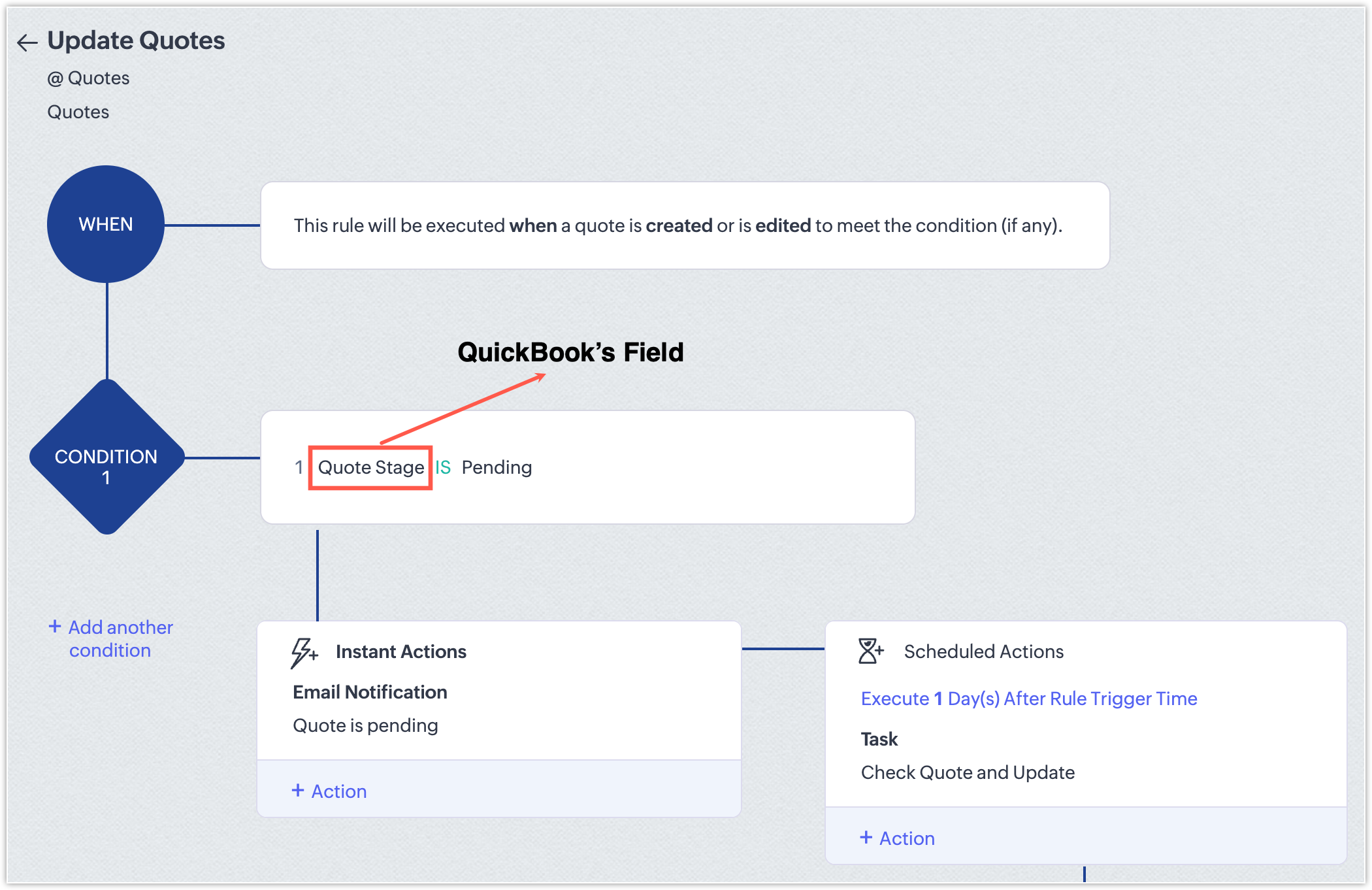
Also, because this is a native CRM integration, all synced fields are available across workflows, blueprints, reports, and notifications. That means teams can build automation around real financial events, like invoice status changes, estimate acceptance, or overdue payments, and manage sales and finance processes end to end—without ever leaving CRM.

Now that we've covered what the integration enables, let's take a quick look at how it works in practice.

Connect Zoho CRM with QuickBooks and configure your sync

Start by installing the QuickBooks integration from the Zoho CRM Marketplace and authorizing your QuickBooks account.

During installation:

  1. Go to Marketplace > Integrations > QuickBooks > Install.

  2. Authorize your QuickBooks account; if you have multiple QuickBooks companies, select the one you want to connect

  3. Choose the CRM modules you want to sync.


Next, configure how data flows between the two systems:

  1. Set the sync direction:

    1. Two-way sync: Contacts, Accounts, Vendors, Products

    2. One-way sync (QuickBooks > CRM): Estimates, Invoices, Purchase Orders

  2. Map fields between QuickBooks and Zoho CRM.

  3. Create new CRM fields directly from the mapping screen if required.


Outcome: Zoho CRM is connected to the right QuickBooks company, with full control over which data syncs and how it appears in CRM.

Create, track, and automate financial records from CRM

Once the integration is in place, sales teams can start working with QuickBooks data directly from Zoho CRM.

When a user clicks Create Estimate / Create Invoice / Create Purchase Order:

  • They're redirected to QuickBooks.

  • The record is created and saved in QuickBooks.

  • It automatically syncs back to Zoho CRM and appears as read-only (locked).


Any changes must be made directly in QuickBooks. For example, if you update the quote status in QuickBooks, the change will automatically be reflected in Zoho CRM.


Outcome: Zoho CRM becomes the central hub for sales operations and financial visibility, allowing teams to act on real-time data without switching systems.

What this means for sales teams

Sales teams no longer need to toggle between multiple systems to track post-deal activity.

From within Zoho CRM, they can now:

  • View the status of invoices and estimates in real time.

  • Create financial documents directly from CRM.

  • Trigger follow-ups automatically based on financial events.
  • Generate reports that combine pipeline and billing information.

With this integration, CRM evolves beyond a simple pipeline tracker; it becomes a central hub for revenue operations that gives teams full visibility and control over sales and finance workflows.

NotesPoints to be noted
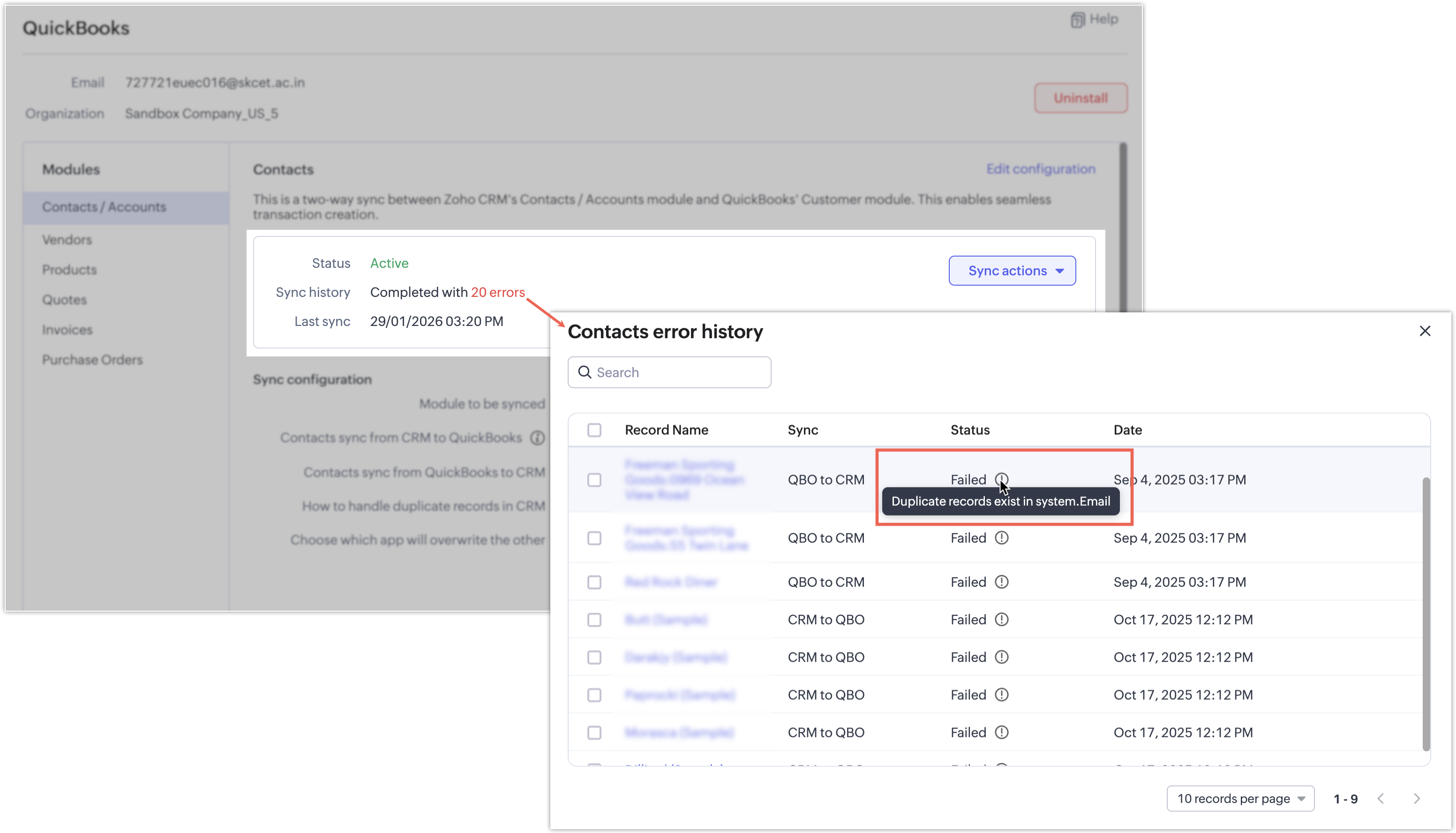
  • If a synchronization attempt fails, the record won't be synced and a clear error message will indicate the reason for the failure.
    Notes

InfoAvailability and pricing
  • Editions: Supported for Enterprise and above editions of Zoho CRM.

  • Pricing: The integration is currently available at no additional cost. Pricing may be introduced in the future.

That's all for this enhancement! We hope this integration helps you manage your sales and finance operations more efficiently. Please give it a try and share your feedback in the comments below.

Thanks and have a great day!

Nizamuddin

Alert
P.S: We're releasing this integration in a phased manner and it's currently available for users across the US, AU, CN, JP, and CA data centers.


      Zoho Campaigns Resources


        • Desk Community Learning Series


        • Digest


        • Functions


        • Meetups


        • Kbase


        • Resources


        • Glossary


        • Desk Marketplace


        • MVP Corner


        • Word of the Day


        • Ask the Experts


          Zoho CRM Plus Resources

            Zoho Books Resources


              Zoho Subscriptions Resources

                Zoho Projects Resources


                  Zoho Sprints Resources


                    Zoho Orchestly Resources


                      Zoho Creator Resources


                        Zoho WorkDrive Resources


                          Zoho CRM Resources

                          • CRM Community Learning Series

                            CRM Community Learning Series


                          • Tips

                            Tips

                          • Functions

                            Functions

                          • Meetups

                            Meetups

                          • Kbase

                            Kbase

                          • Resources

                            Resources

                          • Digest

                            Digest

                          • CRM Marketplace

                            CRM Marketplace

                          • MVP Corner

                            MVP Corner


                            Zoho Writer Writer

                            Get Started. Write Away!

                            Writer is a powerful online word processor, designed for collaborative work.

                              Zoho CRM コンテンツ


                                ご検討中の方

                                  • Recent Topics

                                  • Re-Apply SLA When Ticket Reopened from Closed Status?

                                    If you have an SLA applied, timers are deactivated when going to "On Hold" status type and reactivated when going back to an Open status type. What we discovered is when a customer replies to a closed case and it reopens, the SLA is not applied and timers
                                  • Zoho Books - France

                                    L’équipe de Zoho France reçoit régulièrement des questions sur la conformité de ses applications de finances (Zoho Books/ Zoho Invoice) pour le marché français. Voici quelques points pour clarifier la question : Zoho Books est un logiciel de comptabilité
                                  • 404 error at checkout

                                    Our customers are getting a 404 error at checkout. Anyone else with the same problem?
                                  • Let's bring Manufacturing Resource Planning (MRP), Material Requirement Planning (MRP), and Production Planning/Management module / feature in Zohobooks

                                    Let's bring Manufacturing Resource Planning (MRP), Material Requirement Planning (MRP), and Production Planning/Management module / feature in Zohobooks
                                  • Will I see emails sent via campaigns in CRM?

                                    It would be useful for people to be able to see emails sent via campagins in Zoho CRM is that possible?
                                  • Zoho Forms - Failed CRM Sync Improvement

                                    I'd like to suggest an enhancement to the Zoho Forms and Zoho CRM integration. Currently, once a form entry has been submitted, there is no simple way to push that individual entry to CRM again if needed. Before anyone mentions it, I am aware that the
                                  • Problem with the blueprint flow.

                                    Scenario: 3 departments in a single environment: A-B-C agents from department 1 D-E-F agents from department 2 G-H agents from department 3 Since we've been using Zohodesk (2023), agents can assign tickets to the correct department using the blueprint
                                  • Zoho ZUGs Meetups 2026 en España: Descubriendo nuevas posibilidades con Zoho

                                    ¡Hola, Español Zoho Community! Hemos celebrado una nueva edición de los Zoho User Groups (ZUGs) en España (Madrid, Barcelona & Valencia), una excelente oportunidad para reunirnos, formarnos y descubrir nuevas formas de sacar más partido a nuestras herramientas
                                  • WhatsApp Calling Integration via Zoho Desk

                                    Dear Zoho Desk Team, I would like to request a feature that allows users to call WhatsApp numbers directly via Zoho Desk. This integration would enable sending and receiving calls to and from WhatsApp numbers over the internet, without the need for traditional
                                  • What is MCP and How Does It Connect to Zoho Invoice?

                                    If you've ever wished you could just tell your invoicing software what to do, without clicking through menus, pulling up reports manually, or switching tabs every five minutes, that's exactly what the Zoho MCP server is built for. MCP stands for Model
                                  • Zoho CRM upload files error

                                    Since today, we have been experiencing issues with uploading photos to opportunities. The message indicates that the storage is full, but as far as I can see, there is still plenty of space available. Could there be an issue or a bug?
                                  • DYK 7 - Set dependency from Gantt and List view

                                    Did you know task dependencies in Zoho Projects can be managed across different task views? In a project, multiple teams work together towards the same goal but team members prefer accessing data with different perspectives depending on their responsibilities.
                                  • Goods In Transit

                                    Hi I was wondering if anyone had any tips or work-around to show goods in transit as a liability? We raise a PO with our supplier in China and when the goods are shipped and are invoiced, hence they are a liability of the business. However I can't convert
                                  • Accounts Payable and receivable

                                    I'm currently creating my accounts and noticed that I cannot create any more accounts payable or receivable. Is there any way to create more of this accounts and associate them to the default one available?
                                  • How to display Pick List values with vertical separation in Canvas

                                    I have a Multi-Select Pick List whose values I would like displayed vertically. So far, I have only been able to figure out how to adjust the width and other sizing of the field itself or even how to wrap the values to the next line below. I am trying
                                  • Ability to Use Both AND and OR When Creating Rules (Advanced Conditions)

                                    I'd like to be able to use more complicated logic when setting up rules. E.g. in Zoho Mail, I can choose "Advanced conditions (AND/OR) to create a rule that can be applied to multiple subject lines from the same sender. But in Zoho TeamInbox, I will have
                                  • Introducing a knowledge management and training software in Zoho Projects Plus

                                    Keeping your workforce updated on emerging technology trends is essential to stay on top of the game. While project management software focuses on planning, execution, and project tracking, incorporating a learning management solution within project management
                                  • Problem with UTM Parameters: Zoho Forms - Zoho Desk Integration

                                    Hi Zoho Support Team, I want to automatically capture UTM Parameters from my website URLs and pass it from Zoho Forms into Zoho Desk. I have activated the UTM tracking feature. I've integrated the UTM Tracking code in my website footer on all pages. I've
                                  • #13 Fix Mistakes Without Breaking Your Records

                                    A customer purchases 100 custom-printed invitations for an upcoming event. A few days after delivery, they call to say that some invitations were damaged and others need to be reprinted. They request a return. The customer isn't asking for a completely
                                  • Zoho Directory : transformez vos données d’identité en décisions de sécurité

                                    Que sont les rapports d’identité dans Zoho Directory et pourquoi sont-ils importants? À mesure que les organisations se développent, la gestion des identités devient plus complexe. Les informations existent, mais elles sont souvent réparties entre plusieurs
                                  • How to use Zoho Billing info in a workflow

                                    We have Zoho Billing and CRM sync'd and the Billing info appears as expected for each Account in Zoho CRM, including subscription status, plan type etc. But how can we use this in a workflow? Thanks Dylan
                                  • Why can't we choose Fixed Asset account for Purchased Items? (eTims issue?)

                                    Hello, When the company purchase items not for sale and not supposed to be in the inventory stock, like equipment for operational use, there is no way to access the Fixed Asset accounts in the drop down list. Is that an eTims limitation again? Or something
                                  • Auto-approval for shared key access not working for new users

                                    Hello, I'm an admin of a Zoho Vault organization (34 active users, ZOHO identity provider). I have the "Auto-approval for shared key access" setting enabled in Settings → Fine-Grained Controls → Global, but it does not work as expected. The problem: When
                                  • Zoho Analytics UI Bug

                                    Hello, all, The Aggregate Formulas in Zoho Analytics' list of fields have a 3-dot menu: If the formula has a long name, the name is not fully visible in the list, and a 3-dot menu is not accessible from it: This is not convenient, especially when the
                                  • Canvases Auto-Skewing/Adding Scroll Bars When They Were Not There Prior

                                    Is anyone else noticing rendering issues in their canvases today? It seems to be mainly icons which now have scroll bars added which makes them all look off, though some fields seemed to revert to squished length as well. Were the icons replaced with
                                  • Marketing Tip #37: Reduce purchase doubts with better product images

                                    When customers shop online, they cannot pick up, turn around, or inspect a product in person. That is why your product images need to do more of the selling. Two simple upgrades can make a big difference: Use zoom-friendly images so customers can look
                                  • Why don't Zia agents support file uploads?

                                    I am trying to build a Zia Agent that allows uploading of a PDF file and uses the GLM5 model to process it and extract information. But agents.zoho.com has no way to enable file uploads on the agent. Additionally, GLM5 based agents keep outputting their
                                  • Zia Agent built in ChatKit UI does not render markdown

                                    Hi, You have a major shortcoming in the Zia Agent UI. The test UI that is embedded in agents.zoho.com allows you to test the agent has full support for rendering markdown, but your ChatKit UI does not have support for rendering markdown. If I embed it
                                  • Cliq iOS can't see shared screen

                                    Hello, I had this morning a video call with a colleague. She is using Cliq Desktop MacOS and wanted to share her screen with me. I'm on iPad. I noticed, while she shared her screen, I could only see her video, but not the shared screen... Does Cliq iOS is able to display shared screen, or is it somewhere else to be found ? Regards
                                  • Zoho Books | Product updates | June 2026

                                    Hello users, Welcome to this month's roundup of what's new in Zoho Books! We have an exciting line-up this time. The highlight is the launch of the all-new France Edition with full ISCA compliance. We're also introducing features such as Layout Rules
                                  • Add spaces to input format

                                    In Zoho Inovices, I am trying to do a custom input format for a custom field. I have tried a few variations, but this is my most recent: ^[a-z][A-Z][0-9][,][-][_][:][ ]$ In this field, I will be entering different alphanumeric information, depending on
                                  • Enhancement in Zoho CRM: Introducing New Return Types for String Fields Based on Character Length

                                    Dear Customers, We hope you’re well! In Zoho CRM, formula field with string return type is used in various scenarios where text is involved like concatenating customers’ first and last names, trimming characters from texts, performing find and replace
                                  • GLM 5 not available

                                    Hello, I am trying to setup a Zia Agent using agents.zoho.com. The settings says that GLM5 is among the list of free zoho hosted models available. However, when I try to setup an agent and pick a model from the list only GLM 4.7 Flash is available. How
                                  • Supervisor Rules --> Custom Function

                                    Hello, currently I can't add a custom function to a supervise rule. Is there a reason for this? Background: We have BluePrint managed tickets and actually we have a Supervise rule which should set the ticket to "closed" after 168 hours since the last
                                  • Vault Chrome Extension Asks for Master Password every single time

                                    Is this supposed to be a feature, or is this a bug?  My assumption is that it's a bug, because every time I click on the Extension, there is a red exclamation mark/notification on the Zoho Vault extension.  Is the idea with the Extension that I have to
                                  • What's New in Zoho Inventory | April & May 2026

                                    Hello users, We're excited to roll out the latest Zoho Inventory updates for April and May 2026. These enhancements are designed to make your daily operations smoother and more efficient, from advanced inventory management and flexible pricing to automated
                                  • "Make online" not clearing previously downloaded files from disk

                                    I downloaded a large folder via "Make offline" so I could copy it to another location. This worked. When I was done I hoped that "Make online" would restore it to the previous state where those files are not stored locally in TrueSync. This did not work—Finder
                                  • Permission Denied for Worklogs URL

                                    We're attempting to pull worklogs data from service desk plus and when using the below URL we are met with a message stating we do not have permission. https://sdpondemand.manageengine.com/api/v3/requests/xxxxxx/worklogs/ We used SDPOnDemand.requests.ALL
                                  • Anyone in Australia using Zoho Books AND has their account with NAB?

                                    Hi I have an account with both NAB and Suncorp. Suncorp transaction come in the next day however NAB transactions take 4-5 business days to appear. eg: A deposit made today in my Suncorp will be imported into Zoho tomorrow. A deposit made today to the NAB account will be imported maybe Saturday (Friday overnight). I have contacted both Zoho and NAB but noone seems to know why. I was just wondering if anyone else in Australia uses NAB and has this issue (or doesn't) maybe we could compare notes and
                                  • Please Make Zoho CRM Cadences Flexible: Allow Inserting and Reordering Follow-Up Steps

                                    Sales processes are not static. We test, learn, and adapt as customers respond differently than expected. Right now, Zoho Cadences do not support inserting a new step between existing follow-ups or changing the type of an existing primary step. If I realize
                                  • Next Page