New in Cadences: WhatsApp follow-ups, upgraded limits, and options for add-ons

New in Cadences: WhatsApp follow-ups, upgraded limits, and options for add-ons

Hello everyone,

We're rolling out two key updates to help you engage better and scale smarter with Cadences in Zoho CRM.

Reach customers on WhatsApp, directly from Cadences  

Previously, Cadences have enabled you to automate follow-ups through emails, calls, and tasks. You can now add WhatsApp messages as follow-ups inside any Cadence, alongside your existing emails, calls, and tasks.


Say you run a retail brand promoting festive discounts for new customers. You can now create a Cadence that starts with a WhatsApp message to your new leads with this welcome offer; once they interact with the message, you can schedule a follow-up call for further offers and discount-related discussions. This multichannel approach increases your chances of engagement without extra effort.

WhatsApp follow-ups are supported for Leads and Contacts modules.

Here's how it works:

  • Add WhatsApp as a follow-up step when building your Cadence.

  • Choose a pre-approved WhatsApp template (for example: payment reminders, offers, feedback requests).

  • Schedule when the message should go out, just like you would with emails or calls.

  • Automatically move records to the next follow-up based on whether the WhatsApp message was delivered or failed.

You can also use WhatsApp responses in reports, filters, and unenrollment conditions for better visibility and smarter automation.

Increased Cadence limits and add-ons

We've also made changes related to Cadence limits:

  • We've raised the number of Cadences you can create and keep active per module—so you can build and manage more Cadences as required without worrying about limits.

  • We've also done away with individual limits for each follow-up type in a Cadence and introduced new combined limits for all follow-up types. So whether it's an email, call, task, or the all-new WhatsApp follow-up, you'll have the freedom to choose how many of each you want to keep in your Cadence.
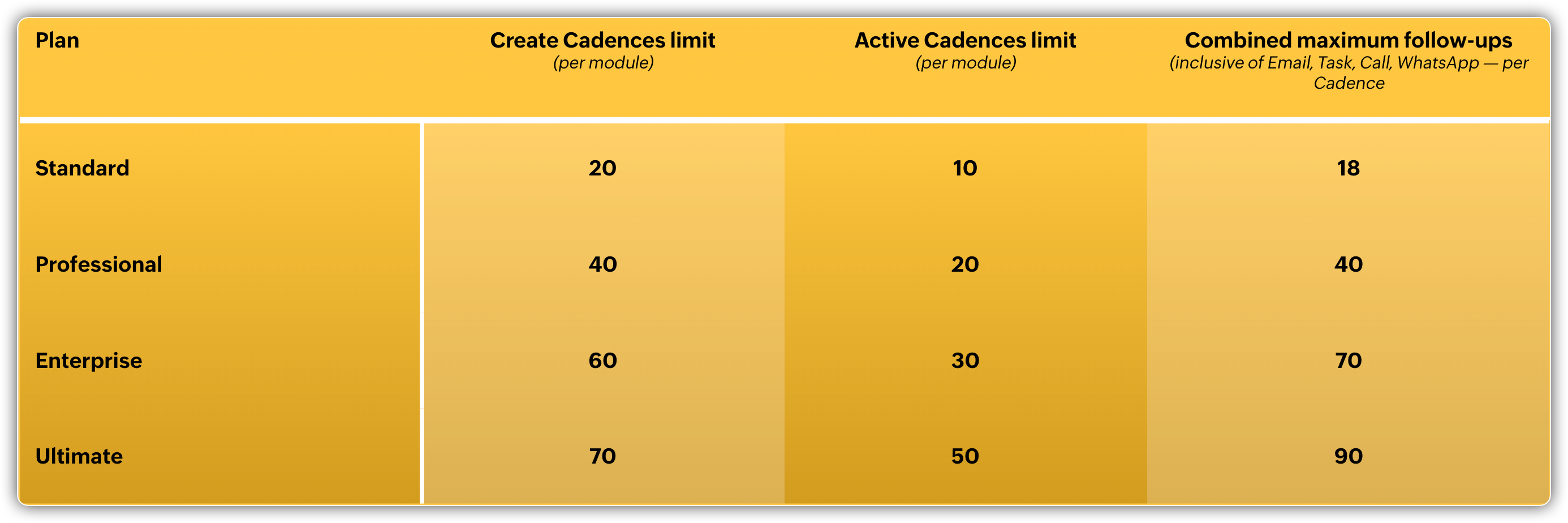

Alongside these increased limits, we're also introducing an add-on option to give you more flexibility as your needs grow—without changing your pay plan. You can extend usage only when you need to and pay only for what you use.

With this update, you can increase your active Cadences limit to up to 70 per module, inclusive of what's already in your plan.

For example, in the Standard edition of Zoho CRM, by default you can create up to 20 Cadences per module and have 10 active Cadences at a time.

Now, let's say for your business requirements you run 30 Cadences simultaneously. In this case, you can buy 20 add-on limits. You'll now be able to have up to 30 active Cadences (10 base + 20 add-ons) and up to 40 Cadences created (20 base + 20 add-ons).

Your existing subscription and pricing remain unchanged; this add-on simply gives you room to scale without added complexity.

Changes related to Cadences permissions

We've also refined how permissions work in Cadences to give you clearer and more flexible access controls.

You can now grant standalone permissions to View and Manage Cadences without needing to enable the Manage Automation permission entirely. This means you can decide exactly who gets to view or manage Cadences while keeping automation permissions separate.


That's all for these enhancements. Please share your feedback in the comments below.

Alert

Release status
(Oct 8, 2025):
  • Support for WhatsApp notifications as follow-up in Cadences is currently available for all users across all DCs.

  • All the new limits mentioned and the options for add-on limits are currently in effect for all users across all DCs.

  • The new permission settings are now available for users in the JP, CN, AU, CASA, EU, and US DCs.


Thanks,

Nizamuddin


      Zoho Campaigns Resources


        • Desk Community Learning Series


        • Digest


        • Functions


        • Meetups


        • Kbase


        • Resources


        • Glossary


        • Desk Marketplace


        • MVP Corner


        • Word of the Day


        • Ask the Experts


          Zoho CRM Plus Resources

            Zoho Books Resources


              Zoho Subscriptions Resources

                Zoho Projects Resources


                  Zoho Sprints Resources


                    Zoho Orchestly Resources


                      Zoho Creator Resources


                        Zoho WorkDrive Resources


                          Zoho CRM Resources

                          • CRM Community Learning Series

                            CRM Community Learning Series


                          • Tips

                            Tips

                          • Functions

                            Functions

                          • Meetups

                            Meetups

                          • Kbase

                            Kbase

                          • Resources

                            Resources

                          • Digest

                            Digest

                          • CRM Marketplace

                            CRM Marketplace

                          • MVP Corner

                            MVP Corner


                            Zoho Writer Writer

                            Get Started. Write Away!

                            Writer is a powerful online word processor, designed for collaborative work.

                              Zoho CRM コンテンツ


                                ご検討中の方

                                  • Recent Topics

                                  • Trigger Zapier on Deluge Insert Into Function?

                                    Hello, To get around the limitation of not being able to trigger a Zapier Zap on Record Update(this would be extremely useful to be able to do btw), I have created a Deluge script to copy the data from Form A to a Trigger Form B using the Insert Into expression from a Custom Action button on a Report from Form A.  This action does not trigger the Zapier Zap whereas manually adding a record or duplicating an existing record does trigger the Zap. Is Insert Into not the same as a manual Add in the context
                                  • Can you inject JS in an HML+CSS+Deluge Page?

                                    I have an HTML + CSS + Deluge page and need just a little vanilla JS functionality. However, it seems like Zoho Creator does not allow that. I'm required to create a JS widget. Is this correct? If so: 1. Won't this quickly consume my API limit if there
                                  • Display Client Name in Zoho Creator Client Portal Dashboard

                                    Hello Zoho Creator Team, We hope you are doing well. Zoho Creator recently introduced the option to set a client’s display name in the Client Portal settings, which is very helpful for providing a personalized portal experience. However, there is currently
                                  • Creator HTML page refresh

                                    Hi, I have added around 5 different html snippets in single creator page. I understand, I can refresh the entire page from page script using Navigational URLs https://help.zoho.com/portal/en/kb/creator/developer-guide/others/url-patterns/articles/navigational-urls
                                  • Custom Related List Inside Zoho Books

                                    Hello, We can create the Related list inside the zoho books by the deluge code, I am sharing the reference code Please have a look may be it will help you. //..........Get Org Details organizationID = organization.get("organization_id"); Recordid = cm_g_a_data.get("module_record_id");
                                  • Zoho Vault API: Create new Secrets

                                    Hello, I attempt to Post Secrets to the vault, since the encrypted entries are almost impossible to decrypt, since there is no documentation on how to decrypt them. Like with the lack of documentation on how to descrypt, there are missing information regarding on how to create new secrets/post secrets. Source: https://www.zoho.com/vault/api/#create-a-new-secret When I try to send JSON Informationen as a POST-Request I only receive the error message: {     "operation": {         "result": {             "error_code": "",
                                  • Introducing the all-new email parser!

                                    Greetings, We are pleased to introduce to you, a brand-new, upgraded version of the Zoho CRM Email Parser, which is packed with fresh features and has been completely redesigned to meet latest customers needs and their business requirements. On that note,
                                  • Samsung Keyboard Issues with Notebook

                                    Dear Users, We're sorry to inform you that some of our users are experiencing certain issues like scrolling, delay/lag, cursor placement especially within the text notes. This occurs mainly due to Samsung Keyboard compatibility with Android 13 and some
                                  • Marketer’s Space - Multi-Channel Campaigns for the Biggest Shopping Week with Zoho Marketing Automation

                                    Hello marketers, Welcome back to another post in Marketers Space! The biggest shopping week of the year is almost here, and it’s your moment to shine without the stress. With Black Friday and Cyber Monday just around the corner, being present across email,
                                  • Is there a problem with sharing workdrive files with links since last night?

                                    As per title, we can't access folders/files through share links since last night. I created ticket but we need quick solution and didn't hear back from the support yet. The files are still accessible by the main account but all zoho files that we are
                                  • Enable Screen Recording in Zoho WorkDrive Mobile Apps (Android & iOS)

                                    Hi Zoho WorkDrive Team, How are you? We are enthusiastic Zoho One users and rely heavily on Zoho WorkDrive for internal collaboration and content sharing. The screen-recording feature in the WorkDrive web app (similar to Loom) is extremely useful- however,
                                  • Flow - Fetch info from drop down in another module

                                    I am running into a road block which I thought would be a simple task. My goal - The account is assigned to a "route" which can be selected from a drop down menu and adds a tag to the account accordingly (easy enough). Now when I create a task for this
                                  • Tags get removed from notes on mobile

                                    I don't know why this keeps happening even after all these app updates but if you log out and log back into the app or you reinstall it, all the tags you assigned to your notes get taken off, but if you go on the desktop version the tags are still there.
                                  • Production Management Tool (MRP / BOM)

                                    Hi Guys, is there any recommended App available that works with zoho and covers the needed applications for a production? What we need is a system that covers the BOM (bill of materials), MRP (material ressources planning), MRP II (manufacturing ressources
                                  • Function #53: Transaction Level Profitability for Invoices

                                    Hello everyone, and welcome back to our series! We have previously provided custom functions for calculating the profitability of a quote and a sales order. There may be instances where the invoice may differ from its corresponding quote or sales order.
                                  • Accessing shared mailboxes through Trident (Windows)

                                    Hi, I have a created a couple of shared mailboxes. The mailboxes are showing up on the browser based Zoho workplace, but I cannot seem to figure out how to access my shared inboxes through Trident (Windows). Am I missing something or is this feature not
                                  • Bug in Zoho Cliq Signup Flow – "%s" Placeholder Visible Instead of Product Name

                                    Hi Zoho Team, I would like to report a UI bug in the Zoho Cliq signup/enable flow. During the step where Cliq asks to enable the product for the company, the following text appears: Great! Your company is already available in Zoho, so you just have to
                                  • Account name not populating when importing contacts

                                    When importing a csv file to add contacts the account name is blank? Every other filed gets mapped and imported correctly, i.e contact name, phone number. However not the account name which I have mapped to "company" field in my csv file
                                  • Zoho Invoice Customer Login Portal

                                    Are there any plans for a customer portal to Zoho Invoice, ala Freshbooks?  I would like customers that I invoice to be able to login to review invoices and invoice history.  I have not switched from Freshbooks for this very reason.
                                  • Exporting tickets

                                    I went to Setup -> Organization -> Import/Export in order to export tickets but found 2 issues: 1. The email body never gets exported. 2. There are some large numbers (like 5.57E+16) under certain columns of the exported CSV file. I could not find any export options. Please can you help with this?
                                  • Editing the Ticket Properties column

                                    This is going to sound like a dumb question, but I cannot figure out how to configure/edit the sections (and their fields) in this column: For example, we have a custom "Resolution" field, which parked itself in the "Ticket Information" section of this
                                  • Copy field information to clipboard

                                    I need to be able to transfer some field information in to the clipboard, so that I can then paste it in to our helpdesk system. Is there a way I could add a button to a detail report that does this?
                                  • Issuing reconciling a bank statement

                                    HELP! I'm trying to reconcile a bank statement. The prior month reconciled perfectly. Beginning balance is correct yet I'm off by the same amount each time. Both myself and my office manager, separately and together, have tried to complete this reconciliation
                                  • Use the searchBy parameter to find user by email address

                                    I'm trying to find a user is Zoho Desk via the Api. In the documentation I see that there is the possibility to add a searchBy parameter in the request. But I can't find how the search values should be formatted. I've tried multiple things and get either
                                  • Correlated subqueries not supported in Zoho Analytics. This creates huge limitations

                                    Running into a major limitation in Zoho Analytics: correlated subqueries simply don’t work, even in completely standard SQL patterns inside a JOIN. Example: LEFT JOIN "Bills" b ON d."Id" = b."Deal ID" AND EXISTS ( SELECT 1 FROM "Bill
                                  • Unknown table or alias 'A1'

                                    I would like to create a subquery but i am getting the following error: Unknown table or alias 'A1' used in select query. This is the sql statement:  SELECT A1.active_paying_customers, A1.active_trial_customers, A1.new_paying_signup, date(A1.date_active_customers), 
                                  • Detect and ignore bots in visitors

                                    The SalesIQ visitor numbers are basically useless to us because there is no bot detection. We get the same bots coming in from the same countries looking at the same pages every day. It can't be that difficult to tell the difference between an actual
                                  • Add Real-Time Microphone Audio-Level Indicator During Screen Recording

                                    Hi Zoho WorkDrive Team, Hope you are doing well. We would like to request an important enhancement to the Zoho WorkDrive screen-recording experience. Current Limitation: During a recording session, there is no visual indication that the microphone is
                                  • Properly Capture Dropdowns & Hover Elements When Recording a Window/Tab

                                    Hi Zoho WorkDrive Team, Hope you are doing great. We encountered a limitation when recording a selected window or browser tab: Certain UI elements, such as dropdown lists, hover menus, and overlays, are not captured unless we record the entire screen.
                                  • Allow Recording Only a Selected Portion of the Screen

                                    Hi Zoho WorkDrive Team, Hope you are doing well. We would like to request a more flexible recording option in Zoho WorkDrive. At the moment, we can record either the entire screen or a specific window/tab — but not a custom selected portion of the screen
                                  • Add Camera Background Blur During Recording

                                    Hi Zoho WorkDrive Team, Hope everything is well. We would like to request an enhancement to the video recording feature in Zoho WorkDrive. Currently, the camera preview displayed during a recording does not support background blur. This is an essential
                                  • Make Camera Overlay & Recording Controls Visible in All Screen-Sharing Options

                                    Hi Zoho WorkDrive Team, Hope you are doing well. We would like to request an improvement to the screen-recording experience in Zoho WorkDrive. Current Limitation: At the moment the recording controls are visible only inside the Zoho WorkDrive tab. When
                                  • Allow Admins to Transfer Ownership of Their Own Files & Folders

                                    Hi Zoho WorkDrive Team, Hope you are doing well. We would like to request an important enhancement to the ownership-transfer functionality in Zoho WorkDrive, specifically regarding administrator capabilities. As administrators, we have the ability to
                                  • How to update custom multi-user field in Zoho Projects?

                                    I'm trying to update custom multi-user fields in Zoho Projects via a Deluge function in CRM. The code I have so far is below. It works for updating standard project fields and single-line custom fields, but it does not work to update multi-user fields.
                                  • Has Anyone successfully integrated Zoho and Sage Intact?

                                    Hey all, We’re evaluating Zoho One + Sage Intacct and I’m trying to connect with anyone who has actually implemented the two together.Specifically, I’d love to know: -- Which functions you kept in Zoho vs. Intacct (e.g., Product Catalog, AR/AP, invoicing,
                                  • Kaizen #57 - Mass Update API in Zoho CRM

                                    Hello everyone! Welcome back to yet another post in the Kaizen series. This week, we will discuss the Mass Update API in Zoho CRM. In this post, we will cover the following: 1. Introduction 2. Mass Update Records API  3. Schedule Update and Get Status
                                  • Zero Personalization of the File Sharing Experience

                                    By now (2025) this is the maximum level of personalization available for a Zoho sharing link. We gently asked Zoho if we could modify at least the background, and they replied that it cannot be customized. We're truly disappointed – and surprised every
                                  • Create static subforms in Zoho CRM: streamline data entry with pre-defined values

                                    Last modified on (9 July, 2025): This feature was available in early access and is currently being rolled out to customers in phases. Currently available for users in the the AU, CA, and SA DCs. It will be enabled for the remaining DCs in the next couple
                                  • Canvas Flex Box containers should not require a width/height.

                                    Flexbox containers are often used as organizational concepts, to ease re-flow on mobile etc. - I cannot use % for flexbox W or H - I cannot omit W or H This means that the content cannot dictate, and a Flexbox container cannot be used merely as an organizational
                                  • Zoho / Outlook Calendar sync

                                    The current Marketplace -> Microsoft -> Meetings integration needs 2 changes. 1. The current language for the Two-Way sync option should be changed. It currently states, "Sync both your Zoho CRM Calendar and Office 365 Calendar meetings with each other."
                                  • Next Page