Question about upgrade and storage space Zoho Notebook
After upgarding my Zoho Notebook plan, I am running into the following issue.
I just upgraded from a free Zoho Notebook subscription to Pro Lite after I got a notification in my Window Zoho Notebook desktop app saying that I had run out of space.
However, after the upgrade, I do see additional space in my Zoho Notebook webapp, but I do not get any additional storage space in my Windows desktop app.
In the Zoho Notebook webapp, when I click on my profile with subscription details, it says that I have used 7,1 GB of 12 GB storage space.
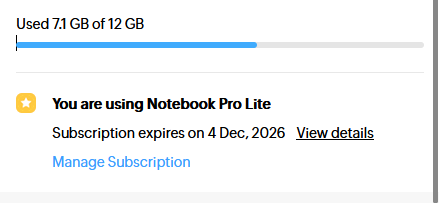
So, this looks fine. I am able to add notes in the webapp.
I also have an Zoho Notebook Android app installed on my phone and I am able to add notes there, too.
But in the desktop app I still get the same message after the upgrade as I got before, saying that I ran out out of space, I'm requested to upgrade.

When I click on my profile with subscription details in the Windows desktop app it says that 7,1G of total 7GB available has been used.

When I try to add a note, I get a message that it is not possible due to lack of space.
I do see, however, the new note I just added using the webapp and the note I added using the Android app on my phone. Which is, off course, quite remarkable as, at the same time, it says that I have run out space.
I already uninstalled the Windows Zoho Notebook desktop app and reinstalled it, but it keeps saying that I ran out of space.
When I click 'Upgrade' in the desktop app, it shows my current plan I just upgraded to, so somehow it seems it has been synced. Before the upgrade, here I got the option to upgrade to Zoho Notebook Pro Lite.
Can you please explain why available storage space differs between the desktop app and the webapp and how I can get the same level of storage space in my desktop app available as in the webapp?
I hope you can help me out with this issue.
Kind regards,
Netherlands