Improved WhatsApp Templates
Greetings,
I hope all of you are doing well. We're excited to announce a major upgrade to Bigin's WhatsApp integration that brings more flexibility, interactivity, and automation to your customer messaging.
WhatsApp message automation
You can now use WhatsApp messages in workflow rules, so whenever a workflow is triggered, say, when a new ticket is created, a WhatsApp message will be sent automatically, saving you time and making sure customers get quick updates without any manual effort.

You can now add WhatsApp messages to stage automations. This means that whenever a record moves into a specific stage, a personalized WhatsApp message can be sent automatically to the contact.


Notes:
- WhatsApp Automation is available for all paid editions.
To learn more about Bigin's WhatsApp integration, please refer to this help document.
Interactive WhatsApp templates
Templates allow you to predefine the content of messages you frequently send to customers. Instead of typing the same message each time, you can create a template and reuse it whenever needed. This saves time and ensures consistency in your communication.
So far, Bigin lets you create only plain-text templates. With this update, your templates can include headers with images, videos, or documents, and interactive buttons, making your messages more structured and engaging.

- Header: Acts as the title of your message. You can include text, images, videos, or documents to give your message a branded and impactful introduction.

- Buttons: Interactive buttons enable your customers to take action right from your messages. You can add two types of buttons:
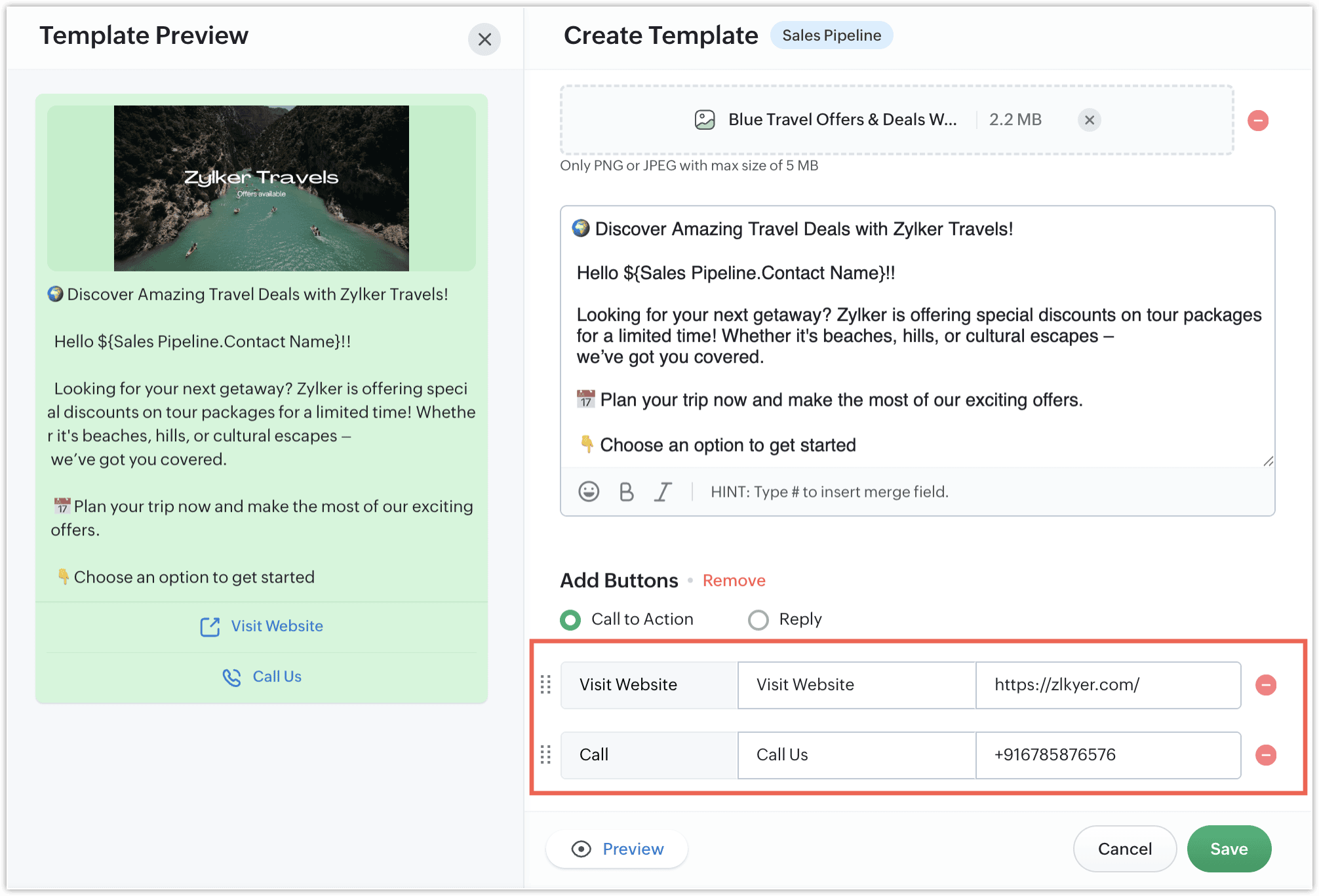
- Call to action: These take the user to a website or let them call a number. For example, a travel agency might create a WhatsApp template to inform customers about their latest travel offers and promote their services. The message could include offer details along with a Visit Website button that directs customers to their booking page. Additionally, they can add a Call Now button with their contact number to enable customers to call directly and inquire about travel packages and other related information over the phone.
- Quick Reply buttons: These buttons let users reply instantly using preset responses. For example, you could create a WhatsApp template to collect feedback on your support services. Your support agent can send a message like “Was your issue resolved?” and include up to three quick-reply buttons such as “Yes,” “No,” and “Need Help.” With these buttons, customers can respond instantly with a single tap, making it easier for you to track resolution statuses and offer further assistance if needed.

The image below shows how your WhatsApp template will look on the customer's mobile device.

Note: You can choose the button type based on the kind of interaction you want to enable, but a single template cannot include both types.
Templates for the Pipelines module
Previously, users could only use templates in the Contacts module. With this update, you can now create and use templates for the Pipelines module as well, so you can send WhatsApp messages directly from deals and other pipeline records, making your communication more contextual and relevant.
To create a new template, go to Setup > Messages > Templates and click the + Template button. You'll then be able to select the module in which you want to use the template.

That's all for these enhancements. We sincerely hope you find these improvements useful. Please give them a try and leave your feedback in the comments section below. Watch this space for future announcements.
Thanks and have a good day!
New to Zoho Recruit?
Zoho Campaigns Resources





Topic Participants
Harrini K
magicsmileturkey7
Arunkumar Chockalingam
Venkat
adam
Sticky Posts
Schedule mass emails, view mass emails status and more!
Hello everyone, Mass emails help you communicate with multiple customers in a couple of clicks. We have introduced a Mass Emails dashboard in Bigin so that users can see the status of the mass emails like how many emails were opened, clicked and bounced.Introducing Bigin 360: Our new pricing edition with increased feature limits and pre-installed toppings
Dear Biginners Club, Today, we're pleased to launch a brand-new pricing edition called Bigin 360, our highest pricing edition that will sit on top of Express and Premier editions. It's been over four years since our launch, and we're receiving some great[New] Create invoices and contracts in minutes with Zoho Writer's Merge Templates for Bigin!
Do you often find yourself manually entering customer information in your business documents like invoices and contracts? This can be a time-consuming process that can take up valuable time from your business operations. With Zoho Writer's Merge TemplatesAnnouncing #BiginnersClub meetups in US, Middle East, India & UK (Free Event)
Exciting news, Bigin enthusiasts! #BiginnersClub meetups are back, and we're hitting some major cities this time, starting from October. Here's what you can expect: Meet our experts face-to-face Deep dive into Bigin and its advanced features PersonalisedIntroducing Forms: Streamline data collection with Bigin's new form builder.
Hello everyone, Bigin's web forms just got a makeover! We are excited to introduce Forms: an online form builder designed to meet all your data collection need. This revamp was inspired by your feedback, resulting in an upgraded and versatile version
Zoho CRM Plus Resources
Zoho Books Resources
Zoho Subscriptions Resources
Zoho Projects Resources
Zoho Sprints Resources
Zoho Orchestly Resources
Zoho Creator Resources
Zoho WorkDrive Resources


Zoho CRM Resources
Get Started. Write Away!
Writer is a powerful online word processor, designed for collaborative work.
Zoho CRM コンテンツ
-
オンラインヘルプ
-
Webセミナー
-
機能活用動画
-
よくある質問
-
Ebook
-
-
Zoho Campaigns
- Zoho サービスのWebセミナー
その他のサービス コンテンツ
ご検討中の方
Recent Topics
Control Position of “X” (Close) Button in Popup Editor
Hello Zoho PageSense Team, We hope you're doing well. We would like to request a customization improvement in the PageSense popup editor. Current Limitation: Currently, the position of the “X” (close) button is fixed and cannot be customized in the popupAdd Standalone “Save” Button in Pagesense Popup Editor
Hello Zoho Pagesense Team, We hope you're doing well. We would like to request an important usability improvement in the Pagesense popup editor. Current Limitation: There is currently no dedicated Save button while building a popup. The only way to saveText Direction Control in Pagesense Popup Editor
Hello Zoho Pagesense Team, We hope you're doing well. We’d like to submit a feature request to add text direction control in the Pagesense popup editor. Current Limitation: Currently, the popup editor does not provide native support for RTL (Right-to-Left)Autosave in Pagesense Popup Editor
Hello Zoho Pagesense Team, We hope you're doing well. We’d like to submit a feature request to enhance the Pagesense editor with an autosave functionality. Current Limitation: Currently, changes made in the Pagesense editor must be manually saved. InBilling frequency is not displayed correctly.
Hello There is an issue while displaying the billing frequency on a subscription quote. I am able to activate the subscription details and get this lovely overview: If I am adding a Plan which I charge quarterly, first of all it should be possible toCreating Secret via Vault API
Hi I am trying to create a secret through vault api. This is the response I get. One thing I am not sure is how to decrypt the secretdata, how to get the secrettypeid? { "operation": { "result": { "error_code": "", "message": "Sorry, we are unable to process your request.",Is It Possible to Hide Menu Option from Main Navigation?
Is it possible to hide a menu option, e.g. Admin, from the Main Navigation based on some criteria, e.g. login = zoho.adminuserUnleash the power of detail, with Table View.
What use is context that's not available where you need it? With this in mind, we bring you the Table View. This feature will add more power to the way you organize and work through your ticket load. Table View comes in handy when you want more control over the ticket information you see. This is a nifty tool for users who find themselves limited in terms of the level of information that is being offered in the Classic View and Compact View. With an upper limit of 15 columns, agents can glean mostKaizen #126 - Circuits in Zoho CRM - Part 1
Hello everyone! Welcome back to another week of Kaizen! Today, we will discuss an exciting topic—Circuits in Zoho CRM. For starters, we will discuss what Circuits are, how beneficial they are for businesses, different views of a Circuit, and the differentMultiple clients in one project
Hi team, What is the possibility to have more than one client to be linked for one project in the Zoho Books? Our business model is to have a project, and this project have expenses/bills, as well, we issue invoices for this same project to several customers.Workdrive on Android - Gallery Photo Backups
Hello, Is there any way of backing up the photos on my android phone directly to a specific folder on Workdrive? Assuming i have the workdrive app installed on the phone in question. EmmaRendering PDF to view on page
My company upload lots of PDF files onto Zoho. But every time we open it, it downloads the file instead of viewing it on the web page. Does Zoho allow uploaded PDF files to be rendered to view on web page yet? I've been trying to use <embed> or <object> but it cannot be loaded. (similar thread: https://help.zoho.com/portal/community/topic/how-to-open-a-pdf-file-of-a-view-in-preview-mode)Dynamically Fetching Lookup Field Display Value
I have an audit trail form, Audit_Changes, that tracks old vs new values across different forms. For lookup fields, the old/new value is the ID, but I also need the display value. What's a best practice for dynamically fetching the display value of theAbility to Create New Items When Zoho Trident is Minimized via tray or taskbar icon
Allow users to create new items (emails, calendar events, tasks, etc.) directly from the system tray icon or by right clicking the task bar icon, even when the window is minimized or not actively running in the foreground. This enables quick access toI can not see Undeliverable emails from my Mass Email Leads activity in CRM
I am sending email templates and I can not see the Undeliverables? I only receive the "Out of Office" replies and any manual replies from the lead. Can you please let me know where the Undeliverable emails are sent so I can use the information to clean up the database?Select Zoho Contacts as Meeting Participants in Zoho Cliq
Hello Zoho Cliq Team, We hope you're doing well. We would like to request an enhancement to the meeting scheduling functionality in Zoho Cliq. Current Limitation: When scheduling a meeting in Zoho Cliq, participants can only be selected from: OrganizationAbility to Select External Users from Participants List When Scheduling Meetings
Hello Zoho Cliq Team, We hope you're doing well. We would like to request an enhancement to the meeting scheduling experience in Zoho Cliq. Current Limitation when scheduling a meeting in Zoho Cliq: External users can be selected from the list only underKaizen #212 - Map Dependency Fields in Zoho CRM using APIs
Hi Everyone!! Welcome back to another week of Kaizen series! Over the past few weeks, we have been addressing your questions and feedback shared through our Kaizen 200th feedback form. Thank you for your continued engagement and thoughtful queries. WeOutdated state in mexico
Hello Zoho team, the drop down to add the state for customers, when they introduce their state in mexico has a city named “Distrito Federal” that name changed many years ago to “ciudad de mexico”. could you please update this so my clients can find theIs anyone using Zoho Flow with airtable?
I need to build a flow that collects data from airtable and uses some of that data to create folders and files in google drive. I have fully function version of this in zapier and want to migrate to zoho. I am trying to perform a very basic fetch fromAI in Zoho Workplace: A Sneak Peek into What’s Coming!
Hello everyone, We’re super excited to share something we’ve been working on and we want you to be part of it! You may have seen our announcement blog post introducing a major evolution in how AI works within Zoho Workplace. Want to be among the firstMeet Canvas' Grid component: Your easiest way to build responsive record templates
Visual design can be exciting—until you're knee-deep in the details. Whether it's aligning text boxes to prevent overlaps, fixing negative space, or simply making sure the right data stands out, just ironing out inconsistencies takes a lot of moving parts.Best way to share/download presentation files in Zoho without losing formatting?
Hello Zoho Community, I often work with PPT/PDF files in Zoho Docs and share them with colleagues. While PDFs usually give a direct download option, I’ve noticed that PPT/PPTX files sometimes only open in the viewer without a clear download link. Is thereWorkflow Failure - Notifications
Good afternoon, I have just experienced an error whereby a Workflow failed, for a reason currently unknown. The problem is that one of my users had to flag this manually (thankfully he's very thorough) and this otherwise would have flown under the radar.Introducing Bin Locations In Zoho Inventory
Hello users, We are excited to let you know that your wait for the Bin Locations feature has now come to an end! Yes, you heard us right! We are here to introduce the much-awaited Bin Locations now in Zoho Inventory. But before we dive into the featureError "Invalid client task found corresponding properties" only when triggered from workflow ?
Hi All, I am facing an error message I never encountered previously: Error in executing On Add - On Load script Error in executing thisapp.get_all_projects_api_call function. Line:(2) Error in executing thisapp.getAccessTokenFromRefreshToken function.How to interpret Campaign report statistics - definitions/explanation
I am trying to make sure I understand the Campaign report correctly Do you have a list of definitions for: Delivered - it has reached the recipient's inbox Campaign reach - is this the number that have opened the campaign email? Unique Opens Clicks/OpenFeature request - pin or flag note
Hi, It would be great if you could either pin or flag one or more notes so that they remain visible when there are a bunch of notes and some get hidden in the list. Sometimes you are looking for a particular name that gets lost in a bunch of less importantSchedule a Call by Date and Time when a specific lead status is selected
Hi Wanting to create a workflow where a call can be scheduled by date & time when a specific lead status is selected. Can only currently set the date by Due Date - Trigger Date - Plus 'x' day(s) ThanksZoho CRM's Copy Customization functionality now works across DCs, for customized accounts, and more
Availability This feature is available in Standard, Professional, Enterprise, and Ultimate editions. These changes have been rolled out to all users in all DCs. For more information, please refer to these help documents: Overview | Instructions HelloHow can I bold text on Zoho Forms submit buttons?
In the old theme builder, I could bold the text on a form's submit button. With the new theme builder, I can only change the text of the header or fields in the form, and not the button itself.Hiding Pre-defined Views
You can enhance Zoho with custom views - but you cannot hide the pre-defined views. Most users focus on 4 or 5 views. Right now for EVERY user EVERY time they want to move to one of their 4 or 5 views - they have to scroll down past a long list of pre-defined views - we don't use ANY of the pre-defined views. Adding the feature to allow a predefined view to be hidden completely or only visible to certain users would be a big improvement in usability for Zoho CRM. This feature is already available[Integration Edition] Deluge Learning Series – Third-Party Integrations with Deluge | October 2025
We’re excited to continue this three-month edition of the Deluge Learning Series: Session 1 – Integrating Zoho Apps with Deluge Using Built-In Integration Tasks Session 2 – Integrating Zoho Apps with Deluge Using invokeURL and invokeAPI Session 3 – Third-PartyFeature Request: Tag, Search, and Report on Individual Private Comments
Zoho Desk Team, First, I want to say that we are extensive users of Zoho Desk and it is a core part of our support operations. We rely heavily on the private comments feature for internal communication, knowledge sharing, and maintaining a clear historyZoho CRM Community Digest - August 2025 | Part 2
Hello Everyone! Here's a quick round-up of handy tips, clever workarounds, and product updates from late August. Product Updates: Meeting Enhancements in Zoho CRM! Track whether a meeting is online, in-office, or at the client’s location using the newAssistance Needed: Ticket Status Not Updating and Sorting by Last Customer Reply in Zoho Desk
Hello, I’m facing two issues in Zoho Desk that I’d like your guidance on: Ticket Status Not Updating: When a customer replies to a ticket, the status does not change to Reopened. Instead, it remains in Waiting on Customer, even after the customer’s responseRound robin
Hi, I'm trying to set up a round robin to automatically distribute tickets between agents in my team but only those tickets that are not otherwise distributed by other workflows or direct assignments. Is that possible and if so which criteria should ITime Entry Notifications
Hi All - I have support staff who place notes of their work in the time entry section of Zoho Desk. Is there a specific workflow or setting I need to enable to have the ticket holder updated via email when an entry is saved?Change text in help desk
Hi, Please let me know how can i change the this text, see screenshot.Customer happiness customisation
Hi, I was wondering if it's possible to somehow customise to whom and when customer happiness request is sent? Can you enable it only for selected tickets for example based on workflow or any other criteria (customer name, tag or anything else)? AlsoNext Page