Spam Quarantine: Manage suspicious emails in Zoho Mail
When an email is quarantined by spam processing, it need not always be blocked right away. Some emails may be marked incorrectly, or may need to be reviewed before a final decision is made.
The Spam Quarantine feature in the Zoho Mail Admin Console gives administrators a dedicated space to review, approve, or reject such emails before they reach your users.
What is spam quarantine in Zoho Mail?
Spam Quarantine in the Zoho Mail Admin Console holds emails flagged by your organization's spam processing rules. Both incoming and outgoing emails can be quarantined. Instead of being delivered or blocked automatically, these emails are placed in a quarantine queue where administrators can review and take action.
Incoming emails may be quarantined due to SPF, DKIM, or DMARC failures, DNSBL flags, block-listed addresses or domains, cousin domain detection, display name spoofing, or organization-level rules. Outgoing emails can be quarantined based on content patterns, attachment type or size, blocked users or recipients, and more.
How can administrators use spam quarantine effectively?
The quarantine section gives administrators full control over what gets delivered and what gets blocked, without missing legitimate emails that were incorrectly flagged.
Review and act on flagged emails: Open any quarantined email, review its content and headers, and choose to deliver or deny it based on your assessment.
Use deliver and deny actions strategically: The Deliver & Add option adds the sender to the allowed list after delivery, while Deny & Add blocks the sender going forward. Use Deny & Notify to inform the sender that their email has been rejected.
Monitor outgoing emails: Outgoing Quarantine helps prevent data loss and policy violations by holding suspicious outbound emails for review before they leave the organization.
Set up quarantine notifications: Configure alerts so that the relevant administrators are notified whenever an email is quarantined, along with the sender, subject, and reason for quarantine.
Assign self moderators: Allow specific users to approve quarantined emails addressed to them, reducing the load on administrators for individual-level quarantine decisions.
Steps to access and manage quarantined emails
Log in to the Zoho Mail Admin Console.
Navigate to Security & Compliance in the left pane.
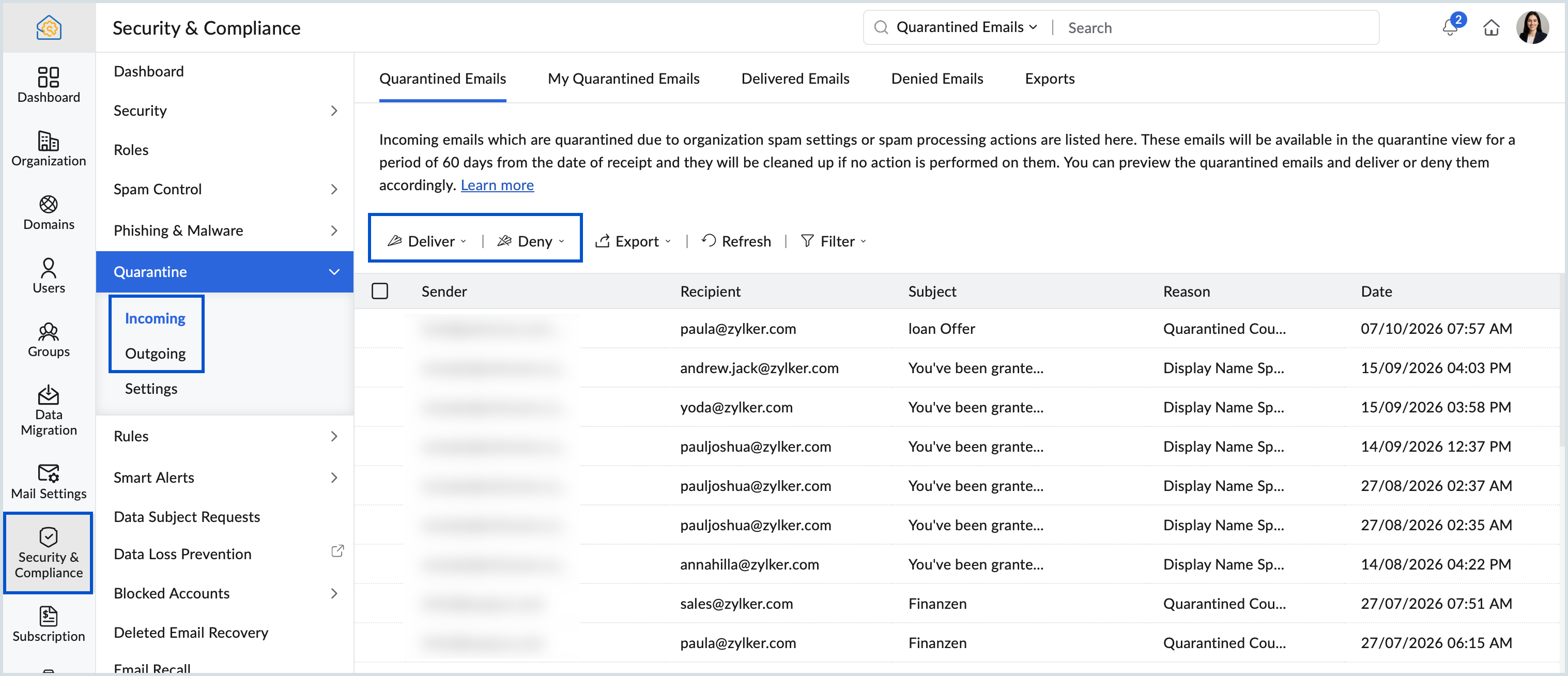
Select Incoming or Outgoing under Quarantine based on the emails you want to review.
Choose from Quarantined Emails, Delivered Emails, Denied Emails, or Exports. For incoming emails, you will also see a My Quarantined Emails tab listing emails addressed specifically to you.
Click on an email to view its content and headers.
Select Deliver or Deny and choose the appropriate action from the dropdown.
Steps to set up quarantine notifications
Log in to the Zoho Mail Admin Console.
Navigate to Security & Compliance and select Quarantine.
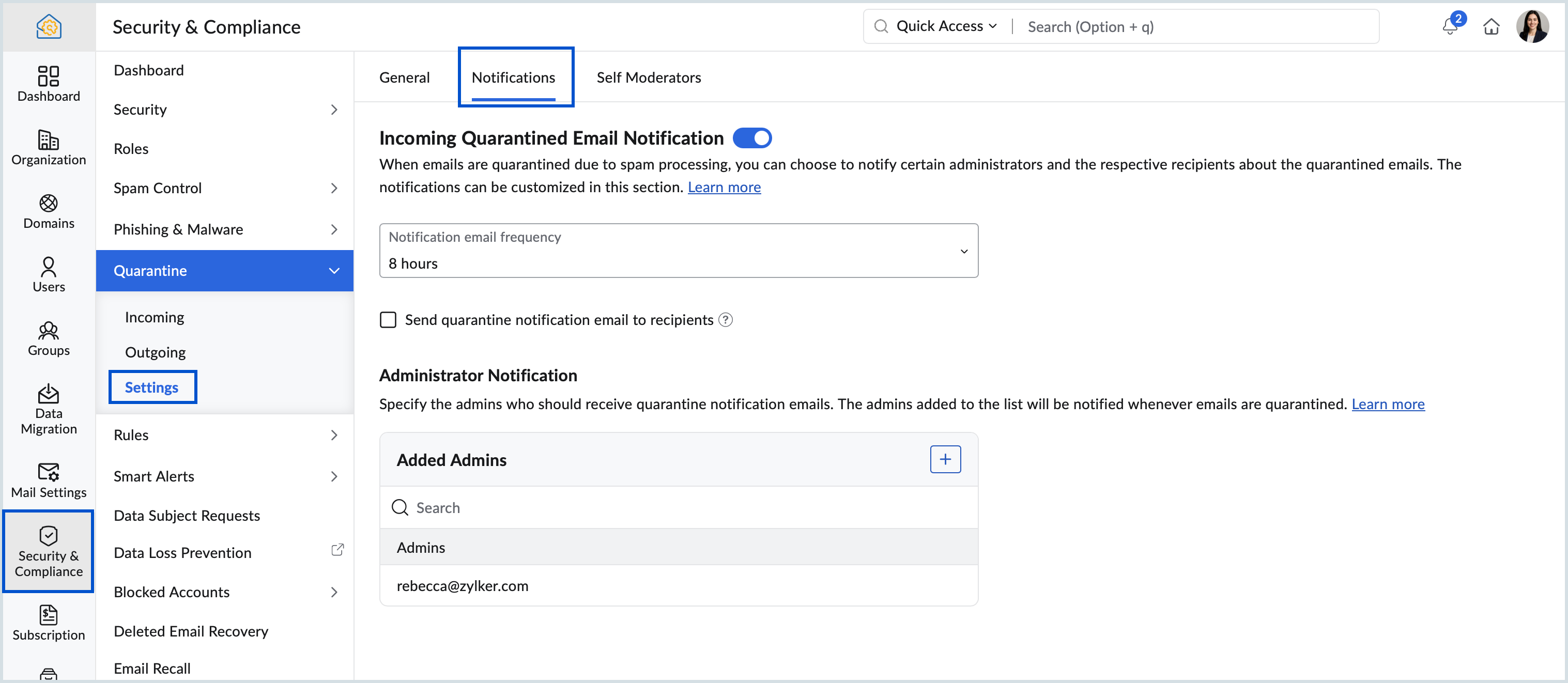
Go to Settings and select the Notifications tab.
Turn on Incoming Email Notification.
Set the notification frequency from the dropdown.
Check the box to send quarantine notifications to the email recipients, if needed.
Under Administrator Notification, add the administrators who should be notified.
Quarantined emails in the My Quarantined Emails section are available for 60 days. If no action is taken, they are automatically removed.
The Deliver partially option is available only for emails with multiple recipients and does not appear when multiple emails are selected at once.
The Deny & Notify option applies to one email at a time and does not appear when multiple emails are selected.
If an administrator denies an email before a self moderator takes action, the self moderator cannot approve it later.
Outgoing Quarantine is available only for paid plans. To enable it for your organization, contact support@zohomail.com
Zoho Campaigns Resources





Topic Participants
Saranya A
Sticky Posts
Zia for Mail: AI-powered assistance for Email, Calendar, and ToDo in Zoho Mail
Zia for Mail brings AI assistance into Zoho Mail for everyday email, calendar, and task activities. Administrators can integrate third-party AI providers, such as ChatGPT or Gemini, and decide which features are available to users. What is Zia for MailEmail Journaling in Zoho Mail: Maintain a complete record of your organization’s email communication
Organizations often need a complete record of their email communication for audits, legal reviews, or internal investigations. Email Journaling in Zoho Mail captures a copy of emails sent and received in your organization and forwards it to a destinationEmail Recall in Zoho Mail: Retract sent emails within your organization
Emails can go out with the wrong recipient, an incorrect attachment, or information that was not meant to be shared. Email Recall in Zoho Mail lets you take such emails back from the inboxes of recipients within your organization. What is Email RecallData Subject Requests in Zoho Mail: Retrieve and export email data for legal and compliance needs
Organizations are often required to retrieve specific email communication data in response to legal investigations or compliance audits. The Data Subject Requests (DSR) feature in the Zoho Mail Admin Console allows administrators to search for all emailSAML authentication in Zoho Mail: Simplify and secure your organization's login management
Managing login credentials across multiple web applications can be challenging for organizations with a large number of users. Without a centralized authentication system, users are required to maintain separate passwords for each application, increasing
Zoho CRM Plus Resources
Zoho Books Resources
Zoho Subscriptions Resources
Zoho Projects Resources
Zoho Sprints Resources
Zoho Orchestly Resources
Zoho Creator Resources
Zoho WorkDrive Resources


Zoho CRM Resources
Get Started. Write Away!
Writer is a powerful online word processor, designed for collaborative work.
-
オンラインヘルプ
-
Webセミナー
-
機能活用動画
-
よくある質問
-
Ebook
-
-
Zoho Campaigns
- Zoho サービスのWebセミナー
その他のサービス コンテンツ
ご検討中の方
Recent Topics
Automating CRM backup storage?
Hi there, We've recently set up automatic backups for our Zoho CRM account. We were hoping that the backup functionality would not require any manual work on our end, but it seems that we are always required to download the backups ourselves, store them,Feature Request: Fully customizable record layouts in Zoho FSM (movable sections and custom subform tables)
Hi Zoho FSM Team and Community, We’d like to suggest a feature that we think would help many FSM users: full control over the layout of record detail pages, starting with the Work Order view. Current situation When you open a Work Order, its sectionsKB Articles from Zoho Learn - Import as .md
I love the concept of being able to use articles from Zoho Learn as knowledge base articles for Zia Agents. This will absolutely help with proper documentation and organization of company processes and SOPs. This was a great concept. However, even whenWhy don't Zia agents support file uploads?
I am trying to build a Zia Agent that allows uploading of a PDF file and uses the GLM5 model to process it and extract information. But agents.zoho.com has no way to enable file uploads on the agent. Additionally, GLM5 based agents keep outputting theirBuilding Toppings #10 - Using signals to build real-time notifications between Bigin and Zoho Desk
Hello Biginners! In our previous post, we covered Bigin Variables and Widgets. In this post, we'll explore another component: Signals. To show how Signals work, we will build a real-time use case integrating Bigin and Zoho Desk. It connects Zoho DeskCliq iOS can't see shared screen
Hello, I had this morning a video call with a colleague. She is using Cliq Desktop MacOS and wanted to share her screen with me. I'm on iPad. I noticed, while she shared her screen, I could only see her video, but not the shared screen... Does Cliq iOS is able to display shared screen, or is it somewhere else to be found ? Regards¡Gracias por acompañarnos en los Workshops de Zoho España!
Los pasados 3 y 4 de noviembre celebramos una nueva edición de los Workshops de Zoho España en el Hotel NH Las Ventas de Madrid. Dos jornadas de formación práctica, demostraciones en directo y encuentros con expertos de Zoho en las que compartimos conocimientos,Mass Update Option for Changing Work Order Owner
Hello FSM Team/Mr. Abid, We would like to inquire if there is an option to mass update or bulk change the Owner of Work Orders in Zoho FSM. Current Situation: At the moment, the Owner of a Work Order can only be changed individually, which becomes time-consumingNever miss a follow-up with personal reminder agent | Zoho Cliq AI Use Case #03
A task mentioned mid-conversation rarely survives the conversation. Someone asks you to follow up, you say you will, and by the time you remember, the message is three hundred lines back, buried under two meetings and a dozen other threads. Personal TaskCalendar won't load
I run into this problem about once a week, where I try to open my Zoho calendar in a web browser, and it just gets stuck, waiting forever to load (see attached screenshot). I'm usually using Edge or Duck-Duck-Go browser. Sometimes it loads just fine,Change 'default' project dashboard
Is it possible to change the default project dashboard for all projects? Both in layout and in what widgets are shown? We have a lot of (short-running) projects and I want to quickly see the tasks and milestones when I open a Project, but I don't want to change the layout for all my projects manually. Thanks, MennoMultiple subscription plan line items in Zoho Billing quotes
I run an IT company and sell a lot of licences. A client might have multiple subscription plans including software licences in different categories. A client might have Microsoft licences, antivirus licences, web hosting and maintenance package services.[ZohoDesk] Improve Status View with a new editeble kanban view
A kanban view with more information about the ticket and the contact who created the ticket would be valueble. I would like to edit the fields with the ones i like to see at one glance. Like in CRM where you can edit the canvas view, i would like to editLive connection to DS files in Zoho Creator / ChatGPT
As an idea, we are using ChatGPT to build with Zoho Creator (outside of Zia), which is works brilliantly to assist write deluge, provide test suggesitons etc. Currently we are uploading the DS files which are very point in time, it would be great to haveUnable to integrate Whatsapp Messaging into Zoho CRM - Business Messaging
Hello, I want to set up Business Messaging in our Zoho CRM and am struggling to set it up. I have logged into the account and our facebook business page, our business shows in the dropdown for WhatsApp Business Account but does not for WhatsApp BusinessFiles in Teamspaces: keep your team's documents where the work happens
Release Note: This feature is available for all accounts across all DCs Hello Everyone, A Teamspace is built around a specific team and a shared objective, and it holds the modules and projects that team works with every day. The document that team dependsScript to access a CBPX file from zoho crm
Hello everyone, I'm planning to write a script in Python or Java in Zoho CRM functions, to access a CBPX file. Is it possible to write this script in the dev console of Zoho? What are the best practices to do this ? Would you have references in the ZohoCalculate hours
Is there any chance that the the "formula" will have the ability to do calculation using the "time" field in the future? Our company has a form set up for tracking hours worked and we use 2 time fields currently. One for the clock-in time, and one for the clock-out time. It's great for keeping that record, but if there were a way to calculate the hours to show on the report would be awesome. Previously we had used JotForm and their calculator had that ability, but it seems that Zoho doesn't acceptIntroducing parent-child ticketing in Zoho Desk [Early access]
Hello Zoho Desk users! We have introduced the parent-child ticketing system to help customer service teams ensure efficient resolution of issues involving multiple, related tickets. You can now combine repetitive and interconnected tickets into parent-childZoho Books | Product Updates | November 2026
Hello users, As the year winds down, we've introduced several enhancements to make compliance, inventory management, and everyday bookkeeping easier in Zoho Books. This month's updates include an improved TDS experience, a new way to exchange transactionsSheet co-edit: no live presence — also on Collaborate demo?
Two Sheet co-edit sessions open OK (same document_id, document.edit: true), but there’s no real-time collaboration: no cell highlights, Group Chat → Users stays empty. Writer co-edit works on the same Office Integrator setup. We see the same on the officialZoho Writer workflows now support custom stages, parallel reviews, and external approvers
Hello everyone, Zoho Writer now lets you build your own approval chains. The pre-built workflows also get new review modes, completion criteria, and external approver support. What’s new Custom workflows: Design review and approval processes from scratch,Expanding sales, marketing, and support capabilities in Zoho CRM Plus 3.0
Hey everyone, It's been more than 10 years since we launched Zoho CRM Plus back in 2014. This is quite a milestone, and we've come a long way in empowering you with everything you need to offer an exceptional customer experience. On that note, we expandedErase function in Zoho PDF editor does not truly redact
Using the "erase" function in the Zoho PDF editor online does not redact the text underneath when opening the file in Adobe. When I used the erase function to whiteout the areas I didn't want to be seen, I opened the supposed redacted files in Adobe.Error creating an XML file
I am creating an xml as string in the function Employee.generatePartA_XML_String, and then I want to save it as a file to the field "Part_A_XML", but I get the response: {"code":3700,"message":"Unable to upload a file. Please check and try again."} HowThunderbird cannot authenticate Zoho on android
I keep getting a message from Thunderbird on Android that it could not authenticate for my account, dadashton@zoho.com., and to update my server settings. Now the settings are exactly the same for my other devices (1 Windows, 1 Mac and 2 Linux) Can anybodyMailchimp Integration
Hello, I am needing some help. Does anybody have a recommended source for information on the Zoho-Mailchimp integration. We are working on a system to import large amounts of records into Zoho that will sync into Mailchimp for us to run a mail campaign out of. Let me explain what the process we are trying to implement - any information or advice is appreciated. Import record data base into Zoho Leads module --> use Lead source to ID records that are part of this mail campaign Zoho Leads (specific[Free webinar] Zoho Creator meets AI with MCP | Creator Tech Connect (November 2026)
Hello everyone, We are excited to invite you to another edition of the Creator Tech Connect webinar. About Creator Tech Connect The Creator Tech Connect series is a free monthly webinar consisting of purely technical sessions, where we dive deep intoInvalid Client - Client ID passed does not exist
I tried connecting the Zoho campaign with the "Uncanny Automator". It shows an error " Invalid Client - Client ID passed does not exist". There is no option to add manual API. URL: https://accounts.zoho.eu/oauth/v2/auth?response_type=code&client_id=1000.MSFIUOA1G8YBK7IFRL9Z0NINM6DW9C&scope=ZohoCampaigns.contact.ALL&redirect_uri=https%3A%2F%2Fapi.automatorplugin.com%2Fv2%2Fzoho-campaigns&prompt=consent&access_type=offlineField of Lookup - 5 Field Association Limit.
This query relates to the post at: https://help.zoho.com/portal/en/community/topic/introducing-the-field-of-lookup-in-crm-public-early-access-2023 My simple (and common) scenario: I select an account / customer lookup and want their address pulled intoTask status - completed - other options
I have a dumb question I know i can make custom statuses for the tasks - but is there anyway to make additional "completed" statuses like for instance if i have a task "call back customer" and i leave a vm for them to call back marking it "completed -#20 I've Sent It and It's Wrong
Meera spots a mistake in an invoice just four minutes after sending it. She has billed a photoshoot at the half-day rate instead of the full-day rate. Her first thought is to delete the invoice and start again. But is deleting the right thing to do? ItZoho Forms API
Is there any way to get all form entry list using API? Looking forward to hear from youBNZ Bank Feeds No Longer Available
The BNZ (New Zealand) bank feeds are still failing and it's been months since they last worked! Uploading bank statements (CSV's) mean waiting to the end of the month when they become available. It is unacceptable to keep my clients waiting for paymentMCP is now easier to access and configure in Bigin
Greetings! We hope you're all doing well. We've previously introduced Zoho MCP for Bigin, which lets you connect Bigin with AI tools and interact with your Bigin data using natural language. Now we're making MCP easier to access and configure directlyLaunch agents from more custom button locations and attach files in Ask Zia
Hello all, Your agents now meet your team where the work happens. You can add agents to custom buttons in list views, create and edit pages, and related lists, so users launch them without leaving the page they’re on. What’s new Agents in more customPhone system to integrate with Zoho CRM
I am looking for phone software that would allow my agency to do the following within Zoho CRM: Make calls from zoho Track calls and notes Leave pre-recorded messages after reaching voicemail of lead Only 2 members, so need company who will allow justIntroducing PRM: Build, manage, and scale your partner ecosystem
Growing a partner ecosystem is a good problem to have. What starts as a handful of partners can quickly turn into a maze of spreadsheets, emails, and disconnected processes. More partners mean more opportunities, greater reach, and new ways to growZoho Projects connector with Zoho CRM (Related List module) features
Hi community, I use Zoho Projects connected to Zoho CRM, where we associate Projects with Deals, clients, etc.. I am looking to change/edit the fields that are available in the integration. Currently it shows Project Status, Project Completion, Milestones,Feature Request: Render Markdown (.md) files in Zoho Cliq
Hi, We regularly share Markdown (.md) files in Zoho Cliq. However, when we open these files in Cliq, the content does not render as Markdown—it displays as plain text. This forces us to copy/paste the content into an external Markdown viewer to read itNext Page