Tip #10: Various time zone settings on the bookings page
Tip #10: Various time zone settings on the bookings page

Managing appointments across different time zones has become an integral part of our daily lives. Whether you're arranging a global business meeting or expanding your consultations to other countries, the ability to adapt to various time zones is crucial.


Let's assume you are an IT consultant who works with clients in multiple countries. To schedule appointments and avoid any time-zone related complications, your booking platform should provide automatic time zone conversion. Additionally, your clients should have the option to select their preferred time zones for appointments. This feature can greatly benefit consultants who frequently travel or meet clients and experience varying time zones on different days.


Likewise, a yoga studio can effortlessly arrange online sessions for its global clients, regardless of their time zones.


Time zone settings in Zoho Bookings

Zoho Bookings offers a range of time zone settings, simplifying the appointment scheduling process regardless of service provider and customer location.

Benefits

  • Minimized errors: Automatic time zone conversion reduces the risk of scheduling errors caused by manual time zone calculations.

  • Time zone selection control: Admins can determine whether the time zone option on the booking should be displayed, hidden, or made editable, offering greater flexibility that is tailored to specific needs.

  • Time zone-based notifications: Email notifications will be sent to both the staff and customers, according to their preferred time zones. For instance, if the staff works in an Australian time zone and the customer books in an American time zone, appointment emails will be sent to each party based on their selected time zones.
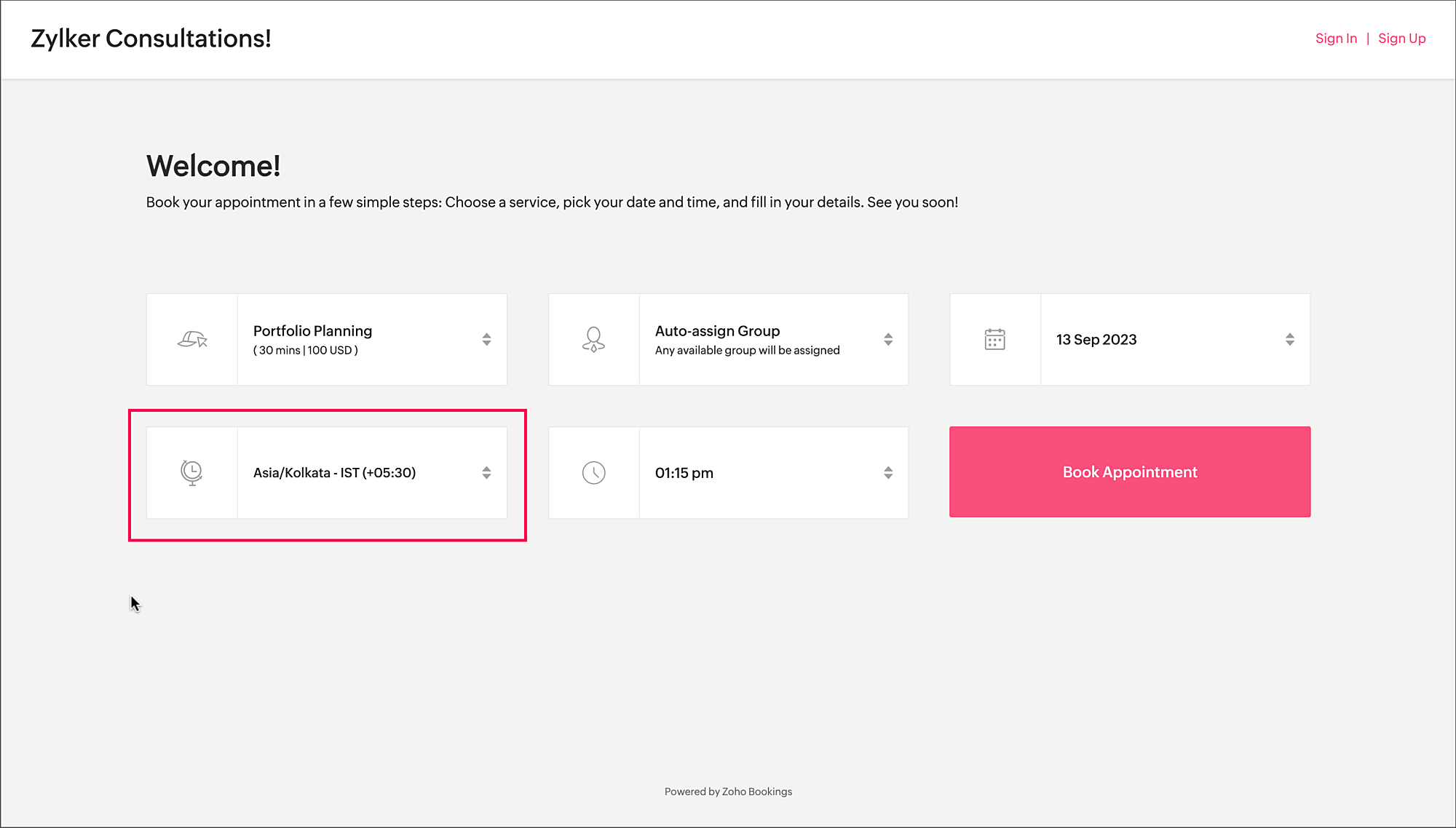

Time zone on the booking page


To access the time zone settings

  1. Navigate to Services > Select the required service > Service Preferences.
    Note: For group and resource booking, the time zone settings can to be configured under Workspaces > Policies and Preferences.

  2. Under General section, click the edit icon against Time Zone Presets.
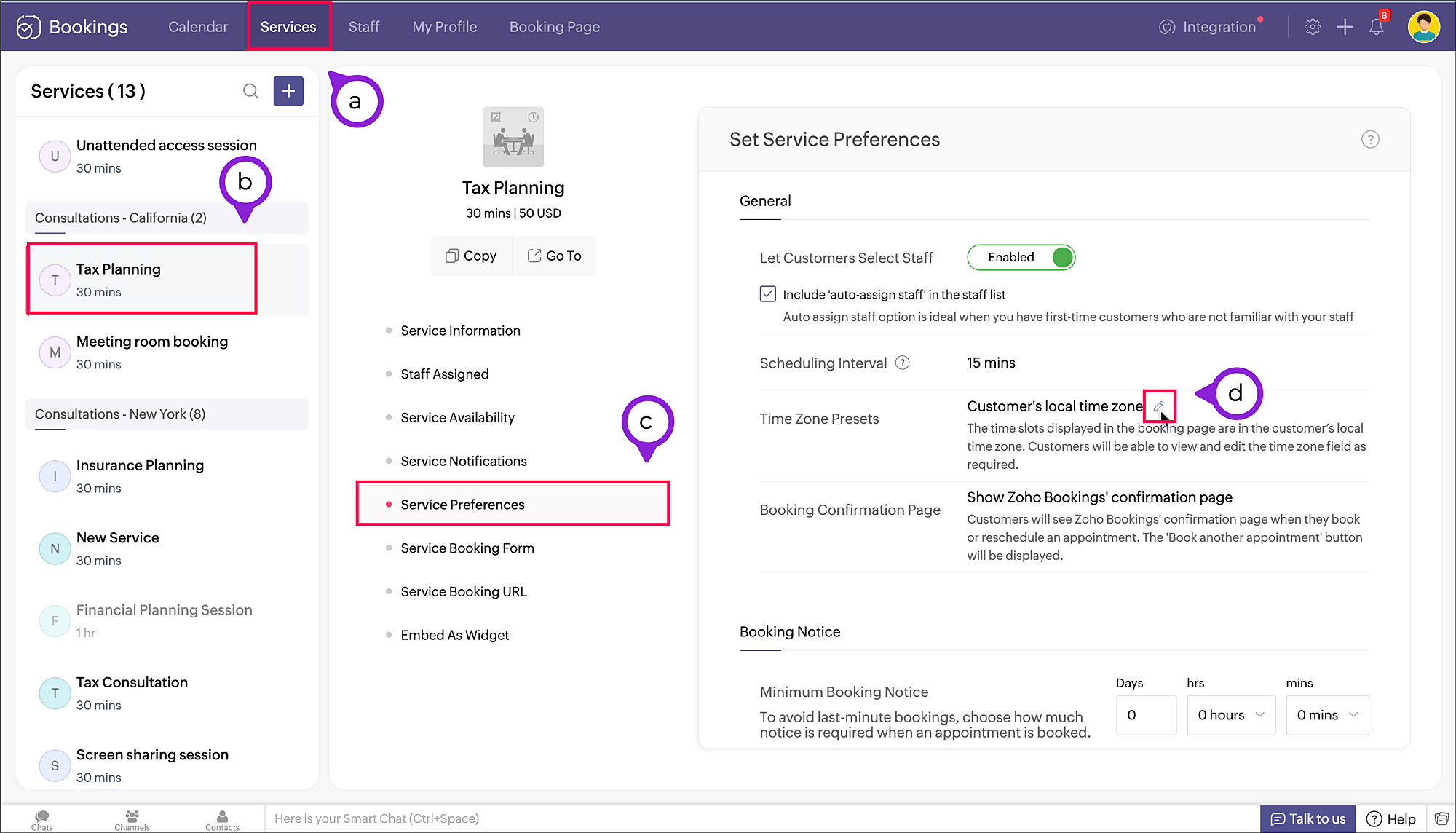


  3. A pop-up appears where you can configure the time zone settings.
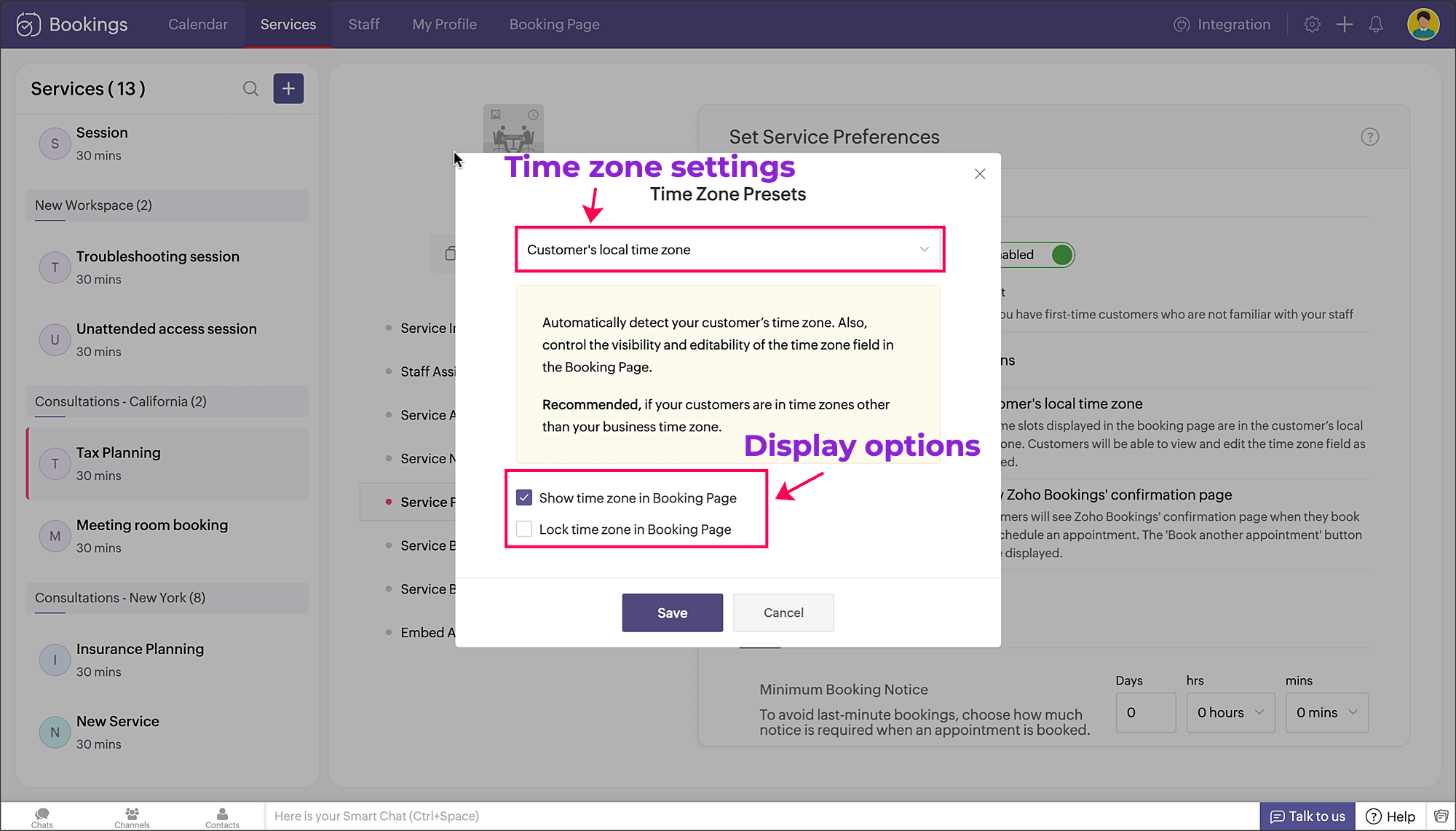


     a. Time zone settings: The first dropdown is for choosing the time zone on the booking page. You have three options to choose from.
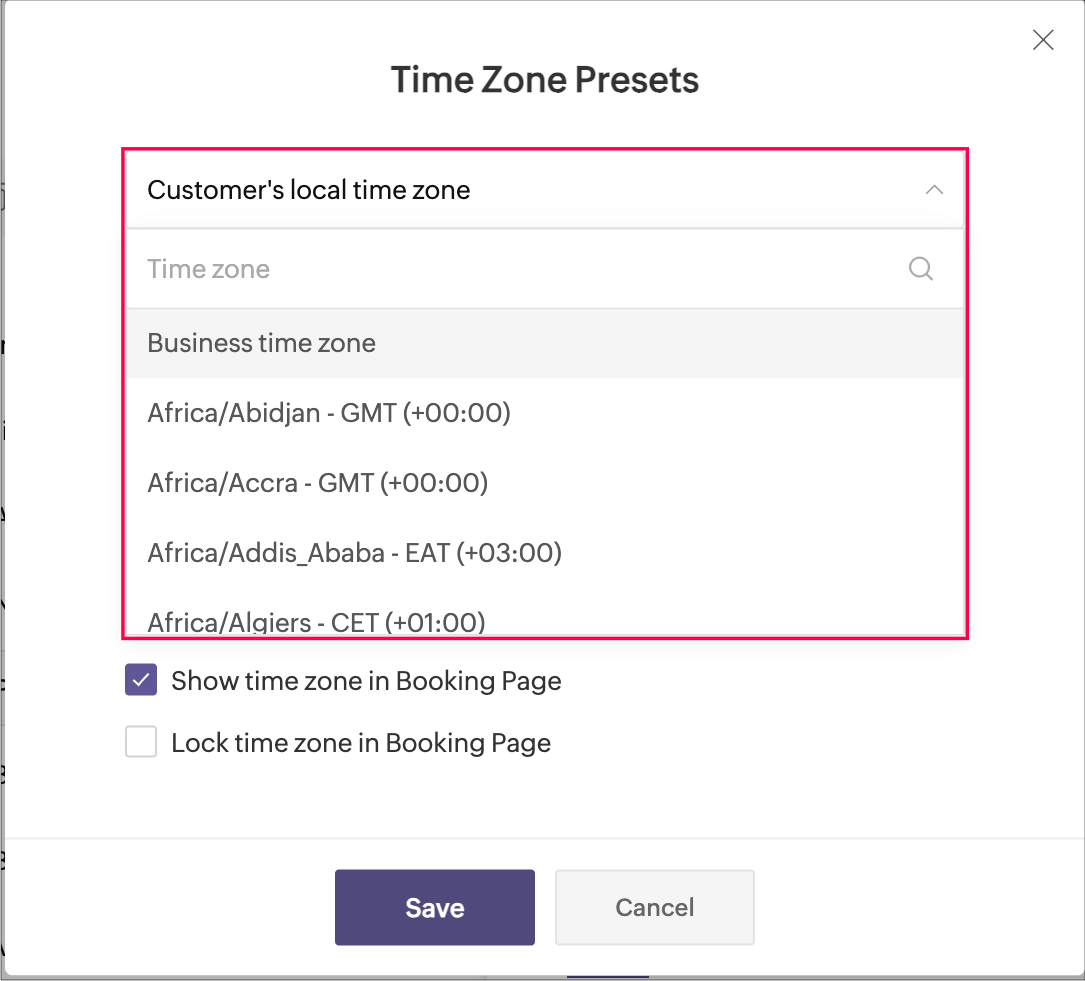


  • Customer's local time zone: By choosing this, the customer's location will be detected and the corresponding time zone will be shown on the booking page.
  • Business time zone: By choosing this, the default time zone of the business will be shown. This can be accessed under Settings > General > Basic Information > Time Zone.
  • Any other time zone: You can choose any other time zone from the list of all time zones.
        
      b. Display options: The checkboxes below provide display options, which involve visibility and locking of time zone on the booking page.


          Visibility options:
  • Show time zone: To show the time zone option on the booking page, select the checkbox next to Show time zone in Booking Page. This displays the time zone which is selected in the above pop-up.

  • Hide time zone: To hide the time zone dropdown option on the booking page, deselect the checkbox next to Show time zone in Booking Page.
    This means that the time zone selected on the above pop-up is suitable for the appointment. However, it's essential to ensure that all parties involved are on the same page regarding the appointment's timing, which might require additional communication or clarification.

          Locking options:

  • Lock time zone: To prevent the customer from changing the time zone, you can select the checkbox next to Lock time zone in Booking Page.
    Here, the booking system displays the specified time zone without the option for customers to modify it. This can be beneficial when strict scheduling adherence is crucial, ensuring that all appointments are synchronized according to a predetermined time zone.

  • Unlock time zone: To allow the customer to edit/change the time zone, you can deselect the checkbox next to Lock time zone in Booking Page. 
    This option provides flexibility, allowing customers to select their preferred time zones, which can be particularly useful for businesses with a global customer base. It empowers customers to book appointments that align with their local time, reducing confusion and scheduling errors.

Combining the visibility and locking options, there are three display options as shown below.

Show

Lock

Result

Shows the time zone and allows customer to modify the time zone on the booking page

Shows the time zone but restricts the customer from modifying the time zone on the booking page

N/A

Hides the time zone


To conclude, implementing time zone settings and providing visibility or locking options on the booking page can greatly enhance user convenience, minimize scheduling errors, and ensure a smoother experience for both customers and service providers.

Hope this tip is useful, let us know your thoughts in the comments section.

Happy scheduling!


      Zoho Campaigns Resources


        • Desk Community Learning Series


        • Digest


        • Functions


        • Meetups


        • Kbase


        • Resources


        • Glossary


        • Desk Marketplace


        • MVP Corner


        • Word of the Day


        • Ask the Experts


          • Sticky Posts

          • Tip #13: Identify where your bookings come from with Source Tracking

            Source tracking is the practice of identifying where your bookings originated. This is important, because online bookings come from a wide variety of sources like social media platforms, your website, email and ad campaigns, partner websites, organic
          • Tip #17: How to mandate partial payment for your appointments

            When you require partial payments during the booking process, customers can only schedule with you after paying a certain amount in advance. This deposit acts as a commitment between both parties. Apart from that, it has many more advantages. Benefits
          • Tip #18: Organize a group workshop in a few steps

            It's the season for workshops—they're everywhere, catering to diverse interests and needs. Whether for more professional goals like leadership development or creative endeavors like painting, there's an abundance of workshops offered every day. A scheduler
          • Tip #16: Custom labels for staff, service, and resources

            Every industry uses its own jargon. Take healthcare, for example; when you visit a doctor, it's not just an appointment, it's a consultation. The people who provide consultations are the providers. Similarly, in the tranquil world of a spa, a massage
          • Tip #15: Customize service prices for each staff member

            It's common practice for a service to be priced differently based on the staff member providing it. For example, an experienced hair stylist may charge more for a haircut compared to the other stylists. This pricing strategy allows businesses to charge

          Zoho CRM Plus Resources

            Zoho Books Resources


              Zoho Subscriptions Resources

                Zoho Projects Resources


                  Zoho Sprints Resources


                    Zoho Orchestly Resources


                      Zoho Creator Resources


                        Zoho WorkDrive Resources


                          Zoho CRM Resources

                          • CRM Community Learning Series

                            CRM Community Learning Series


                          • Tips

                            Tips

                          • Functions

                            Functions

                          • Meetups

                            Meetups

                          • Kbase

                            Kbase

                          • Resources

                            Resources

                          • Digest

                            Digest

                          • CRM Marketplace

                            CRM Marketplace

                          • MVP Corner

                            MVP Corner


                            Zoho Writer Writer

                            Get Started. Write Away!

                            Writer is a powerful online word processor, designed for collaborative work.

                              Zoho CRM コンテンツ


                                ご検討中の方

                                  • Recent Topics

                                  • Channel Configuration and Default Channels

                                    There are some of the default fields that cannot be removed or changed. Examples are the social media ones, such as Facebook. It would be nice to be able to remove these fields as it would be confusing if someone selected this but it's not configure
                                  • Automating Employee Birthday Notifications in Zoho Cliq

                                    Have you ever missed a birthday and felt like the office Grinch? Fear not, the Cliq Developer Platform has got your back! With Zoho Cliq's Schedulers, you can be the office party-cipant who never forgets a single cake, balloon, or awkward rendition of
                                  • Delay function execute

                                    I've got a workflow which uses a webhook to send information to Flow, which in return updates a record in Creator. Problem is, by the time this has executed, the rest of my script has run and can't find the (yet to be) updated info in the record. Is there
                                  • Keep Converted Leads

                                    How do I keep the converted leads in the Leads Module after conversion (converting it to account, contact, deal). I want to add it in a converted stage in the leads module in order to get a report or dashboard and see all converted leads from my pip
                                  • Change in Zoho CRM API?

                                    Hello, I am using the Zoho API trough the PHP SDK v2.1 Since few days, I noticed that I have to change the way I pass the data to the API when I create, update, or upsert a record. Dates Before I was passing a PHP date object to "$record->addKeyValue(...)",
                                  • Support www.camcard.com

                                    Hi, Is it possible CRM Zoho have integrations with https://camcard.com/? Thanks Br, Andy
                                  • Option to Customize Career Site URL Without “/jobs/Careers”

                                    Dear Zoho Recruit Team, I hope you are doing well. We would like to request an enhancement to the Career Site URL structure in Zoho Recruit. In the old version of the career site, our URL was simply: 👉 https://jobs.domain.com However, after moving to
                                  • Can't make a document editable to anyone

                                    Hey everyone, I am using Zoho Workdrive and trying to share a document so that it is editable by anyone with the link. I am trying to convince people to shift from Google to Zoho, but they don't have accounts yet. When I try to change the share settings
                                  • Edit Default Print

                                    What I want to do is create / edit the "Default Print" template without changing the layout I'm using. Currently I can create "Email Templates" but I don't use them for emailing and getting to that selection takes multiple clicks. If an email template could be set to be the Default Print template that would be helpful. I'd also like to print these in bulk but don't see that option (there is a mail merge macro but that goes straight to emailing, not to print or PDF).
                                  • Widget shows error

                                    Hi, May I ask why below characters will be auto added into the widget link and how to solve this error? As my widget shows 404 error now. ?serviceOrigin=https%3A%2F%2Fcrm.zoho.com&frameorigin=https%3A%2F%2Fcrm.zoho.com
                                  • How to print envelope labels from Zoho CRM

                                    Can anybody give me any clue how to print envelope/package labels directly from Contacts view? Regards, Alexandru Moderation Update: The Canvas Print View, which also facilitates the formatting of mailing labels, is now available! Learn more here: Zoho
                                  • Data Import: New interface, improved field mapping, and more

                                    Hello everyone! We’ve redesigned the data import process to ensure accurate field alignment and verify that every column in the uploaded file maps correctly with Desk fields before import. Here's how: Streamlined Import Steps Importing data is now more
                                  • Address labels

                                    Hi, we've been searching for a long time for a simple way for our employees to print address labels using a Dymo Label Writer 450. We came up with two alternatives that work, bur aren't really optimal.  First one is WebMerge. Webmerge is a great application that does 100% what we need but it is way too expensive for our needs. We only need to print a couple of labels per month. The second one is the integrated print tool in Zoho CRM, (Print preview) You would think this is the obvious way to do this
                                  • This domain is not allowed to add. Please contact support-as@zohocorp.com for further details

                                    I am trying to setup the free version of Zoho Mail. When I tried to add my domain, theselfreunion.com I got the error message that is the subject of this Topic. I've read your other community forum topics, and this is NOT a free domain. So what is the
                                  • Print Labels

                                    How can I configure my address to print my labels like this: Name Mailing Address Mailing City, Mailing State Mailing Zip Country Instead of: Name Mailing Address Mailing City Mailing State Mailing Zip Country Thanks!!!!
                                  • All new Address Field in Zoho CRM: maintain structured and accurate address inputs

                                    The address field will be available exclusively for IN DC users. We'll keep you updated on the DC-specific rollout soon. It's currently available for all new sign-ups and for existing Zoho CRM orgs which are in the Professional edition. Latest update
                                  • Mailing labels - Improperly formatted

                                    All I'm trying to do is print one, properly formatted, mailing label. I'm in the Contacts module. In the default "list view" for mailing labels I selected a single client, hit the "more actions" drop down and selected print mailing label. Unfortunately,
                                  • Printing mailing labels

                                    The ability to print mailing labels would seem to be an important, basic, function of a good CRM. I find it very surprising that this has still not been addressed adequately by Zoho. When trying to use the existing "mailing label" included: 1. the data
                                  • Pageless mode needed to modernise Writer

                                    When we switched from GSuite to Zoho, one of the easiest apps I found to give up, was Docs. In many ways, Writer has always been more powerful than Docs, especially in terms of workflows/fillable forms/etc. However, I went back into Docs because I notice
                                  • Zoho Projects - Visual improvement to parent and sub-task relationship

                                    Hi Projects Team, My feature request is to improve sub-task visibility. Please see screenshot below. I really think parent child relationships could be visually improved. Even if the first letter of the parent task was inline with other same level tasks
                                  • AI Interview Insights: Turn Recorded Interviews into Quick Transcripts & Summaries

                                    Evaluating interviews shouldn’t require replaying long recordings or taking manual notes. With AI Interview Insights, you can now review complete transcripts and AI-generated summaries of your One-way (Recorded) interviews right inside Zoho Recruit. This
                                  • API method to get activity feed in Recruit

                                    Hi community, I'm trying to figure out - is there any API method tto get information about datetime when Recruit/Candidates record tag where added?
                                  • Printing Mailing labels

                                    Is there any way to adjust the size of the printing labels? or product would I use to print labels from Zoho? Thanks, Josef Krieger Moderation Update (14th April 2025): We have another post discussing the same topic with votes and feedback from users.
                                  • Default to Current Date

                                    I'm importing data from a excel spread sheet that does not have date column and I'd like the date column in the Zoho Database to default to the current date. Any way I can do this?
                                  • "Spreadsheet Mode" for Fast Bulk Edits

                                    One of the challenges with using Zoho Inventory is when bulk edits need to be done via the UI, and each value that needs to be changed is different. A very common use case here is price changes. Often, a price increase will need to be implemented, and
                                  • Different Company Name for billing & shipping address

                                    We are using Zoho Books & Inventory for our Logistics and started to realize soon, that Zoho is not offering a dedicated field for a shipping address company name .. when we are creating carrier shipping labels, the Billing Address company name gets always
                                  • What's New in Zoho Inventory | Q2 2025

                                    Hello Customers, The second quarter have been exciting months for Zoho Inventory! We’ve introduced impactful new features and enhancements to help you manage inventory operations with even greater precision and control. While we have many more exciting
                                  • Make Packages from multiple sales order of a single customer

                                    Our customers sends orders to us very frequently, some times what customer wants is to ship items from 5 to 6 sales orders in a single shipment. it will be very nice if, zoho can implement this function, in which we can select items from other sales orders of the customer.
                                  • Update CRM Price Books to include volume discounts as per Zoho Books/Inventory

                                    Once again, Zoho has 3 great products that all store information in different ways (which is not helpful when you attempt to integrate the 3 products - one of the best features of Zoho). Zoho CRM Price Books are basic at best. Zoho Books/Inventory Price
                                  • Print a price list or price book

                                    Hi Community. Am I right in concluding that Zoho has no functionality to print a price list from either Zoho CRM, Zoho Inventory or Zoho Books? I won't get stuck on the fact that Zoho doesn't sync price books between Zoho CRM and Books/Inventory (more
                                  • Start Workflow from Deluge Script

                                    I have developed a customized process from our CRM that leverages a deluge script to create a statement of work document. Once the document has been created via the merge and store function, I would like the ability to start a workdrive review & approve
                                  • Show Custom Button in Portal Listview Canvas

                                    I have created a custom button that shows in a list view of deals (internally I can see it). I have permissions to allow this button on the portal. But it is not displaying in the canvas list? Before I do too much leg work, is this function allowed?
                                  • Zoho Survey Enhancements

                                    We love Survey. We use it a ton. It needs some enhancements. Maybe some of these are already on the roadmap? API - this is crucial. We have some complex surveys that take place and need to update records, trigger other functions/automations, etc. I would
                                  • Zoho Sites "pages" management page

                                    I have 80 plus pages on zoho sites. When I go to the "pages" link to view and edit pages, They are not in any kind of order, so I spend lots of time searching for pages when I need to edit or create new. How can I change the view order of all my pages
                                  • AI feature in Zoho Desk suggesting answers based on past ticket threads

                                    Hi I would like to suggest something that would be very useful : instead of suggesting answers based on the Knowledge Base, I think it would be great if Zia could analyze the history of all customer and agents threads, to suggest answers in new tickets.
                                  • Advanced Customization of the Help Center using JavaScript

                                    Hello everyone, The Help Center in Zoho Desk can be customized by using HTML and CSS to provide structure and enhance the page's appearance—but what if you want to add interactive and dynamic elements? You can add these effects with JavaScript, a programming
                                  • Using a CRM Client Script Button to create a Books Invoice

                                    Hello, I need help handling error messages returned to my client script from a function. The scenario I have setup a client script button which is available from each Deal. This CS executes a crm function, which in turn creates an invoice based on the
                                  • Zoho CRM Kiosk issues

                                    Firstly this is for a system on the AU servers if that makes a difference. Issues are as follows (For Kiosk): 1. Re-ordering fields in the screen builder is broken. The fields seem to be re-ordering themselves, unless you order everything by moving the
                                  • Using IMAP configuration for shared email inboxes

                                    Our customer service team utilizes shared email boxes to allow multiple people to view and handle incoming customer requests. For example, the customer sends an email to info@xxxx.com and multiple people can view it and handle the request. How can I configure
                                  • Introducing Zoho POS for the Kingdom of Saudi Arabia

                                    Hey everyone, We are excited to kick-start December with a completely personalized edition of POS for retail businesses in Saudi Arabia to help run your operations with ease. It offers four different subscription plans—Free, Standard, Professional, and
                                  • Next Page