Tip #13: Identify where your bookings come from with Source Tracking
Tip #13: Identify where your bookings come from with Source Tracking


Source tracking is the practice of identifying where your bookings originated. This is important, because online bookings come from a wide variety of sources like social media platforms, your website, email and ad campaigns, partner websites, organic traffic from search engines, and recommendations from previous clients. Understanding where your bookings come from enables you to make better decisions about where to focus your marketing efforts. If you can identify which channels are generating the most bookings, you can adjust your strategy accordingly and make more informed choices about pricing and promotions.


Use case

For example, if a hotel discovers that the majority of their bookings come from a certain online travel agency, they can engage in negotiations to secure better terms and discounts for their customers. This strategic move could result in more bookings from that channel, contributing to overall revenue growth.


In Zoho Bookings, you can implement source tracking by adding a hidden field to the booking form. Use a unique URL for each channel to specify the channel name in the hidden field. When customers book using those links, you'll be able to easily identify which channels are generating the most new customers and bookings.

Steps to implement source tracking:

  1. Navigate to Services, select the required service, and click Service Booking Form. 
  2. Click Add Field in the right corner of the Fields section.
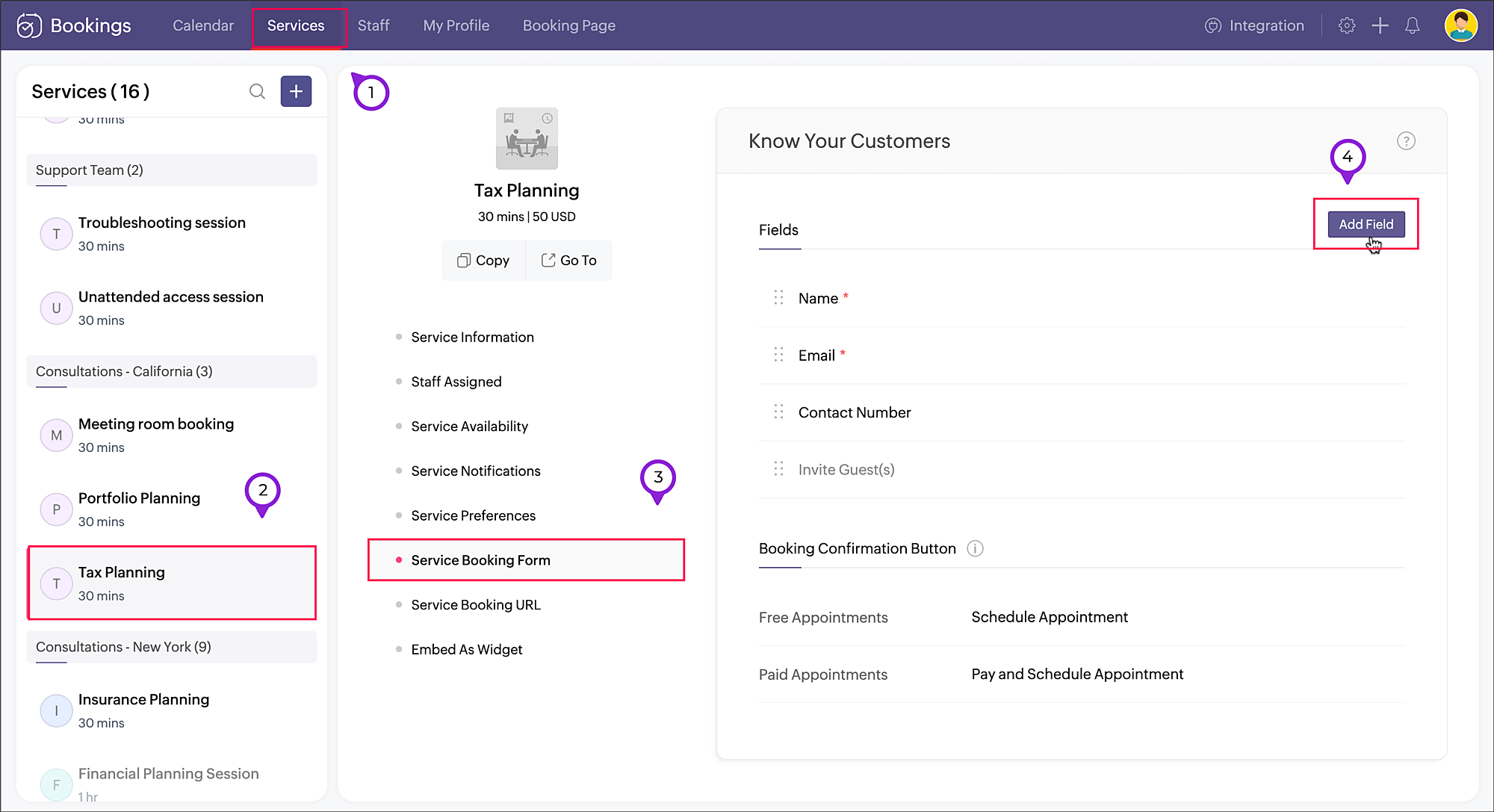


  3. A pop-up window will appear. Enter the Field Label as "Source" (or use any name of your choice). Choose SingleLine in Field Type, as we'll be using a limited amount of text in this field. Click Save


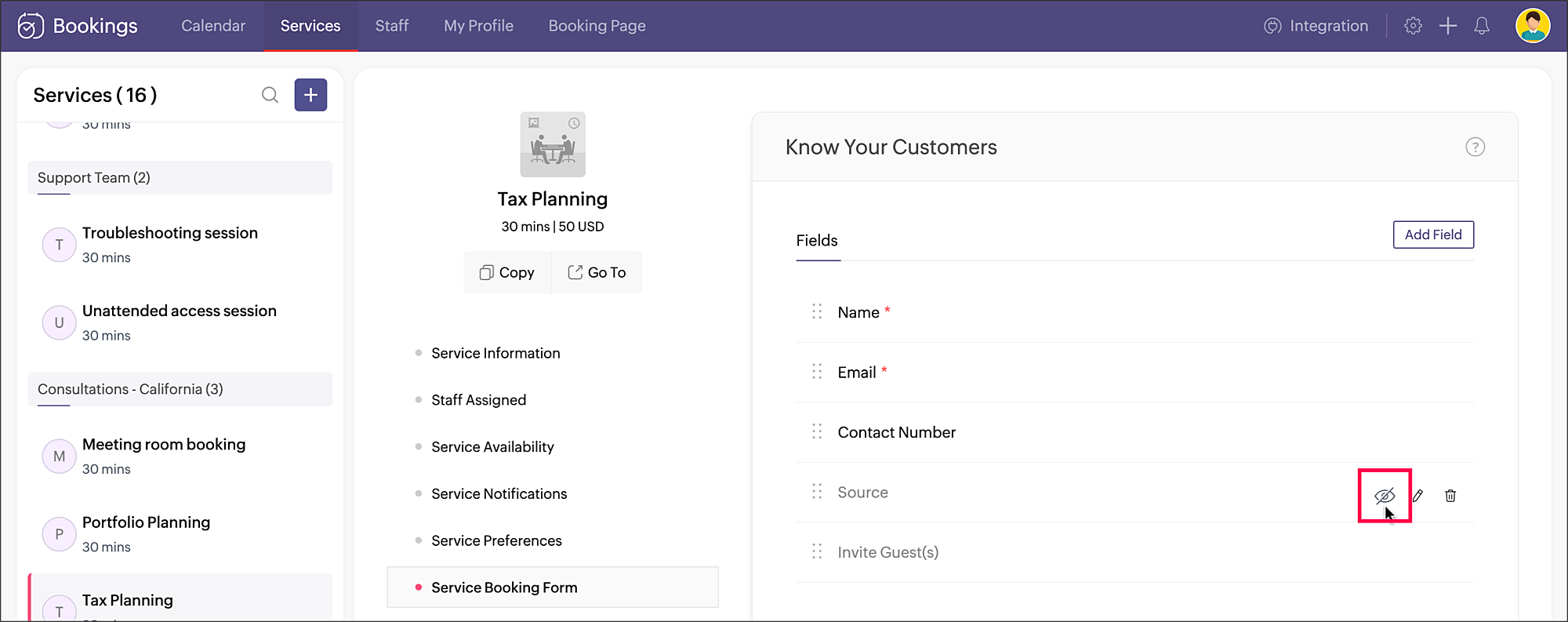
  4. Click the eye icon next to the Source field that you just created and make the field hidden in the booking form.


    Your source tracking is all set. When you share the service booking page link, add the source name accordingly. You can include the source value as a query parameter to the booking URL in the below format:
    <service_booking_page_URL>?source=<source_name>

    For example, lets say the above service Tax planning has the booking page link: https://business.zohobookings.com/#/customer/4050029000003367030.

    When this link is shared on Facebook, the source name can be added at the end: https://business.zohobookings.com/#/customer/4050029000003367030?source=facebook
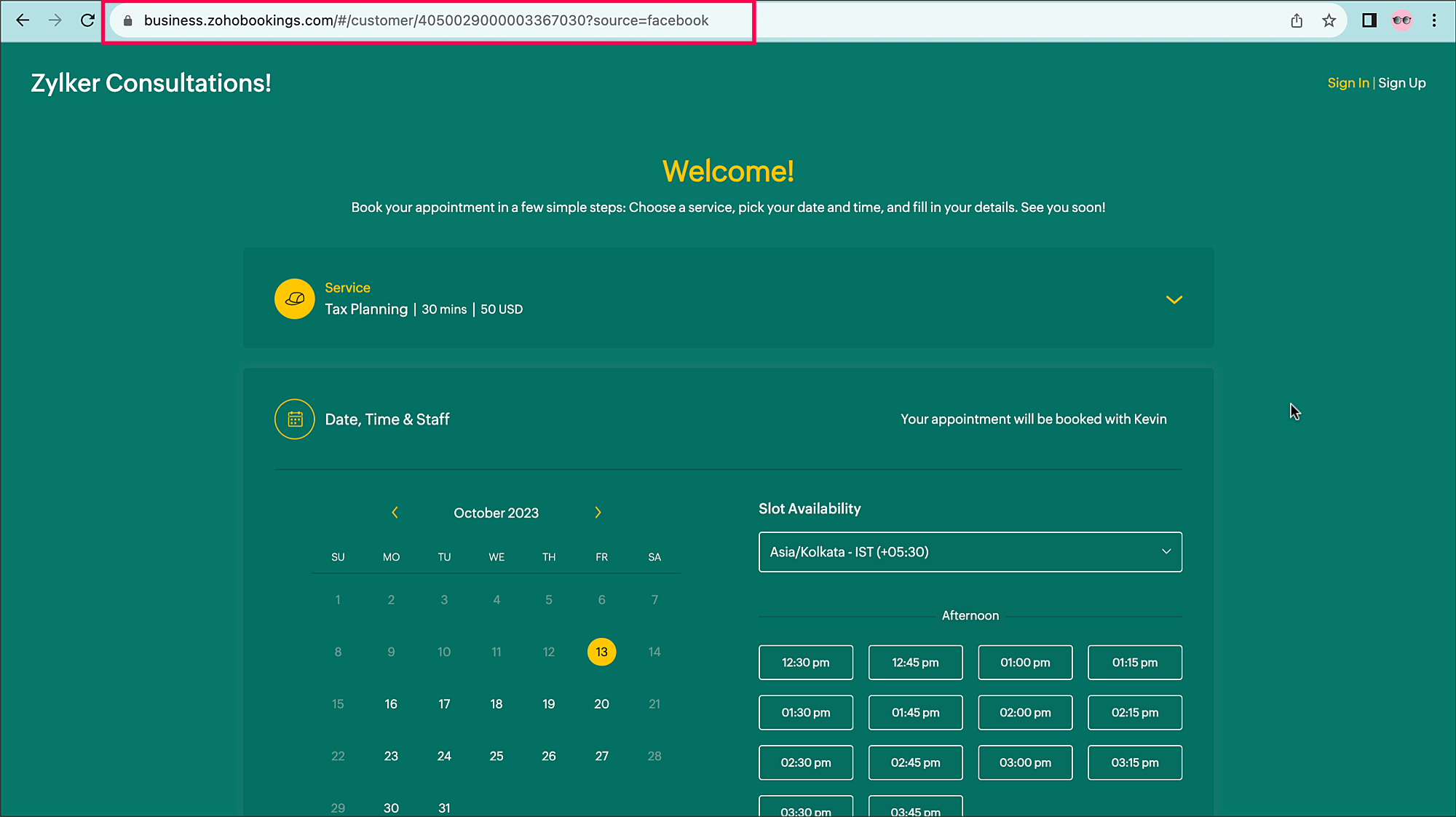


    You can easily add additional sources, such as:
    ?source=official_website
    ?source=partner
    ?source=email_campaign


    When an appointment is booked, the source name can be seen in the
    Appointment Summary under Additional Info.
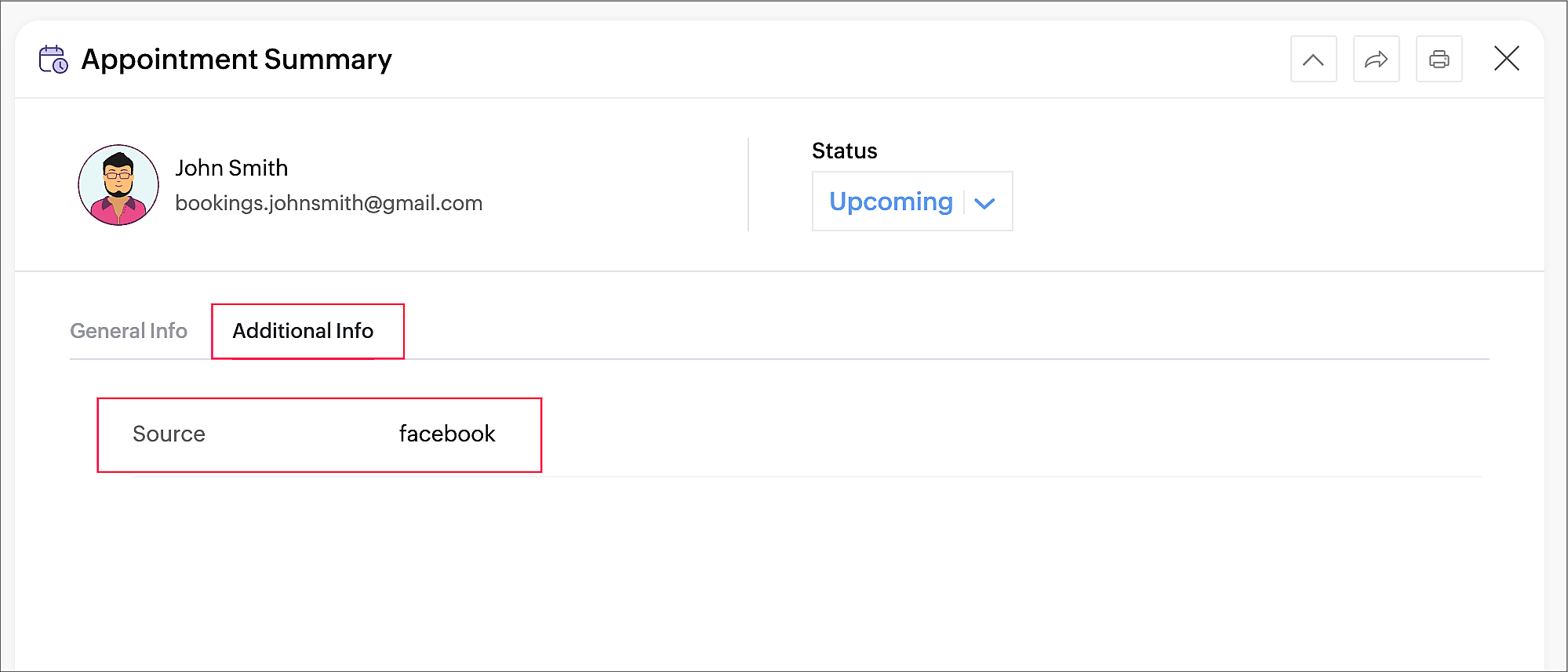
     

Tracking the sources of your bookings can help you identify which channels are effective for acquiring new customers and contribute the most to your revenue, so you can implement more targeted marketing and customer engagement strategies.

Thanks for reading! Please watch this space for more tips about online appointment scheduling.


Related Topics

Service Booking Form


      Zoho Campaigns Resources


        • Desk Community Learning Series


        • Digest


        • Functions


        • Meetups


        • Kbase


        • Resources


        • Glossary


        • Desk Marketplace


        • MVP Corner


        • Word of the Day


        • Ask the Experts


          • Sticky Posts

          • Tip #13: Identify where your bookings come from with Source Tracking

            Source tracking is the practice of identifying where your bookings originated. This is important, because online bookings come from a wide variety of sources like social media platforms, your website, email and ad campaigns, partner websites, organic
          • Tip #17: How to mandate partial payment for your appointments

            When you require partial payments during the booking process, customers can only schedule with you after paying a certain amount in advance. This deposit acts as a commitment between both parties. Apart from that, it has many more advantages. Benefits
          • Tip #18: Organize a group workshop in a few steps

            It's the season for workshops—they're everywhere, catering to diverse interests and needs. Whether for more professional goals like leadership development or creative endeavors like painting, there's an abundance of workshops offered every day. A scheduler
          • Tip #16: Custom labels for staff, service, and resources

            Every industry uses its own jargon. Take healthcare, for example; when you visit a doctor, it's not just an appointment, it's a consultation. The people who provide consultations are the providers. Similarly, in the tranquil world of a spa, a massage
          • Tip #15: Customize service prices for each staff member

            It's common practice for a service to be priced differently based on the staff member providing it. For example, an experienced hair stylist may charge more for a haircut compared to the other stylists. This pricing strategy allows businesses to charge

          Zoho CRM Plus Resources

            Zoho Books Resources


              Zoho Subscriptions Resources

                Zoho Projects Resources


                  Zoho Sprints Resources


                    Zoho Orchestly Resources


                      Zoho Creator Resources


                        Zoho WorkDrive Resources


                          Zoho CRM Resources

                          • CRM Community Learning Series

                            CRM Community Learning Series


                          • Tips

                            Tips

                          • Functions

                            Functions

                          • Meetups

                            Meetups

                          • Kbase

                            Kbase

                          • Resources

                            Resources

                          • Digest

                            Digest

                          • CRM Marketplace

                            CRM Marketplace

                          • MVP Corner

                            MVP Corner


                            Zoho Writer Writer

                            Get Started. Write Away!

                            Writer is a powerful online word processor, designed for collaborative work.

                              Zoho CRM コンテンツ


                                ご検討中の方

                                  • Recent Topics

                                  • Format print pos

                                    can anyone help me create a format to print in thermal pos format as epson t20ii printer
                                  • Getting the Record ID of a form once it is submitted - so that form can be edited later

                                    In Zoho Forms, where can I access the record ID of a form once the form is submitted? - Record ID is not available in webhook payloads - It is not available to form fields, including in formulas - It is not available as a parameter in a thankyou page
                                  • Tip#51: Use Nested Picklists for cleaner forms

                                    Are you looking for a dropdown field that branches out with multiple child options? Zoho Sprints supports Nested Picklist where you can create a parent-child relationship to navigate the users seamlessly with the required options. This ensures that the
                                  • #19 The Easier It is to Pay, the Faster You Get Paid

                                    In our previous post, we looked at recording offline payments to keep your books accurate. But what if you could eliminate that manual step altogether? Imagine sending an invoice where your customer doesn't have to copy your bank details, switch between
                                  • All new Address Field in Zoho CRM: maintain structured and accurate address inputs

                                    Availability Update: 29 September 2025: It's currently available for all new sign-ups and for existing Zoho CRM orgs which are in the Professional edition exclusively for IN DC users. 2 March 2026: Available to users in all DCs except US and EU DC. 24
                                  • Mass Email: Individual or Bulk?

                                    Can anyone confirm that the mass email feature sends as an individual email or as bulk? I'm curious to know what a mass email header looks like.
                                  • How do I add our corporate fonts to campaign template?

                                    We have developed a custom campaign template in Zoho Campaigns. Unfortunately there is such a small option of fonts by Zoho default. We need to add our 2 corporate fonts so that our campaigns are in line with our brand. How do we do this?
                                  • Export current view on timesheet bug?

                                    When you export current view on timesheet, which is a welcome change, it states: Only the current view with its visible columns will be exported from Zoho Books in CSV or XLS format.". However when this is done, the current view is not fully exported.
                                  • What's New in Zoho Invoice | April – June 2026

                                    Hello everyone! We're back with the latest updates and enhancements we've rolled out in Zoho Invoice from April to June 2026. Here's what's new this quarter: Connect Zoho Invoice to AI Using Zoho MCP Customize Accessibility Preferences Attach Annexure
                                  • Marketing Tip #38: Increase order value with free shipping thresholds

                                    Free shipping is one of the easiest ways to nudge customers to spend a little more. Instead of offering free shipping on every order, set a minimum order value customers need to reach. This encourages shoppers to add one more item to their cart, which
                                  • Integration between Zoho Creator & Zoho Projects?

                                    Hie , Integration between Zoho Creator & Zoho Projects? Is that possible if yes then How??
                                  • Zoho CRM's Old User Interface is set for EOL - Deadline and What to Expect

                                    Hello Everyone, We are nearing the completion of enabling the Next Gen UI for users as announced in this post. The Next Gen UI introduces CRM For everyone with an improved workspace experience housing features like Teamspaces, Team Modules, enhanced views,
                                  • Error AS101 when adding new email alias

                                    Hi, I am trying to add apple@(mydomain).com The error AS101 is shown while I try to add the alias.
                                  • Improved Email Management: More control over outgoing email delivery in Zoho Creator

                                    Hello everyone, Managing how your Zoho Creator applications send emails just got a whole lot more powerful. We've completely revamped the Email Management feature to give you greater flexibility, better deliverability, and deeper control over your outgoing
                                  • Send a converted Contact or Deal back to Leads using the Restore Lead extension for Zoho CRM

                                    Hello everyone, This comes up more than people expect: a Lead gets converted into a Contact, and sometimes a Deal along with it, because at the time it looked ready. Then the situation changes the opportunity turns out to be much further off than expected,
                                  • Marketer's Space: Make your emails more engaging with polls and surveys

                                    Hello Marketers! Welcome back to Marketer's Space. This week, we're looking at two features that can turn a one-way email blast into an actual conversation: polls and surveys. Why to use polls and surveys? Most emails go out and you hear nothing back.
                                  • Error when connecting zoho projects mcp to Claude

                                    When trying to connect zoho projects mcp through cloude, I am redirected to zoho login page, and then after adding my registered email I receive this error: Error while Initiating OAuth Invalid server url. Kindly re-verify oauth url from metadata and
                                  • Item image on document

                                    I know what I am asking may not be possible, but I will ask anyway, maybe I will get lucky, and someone else is doing it. My business is based on special orders only from various online stores. When I send a quote to a client, I generate a separate quote
                                  • Cash Recipt

                                    You can not receive cash more than 10000 from one party in a day and two lakh in a year. In statement you can't differentiate cash or bank receipt. zoho does not support this
                                  • MCP > Creator connection failing with Claude

                                    I'm trying to get claude to access any of my Zoho Creator apps and it keeps failing. I have enabled all tools for creator and ensured in claude settings that everything is authorised. Here is what claude says : Unfortunately, the error messages I'm receiving
                                  • Zoho Analytics Aggregates

                                    I have the attached report that lists Jobs and I want to aggregate the totals of Total Budgets, Total Bills and Difference for each Construction Stage. Can anyone tell me how I aggregate them?
                                  • Customer/Vendor Portal session duration - can it be extended?

                                    Hi all, We'd like to know how long the login session lasts for the Customer/Vendor Portal in Zoho Books, and whether there's any way to extend it (either through settings or via support/API). Right now this is causing a pretty poor experience for our
                                  • is it possible to adjust the date field to show Monday as a first day

                                    Hi, Is it possible to adjust somewhere the date field, so the first day of the week is Monday (instead of Sunday)? Thank you! Ferenc
                                  • Last Name Required

                                    Is there a way in CRM with the last name field to make it not mandatory? We are taking leads from a web form created in ZoHo CRM Form builder Form fields for this specific form are: First Name E-Mail Question/Comment Previously when using another form
                                  • Cannot receive emails

                                    Sent one days ago still no feedbacks, cannot call customer services number
                                  • Rating system button not translated to Spanish + "Done"

                                    I've run into a issue with the new system for rating support interactions when the chat is ended: Missing Spanish translation: The button is still showing in English as "Done," even though the interface language is set to Spanish. It should display something
                                  • Deprecation Notice: OpenAI Assistants API will be shut down on August 26, 2026

                                    I recieved this email from openAI what does it means for us that are using the integration and what should we do? Earlier this year, we shared our plan to deprecate the Assistants API once the Responses API reached feature parity. With the launch of Conversations,
                                  • Zoho Cliq not working on airplanes

                                    Hi, My team and I have been having this constant issue of cliq not working when connected to an airplane's wifi. Is there a reason for this? We have tried on different Airlines and it doesn't work on any of them. We need assistance here since we are constantly
                                  • Completed Calls don't associate with Scheduled Calls

                                    I schedule calls at specific times so that they are easily viewable on my phone. I open a given call on my phone and use the call icon at the bottom of the screen. I complete the call and select "yes" when asked if I want to log the call. I enter the
                                  • Need Parallel Transitions for Zoho Desk Blueprint

                                    Zoho CRM's Blueprint already supports Parallel/Multiple Transitions, letting multiple transitions run simultaneously between two states (refer to https://help.zoho.com/portal/en/kb/crm/process-management/blueprint/articles/parallel-and-multiple-transitions-configuration-and-usage#Using_Parallel_Transitions)
                                  • Zoho Forms integration Google Sheets

                                    Hi, quick one. I wonder if you can help. I have a Zoho Form integrated to a Google Sheet. The fields are showing across the top, but no records are there. I have checked in Zoho Forms to see if there have been any failed integrations, but there are none.
                                  • ZoHo Mail & MCP connectors

                                    Is ZoHo working an MCP connector for mail?? I find it very useful in Gmail to have Claude summarize messages for me. Thanks Jim P.S. Sorry if this is the incorrect forum. Mods please adjust as necessary.
                                  • Introducing the Required Skills field for Job Openings

                                    We're excited to announce a new enhancement to the Job Openings module - the Required Skills field, formerly known as the Skillset field. This enhancement brings improved functionality and a fresh UI to help you define your job requirements effortlessly.
                                  • ZDialer app sign in replys: Account doesn't exist

                                    I couldn't find Zoho Voice for a category. Problem: I have an active Zoho account with Zoho Voice and Zoho CRM. I can successfully sign into both services from my computer using my email address. However, the ZDialer mobile app redirects to accounts.zoho.com
                                  • Checking validity of fields when converting Leads

                                    Hello, When converting a lead to a contact (and Company), we want to check beforehand if some fields are filled. Ideally a script or action should be triggered to check the fields and then continue if all is fine, or display a message and stop the process. Reasons: Leads are created with few data at the beginning (often name and email), and with time the profile is augmented. Until it reaches some minimal data, this leads shouldn't be convertable as Contacts. Contacts are people we are making business
                                  • Is it possible to have conditional pages?

                                    We have a Document, which consists of multiple different subdocuments. We want to have the subdocuments as pages inside a doc and only show them in specific cases. Is it possible to have conditional pages inside of a mail merge based on CRM data?
                                  • Reports not adding up

                                    I have a subform that we add lines for costs. These are added up in the aggregate (see image 1). When I pulled these into reports, I link the aggregate subform cost, but it keeps adding each subform line, instead of just the PO Subject and the numbers
                                  • 【西日本初開催】「AI and DX Summit 2026」のご案内

                                    ユーザーの皆さま、こんにちは! 西日本初開催となるZoho ユーザー / 検討中の方々向けイベントのご紹介です。 AI・DX大型カンファレンス「AI and DX Summit 2026」を、2026年7月16日(木)に開催します。 会場は、ウォルドーフ・アストリア大阪。 グラングリーン大阪直結のラグジュアリーな空間で、AIとDXの最新トレンド、実践事例、 展示、ネットワーキングが集結する、特別な1日をお届けします。 👉イベントページを見る ━━━━━━━━━━━━━━━ AIとDXの“今”を、体感。
                                  • creating an alias

                                    your instructions for creating an alias are wrong. there is no add alias in my mail account. also i dont have a control panel link just a settings link how do i really make an alias
                                  • Set Mandatory Lookup Fields in Ticket Layout

                                    I added a custom module called 'Site' in the desk. I also added a lookup field 'Site' in the ticket layout. Now, I want the 'Site' field to be mandatory in the blueprint transition. How can I do that?
                                  • Next Page