Visualize your data with a new set of charts: Treemap, Butterfly, Sankey, and Cluster charts in Zoho CRM
Dear customers,
When it comes to analytics, it's not just about the numbers; it's about understanding the story behind them.
With that philosophy in mind, we’re excited to introduce a line of representations to the existing array of chart types in Zoho CRM: Treemap, butterfly, sankey and cluster charts. Let's go!
Treemaps
Treemap charts are used to visually represent hierarchical datasets in a rectangular layout. It aligns its parent categories as larger tiles with their sub-categories nested within them. The size of each tile is proportional to its corresponding value, making it easy to compare different segments within the hierarchy.
This is how a treemap chart looks:

These structured data representations help you understand overall performance and contributions, as well as compare participating entities at a glance.
Unlike traditional bar charts or pie charts, treemaps can be used if your datasets are large and exhibit parent-child relationships.
Here are some examples to better understand their usage:
Comparing revenue distribution between functions
A company's revenue is distributed among its functions before it gets further disbursed to its employees. Treemap charts can be used to depict this distribution and compare it between functions. As you can see below, the hierarchy can be represented as a treemap to compare it directly with other functions:

The hierarchy at the top shows just the numbers and levels, but the treemap chart represents the numbers proportionally, allowing leaders to visualize the difference in distribution.
Interpretation: As you can easily see in the treemap, sales and marketing receive the same amount of revenue, while engineering is given significantly more than the other two.
Likewise, with treemap charts, you can:
- Compare popular lead sources with lead counts is the measure and lead source being the participating entity—a classic single-grouping configuration.
- View cost savings achieved across departments. With the departments as the grouping parameters and the cost saved as the measured amount, the chart lays out all the departments as tiles in proportion, based on money saved.
- Compare ad spends across channels, where channels are the parent grouping and ad spend is the measured unit.
Butterfly
Butterfly charts are used to compare two related datasets side-by-side, resulting in a representation that looks like a butterfly or tornado.
Now, how does it differ from bar charts?
The standard bar chart can compare two entities for a given measure. Say, you are comparing the performance of Mary and Charles. The two users' data is represented using bars, and the length will denote their performances. But, when it comes to comparing their performances over a period or their contribution across different stages, a bar chart is not sufficient.


With butterfly charts, you can:
- Compare revenue between two of your branches each month. With branches being compared for sum of sales revenue, grouped by closing date.
- Compare the performance of two reps in a given quarter. Compared between two users for average of amount of deals, grouped by closing date until today.
In addition to the user-based comparison above, butterfly charts are well-suited to visualizing other types of data comparisons, like:
- Picklist-based comparisons
- Duration-based comparisons
- Aggregate-based comparisons
Business scenario
Comparing the number of deals closed for each lead sources: Duration-based comparison
You can identify the productive lead source by comparing the number of deal closures for every lead source in your organization based on their closing week.

Analyzing effective sales methodology, inbound vs. outbound: Picklist-based comparison
Businesses use both inbound and outbound lead generation strategies, and each of these methods can reap different results based on the season and occasion. By comparing inbound versus outbound each month, you can identify which works best at what time.

Analyze the amount versus the expected revenue between accounts: Aggregate-based comparison
Expected revenue is a result of a deal's progression in the sales pipeline. Comparing the amount versus their expected revenue will not only help visualize the expected revenue of participating accounts but also indicate the accounts' stage in the sales pipeline.

Sankey
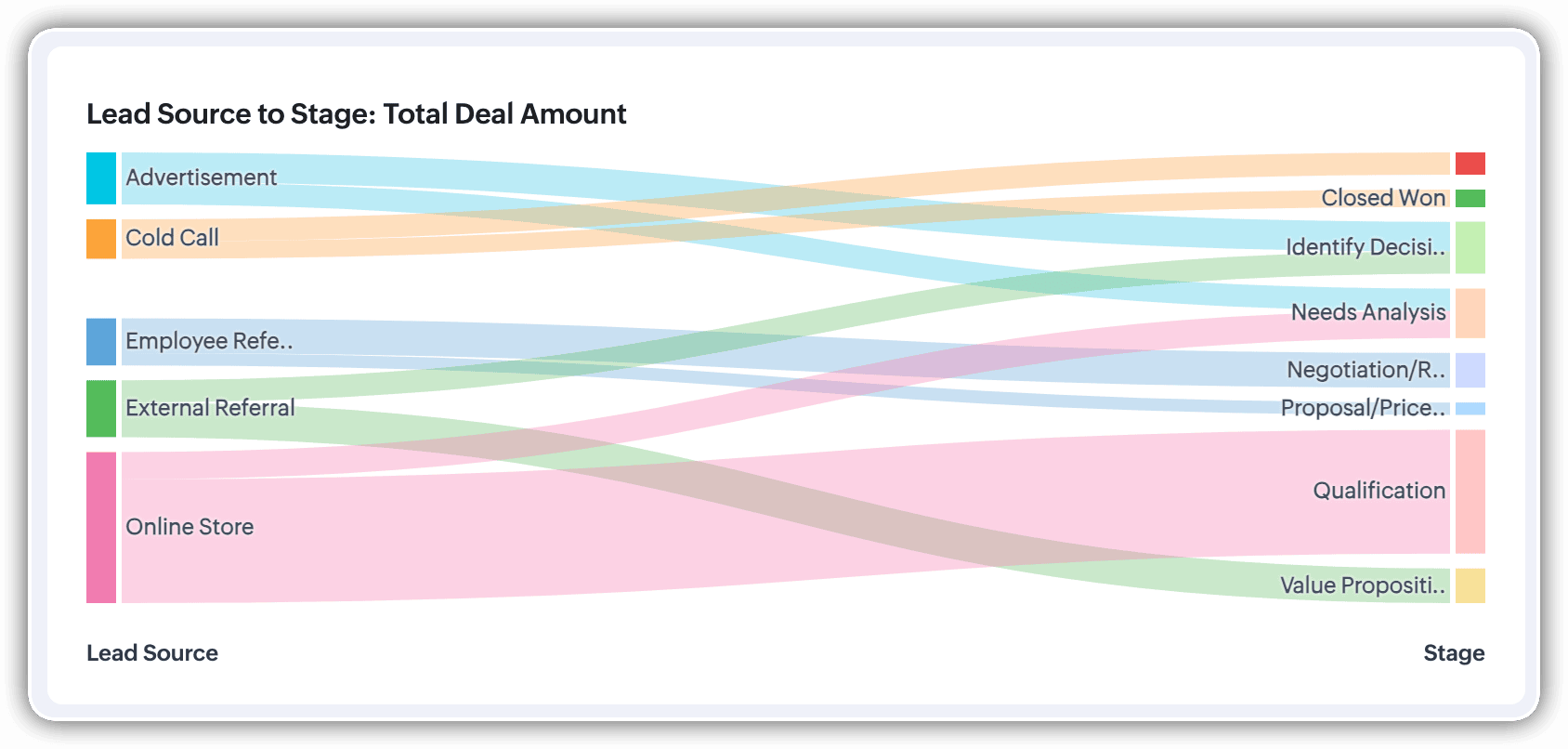
A Sankey Chart is designed to visualize the movement of data across different data groups. Unlike traditional charts—such as bar, column, pie, or donut—that mainly provide a static distribution of values, the Sankey Chart focuses on illustrating the flow between multiple segments or grouping fields. This makes it an ideal choice when you want to track how values (like lead counts, revenue, or deal statuses) move from one category to the next.

Key features
- Flow visualization: With the Sankey Chart, you can observe the movement of data between different groups.
- Multiple grouping fields: This chart works best when you have at least two grouping fields. You can go even further and add a third grouping to see an even more detailed mapping of your data flow.
- Simple configuration: The configuration for the Sankey Chart is as simple as any other chart type in Analytics.
Business scenarios:
Imagine you’re a sales manager trying to get a better handle on your team’s performance and your company’s pipeline. You want to understand not just how many deals are coming in, but also which sources are contributing the most value—and how those deals are progressing through different sales stages.
Let’s say you want to understand which lead sources are driving the most deal activity and how those deals progress through the pipeline. You can create a Sankey chart that maps the count of deals from Lead Source to Stage.

After analyzing the chart, you might notice that Online Store brings in a high volume of early-stage deals, while sources like External Referral contribute fewer deals that are more likely to reach advanced stages like Proposal or Negotiation.
This insight helps you prioritize nurturing the most profitable channels.
Sankey charts can also be helpful in other operational scenarios where understanding transitions across stages or teams is essential:
- Regional revenue distribution: Visualize how revenue flows across different regions, product categories, and their corresponding annual revenue. This helps you compare which regions contribute the most to each product line and where your high-value segments lie.
- Ticket handling flow: Visualize the flow of support tickets from their origin channel to internal departments and finally to resolution statuses. This can reveal workload imbalances or common points of delay in your support process.
Cluster
A cluster chart is similar to stacked column charts, but instead of stacking horizontally, the data is represented as vertical bars. As you create a column chart with multiple groupings, you can change the type of column chart to a cluster chart to achieve this representation.

In the above image, you can see the stacked column chart compares the number of lead conversions based on popular sources between countries. The stacks appearing on top of existing stacks ask you to calibrate the record count (y-axis) based on the previous stacks, which can lead to inaccurate interpretations. In this case, a cluster representation will paint a clearer picture of the analyses.
Other minor enhancements:
In addition to the three charts we mentioned above, we've also made the following minor changes:
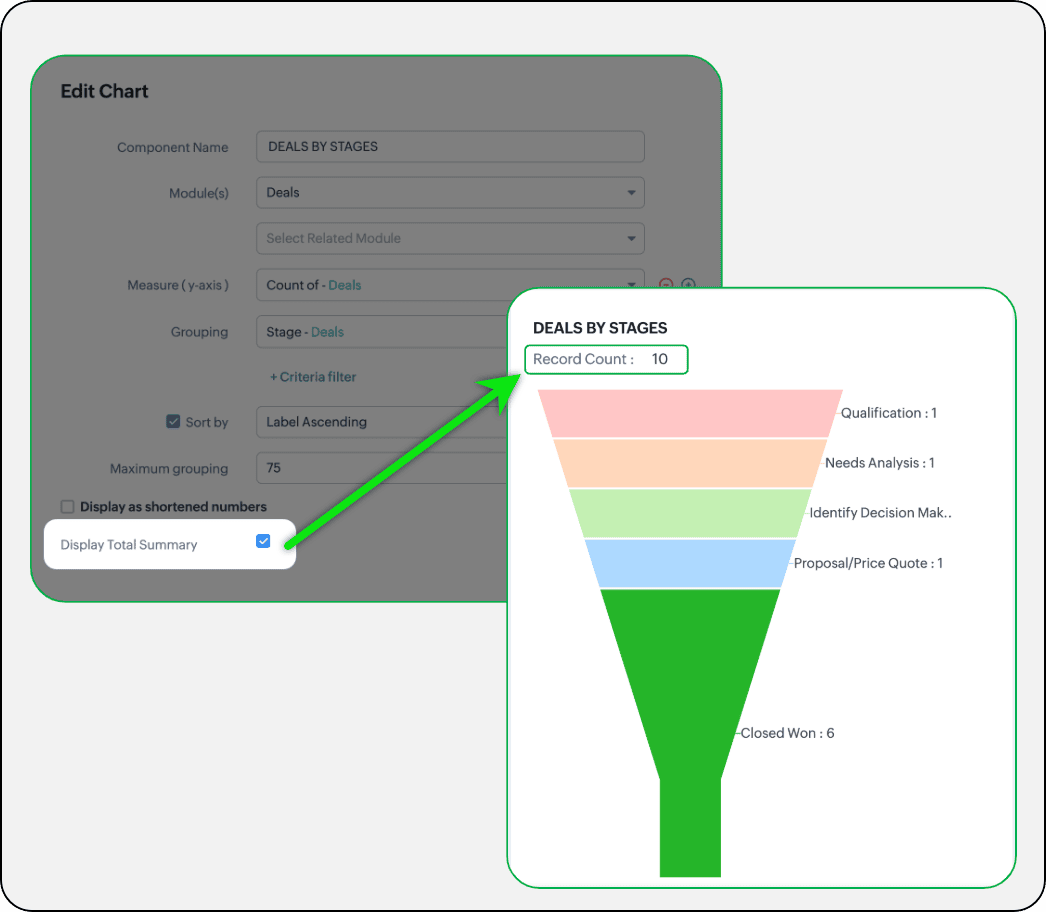
- Display total summary: Thus far, for all charts, each participating measure included labels. Now, to better understand overall contributions, a check box to display the total summary is provided under More options on the Chart Configuration page. Based on the configuration, the total revenue or the rolled-up quantities will be prominently displayed.
- Merge Y-axis: For charts that use two y-axis measurements, the intention is to view the progression of one entity against these two measures. Despite the scale, if the y-axis on the left is disproportionate to the values of the y-axis on the right, the plotted graph will result in a graphically and logically incorrect representation.
As you can see in the image below, the plot area of the sum of amount bar and the sum of expected revenue aligns close together, while, the difference between $700,000 and $40,500 is drastic, creating inaccurate interpretations.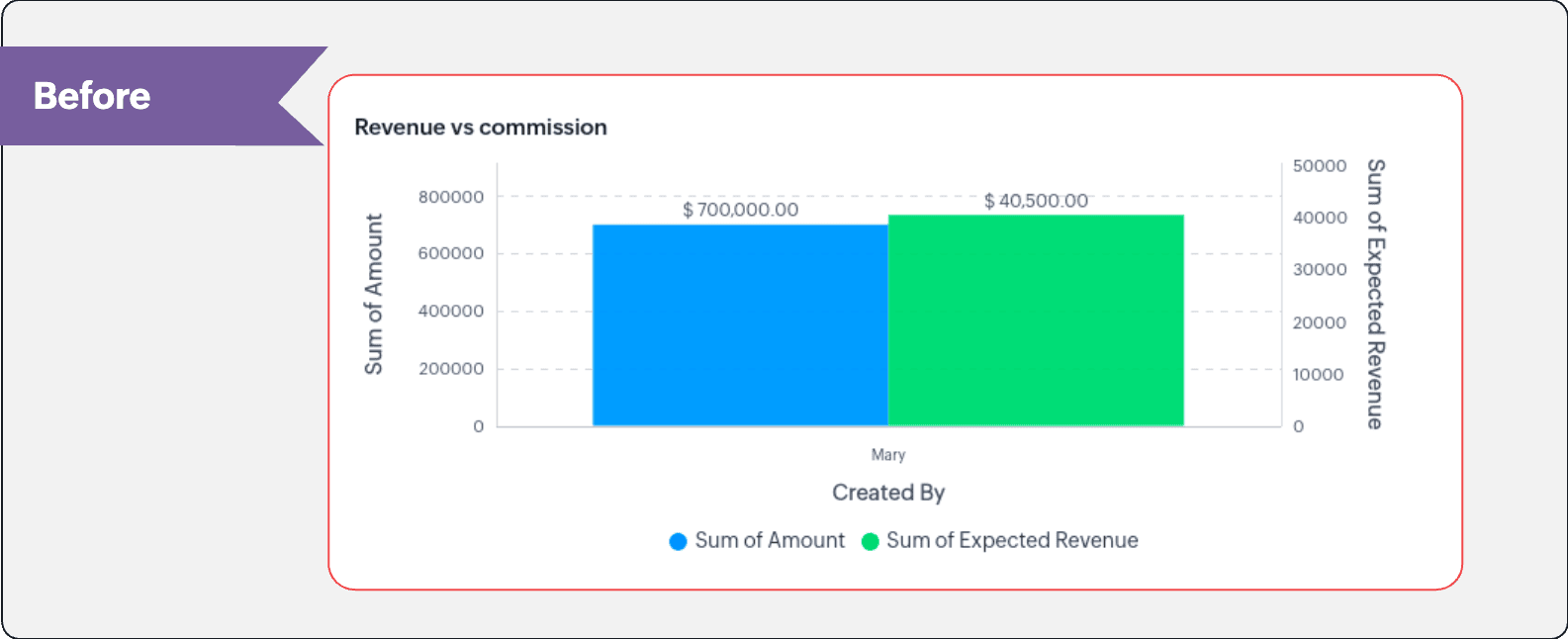
In this enhancement, we're allowing neighboring values of measures to merge so that the interpretation can be more visually accurate.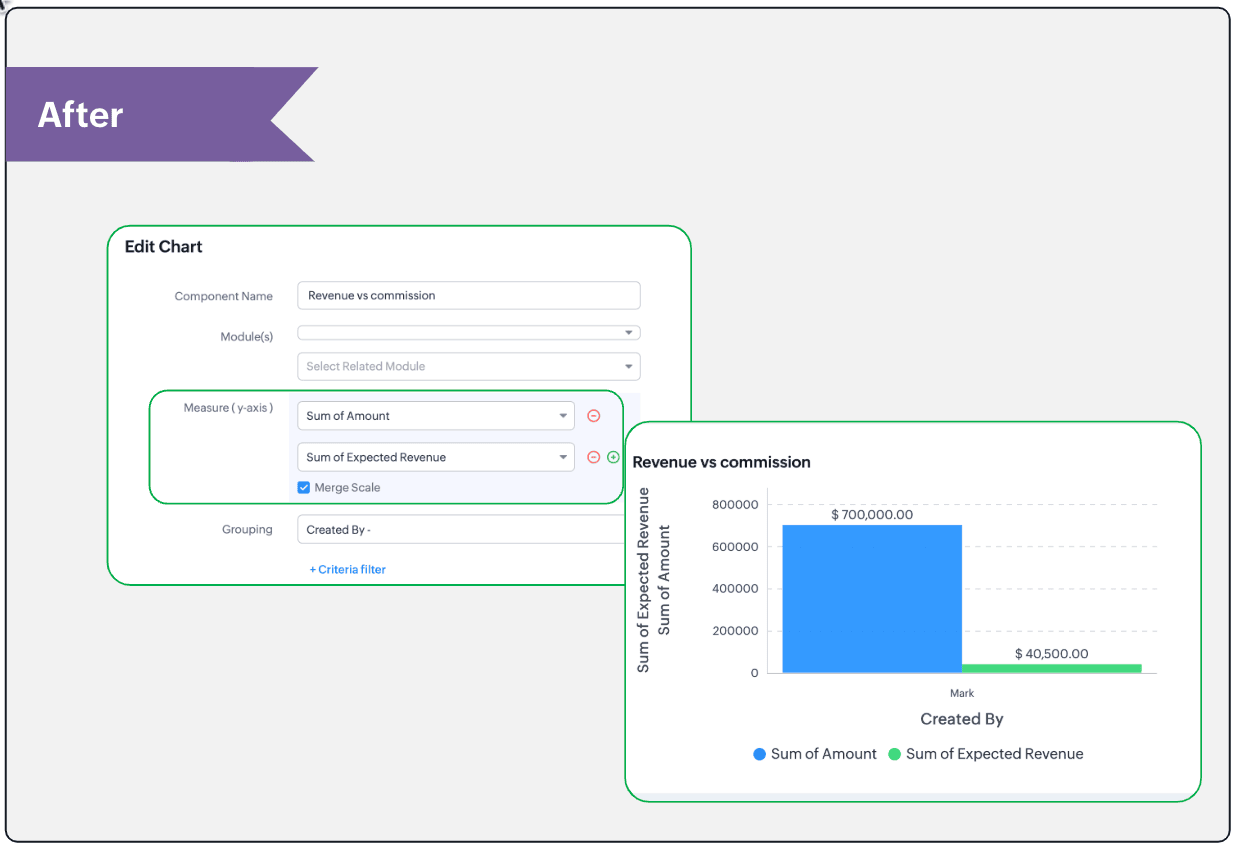
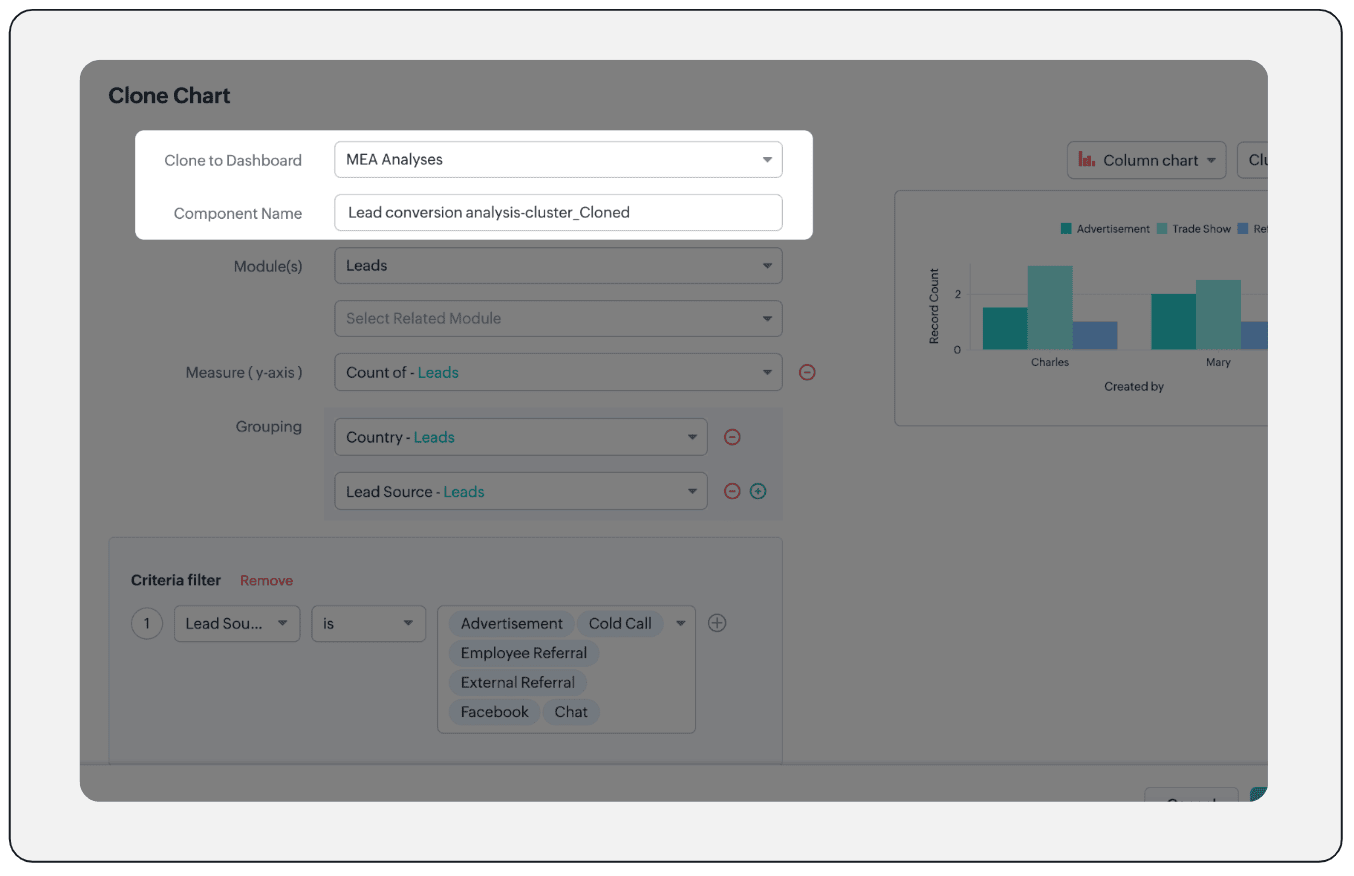
- Clone components to a different dashboard: Dashboards in Analytics serve in unique ways for various audiences—there can be separate dashboards for the sales team, marketing team, engineering team, and so on, and the chances of using the same measure for reference is common. Thus, when you clone a chart, you can now determine the target dashboard in which the cloned chart can be placed.
Resource: Help document
Thanks and have a good one!
Kind regards,
Saranya Balasubramanian
Saranya Balasubramanian
New to Zoho Recruit?
Zoho Campaigns Resources





Topic Participants
Saranya Balasubramanian
Sticky Posts
Presenting ABM for Zoho CRM: Expand and retain your customers with precision
Picture this scenario: You're a growing SaaS company ready to launch a powerful business suite, and are looking to gain traction and momentum. But as a business with a tight budget, you know acquiring new customers is slow, expensive, and often deliversGood news! Calendar in Zoho CRM gets a face lift
Dear Customers, We are delighted to unveil the revamped calendar UI in Zoho CRM. With a complete visual overhaul aligned with CRM for Everyone, the calendar now offers a more intuitive and flexible scheduling experience. What’s new? Distinguish activitiesCreate and populate a record in an instant: Introducing zero-shot field prompting to Zia's ICR
A couple of months ago, we upgraded our in-house AI image detection and validation tool, Zia Vision, with intelligent character recognition (ICR). By training Zia with sample images, you could create and enrich CRM records with data extracted from standardIn-person ZUG Meetups for Real Estate Professionals - US Q1 2026
The Real Estate Zoho User Group is going on a multi-city, in-person meetup tour across the US, and we’d love to see you there! These meetups are a great opportunity to: Connect with fellow real estate professionals using Zoho Share challenges and discoverNimble enhancements to WhatsApp for Business integration in Zoho CRM: Enjoy context and clarity in business messaging
Dear Customers, We hope you're well! WhatsApp for business is a renowned business messaging platform that takes your business closer to your customers; it gives your business the power of personalized outreach. Using the WhatsApp for Business integration
Zoho CRM Plus Resources
Zoho Books Resources
Zoho Subscriptions Resources
Zoho Projects Resources
Zoho Sprints Resources
Zoho Orchestly Resources
Zoho Creator Resources
Zoho WorkDrive Resources


Zoho CRM Resources
Get Started. Write Away!
Writer is a powerful online word processor, designed for collaborative work.
Zoho CRM コンテンツ
-
オンラインヘルプ
-
Webセミナー
-
機能活用動画
-
よくある質問
-
Ebook
-
-
Zoho Campaigns
- Zoho サービスのWebセミナー
その他のサービス コンテンツ
ご検討中の方
Recent Topics
Zoho Creator customer portal users
Hi, I'm in a Zoho One subscription with our company. I'm running a project now that involves creating a Zoho Creater application and using the Zoho Creator Customer Portal. At most we need 25 customer portal users. In our Zoho One plan we only get 3DKIM Verification Failed (Namecheap)
Hi! I have already set up the TXT records in Namecheap but I keep getting the "Verification Failed" pop up. Was wondering if I'm the only one who has this problem and can anyone help me with this? Thanks!Emails stuck in Queue
Hi there, Since yesterday I have a few out going emails stuck in a queue. It say it will auto retry sending however nothing is happening. It seems to be affecting roughly 50% of my outgoing emails. Please help ThanksSoft Bounce from transational emails from BREVO (Sendinblue)
I manage the website of a client who uses your EMAIL service for the domain floranativadobrasil.com. And I use the BREVO email service, previously called SendinBlue, to send transactional emails about events specific to the website. All emails sent toAbility to Edit YouTube Video Title, Description & Thumbnail After Publishing
Hi Zoho Social Team, How are you? We would like to request an enhancement to Zoho Social that enables users to edit YouTube video details after the video has already been published. Your team confirmed that while Zoho Social currently allows editing theIntroducing Multi-Asset Support in Work Orders, Estimates, and Service Appointments
We’re excited to announce a highly requested enhancement in Zoho FSM — you can now associate multiple assets with Work Orders, Estimates, and Service Appointments. This update brings more clarity, flexibility, and control to your field service operations,Getting an error Address not found Your message wasn't delivered
Hey, I'm trying to configure zoho mail for my website https://businessentity.org/ The email is meredith.karter@businessentity.org I'm able to successfully send the mails but when someone sends an email to above mail, this error shoots up: Address notSupport Uploading YouTube Videos Longer Than 60 Minutes
Hi Zoho Social Team, How are you? We would like to request support for uploading YouTube videos longer than 60 minutes directly through Zoho Social. Your support team informed us that Zoho Social currently cannot upload videos over 60 minutes due to “APINeed Faster Help? Try Live Chat Support
Hello there, We understand that sometimes, whether you’re facing an issue, exploring a feature, or need quick clarification, sending an email and waiting for a response just doesn’t cut it. You need answers, and you need them now. That’s exactly why weCan't deactivate Spell Check
Hi Community, right now I'm using the Zoho Mail Desktop-Software. So far, so good.. many possibilities. Overall very nice. What is extremely annoying right now, is that we are not able to deactivate the Spell Check feature. And we are barely able to focusZoho Toolkit Email Signature Generator
I'm having real issues with the email signature generator with no matter where I host the photo, Zoho doesn't seem to show the photo on the link provided?Company Policy Upload - Request All EE to review and sign
How can I upload policies into Zoho People and have the employees review them and sign off saying they agree, etc.? Also, if I make a revision to a policy, I would like that changed or updated policy to be distributed or have the employees notified thatZoho Sign Global Settings vs. Template and Document
Hello, We are running into an issue on a current use case. We already use Zoho Sign. Now that KBA is available, we want to begin using it in our tax delivery process, by allowing clients to sign electronically, but also download a copy of their returnZoho Mail Desktop Crashes on Linux - Ubuntu 24 LTS
Hi, I have been trying to run the desktop app on Ubuntu for the past few day with no luck. I have tried both the .deb package and the appImage. When I attempt to open the app. It just crashes immediately. The crash error dialog appeared once and I cantCan't login to Zoho mail
I'm logged into Zoho but when I try to go in zoho mail I get: Invalid request! The input passed is invalid or the URL is invoked without valid parameters. Please check your input and try again. I just set up my mx records and stuff with namecheap a fewZoho IP blocked by SpamCop
Hi, Many of my emails are blocked and I receive this: INVALID_ADDRESS, ERROR_CODE :550, ERROR_CODE :spamcop.mimecast.org Blocked - see https://www.spamcop.net/bl.shtml?136.143.188.51. - https://community.mimecast.com/docs/DOC-1369#550 [DGwIYPPSOfWIDifferences between Zoho Books and Zoho Billing
Without a long drawn out process to compare these. If you were looking at these Books and Billing, what made you opt for one and not the other. ThanksCustom validation in CRM schema
Validation rules in CRM layouts work nicely, good docs by @Kiran Karthik P https://help.zoho.com/portal/en/kb/crm/customize-crm-account/validation-rules/articles/create-validation-rules I'd prefer validating data input 'closer to the schema'No Ability to Rename Record Template PDFs in SendMail Task
As highlighted previously in this post, we still have to deal with the limitation of not being able to rename a record template when sent as a PDF using the SendMail Task. This creates unnecessary complexity for what should be a simple operation, andServer error when trying to Data > Sort > Custom Sort
Been using Data > Sort > Custom Sort for a while, now it has suddenly stopped working. When selecting the same data range and trying to execute, I get "Sorry! There was a problem saving your last edit. Please try again."To Assign a genrated pdf to a file upload field using delug
content = "<html><body>HTML Content on page One <div style='page-break-after:always'></div> HTML Content on page Two </body></html>"; file = zoho.file.convertToPDF(content); file.setFileName("Name of the file"); <variableName> = <FormLinkName>[ID == input.ID];TArgets To Accounts (Modules)
How can i set sale target to Customers (Accounts Module)Breaking barriers with multilingual WhatsApp templates in IM
Ever wondered what it feels like to be greeted in your own language by a brand you love? A “Welcome!” feels nice, but a “¡Bienvenido!” or “स्वागत है!” feels personal. In today’s global world, conversations often need to cross both time zones and crossSuper Admin Logging in as another User
How can a Super Admin login as another user. For example, I have a sales rep that is having issues with their Accounts and I want to view their Zoho Account with out having to do a GTM and sharing screens. Moderation Update (8th Aug 2025): We are workingHow to share private Opportunities with whole org at an account level
Opportunities are currently set to private, so our sales team only sees their own opportunities, along with their manager and upper leadership. The need is the ability for the rest of the Org to see the opportunities at an account level, not within theNew in Smart Prompt: Record Assistant for contextual assistance, and support for new AI models
Smart Prompt helps teams stay informed and move faster by providing relevant suggestions where work happens in CRM. With this update, Smart Prompt becomes more adaptable to your organization’s AI preferences. You can now choose which Large Language ModelProblema Verificacion con proveedor NIC.AR
No puedo realizar la verificación del correo, he seguido los pasos indicados y configurado los MX. Y no puedo verificar el correo. He leido en el foro que otros han tenido el mismo problema. Alguno pudo solucionarlo?How to remove some users in zoho accounts
How to remove some users in Zoho accounts.Unified Inbox for all, including fetched mails
I fetch mails from different third-parties mailboxes. But I need to switch mailbox too see fetched mails. It's strange. All mailboxes have one shared disk space for own mail and fetched mail, but why do we need to switch mailbox (on the left bottom) toMy domain did not activate
Hi, my domain (apsaindustrial.com.ar) did not activate, and the phone verification message never arrived. Please would you solve this problem? Thanks.Whatsapp Limitation Questions
Good day, I would like to find out about the functionality or possibility of all the below points within the Zoho/WhatsApp integration. Will WhatsApp buttons ever be possible in the future? Will WhatsApp Re-directs to different users be possible basedUsers Not Automatically Being Added To WorkDrive Team
I have already created a ticket for this issue, but the support team doesn't seem to understand what's happening. Our organization started with a trial of Zoho Workplace around November 10, 2025. I created 10 users, including myself. I sent out the invites,Synchronization between Gmail and Zoho Mail
Hello! I am using Zoho Mail within the Zoho One platform. I have completed the basic setup and added all the required DNS records with our domain provider. Our goal is to set up two-way synchronization between our current Gmail inbox and Zoho Mail, butIMAP login problem
I have my domain hosted with zoho @wilson.ie I have added a new user and have enabled IMAP access to this user account The user can login to zoho mail on the web. When we enter the server settings into Outlook as per below, Outlook cannot login to theContact data removes Account data when creating a quote
Hi, Our customer has address fields in their quote layout which should be the address of the Account. They prefill the information, adding the account name - the address data is populated as per what is in the account - great. However when they then addChanges to subform in Zoho CRM Portal Timeline History Unavailable
Hi Support Team, We have noticed a feature limitation in the Zoho CRM portal. We created a portal for our vendors to edit records directly, but when vendors make updates, the Modified Time and Date fields are not being updated. Additionally, these updatesThis mobile number has been marked spam. Please contact support.
Hi Support, Can you tell me why number was marked as spam. I have having difficult to add my number as you keep requesting i must use it. My number is +63....163 Or is Zoho company excluding Philippines from their services?Function #11: Apply unused credits automatically to invoices
Today, we bring you a custom function that automatically applies unused credits from excess payments, credit notes, and retainer payments to an invoice when it is created. Prerequisites: Create a Connection named "zbooks" to successfully execute the function.Duplicating report but custom layout does not
Dear Zoho Creator, I need to duplicate a report into 10 copies, but unfortunately the custom layout (detail view) doesn’t copy along with it. I tried exporting and importing the custom layout, but the field mappings are incorrect. I believe everyone areCredit Card Readers?
We would like to use our commerce website at conferences (and eventually in store) to swipe credit cards to pay for orders. How would we accomplish this? Does Zoho have anything available for a developer write code to integrate something like Stripe TerminalNext Page