Wat is er nieuw in Zoho Desk 2023
Beste Community leden,
Hoeveel je ook van je klanten en je werk houdt, als klantenservice medewerker zul je zeker een aantal zware dagen tegenkomen. We hebben het dan over de dagen dat je een paar keer op de snooze-knop drukt, koffie morst op je favoriete shirt en op je werk inlogt om een stapel ongeopende support tickets in je wachtrij te vinden. Het is logisch dat je naast goede ook slechte dagen hebt. Soms, tijdens die sombere klantenservice diensten, is "Dank u voor uw hulp" wat je op de been houdt.
Klantenservice medewerkers spelen zo'n belangrijke rol in de tevredenheid van de klant dat sommige bedrijven de rol hebben geherdefinieerd tot "customer happiness agent". Als agent speel je een directe rol om ervoor te zorgen dat klanten een geweldige ervaring hebben met je bedrijf. En bij Zoho Desk hebben we het onze missie gemaakt om jou - als "geluksbrenger" - de klant tevreden te houden!
Sinds het begin staat tevredenheid (zowel van jou als van je klanten) centraal bij alles wat we bij Zoho Desk doen. Immers, een tevreden werknemer zorgt voor meer tevreden klanten en uiteindelijk voor een gezonder bedrijf.
De nieuwe Zoho Desk release versterkt de omnichannel communicatie, customer self-service en agent experience. Lees verder voor meer informatie over alles waar we mee bezig zijn geweest.
Instant messaging
We zijn verheugd om een nieuwe manier van interactie met je klanten in Zoho Desk te onthullen. Met het Instant Messaging (IM) platform voor Zoho Desk kunnen klanten je bedrijf bereiken via WhatsApp, Telegram, LINE en WeChat. Aangezien de meeste van je klanten deze platforms al gebruiken voor communicatie, is het alleen maar logisch om ze daar te helpen. We hebben alle tools die je al kent gecombineerd met onze uitgebreide IM-module, samen met enkele nieuwe functies die zijn ontworpen om de productiviteit te maximaliseren.
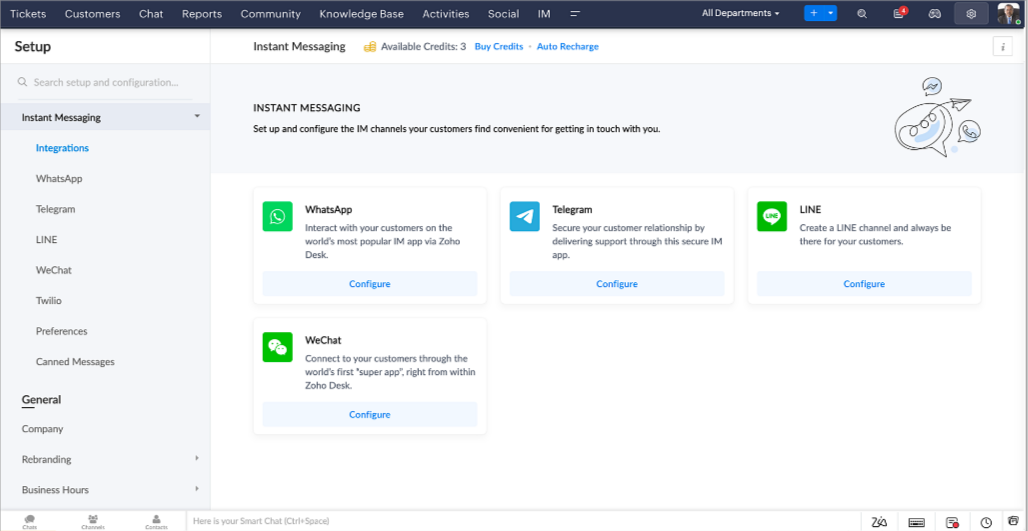
Zoho Desk geeft je een melding in realtime voor inkomende chats, zodat je gemakkelijk contact kunt leggen met klanten vanuit de interface die je al gebruikt. Daarbij kun je nu:
- Klantcontact, ticket informatie, cross-channel gespreksgeschiedenis en bijlage gegevens binnen het chatvenster van de klant volgen voor directe context.
- Kennisbank artikelen openen en toevoegen vanuit het invoergedeelte, vooraf opgestelde antwoorden gebruiken voor snelle oplossingen en emoji's toevoegen voor extra personalisering.
- Neem deel aan meerdere chats tegelijk in verschillende kanalen zonder van tabblad te hoeven wisselen.
- Wijs gesprekken toe aan je teamgenoten.
- Converteer gesprekken in tickets om ze gemakkelijk te kunnen volgen tot ze zijn opgelost.
Hoe zit het met automatisering? Je hebt het! Automatisering, zoals workflows, Blueprints, toewijzingsregels en SLA's, en meer die mogelijk zijn voor tickets aangemaakt vanuit andere kanalen zijn mogelijk voor tickets aangemaakt vanuit je instant messaging kanalen. Je kunt ook automatische reacties instellen voor de tijden dat je afwezig bent of je klanten op oneven uren berichten sturen.
Je kunt het voor klanten gemakkelijk maken om contact met je op te nemen door QR-codes te installeren bij fysieke verkooppunten of door onze eenvoudig te implementeren knop Bericht ons op je website te embedden. Ze kunnen je zelfs bereiken via direct zakelijk zoeken op het IM-platform zoals Telegram.
Guided Conversations (GC)
We zijn erg enthousiast over de introductie van Guided Conversations (GC), het resultaat van de inzet van ons productteam om je de beste zelfbedieningsopties te bieden.
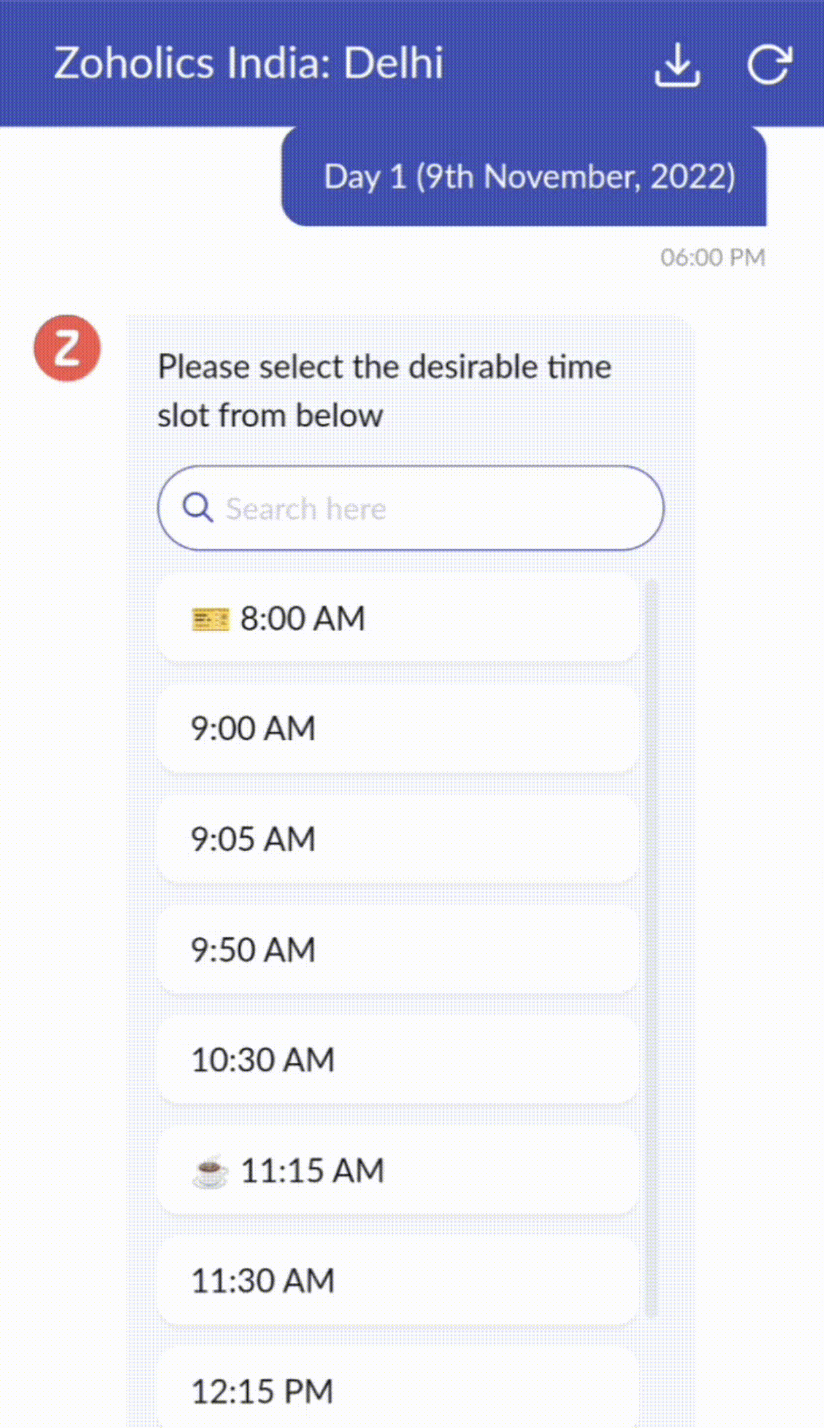
Als klantenservice professional weet je dat de meeste vragen geen eenvoudige antwoorden hebben. Ze vereisen vaak vervolgvragen en veel context voordat er een oplossing komt. Daar komt GC om de hoek kijken. Het is een proactief, low-code, self-service platform dat het pad naar antwoorden voor complexe vragen van je klanten vereenvoudigt. Kies uit een reeks vooraf gedefinieerde vervolgvragen of antwoorden om een GC-flow te creëren die klanten systematisch naar de best mogelijke oplossingen leidt. Je kunt GC bouwen met functionaliteiten die specifiek zijn voor je publiek. Bovendien kun je op elk moment tijdens het gesprek je klanten doorverwijzen naar menselijke interactie, en dan zo nodig terugschakelen.
Guided Conversations kunnen worden gebruikt in verschillende situaties, zoals bij het boeken, bestellen, terugvragen of het verzamelen van informatie voor creditcard verwerking of verzekeringen. De mogelijkheden zijn eindeloos. Hier zie je hoe we Guided Conversations hebben gebruikt voor Zoholics, ons jaarlijkse gebruikersconferentie.
Drag-and-drop bouwer
Bouw je GC-flow met behulp van een reeks reactieformaten of -blokken, zoals tekst, afbeeldingen, valuta, datum en tijd, schuifregelaar, keuze, overslaan en opnieuw beginnen. Om een GC-flow te bouwen, sleep je gewoon blokken, voeg je variabelen of dynamische plaatshouders toe en verbind je paden om de volgorde van gebeurtenissen te bepalen, afhankelijk van de keuze van een gebruiker in elke engagement fase.
Webhooks voor naadloze integratie
Door Webhook-blokken te configureren, kun je je conversatiestroom zo samenstellen dat er interactie is met Zoho Desk-processen, andere Zoho-services of applicaties van derden. Als de gebruiker bijvoorbeeld al je contactpersoon is, haalt het Webhook-blok zijn informatie rechtstreeks op uit uw CRM, in plaats van hem te vragen deze elke keer te verstrekken.
Integreer GC overal waar klanten toegang hebben.
Bekijk en implementeer je uiteindelijke flow door deze te koppelen aan uw ASAP helpcentrum op je website, landingspagina's en mobiele apps.
We kunnen niet wachten om de unieke flows te zien die je maakt met Zoho Desk's Guided Conversations!
Verbeterde ervaring
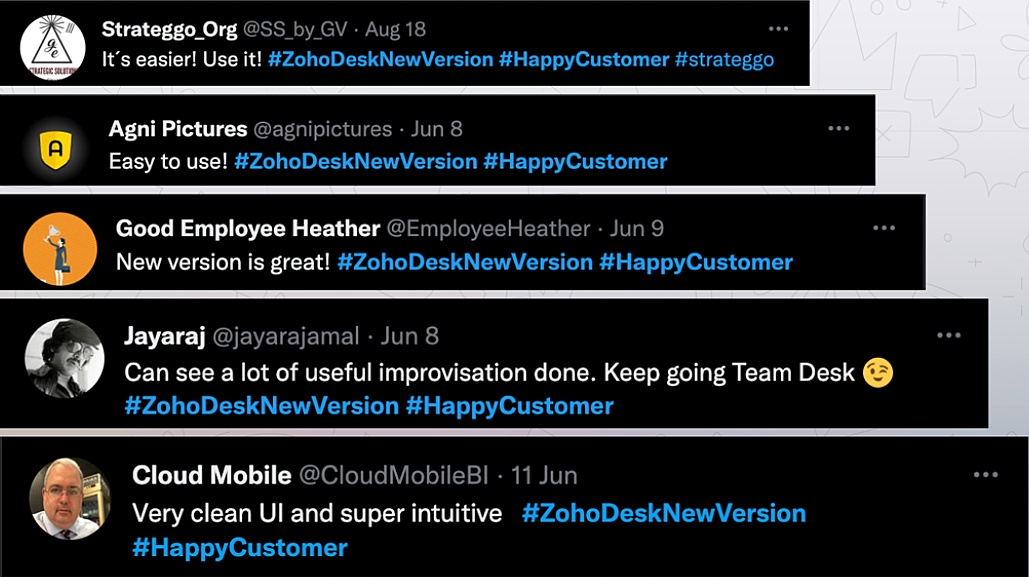
Misschien heb je de Try New Version-optie in Zoho Desk al opgemerkt en zelfs onze vernieuwde gebruikersinterface (UI) geprobeerd, die we eerder dit jaar hebben geïntroduceerd. Dit is onderdeel van onze inspanningen om Zoho Desk logischer en visueel aantrekkelijker te maken om je de beste werkervaring te geven - omdat we weten dat een ingewikkelde helpdesk ervoor kan zorgen dat acht uur aanvoelt als 20 uur.
Wat is er veranderd?
Betere UI, meer context en eenvoudigere navigatie
Wij geloven dat goed ontworpen software weinig tot geen instructies nodig heeft. Daarom hebben we de gebruikersinterface aantrekkelijker, samenhangender en begrijpelijker gemaakt. Die presenteert gegevens beter, geeft meer context en is gemakkelijker te navigeren.
Het belang van snelle toegang tot relevante informatie voor klantenservice teams kan niet genoeg worden benadrukt. We hebben onze UI geoptimaliseerd en het navigeren door verschillende schermen om de juiste informatie te vinden eenvoudiger gemaakt. We hebben ook enkele schermen een make-over gegeven om je een holistisch beeld te geven van je klanten en tickets op één enkele interface. Weet je nog hoe graag we je context geven? Bekijk onze nieuwe look in:
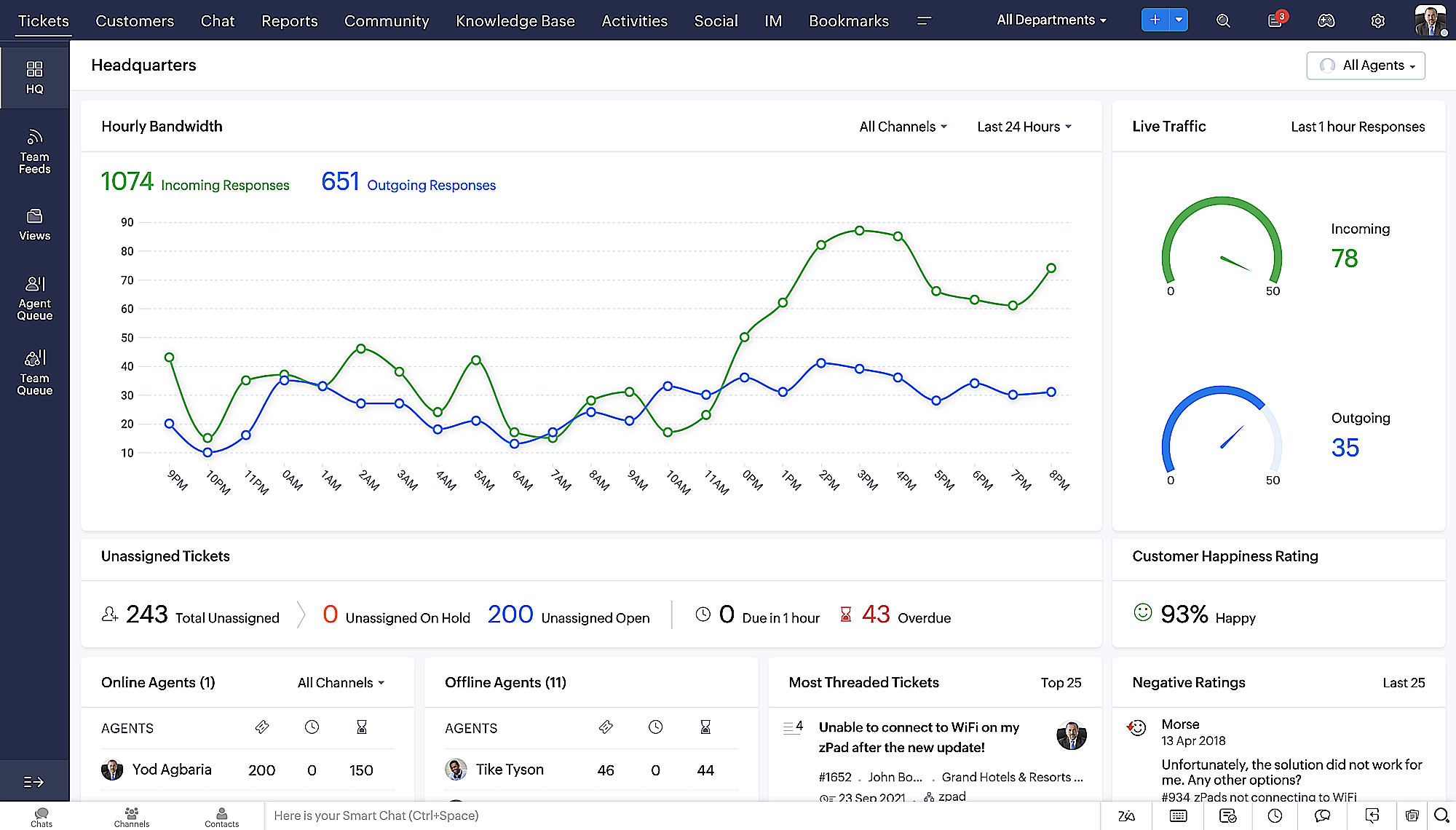
- Laatste Hoofdkwartier weergave met een verfijnde gegevensindeling en vernieuwde algemene look.
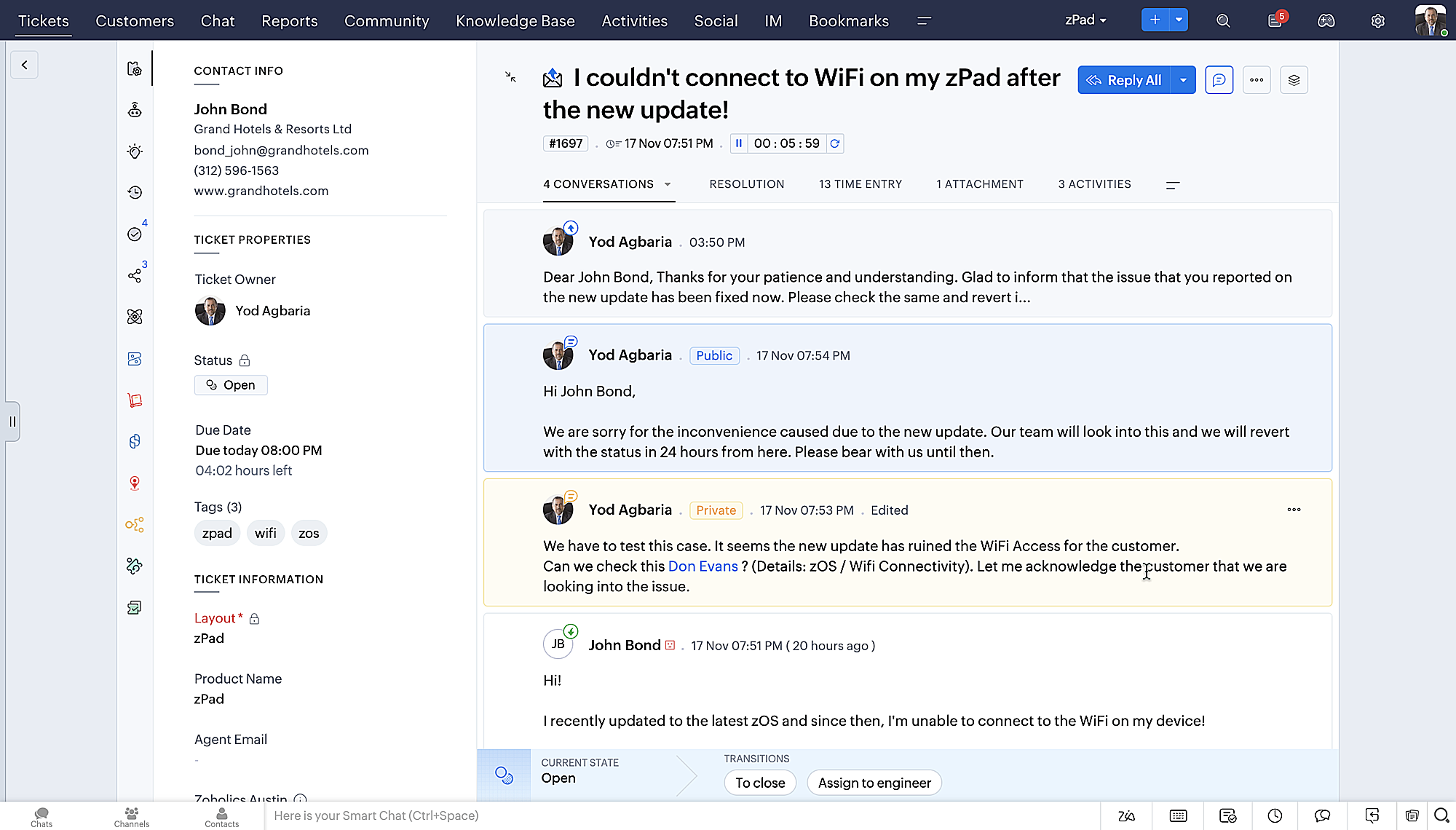
- Gedetailleerde ticketweergave met kleurgecodeerde threads voor eenvoudigere navigatie tussen gesprekken en opmerkingen.
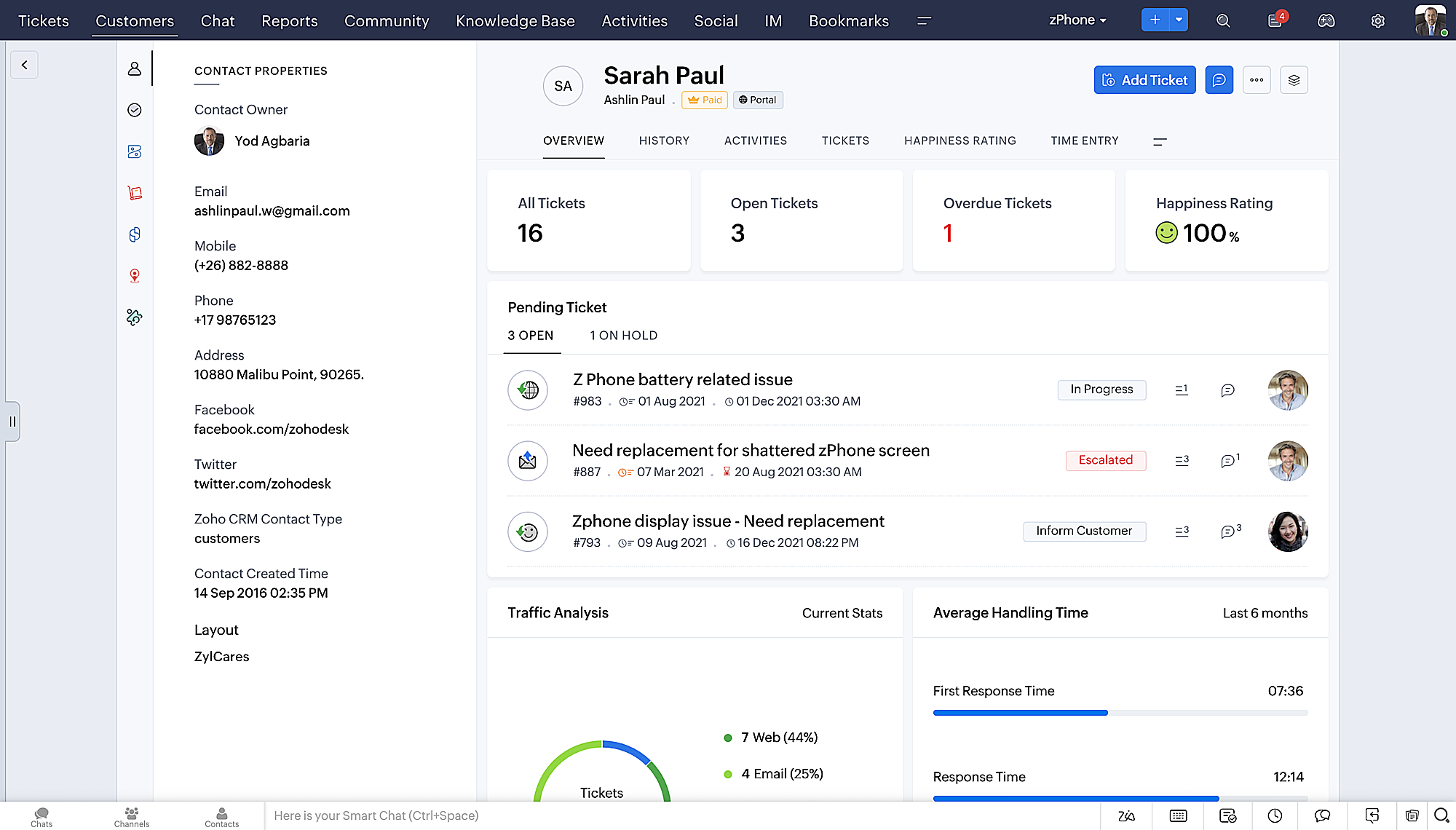
- Gedetailleerde Contactweergave met knoppen voor snel toevoegen, een sectie Wachtende tickets en een overzicht van Ticketinzichten.
- Ticket Queue View met drop-down statusopties, zodat je snel updates kunt geven zonder Ticket Detail View te openen.
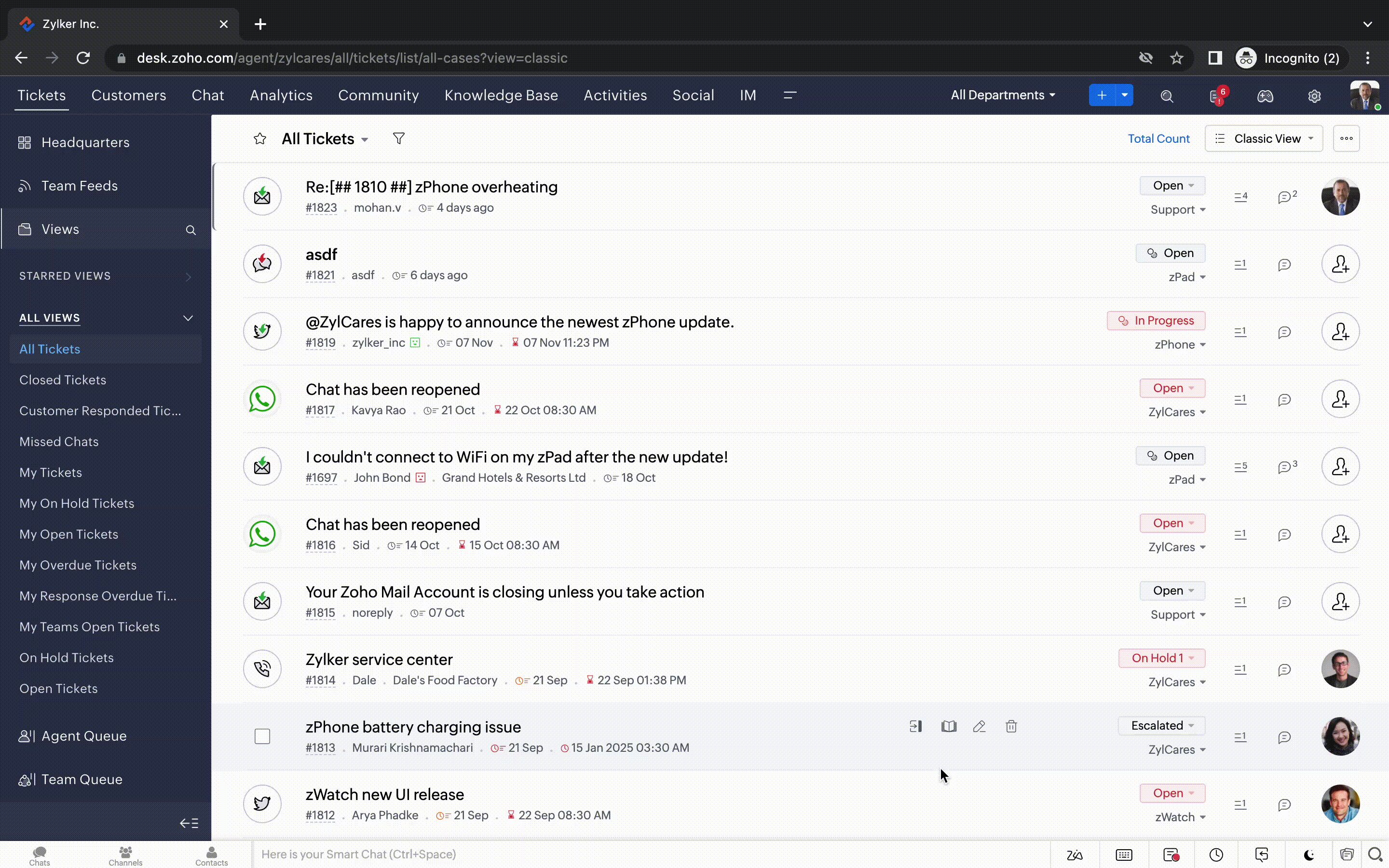
- Een nieuwe optie markeren als gelezen/ongelezen in de ticket lijstweergave, en een geconsolideerde vervolgkeuzelijst Werkmodi in de hele module Tickets.
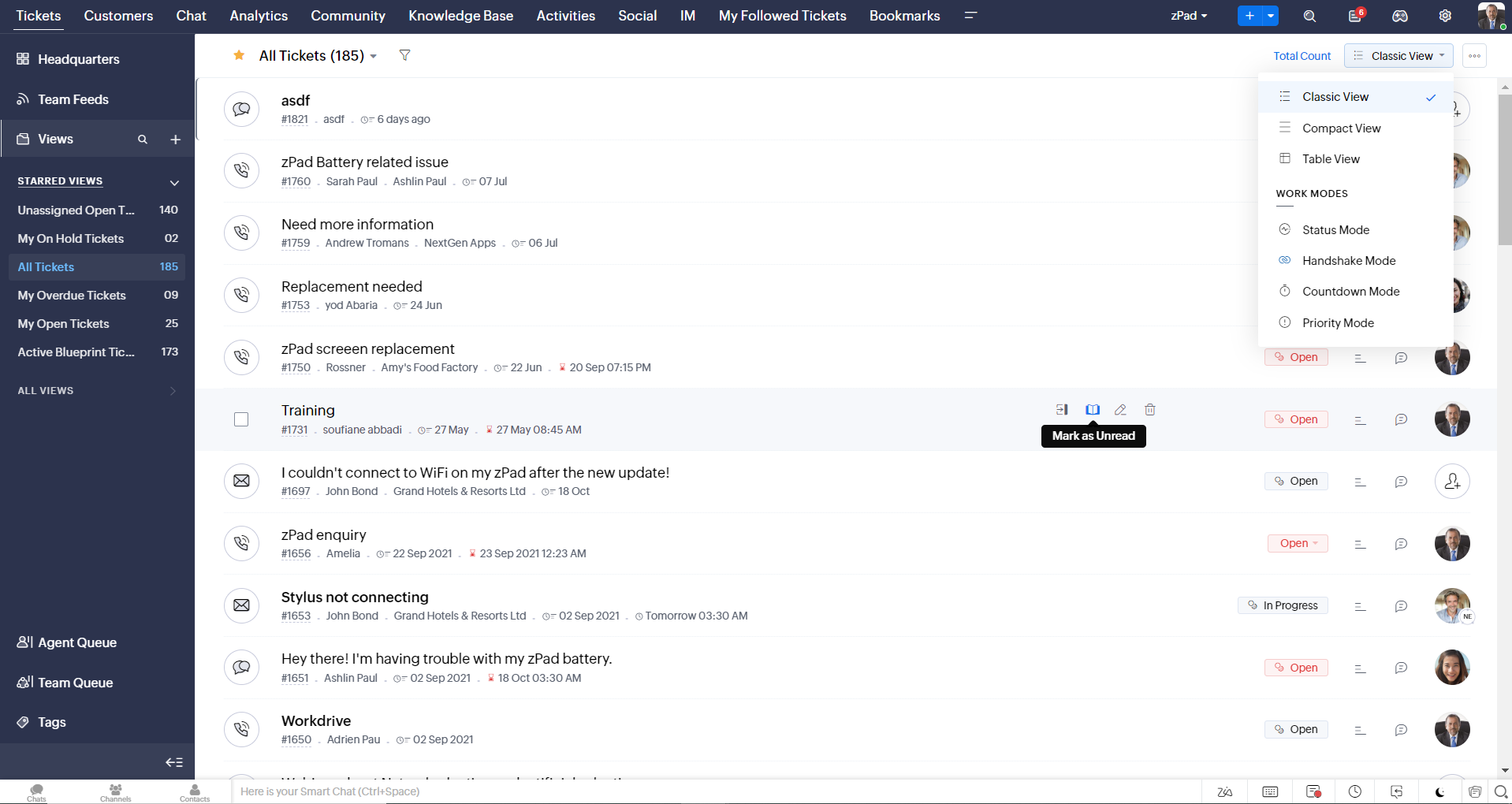
- Oneindig scrollen voor snellere ticket verkenning en navigatieknoppen om snel naar de bovenkant of onderkant van de pagina te gaan.
Nieuwe personaliseringsopties voor gebruikers
Personalisatie is zo'n gewoon onderdeel van ons dagelijks leven geworden dat we het in de meeste van onze productinteracties verwachten.
In Zoho Desk kun je al lay-outs, velden, rollen, sjablonen en je helpcentrum aanpassen. Nu kun je ook het uiterlijk van je portaal aanpassen, zodat je je meer verbonden voelt met je helpdesk. Dit is wat er nieuw is:
- Dark mode/nachtmodus voor een comfortabele kijk- en leeservaring bij weinig licht.
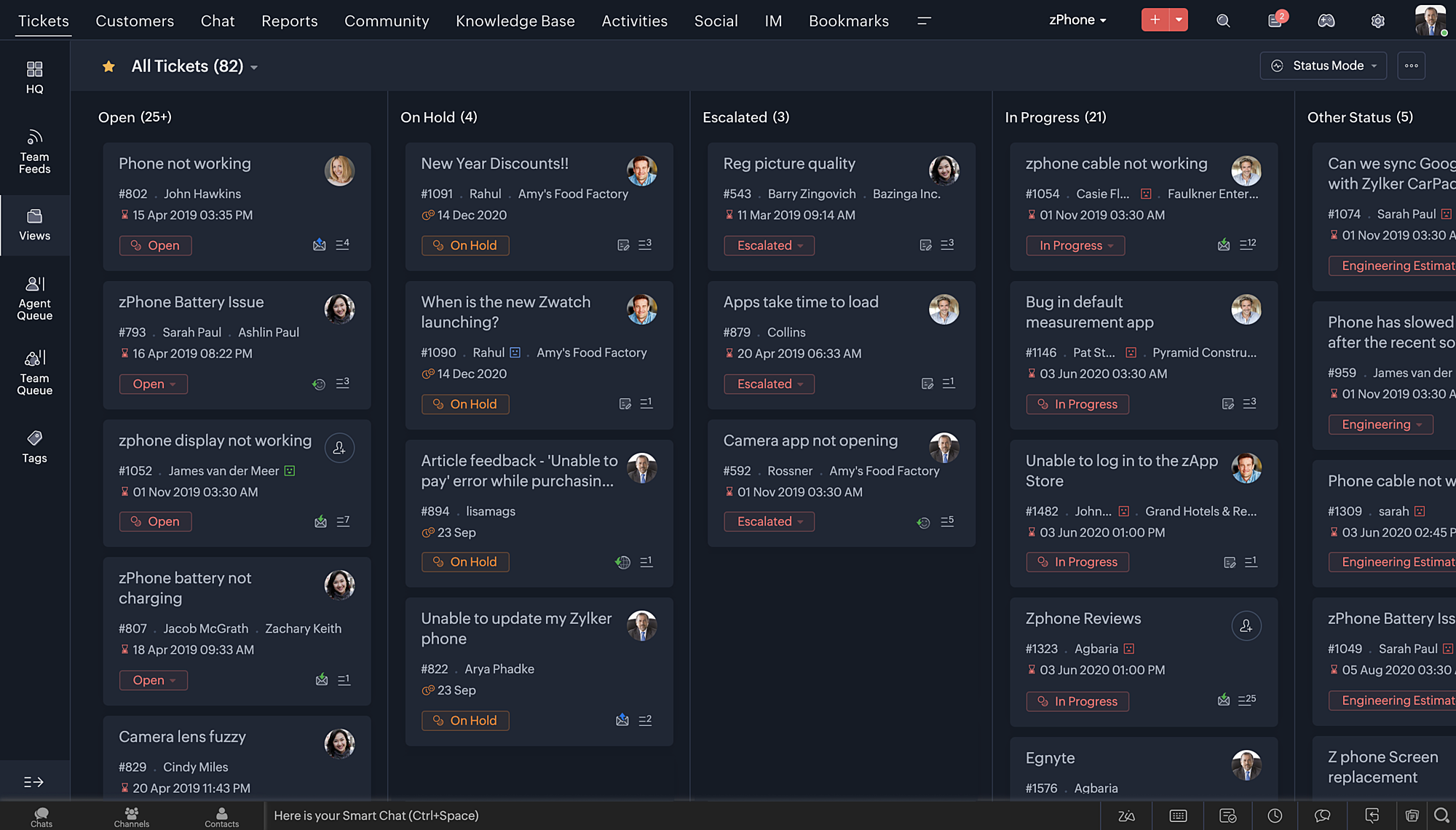
- Nieuwe thema's voor het bekijken van Desk in je favoriete kleur, of in kleuren die jouw merk vertegenwoordigen.
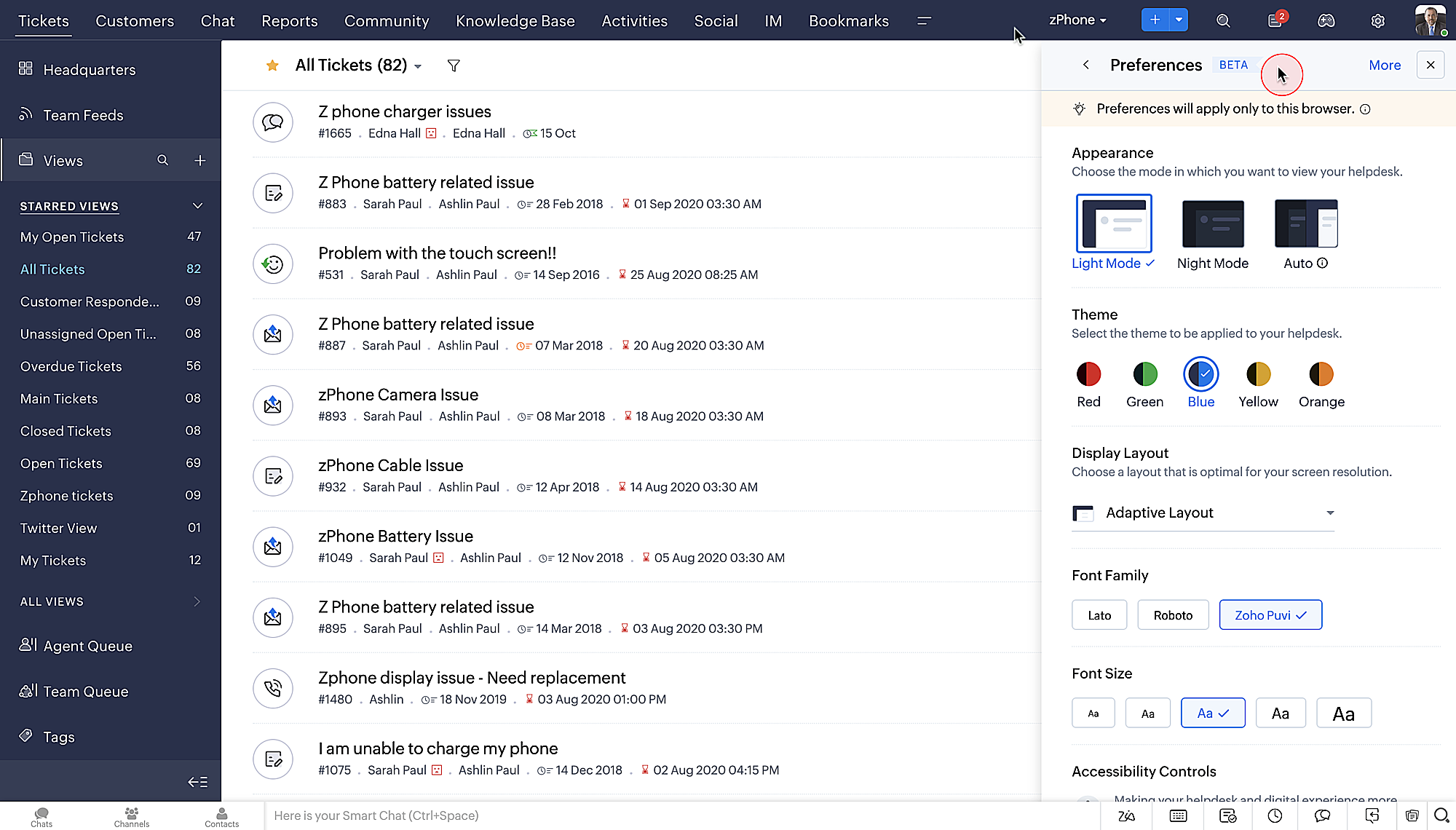
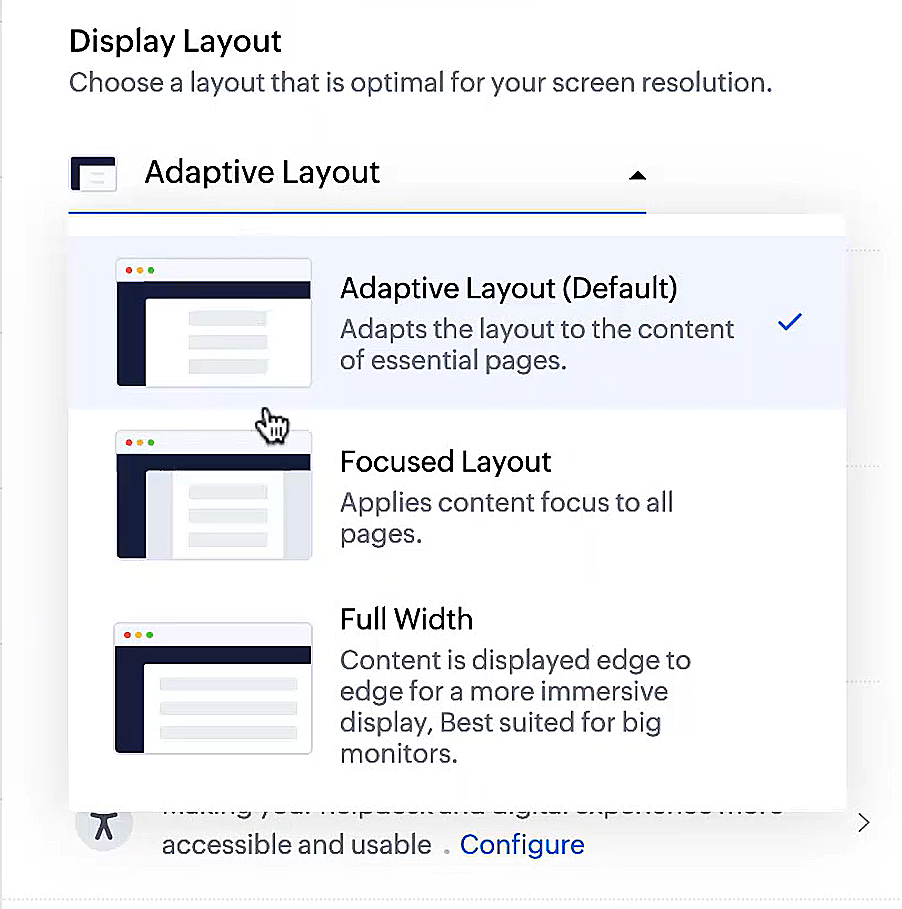
- Display lay-outs waarmee je kunt kiezen hoe je inhoud aan je wordt gepresenteerd.
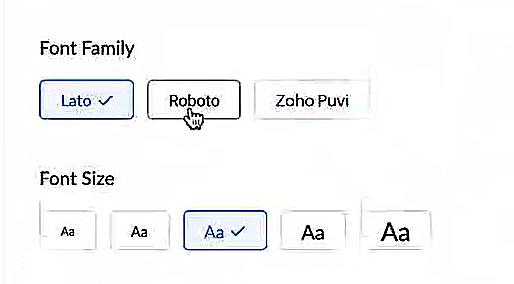
- Nieuwe lettertypes en -groottes zodat je tekst precies overeenkomt met je voorkeuren.
Toegankelijkheidscontroles
Het is altijd onze missie geweest om alle gebruikers toegang te geven tot onze producten, en met onze nieuwe toegankelijkheidscontroles komen we een stapje dichterbij. We hebben meerdere knoppen toegevoegd ter ondersteuning van je gezichtsvermogen, fysieke en motorische behoeften en leerbehoeften.
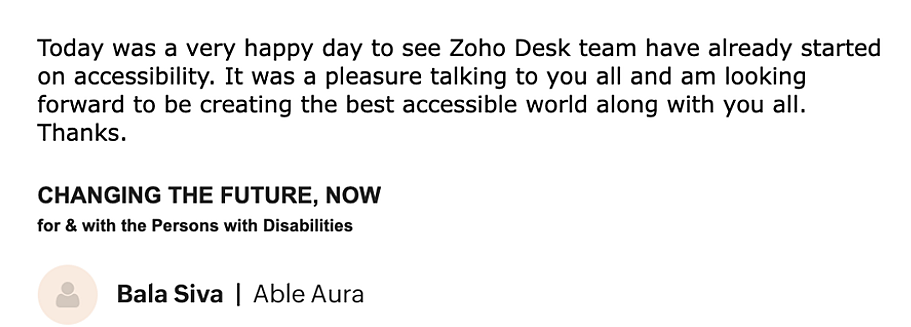
- Highlight Critical Information toont belangrijke informatie, zoals ticket ID, ticket eigenaar en contactgegevens in een opvallende kleur.
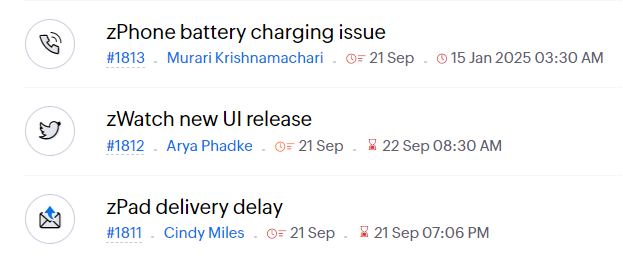
- Onderstreep Links verhoogt de zichtbaarheid van klikbare links.
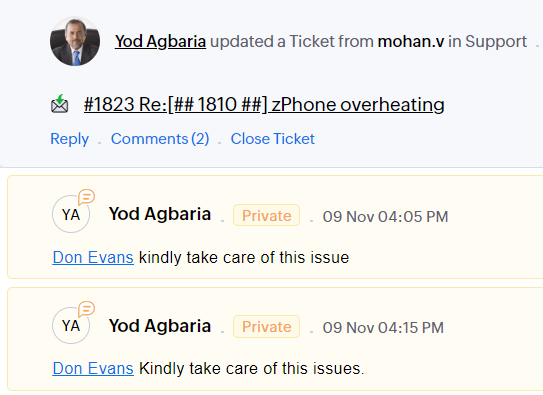
- Benadruk Focusgebied voegt een rand toe rond je focusgebied om de omvang en klikbaarheid aan te geven.
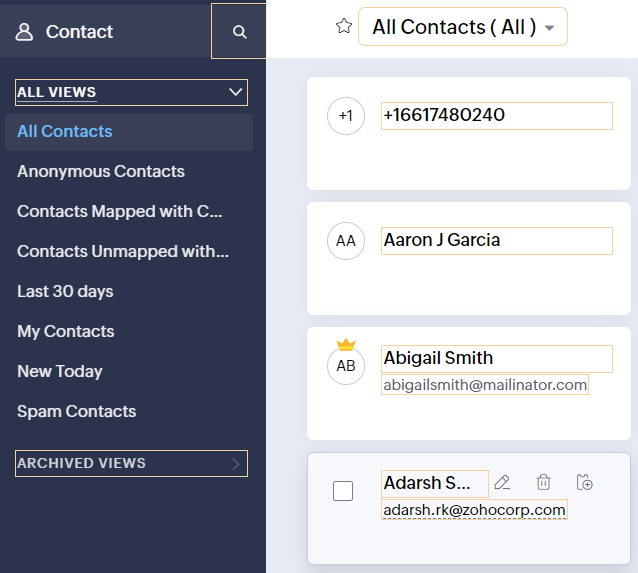
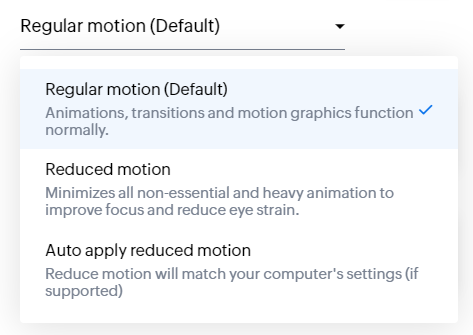
- Animatie regeling optimaliseert animaties en overgangen in je helpdesk.
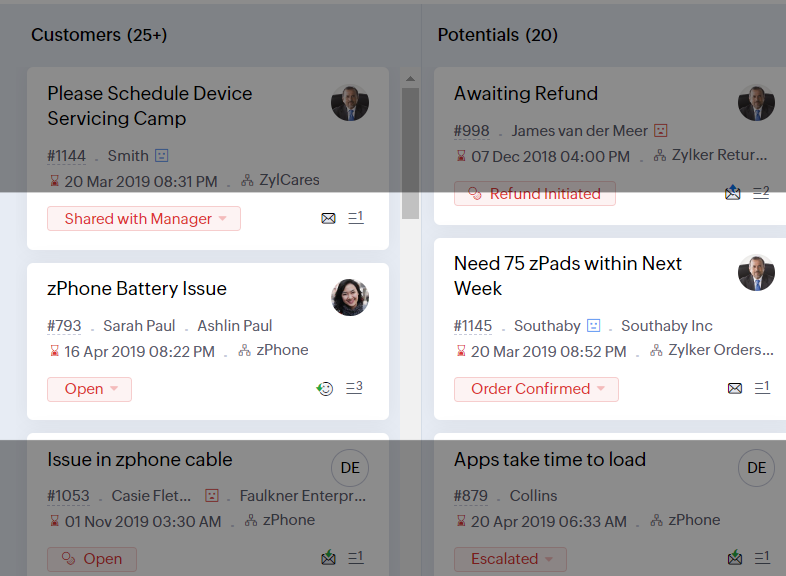
- Leesmasker elimineert afleiding door tekst te maskeren die je momenteel niet leest.
- Met Zoomniveau kun je in- en uitzoomen tot de pagina gemakkelijk te bekijken is.
- Toon lettergrootte past de lettergrootte aan tot de pagina goed leesbaar is.
Met alle nieuwe functies in de Zoho Desk 2022 editie hebben bedrijven nu meer mogelijkheden om te zorgen voor tevreden medewerkers en tevreden klanten.
We horen graag wat je van de nieuw toegevoegde functies vindt! Deel je feedback in onze comments of op social media.
New to Zoho Recruit?
Zoho Campaigns Resources





Topic Participants
Sukhpreet Singh
Sticky Posts
Doe mee aan de Zoho Desk Meetup op 7 maart in Antwerpen
Beste Community leden, Wij nodigen jullie graag uit voor de Community Meetup van Zoho Desk! Op 7 maart komen we bij elkaar in Antwerpen, samen met een klant en de Zoho Experts van Brainsolutions. Onze experts zullen een live demo presenteren en jouw vragenDoe mee aan de Zoho Desk Meetup op 16 Februari in Utrecht
Beste Community leden, Wij nodigen jullie graag uit voor de Community Meetup voor Zoho Desk! Op 16 februari komen we bij elkaar in Utrecht, samen met Fleetkennis en de Zoho Expert van Mobile XL. Onze experts zullen een live demo presenteren en jouw vragenWat is er nieuw in Zoho Desk 2023
Beste Community leden, Hoeveel je ook van je klanten en je werk houdt, als klantenservice medewerker zul je zeker een aantal zware dagen tegenkomen. We hebben het dan over de dagen dat je een paar keer op de snooze-knop drukt, koffie morst op je favorieteTips & Tricks #10 Automatiseren met Zoho Desk Deel 2
In deel 1 van het automatiseren met Zoho Desk las je een use case over een probleem in een appartementencomplex en hoe dit door gebruik te maken van Zoho Forms en Zoho Desk kan worden opgelost. In deel 2 lees je meer over het integreren van Zoho FormsTips & Tricks #09 Automatiseren met Zoho Desk Deel 1
Beste Community leden, Zoals jullie weten hebben we in Nederland een woningtekort. Een oplossing hiervoor is de hoogbouw. Echter, om de de hoogte in te gaan moet er ook voor de juiste faciliteiten in flats worden gezorgd. Problemen kunnen we allemaal
Zoho CRM Plus Resources
Zoho Books Resources
Zoho Subscriptions Resources
Zoho Projects Resources
Zoho Sprints Resources
Zoho Orchestly Resources
Zoho Creator Resources
Zoho WorkDrive Resources


Zoho CRM Resources
Get Started. Write Away!
Writer is a powerful online word processor, designed for collaborative work.
Zoho CRM コンテンツ
-
オンラインヘルプ
-
Webセミナー
-
機能活用動画
-
よくある質問
-
Ebook
-
-
Zoho Campaigns
- Zoho サービスのWebセミナー
その他のサービス コンテンツ
ご検討中の方
Recent Topics
merhaba
merhaba sosyal medya paketimiz mevcut ama yorumları göremiyoruz ve o yüzden cevap veremiyoruz destek rica ediyoruz.Teaminbox not working
We couldn't send or receive any mail within the team inbox. Displaying error 'Unable to process this request.'Related lists New option in missing
hi I have created quite a few modules and added as related lists to my main module. Some have new, some dont I can not see why?Cliq and ToDo integrations?
I'm a bit surprised not to find any way to open a Cliq chat for the current thread, or to create a Zoho Mail ToDo from a thread. Are these on the roadmap?Reply-to names are mangled
Hello, I'm seeing an odd behavior in replies. Steps to reproduce: 1. Click reply to an email from "John Doe <doe.john@example.com> in TeamInbox Expected outcome: TO field pre-filled with "John Doe <doe.john@example.com>" Actual outcome: TO field pre-filledI CANT UPGRADE MY FREE ACCOUNT
I TRY TO UPGRADE MY FREE ACCOUNT AND I COULD NOT UPGRADE IT CAN SOMEBODY TELL ME WHY? AND I HAVE THE MONEY SO.Level up your ASO game with tags & categories in store reviews
Introducing tags and categories in Apptics' store reviews Dear Apptics community, If your app is listed on the Play Store or App Store, you already know how important store reviews and ratings are. They’re one of the most direct signals of user sentimentIncluding attachments with estimates
How can attachments be included when an estimate is sent/emailed and when downloaded as a .pdf? Generally speaking, attachments should be included as part of an estimate package. Ultimately, this is also true for work orders and invoices.Adding VENDOR SKU to PURCHASE ORDERS
how can we add the Vendor SKU when issuing a Purchase Order , so the PO shows the Supplier SKU and our own Internal SKU , which is what we want to receive into the system .Possible to freely prompt/query CRM data using Zia?
Is it possible to prompt Zia to query on any information stored in the CRM, especially on the data stored in custom text fields? My use case is the people in my organisation have entered lots of text in custom text fields to capture information from anRestrict employees to take only one day holiday from a multi-day festival holiday
Hi everyone, I have a requirement related to Optional/Festival Holidays in Zoho People. For example, in the month of May there are three optional holiday dates: May 11, May 12, and May 13. Employees can choose one of these days as their optional holiday.Cannot modify colours in invoice email template
I have tried switching browsers... but I cannot change the (pretty horrible) default colours in the preset email when sending an invoice... the blue banner, red outstanding total and the bright green button... I can change other things but not the colours?Cannot find zpuid for Zoho Projects user
I'm using the Zoho Projects v3 API to create a task. The task is created successfully, but in order to assign the task owner, the "Create a Task" API also requires the zpuid of the task owner. Unfortunately I cannot find any user-related API calls thatPrint a document from Zoho Writer via Zoho Creator
If i use the code below i can get writer to create a new document or email it to me but i want to be able to print it directly from the browser and not have to send it via email and then print. Below is the code im using. Attached options form zoho writerAllow styling for specific Subform fields in Zoho Creator
Sometimes in forms we need to visually highlight a specific field inside a Subform (for example Sanctioned Amount, Approved Value, Critical Fields, etc.) so that users immediately notice it while entering data. Currently there is no direct UI option toCareer site URL - Suggestion to modify URL of non-english job posting
Hi, I would like to suggest making a few modification to career sites that are not in english. Currently, the URL are a mix of different languages and are very long. It makes for very unprofessional looking URLs... Here is an example of one of our URL3/18 オンライン勉強会のお知らせ Zoho ワークアウト (無料)
ユーザーの皆さま、こんにちは。コミュニティチームの中野です。 3月開催のZoho ワークアウトの開催が決定しましたのでご案内します。 今回はZoomにて、オンライン開催します。 ▶︎参加登録はこちら(無料) https://us02web.zoom.us/meeting/register/BoNTN7zYR8OvOPGShqBY0A ━━━━━━━━━━━━━━━━━━━━━━━━ Zoho ワークアウトとは? Zoho ユーザー同士で交流しながら、サービスに関する疑問や不明点の解消を目指すイベントです。New 2026 Application Themes
Love the new themes - shame you can't get a little more granular with the colours, ie 3 different colours so one for the dropdown menu background. Also, I did have our logo above the application name but it appears you can't change logo placement positionPlaceholder format in Number field does not reflect Max Digits configuration
When the Max Digits (Maximum digits of number) property is set to a smaller value (for example, 2 digits), the placeholder in the input field still displays a 7-digit format (#######). The same behavior can also be observed in Decimal and Currency fieldHow does SKU work when selling products in parts in Zoho Inventory
Hello everyone, Zoho Inventory does not understand the physical cutting of the piece.. It only tracks quantities of the unit (like feet ). So when you sell part of an item, the system simply reduces quantity for that SKU. Assume that i have a 50 ft longCRM Cadences - working timesThe Friday afternoon? The next Monday morning? Not at all?
I think I’m writing saying that cadence emails are only sent during the organisations set working hours in CRM. So if a particular email is set to send for example in three days and that lands on a Sunday (when working hours are not operational) whenCRM Cadences - working times
I think I’m right in saying that cadence emails are only sent during the organisations set working hours in CRM. So if a particular email is set to send for example in three days and that lands on a Sunday (when working hours are not operational) whenPush Notification for New Bookings in Zoho Bookings App
when a someone schedules an appointment through the booking page, is there any option to receive a push notification in the mobile app?Intergrating multi location Square account with Zoho Books
Hi, I have one Square account but has multiple locations. I would like to integrate that account and show aggregated sales in zoho books. How can I do that? thanks.Add the same FROM email to multiple department
Hi, We have several agents who work with multiple departments and we'd like to be able to select their names on the FROM field (sender), but apparently it's not possible to add a FROM address to multiple departments. Is there any way around this? Thanks.Zoho Desk View Open Tickets and Open Shared Tickets
Hi, I would like to create a custom view so that an agent can view all the open tickets he has access to, including the shared tickets created by a different department. Currently my team has to swich between two views (Open Tickets and Shared Open Tickets).Clone Banking Transaction
Why is there no option to CLONE a Transaction in the Banking module?? I often clone Expenses (for similar expense transactions each month) so I would also like to clone Income transactions. But there is no option in Banking to clone an existing IncomeZoho Expense - Bi-Weekly Report Automation
Hi Zoho Expense Team, My feature request is to please include an option to automate creation of reports bi-weekly (every 2 weeks)Application Architecture in Zoho Creator: Why You Should Think About It from the Start
Many companies begin using Zoho Creator by building simple forms to automate internal processes. This is natural — the platform is extremely accessible and allows applications to be built very quickly. The challenge begins to appear when the applicationArquitetura de Aplicações no Zoho Creator: Por que pensar nisso desde o início
Muitas empresas começam a utilizar o Zoho Creator criando formulários simples para automatizar processos internos. Isso é natural — a plataforma é extremamente acessível e permite construir aplicações rapidamente. O problema começa a aparecer quando aDark Mode - Font Colors Don't Work
When editing a document in Dark Mode and selecting font colors, they don't show up on screen. Viewing/editing the same document in Light Mode shows them just fine.How to Customize & Reorder Spaces in Zoho One 25 (Spaces UI) — Admin Tips Not in the Docs
Hey Zoho Community, After digging around in the new Spaces UI, I found a couple of admin features that aren't well documented yet but are really useful. Sharing here in case others are looking for the same things. 🔁 How to Change the Default Space UsersSystem Components menu not available for Tablet to select language
I have attached a screenshot of my desktop, mobile, and tablet menu builder options. I am using 2 languages in my application. Language Selection is an option under the System Components part of the menu, but only for my desktop and phone(mobile). MyApprovals in Zoho Creator
Hi, This is Surya, in one of my creator application I have a form called job posting, and I created an approval process for that form. When a user submits that form the record directly adding to that form's report, even it is in the review for approval.How Zoho Desk contributes to the art of savings
Remember the first time your grandmother gave you cash for a birthday or New Year's gift, Christmas gift, or any special day? You probably tucked that money safely into a piggy bank, waiting for the day you could buy something precious or something youEstimate PDF Templates - logo too large
Hello, I cloned a standard estimate template, but my logo is showing up much larger than intended. This doesn’t happen with the standard invoice template, where the logo displays correctly. How can I adjust the logo size in the estimate template? ThankSelect CRM Custom Module in Zoho Creator
I have a custom module added in Zoho CRM that I would like to link in Zoho creator. When I add the Zoho CRM field it does not show the new module. Is this possible? Do i need to change something in CRM to make it accesible in Creator?Invoice emails not sending but reminders are
I am a new user. I have been creating some dummy invoices before I go live and have struck a block. Emails for the invoice are not being recieved by the recipient, however, when I send a reminder for the same invoice the email is sent. NOTE: I have checkedDeleted account recovery
I ended up accidentally deleting our Zoho invoice account while trying to work something out. Emailed support for recovery and restoration of the deleted account, if possible, but they responded by saying they can't find an account associated with thatDevis et factures multipage coupées
Bonjour, je suis sur Zoho invoice et je rencontre un problème sur mes devis et factures lorsqu'ils dépassent 1 page. je me retrouve souvent avec des lignes coupées ou le sous total page 1 et le total page 2. j'aimerai savoir s'il existe une possibilitéNext Page