What’s New in Zoho Expense: January - March 2025

What’s New in Zoho Expense: January - March 2025

Hello users,

We're excited to bring you the latest updates and improvements we've made to make your travel and expense management smoother and more effortless. Let's take a quick look at the important updates we've rolled-out in Zoho Expense between January and March.  

Added a New Preference in Trips

To restrict users from creating reports for closed and cancelled trips, we've added a new option in the Trips preference. To enable this feature, you can mark the option Restrict report creation for trips and select the trip status from the dropdown. 


Enhancements in Real-Time Card Feeds

1. Users using the German edition and five countries in the global edition, including the US, UK, Canada, Germany, and Italy, can now fetch their card feeds instantly in Zoho Expense as soon as a transaction is made using their cards, which are connected for real-time feeds.

Note: This feature is currently available in early access. Write to us at support@zohoexpense.com to enable it for your organization.

2. In addition the Mastercard support for users using the UK edition of Zoho Expense, we now support Visa cards as well.

Shortcut to Edit Expenses

Quickly
 update the category, date, amount, merchant name, currency, description, and custom fields of your expenses from the expense detail page, without navigating to the edit page in the Expenses and Reports modules. Users can hover over the fields and click the Edit icon that appears next to it. Once the changes are made, click the tick icon next to the updated field to save the updates.


Export All Analytic Report Details

If you'd like to export or download all the data in an analytic report for backup, unmark Export Current View while exporting the analytic report. Once you click this, the report will be exported with all the data. However, this option is available only for exporting analytic reports in XLS, XLSX, CSV, or to Zoho Sheets.

Field Customizations For Recording Advance Refunds

If you'd like to capture specific details related to advance refunds for better clarity and record keeping, you can mandate the Refunded To, Notes, Reference#, and other custom fields for users while recoding an advance refund.


Note: This feature is available in early access. If you want to enable this feature for your organization, write to us at support@zohoexpense.com.

Introducing Multi-Criteria Workflow Rules

Associate multiple criteria to a workflow and automate tasks in Zoho Expense seamlessly. You can trigger actions such as an email, SMS alert, or custom functions, which will execute actions automatically whenever the set conditions are satisfied.

Introducing Online Advance Payments

In addition to recording advance payments offline, we've enabled online payments options for advances. Choose your preferred option to pay employees' advances from the Pay Advance dropdown on the advance details page. Users using the India edition of Zoho Expense can pay via ICICI, HSBC, and Yes Bank, while the US edition users can pay via ACH.  


Note: This feature is only available to organizations that've enabled the Paid status feature for Advances. 


Add Multiple Items at Once to Purchase Requests

If your users want to add multiple items at once to a purchase request, they can select + Add Items in Bulk from the dropdown next to + Add New Row in the items table. In the pop-up, all the available items in the organization will be displayed. Select the items you want to include in the purchase request and use the plus and minus icons to adjust the item quantity. Once done, click Add Items.


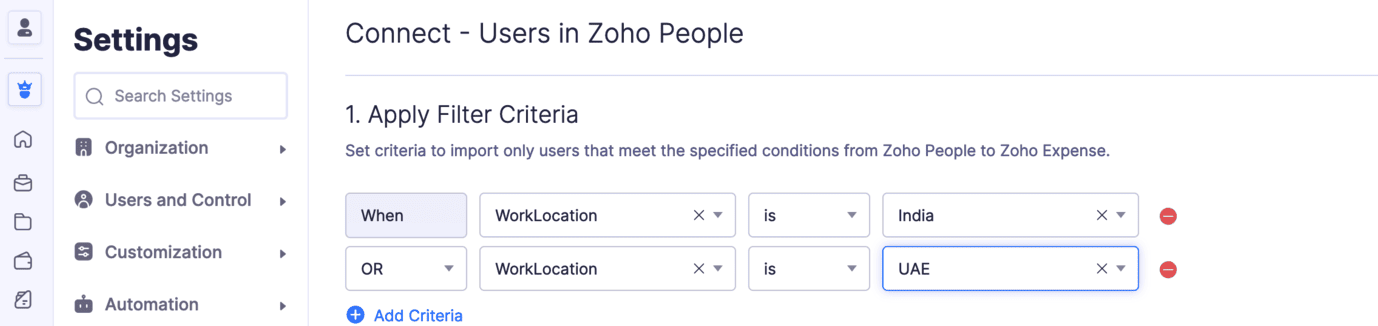
Filter and Import Users from Zoho People to Zoho Expense

Set criteria and import only the users who meet the specified criteria into Zoho Expense. Once you integrate with Zoho People, you can sync its modules with Zoho Expense. Under the Users section, click Configure Now and set the criteria that will be used to filter and sync users into Zoho Expense. 

iOS App Updates:

Calculate Mileage Expenses Using Maps: While calculating mileage expenses using maps, users can add their travel locations. Once added, all the possible routes will be displayed on the map. Choose the travel route, and the distance travelled will be calculated automatically. These details will also be displayed on the expense details screen.

Note: This feature is available in early access. Write to us at support@zohoexpense.com to enable it for your organization.

Additionally, users can also add their travel locations while creating mileage expenses using the Odometer reading or by manually entering the distance travelled, if you've enabled the calculate mileage using maps feature.

Try out all the new features and let us know what you think in the comments below. If you have any inquiries or feature requests, please write to us at support@zohoexpense.com. 

Stay tuned for more updates!

Regards, 
Zoho Expense Team


      Zoho Campaigns Resources


        • Desk Community Learning Series


        • Digest


        • Functions


        • Meetups


        • Kbase


        • Resources


        • Glossary


        • Desk Marketplace


        • MVP Corner


        • Word of the Day


        • Ask the Experts


          Zoho CRM Plus Resources

            Zoho Books Resources


              Zoho Subscriptions Resources

                Zoho Projects Resources


                  Zoho Sprints Resources


                    Zoho Orchestly Resources


                      Zoho Creator Resources


                        Zoho WorkDrive Resources


                          Zoho CRM Resources

                          • CRM Community Learning Series

                            CRM Community Learning Series


                          • Tips

                            Tips

                          • Functions

                            Functions

                          • Meetups

                            Meetups

                          • Kbase

                            Kbase

                          • Resources

                            Resources

                          • Digest

                            Digest

                          • CRM Marketplace

                            CRM Marketplace

                          • MVP Corner

                            MVP Corner


                            Zoho Writer Writer

                            Get Started. Write Away!

                            Writer is a powerful online word processor, designed for collaborative work.

                              Zoho CRM コンテンツ


                                ご検討中の方

                                  • Recent Topics

                                  • Creator Offline

                                    We had online access setup and working on our iphones. We have just set it up on an 'Android Tablet' and it is not downloading all the images? We use it to show customers our catalogue. Any ideas. Offline components all setup on both devices
                                  • Optimum CRM setup for new B2B business

                                    Can some advise the most common way to setup Zoho CRM to handle sales for a B2B company? Specifically in how to handle inbound/outbound emails. I have spent hours researching online and can't seem to find an accepted approach, or even a tutorial. I have
                                  • Facing Issues with Sites Mobile font sizes

                                    my page renediaz.com is facing issues mobile view, when i try to lower font sizes in home page, instead of changing the size, it changes the line space
                                  • Does the Customer “Company Name” field appear anywhere in the Zoho Books UI outside of PDFs?

                                    Hi everyone, I’m trying to understand how the Company Name field is actually used in Zoho Books. There is a Company Name field on the customer record, but when viewing transactions like a Sales Order in the normal UI (non-PDF view), that field doesn’t
                                  • Set expiration date on document and send reminder

                                    We have many company documents( for example business registration), work VISA documents. It will be nice if we can set a expiry date and set reminders ( for example 90 days, 60 days, 30 days etc.,) Does Zoho workdrive provide that option?
                                  • Analytics : How to share to an external client ?

                                    We have a use case where a client wants a portal so that several of his users can view dashboards that we have created for them in Zoho Analytics. They are not part of our company or Zoho One account. The clients want the ability to have user specific,
                                  • Automatically Update Form Attachment Service with Newly added Fields

                                    Hi, When I have a Form Setup and connected to a 3rd Party Service such as OneDrive for Form Attachments, when I later add a new Upload Field I have to remove and redo the entire 3rd Party Setup from scratch. This needs to be improved, such as when new
                                  • Zoho Sheet for Desktop

                                    Does Zoho plans to develop a Desktop version of Sheet that installs on the computer like was done with Writer?
                                  • Payroll and BAS ( Australian tax report format )

                                    Hello , I am evaluating Zoho Books and I find the interface very intuitive and straight forward. My company is currently using Quickbooks Premier the Australian version. Before we can consider moving the service we would need to have the following addressed : 1.Payroll 2.BAS ( business activity statement ) for tax purposes 3.Some form of local backup and possible export of data to a widely accepted format. Regards Codrin Mitin
                                  • Zoho Desk API - Send Reply to CUSTOMERPORTAL

                                    Hello! I'll try to send a reply to Customer Portal, But the response is 500 (INTERNAL_SERVER_ERROR in service response). {"Error":"{\"errorCode\":\"INTERNAL_SERVER_ERROR\",\"message\":\"An internal server error occurred while performing this operation.\"}"}
                                  • Python - code studio

                                    Hi, I see the code studio is "coming soon". We have some files that will require some more complex transformation, is this feature far off? It appears to have been released in Zoho Analytics already
                                  • Dheeraj Sudan and Meenu Hinduja-How do I customize Zoho apps to suit my needs?

                                    Hi Everyone, I'm Meenu Hinduja and my husband Dheeraj Sudan, run a business. I’m looking to tweak a few things to fit my needs, and I’d love to hear what customizations others have done. Any tips or examples would be super helpful! Regards Dheeraj Sudan
                                  • From Zoho CRM to Paper : Design & Print Data Directly using Canvas Print View

                                    Hello Everyone, We are excited to announce a new addition to your Canvas in Zoho CRM - Print View. Canvas print view helps you transform your custom CRM layouts into print-ready documents, so you can bring your digital data to the physical world with
                                  • Zoho Books Payroll

                                    How am I supposed to do payroll and pay my employees with Zoho Books? I think it's pretty strange that an accounting software doesn't have the ability to perform one of the most common functions in business; paying your employees. Am I missing something,
                                  • Layout Rules Don't Apply To Blueprints

                                    Hi Zoho the conditional layout rules for fields and making fields required don't work well with with Blueprints if those same fields are called DURING a Blueprint. Example. I have field A that is used in layout rule. If value of field A is "1" it is supposed to show and make required field B. If the value to field A is "2" it is supposed to show and make required field C. Now I have a Blueprint that says when last stage moves to "Closed," during the transition, the agent must fill out field A. Now
                                  • validation rules doesn't work in Blueprint when it is validated using function?

                                    I have tried to create a validation rule in the deal module. it works if I try to create a deal manually or if I try to update the empty field inside a deal. but when I try to update the field via the blueprint mandatory field, it seems the validation
                                  • Sort Legend & stacked bar chart by value

                                    I'd love to see an option added to sort the legend of graphs by the value that is being represented. This way the items with the largest value in the graph are displayed top down in the legend. For example, let's say I have a large sales team and I create
                                  • Is It Possible to Convert a Custom Module to a Quote?

                                    I recently created a custom module in our CRM environment for RFQs so that our sales team can submit quote requests directly in Zoho rather than by email/phone. This allows for a cleaner overall process, minimizing potential errors and potentially encouraging
                                  • All new Address Field in Zoho CRM: maintain structured and accurate address inputs

                                    The address field will be available exclusively for IN DC users. We'll keep you updated on the DC-specific rollout soon. It's currently available for all new sign-ups and for existing Zoho CRM orgs which are in the Professional edition. Latest update
                                  • How can Data Enrichment be automatically triggered when a new Lead is created in Zoho CRM?

                                    Hi, I have a pipeline where a Lead is created automatically through the Zoho API and I've been trying to look for a way to automatically apply Data Enrichment on this created lead. 1) I did not find any way to do this through the Zoho API; it seems like
                                  • Client Side Scripts for Meetings Module

                                    Will zoho please add client side scripting support to the meetings module? Our workflow requires most meeting details have a specific format to work with other software we have. So we rely on a custom function to auto fill certain things. We currently
                                  • Proposal: Actionable API Error Messages to Reduce Support Ticket Volume

                                    I've encountered a long-standing frustration with how Zoho Creator's API communicates errors to developers, and I'm hoping the Zoho team can address this in a future update. This issue has persisted for over 9 years based on community discussions, and
                                  • Zoho CRM - Option to create Follow-Up Task

                                    When completing a Zoho CRM Task, it would be very helpful if there was an option to "Complete and Create Follow-Up Task" in the pop-up which appears. It could clone the task you are closing and then show it on the screen in edit mode, all the user would
                                  • Dynamic Field Folders in OneDrive

                                    Hi, With the 2 options today we have either a Dynamic Parent Folder and lots of attachments all in that one folder with only the ability to set the file name (Which is also not incremented so if I upload 5 photos to one field they are all named the same
                                  • Drag 'n' Drop Fields to a Sub-Form and "Move Field To" Option

                                    Hi, I would like to be able to move fields from the Main Page to a Sub-Form or from a Sub-Form to either the Main Page or another Sub-Form. Today if you change the design you have to delete and recreate every field, not just move them. Would be nice to
                                  • File Conversion from PDF to JPG/PNG

                                    Hi, I have a question did  anyone every tried using custom function to convert a PDF file to JPG/PNG format? Any possibility by using the custom function to achieve this within zoho apps.  I do know there are many third parties API provide this with
                                  • Allocating inventory to specific SO's

                                    Is there a way that allocate inventory to a specific sales order? For example, let's say we have 90 items in stock. Customer 1 orders 100 items. This allocates all 90 items to their order, and they have a back order for the remaining 10 items which could
                                  • Cliq iOS can't see shared screen

                                    Hello, I had this morning a video call with a colleague. She is using Cliq Desktop MacOS and wanted to share her screen with me. I'm on iPad. I noticed, while she shared her screen, I could only see her video, but not the shared screen... Does Cliq iOS is able to display shared screen, or is it somewhere else to be found ? Regards
                                  • Pull cells from one sheet onto another

                                    Hello all! I have created an ingredients database where i have pricing and information and i want to pull from that database into a recipe calculator. I want it to pull based on what ingredient I choose. The ingredients database has an idea and i want
                                  • Closing the Loop: Why Lookup Asymmetry is Harming Data Integrity in Creator

                                    TL;DR: Lookup fields allow users to add new related records inline via the "+" icon, but there's no equivalent ability to edit an existing related record without navigating away and losing form context. Adding a native "Edit" icon—with automatic User
                                  • Add the ability to Hide Pages in Page Rules

                                    Hi, We have Field Rules to show and hide fields and we have page Rules, but we can't hide a page in Page Rules so it isn't completed before the previous page (And then have the Deny Rules to prevent submitting without both pages completed), we can only
                                  • Enable Free External Collaboration on Notecards in Zoho Notebook

                                    Hi Zoho Notebook Team, I would like to suggest a feature enhancement regarding external collaboration in Zoho Notebook. Currently, we can share notes with external users, and they are able to view the content without any issue. However, when these external
                                  • using the Client script on the load of the form if service no is empty means then i want to make issue relate to is Service

                                    using the Client script on the load of the form if service no is empty means then i want to make issue relate to field is Service if Purchae no is empty means then i want to make issue relate to is Purchase
                                  • Changes to the send mail Deluge task in Zoho CRM

                                    Hello everyone, At Zoho, we continuously enhance our security measures to ensure a safer experience for all users. As part of our ongoing security enhancements, we're making an important update on using the send mail Deluge task in Zoho CRM. What's changing?
                                  • Work Order wont mark as Completed

                                    I have a couple of work orders that won't mark as completed even when I've marked the Service Appointments as completed fully.
                                  • Item name special charaters <>

                                    Im trying to input speical characters such as < and > into item name and item description but comes up with following error: Invalid value passed for Item Name and Invalid value passed for Item Description How do i allow speical characters?
                                  • Zoho Analytics Dashboard - How to hide the user filter

                                    I am using the same dashboard template across different external clients and applying a user filter to the data by site URL. How can I hide the user filter in View Mode so the external client won't see the list of other clients in the drop-down menu?
                                  • Customer Parent Account or Sub-Customer Account

                                    Some of clients as they have 50 to 300 branches, they required separate account statement with outlet name and number; which means we have to open new account for each branch individually. However, the main issue is that, when they make a payment, they
                                  • Cannot get code to work with v2.mergeAndStore!

                                    Please can someone help me pass subform items into a repeating mail merge table row using v2.mergeAndStore? I have a mail merge template created in Writer and stored in Workdrive. This template is referenced by a custom CRM function which merges all of
                                  • Kaizen #229: Email-Deal Associations in Zoho CRM

                                    Hi All, Welcome back to another week of Kaizen! Emails are a core channel for customer communication in any CRM system. In Zoho CRM, emails can be associated with records across multiple modules. In this post, we will focus on email associations with
                                  • Next Page