What's New in Zoho Inventory | June 2026

What's New in Zoho Inventory | June 2026

Hello users,

June 2026 introduces a range of exciting enhancements to Zoho Inventory. With the full rollout of the Zoho Inventory Windows application, the launch of Terminal Payments, and new tracking combinations in Advanced Inventory Tracking, you can manage inventory more efficiently, streamline fulfillment operations, and gain greater control over your business.


Inventory & Sales Management

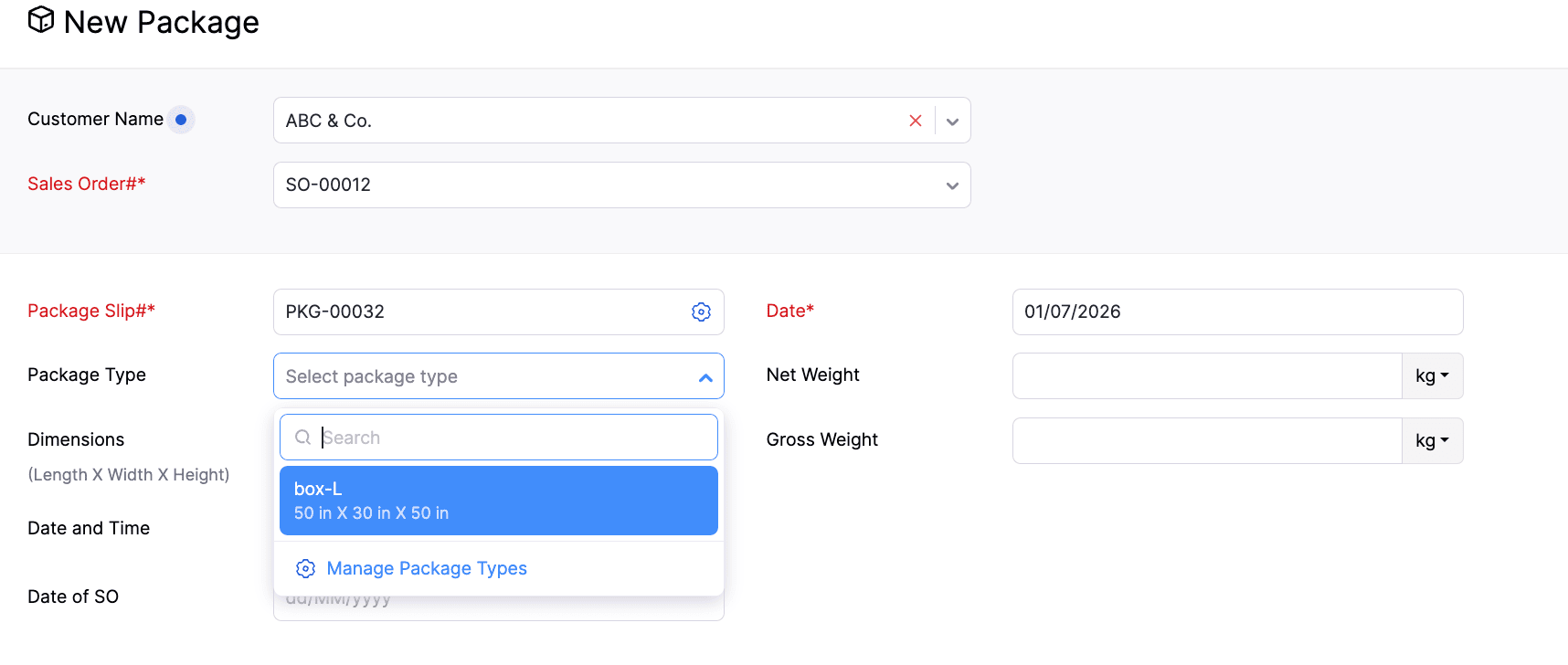
Introducing Package Types

Package Types are now available in Zoho Inventory, making it easier to standardize packaging during creation. You can create predefined package types with dimensions and weight, and associate them with packages as you create them. You can also edit, delete, mark as active, and inactive the package types directly from the package creation page.

We've also enhanced package weight tracking by splitting the existing Weight field into Net Weight and Gross Weight, providing more accurate weight information for your packages and shipments.

To select package type > Go to Packages > Click +New > Select the Customer and Sales Order > Navigate to the Package Type field

Payment and Compliance

Collect Invoice Payments Using Payment Terminals (IN, US & CA)

Invoice payments can now be collected through payment terminals and dynamic QR codes across the web, Windows, and mobile apps. Once configured, payments can be initiated directly from the Invoice Details page using the Pay with Terminal option. The app will automatically track the payment and update the transaction status.

To configure the payment gateway, go to Settings > Online Payments > Customer Payments > Enter your credentials for the gateway.


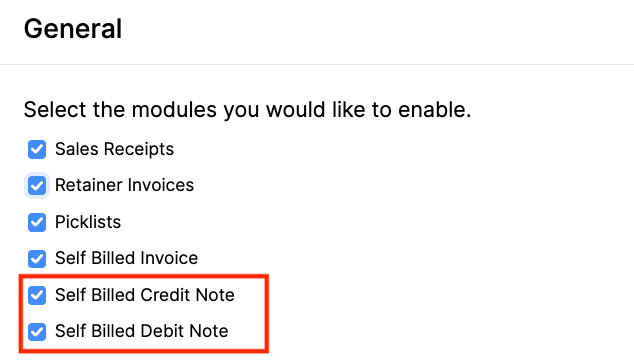
Self-Billed Credit Notes and Debit Notes [Global Edition]

Introducing Self-Billed Credit Notes (SBCNs) and Self-Billed Debit Notes (SBDNs) for organizations complying with Malaysia's E-Invoicing regulations.

A Self-Billed Credit Note can be created by the buyer when the payable amount decreases or when a supplier invoice needs to be cancelled. A Self-Billed Debit Note can be created when the payable amount increases. They are also included in the relevant reports, with SBCNs appearing in Vendor Credit Reports and SBDNs in Bills Reports.

To enable the options > Go to Settings > Setup & Configurations > General > Enable Self-Billed Credit Note and Self-Billed Debit Note
                                             

Applications

Introducing Zoho Inventory Windows Application

The dedicated Windows application for Zoho Inventory is now available on the Microsoft Store. It offers built-in support for Warehouse Management, Batch Tracking, Serial Number Tracking, Bin Tracking, and Barcode Scanning across the relevant modules, enabling a seamless desktop inventory management experience.


Enhancements in
Advanced Inventory Tracking

Manage Serial-Tracked Items with UOM

Unit of Measurement (UOM) conversion is now available for Serial Tracked Items. You can transact serial-tracked items in your preferred unit of measurement. The batch and bin allocation screen displays available quantities in the selected transaction unit.

Enhancements in Batches List View

You can now use Custom Views, Column Customization, and Advanced Search for batch-tracked items. These options give you more control over how you organize and filter batch records.

Note: The enhancements are available in Advanced Inventory Tracking-supported plans.

Export Bin Details in Transactions
You can now export bin details for the transactions and entities, including Bills, Packages, Purchase Receives, Sales Returns, Items, Opening Balance, Credit Notes, Vendor Credits, and Invoices.


Reports & Insights

Introducing the Weighted Average Costing Valuation Transactions Report

We have introduced the Weighted Average Costing (WAC) Valuation Transactions report, providing greater visibility into item valuation over time. It also displays the opening and closing Weighted Average Costing (WAC) values for items within a selected date range. You can drill down into an item to view its transaction history and see how the WAC is recalculated after each transaction.

Additionally, it also includes Stock Availability filtering, Multi-Level Group By, Advanced Filters, and Show/Hide Columns, making it easier to analyze inventory valuation based on your business needs.

Enhancement in Picklist Details Report

The Picklist Details Report now includes both Bin details and Batch details, giving warehouse teams a more comprehensive view of item locations and batch information during the picking process.


Workflow & Automation

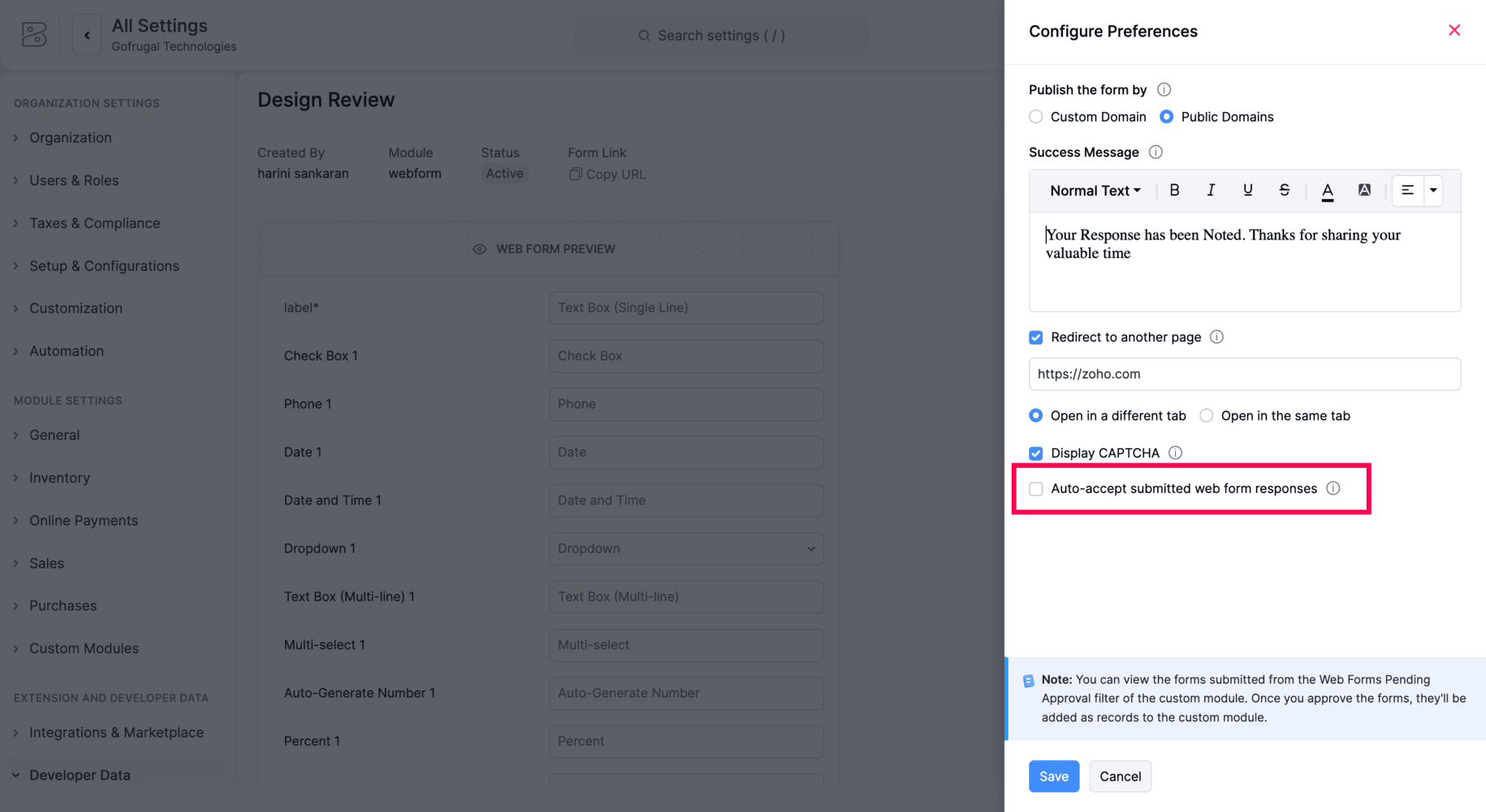
Automatic Acceptance for Web Form Submissions

Zoho Inventory now includes an Auto-accept submitted web form responses option for Web Forms. When enabled, incoming submissions are automatically accepted and created as records in the associated custom module, eliminating the need for manual review before record creation.
             

Early Access Features

Introducing Material Requests & Material Issues

We're introducing two new modules that help businesses manage internal material movement more efficiently.

  • Material Requests

  • Material Issues

Users can create a material request by specifying the required items, quantities, expected date, and location. Once the request is approved, the warehouse can fulfill it through a material issue, either fully or partially, with the issued quantity automatically deducted from available stock. If unused materials are returned, they can be recorded using the Material Returns option. After approval, the returned quantity is added back to the available stock.

These modules support Projects, Reporting Tags, Batch Tracking, Serial Number Tracking, Bin Locations, and Item-Level Accounts, and are compatible with both simple and multi-level approval workflows.

To enable it, go to Settings > Setup & Configurations> General > Enable Material Requests and Material Issues 
Note: This feature is available in Early Access. Contact support@zohoinventory.com to enable it for your organization.


Enhanced Inventory Tracking with Batch and Serial Combinations

Advanced Inventory Tracking now allows you to enable both batch and serial tracking for an item, along with bin tracking. For outward transactions, users can select serial numbers directly or filter them by batch for easier inventory allocation.

For inward transactions, serial numbers can be entered directly, with the serial number count linked to the batch quantity. Additionally, the Serial Number Details report now includes batch information for each serial number, improving inventory traceability.

Note: This feature is available for plans that support Advanced Inventory Tracking. Contact support@zohoinventory.com to enable it for your organization.

Introducing the New Networking Flow[India Edition]

The new version of Networking in Zoho Inventory enables your businesses to exchange transactions with their partners using Network Keys. To establish a connection, both businesses must exchange and verify their Network Keys. Once connected, a Push via Network option is available on supported transactions, allowing users to send them directly to their partners. Incoming transactions are displayed in a dedicated Received tab and are not imported automatically. Users can review each transaction and choose to accept or reject it. When a transaction is accepted, a co-creation page opens with the transaction details pre-filled, making it easy to review and complete. The sender is notified of the recipient's decision and can re-push the transaction if required.

Note: This feature is currently available in the India Edition. Contact support@zohoinventory.com to enable it for your organization.

Integrate Zoho Inventory with Mercado Libre

Zoho Inventory now integrates with Mercado Libre, enabling you to streamline order fulfillment and inventory management across one of Latin America's leading marketplaces. Sync products, orders, invoices, payments, shipments, and inventory automatically, with configurable sync schedules, customer mapping preferences, tax persistence, and comprehensive sync history reports.

Note: This feature is available in Early Access. Contact support@zohoinventory.com to enable it for your organization.


Introducing Myntra Integration

We’ve introduced the Myntra integration in Zoho Inventory, allowing you to manage your marketplace operations from a single platform. Automatically sync products, sales orders, invoices, payments, shipments, and stock updates while configuring sync preferences, customer mapping, location mapping, and tax persistence. The integration also includes detailed sync history reports for easier monitoring.

Note: This feature is available in Early Access. Contact support@zohoinventory.com to enable it for your organization.


Minor Enhancements

  • Bulk Actions in Inventory Adjustments: You can now submit, approve, and convert inventory adjustments to the Adjusted status in bulk, with support for up to 25 adjustments at a time.

  • Comments in Stock Counts: Comments are now available in Stock Counts, allowing users to add or delete comments directly within a stock count.

  • Add Items Using Identifiers - Search and add the item to a transaction using any of its identifiers.

Mobile Updates

Updates for Both Android and iOS

  • Comments in Stock Counts: The Stock Counts module now supports comments, allowing you to add and manage comments during stock count activities.

  • Custom Fields for Batch Items: Custom fields are now available for batch-tracked items and can be viewed directly within transactions for better visibility of batch-specific information.


Android Specific Updates

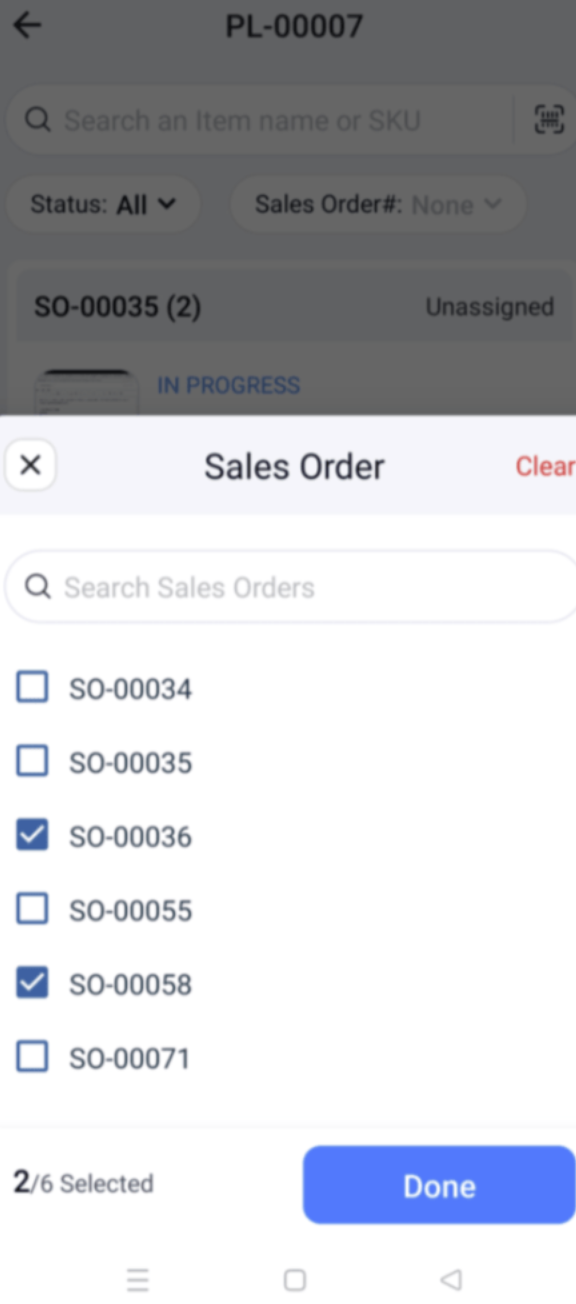
  • Multi Sales Orders in Picklists: Picklists now allow you to select multiple sales orders during creation, making it easier to pick items from multiple orders in a single picklist
                                             

  • Bin Location Details Report: View item-wise quantities across bins within a location using the Bin Location Details Report for improved inventory visibility.


iOS Specific Updates

  • Default Price List for Locations: Assign a default price list to each location, ensuring the appropriate pricing is applied automatically during transactions.

  • Multi-Dated Price Lists: Create and manage multiple price lists with different effective dates, allowing pricing changes to take effect automatically as scheduled.


That's a wrap for now! We hope these updates make your inventory management smoother and more powerful. If you have any questions or would like to learn more, feel free to reach out to us at support@zohoinventory.com. We'll be back soon with more updates from Zoho Inventory!

Best regards,

The Zoho Inventory Team.


      Zoho Campaigns Resources


        • Desk Community Learning Series


        • Digest


        • Functions


        • Meetups


        • Kbase


        • Resources


        • Glossary


        • Desk Marketplace


        • MVP Corner


        • Word of the Day


        • Ask the Experts


          Zoho CRM Plus Resources

            Zoho Books Resources


              Zoho Subscriptions Resources

                Zoho Projects Resources


                  Zoho Sprints Resources


                    Zoho Orchestly Resources


                      Zoho Creator Resources


                        Zoho WorkDrive Resources


                          Zoho CRM Resources

                          • CRM Community Learning Series

                            CRM Community Learning Series


                          • Tips

                            Tips

                          • Functions

                            Functions

                          • Meetups

                            Meetups

                          • Kbase

                            Kbase

                          • Resources

                            Resources

                          • Digest

                            Digest

                          • CRM Marketplace

                            CRM Marketplace

                          • MVP Corner

                            MVP Corner


                            Zoho Writer Writer

                            Get Started. Write Away!

                            Writer is a powerful online word processor, designed for collaborative work.

                              Zoho CRM コンテンツ


                                ご検討中の方

                                  • Recent Topics

                                  • Global Sets for Multi-Select pick lists

                                    When is this feature coming to Zoho CRM? It would be very useful now we have got used to having it for the normal pick lists.
                                  • How to add line breaks in formula with Concat?

                                    I am trying to combine different fields with a formula field, but want to add line breaks.  I.e. the current code looks like:  Concat(${Contacts.Company_Name}, ' ' ,${Contacts.First_Name}, ' ' ,${Contacts.Last_Name}) And the result should be:  John Doe
                                  • Introducing spam detection for webforms: An additional layer of protection to keep your Zoho CRM clean and secure

                                    Greetings all, One of the most highly anticipated feature launches—Spam Detection in webforms—has finally arrived! Webforms are a vital tool for record generation, but they're also vulnerable to submissions from unauthenticated or malicious sources, which
                                  • Is Zoho Assist Secure Connect even practical for 1 person shop?

                                    I was gun ho with Zoho Assist to replace my existing Remote Access product I have been using but I need to implement MFA on each unattended connection. Right now each of these connections in my other product has a rotating token that I have enter off
                                  • Join the Zoho Desk Virtual Classroom Training (VCRT)

                                    Hello everyone, Have you heard about Zoho's Virtual Classroom Training (VCRT)? Zoho Desk's Virtual Classroom Training offers end-to-end training for Zoho Desk users. Join the VCRT and get hands-on guidance for setting up Zoho Desk and getting your business
                                  • Zoho CRM's revamped timeline view now extends to 3 years and support notes, filters, and email statuses

                                    Editions: All DCs: All Release plan: These enhancements are being rolled out to customers in a phased manner. They will be available to most organizations by the end of May. For organizations with huge volumes of data, they will be available by the end
                                  • Zoho Mail App Unable to connect to server

                                    Hi all, For the last two weeks, my Zoho Mail App on my iPhone which has worked fine up to this point has been unable to connect to the mail server. I can't access my emails even though I will get notification banners on the screen saying that they have been received. I can open Safari on my phone and then log in that way. This issue happens when I'm connected to wifi and on my phone data.  I've tried deleting the app several times and reinstalling, and have updated to the latest version. But it still
                                  • Specific ListView Canvas on Canvas Home Page Always Loads Most Recent ListView, Not the One Specified

                                    I had mentioned this to ZOHO, but I mainly wanted to see if others in the Community are also facing this problem. I created a Canvas ListView for a Custom Module, and then created a Canvas Home page (technically on a tab item, but I'm not sure if that
                                  • Add the Zoom Option to the Camera

                                    Hi, I use the ZOHO Forms Camera so I can manage metadata, compression, etc. but this doesnt have the zoom parameter activated, so when we have photos in a tight space and want to use 0.5 for example, we can't, can this be enabled please. Thanks Dan
                                  • Manage booking pages from your Android phone

                                    Hello everyone! We are happy to announce that users can now add and manage booking pages from their Bigin Android app. It is a multi-step form that users can create for purposes like booking appointments, scheduling calls or meetings, conducting webinars,
                                  • New UI - Color Preference Not Saving Permanently

                                    Small, not very urgent problem I'd like to share regarding the new UI theme color. I've changed my theme preference to the default blue color around 20 times by now. It always reverts to a green color theme. I've followed the instructions of changing
                                  • reset password

                                    Hi I need to reset my password and need help
                                  • Automating Employee Birthday Notifications in Zoho Cliq

                                    Have you ever missed a birthday and felt like the office Grinch? Fear not, the Cliq Developer Platform has got your back! With Zoho Cliq's Schedulers, you can be the office party-cipant who never forgets a single cake, balloon, or awkward rendition of
                                  • Unbundle feature for composite items

                                    We receive composite items from our vendors and sell them either individually or create other composite items out of them. So, there is a lot of bundling and unbundling involved with our composite items. Previously, this feature was supported in form
                                  • Inventory Barcode Creation - Add Picture of Item

                                    Hi I am trying to set up bar code labels and include a picture of the item on the label - any idea on how to add that field to the barcode generator?
                                  • Is it possible to set a value to a field based on certain conditions

                                    Greetings Say i have a field that i want to set its value based on the value of another field.. for example if "number" field has value greater than 10, i want to set my field's value to X. Or if radio group had option 1 selected, then i want to set my
                                  • Gemini Action - Add "inineData" Support

                                    Thank you guys for adding a Gemini action. I like Gemini models for the "grunt work" of AI, as they have the cheapest tokens of the trustworthy providers One thing that's missing in the action, though, is the ability to pass file data. If you pass a base64-encoded
                                  • Protect backed up and exported data using password encryption

                                    Hello everyone, Protecting live data is crucial for any organization or product, as it contains sensitive customer information. However, protecting data does not end within the platform. Backup and export files often contain sensitive information and
                                  • Smarter holiday planning with yearly-specific Holiday Lists

                                    Hello everyone! Managing holidays and business hours is now easier and more efficient. Holiday Lists now support holidays that fall on different dates every year, while business hours now supports more than one holiday list. This helps businesses manage
                                  • Zoho Projects - Cloning a task does not trigger task workflow when created

                                    Hello! I have a Project where my team uses a set of tasks from a tasklist as templates, so we could simply clone it and drag it to another list in kanban view to avoid creating a new one from scratch. The process works well, but after cloning it the new
                                  • Best way to setup Inventory bin tracking for products with multiple boxes/crates

                                    Hi - we need some advice from the community on setting up Items in the Inventory for products with multiple crates. We have large products in our warehouse where the product is delivered as two large (double pallet) crates. We've setup the Items for these
                                  • Cliq iOS can't see shared screen

                                    Hello, I had this morning a video call with a colleague. She is using Cliq Desktop MacOS and wanted to share her screen with me. I'm on iPad. I noticed, while she shared her screen, I could only see her video, but not the shared screen... Does Cliq iOS is able to display shared screen, or is it somewhere else to be found ? Regards
                                  • not able to access Zoho from home WIFI

                                    for some reasone i am not able to access Zoho on my laptop or my iphone while i am connected to my home Wifi, i am able to access these sites both on laptop as well as Iphone and associated apps on any other Wifi as well as when I am on my 4G connection
                                  • Five Guided Conversations Updates in Zoho Desk

                                    Hello everyone, Guided Conversations is getting updates that make it easier to create more inclusive customer experiences, retain important conversation context, customize your widget, keep track of changes, and connect with external services. Here are
                                  • zoho desk

                                    Hello, Did Zoho Desk have any issues today? Are tickets coming in late? I have an email account linked, and messages seem to be arriving with a delay—some email threads aren't coming through completely, and so on.
                                  • An important update for Zoho Cliq desktop users

                                    The latest version of the Zoho Cliq desktop app (v1.8.0) will no longer be supported on macOS 10.15 Catalina and earlier versions. This is because the framework we use (Electron) no longer supports some older macOS versions. If you’re using macOS 10.15
                                  • Simplify eSignatures: Automate document workflows with Zoho WorkDrive

                                    Hello everyone, We’re excited to invite you to our upcoming live webinar, where Zoho WorkDrive and Zoho Sign will come together to show you how to simplify and automate document workflows. From creating and collaborating on documents to approvals, e-signatures,
                                  • Function #7: Fetch a value from Deal in Zoho CRM to the related Estimate in Zoho Books

                                    We're here with another function for those using the integration with Zoho CRM. You know that potentials can be linked to transactions in Zoho Books. But if you're including additional details about a Deal (potential) in Zoho CRM and you want to inherit
                                  • Turn off workflow Applied pop-up

                                    hi We are new to Desk. I have a rule to set to "waiting for customer" when agent sends reply. This comes up every time. How to i turn off? Or am i seeing as admin.
                                  • Workflows being applied and the Large unwanted popup

                                    When a workflow is being applied do to an action, then the Agent is left with a large Window asking if they would like the see the changes this workflow did. Is there any way to disable this prompt from appearing?
                                  • Maintenance notice for Zoho CommunitySpaces US data centers on August 23, 2026

                                    Dear customers, We have scheduled a maintenance activity for Zoho CommunitySpaces in our United States (US) data centers on August 23, 2026, from 1:30 a.m. to 2:00 a.m. During this 30-minute maintenance window, Zoho CommunitySpaces will be temporarily
                                  • Knowledge base: The nitty-gritty of SEO tags

                                    A well-optimized knowledge base with great SEO can benefit your company by allowing customers to find help articles and support resources using search engines. This enables customers to quickly and efficiently find the information they need without direct
                                  • zoho desk: Can tickets be created from Microsoft Teams messages?

                                    I am trying to see if there is a way to integrate Microsoft teams with zohodesk. we have a few customers who prefer to communicate requests through Teams, and it would be great to create tickets when they do.
                                  • ´´Send Email Reply´´ action does not work when the message body contains placeholders.

                                    Hi Community, I am working on a workflow where the Customer contact is notified via email when their ticket status goes On Hold. To do that, I chose the Send Email Reply action, and the minute I add a placeholder, the workflow does not work and the ticket´s
                                  • Zoho ERP | Product updates | July 2026

                                    Hello users, We're back with another round of updates to help you streamline your operations. This month's release brings new features and enhancements designed to help you work more efficiently. Read on to discover everything that's new in Zoho ERP this
                                  • Zoho Forms Spam Submissions

                                    Hello community! It seems that after updating the Recaptcha settings on our newsletter form (Zoho Forms), we keep getting low quality spam emails subscriptions. I first used 0.5 treshold on invisible google captcha, then raised it to 0.7 but to no avail.
                                  • Migration from Hosted Exchange Server

                                    I am looking for documentation on how to migrate from a hosted version of Microsoft Exchange to Zoho Mail.  The existing material is very good for non-hosted Exchange or local Outlook account but I have been unable to locate information to move from a hosted Exchange environment. This is complicated by not being able to have access to the Exchange Server (other than login credentials) and the lack of a local PST file (local Outlook uses OST files). I am to the point that all I need to do is migrate
                                  • Subform edits don't appear in parent record timeline?

                                    Is it possible to have subform edits (like add row/delete row) appear in the Timeline for parent records? A user can edit a record, only edit the subform, and it doesn't appear in the timeline. Is there a workaround or way that we can show when a user
                                  • Unable to view existing or create new WhatsApp IM templates on Zoho Desk

                                    Hi there, Is there a issue with WhatsApp templates in Zoho Desk currently [17 Aug 2026]? I am unable to view existing or create new WhatsApp IM templates. It's saying "Oops, something went wrong. Please try again later."
                                  • WhatsApp Business Calling API

                                    Dear Zoho SalesIQ Team, I would like to request a feature that allows users to call WhatsApp numbers directly via Zoho SalesIQ. This integration would enable sending and receiving calls to and from WhatsApp numbers over the internet, without the need
                                  • Next Page