Zoho Projects Coming to CRM Teamspaces

Zoho Projects Coming to CRM Teamspaces

Alert
Availability: The US DC Standard Edition is now available. It will be rolled out to customer accounts in all DCs in phased manner.

Hello all,

You are probably already familiar with Teamspaces, the dedicated workspaces where teams organize the CRM modules they rely on and collaborate on records tied to their specific function or initiative.

While modules help teams manage operational data, many teams also work on projects that involve planning, coordination, and task execution. Previously, these projects were managed outside of the Teamspace environment, typically through Zoho Projects and accessed from individual record contexts such as Accounts or Contacts.


To extend the scope of collaboration within Teamspaces, projects can now be brought directly into a Teamspace. This allows teams to work on their ongoing projects alongside the modules already present in their workspace. This enhancement helps teams manage both record-based work and project-based collaboration within a single workspace, improving coordination and overall team productivity.

Know more about Teamspaces and Project Integration in Zoho CRM.


Why bring Zoho Projects into Teamspaces?

With this enhancement, teams can now bring projects directly into their Teamspace, making them accessible alongside the modules already present in the space.

This helps teams:

  • Access project work from their shared Teamspace

  • Collaborate on tasks without switching between multiple views

  • Keep project execution aligned with CRM records and team activities

  • Organize both internal and customer-related initiatives within the same workspace


When would teams use Projects in a Teamspace?

Projects become especially useful in Teamspaces where teams already manage operational modules and need a structured way to track execution and collaboration.


Marketing Teamspace:

A marketing Teamspace may include modules such as Campaigns, Case Studies, Influencer Outreach, and Customer Feedback.

Projects can be used to manage campaign execution and related activities. For example:

  • Product Launch Campaign – Tracks tasks such as campaign planning, content creation, ad deployment, and partner outreach.

  • Customer Case Study Initiative – Coordinates activities like customer outreach, content drafting, and publication schedules.

These projects allow the team to manage campaign records while tracking execution progress within the same workspace.


Customer Delivery Teamspace:

Customer-facing teams often manage modules such as Accounts, Deals, Case Studies, and Customer Feedback.

Projects can help coordinate customer onboarding or implementation work. For example:

  • Customer Implementation Project – Tracks setup activities, milestone completion, and delivery timelines for a customer.

  • Customer Onboarding Project – Manages onboarding tasks such as configuration, training sessions, and adoption monitoring.

This enables delivery teams to monitor milestones and collaborate on project tasks alongside the relevant customer records.


When working with a key customer on implementation or onboarding activities, the team can bring the related customer project into their Teamspace. This allows the delivery team to monitor milestones and collaborate on project tasks alongside the relevant customer records.


Types of projects supported

Projects added to a Teamspace can fall into two categories.

Client Projects : Client projects are projects that are already associated with CRM accounts or contacts.

Within a Teamspace:

  • Existing client projects can be brought into the space

  • Teams can monitor project progress directly from their workspace.

  • The project continues to remain associated with the related CRM records.

This helps teams working with key customers track ongoing implementation or delivery projects without repeatedly navigating to individual records.


Internal Projects Internal projects are projects that are not associated with any external client or CRM record. They are created purely for collaboration among CRM users within the team. These projects are typically used to plan and track internal initiatives such as feature development, documentation updates, campaign planning, or operational improvements.

Example: Sales Enablement Teamspace

A Sales Enablement Teamspace may include modules such as Leads, Deals, Sales Collateral, and Customer Feedback.

In addition to managing sales records, the team may work on several internal initiatives that require structured coordination. For example:

  • Sales Playbook Development – Organizes the creation and updates of sales scripts, pitch decks, and competitive positioning guides.

  • Quarterly Sales Training Program – Plans internal training sessions, certification programs, and onboarding materials for new sales representatives.

  • Lead Qualification Framework Update – Tracks improvements to lead scoring rules and qualification guidelines used by the sales team.

By creating these internal projects within the Teamspace, the team can coordinate training, documentation, and process improvements while working alongside their CRM data.


How Projects work inside a Teamspace

Projects can be added to a Teamspace in two ways:
  • Create a new project directly from the Teamspace

  • Bring an existing project into the Teamspace
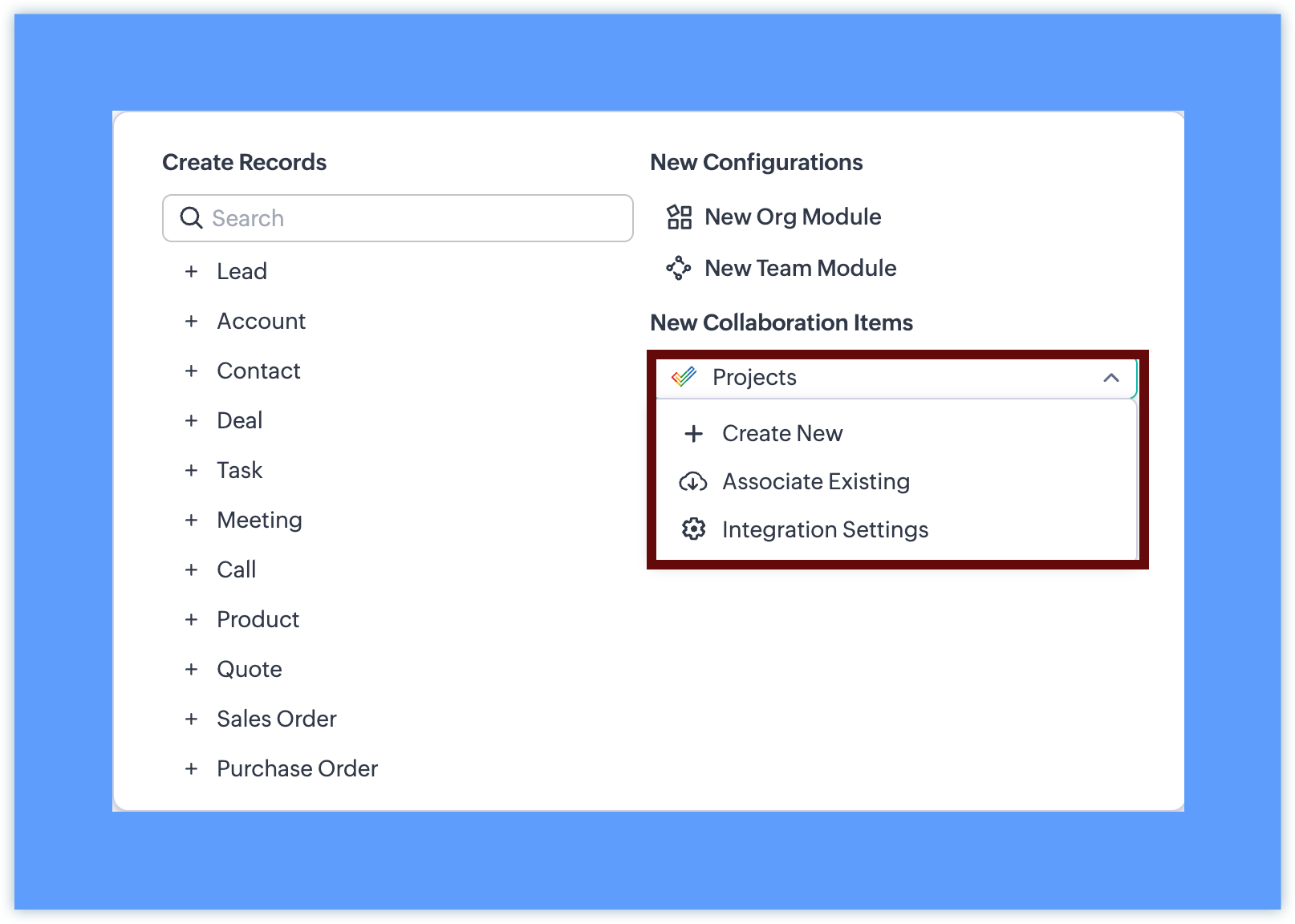

Once a project is added:


  • Once added, the project appears in the Teamspace navigation panel. Projects can be placed inside any folder within the Teamspace, alongside modules or other projects.
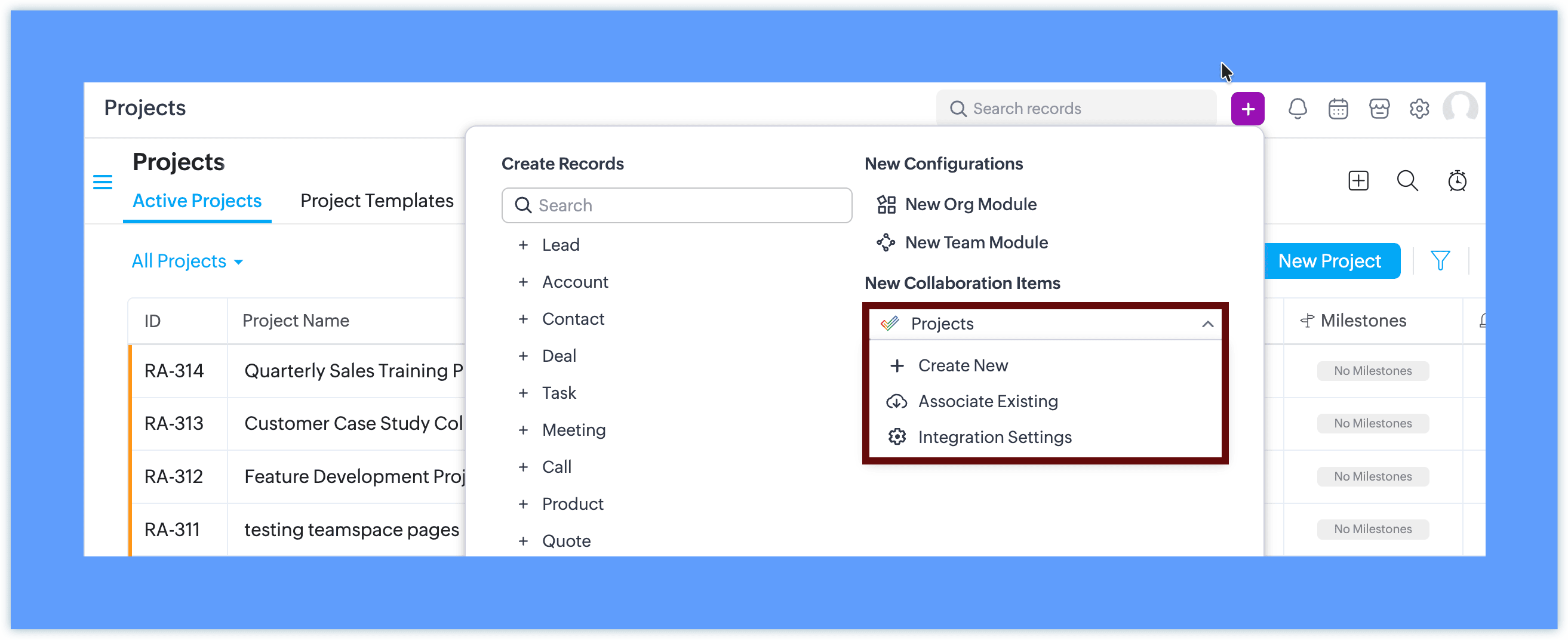
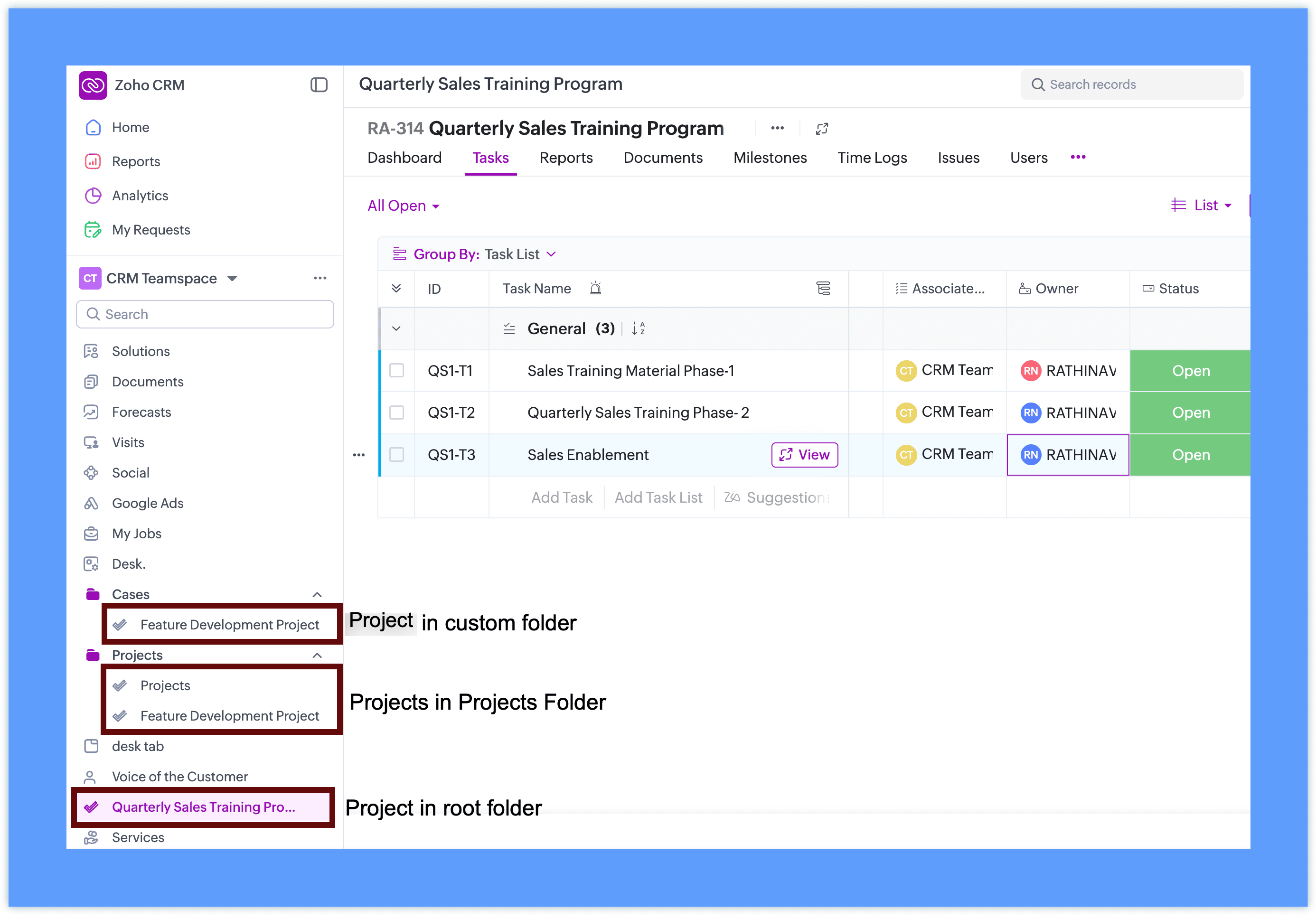

  • Team members can open and work on the project without leaving CRM

  • The project interface is displayed within the Teamspace using the Zoho Projects view
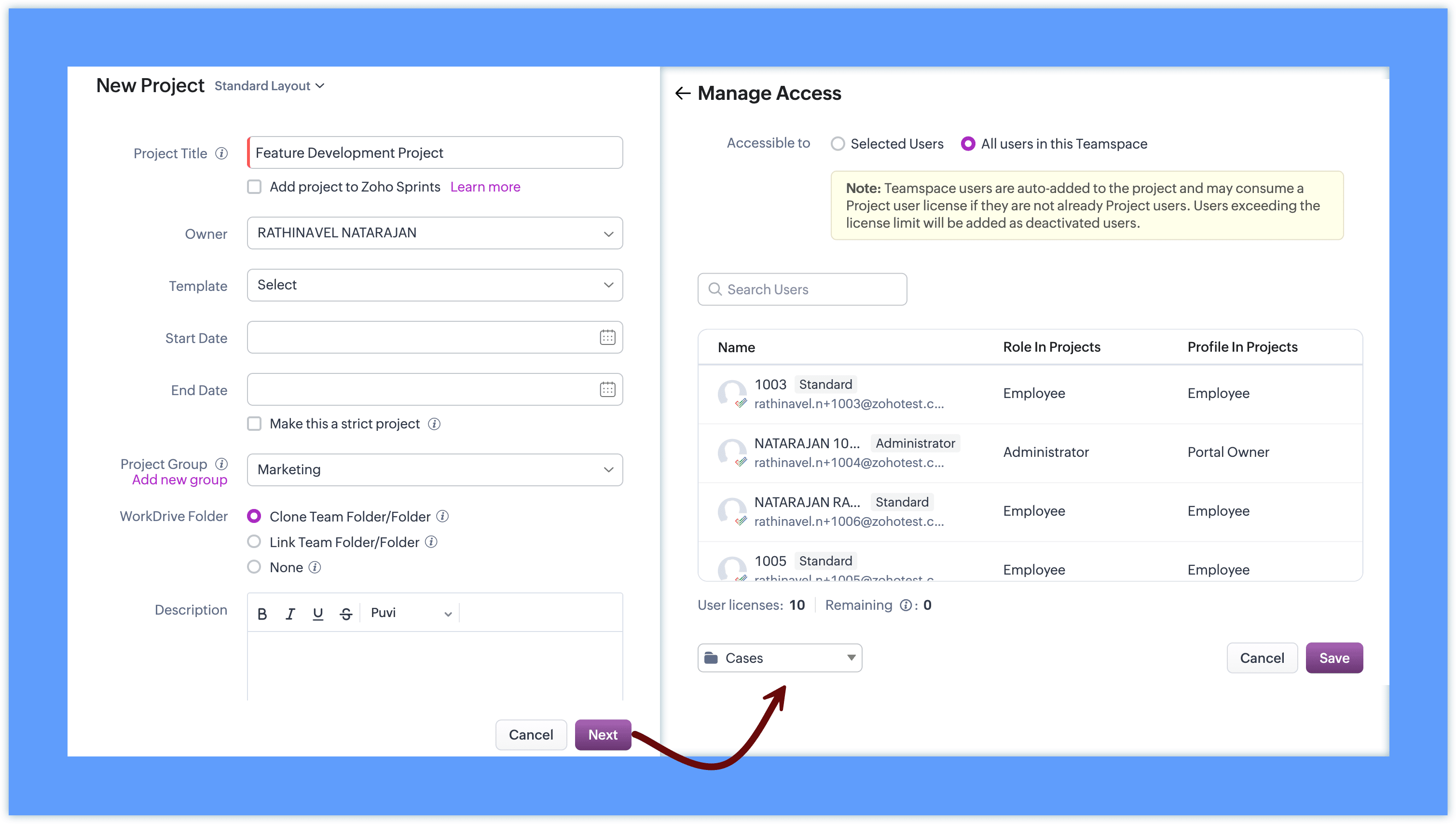
This allows teams to work with familiar project capabilities while accessing them directly from their workspace.


Project behavior inside CRM

Projects added to Teamspaces continue to follow the existing Zoho Projects behavior.

  • Projects remain managed through Zoho Projects

  • CRM surfaces the project interface inside the Teamspace

  • Client projects retain their association with CRM records

  • Internal projects can be created without selecting a client


This ensures that teams can continue using the same project functionality while accessing it within their Teamspace.

Access and collaboration

To add projects to a Teamspace, integration with Zoho Projects is required. If it is not already configured, you can set it up directly from the Teamspace in a single step.
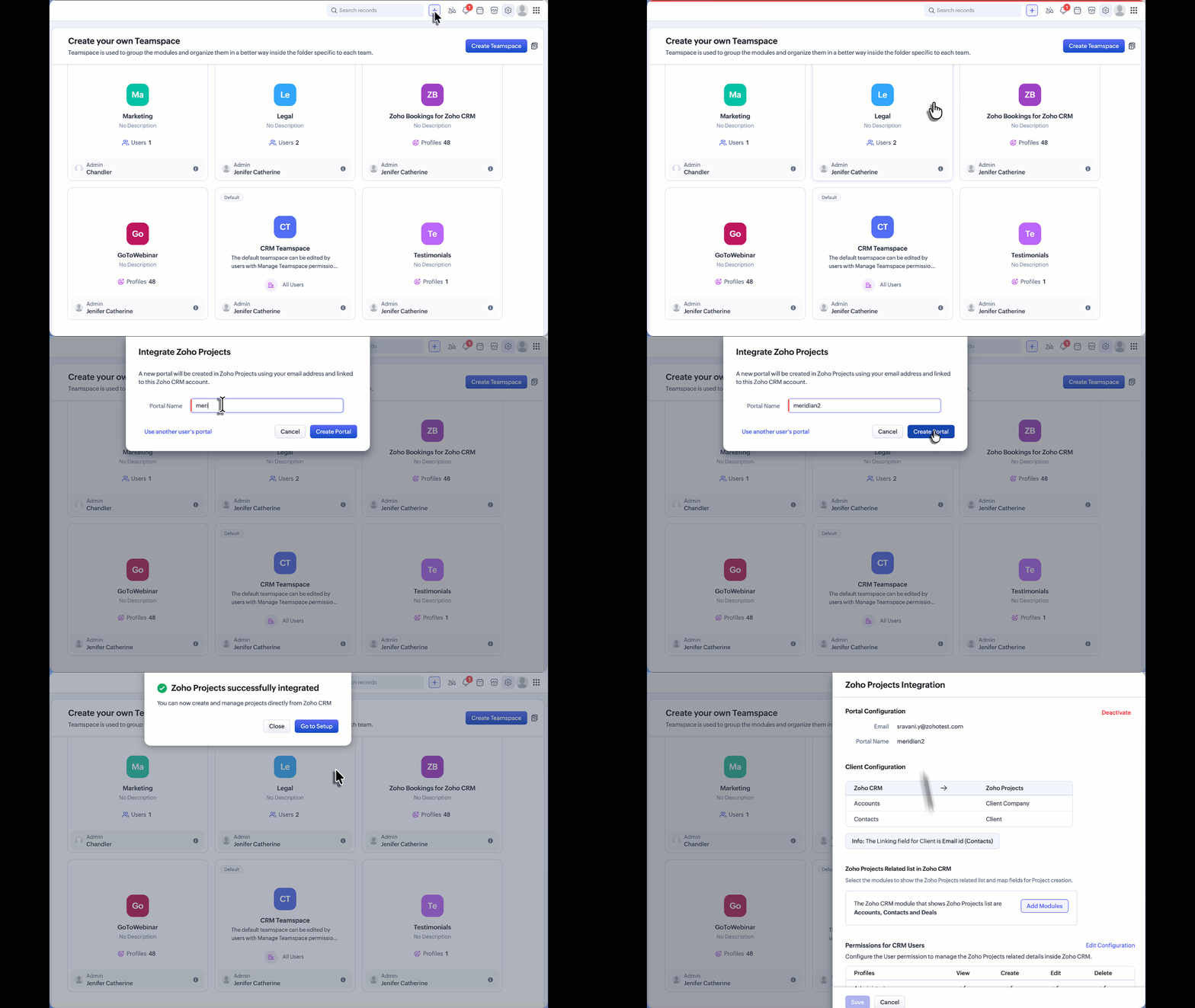

For detailed instructions on the complete setup and how Zoho Projects works, refer to the Zoho Projects integration help documentation. If Zoho Projects is available for the CRM account:

  • Users can create or associate projects within the Teamspace.

  • Project visibility follows Zoho Projects user access permissions.

  • Team members can collaborate on tasks and monitor project progress directly from the Teamspace.

Additional Notes:

  • User Access: Project user access depends on the number of available user licenses in Zoho Projects. If the license limit has been reached, Teamspace users will be added as inactive users in Zoho Projects. These users can be activated later once additional licenses are available through subscription.

  • Updated Project UI: The Create Project and Associate Project interfaces accessed from the Accounts or Contacts related list have also been updated to align with the new Teamspace project UI. This ensures a consistent project creation and association experience across CRM.


      Zoho Campaigns Resources


        • Desk Community Learning Series


        • Digest


        • Functions


        • Meetups


        • Kbase


        • Resources


        • Glossary


        • Desk Marketplace


        • MVP Corner


        • Word of the Day


        • Ask the Experts


          Zoho CRM Plus Resources

            Zoho Books Resources


              Zoho Subscriptions Resources

                Zoho Projects Resources


                  Zoho Sprints Resources


                    Zoho Orchestly Resources


                      Zoho Creator Resources


                        Zoho WorkDrive Resources


                          Zoho CRM Resources

                          • CRM Community Learning Series

                            CRM Community Learning Series


                          • Tips

                            Tips

                          • Functions

                            Functions

                          • Meetups

                            Meetups

                          • Kbase

                            Kbase

                          • Resources

                            Resources

                          • Digest

                            Digest

                          • CRM Marketplace

                            CRM Marketplace

                          • MVP Corner

                            MVP Corner


                            Zoho Writer Writer

                            Get Started. Write Away!

                            Writer is a powerful online word processor, designed for collaborative work.

                              Zoho CRM コンテンツ


                                ご検討中の方

                                  • Recent Topics

                                  • View Answer Bot conversations?

                                    We are trialing Zia and are experimenting with Answer Bot on our knowledge base. So far so good! Management asks me if it is possible to view Answer Bot conversations, the purpose being to look over its shoulder and confirm that it is working as des
                                  • Add Comment workflow action delayed by 1–2 minutes in Zoho Desk

                                    Hello Zoho Support team, We are experiencing an issue with a workflow in Zoho Desk. The workflow is triggered when the Quote ID field is updated and performs two actions: A standard Field Update An Add Comment custom action When the Quote ID field is
                                  • Zoho CRM Layout Rules: Nine New Actions, Profile-Based Execution, and Interactive Preview

                                    Hello everyone, Availability: This feature is now available for customers in the JP and SA DCs. It is planned to be released for other customers in soon. We’re excited to announce powerful new enhancements to Layout Rules in Zoho CRM - a feature built
                                  • Zoho Books and TRAINING SALES receipt label for eTims?

                                    Hi, Can Zoho Books implement TRAINING SALES receipts and push them to eTims for test? In other words how can we send to Zoho or even create in Zoho training mode invoices and TEST the workflow POS>Zoho Books>eTims and back without actually registering
                                  • Reporting Tags and COGS

                                    Is there any way to get COGS recorded against reporting tags? The use cases seems very straightforward to me. If I'm running a P/L report against a specific reporting tag (I use mine for customer type, but it could be used for regions, etc.), the revenue
                                  • Hide Custom Fields for Customers or Vendors

                                    For whatever reason, all custom fields added to the Customer module also get added to the Vendor module. This leads to a clunky experience for users, as many custom fields we add only apply to one or the other. There should be a "hide" option to hide
                                  • Onboarding process

                                    I urgently need onboarding support. My account still shows trial period.
                                  • Detailed General Ledger - Display Transaction Description in Reports

                                    Hi Zoho Team, I'm currently using Zoho Books and have a question regarding the Detailed General Ledger report. When we enter a description or narration in transactions (Bills, Journal Entries, Expenses, etc.), the report does not display this description.
                                  • Which Zoho CRM tasks would you want an AI assistant to handle?

                                    I’ve started delegating my Zoho CRM work to AI – and many tasks now take me half the time. It has been so useful that we’re now working to make it available to everyone. Instead of clicking through records and tabs, I simply describe what needs to be
                                  • Zoho Mail Does Not Integrate with Analytics

                                    Hello everyone, Just wanted to make a quick post about the problem with zoho mail. Currently it does not connect to Zoho Analytics, which I think is crazy considering both of these applications have existed for a long period of time. Even zoho voice a
                                  • Net ##th Terms (e.g. due on the following 15th)

                                    I have a client who pays me twice monthly per our contract. It would be helpful to have terms on my invoices where the invoice is due on the 15th or the 30th of the same or the following month.
                                  • Project status update visibility within a project

                                    Currently the only place within Zoho projects to see status updates for a given project is actually not in the project it's self it's in the Collaboration section and then by searching for a given project and clicking on the status tab. It would be great
                                  • Using custom CRM fields

                                    I have created a series of fields in the Deals module that need to be linked to fields in a contract I have customized. I can only see how to map standard fields, not the custom ones. How do I do this?
                                  • Como limitar o Zia Agent?

                                    Geralmente quando estamos criando um agente de IA no ZIa Agent Studio, colocamos o que ele deve fazer, utilizando as instruções que colocamos no Knowledge Base. Mas como colocamos limites que não devem ser ultrapassados? Para isso utilizamos os Guardrails,
                                  • An important update for Zoho Cliq desktop users

                                    The latest version of the Zoho Cliq desktop app (v1.8.0) will no longer be supported on macOS 10.15 Catalina and earlier versions. This is because the framework we use (Electron) no longer supports some older macOS versions. If you’re using macOS 10.15
                                  • Zoho Flow - Zoho Desk trigger "Ticket created or updated" overrides Department

                                    Just in case anyone else has this issue. We had a Zoho Flow with the Zoho Desk trigger "Ticket created or updated". In the trigger I had selected a Department (Sales). What happens is that the Department ID (Sales) is submitted as part of the request
                                  • 2026 Product Roadmap and Upcoming Features

                                    This is your guide to what is coming in Zoho Vertical Studio throughout 2026. We’ll update this post throughout the year as items move from development to release, and as and when new initiatives are added. Once a feature is released, it will be reflected
                                  • Introducing Canvas templates: Design once, apply everywhere

                                    Greetings all! We're happy to introduce Canvas templates, a Forms view enhancement that enables you to design form layouts just once and apply them seamlessly across multiple modules. Imagine you use five CRM modules (Contacts, Deals, Leads, and more),
                                  • Why cant i see the Campaigns module in my Zoho app

                                    I am on the ZOHO CRM Standard edition. I can clearly see and use the Campaign module when viewing the ZOHO CRM desktop. When I switch to my phone, the Campaign Module does not show. I have gone through all the settings I can think of, but I still can't
                                  • 📣 Ask the team behind Zoho SalesIQ: Summer '26 Q&A

                                    Hi everyone! Following our recent webinars, Summer '26 Release: What's New in Zoho SalesIQ—where we walked you through all the new features, what they do, and how they work—and Driving the AI Evolution: Building Smarter Customer Experiences with Zoho
                                  • Always display images from this sender – Is this feature available?

                                    In Zoho mail, I had my "Load external images" setting set to "Ask me", and that's fine. That's the setting I prefer. What's not fine though is I always need to tick "Display now" for each email I get, regardless if I've done that multiple times from several
                                  • Set Custom Icon for Custom Modules in new Zoho CRM UI

                                  • Displayed sample tracking for multi branch setup.

                                    We have multiple branches and one of the biggest challenges for us to be able to track if a particular item is in display or not. I am shooting in the dark but I am wondering if there is a solution for the following : Each product used for display is
                                  • How do I migrate from Office 365 to Zoho Mail?

                                    Check out Advik Email Migration Wizard, this software is specially developed to move mailboxes from Office 365 to Zoho Webmail. In addition you can migrate from Gmail, Yahoo, Rediffmail and 80+ webmail servers to ZOHO MAIL. Isn't it amazing? This is an all in one email migration solution. Steps to export emails from Office 365 to Zoho Webmail are as follows; Run Advik Email Migration Tool in your system. Select Office 365 as source and enter its login credentials. Select mailbox folders and choose
                                  • Connection Issues

                                    Morning. Seems like a few of my colleagues that are offsite are having issues with connection to cliq, even when their internet is working perfectly fine and only 1 person onsite has issues. Can you please explain? Thanks
                                  • Backorder process review - Automating Removal of Sales Order from "On Hold" When PO is Received

                                    Hello Zoho Inventory Team, Currently, sales orders in On Hold status are released only when the bill for the purchase order is created. In our workflow, it would be much more efficient if the sales order could automatically move out of On Hold as soon
                                  • Which Is the best online store to buy office furniture in Australia ?

                                    The most important part of your office is the office furniture. Your office is not complete when you have not put the required furniture in place. You need a furniture in your office so that you and your employees have desks, tables, and chairs which
                                  • Add "Product Code" as available column and search criteria for Assemblies

                                    Hi Zoho Community. For product (item) assemblies, it would be helpful to be able to create a custom view search criteria that limits the view by product code or perhaps product category. Currently, Product Code is not an available option to display as
                                  • What's New - July 2026 | Zoho Backstage

                                    Hello everyone, We hope you’re having an expectation-exceeding event experience! We’ve been hard at work bringing you a bunch of enhancements designed to make event management even easier. Let’s take a look at what’s new in Zoho Backstage. Export delivery
                                  • Delete Field that is used in a Zoho Flow connection

                                    I'm trying to delete a Field used in a Webhook created by Zoho Flow with CRM Connection and i get the following alert: When going to the alert i get to the following issue, can't edit it since its been deployed by a pluggin But yes i have here the prompted
                                  • Q3 USA ZUG Meetups - Build AI Agents with Zoho

                                    Hi everyone! What if you could build your own AI agent from scratch in just one session? That's exactly what we're going to do at the upcoming ZUG Meetups across the United States, where you'll get hands-on experience with Zia Agents and explore how AI
                                  • Data Export is forcing Creation/Modified date just like reports

                                    The data export now forces you to select a created or modified date. There is not an All-Time option. This severely cripples the whole function of data export for audit purposes. If the data export (or reports for that matter), requires a date, there
                                  • Default ticket template in helpcenter

                                    Hello, I have a web form and a ticket template created. How can I make that my default ticket template? If an user clicks New ticket or create a ticket, I want that template to be the default one. Thank you for the time and info.
                                  • Zia Agents looks promising, but I still cannot deploy my first agent or connect WhatsApp after weeks of support tickets

                                    Hi Everyone, I am posting here because I am stuck and need practical help from someone who has successfully deployed a Zia Agent with WhatsApp. Zia Agents looks like a very promising product. I have watched the platform expand quickly, and I have noticed
                                  • Valid characters for use in email addresses using Zoho's apps/APIs

                                    We have found an issue with the + sign character in zoho subs - we are allowed to create a customer with an email address that has a plus sign but the API doesn't allow the + so the billing portal is not created. We are going to prevent users from using
                                  • Feature Request – Per-Channel Pre-Chat Form Controls

                                    We'd like the ability to enable/disable the pre-chat form on a per-channel basis, rather than having a single global setting. On the website widget, asking for name and email before chat starts makes sense. On WhatsApp, however, email isn't necessary
                                  • Copy + Paste in Notes: Text color and text background are not retained

                                    I've recently started using Zoho Notebook as an Evernote replacement. When copying and pasting text within Zoho Notes, I notice that the formatting of the text (text color and background color) is not retained when pasting. Only the attributes "Bold"
                                  • Need to show discount before total after subtotal

                                    Need to show discount before total after subtotal on my estimate template (see attachment)
                                  • Google Ads Data is Publicly available in Zoho CRM

                                    We recently discovered that ALL of the following Google Ads fields are visible to all users in our CRM that have access to either Leads or Contacts modules. Not only is this troubling and inconvenient, it should be unacceptable. It also creates a mess
                                  • Zoho Books bill pay option not available with zoho one

                                    Why isn't Zoho Books bill pay add-on not available for Zoho one customers not even as a purchasable option. I think this is very inconvenient for companies wanting to use this feature all in one system
                                  • Next Page