Zoho Writer's WordPress extensions

Zoho Writer's WordPress extensions

Hey Zoho Writer users!
 
Say goodbye to all your WordPress content publishing woes with Zoho Writer's WordPress extensions. Publish content with all your formatting and images, republish content when you update a document, and more—from a single window in Zoho Writer.
 
Before we dive into how to post your content to WordPress easily, here's a quick overview of the two types of WordPress blogs and their purposes.

WordPress.com 

WordPress.org 
Simple option for individuals to set up a blog for personal use
 
More complex option suited for organizations and professionals
 
Managed hosting is built-in
You must find and pay for a hosting provider yourself
Individuals can easily create blogs and post content
 
Admins need to add users to the self-hosted blog
 
Not dependent on any external plugin for posting content
 
Dependent on external plugins to set up and post content
 

Zoho Writer offers extensions for both types of WordPress blogs. You can install the extensions for WordPress and WordPress.org from Zoho Marketplace.

How to integrate and post documents to WordPress.org with Zoho Writer

To integrate Zoho Writer with your self-hosted WordPress blog, you need a plugin. You can use our Zoho Flow plugin for a simple, seamless process.
 
Steps to integrate WordPress.org with Zoho Writer:

1. Install the Zoho Flow plugin in your WordPress.org account.
2. Install the WordPress.org extension in Zoho Writer and complete the authentication process.

Installing the Zoho Flow plugin in WordPress.org account
 
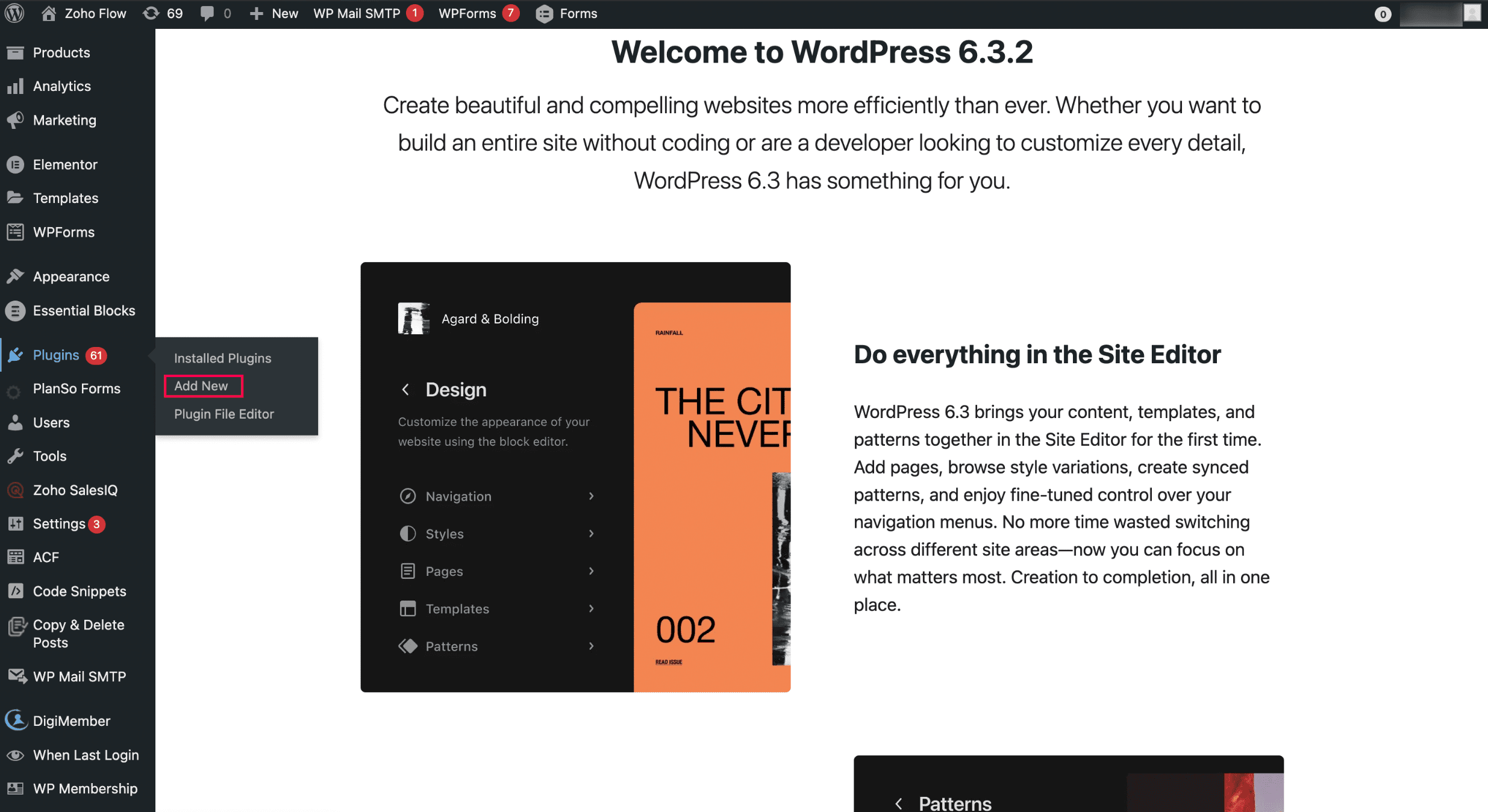
  • To install it from the Plugins menu:
i. Open WordPress and click Add New in the Plugins menu.
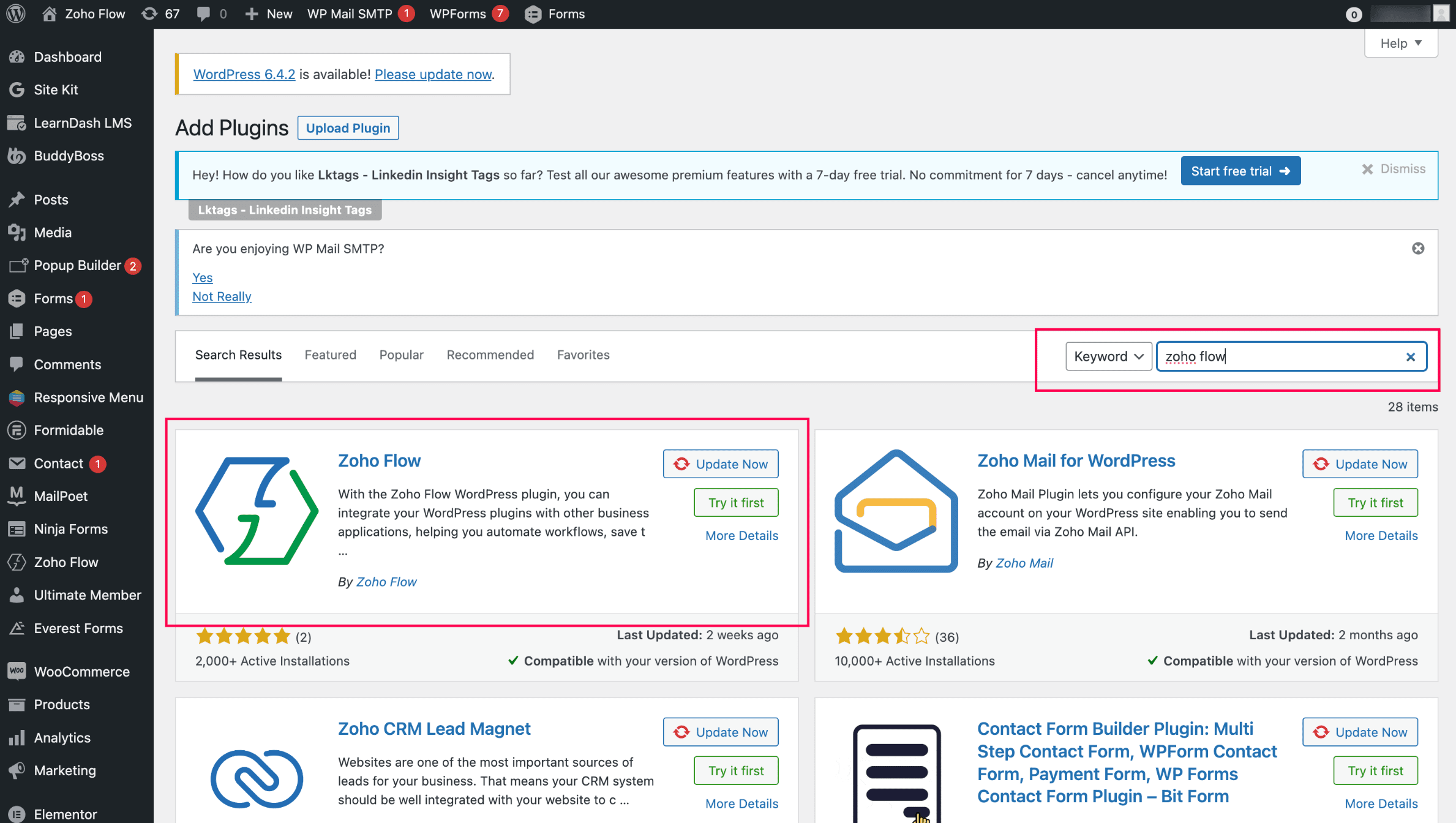
ii. Search for Zoho Flow and click Zoho Flow plugin to initiate the installation.

Installing the WordPress.org extension in Zoho Writer and completing the authentication: 
  1. Install the WordPress.org extension from Zoho Marketplace in Zoho Writer. (By default, it'll be pre-installed for all Zoho Writer users)
  2. Authenticate the extension with your base URL and API key(Note: You can authenticate only one WordPress site at a time)
  3. To generate the base URL and API key, click Zoho Flow in your WordPress site and choose WordPress.org.
Posting content from Zoho Writer: 
  1. Open the WordPress.org extension from the right pane of your document in Zoho Writer.
  2. Add important metadata to your blog posts, such as title, description, and tags, and choose from a list of categories.
  3. Click Publish to publish the content. 
When posting content from Zoho Writer, SEO-friendly image names will help increase visibility in search engines.
You can customize and change the theme of your WordPress blog from Appearance > Themes in the right side of your WordPress blog. Choose a new design or customize the existing design by clicking the Customize button.


Updating blog content from Zoho Writer: 
  1. Click View Published History in the WordPress.org extension in your Writer document.
  2. Choose the document version you want to update the content to from the list of options displayed and click Republish Current Version.

Switch to the Zoho Flow plugin from Jetpack and continue posting to your WordPress.org from Zoho Writer. 


Try Zoho Writer's WordPress and WordPress.org extension and let us know your suggestions and feedback in the comments or email us at support@zohowriter.com or support@eu.zohowriter.com. You can also add your feedback about the Zoho Flow plugin here. It will help us improve the plugin and smoothen your experience.


Regards,

Team Writer


      Zoho Campaigns Resources


        • Desk Community Learning Series


        • Digest


        • Functions


        • Meetups


        • Kbase


        • Resources


        • Glossary


        • Desk Marketplace


        • MVP Corner


        • Word of the Day


        • Ask the Experts


          • Sticky Posts

          • Zoho Writer's WordPress extensions

            Hey Zoho Writer users! Say goodbye to all your WordPress content publishing woes with Zoho Writer's WordPress extensions. Publish content with all your formatting and images, republish content when you update a document, and more—from a single window
          • Easily perform calculations using dates with the new DATEDIF function

            Hey Zoho Writer users! We've enhanced Zoho Writer's formula capabilities with the new DATEDIF function. This allows you to calculate the difference between dates in days, months, and years. Function syntax: =DATEDIF(start_date, end_date, unit) Inputs:
          • Date-based conditions and filters

            Configure conditions with date  Hi everyone! We are excited to announce that you can now compare and filter data with date-based conditions. This update lets you compare date fields in a document to a reference date and display a text or value if the
          • Introducing group by, aggregation, and repeating regions in mail merge templates

            Display data exactly the way you want and highlight key insights with Zoho Writer's enhanced merge templates. We've supercharged Zoho Writer's merge templates with the capability to dynamically group, aggregate, and repeat data as blocks. You can now
          • Say hello to an improved way to merge documents!

            Automating all your documents from start to finish is now easier than ever with Writer's new merge tools.   If you haven't seen it yet, you can read the main announcement here. Here is the full list of the features we've rolled out: 1. Dynamic Table Headers

          Zoho CRM Plus Resources

            Zoho Books Resources


              Zoho Subscriptions Resources

                Zoho Projects Resources


                  Zoho Sprints Resources


                    Zoho Orchestly Resources


                      Zoho Creator Resources


                        Zoho WorkDrive Resources


                          Zoho CRM Resources

                          • CRM Community Learning Series

                            CRM Community Learning Series


                          • Tips

                            Tips

                          • Functions

                            Functions

                          • Meetups

                            Meetups

                          • Kbase

                            Kbase

                          • Resources

                            Resources

                          • Digest

                            Digest

                          • CRM Marketplace

                            CRM Marketplace

                          • MVP Corner

                            MVP Corner


                            Zoho Writer Writer

                            Get Started. Write Away!

                            Writer is a powerful online word processor, designed for collaborative work.

                              Zoho CRM コンテンツ


                                ご検討中の方

                                  • Recent Topics

                                  • Real-Time Screen Annotation During Zoho Cliq Screen Sharing

                                    Hi Zoho Support Team, Hope you're doing well. We’d like to request the addition of real-time screen annotation tools during screen sharing sessions in Zoho Cliq video calls. 🔍 What We're Looking For: The ability for the presenter—and optionally, other
                                  • Testing Post

                                    Say goodbye to paper-based systems and rigid software—the low-code revolution is here. Save time, reduce effort, and increase profitability with custom-built manufacturing ERP software.
                                  • encountering an error when attempting to associate an email with a Deal using the Zoho CRM extension in Zoho Mail.

                                    When I click "Yes, associate," the system displays an "Oops!! Something went wrong" error message. I have attached a screenshot of the issue for reference.
                                  • I'm getting this error when I try to link an email to a deal inside the Zohomail Zoho CRM extension.

                                    When I click "Yes, associate," the system displays an "Oops!! Something went wrong" error message. I have attached a screenshot of the issue for reference.
                                  • Autofill address using smart fields mapped over the pdf document

                                    Hi, I'm using mail merge to map smart fields onto PDF documents I plan to distribute for signing. I already have a Zoho Sign subscription. When mapping smart fields from the Employee form, I only see the permanent and current addresses which include the
                                  • Live Chat for user

                                    Hi everyone, I’m new to Zoho Creator and wanted to ask if it’s possible to add a live chat option for all logged-in portal users so they can chat internally. I’m trying to create a customer portal similar to a service desk, but for vehicle breakdowns,
                                  • How do I cap employee leave accrual

                                    HI there, How do I cap an employee's leave accrual? The policy is that you accrue 15 days leave annually (1.25 days a month) and once you reach 15 days, you wont accrue more until you take leave. Thank you!
                                  • abou arattai

                                    I want to use the Arattai app for business purposes, so please convert my account to a business account.I have my own invoice app, and I want to link it with the Arattai app for direct messaging.
                                  • Zoho Creator Application - New User Not able to access the application

                                    In Zoho Creator, The newly added user not able to access the " Added Application" - User has received the Invitation Email, but while clicking "confirm Account" in the invitation Email, the following error message has appeared. "Sorry! you cannot accept
                                  • Open sub form from a button as a popup form

                                    Is there a way within a form to use similar code as below to show a button in the form when clicked opens the subform for data to be added to the record being viewed in the form OpenUrl("#Form:<Customer_Delivery_Address>?<Delivery_Address>=" + input.ID,"popup
                                  • Ability to Edit Ticket Subject when Splitting a Ticket

                                    Often someone will make an additional or new request within an existing ticket that requires we split the ticket. The annoying part is that the new ticket maintains the subject of the original ticket after the split so when the new ticket email notification
                                  • Timeline Tracking Support for records updates via module import and bulk write api

                                    Note: This update is currently available in Early Access and will soon be rolled out across all data centers (DCs) and for all editions of Zoho CRM. The update will be available to all users within your organization, regardless of their profiles or roles.
                                  • Weekly Sales Summary

                                    Is it possible to generate a weekly report in Zoho Books to show -$$ amount of estimates generated -# of estimates generated by Salesperson -$$ amount of Sales Orders created -$$ amount of Invoices generated
                                  • Dont have backup option in setting

                                    Hi guys. I started using zoho book a week ago. I bought premium package yet I don't have backup option in setting. I hope anyone can help me find a solution. Thanks in advance
                                  • Making Tags Mandatory

                                    When creating an expense, is it possible to make the Tags field mandatory?  I see the option in settings to make other fields mandatory, like Merchant, Description, Customer, etc, but nothing about Tags. Thanks! Kevin
                                  • Is there a plan to integrate zoho voice with zoho books?

                                    Hello, Is there a plan to integrate zoho voice with zoho books? Right now we are using the Twilio SMS integration into zoho books, but have recently decided to switch to zoho voice for calls and sms. Is there a plan to integrate zoho voice natively into
                                  • Need a Universal Search Option in Zohobooks

                                    Hello Zoho, Need a Universal Search Option in Zohobooks to search across all transactions in our books of accounts. Please do the needful Thanks
                                  • Pass variables to Zoho Desk via URL to create a fast new ticket landing page

                                    We are integrating our phone system into Zoho Desk. Currently when a helpdesk agent answers the phone, a soft client opens a new tab with zoho desk at the new case page. https://desk.zoho.com/support/companyname/ShowHomePage.do#Cases/new We would like
                                  • Zoho Books Extension: What Happens If Custom Fields Already Exist?

                                    When developing Zoho Books extensions, what happens if the target Zoho Books organization already has a custom field with the same API name as one defined in the extension? I’m asking because we originally created an on-Books version of this functionality,
                                  • Ability to add VAT to Retainer Invoices

                                    Hello, I've had a telephone conversation a month ago with Dinesh on this topic and my request to allow for the addition of VAT on Retainer Invoices.  It's currently not possible to add VAT to Retainer Invoices and it was mutually agreed that there is absolutely no reason why there shouldn't be, especially as TAX LAW makes VAT mandatory on each invoice in Europe!   So basically, what i'm saying is that if you don't allow us to add VAT to Retainer Invoices, than the whole Retainer Invoices becomes
                                  • Modular Permission Levels

                                    We need more modular Permissions per module in Books we have 2 use cases that are creating problems We need per module export permission we have a use case where users should be able to view the sales orders but not export it, but they can export other
                                  • ¡Vuelven los Workshops Certificados de Zoho a España!

                                    ¡Hola usuarios de Español Zoho Community! Hace ya unos días que hemos dado la bienvenida al 2026, y promete ser un año de lo más emocionante. Y es que nos gustaría haceros nuestro particular regalo de Reyes, aunque lleguemos un poco tarde. 🎁 ¡Nos gustaría
                                  • Free Webinar on 21 January: Looking back at Zoho Mail in 2025

                                    Hello Zoho Community! Curious about how Zoho Mail evolved in 2025? Wondering how these updates can make your everyday email work simpler? We’ve got a session you won’t want to miss. In our Zoho Mail 2025 recap webinar, we’ll walk you through the key features
                                  • Delay in rendering Zoho Recruit - Careers in the ZappyWorks

                                    I click on the Careers link (https://zappyworks.zohorecruit.com/jobs/Careers) on the ZappyWorks website expecting to see the job openings. The site redirects me to Zoho Recruit, but after the redirect, the page just stays blank for several seconds. I'm
                                  • Cliq Networks users can see all other network users contact information

                                    Is there a way to hide user contact information from each user in networks? I would only like the users to see the admin's contact information, not other users. Network users information shared by default
                                  • Fix the speed

                                    It takes ages to load on every step even though my dataset is quite small.
                                  • Zoho Sheet - Printing - Page Breaks and Printing Customization

                                    I think the title is descriptive enough in that I cannot find help documentation on a simple task of adding in page brakes for separating pages on print. Thanks
                                  • Missing the "Find & Merge Duplicates" choice

                                    Hi, I am missing the "Find & Merge Duplicates" choice. I looked under the "More Actions" menu in Contacts, Accounts, Vendors, and Leads and it is not there. I have full permissions. Please assist me on finding this feature. Thanks!
                                  • OAuth integration issues

                                    I'm experiencing persistent OAuth errors when trying to connect Make with Zoho API. I've tried multiple approaches but keep encountering the following issues: First error: 'Invalid Redirect Uri - Redirect URI passed does not match with the one configured'
                                  • Bigin, more powerful than ever on iOS 26, iPadOS 26, macOS Tahoe, and watchOS 26.

                                    Hot on the heels of Apple’s latest OS updates, we’ve rolled out several enhancements and features designed to help you get the most from your Apple devices. Enjoy a refined user experience with smoother navigation and a more content-focused Liquid Glass
                                  • Marketing Tip #16: Ideal sizes and formats for adding images to your online store

                                    Images can make (or break) your storefront experience. When your banners and product photos follow the right sizes and aspect ratios, your store looks cleaner, loads faster, and feels more trustworthy—especially on mobile. Here are recommended image sizes
                                  • Improve WhatsApp Module in Zoho CRM

                                    The current WhatsApp module UI in Zoho CRM feels cluttered and complex, especially when handling high volumes of conversations. It would be great to enhance the WhatsApp module UI/UX by adopting a clean and simplified interface similar to Bigin CRM’s
                                  • Blueprint transitions on locked records

                                    We use the ability to automatically lock records (quotes, sales orders, etc.) based on criteria, such as stage. For instance, if a quote has been sent to a client, the quote is then locked for further edits. Our ideal quote stage process is: Draft>Sent>Won.
                                  • Enhance productivity with the revamped Zoho Sheet View

                                    Hello folks, For some time now, you've been able to use the Zoho Sheet View to quickly edit multiple records or to insert a batch of new records. Its tabular interface allows users to engage in these tasks productively. Despite this, the existing Sheet
                                  • No OR Filter for Views with a Related Modules Criteria

                                    We would like to create a Deal View where the User can see all their deals. For that, we would need an OR to connect the criteria. One of the Fields is a "multiselect User", these (Related Modules Criteria) can only be Filter with an AND. Even between
                                  • Notes badge as a quick action in the list view

                                    Hello all, We are introducing the Notes badge in the list view of all modules as a quick action you can perform for each record, in addition to the existing Activity badge. With this enhancement, users will have quick visibility into the notes associated
                                  • Good news! Calendar in Zoho CRM gets a face lift

                                    Dear Customers, We are delighted to unveil the revamped calendar UI in Zoho CRM. With a complete visual overhaul aligned with CRM for Everyone, the calendar now offers a more intuitive and flexible scheduling experience. What’s new? Distinguish activities
                                  • How to apply customized Zoho Crm Home Page to all users?

                                    I have tried to study manuals and play with Zoho CRM but haven't found a way how to apply customized Zoho CRM Home Page as a (default) home page for other CRM users.. How that can be done, if possible? - kipi Moderation Update: Currently, each user has
                                  • Limit maximum entries for subform - depending on fields entry

                                    Hi Zoho! I have a form with a subform in it. I'd like to have limitation for the row number depending on an entry in a drop-down field in the main form (If the field in the main form is marked "Answer1" - Limit the entries to 1 row, if the field is "Answer2" to have 2 rows limitation, "Answer3" = no limitation at all) Can this be done? Thanks Ravid
                                  • Save HTML Snippet Page as PDF with Dynamic Data in Zoho Creator (Working Solution)

                                    Hi Zoho Creator Community 👋, I faced a common challenge while working with HTML Snippet Pages — I needed to generate a PDF with dynamic data and save it back into the record automatically. Here’s the working solution that might help others. Use Case
                                  • Next Page