Monitor your brand's performance
It's important to stay on top of your brand's performance on every social channel. Brand Health helps you with that precisely. Think of it like a fitness tracker, but for your brand. It provides you with stats and numbers that help you understand how your brand is doing on a particular social channel. Instead of counting steps or calories, this tracks all the numbers that matter to your brand's social media marketing efforts.
How does this work? By watching four key metrics - Total Followers, New Followers, No. of Posts, Reach, and Engagements.
The stats in green signify growth or progress, while those in red indicate a drop or decline. You can learn more about what each of the stats means by simply hovering over the question mark on the stats bar. You can monitor the performance metrics of your brand over the past 30 days.
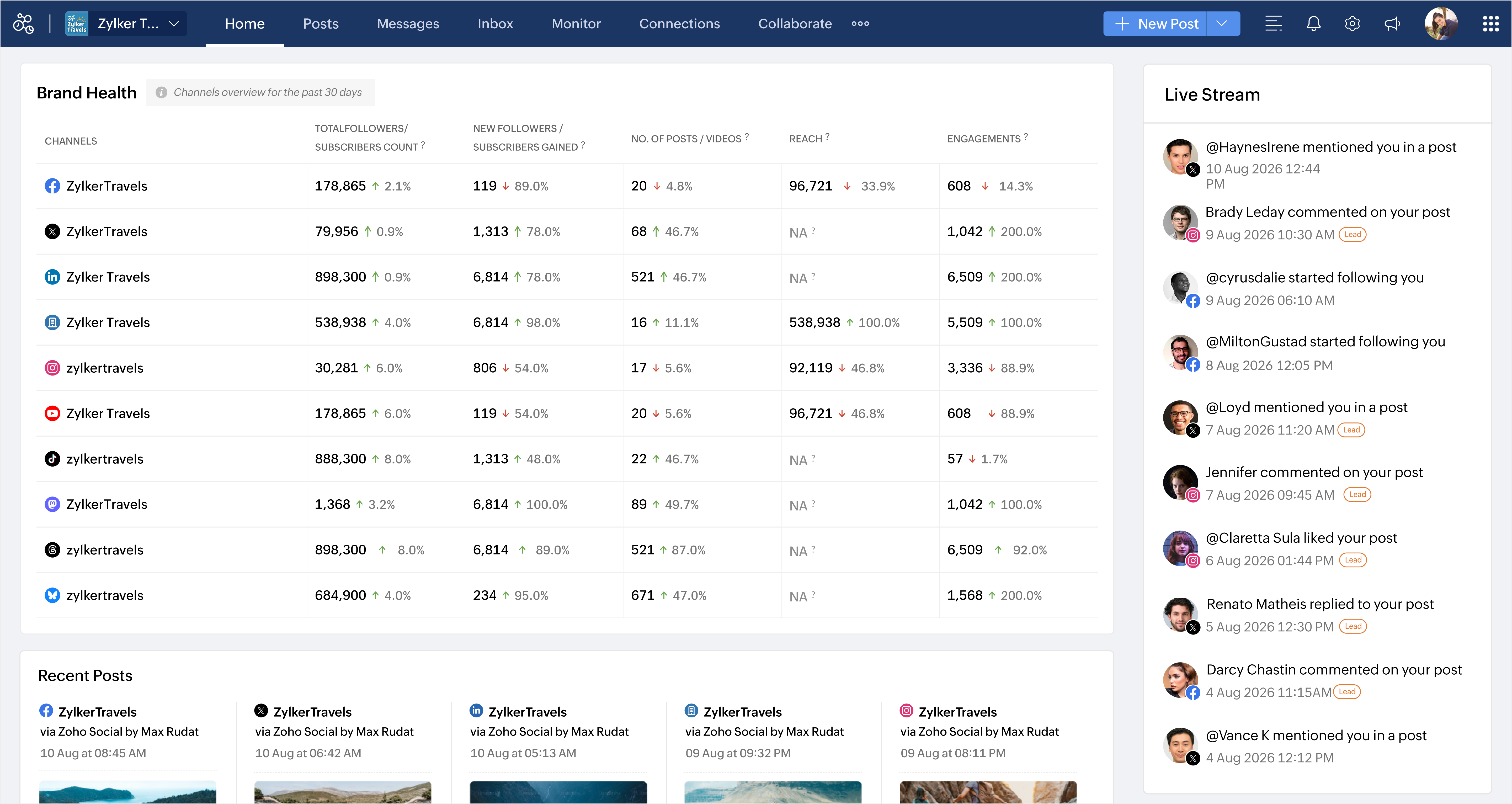
Brand Health stats are available for:
- Facebook Page
- X Profile
- LinkedIn Profile
- LinkedIn Company Page
- Instagram Business Profile
- Youtube
- TikTok Channel
- Mastodon Channel
- Threads Profile
- Bluesky Profile

Note:
- You would be unable to view the stats such as Reach for your X Profile and TikTok Channel, and Total Followers, New Followers, and No. of Posts for your Google My Business Listing due to API limitations.
View detailed statistics of your brand's performance
You can view in-depth data on the various performance metrics available for the brand from brand health by simply clicking on the desired metrics. Apart from that, you can also initiate a discussion with your team about the data, export it as PDF, PNG, or CSV, send it as an email, or schedule it to be sent automatically to your team.
Note:
- The Engagements section in Brand Health denotes the total number of engagements (such as likes, comments, and shares) for posts created in the last 30 days. Whereas the detail view denotes the total engagement received in the last 30 days.