A fresh interface and functionality improvements for Zoho CRM's data sharing settings
Data sharing is essential for maintaining proper access controls in your CRM. Whether you're setting default permissions or defining custom sharing rules, these settings determine how records are shared among users, roles, and groups.

What's improved?
To address these challenges, we've revamped Zoho CRM's data sharing settings in terms of UI and functionality. So without further ado, let's jump into the details.
Two dedicated tabs for better navigation
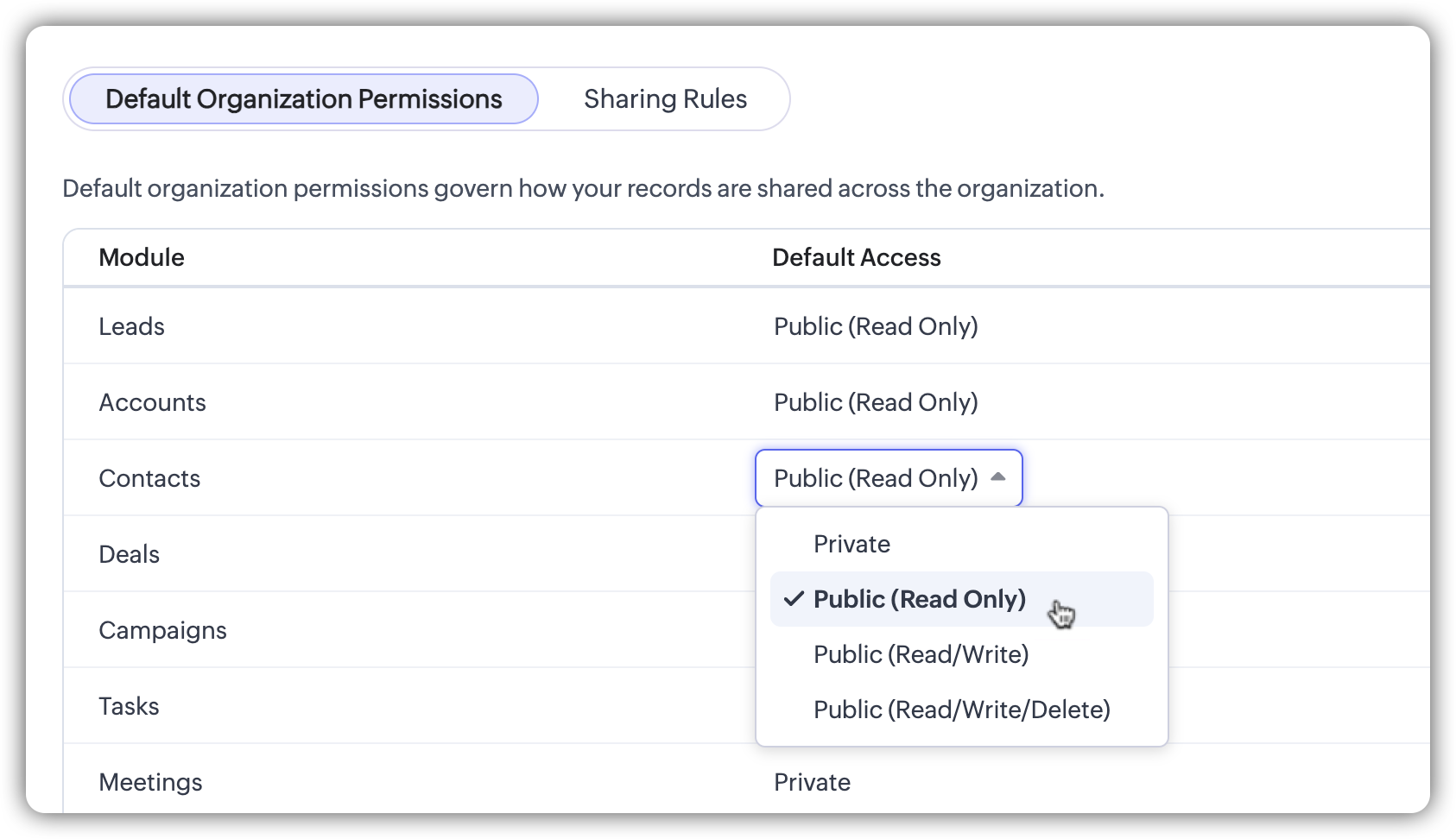
Default organization permissions and sharing rules are now structured into two separate tabs.

Default Organization PermissionsThis tab enables users to define organization-wide access for each module. While the structure remains the same, the permission selection is now presented as a picklist-style dropdown for better clarity and ease of use.
This ensures a clearer and more structured approach to managing default access.The most significant update is in the Sharing Rules tab, which now provides a structured, module-specific display of all existing sharing rules.
Sharing Rules: A new detailed view
Key enhancements in the Sharing Rules tab

A more organized rule list
- The list now provides a clearer, more structured view by grouping sharing rules based on the module to which they belong, such as Leads, Contacts, Deals, and Accounts, eliminating unnecessary gaps and making navigation more efficient.
- New columns and interactive elements have been introduced to display key details at a glance, such as shared from, shared to, permission levels, last modified user and time, and status. This ensures you can quickly access and manage sharing rules without needing to open each one individually.
Activate or deactivate rules instantly
You can now instantly activate or deactivate sharing rules with a single click. The new toggle button provides greater flexibility in managing data access without the hassle of deleting and recreating rules.
Clone a rule
We've introduced an option to clone a rule within the same module. For example, if you have an existing rule for sharing leads from your eastern region and need a similar rule for your western region, you can simply clone the rule, update the name and configurations as needed, and use it.
Search and filtering options for easy access
Finding specific rules is now faster and more intuitive with the new search bar and advanced filtering options.
- Search by rule name: The search bar enables you to find a rule via its name. Simply enter a rule name and matching results are fetched dynamically.
- Module filter: You can also use the dropdown to view rules for a specific module or across all modules.
- Filter rules: You can further refine the search based on your requirement with options such as:
- Shared from (filter by a specific role or group)
- Shared to (select a target role or group)
- Superiors inclusion (filter rules that include or exclude superior roles)
- Status (active/inactive)

Created and last modified details
You can now easily track when a rule was created and last modified directly within the rule configuration page. Additionally, the Last Modified column provides a quick view of the date, time, and user details so you can monitor recent changes without needing to open each rule individually.
What stays the same?
These UI changes do not affect the core functionality of data sharing settings:
- Default permissions work the same way, with only some UI refinements.
- The rule creation process remains unchanged, except for minor layout improvements.
- Existing sharing rules remain intact and function as before.
These updates do not require any action from users. While the core functionality remains unchanged, the enhancements provide greater flexibility in managing data sharing with improved controls, navigation, and usability.
That's all for these enhancements. Let us know your feedback in the comments.

These enhancements are being rolled out in a phased manner, and are currently available for users in the AU DC.
Thanks,
Nizamuddin
Topic Participants
Nizamuddin Sohel SK
Sakis Oikonomou
James
Sticky Posts
Good news! Calendar in Zoho CRM gets a face lift
Dear Customers, We are delighted to unveil the revamped calendar UI in Zoho CRM. With a complete visual overhaul aligned with CRM for Everyone, the calendar now offers a more intuitive and flexible scheduling experience. What’s new? Distinguish activitiesAccessibility in Zoho CRM: Not just a feature—a way to empower
For instructions on setting up these controls, please check this help document: Configuring accessibility controls. Hello everyone, Today (December 3, 2024), on the International Day of Persons with Disabilities, we begin our journey towards a CRM thatScaling the customer journey: What's new in CommandCenter
Dear Customers, The last time we connected about CommandCenter, it was about the tool's new controls and revamped UI. Personally, the overhaul of the UI from the last update, still excites me. Today, we're here with news about its scalability and addedEnhancement to ICR’s field prompting: Preferred data extraction using advanced field prompting
Dear Customers, We hope you’re well A quick background Intelligent Character Recognition (ICR) comes as part of Zia’s optical recognition capability called Zia Vision. When we introduced it last April, the data extraction was training-based and was applicableZoho CRM's sales trend and sales follow-up trend dashboards are now customizable
Dear Customers, We're here with good news! Sales trend and sales follow-up trend are two system-defined dashboards that help you understand trends and anomalies in your sales outreach and conversion efforts. They use Zia's intelligence to identify patterns
Nederlandse Hulpbronnen

Recent Topics
Download pricebook products & details - not just pricebook creation date & name
We're looking to download a copy of a pricebook and its associated products & book prices (as we have several offices in different countries selling the same products), however, when using the export feature under Data administration it only gives meLet us view and export the full price books data from CRM
I quote out of CRM, some of my clients have specialised pricing for specific products - therefore we use Price Books to manage these special prices. I can only see the breakdown of the products listed in the price book and the specialised pricing forAssign Meeting in records
It would be nice to be able to "call and assing" meetings from a record, for example from a Deal. Right now - calendar is synced with CRM - meetings show in calendar - you can go in each meeting and assign it to a record It would be nice to be able toSyncing calendar with Google Calendar doesn't work when events are sent to auto repeat
Hi... The ZOHO CRM -- GOOGLE CALENDAR sync is broken. If I create a single event on either side, sync works, but if I create an event with auto repeat on either side it doesn't work. Furthermore, events created before the sync don't show up in the calendar.Allow Global Admin to access/edit all forms without changing owners
Hi there, Please consider adding a feature where the Global Admin of the account an automatically access/edit any form in the Company Account. I'm the Global Admin on our Zoho One plan, and we have multiple users that use/create forms. But for me to accessERROR: "Please enter a valid Phone"
WHAT IS THE PHONE FORMAT? There is nothing ANYWHERE to define the format. At least the error should either show the correct format or provide a link to the help file I enter a valid phone number in as many formats as I can think of and none of them allow me to save the number to CRM Nothing works! No matter what format I enter I keep getting a red error "Please enter a valid Phone" The international format for MY mobile is +61414652366 (or +61 414 652 366) Local format is 0414652366 I call all overClient and Vendor portal at the same time
We have companies that serve both as clients and vendors and they are linked. However, we have a problem giving them access to the vendor/client portal. If they accept the invitation from the client portal, when we try to invite them to the vendor portalHow to create a boxplot chart in Zoho Analytics?
Hi, I'm looking forward to making a boxplot in Zoho Analytics, either with all my data or with a time segmentation. No documentation or YouTube video explaining that was found. I guess this is a feature gap. How feasible would it be to add this to Analytics?Introducing Zoho Sprints 3.0
Zoho Sprints is consistently evolving in steady increments. The introduction of the latest version, with its enterprise level solutions, brings to you advanced capabilities that propel your agile efforts in the right direction. Here's a quick glimpseCan we rely on order of returned ids when inserting multiple records?
Hello! API https://www.zoho.com/crm/developer/docs/api/v8/insert-records.html does not mention that the response array will match the input array*, keeping this important information implicit and someone might have doubts to rely on it. (*the responseTransaction Rules & Customer Payments
So I have a situation as follows. We have many clients who are all invoiced on the 1st of each month on a recurring invoice for 1 of 10 plans. This means that almost all payment dates are the same (some people pay late) and that a lot of the amounts areCustomize Sign-out Button
Are there some url parameters I can use to make a form button sign-out the user from the app? The sign-out link on the top right is small. Here's and example of the url for the top right sign-out: https://creator.zoho.com/logoutpage.jsp?sharedBy=niskypto&appID=212085000006568003&appLinkName=MYAPP&signOutUrl=niskypto/MYAPP/view-login/SOMEPAGE Note: In my account, the sign-out is set to redirect users to my website. Can I also override this with some url parameters? John M. WhitneyPlease can the open tasks be shown in each customer account at the top.
Hi there This has happened before, where the open tasks are no longer visible at the top of the page for each customer in the CRM. They have gone missing previously and were reinstated when I asked so I think it's just after an update that this featureTip #65 - Exploring Technician Console: Short Keys - 'Insider Insights'
Hello Zoho Assist Community! Have you ever been in the middle of a remote support session, trying to pass a key combination onto the remote machine, only to find it's reflecting on the technician's computer. The Short Keys feature in Zoho Assist is hereReading from and writing to Zoho Projects Custom Module with Deluge
Does anyone know if there is a way to read from and write to the Custom Modules that Zoho now supports. I would love to be able to loop through a set of data and create the entities I need to for this new custom module I'm looking to put together.Disappointment with Zoho Payments
Dear Gowdhaman, I am writing to inform you that I am removing Zoho Payments from my website. I cannot continue to disappoint my customers due to the lack of UPI support, as has been the case with my experience so far. Please note that the 0.5% transactionEvolução do modelo de ambientes: Dev, Homologação e Produção com pacotes versionados
Hoje o Zoho CRM já oferece Sandbox, o que é um avanço importante para organizações que trabalham com customizações mais complexas. No entanto, na prática, o modelo atual ainda apresenta limitações significativas quando múltiplas equipes ou consultoriasPermissões granulares por usuário além do modelo baseado exclusivamente em perfis
Atualmente, o modelo de segurança do Zoho CRM é fortemente baseado em perfis. Embora funcional, esse modelo apresenta limitações quando equipes possuem variações individuais de acesso dentro do mesmo grupo operacional. Em cenários reais, é comum que usuáriosAdd or update lookup field values during Blueprint transition
Hello everyone, During blueprint transition users can add or modify the value of a lookup field. For instance, if the Tickets module includes a lookup field that connects it to records in the Assets module, agents can link the ticket to the correct assetCan you limit SEO penalties by delaying the appearance of a pop-up?
Google is not keen on pop-ups and has got even less keen on them with the new Core Web Vitals updates. But I like using pop-ups. If you delay the pop-up so it only appears 10 seconds after the page loads, do you avoid Google’s penalties?Adding bank details to the contact through API
How to add bank-related information to the contact while creating it using API? The account number needs to be encrypted before sending it through API but not sure how to encrypt and get those values. Please guide me in this.Restrict Payment Methods
Allow us to restrict certain payment methods specific for each customer.Clone Banking Transaction
Why is there no option to CLONE a Transaction in the Banking module?? I often clone Expenses (for similar expense transactions each month) so I would also like to clone Income transactions. But there is no option in Banking to clone an existing IncomePDF limit
Hello everyone, We have received an e-mail that we have reached our PDF limit. (see screenshot) However, I cannot find any reference to a PDF limit in our tariff plan (Premium). (see screenshot). What is the maximum number of PDFs that can be generatedHow can I see content of system generated mails from zBooks?
System generated mails for offers or invices appear in the mail tab of the designated customer. How can I view the content? It also doesn't appear in zMail sent folder.Credit Card Pre-Authorization with later Capture/Settlement
We really enjoy the convenience of being able to pay off a customer's invoice using our Auth.Net integration with Zoho Books. Unfortunately, we can only take advantage of this feature with a small percentage of our customers as it leaves a gaping holeZoho Projects and CRM Integration in Analytics
Hi Team, In Zoho CRM, I’ve integrated CRM with Zoho Projects and associated a project within the CRM. The integration is visible under the Deals module. However, I’m unable to find this data in Zoho Analytics. Does anyone know where this information isComposite items inside of composite items; bill of materials needed
Hi Zoho and Everyone, I am evaluating whether Zoho Inventory will work for my small business. I grow and harvest herbs and spices but also get from wholesalers. I use all these items to make herbal teas, but also sell them as individual items on my Shopify store and Etsy. I discovered the composite item bundling and am wondering if I could get some assistance since there is no bill of materials: Our herbal company's best selling tea is a sleepytime tea. Sleepytime Tea can be purchased in three weightsAccessibility in Zoho CRM: Not just a feature—a way to empower
For instructions on setting up these controls, please check this help document: Configuring accessibility controls. Hello everyone, Today (December 3, 2024), on the International Day of Persons with Disabilities, we begin our journey towards a CRM thatDirect Assignment vs Round Robin: Choosing the right routing method in Zoho Desk
This post is part of the "Desk Automation Series," Chapter 1. Through this series, we will help you choose the right automation type in Zoho Desk by comparing commonly confused automations through real scenarios and business processes, so you can clearlyInvalid tax authority ID.
How do I correct this ?Pay Pal Paylater button
I am testing the paypal setup to have my customers pay invoices with paypal and credit cards. But it seems to have two options. Paypal and Pay later. I don't want my customers access to pay later feature. How can I turn that part off.. My other integrationZoho Workshops are coming to the Netherlands - Join us on 14-16 April in Amsterdam!
Dear Zoho Community Members, After succesful recent editions in the UK and Scandinavia, we’re pleased to invite you to the upcoming Zoho Benelux Workshop 2026, taking place 14–16 April 2026 in Amsterdam. This three-day, in-person event at the Park PlazaHow to install Widget in inventory module
Hi, I am trying to install a app into Sales Order Module related list, however there is no button allow me to do that. May I ask how to install widget to inventory module related list?Sub form auto field population based on parent form
I have a parent form called "Sites" with a text field called "Site". I have a subform called "Design Comments" (actual form name "Review Comments") with a lookup field name "Sites1" that looks up from the Sites form. I want the Sites1 lookup field toBuilding Toppings #7 - Using schedules and workflow functions
Hello Biginners, In our previous forum post, we explored install and uninstall actions and learned how to trigger custom logic the moment a topping is added or removed from an organization. In this post, we'll look at how to automate actions during regular,Simplify scripting with Zia assistant bot
Hello everyone, Building automation using Deluge custom functions gives users flexibility and control. Traditionally, creating these functions required writing scripts, testing the logic, and validating the configuration before using it. With Zia assistantZoho Sprints iOS app update: Global view, screen capture control, file encryption, tags enhancement
Hello everyone! We are excited to introduce new features in the latest version(v2.1) of the Zoho Sprints iOS app update. Let’s take a quick look at what’s new. 1. Global view Global view brings all your project items into one centralised space. You canResource Management System built using Zoho CRM, Creator, Projects, and People:
In a Resource Management System built using Zoho CRM, Creator, Projects, and People: CRM Deal Closed → Creator Allocation Engine → Zoho Projects Task Assignment What is the recommended architecture to handle dynamic reassignment when: an employee goesRequest to Remove LinkedIn Verification from My Emai
I would like to submit a complaint regarding my Zoho Mail account. I previously used this email address to verify a LinkedIn account, but that LinkedIn account has now been closed. I need to remove or cancel the verification associated with the closedNext Page