Announcing Zoho Analytics 6.0 Beta!
We are delighted to open up the next major version, Zoho Analytics 6.0 Beta! The new version comes packed with a wide range of functionalities for all persona, namely business users, data analysts, data engineers, and data scientists. Zoho Analytics team has meticulously developed these functionalities with a focus on current and future business needs, incorporating valuable user & market feedback.

New capabilities in Zoho Analytics 6.0 Beta includes more data connectors, new visualizations, new interactions, advanced analytical models , the ability to build custom ML models, and 60+ features.

Note: 6.0 Beta is now available in all paid plans to try out. Features available in specific plans are annotated inline.
1. Data Connectors & Data Management
New Connectors
We are expanding our already available 500+ data connectors with 25+ new connectors for big data platforms and business applications that includes Yellowbricks, ClickHouse, Dremio, Zoho Connect, Zoho Marketing Automation, Zoho Backstage, Amazon Seller Central, Airtable and many more.
Also, managing data has now become easier with the following features -- Audit history, Sync history, and Import roll back.
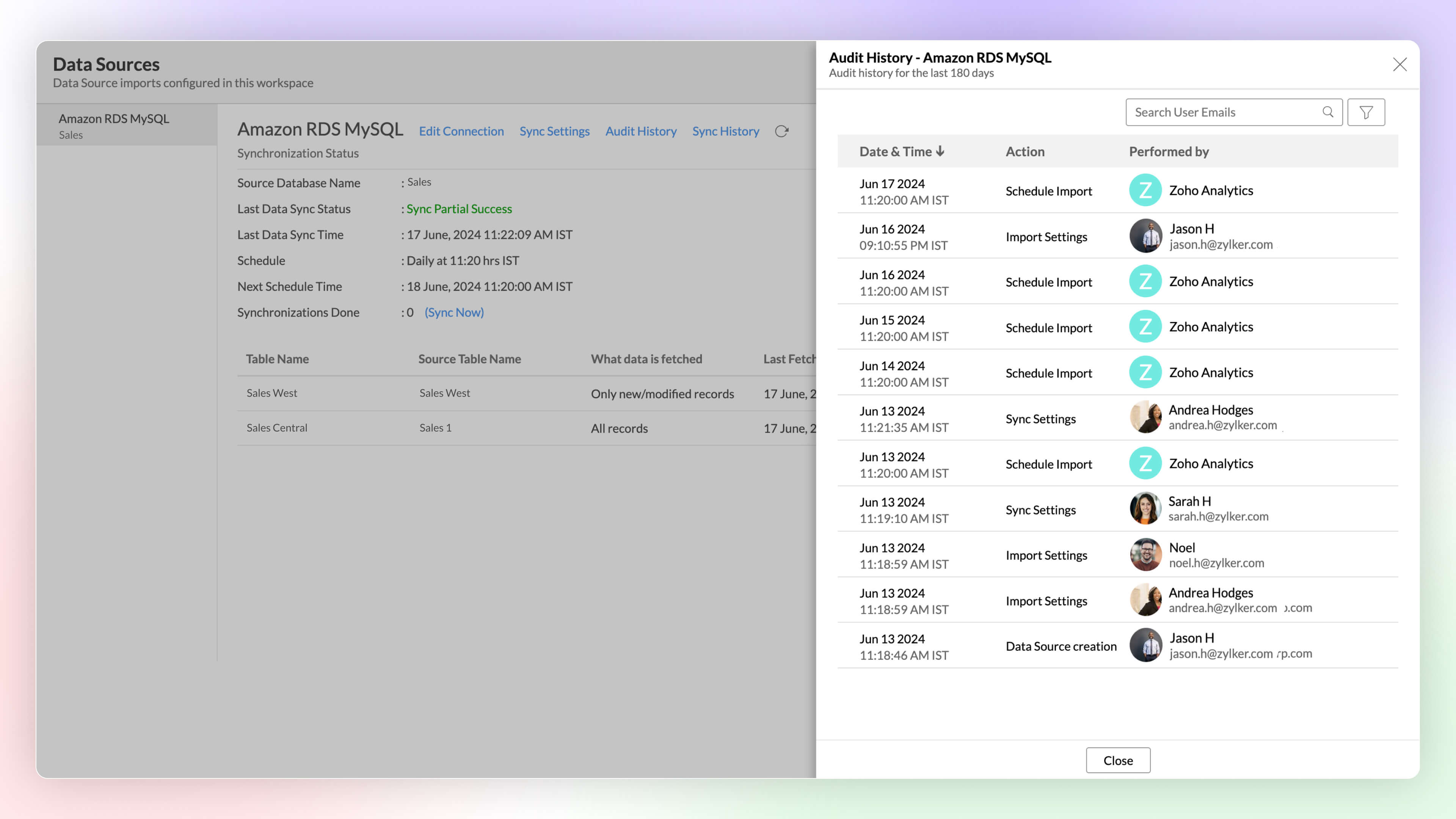
Audit History
Audit logs are crucial for maintaining security and troubleshooting issues. They provide a comprehensive record of user and system Actions, including details of the time when the action occurred and information about the administrator who performed the action.
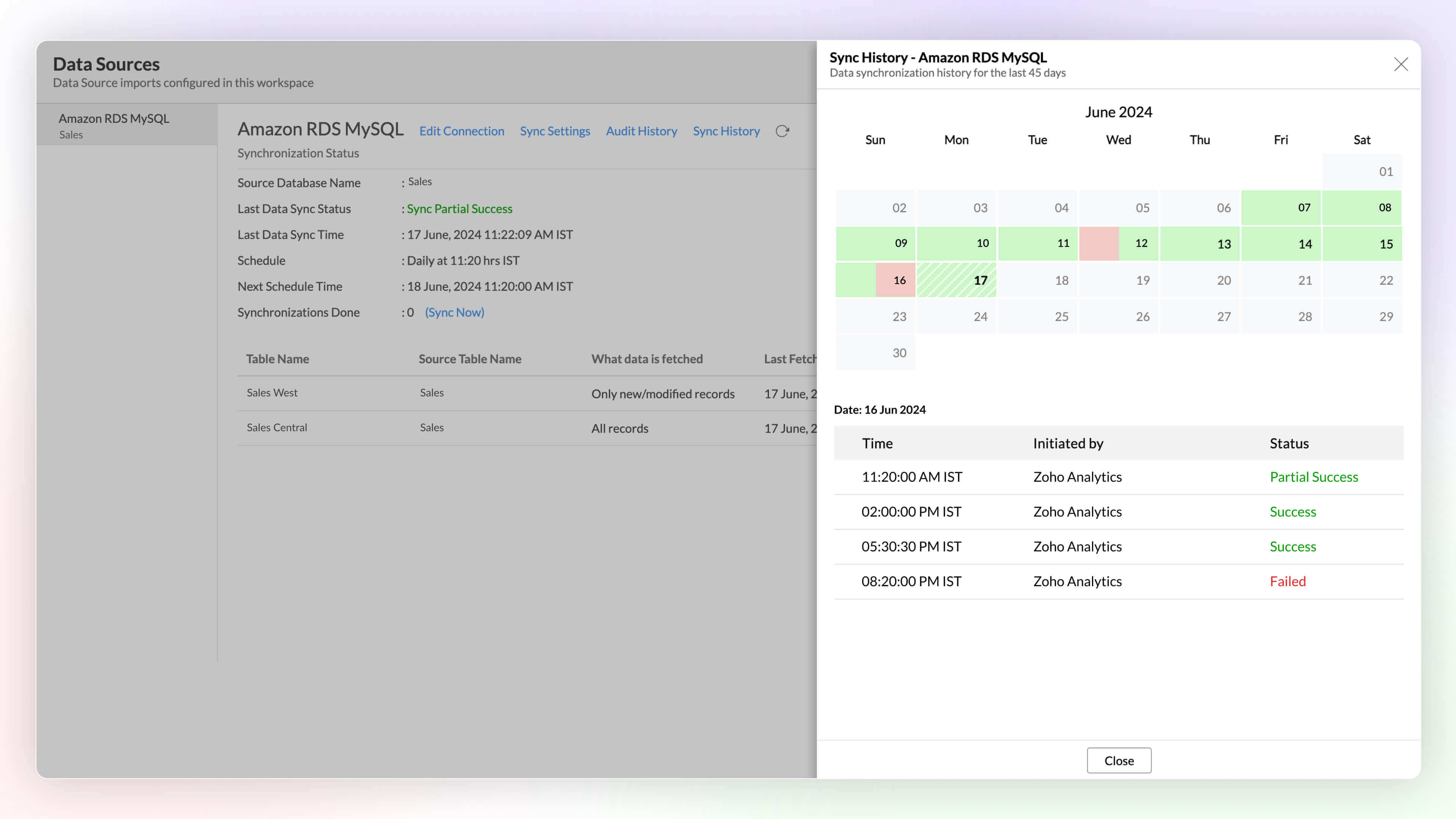
Sync History
Sync history provides a detailed record of data synchronization activities, making it easy for the administrators to track the status of each data sync. The sync operations are color-coded for immediate recognition. Successful data syncs are indicated in green, and failed data syncs are marked in red with the reasons for failure along with the necessary action to be taken.
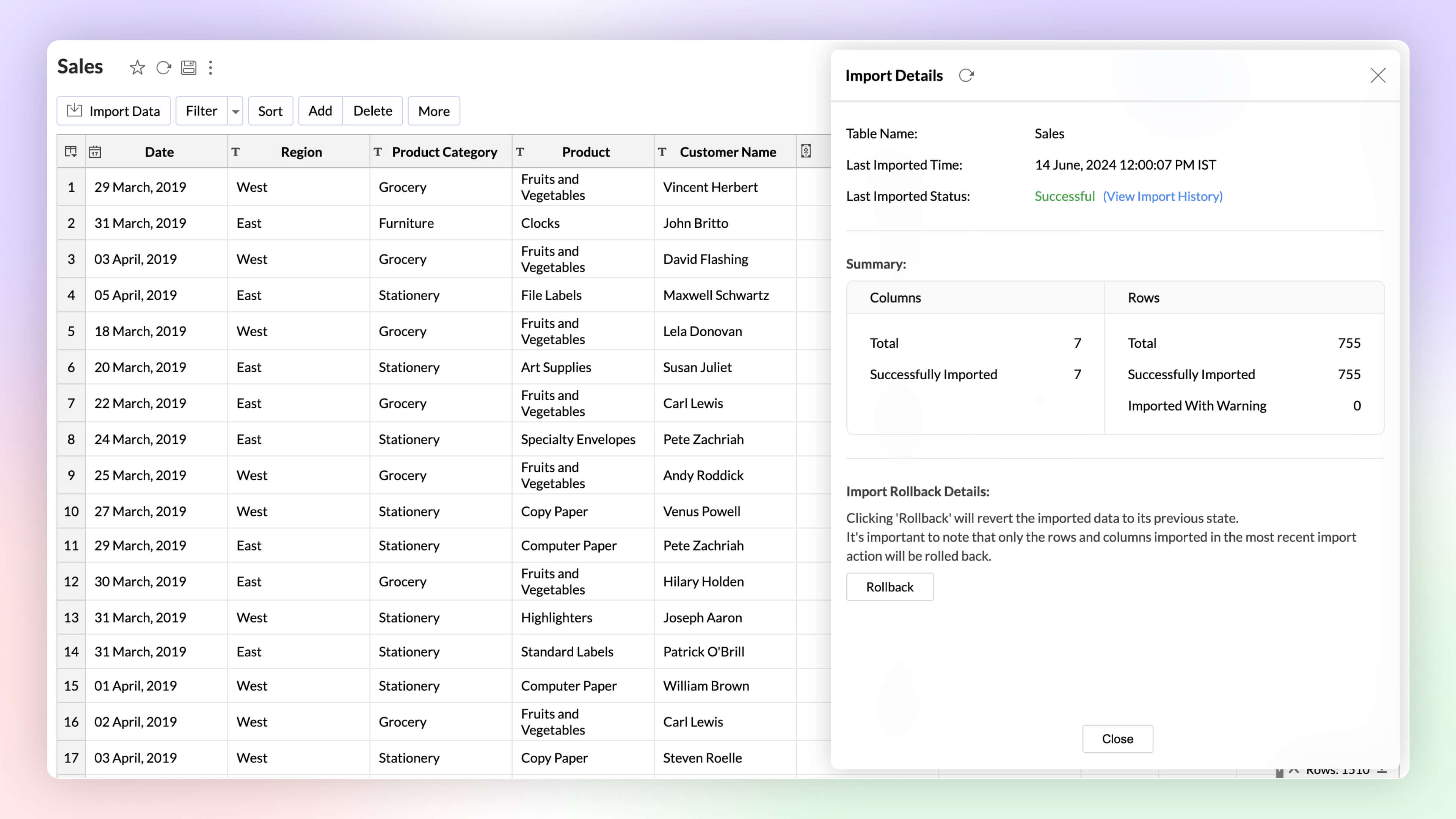
Import Rollback 
Automated imports can sometimes have errors and inconsistencies in data, and this can affect the data quality and the results. The import rollback capability reverts the current data import version to its previous version without affecting the existing data flow and analysis, ensuring data integrity.
Unified Metrics
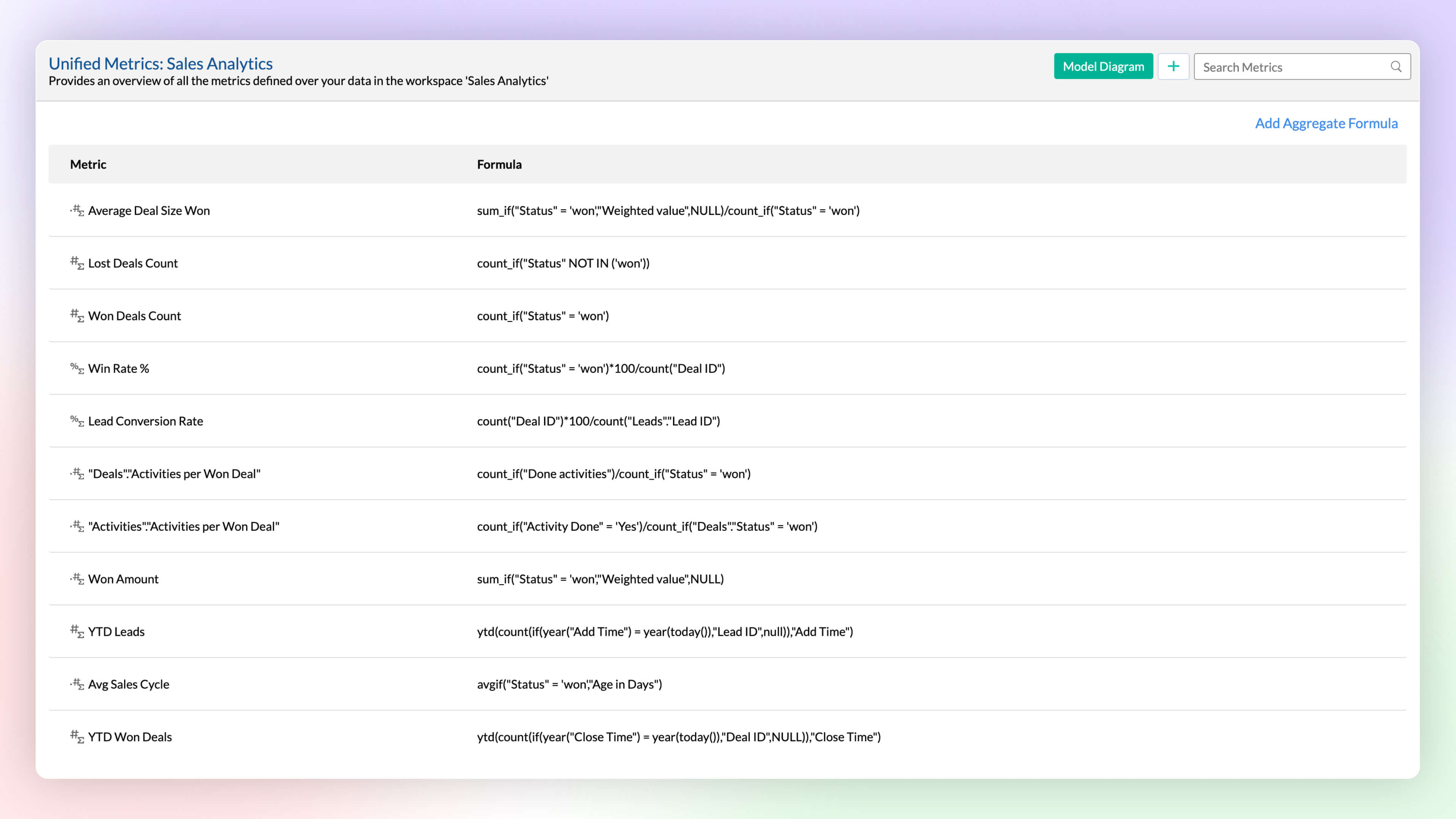
Workspace will have data imported from varied sources, and each data source or table will have different metrics (aggregates) computed for analysis. A unified metrics consolidates all the metrics used across the workspace, helps in standardization, promotes usage, and avoids duplication.
Data Bucketing
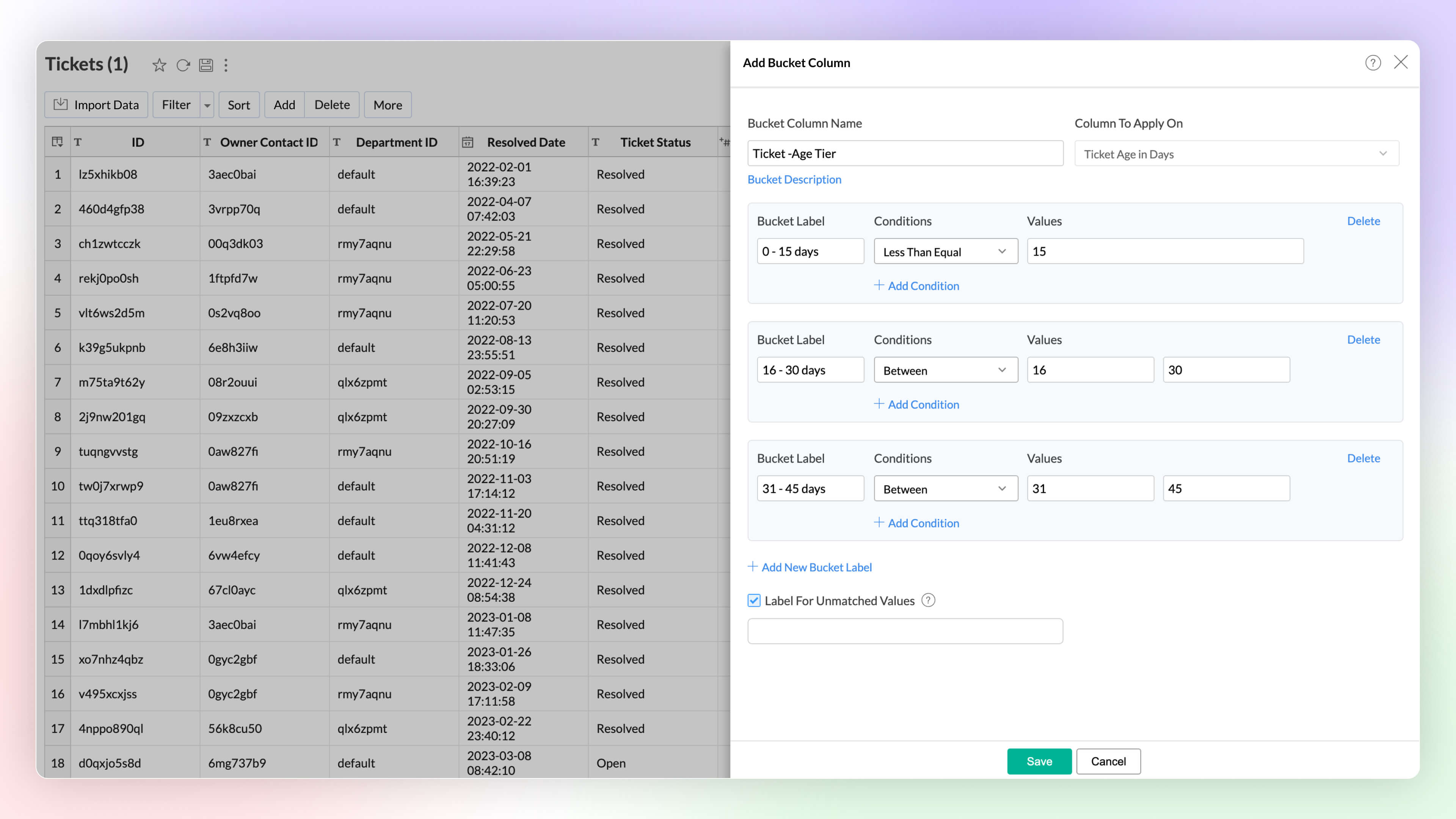
Categorize or group data points easily with the Bucket Columns options in Zoho Analytics. (Until now, users had to write formulas to achieve this; now, it is available as an inbuilt option.) Bucketing reduces the number of distinct values (cardinality). It facilitates the transformation of numerical data into different categorical bins and makes data analysis easier.
2. Visual Analytics
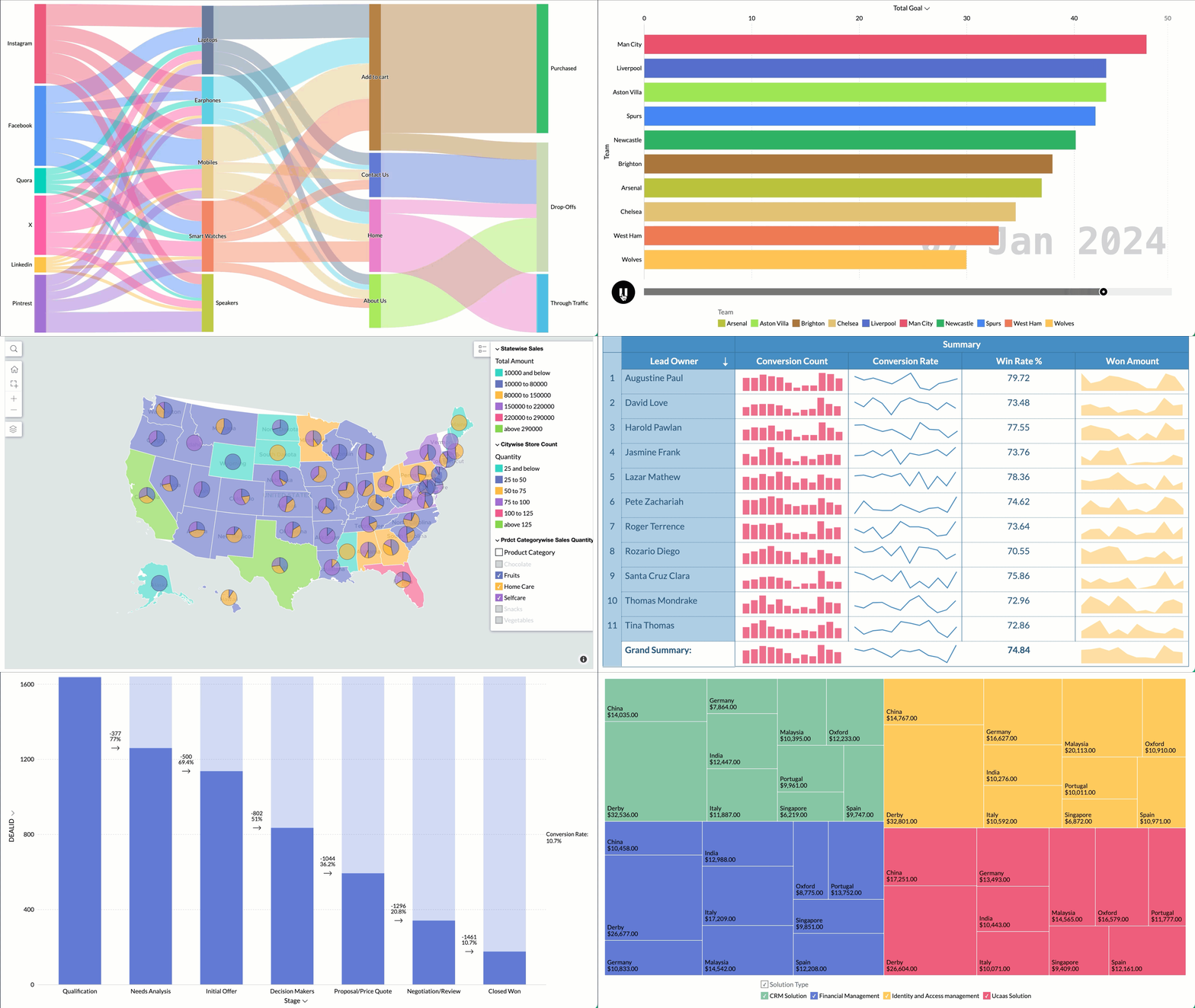
Zoho Analytics supports 7+ new chart types (on top of 50+ existing ones) with extensive customization options to enhance the presentation and interpretation of the data.
- Sankey charts are best suited for visualizing the flow of any process, as they clearly capture the movement of data from one point to another. It helps understand the movement of events through interconnected lines.
- Racing charts are animated views that are best suited for visualizing the changes in the data over a period of time where the relative ranking of categories is important. They highlight and help comprehend the fluctuations and progression in the data. These types of charts grab the user's attention instantly, providing an immersive experience and helping craft a compelling story about the data.
- Spark lines are compact charts that show the trends and variations in the data without taking up much space. They are widely used alongside pivot tables and help grasp trends and allow quick comparison of metrics across different fields. Zoho Analytics supports three variations that includes line chart, area chart, and bar chart.
- Geo Map Layering, add multiple data layers to the geo map to visualize various dimensions of information. This feature includes interactive options for enhanced data exploration.
- Sunburst charts represent hierarchical data through a series of rings, or concentric circles. Each ring corresponds to a level in the hierarchy. The central or innermost circle represents the root node, or the top-level category. Moving outwards, each subsequent ring represents a subcategory, where the outermost ring is the leaf node. The size of each arc in the ring is proportional to the value of the data.
- Conversion bar charts show the connected stages of a process and the gradual decrease in data as it moves through different stages of the process. Each stage is represented by a bar, with a step or stair case pattern indicating the shift in values (along with conversion percentage) at each stage.
- Tree Map is a visualization composed of differently-sized rectangles that represent your data values. This is beneficial when you want to depict the part to whole relationship among various categories.
Zia Suggestions
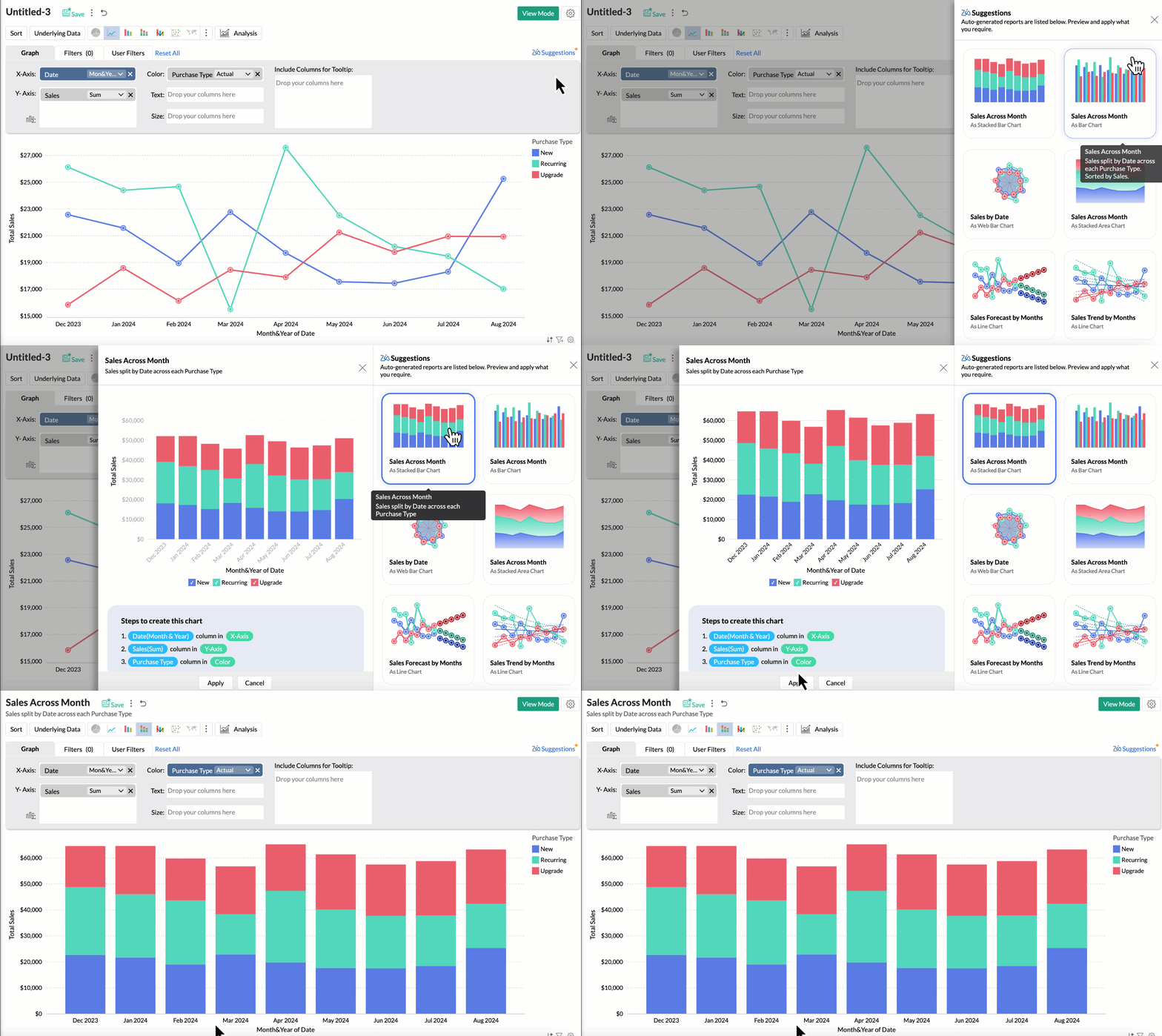
Now, with the new Zia Suggestions, you can effortlessly receive insightful chart recommendations while you are in the creation process. Zia suggests a variety of charts suggestions tailored to your data, allowing you to preview and apply them seamlessly with just a click.
Global User Filter in Dashboards
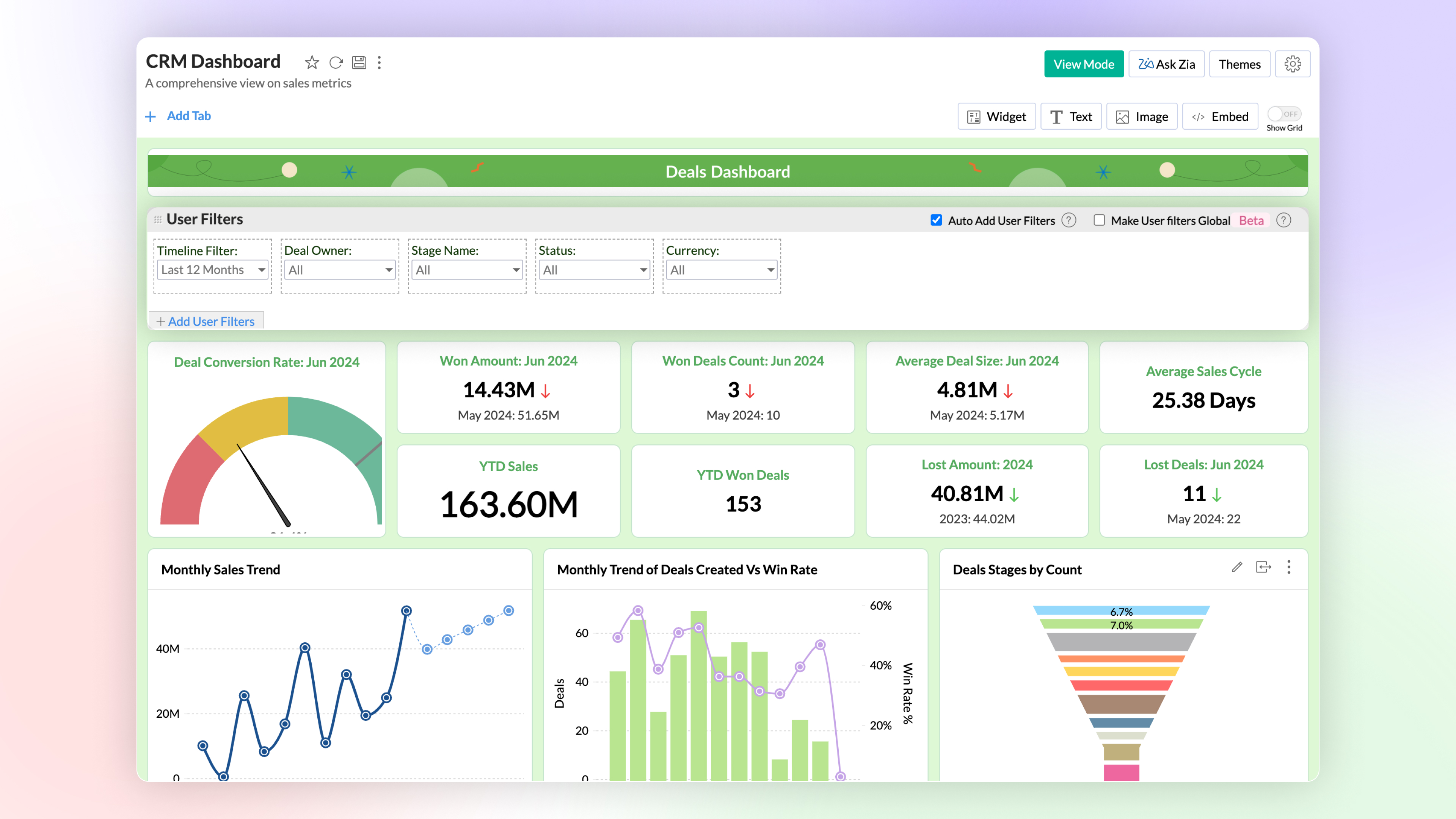
You can now have a common user filter across all tabs in the dashboard. Global user filter gets applied across all reports in all tabs of the dashboard.
3. Advanced Data Analytics
Zoho Analytics now supports two more advanced data analytics methods: Anomaly Detection and Cluster Analysis.
Anomaly Detection 
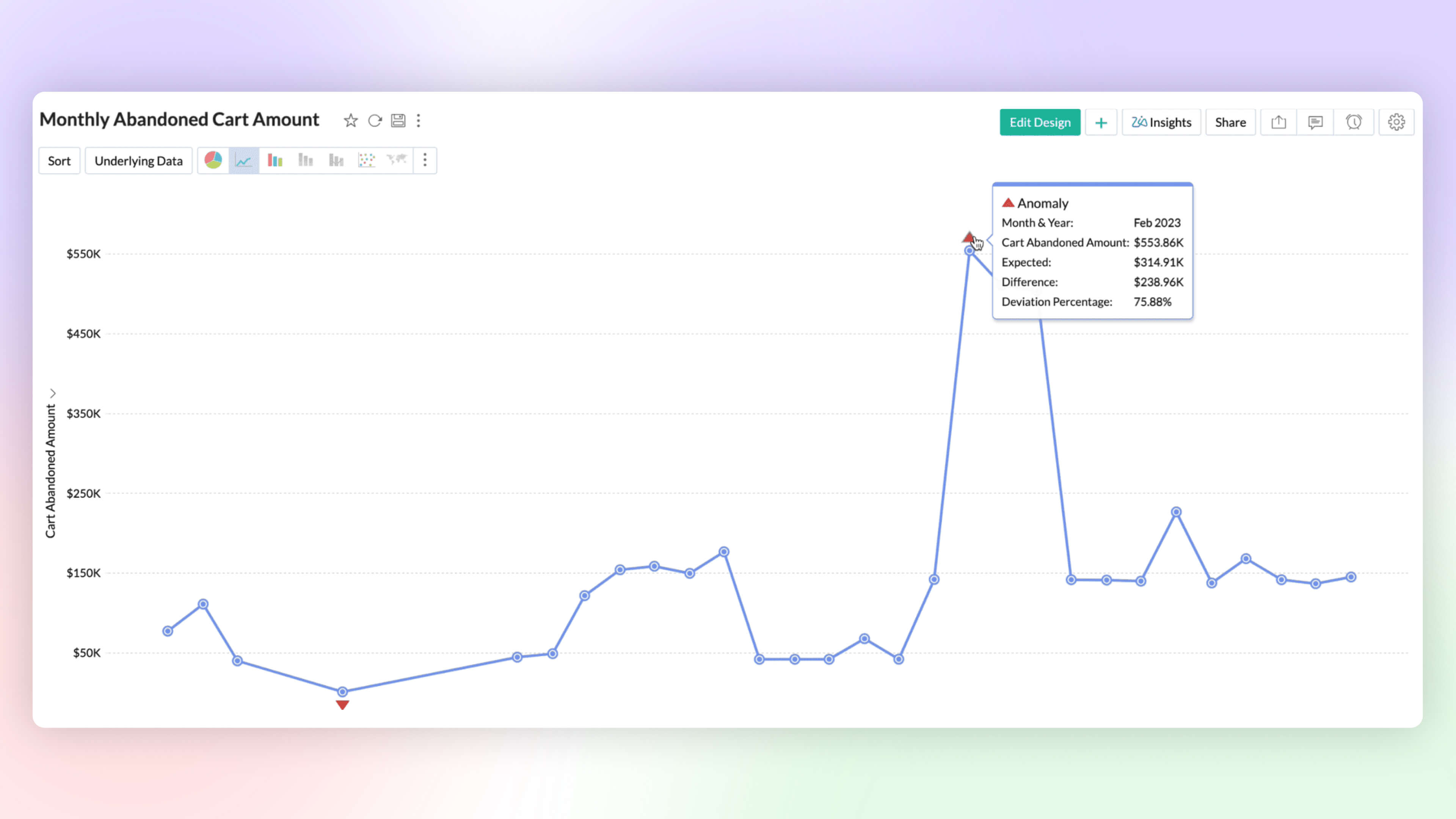
Anomaly detection helps you to flag outliers in your data or metrics easily. You can now create charts which highlight anomalous points visually for your attention and action. Zoho Analytics deploys robust ML algorithms and various statistical models for detecting outliers.
Cluster Analysis 
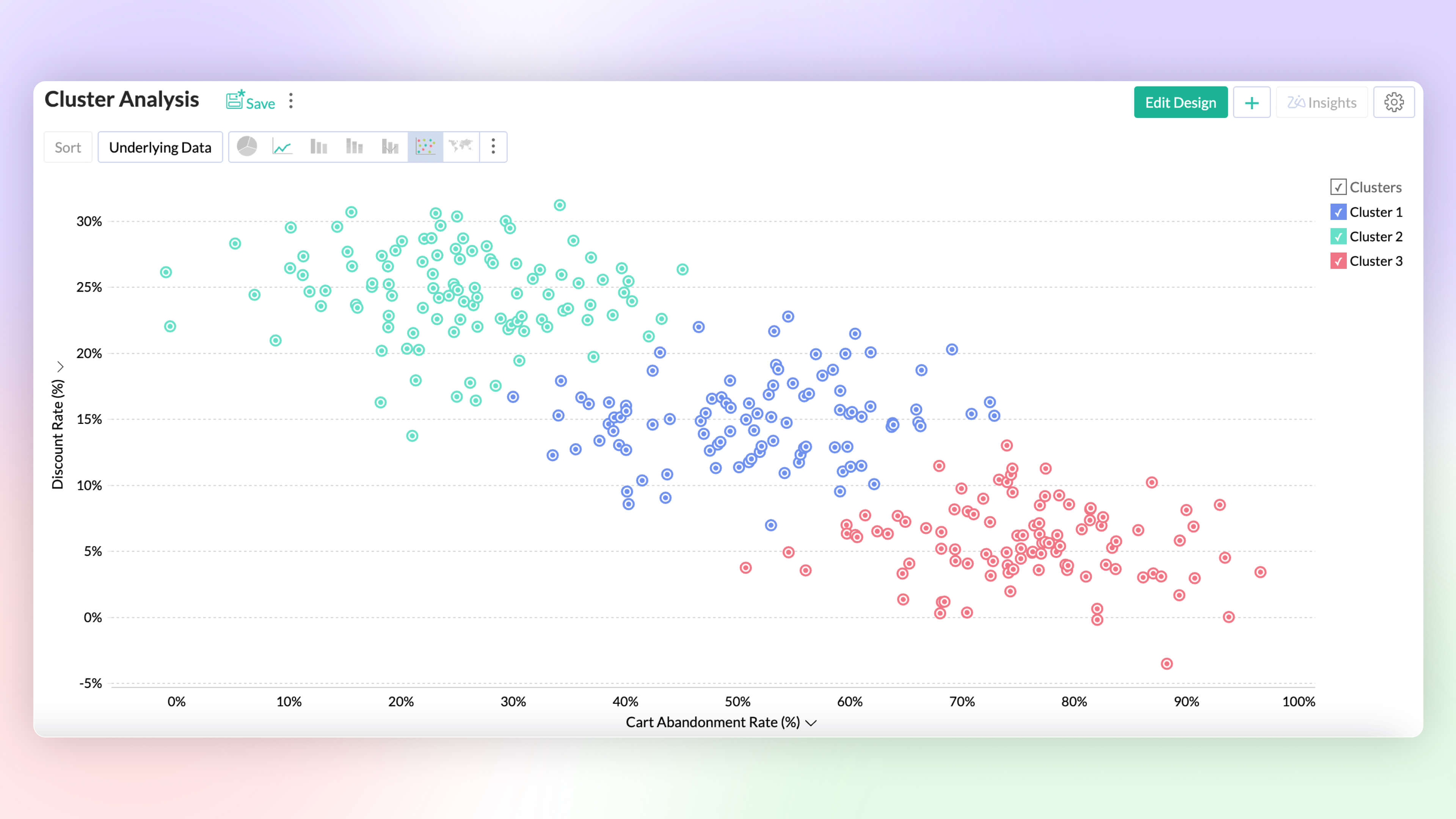
Cluster analysis groups similar data points together based on certain factors or conditions. Each cluster contains data points that are more similar to each other than to those in other clusters, reducing the complexity of the data. Zoho Analytics deploys K-means, K-modes and K-prototypes algorithms for clustering the data points.
Alerts Based on Threshold and Anomalies
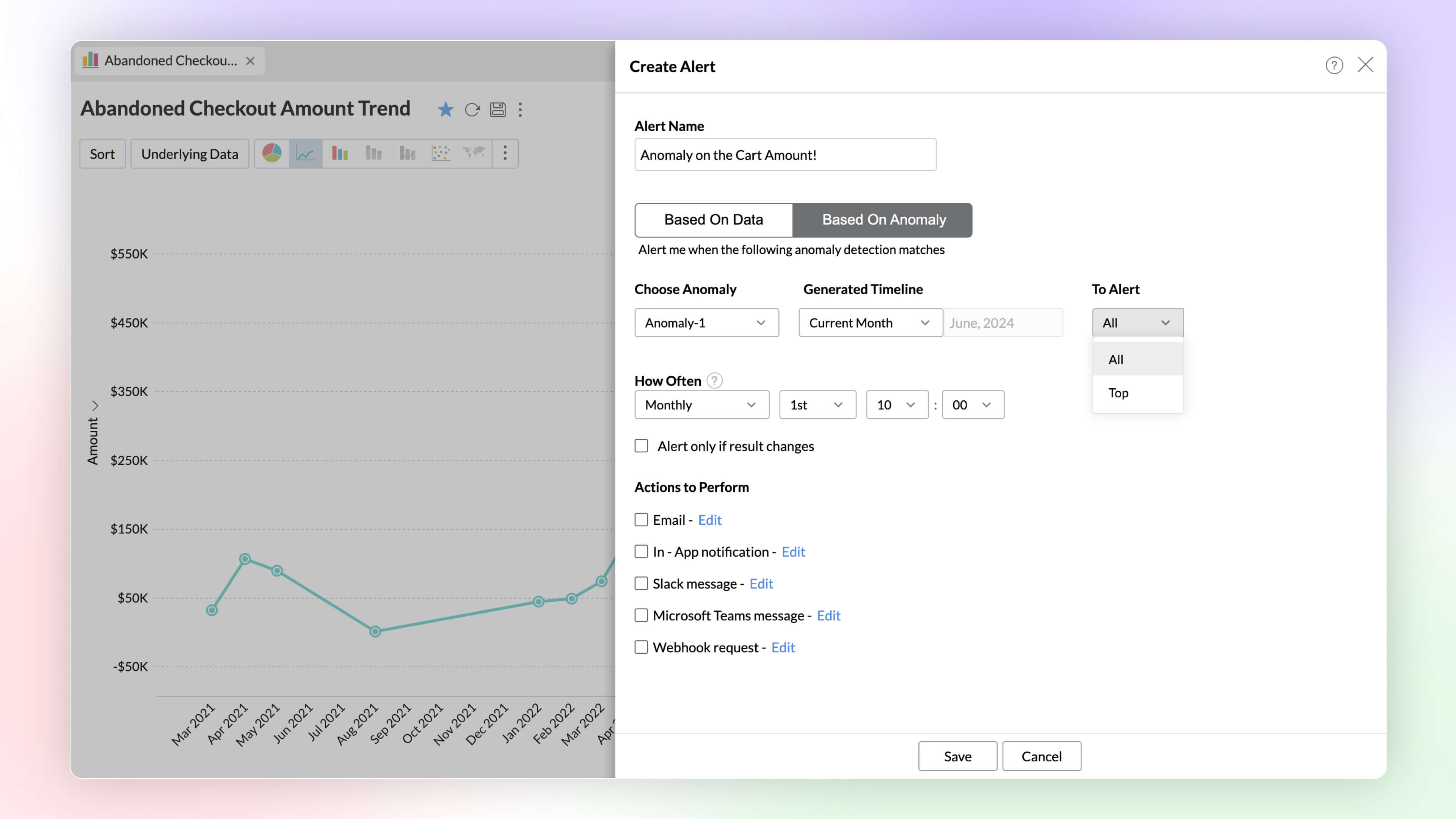
Set data alerts based on thresholds and anomalies to ensure timely identification of vital change in the key business metrics and potential issues.
Ask Zia Bot in Microsoft Teams
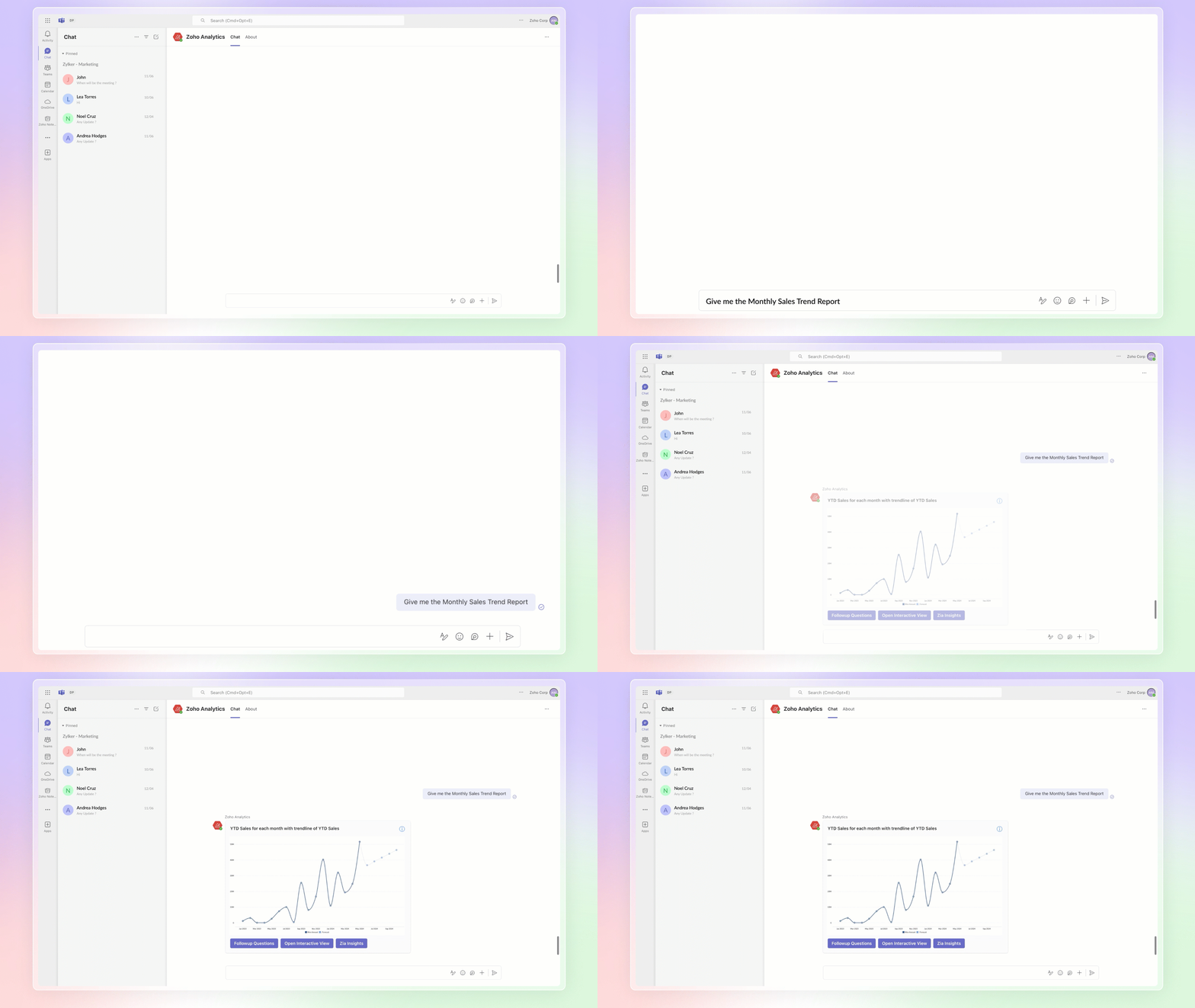
Combine the generative AI capabilities of Zoho Analytics' Ask Zia with Microsoft Teams. Get answers to your data queries, access key business insights quickly, predict future trends, and build reports right from within Microsoft Teams with Ask Zia bot.
4. Build your ML Models with AutoML & Code Studio
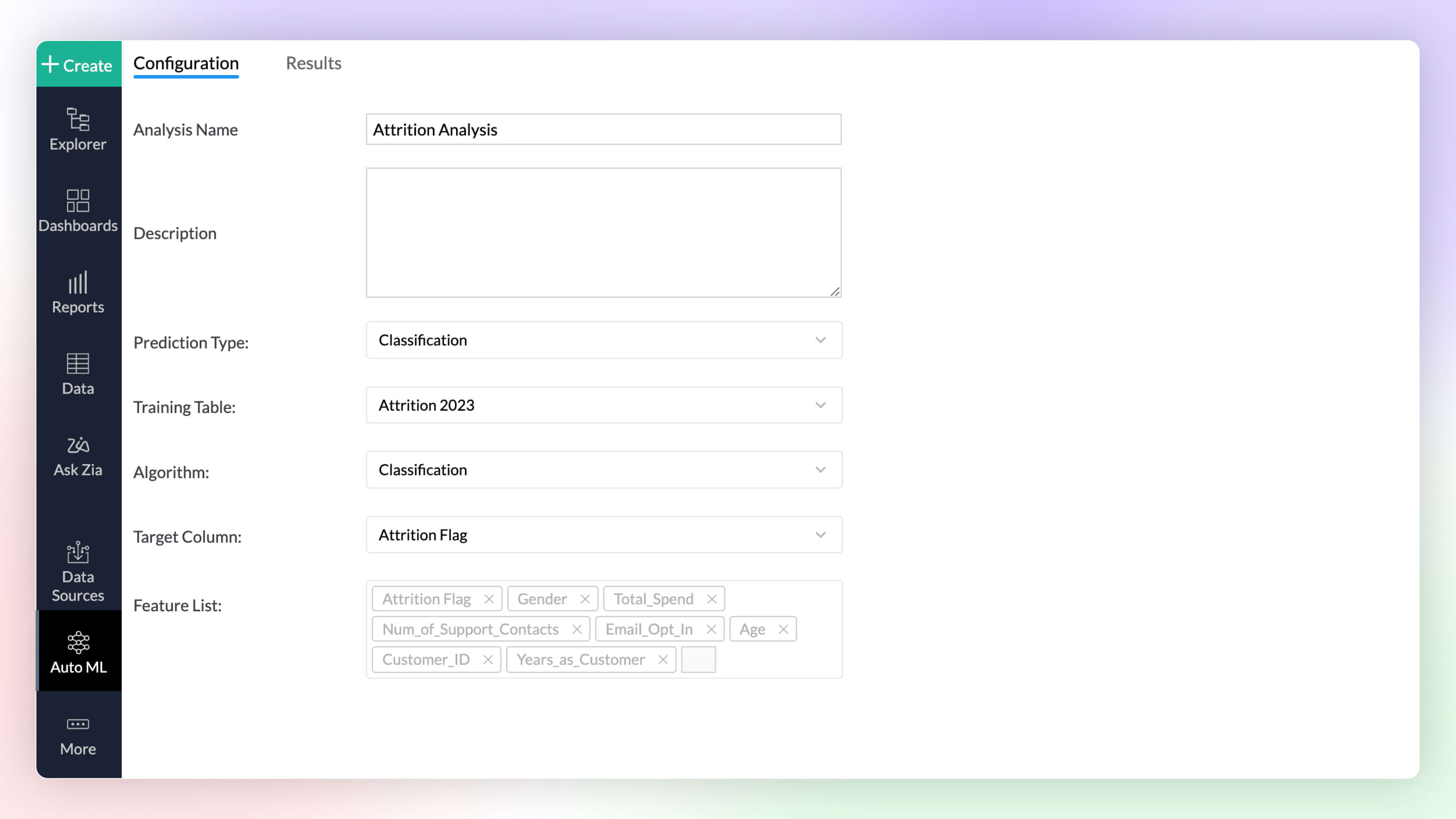
Auto ML 
Automated machine learning provides a code-free (low-code/no-code) experience to train, verify, and build custom machine learning models with high efficiency. The simple and user-friendly design makes it possible for people with varied data-level expertise to create ML models easily for their custom needs.
Code Studio 
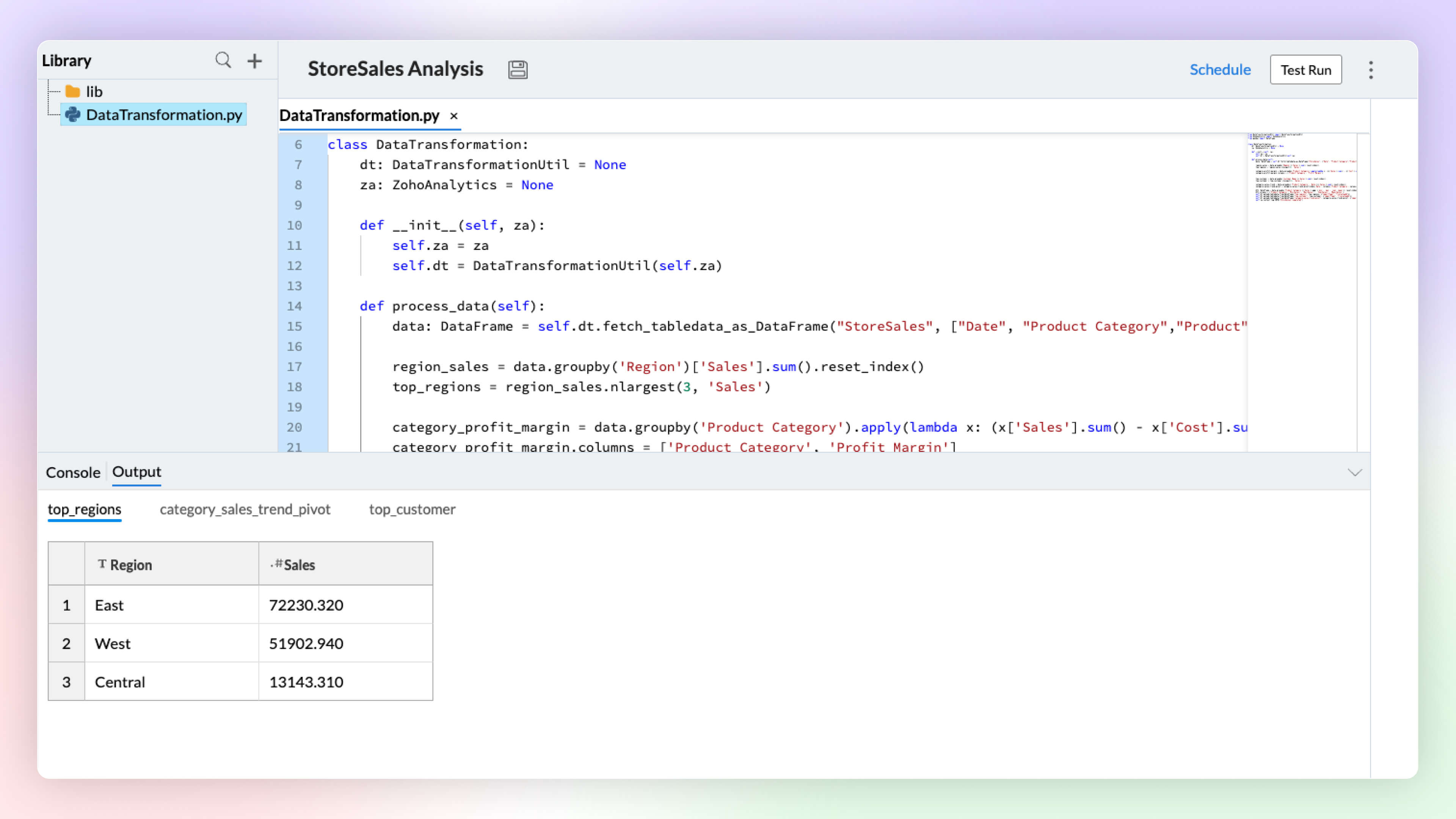
Python Code Studio enables you to build/import custom logic and ML models for your specific data preparation, transformation, enrichment, and analytical modeling needs.
5. Data Storytelling
BI Fabric
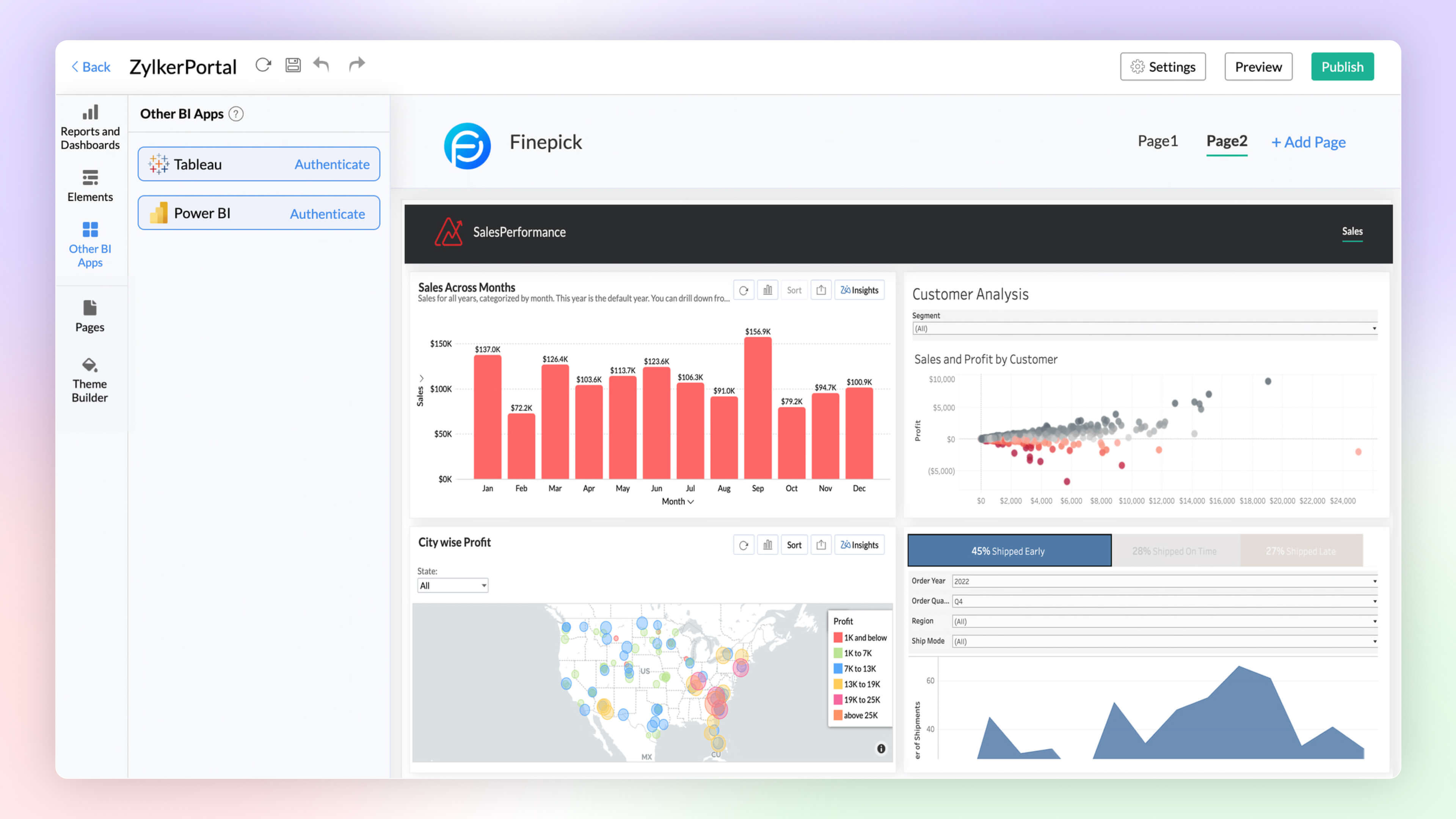
Create unified BI portals for your organization's business needs. Collate reports from other BI applications like Tableau and Power BI. Having a unified portal improves collaboration, promotes centralized accessibility, and makes it easy for C-level executives to make robust business decisions.
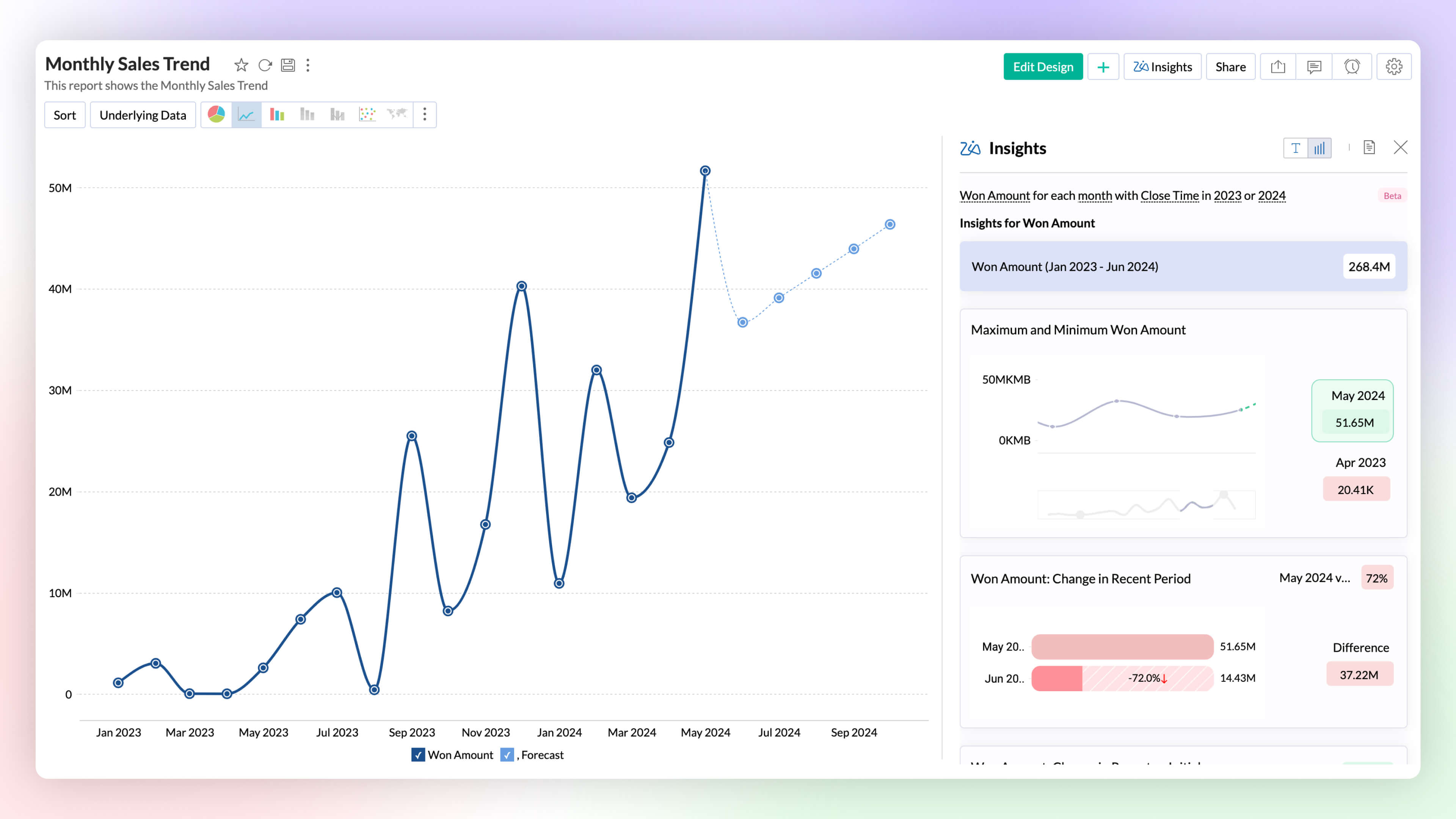
Visual Zia Insights
Zia Insights now provides visual narratives! Visuals help process information far more efficiently than lengthy text descriptions. These visuals facilitate multi-dimensional interpretations like comparison, contribution, distribution, trends and proportions.
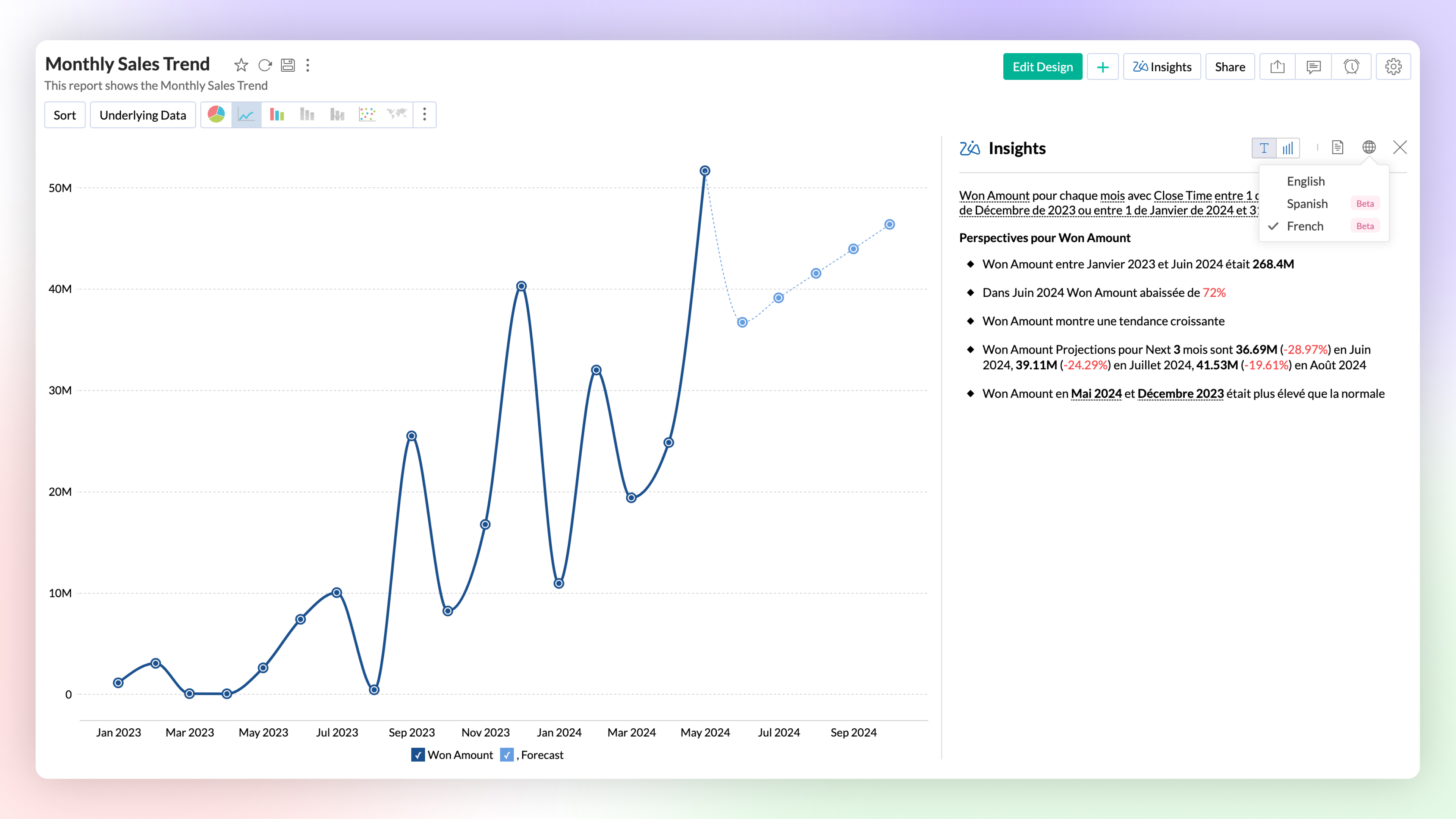
Zia Insights -Multilingual Support
Zia Insights is now available in French and Spanish. Users can choose their preferred language when accessing Zia Insights for a specific report.
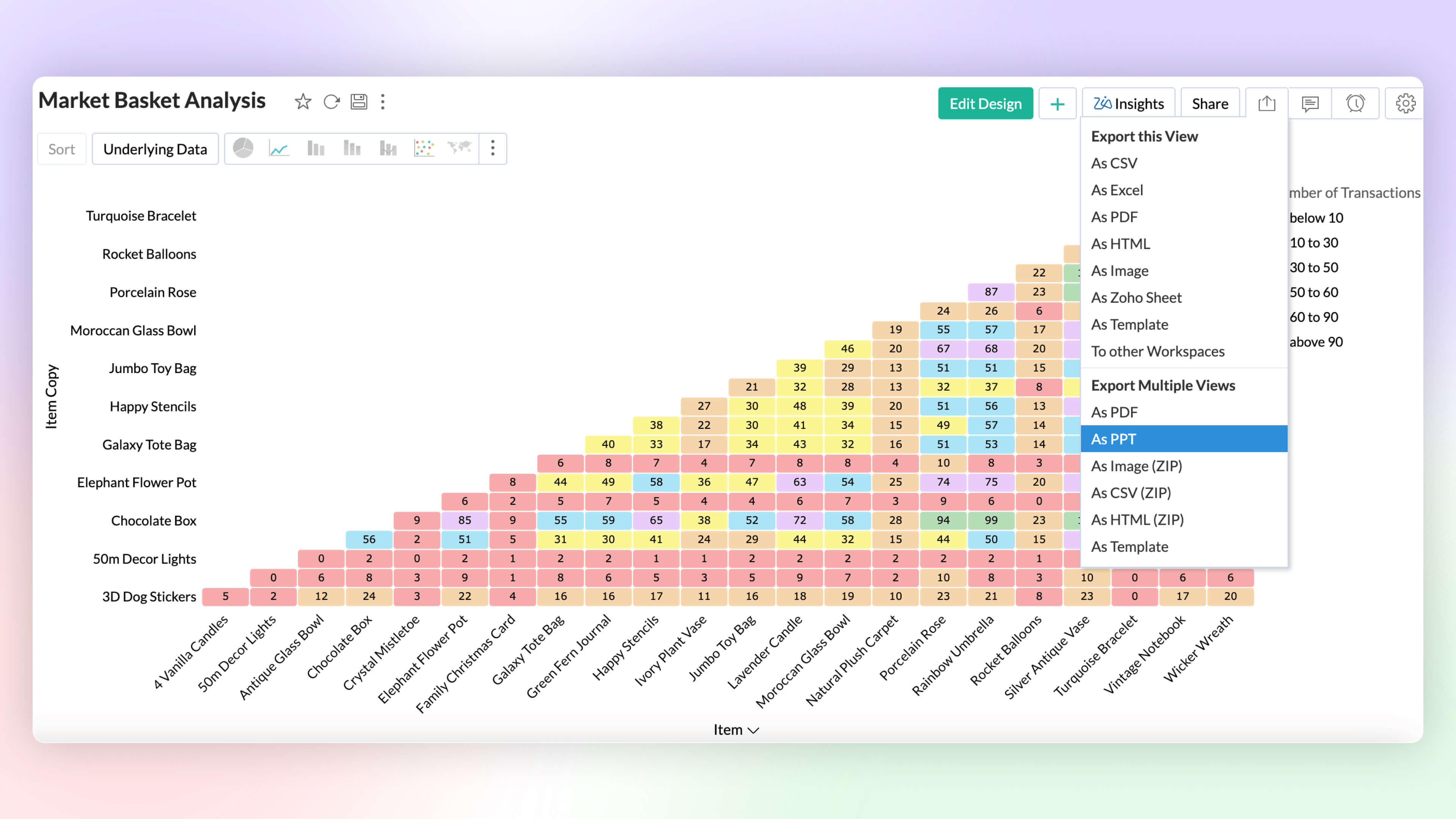
Export as PPT
Export multiple views as a Microsoft PowerPoint presentation. Enhance security by protecting the file with a password.
6. More enhancements
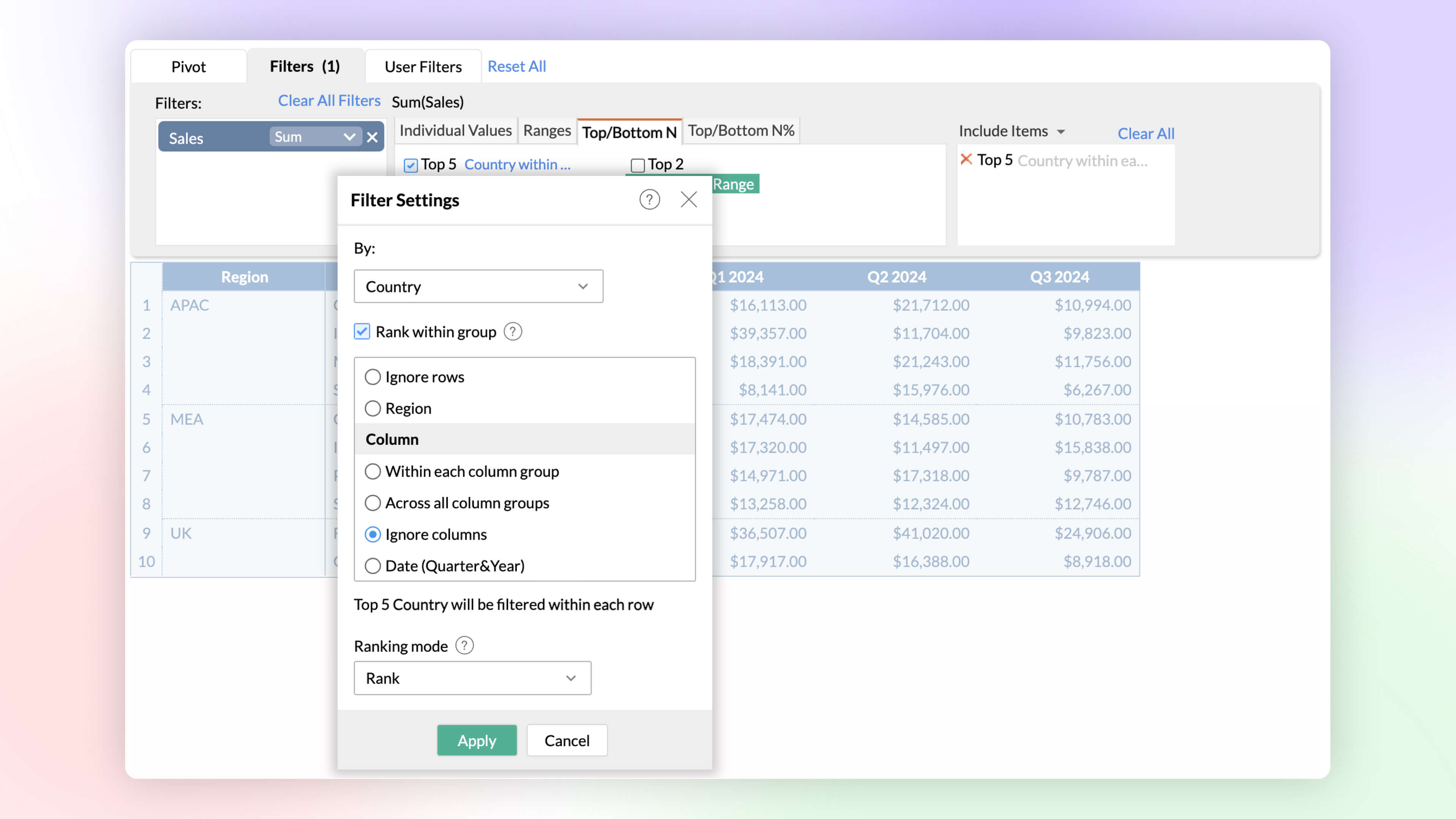
Rank within Filters
Identify and analyze top and bottom performers across various dimensions. The rank-based ability helps find the top or bottom performers within and across individual groups without having to write complex formulas.
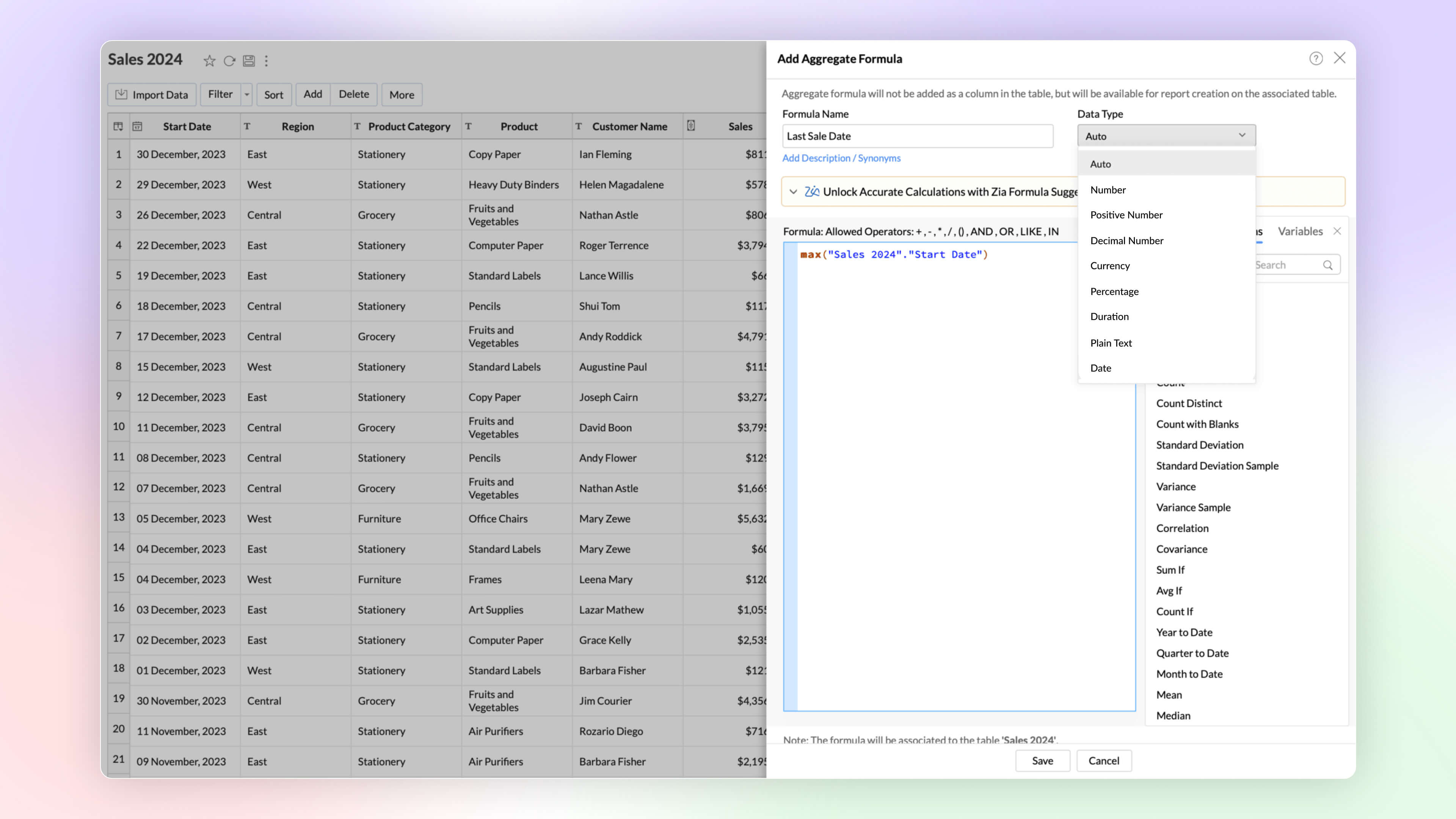
Date and String data types in Aggregate Formula
Zoho Analytics now supports the date and plain text as return data types in aggregate functions. This improvement proves immensely beneficial in scenarios such as cohort analysis, project milestone tracking, and various other use cases.
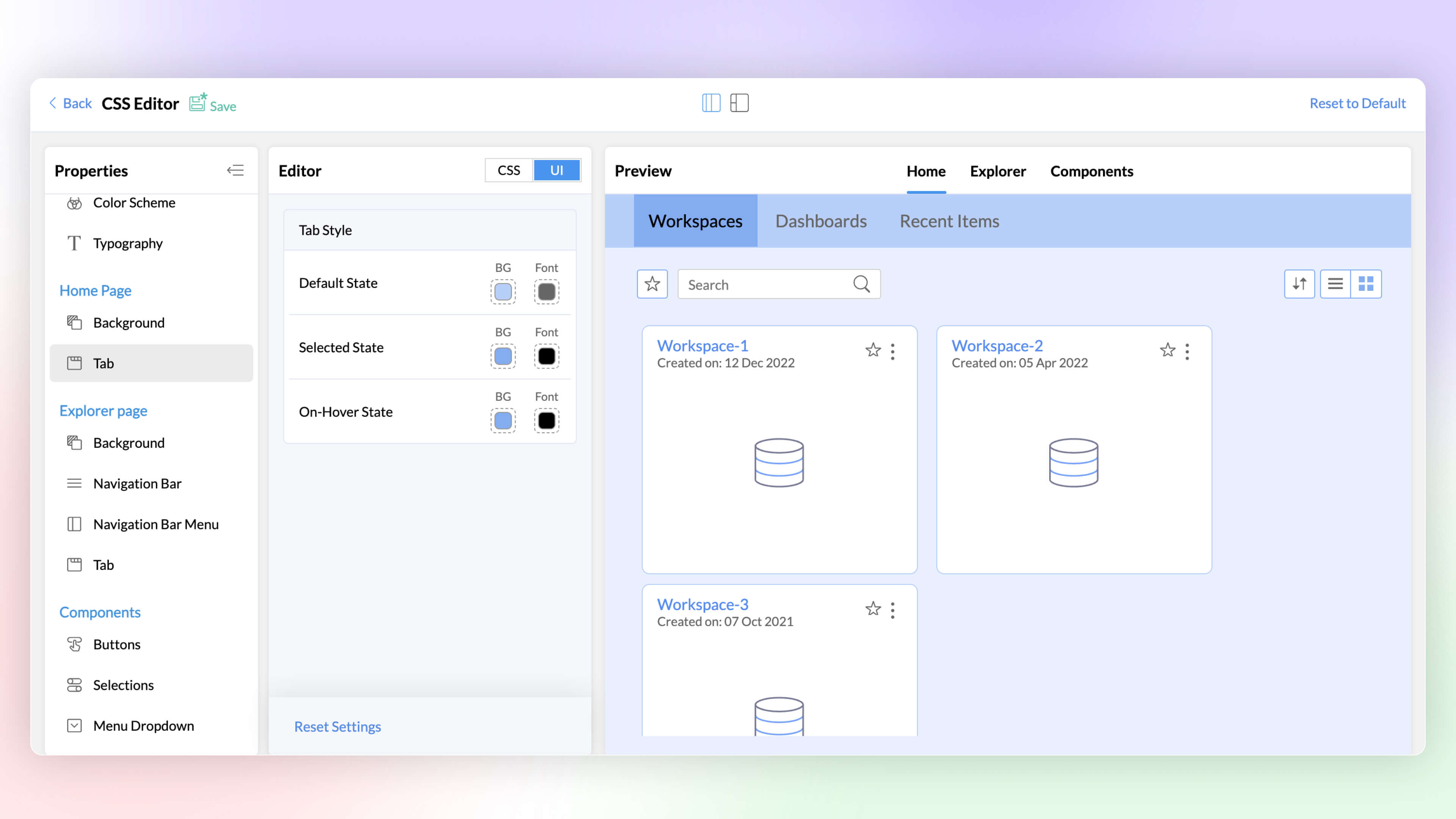
White Label CSS Customization
Elevate the visual appeal of your white labeled product and align it with your brand through the CSS customization feature. This latest addition to Zoho Analytics enables you to customize text, colors, and more on pages, tabs, selections, hover options, enhancing the overall look and feel.
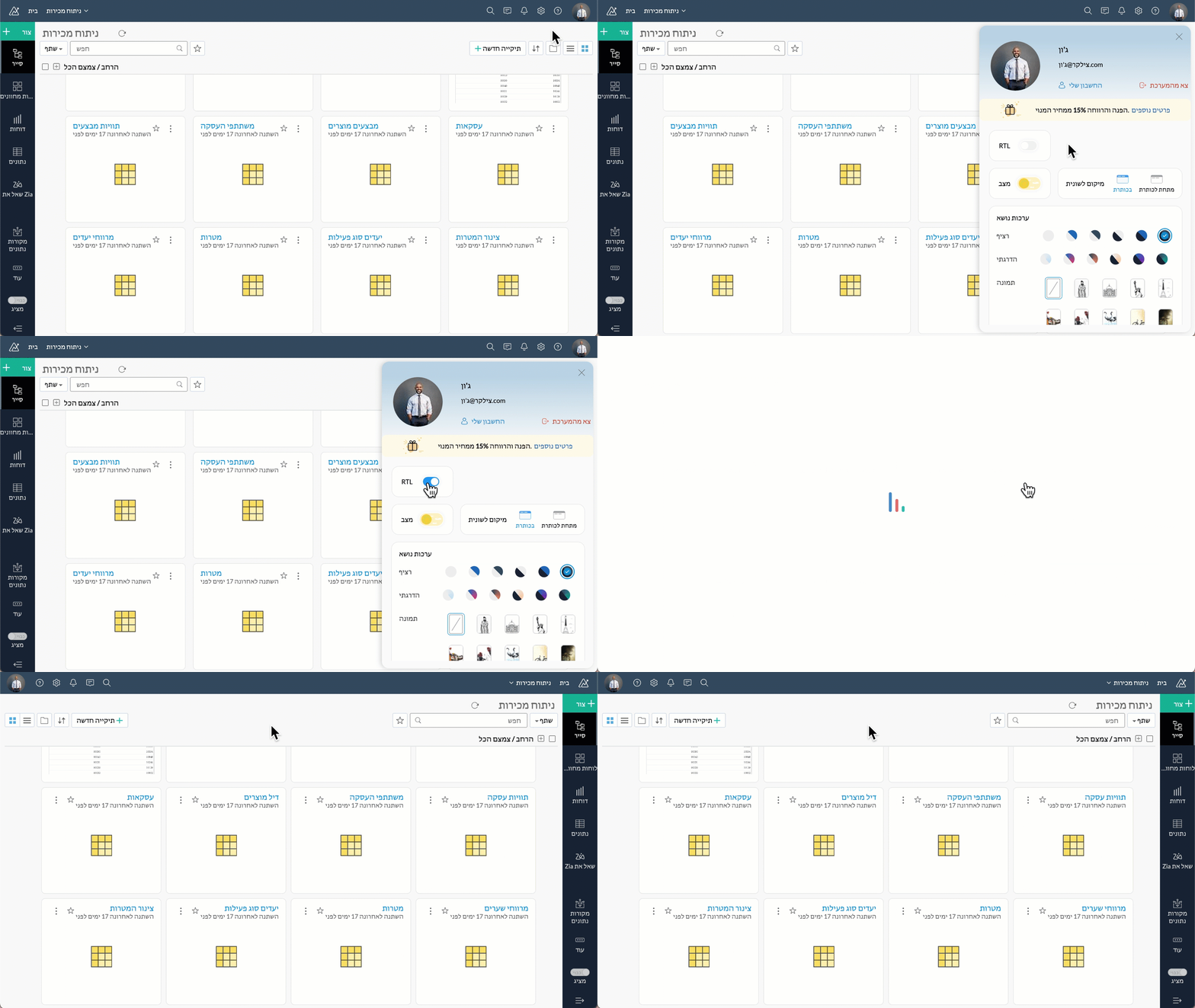
Right to left User Interface
Zoho Analytics now supports a right to left user interface. This option is best suited for languages like Arabic and Hebrew that are read from right to left.
Security
At Zoho Analytics, ensuring data privacy and security remains our topmost priority. We have implemented additional measures to strengthen security through the following enhancements.
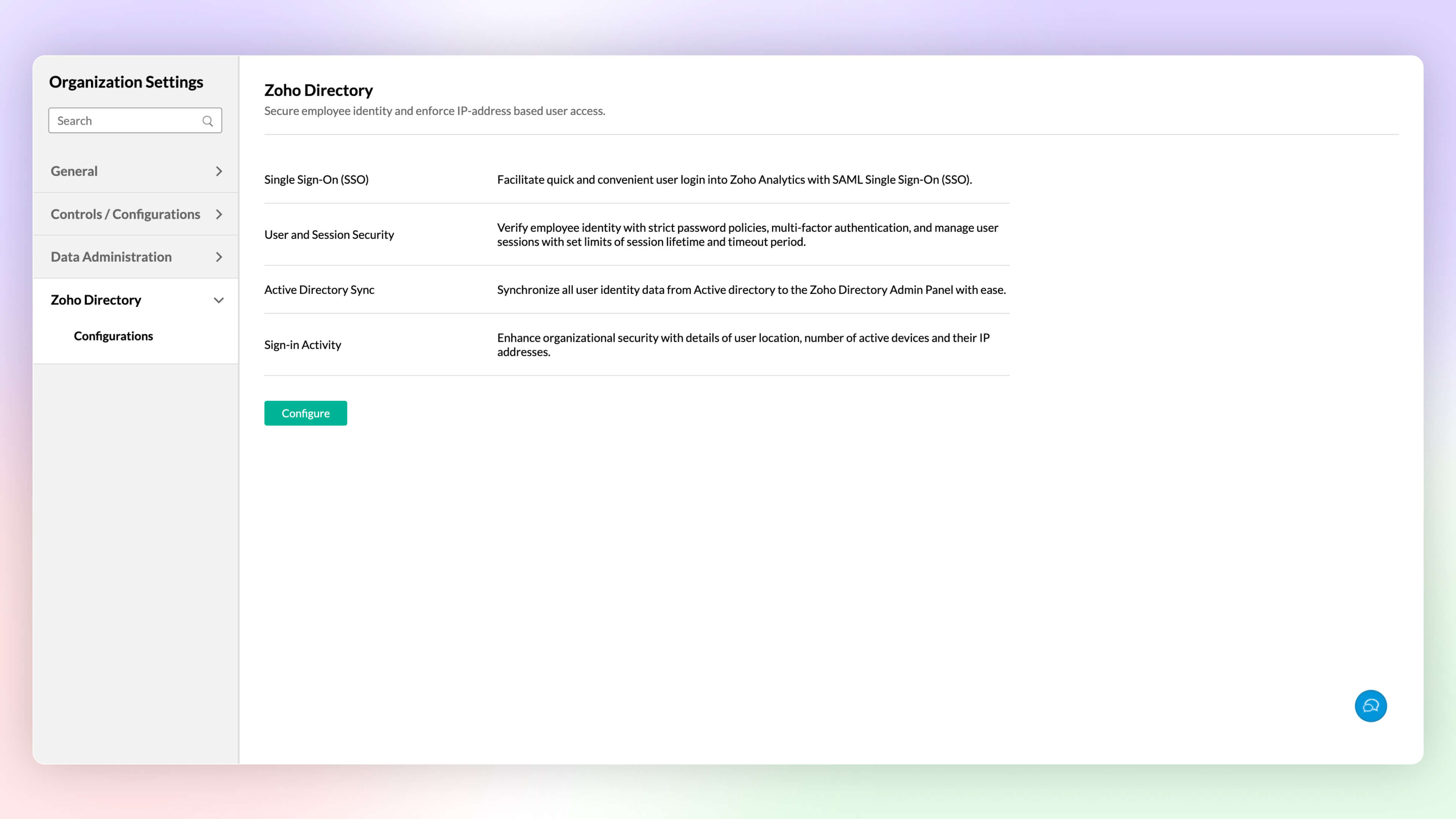
Zoho Directory
Zoho Analytics' integration with Zoho Directory allows administrators to handle identity and user access management with ease. You can now easily setup Single Sign-on, setup Active Directory sync, manage user access, etc.,with Zoho Directory.
Workspace Level IP Restriction
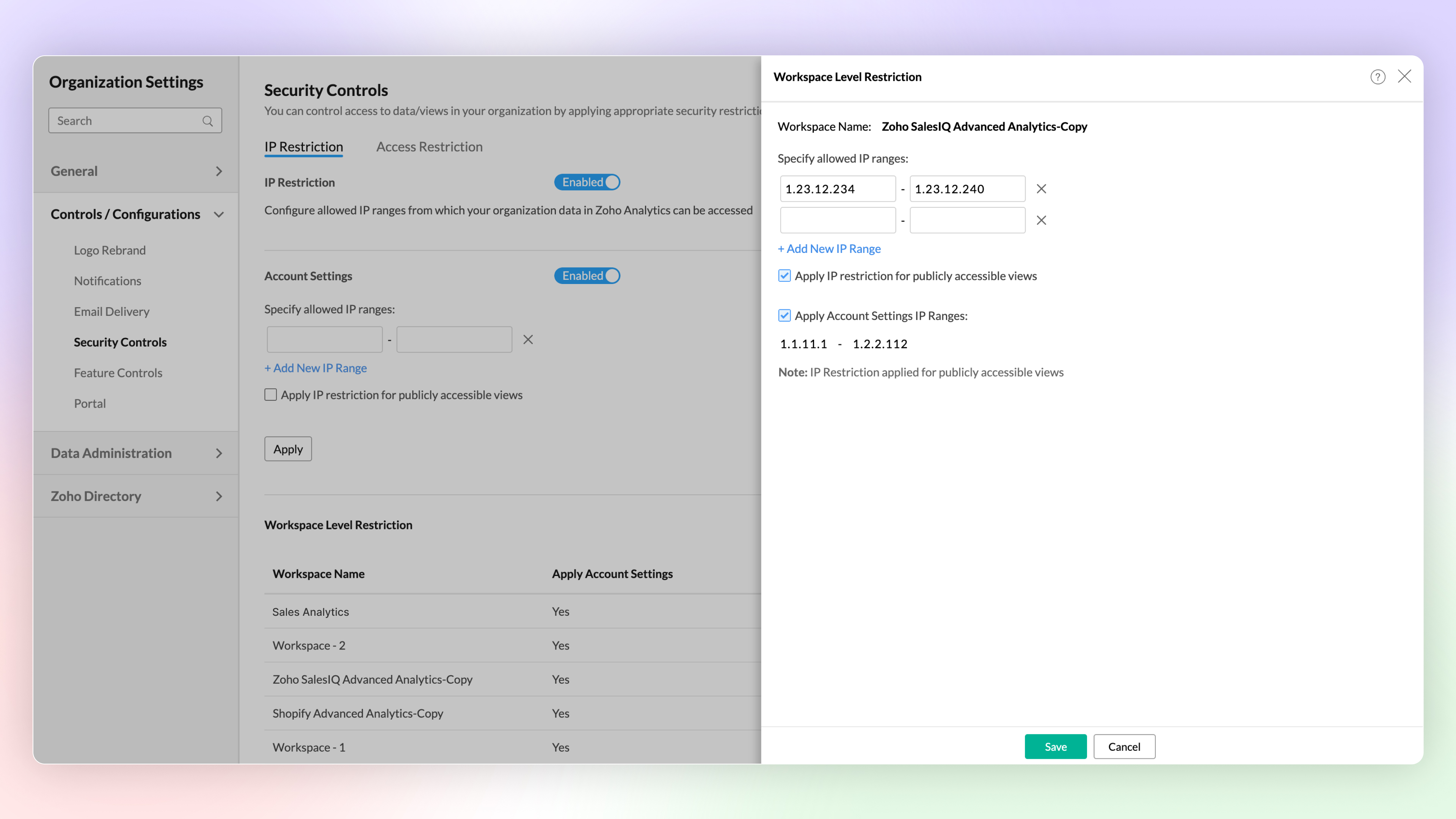
Configure workspace-level IP restrictions for enhanced security and to prevent unauthorized access. Previously, IP restrictions were available only at the account level.
Zoho Analytics Mobile App
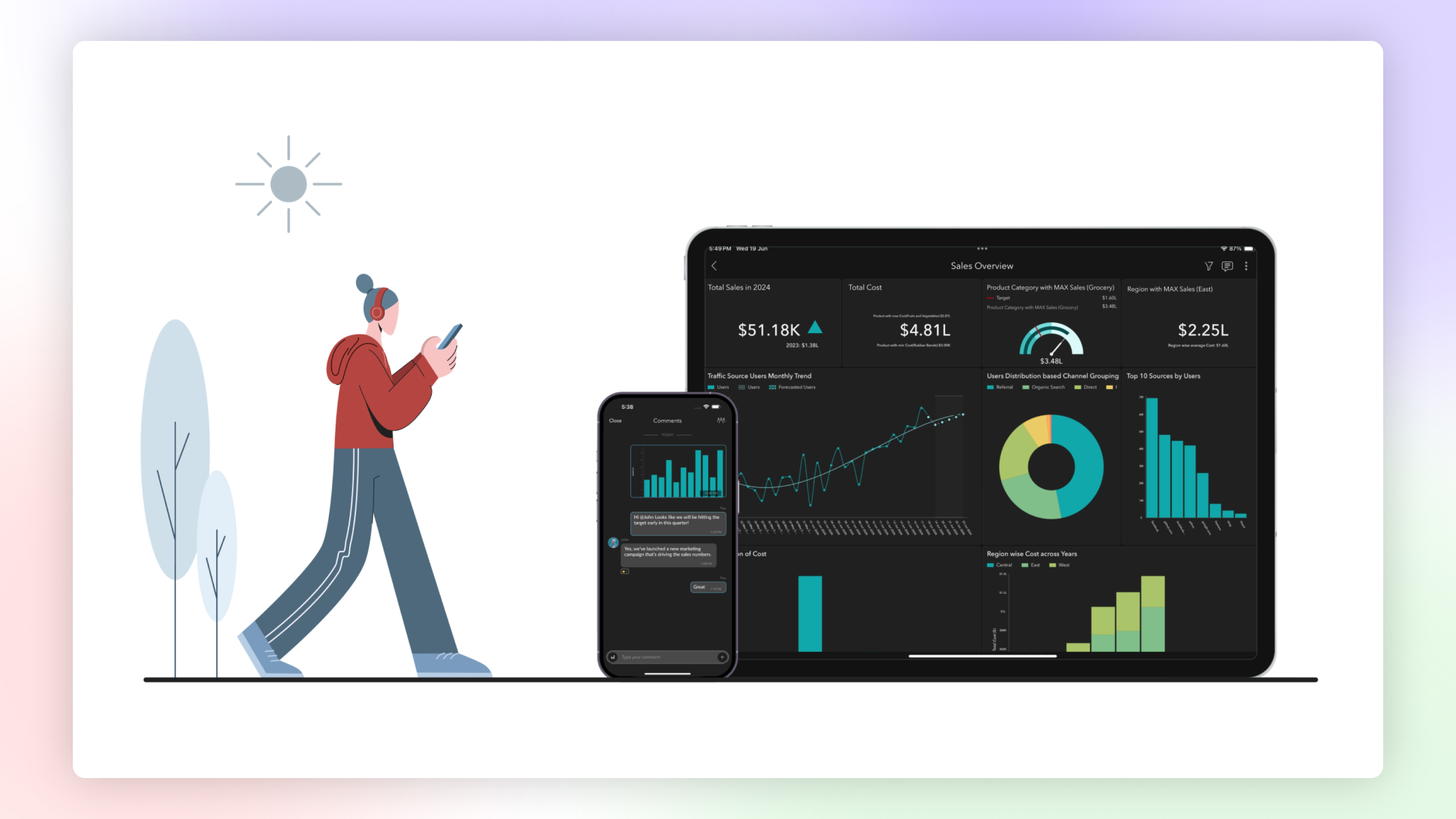
The Zoho Analytics Mobile app has been upgraded as a native app, optimized for your specific device. This enhancement provides faster loading times, high-quality visuals, and advanced security features specific to your device's operating system to protect your data.
Email Schedule APIs
A new set of APIs are now available for managing your email schedules. These APIs enable you to create, update, trigger and delete email schedules easily.
Features in Private Beta
ChatGPT in Ask Zia
Ask Zia now integrates with ChatGPT assisting you to write complex queries and formulas for effective data analysis.
Diagnostic Analysis
Zia insights now supports diagnostic analysis helping you understand the root causes for a certain outcome.
Custom Connector
Zoho Analytics now enables you create your own integration with third party applications.
Try Zoho Analytics 6.0 Beta!
Do try out the new features and share your valuable feedback with us at support@zohoanalytics.com. Your suggestions are crucial to helping us improve and serve you better.
Topic Participants
Nisha Angel J
Sellers
paul
César Pedrolini
Heike
Sticky Posts
Meet the new Zoho Analytics: The Agentic Analytics platform
Every major release of Zoho Analytics has changed what you can do with data. This one changes who does the work. For years, analytics meant a chain of hands. The engineer shaped the data, the analyst wrote the query, the designer built the dashboard,[Virtual launch event] Experience the agentic analytics platform | A sneak peek into Zoho Analytics 7.0
AI and agents are reshaping how businesses operate, and teams that can act on contextual, real-time intelligence are the ones best placed to adapt. Analytics platforms are evolving fast to meet that need. Join us for a live walkthrough of Zoho AnalyticsWhat's New in Zoho Analytics - August 2026
Hello Users! This month puts you in control of how your analytics moves: promote content safely between workspaces with Deployment Management, govern data access and sign-in more precisely, and make your forecasts smarter with external drivers. There'sWhat's New in Zoho Analytics - June 2026
Hello Users! This month is about meeting your data wherever it lives: reaching it from AI assistants, bringing it in from more sources, and keeping it flowing with less manual effort. Here's what's new across Ask Zia and AI, data import, integrations,What's New in Zoho Analytics - February 2026
Hello Users! We're back with another round of updates for Zoho Analytics. This month's release focuses on giving you greater flexibility in how you visualize, manage, and act on your data - with new features like custom visualizations, remote MCP server,
Nederlandse Hulpbronnen

Recent Topics
Live connection to DS files in Zoho Creator / ChatGPT
As an idea, we are using ChatGPT to build with Zoho Creator (outside of Zia), which is works brilliantly to assist write deluge, provide test suggesitons etc. Currently we are uploading the DS files which are very point in time, it would be great to haveZoho Forms - Feature Request - Embed iFrame or Dynaic URLs in Description fields
Hi Zoho Forms team, I'm working with a client who uses Zoho Forms internally to collect information over the phone from potential work placement candidates. At the end of the form, the candidate needs to be booked in for an induction, which we've configuredNew in Office Integrator: Add text, diagrams, and drawings to your spreadsheet
Hi users, We are pleased to introduce the Shapes feature in Zoho Office Integrator's spreadsheet editor. It lets users create visual elements; including simple shapes, text boxes, freehand drawings, and structured diagrams; directly within the spreadsheet.Highlight what matters, erase what doesn’t in PDFs
When reviewing PDFs or preparing them for sharing, two things often come up: you want to draw attention to what’s important, and you want to hide what isn’t. Zoho PDF Editor gives you both capabilities in one place with its highlight and erase tools.WorkDrive Desktop Sync Is Being Deprecated: Move to WorkDrive TrueSync for a Smarter Experience
Hi everyone, We are excited to share a better, smarter way to access and manage your files directly from your computer! We’re transitioning from our legacy Desktop Sync app to WorkDrive TrueSync, designed to give you faster performance,greater flexibility,Zoho Desk API returning 403 SCOPE_MISMATCH for Ticket Search API
Hello Zoho Support Team, We are experiencing an authorization issue with the Zoho Desk Ticket Search API. Our integration was working correctly yesterday, but we are now receiving the following error when calling the Search Tickets endpoint: API: GETSet connection link name from variable in invokeurl
Hi, guys. How to set in parameter "connection" a variable, instead of a string. connectionLinkName = manager.get('connectionLinkName').toString(); response = invokeurl [ url :"https://www.googleapis.com/calendar/v3/freeBusy" type :POST parameters:requestParams.toString()Introducing the Zoho Campaigns MCP server
Hello everyone, We are pleased to announce that Zoho Campaigns is now available in Zoho MCP. You can now connect your Zoho Campaigns organization to AI tools such as Claude, ChatGPT, GitHub Copilot in VS Code, and Cursor, and manage your email marketingSubForm Custom Sort - Deluge Workflows
I have been experimenting with the Custom Order function of Subforms, it works beautifully within the subform itself and retains the sorting order. However, I need to be able to iterate through the records in Deluge using the sort order (The usage caseHow to embed Google Analytics GA4 tracking on a standalone Public Page (outside Customer Portal)?
Hi, Is there an official or recommended way to embed Google Analytics (GA4) tracking directly onto a standalone public Zoho Creator Page (outside of a Customer Portal)? I’m considering using an invisible Custom JS Widget as a workaround, but I’d loveBank feeds automation is broken - requires manual intervention and authentication
Yodlee supports Australian Open Banking CDR protocols natively, but Zoho Books' implementation is still triggering legacy screen-scraping MFA blocks on CBA and other business banking accounts. When will Zoho update its Australian bank feed pipeline toCannot Access Subform Display Order in Deluge
As highlighted in this community post, we still have to deal with the significant limitation of not being able to access the user-sorted order of subform rows through Deluge. This creates a major disconnect between the UI capabilities and backend automation,Process FOR loop for subform items in the order of the manual sorting
Hi Guys, I have searched everywhere and tried everything, but I still not able to resolve one particular challenge. I have a subform in my Invoice with rows for each item. I made it so that we can change the order of the items manually. I need to be ableAugmenting subform capabilities
Greetings, everyone! Finally, the day has come for us to announce some of the most anticipated, requested, and exciting updates to subforms in Zoho Creator. As you're aware, subforms are an integral part of Creator forms, as they help in establishingBuild appointment scheduling into your vibe-coded apps with Zoho Bookings
Exploring vibe coding? Wondering how an app built with AI can handle appointment scheduling? Join our upcoming live webinar to discover how Zoho Bookings APIs can help connect applications to scheduling capabilities. Here's what we'll explore: • ShowIs there a way to make Reason For Loss field mandatory at Closed Lost stage?
Hi guys, Reason For Loss system picklist appears on Verify Details page but it is not mandatory so as a result, AEs tend to omit it (leave at default value -None-). Is there a way to make it mandatory at Closed Lost? I tried layout rule but this fieldCannot reorder fields in Page Layout in Expenses and Purchase Requests
It is very inconvenient that the custom fields in Page Layout cannot be re-ordered. The only way is to remove the fields and re-create them; however, it is impractical. This would affect the reports and dashboards we are having. Not able to re-order theRequest for Zoho Desk Version and Module Details
Kindly help us confirm the version of Zoho Desk currently being used in our portal, along with the module/edition name. We require this information urgently for our internal documentation.How to customize the displayed name of contacts in Trident?
Hello, For work purposes, I sort different customers into different folders, and I also change their display names in Contacts so I can easily recognize them later. However, Trident doesn’t seem to support this. Even after I edit a contact’s name in Contacts,User and mailbox reports in Zoho Mail: Review account status, storage, and login activity of users
Administrators often need answers to questions such as which users have never logged in, whose storage is almost full, or which mailboxes are accessed through POP or IMAP. The User and Mailbox reports in the Zoho Mail Admin Console provide these detailsZOHO CRM APP - SALESINBOX
Is it possible to access SALESINBOX in the CRM MOBILE APPUnbundle feature for composite items
We receive composite items from our vendors and sell them either individually or create other composite items out of them. So, there is a lot of bundling and unbundling involved with our composite items. Previously, this feature was supported in formTip #96 – See more of the remote screen with Virtual Monitor – 'Insider Insights'
Hello Zoho Assist Community! Say you're supporting a device that has no monitor attached, like a server in a closet or a kiosk PC. You connect, and the screen is tiny, blurry, or distorted. Text overlaps and windows end up in odd places. TroubleshootingUnderstanding transactional channels in Zoho CPaaS
Every interaction with a business creates an opportunity to communicate.Whether it's welcoming a new user, confirming a payment, sharing an order update, or verifying a login, timely communication keeps users informed and connected. But how do businessesAutoscan Settings
I saw that autoscan is now included in my plan which is great however when I import pdf invoices from my main supplier which contain inventory lines and some also include shipping charges the autoscan doesn't match any of the items and also misses theHow to resubscribe to email after using unsubscribe link in Zoho
I was testing the unsubscribe link feature from our contacts module in ZohoCRM and I sent my personal email a version of an email template with the default embedded unsubscribe link to see if it would utilize the "Email Opt Out" field to track un-subscription.WhatsApp Calling Integration via Zoho Desk
Dear Zoho Desk Team, I would like to request a feature that allows users to call WhatsApp numbers directly via Zoho Desk. This integration would enable sending and receiving calls to and from WhatsApp numbers over the internet, without the need for traditional[ZohoDesk] Improve Status View with a new editeble kanban view
A kanban view with more information about the ticket and the contact who created the ticket would be valueble. I would like to edit the fields with the ones i like to see at one glance. Like in CRM where you can edit the canvas view, i would like to editNo access to contact categories in Zoho Mail Apps
I have set up a number of contact categories for my organization. When I compose an email using a web browser these categories are visible. When I compose an email using your Android or iOS Apps no contact categories are visible. Is this expected? IfZoho Plug In
Is there anyone out there who is able to use it? I have seen lots of problems posted, unable to get any satisfactory suppport at the moment! I would be really appreciate hearing from users that have it installed and working, my team are loosing belief it will ever work. Be great to hear from those that have a more positive experienceOutlook to Zoho sync
I am the admin for our company and I have (1) single user that is having difficulties with her emails syncing. I have found where the problem is, but I don't know 100% if what is happening is how the plug-in works or if it's a setup issue. My boss createdCant' find the CRM plug in for outlook
I want to be able to tag emails that I have received into accounts. But I can't find the plug in for out look in the other apps section. Where can I download it from?Problems with Zoho CRM Microsoft Outlook Plug-In (Add-On)
I am having problems with the Zoho CRM Microsoft Outlook Plug-In. I was able to install and setup the Plug-In correctly I believe in Microsoft Outlook, but contacts are now being created in Zoho CRM when an email is sent from MS Outlook. A contact is created and appears under Contacts in Zoho CRM but no other information is populated in the fields; for instance only the name is there (for instance "rfairley" ) which matches the beginning of their email address; but no phone numbers. Also, otherzoho for outlook
it would be woderfull to be able to add an email to a case, just as it is possible to add an email to a potential VincentMail Addon issue
Hi, I am trying to make the mail add on feature work without clutter. The issues is that all emails from the contact are being listed in every opportunity that contact is involved in/ linked to. I want to filter out the emails that are not relevant to the opportunity. It is ok to have all the mails of a contact under in the contact module. But under the opportunity it shall show only the relevant emails. Is there a way i could do this? Atleast if I could manually assign or amend the listed emailsEliminate duplicate tickets in one department using Email Deduplication
Hello everyone, A department can have multiple email addresses designed for different purposes for example, support@zpad.com and help@zpad.com. When a customer sends an email or thread response to both addresses, or includes both in the To, CC, or BCC"Pinning" a Note
It would be really helpful to have a way to "Pin" a note to the top of the notes section. This is really important when you have something important about someone and do not want the note to get buried farther and farther down the note stream. For instance:Feature Request - Copy Reschedule Link
Hi Bookings Team, I had a client contact me today, to let me know that she can't make a meeting she booked this week. I can't remember if I included a reschedule link in email notifications, but I was thinking that it would be great if I could just openIssue While Rescheduling Interviews in Zoho Recruit
Dear Zoho Support Team, We are facing an issue with the Interview Rescheduling functionality in Zoho Recruit integrated with Microsoft Teams. Problem Description When an interview is rescheduled through Zoho Recruit: The new interview is created successfullyEnhancement Request for Job Publishing Management in Zoho Recruit
Provide a centralized view to Publish/Unpublish job openings across: - Job Portals - Career Portal - Employee Referral Portal Add filters to view job openings based on: Published to Career Portal Published to Employee Referral Portal Published to specificNext Page