Workflows vs Macros in Zoho Desk: Key Differences, Use Cases & Best Practices

Workflows vs Macros in Zoho Desk: Key Differences, Use Cases & Best Practices

Workflows vs Macros in Zoho Desk: Choosing the right help desk automation
InfoThis post is part of the "Desk Automation Series," Chapter 1. Through this series, we will help you choose the right automation type in Zoho Desk by comparing commonly confused automations through real scenarios and business processes, so you can clearly see what to use, when, and why.
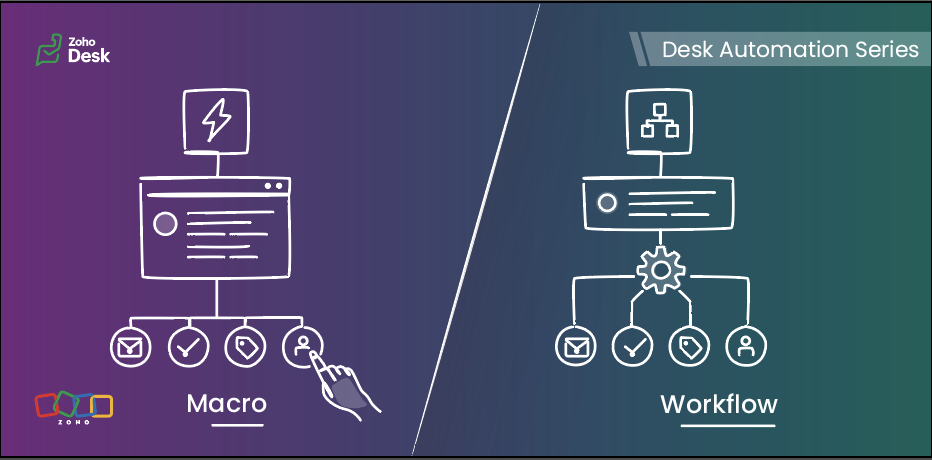

When you are running support at scale, not every task should be handled manually, and not every action should be fully automated either. Some steps need to happen instantly in the background, while others are better left to agents after they review the ticket.

That is exactly where workflows and macros in Zoho Desk make a difference.

In simple terms, workflows are meant for automatic actions based on ticket data, whereas macros help agents complete repeated actions faster after reviewing the ticket.

This guide will help you understand the difference between the two, so you can decide:

  • what your system should handle automatically 
  • what your agents should trigger while working on a ticket 
Quote


Workflows run automatically when defined criteria are met, while macros are applied by agents as they work on a ticket.

Workflows  

Workflows help businesses bring structure, accountability, and momentum to support operations. When defined conditions are met, Zoho Desk executes actions automatically in the background, enabling teams to handle volume with more control, fewer process gaps, and stronger execution quality.

How workflows work  :

A workflow consists of three parts:

When — the trigger
 (ticket created, ticket edited, field update, etc)

If — the criteria

(The criteria used to filter records that meet specific conditions)

Then — the actions
(update fields, assign tickets, send notifications, change status, call custom functions)

Once active, the workflow runs for tickets that meet its criteria.


When to use workflows
  

Use workflows when:

  • An action must run whenever specific conditions are met
  • The action should not depend on an agent remembering to do it
  • Needs to be ensured that the same action is taken for every similar scenario
  • Trigger actions the moment conditions are met, without waiting for manual input 
  • Reduce operational load and keep processes moving without adding effort 
  • Keep critical actions running reliably in the background 

Typical examples:

  • Assigning tickets based on category or department
  • Setting priority for specific customer types
  • Updating fields when a ticket is modified
  • Reassigning tickets to another team based on defined rules
  • Using Zia actions in the workflow to predict field values from ticket context or extract details such as order IDs, dates, or product names and map them to ticket fields. 

Macros  

Macros allow agents to perform multiple actions on a ticket in a single click. They are available inside the ticket and are applied manually. These operations can be performed on mass tickets as well.

Macros help your agents complete repeated actions quickly, with better speed and consistency, once they know what the ticket needs.


How macros work
  

A macro can:

  • Update fields
  • Send an alert
  • Add tasks
  • Execute custom functions
  • Move ticket to specific department

When to use macros  

Use macros when:

  • Agents need to perform the same manual actions across similar tickets
  • The ticket needs to be reviewed before any action is applied
  • The same set of actions needs to be applied to multiple tickets at once
  • The next set of actions depends on a deeper understanding of the ticket context 

Typical examples:

  • Applying a follow-up response after troubleshooting
  • Ticket transfer to a different department based on agent’s manual interpretation
  • Sending emails and updating ticket fields in a single manual action 
  • Creating follow-up tasks while updating ticket details after review 
  • Applying the same set of field updates across similar tickets  

Macros help agents complete routine updates without performing each step manually.

Key differences at a glance  

Feature

Workflows

Macros

Primary purpose

Automate actions based on predefined conditions to reduce manual effort and standardize processes.

Enable agents to execute a set of actions (emails, tasks, field updates) together after reviewing a ticket.

Triggered by

System-driven events such as ticket creation, updates, replies, or specific field changes.

Manually triggered by agents from within tickets or in bulk view.

Agent involvement

Not required

Required for every execution

How actions are executed

Runs automatically in the background when conditions are met

Runs as per manually selected action

Best suited for

Routing tickets, updating fields, sending alerts, and handling rule-based or event-driven actions

Applying repeated actions such as sending acknowledgement emails, creating tasks, and updating fields during ticket handling

Decision basis

Based on ticket data, conditions, and system events

Based on agent review and ticket context

Choosing the right automation tool  

Use a workflow when:  

  • The action must always run for certain tickets 
  • The criteria matches the ticket context 
  • The action is triggered by ticket events such as creation, updates, or replies 

Use a macro when:  

  • Agents perform the same set of actions frequently 
  • The action is applied after reviewing the ticket 
  • The update depends on agent confirmation before execution

A practical scenario  

Let’s look at how both tools work together in a realistic business scenario using a fictional organization, Zylker Travel.

Zylker Travel handles support for hotel bookings, holiday packages, cancellations, airport transfers, and special stay requests.


New ticket created for a booking with check-in within 24 hours  

Use: Workflow

When the ticket is created and the check-in date falls within the next 24 hours, the workflow:

  • Sets the priority to High
  • Assigns the ticket to the urgent reservations team
  • Sends an internal notification

This happens automatically based on ticket data.


Customer asks to cancel a reservation

Use: Macro

The agent:

  • Reviews the booking type
  • Confirms eligibility
  • Applies the cancellation macro

The macro:

  • Send an email alert to the customer 
  • Update the ticket status 
  • Update a refund-related field, such as refund percentage, if that is available as a ticket field 
  • Move the ticket to the Finance department for the next step
     

Special request completed (late check-out, airport transfer, or room upgrade)  

Use: Macro

After confirming the request is fulfilled, the agent applies a closure macro that:

  • Sends the confirmation message
  • Updates the status to Closed


Refund request crosses a defined value threshold

Use: Workflow
When a ticket is created or updated and the refund amount exceeds a defined threshold, the workflow can:

  • Set the priority to High 
  • Assign the ticket to a senior support or finance queue 
  • Notify the relevant internal team 

This is a workflow because the action is based on ticket data and should happen consistently without waiting for agent action.


Manual transfer after review  

Use: Macro

Sometimes, the right department cannot be determined from the initial ticket data alone. After reviewing the conversation, the agent can apply a macro that:

  • then moves the ticket to the right department 
  • creates a follow-up task 


Booking upgrade request
  

A customer asks to upgrade a confirmed booking.

Use: Workflow and Macro

Workflow:

When the ticket is created with upgrade or booking modification, the workflow can:

  • Assign it to the booking changes team 
  • Set priority based on travel date 
  • Add or update tags for categorization (for example, “Upgrade request”) 
  • Send an internal notification to the team 
  • Update initial ticket fields such as request type or category 

Macro:
After the agent checks availability and pricing, they can apply a macro to:

  • Send the upgrade response 
  • Update the ticket status to Waiting for customer confirmation
  • Update review-based ticket fields such as upgrade status
  • Move the ticket to the next department if required

Why both:
The workflow handles routing and priority automatically. The macro helps the agent complete the response after review.


Workflows vs Macros in common business scenarios  

Scenario

Best-suited automation

Why

Order status replies in e-commerce

Macro

The agent selects the reply after reviewing the ticket

Internal approval escalation for refunds

Workflow

Based on defined criteria

Closing resolved tickets with a standard note

Macro

Triggered when the agent confirms resolution

Follow-up message after troubleshooting

Macro

Sent after agent confirmation


Guidelines for quick selection
  

  • A rule must always run when defined conditions are met Workflow
  • Routing based on ticket data or ticket events Workflow
  • The action is triggered by ticket events such as creation, update, or reply Workflow
  • Repeated manual ticket actions Macro
  • An action needs to be applied after the agent reviews the ticket Macro
  • The next step depends on agent judgment or confirmation Macro

Best practices  

For workflows  

  • Keep conditions specific and business-driven
  • Avoid multiple workflows updating the same field unless required
  • Document the purpose of each workflow
  • Test in a limited scope before enabling for all tickets
  • Review workflows after process changes

For macros  

  • Create team-specific macros
  • Keep response templates easy to edit
  • Use clear naming so agents can find them quickly
  • Remove unused macros periodically
  • Do not use macros for actions that must run automatically


The verdict  

In Zoho Desk, workflows bring control. Macros bring speed.

Put them together, and you get the best of both worlds: structured automation for your business, effortless execution for your teams, and a smoother experience for every customer.

    • Sticky Posts

    • Register for Zoho Desk Beta Community

      With the start of the year, we have decided to take a small step in making the life of our customers a little easier. We now have easy access to all our upcoming features and a faster way to request for beta access. We open betas for some of our features
    • Share your Zoho Desk story with us!

      Tell us how you use Zoho Desk for your business and inspire others with your story. Be it a simple workflow rule that helps you navigate complex processes or a macro that saves your team a lot of time; share it here and help the community learn and grow with shared knowledge. 
    • Tip #1: Learn to pick the right channels

      Mail, live chat, telephony, social media, web forms—there are so many support channels out there. Trying to pick the right channels to offer your customers can get pretty confusing. Emails are most useful when the customer wants to put things on record. However, escalated or complicated issues should not be resolved over email because it's slow and impersonal.  When you need immediate responses, live chat is more suitable. It's also quick and convenient, so it's the go-to channel for small issues. 
    • Welcome to Zoho Desk Community - Say hello here!

      Hello everyone! Though we have been here for a while, it’s time to formally establish the Zoho Desk Community; we’re really happy to have you all here! This can be the place where you take a moment to introduce yourself to the rest of the community. We’d love to hear all about you, what you do, what company or industry you work for, how you use Zoho Desk and anything else that you will like to share! Here’s a little about me. I am Chinmayee. I have been associated with Zoho since 2014. I joined here
    • Webinar 1: Blueprint for Customer Service

      With the launch of a host of new features in Zoho Desk, we thought it’ll be great to have a few webinars to help our customers make the most of them. We’re starting off with our most talked about feature, Blueprint in Zoho Desk. You can register for the Blueprint webinar here: The webinar will be delivered by our in-house product experts. This is a good opportunity to ask questions to our experts and understand how Blueprint can help you automate your service processes. We look forward to seeing

    Nederlandse Hulpbronnen


      • Recent Topics

      • Does Zoho Learn integrate with Zoho Connect,People,Workdrive,Project,Desk?

        Can we propose Zoho LEarn as a centralised Knowledge Portal tool that can get synched with the other Zoho products and serve as a central Knowledge repository?
      • Request to Update Billing Information and Payment Method

        Hello, I’m using Zoho and I would like to update the billing information and change the payment card to our company card. Could you please let me know how I can do this? Thank you in advance for your help.
      • Zoho Analytics "Esc" key problem

        I frequently use the Escape (Esc) key while building dashboards, reports, and writing SQL queries. Since the recent updates to Zoho Analytics, the Esc key no longer behaves as expected. When writing SQL queries, pressing Esc to dismiss a suggestion now
      • Zoho Analytics Filter Bug

        I encountered a bug where typing the letter "A" in the drop-down filter of a table or query table causes the drop-down to close unexpectedly. For example, when typing "Today", the drop-down list closes as soon as "a" is entered. I tested this on another
      • Using Email Triggers on Zoho Flow

        Hello, I'm sending the email to create the variables as this article says: https://help.zoho.com/portal/en/kb/flow/user-guide/create-a-flow/articles/email-trigger#How_email_trigger_works But the collection of the variables only seems to work when the
      • How to customize the "Placeholder Text" separately from the "Field Label" on the Booking Form?

        Hi, I am currently customizing the Booking Form for one of my Workspaces in Zoho Bookings, and I need some help adjusting a custom text field. Right now, when I create a custom text field, the gray "placeholder text" inside the text box automatically
      • What's New in Zoho Inventory | April & May 2026

        Hello users, We're excited to roll out the latest Zoho Inventory updates for April and May 2026. These enhancements are designed to make your daily operations smoother and more efficient, from advanced inventory management and flexible pricing to automated
      • Related products & AI product recommendations through commerce API.

        Hello Zoho team I’m looking to add related products and AI product recommendations to my Zoho Commerce webshop with custom storefront. Is this supported through the API? And if not, is this on your roadmap? Thanks in advance David
      • Why don't Zia agents support file uploads?

        I am trying to build a Zia Agent that allows uploading of a PDF file and uses the GLM5 model to process it and extract information. But agents.zoho.com has no way to enable file uploads on the agent. Additionally, GLM5 based agents keep outputting their
      • Pasting Images in Zoho Desk ignores cursor location

        My team has reported an issue which started recently where when we paste an image into a new or existing reply or comment, the pasted image seems to ignore the current cursor location instead paste itself at the last character present in the reply/comment,
      • 'Pinned' notes feature of a pipeline record

        Hi team, Could you please implement a feature which will allow users to pin different notes so that they will appear at the very top of the notes tab in a pipeline record. Sometimes we have a wide range of notes on a record which means more important
      • Announcing new features in Trident for Mac (1.37.0)

        Hello everyone! We’re excited to introduce the latest updates to Trident, which are designed to take workplace communication to the next level. Let’s dive into the details. Import EML archives directly into Trident. You can now import EML archives into
      • #10 Bill While You Sleep

        A consultant is reviewing last month's work. Client meetings? Done. Deliverables? Sent. Support requests? Resolved. Then they realize something. "I have completed the work... but I haven't billed the client yet." The work was completed. The client was
      • Team Module Issues?

        We are testing Team Licenses for use by our Customer Service staff. I created a Teamspace called CSR and only assigned two users to this space: Administrator (me) and “Team License Test.” Team License Test is assigned to the Team User profile, with a
      • Access images from form submission in power automate

        Images from form submission show up as links in power automate. How do I access the image data?
      • Problem with CRM Connection not Refreshing Token

        I've setup a connection with Zoom in the CRM. I'm using this connection to automate some registrations, so my team doesn't have to manually create them in both the CRM and Zoom. Connection works great in my function until the token expires. It does not refresh and I have to manually revoke the connection and connect it again. I've chatted with Zoho about this and after emailing me that it couldn't be done I asked for specifics on why and they responded. "The connection is CRM is not a feature to
      • Kaizen #245 - Real Time Signal Alerts for High-Value Abandoned Checkouts

        Howdy, Tech Wizards! Welcome back to another week of Kaizen. In this post, we will build a real-time abandoned checkout notification system using Stripe, Zoho CRM Functions, Sales Signals, and Widgets. When a customer abandons a high-value purchase, Zoho
      • Unable to attach Fillable File Upload field to Merge Template ever since UI update

        Ever since the new UI update, the field for Attachments for sending document for Signing in Writer has had an issue where trying to add a Fillable item in the Attachment field ends up always becoming a "Choose a File From Drive" option instead. No matter
      • パスワード

        ログインするためのパスワード取得したい。
      • Latest updates in Zoho Meeting | An improved Analytics tab and user interface, an invite pop-up revamp, an enhanced Zoho Meeting iOS app, a recording feature in the Android app, and more

        Hello everyone, We’re excited to share a few updates and enhancements in Zoho Meeting. Here's what we've been working on lately: Improved analytics for meetings, an invite pop-up revamp, a multi-video feed interface in the iOS app, a recording feature
      • Inquiry Regarding Automated Assignment of Zoho TeamInbox Messages using Zoho Flow and Deluge

        Hello, Our company is currently using Zoho TeamInbox, and we are interested in automating the assignment of responsible parties using tools such as ZOHO Flow and Deluge. Is it possible to achieve this? Allow me to provide more details. Currently, when
      • [Bug] WebAuthn passkey registration blocked on rpIds with TLDs longer than 6 characters (.accountant, .technology, etc.) — isValidDomain regex too strict

        Hi, Filing on behalf of an enterprise customer where Zoho Vault is deployed across the company. The Chrome extension blocks WebAuthn passkey registration on legitimate sites whose Relying Party ID (rpId) has a TLD longer than 6 letters. This affects every
      • Celebrating the businesses behind Bigin: Customer Awards 2026

        Hello Biginners, We're excited to announce the very first Bigin Customer Awards! If Bigin has played a role in your organization's journey, we'd love to hear about it. Share your story for a chance to be recognized among the best Bigin users across industries.
      • Send Email Directly to Channel

        Hi, We are coming from Slack. In Slack each channel has a unique Email address that you can send emails too. I currently forward a specific type of email from my Gmail InBox directly do this channel for Verification Codes so my team doesn't have to ask
      • Zoho Desk: Auto-resizing of the "Description" textarea when creating a ticket.

        I would like to suggest an improvement for Zoho Desk regarding the Auto-Height-Resizing for Description field on the “Create a Ticket” page. It would be highly beneficial if the editor supported auto-resize functionality, allowing it to adjust dynamically
      • Not able to see appointements when the territory permission is activated

        Hello, I created different territories to separate the various departments within the company that will be working on different projects. The issue I am currently experiencing is that when I enable territory-based permissions, I can see the work order
      • Accepting Event from Outlook Client

        I've noticed this behavior for a few years now. If an Event is created from CRM and sent to participants and the participant accepts the invitation using Outlook client, Zoho event won't be updated as "Going" it only works if the recipient accepts it
      • Is there an API endpoint to retrieve the remaining email credit balance?

        Hi everyone, Is there any way to retrieve the remaining email credit balance programmatically through the API? I've gone through the full API documentation and it seems like there's no endpoint for this — everything related to credits is only visible
      • Switch between multiple LLMs instantly for tailored Zia experiences

        Availability Editions: Professional , Enterprise, Ultimate , CRMPlus , ZohoOne Release Plan: Available for all DCs Hello everyone, Previously, the multi-LLM feature supported only one LLM at a time for Zia Record Assistant, which restricted users' flexibility
      • Zoho CRM Community Digest - April 2026 | Part 2

        Hello Everyone! We're back with Part 2 of the April Zoho CRM Community Digest to wrap up our monthly roundup. This week, the spotlight is on smart database connections, proactive error tracking, and optimizing subform line items without breaking your
      • 【西日本初開催】「AI and DX Summit 2026」のご案内

        ユーザーの皆さま、こんにちは! 西日本初開催となるZoho ユーザー / 検討中の方々向けイベントのご紹介です。 AI・DX大型カンファレンス「AI and DX Summit 2026」を、2026年7月16日(木)に開催します。 会場は、ウォルドーフ・アストリア大阪。 グラングリーン大阪直結のラグジュアリーな空間で、AIとDXの最新トレンド、実践事例、 展示、ネットワーキングが集結する、特別な1日をお届けします。 👉イベントページを見る ━━━━━━━━━━━━━━━ AIとDXの“今”を、体感。
      • Stop by and explore our six updates in ABM for Zoho CRM

        Dear Customers, We hope you're well! ABM for Zoho CRM is built to sharpen your database so that you engage with the right set of customer accounts. To fine-tune it further, we have six new updates: New access location for ABM Refined account entry criteria
      • URGENT ESCALATION — Unresolved Datacenter Conflict: Zoho Recruit .in vs Zoho Apps .com | Business-Critical Issue

        ━━━━━━━━━━━━━━━━━━━━━━━━━━━━━ ISSUE SUMMARY ━━━━━━━━━━━━━━━━━━━━━━━━━━━━━ Our organisation has existing Zoho accounts registered under the US datacenter (.com). We have onboarded Zoho Recruit under the India datacenter (.in) at https://recruit.zoho.in/
      • Tracking Emails sent through Outlook

        All of our sales team have their Outlook 365 accounts setup with IMAP integration. We're trying to track their email activity that occurs outside the CRM. I can see the email exchanges between the sales people and the clients in the contact module. But
      • Enhancement in Zoho CRM: Introducing New Return Types for String Fields Based on Character Length

        Dear Customers, We hope you’re well! In Zoho CRM, formula field with string return type is used in various scenarios where text is involved like concatenating customers’ first and last names, trimming characters from texts, performing find and replace
      • Cross Module Filtering – Use Fields from Lookup modules in Custom Views criteria and Advanced Filters

        Hello everyone, Zoho CRM now enables you to achieve deeper filtering of records in a module, using fields of a lookup, thereby enhancing your data management experience manifold. This filtering based on lookup module fields is now available in advanced
      • Incoming Rules: Define how incoming emails are evaluated and handled

        As organizations grow, managing incoming emails manually becomes increasingly difficult. Administrators often need more control than what a standard spam filtering can provide. Whether that's enforcing company-wide email policies, handling messages from
      • Zia Emails Summary: Instant context from past emails

        Hello all, Reading all of the past emails associated with a specific record can be tedious, which in turn makes it difficult to understand the context quickly, as these messages often include irrelevant details that waste time. This is true for everyone
      • Boost your CRM communication with new font types, sizes, and default reply-to options while composing emails

        Hello Everyone, We’re excited to introduce a series of impactful enhancements to the email composer settings in Zoho CRM. These updates enable you to personalize and optimize your customer interactions with greater efficiency. So what's new? Add custom
      • Bing ads integration and tracking

        Hi, Is there any way to track Bing ads in the same way that we are able to track google adwords?  It is important for us to be able to determine the conversion rate of our Bing ads.  If this is not possible now, will this feature be added in the future?
      • Next Page