Bigin Android app update: Introducing an option to change language -> Set your preferred language directly from within the app
Hello everyone!
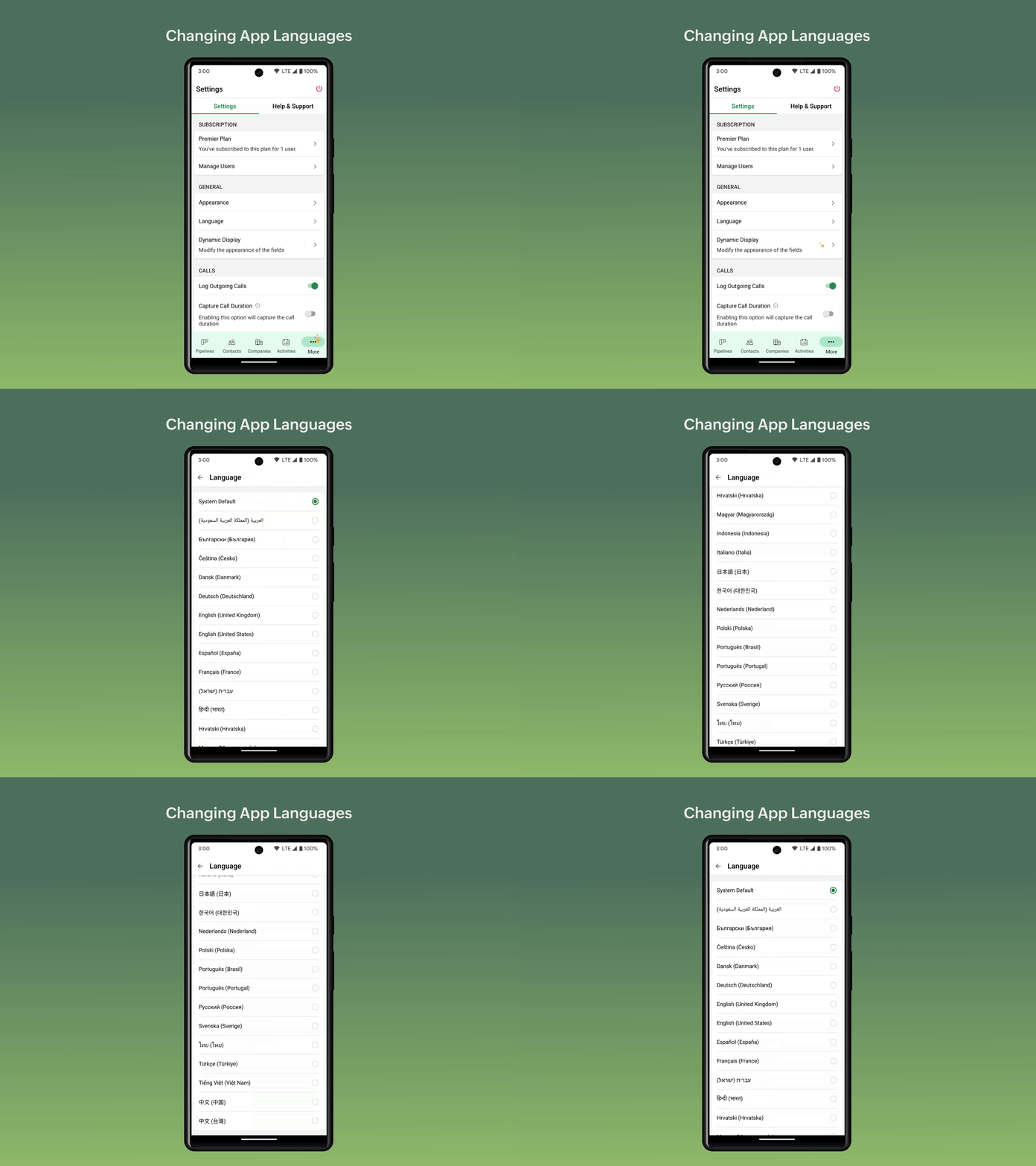
In the latest version(v1.7.22) of the Bigin Android app update, we have brought in support for an option to change the app language directly from within the app . Currently, we have supported 28 languages, using which you can choose the preferred language to access the app. Here is the list of supported languages:
- Arabic
- Bulgarian
- Czech
- Danish
- German
- English - US
- Spanish
- French
- Hebrew
- Hindi
- Croatian
- Hungarian
- Indonesian
- Italian
- Japanese
- Korean
- Dutch
- Polish
- Portuguese - Brazil
- Portuguese - Portugal
- Russian
- Swedish
- Thai
- Turkish
- Vietnamese
- Chinese - China
- Chinese Taiwan
- English - UK
How to change the app language in Bigin app?
- Open the Bigin app.
- Go on to the 'Settings' module.
- Select the 'Language' option under the 'General' section.
- Choose the preferred language.
Note:
- By default, the 'System Default' option will be selected on the Bigin app and language that you have set in device will be reflected on the app.
- If you choose a different language on the Bigin app than the one that you have set on the device, the app will be displayed in respective language that you have chosen and not the language that you set on the device.
- For e.g., if 'English' is set as the device language and if you have chosen 'Spanish on the Bigin app, the app will be localised in Spanish.
Please update the app to the latest version directly from the Play Store or using the link given below:
Feel free to write to us at bigin@zohomobile.com or submit feedback(go on to the 'Settings' module > switch to the 'Help & Support' tab > select 'Submit Feedback') within the app and we'll get right back to you.
Until next time,
Sneha